stop start VOLVO V60 2014 User Guide
[x] Cancel search | Manufacturer: VOLVO, Model Year: 2014, Model line: V60, Model: VOLVO V60 2014Pages: 442, PDF Size: 13.85 MB
Page 76 of 442
03 Instruments and controls
03
74* Option/accessory, for more information, see Introduction.
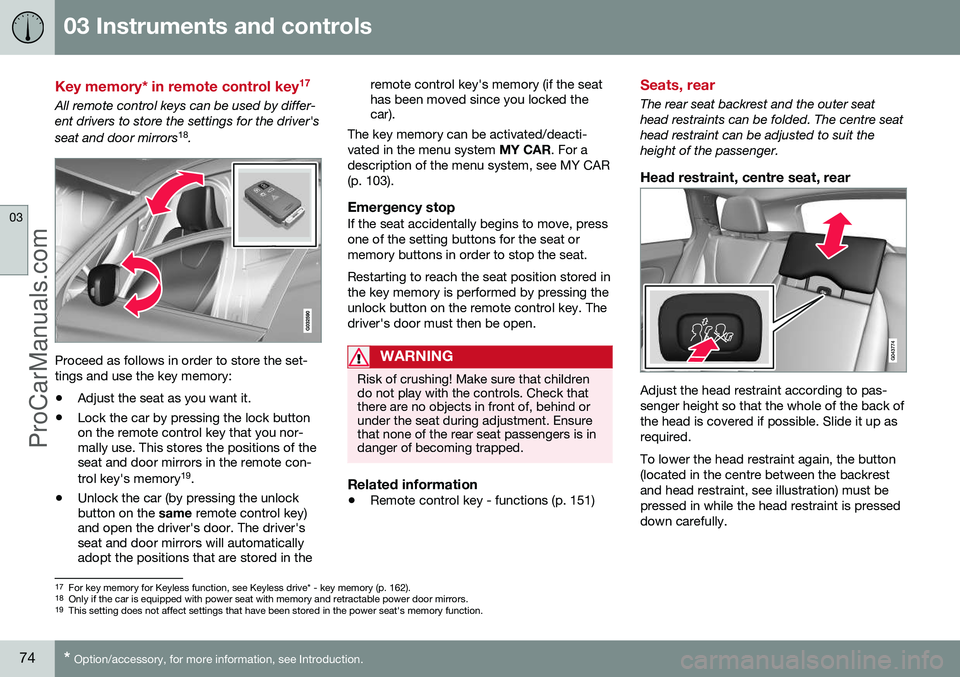
Key memory* in remote control key 17
All remote control keys can be used by differ- ent drivers to store the settings for the driver's seat and door mirrors
18
.
Proceed as follows in order to store the set- tings and use the key memory:
• Adjust the seat as you want it.
• Lock the car by pressing the lock button on the remote control key that you nor-mally use. This stores the positions of theseat and door mirrors in the remote con- trol key's memory 19
.
• Unlock the car (by pressing the unlock button on the
same remote control key)
and open the driver's door. The driver'sseat and door mirrors will automaticallyadopt the positions that are stored in the remote control key's memory (if the seathas been moved since you locked thecar).
The key memory can be activated/deacti- vated in the menu system MY CAR. For a
description of the menu system, see MY CAR(p. 103).
Emergency stopIf the seat accidentally begins to move, pressone of the setting buttons for the seat ormemory buttons in order to stop the seat. Restarting to reach the seat position stored in the key memory is performed by pressing theunlock button on the remote control key. Thedriver's door must then be open.
WARNING
Risk of crushing! Make sure that children do not play with the controls. Check thatthere are no objects in front of, behind orunder the seat during adjustment. Ensurethat none of the rear seat passengers is indanger of becoming trapped.
Related information
• Remote control key - functions (p. 151)
Seats, rear
The rear seat backrest and the outer seat head restraints can be folded. The centre seathead restraint can be adjusted to suit theheight of the passenger.
Head restraint, centre seat, rear
Adjust the head restraint according to pas- senger height so that the whole of the back ofthe head is covered if possible. Slide it up asrequired. To lower the head restraint again, the button (located in the centre between the backrestand head restraint, see illustration) must bepressed in while the head restraint is presseddown carefully.
17
For key memory for Keyless function, see Keyless drive* - key memory (p. 162).
18 Only if the car is equipped with power seat with memory and retractable power door mirrors.
19 This setting does not affect settings that have been stored in the power seat's memory function.
ProCarManuals.co’
Page 85 of 442
03 Instruments and controls
03
}}
83
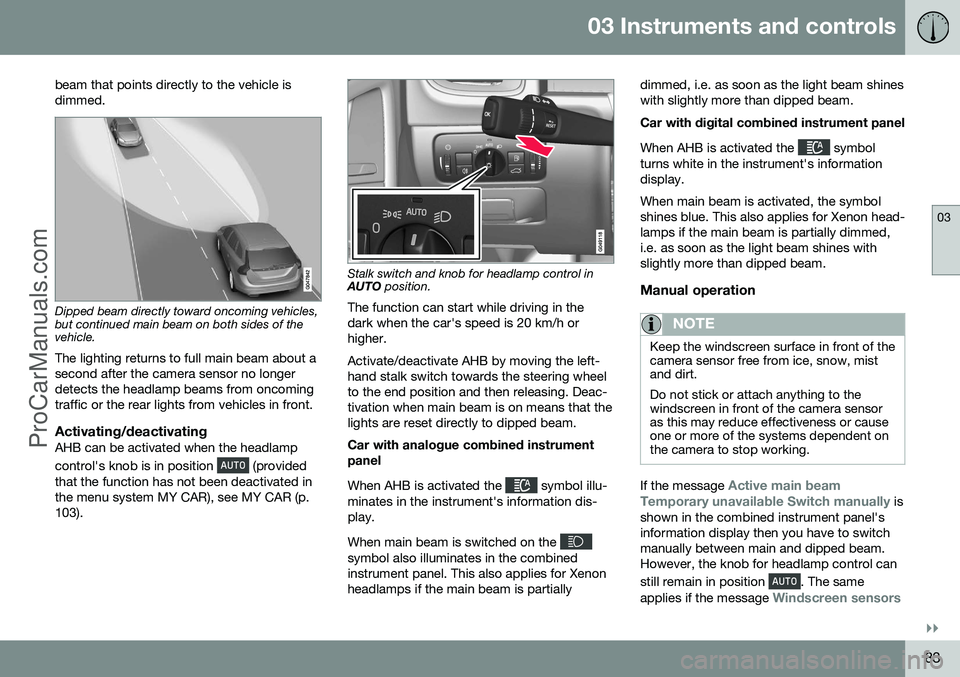
beam that points directly to the vehicle is dimmed.
Dipped beam directly toward oncoming vehicles, but continued main beam on both sides of thevehicle.
The lighting returns to full main beam about a second after the camera sensor no longerdetects the headlamp beams from oncomingtraffic or the rear lights from vehicles in front.
Activating/deactivatingAHB can be activated when the headlamp control's knob is in position
(provided
that the function has not been deactivated in the menu system MY CAR), see MY CAR (p.103).
Stalk switch and knob for headlamp control in AUTO position.
The function can start while driving in the dark when the car's speed is 20 km/h orhigher. Activate/deactivate AHB by moving the left- hand stalk switch towards the steering wheelto the end position and then releasing. Deac-tivation when main beam is on means that thelights are reset directly to dipped beam. Car with analogue combined instrument panel When AHB is activated the
symbol illu-
minates in the instrument's information dis- play. When main beam is switched on the
symbol also illuminates in the combined instrument panel. This also applies for Xenonheadlamps if the main beam is partially dimmed, i.e. as soon as the light beam shineswith slightly more than dipped beam. Car with digital combined instrument panel When AHB is activated the
symbol
turns white in the instrument's information display. When main beam is activated, the symbol shines blue. This also applies for Xenon head-lamps if the main beam is partially dimmed,i.e. as soon as the light beam shines withslightly more than dipped beam.
Manual operation
NOTE
Keep the windscreen surface in front of the camera sensor free from ice, snow, mistand dirt. Do not stick or attach anything to the windscreen in front of the camera sensoras this may reduce effectiveness or causeone or more of the systems dependent onthe camera to stop working.
If the message Active main beam
Temporary unavailable Switch manually is
shown in the combined instrument panel's information display then you have to switchmanually between main and dipped beam.However, the knob for headlamp control can still remain in position
. The same
applies if the message
Windscreen sensors
ProCarManuals.com
Page 99 of 442
03 Instruments and controls
03
* Option/accessory, for more information, see Introduction.97
Automatic dimming*Bright light from behind is automatically dimmed by the rearview mirror. The controlfor manual dimming is not available on mir-rors with automatic dimming. The rearview mirror contains two sensors - one forward facing and one rearward facing -that work together to identify and eliminatedazzling light. The forward facing sensordetects ambient light, while the rearward fac-ing sensor detects the light from vehicleheadlights behind.
NOTE
If the sensors are obscured by e.g. parking permits, transponders, sun visors orobjects in the seats or in the cargo area insuch a way that light is prevented fromreaching the sensors, then the dimmingfunction of the interior rearview and doormirrors is reduced.
The compass (p. 97) can only be specified for a rearview mirror with automatic dimming.
Related information
• Door mirrors (p. 94)
Compass*
The rearview mirror contains an integrated display that shows the compass direction inwhich the front of the car is pointing.
Operation
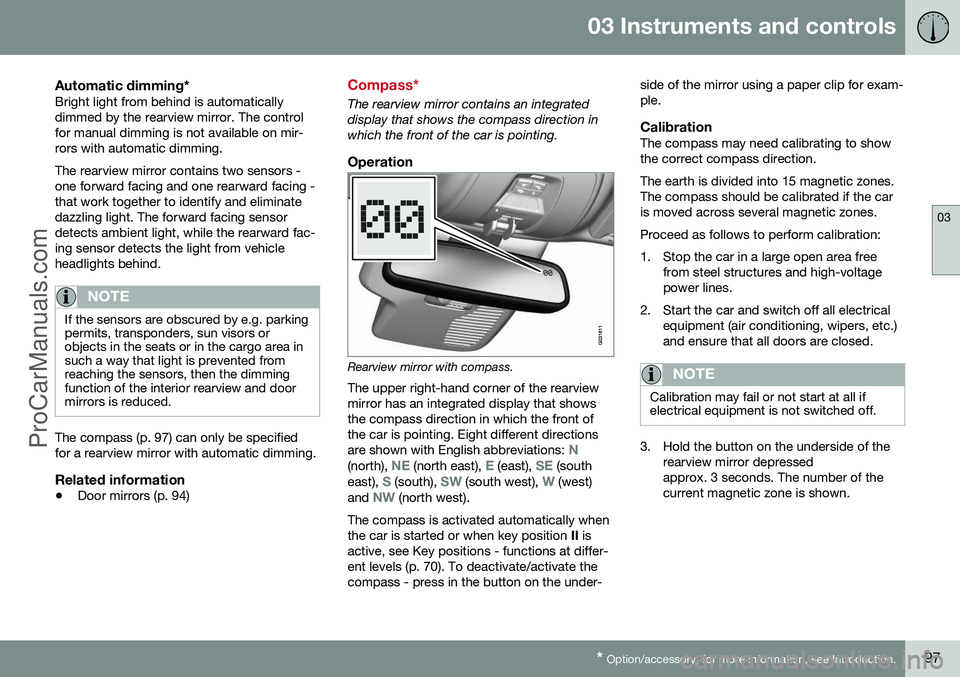
Rearview mirror with compass.
The upper right-hand corner of the rearview mirror has an integrated display that showsthe compass direction in which the front ofthe car is pointing. Eight different directions are shown with English abbreviations:
N(north), NE (north east), E (east), SE (south
east), S (south), SW (south west), W (west)
and NW (north west).
The compass is activated automatically when the car is started or when key position II is
active, see Key positions - functions at differ-ent levels (p. 70). To deactivate/activate thecompass - press in the button on the under- side of the mirror using a paper clip for exam-ple.
CalibrationThe compass may need calibrating to showthe correct compass direction. The earth is divided into 15 magnetic zones. The compass should be calibrated if the caris moved across several magnetic zones. Proceed as follows to perform calibration:
1. Stop the car in a large open area free
from steel structures and high-voltage power lines.
2. Start the car and switch off all electrical equipment (air conditioning, wipers, etc.)and ensure that all doors are closed.
NOTE
Calibration may fail or not start at all if electrical equipment is not switched off.
3. Hold the button on the underside of therearview mirror depressed approx. 3 seconds. The number of thecurrent magnetic zone is shown.
ProCarManuals.co’
Page 108 of 442
||
03 Instruments and controls
03
106* Option/accessory, for more information, see Introduction.
FunctionsInformation
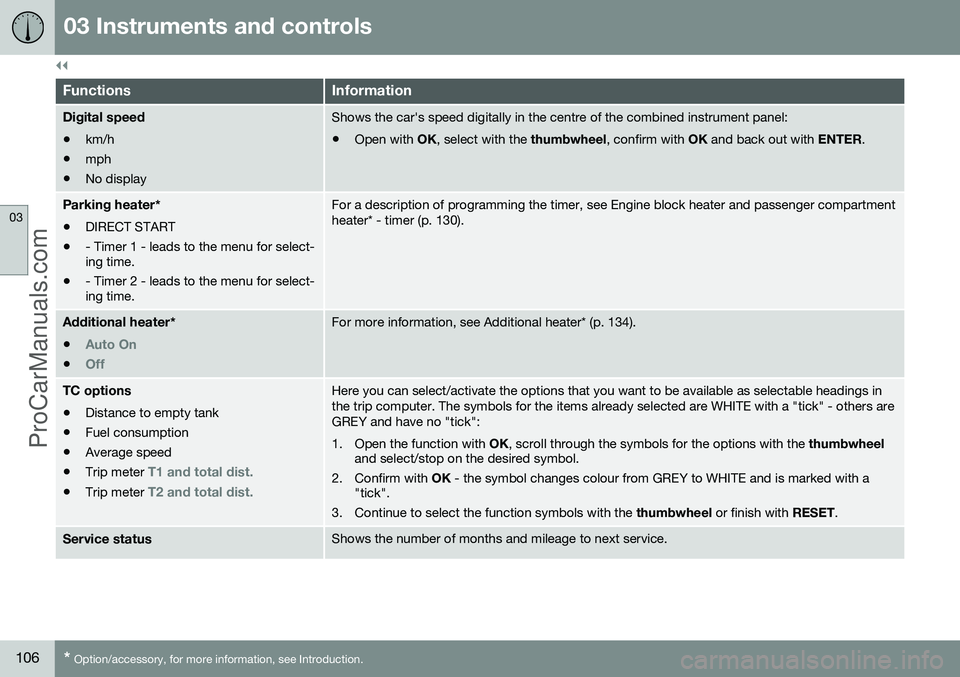
Digital speed
• km/h
• mph
• No displayShows the car's speed digitally in the centre of the combined instrument panel:
• Open with
OK, select with the thumbwheel, confirm with OK and back out with ENTER.
Parking heater *
• DIRECT START
• - Timer 1 - leads to the menu for select- ing time.
• - Timer 2 - leads to the menu for select-ing time.For a description of programming the timer, see Engine block heater and passenger compartment heater* - timer (p. 130).
Additional heater
*
•
Auto On
•Off
For more information, see Additional heater* (p. 134).
TC options • Distance to empty tank
• Fuel consumption
• Average speed
• Trip meter
T1 and total dist.
•Trip meter T2 and total dist.
Here you can select/activate the options that you want to be available as selectable headings in the trip computer. The symbols for the items already selected are WHITE with a "tick" - others areGREY and have no "tick":
1. Open the function with
OK, scroll through the symbols for the options with the thumbwheel
and select/stop on the desired symbol.
2. Confirm with OK - the symbol changes colour from GREY to WHITE and is marked with a
"tick".
3. Continue to select the function symbols with the thumbwheel or finish with RESET.
Service statusShows the number of months and mileage to next service.
ProCarManuals.co’
Page 115 of 442
03 Instruments and controls
03
* Option/accessory, for more information, see Introduction.113
Change unitYou can change unit (km/miles) for distance and speed in the menu system My Car, seeMY CAR (p. 103).
NOTE
In addition to in the trip computer, these units are also changed in Volvo's naviga-tion system*.
Related information
• Trip computer - trip statistics* (p. 113)
Trip computer - trip statistics*
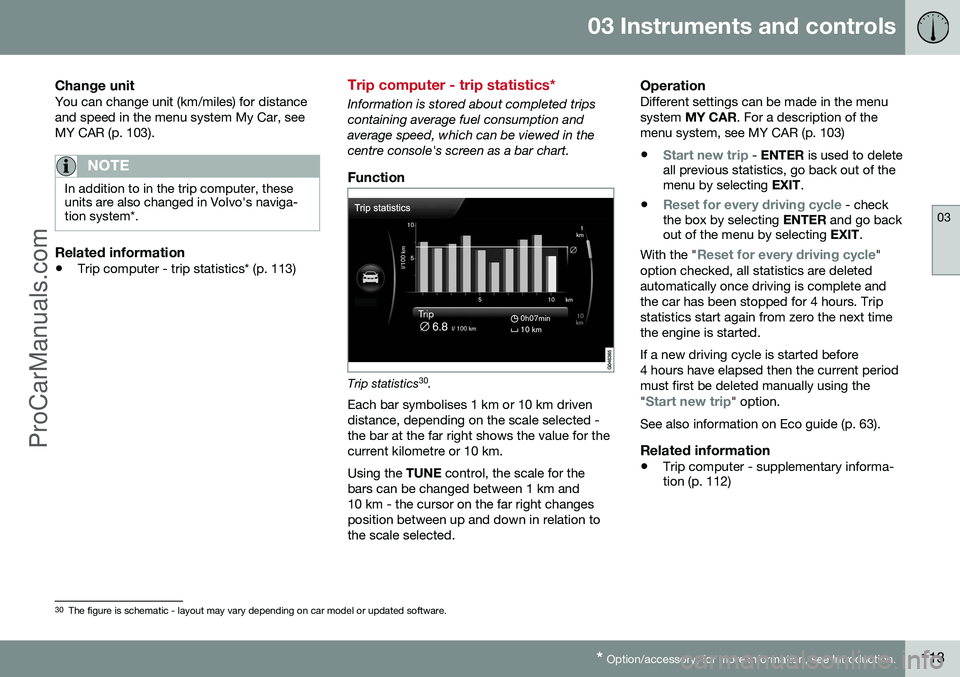
Information is stored about completed trips containing average fuel consumption andaverage speed, which can be viewed in thecentre console's screen as a bar chart.
Function
Trip statistics 30
.
Each bar symbolises 1 km or 10 km driven distance, depending on the scale selected -the bar at the far right shows the value for thecurrent kilometre or 10 km. Using the TUNE control, the scale for the
bars can be changed between 1 km and 10 km - the cursor on the far right changesposition between up and down in relation tothe scale selected.
OperationDifferent settings can be made in the menusystem MY CAR . For a description of the
menu system, see MY CAR (p. 103)
•
Start new trip - ENTER is used to delete
all previous statistics, go back out of the menu by selecting EXIT.
•
Reset for every driving cycle - check
the box by selecting ENTER and go back
out of the menu by selecting EXIT.
With the "
Reset for every driving cycle"
option checked, all statistics are deleted automatically once driving is complete andthe car has been stopped for 4 hours. Tripstatistics start again from zero the next timethe engine is started. If a new driving cycle is started before 4 hours have elapsed then the current periodmust first be deleted manually using the "
Start new trip" option.
See also information on Eco guide (p. 63).
Related information
• Trip computer - supplementary informa- tion (p. 112)
30
The figure is schematic - layout may vary depending on car model or updated software.
ProCarManuals.co’
Page 117 of 442
04 Climate control
04
* Option/accessory, for more information, see Introduction.115
General information on climate control
The car is equipped with electronic climate
control (p. 121). The climate control systemcools or heats as well as dehumidifies the airin the passenger compartment.
NOTE
Air conditioning (AC) (p. 124) can be switched off, but to ensure the best possi-ble climate comfort in the passenger com-partment, and to prevent the windowsfrom misting, it should always be switchedon.
To bear in mind
• To ensure that the air conditioning works optimally, the side windows and sunroof*should be closed.
• Total airing function (p. 166) opens/closes all side windows simultaneouslyand can be used for example to quicklyair the car during hot weather.
• Remove ice and snow from the climatecontrol system air intake (the grillebetween the bonnet and the windscreen).
• In warm weather, condensation from theair conditioning may drip under the car.This is normal.
• When the engine requires full power, e.g.for full acceleration or driving uphill with atrailer, the air conditioning can be tempo-rarily switched off. There may then be a temporary increase in temperature in thepassenger compartment.
• Remove misting on the insides of the win-dows primarily by using the defrosterfunction (p. 125). To reduce the risk ofmisting, keep the windows clean and usewindow cleaner.
Cars with Start/Stop*With an auto-stopped (p. 279) engine certain equipment may have its function temporarilyreduced, e.g. climate control fan speed (p.123).
Cars with ECO*Certain equipment may have its function tem-porarily reduced or deactivated when theECO (p. 288) function is activated, e.g. the airconditioning (p. 124).
NOTE
When the ECO function is activated, sev- eral parameters in the climate control sys-tem's settings are changed, and severalelectricity consumer functions are reduced- a press of the
AC button resets the cli-
mate control system, but then withreduced AC function.
Related information
• Actual temperature (p. 116)
• Menu settings - climate control (p. 118)
• Electronic climate control - ECC (p. 121) •
Air distribution in the passenger compart- ment (p. 119)
• Air cleaning (p. 116)
ProCarManuals.co’
Page 127 of 442
04 Climate control
04
* Option/accessory, for more information, see Introduction.125
Demisting and defrosting the windscreen
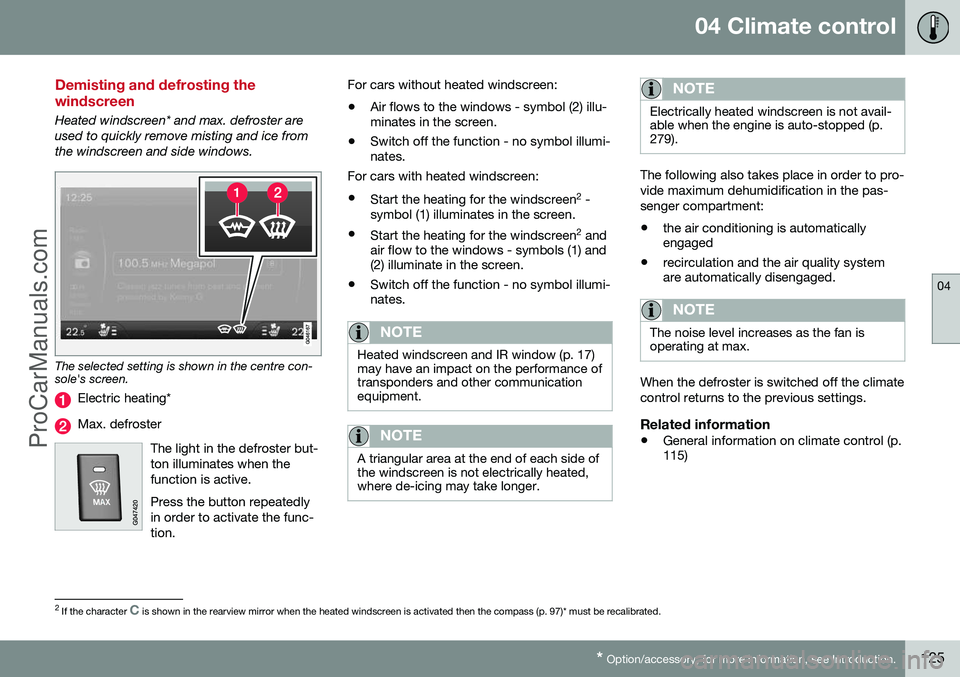
Heated windscreen* and max. defroster are used to quickly remove misting and ice fromthe windscreen and side windows.
The selected setting is shown in the centre con- sole's screen.
Electric heating*
Max. defroster
The light in the defroster but- ton illuminates when thefunction is active. Press the button repeatedly in order to activate the func-tion.
For cars without heated windscreen:• Air flows to the windows - symbol (2) illu- minates in the screen.
• Switch off the function - no symbol illumi-nates.
For cars with heated windscreen:
• Start the heating for the windscreen 2
-
symbol (1) illuminates in the screen.
• Start the heating for the windscreen 2
and
air flow to the windows - symbols (1) and(2) illuminate in the screen.
• Switch off the function - no symbol illumi-nates.
NOTE
Heated windscreen and IR window (p. 17) may have an impact on the performance oftransponders and other communicationequipment.
NOTE
A triangular area at the end of each side of the windscreen is not electrically heated,where de-icing may take longer.
NOTE
Electrically heated windscreen is not avail- able when the engine is auto-stopped (p.279).
The following also takes place in order to pro- vide maximum dehumidification in the pas-senger compartment:
• the air conditioning is automatically engaged
• recirculation and the air quality systemare automatically disengaged.
NOTE
The noise level increases as the fan is operating at max.
When the defroster is switched off the climate control returns to the previous settings.
Related information
• General information on climate control (p. 115)
2
If the character C is shown in the rearview mirror when the heated windscreen is activated then the compass (p. 97)* must be recalibrated.
ProCarManuals.co’
Page 132 of 442
04 Climate control
04
130* Option/accessory, for more information, see Introduction.
Engine block heater and passenger compartment heater* - direct start/immediate stop
Upon direct start of the engine block and pas- senger compartment heater (p. 129), it will runfor 50 minutes. Heating of the passenger compartment will begin as soon as the engine coolant hasreached the correct temperature.
NOTE
The car can be started and driven while the fuel-driven auxiliary heater is running.
1. Press OK to access the menu.
2. Scroll with the thumbwheel to
Parking
heater and select with OK.
3. Scroll forward in the next menu to
Direct
start/Stop in order to activate/deactivate
the heater and select with OK.
4. Exit the menu with RESET.
Related information
•Engine block heater and passenger com- partment heater* - timer (p. 130)
• Engine block heater and passenger com-partment heater* - messages (p. 132)
Engine block heater and passenger compartment heater* - timer
The timer of the engine block and passenger compartment heater (p. 129) is connected tothe car's clock. Two different times can be selected using the timer. Here, time refers to the time when thecar is heated and ready. The car's electronicsystem calculates when heating should bestarted based on the outside temperature.
NOTE
All timer programming will be cleared if the car's clock is reset.
Adjusting 31. Press
OK to access the menu.
2. Use the thumbwheel (p. 100) to scroll to one of the timers
Parking heater and
select with OK.
3. Select one of the two timers using the thumbwheel and confirm with OK.
4. Briefly press OK to move to the lit hours
setting.
5. Select the required hour using the thumb- wheel. 6. Briefly press
OK to move to the flashing
minutes setting.
7. Select the required minute using the thumbwheel.
8. Press OK4
to confirm the setting.
9. Go back in the menu structure using RESET .
10. Select the other time (continue from step 2) or exit the menu with RESET.
Starting1. Press OK to access the menu.
2. Scroll with the thumbwheel to
Parking
heater and select with OK.
3. Select one of the two timers using the thumbwheel and activate with OK.
4. Exit the menu with RESET.
Switching offA timer-started heater can be switched off manually before the set time has elapsed.Proceed as follows:
1. Press OK to access the menu.
3
Setting the timer is only possible with the engine switched off.4
Press OK again to activate the timer.
ProCarManuals.co’
Page 133 of 442
04 Climate control
04
* Option/accessory, for more information, see Introduction.131
2.
Scroll with the thumbwheel to
Parking
heater and select with OK.
> If a timer is set but not activated then a clock icon is shown beside the set time.
3. Select one of the two timers using the thumbwheel and confirm with OK.
4. Deactivate the timer as follows:
•long press on
OK or
• short press on
OK to continue in the
menu. Then select to stop the timer and confirm with OK.
5. Exit the menu with RESET.
A timer-started heater can be switched off directly (p. 130).
Related information
• Engine block heater and passenger com- partment heater* - messages (p. 132)
ProCarManuals.co’
Page 134 of 442
04 Climate control
04
132* Option/accessory, for more information, see Introduction.
Engine block heater and passenger compartment heater* - messages
Symbols and display messages regarding the engine block and passenger compartment
heater (p. 129) differ depending on whetherthe combined instrument panel (p. 59) is ana-logue or digital.
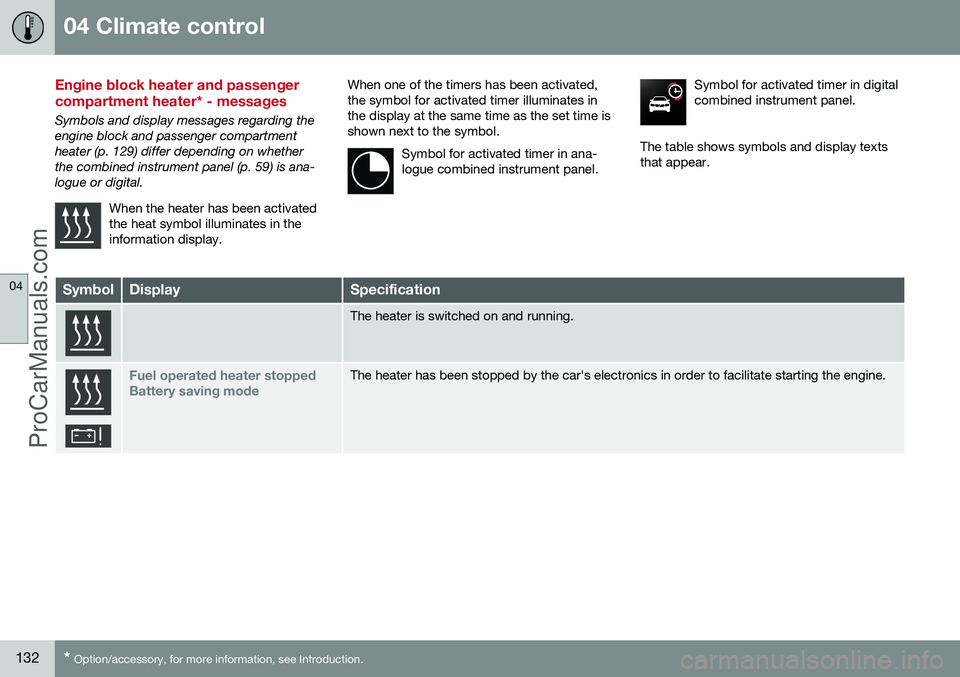
When the heater has been activatedthe heat symbol illuminates in theinformation display.
When one of the timers has been activated, the symbol for activated timer illuminates inthe display at the same time as the set time isshown next to the symbol.Symbol for activated timer in ana-logue combined instrument panel.Symbol for activated timer in digital combined instrument panel.
The table shows symbols and display texts that appear.
SymbolDisplaySpecification
The heater is switched on and running.
Fuel operated heater stopped Battery saving modeThe heater has been stopped by the car's electronics in order to facilitate starting the engine.
ProCarManuals.co’