stop start VOLVO V60 2014 Service Manual
[x] Cancel search | Manufacturer: VOLVO, Model Year: 2014, Model line: V60, Model: VOLVO V60 2014Pages: 442, PDF Size: 13.85 MB
Page 285 of 442
08 Starting and driving
08
* Option/accessory, for more information, see Introduction.283
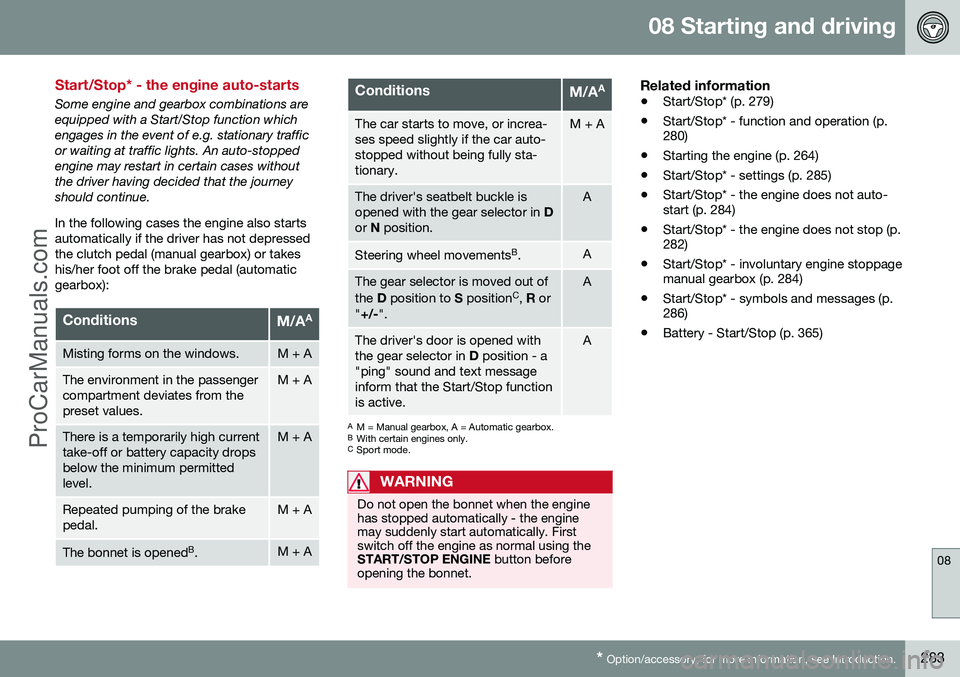
Start/Stop* - the engine auto-starts
Some engine and gearbox combinations are equipped with a Start/Stop function whichengages in the event of e.g. stationary trafficor waiting at traffic lights. An auto-stoppedengine may restart in certain cases withoutthe driver having decided that the journeyshould continue. In the following cases the engine also starts automatically if the driver has not depressedthe clutch pedal (manual gearbox) or takeshis/her foot off the brake pedal (automaticgearbox):
ConditionsM/A A
Misting forms on the windows.M + A
The environment in the passenger compartment deviates from thepreset values.M + A
There is a temporarily high current take-off or battery capacity dropsbelow the minimum permittedlevel.M + A
Repeated pumping of the brake pedal.M + A
The bonnet is opened
B
.M + A
ConditionsM/A A
The car starts to move, or increa- ses speed slightly if the car auto-stopped without being fully sta-tionary.M + A
The driver's seatbelt buckle is opened with the gear selector in
D
or N position.A
Steering wheel movements B
.A
The gear selector is moved out of the D position to S position C
, R or
" +/- ".A
The driver's door is opened with the gear selector in D position - a
"ping" sound and text messageinform that the Start/Stop functionis active.A
A M = Manual gearbox, A = Automatic gearbox.
B With certain engines only.
C Sport mode.
WARNING
Do not open the bonnet when the engine has stopped automatically - the enginemay suddenly start automatically. Firstswitch off the engine as normal using theSTART/STOP ENGINE button before
opening the bonnet.
Related information
• Start/Stop* (p. 279)
• Start/Stop* - function and operation (p. 280)
• Starting the engine (p. 264)
• Start/Stop* - settings (p. 285)
• Start/Stop* - the engine does not auto-start (p. 284)
• Start/Stop* - the engine does not stop (p.282)
• Start/Stop* - involuntary engine stoppagemanual gearbox (p. 284)
• Start/Stop* - symbols and messages (p.286)
• Battery - Start/Stop (p. 365)
ProCarManuals.co’
Page 286 of 442
08 Starting and driving
08
284* Option/accessory, for more information, see Introduction.
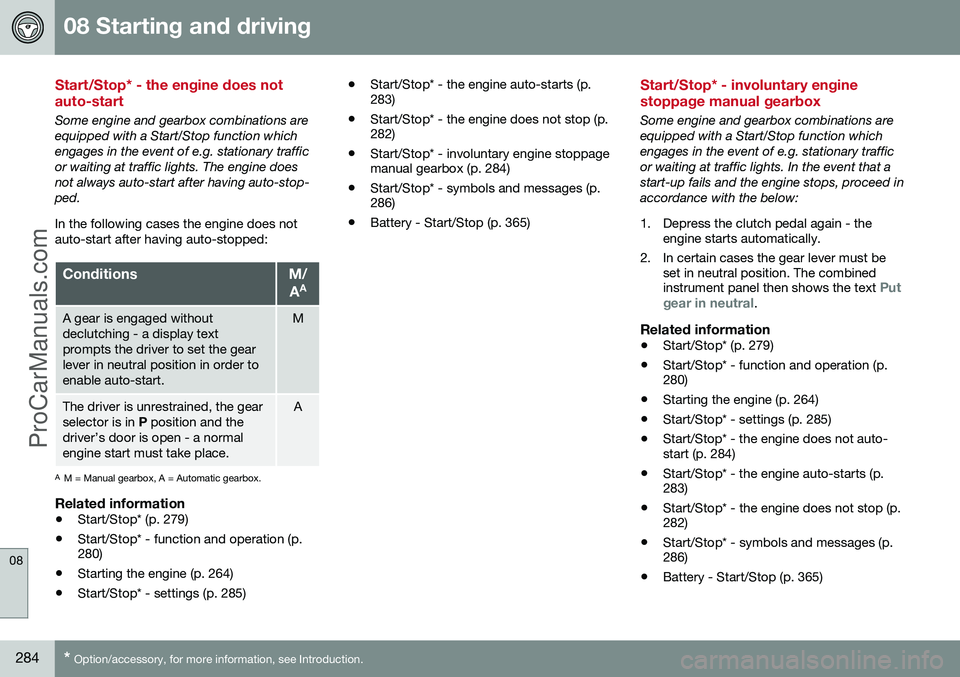
Start/Stop* - the engine does not auto-start
Some engine and gearbox combinations are equipped with a Start/Stop function whichengages in the event of e.g. stationary trafficor waiting at traffic lights. The engine doesnot always auto-start after having auto-stop-ped. In the following cases the engine does not auto-start after having auto-stopped:
ConditionsM/
A A
A gear is engaged without declutching - a display textprompts the driver to set the gearlever in neutral position in order toenable auto-start.M
The driver is unrestrained, the gear selector is in
P position and the
driver’s door is open - a normalengine start must take place.A
A M = Manual gearbox, A = Automatic gearbox.
Related information
• Start/Stop* (p. 279)
• Start/Stop* - function and operation (p. 280)
• Starting the engine (p. 264)
• Start/Stop* - settings (p. 285) •
Start/Stop* - the engine auto-starts (p.283)
• Start/Stop* - the engine does not stop (p.282)
• Start/Stop* - involuntary engine stoppagemanual gearbox (p. 284)
• Start/Stop* - symbols and messages (p.286)
• Battery - Start/Stop (p. 365)
Start/Stop* - involuntary engine stoppage manual gearbox
Some engine and gearbox combinations are equipped with a Start/Stop function whichengages in the event of e.g. stationary trafficor waiting at traffic lights. In the event that astart-up fails and the engine stops, proceed inaccordance with the below:
1. Depress the clutch pedal again - the
engine starts automatically.
2. In certain cases the gear lever must be set in neutral position. The combined instrument panel then shows the text
Put
gear in neutral.
Related information
• Start/Stop* (p. 279)
• Start/Stop* - function and operation (p. 280)
• Starting the engine (p. 264)
• Start/Stop* - settings (p. 285)
• Start/Stop* - the engine does not auto-start (p. 284)
• Start/Stop* - the engine auto-starts (p.283)
• Start/Stop* - the engine does not stop (p.282)
• Start/Stop* - symbols and messages (p.286)
• Battery - Start/Stop (p. 365)
ProCarManuals.co’
Page 287 of 442
08 Starting and driving
08
* Option/accessory, for more information, see Introduction.285
Start/Stop* - settings
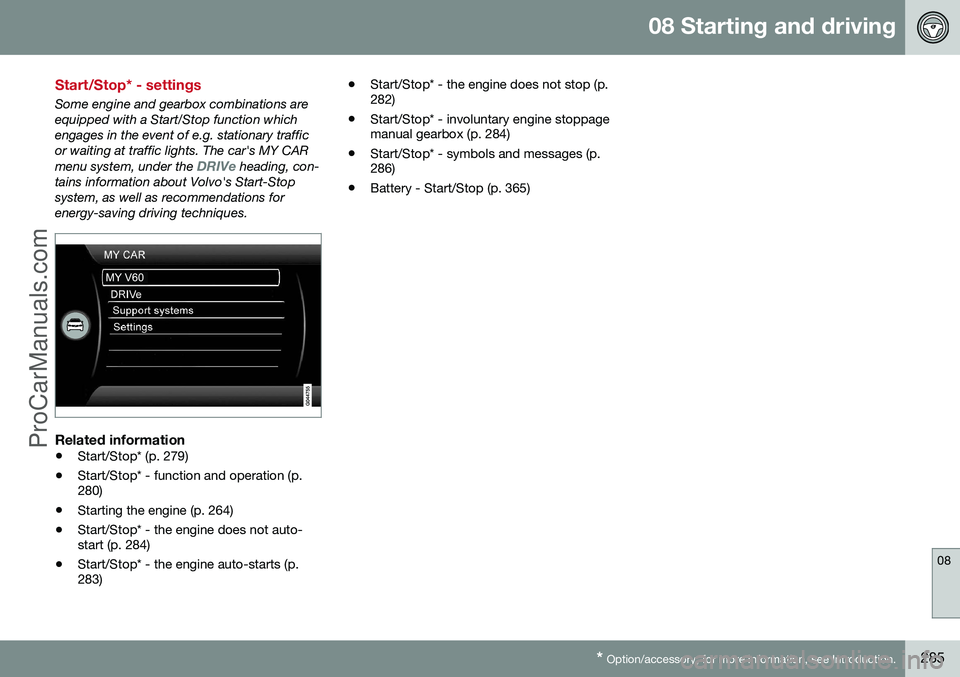
Some engine and gearbox combinations are equipped with a Start/Stop function whichengages in the event of e.g. stationary trafficor waiting at traffic lights. The car's MY CAR menu system, under the
DRIVe heading, con-
tains information about Volvo's Start-Stop system, as well as recommendations forenergy-saving driving techniques.
Related information
• Start/Stop* (p. 279)
• Start/Stop* - function and operation (p. 280)
• Starting the engine (p. 264)
• Start/Stop* - the engine does not auto-start (p. 284)
• Start/Stop* - the engine auto-starts (p.283) •
Start/Stop* - the engine does not stop (p.282)
• Start/Stop* - involuntary engine stoppagemanual gearbox (p. 284)
• Start/Stop* - symbols and messages (p.286)
• Battery - Start/Stop (p. 365)
ProCarManuals.co’
Page 288 of 442
08 Starting and driving
08
286* Option/accessory, for more information, see Introduction.
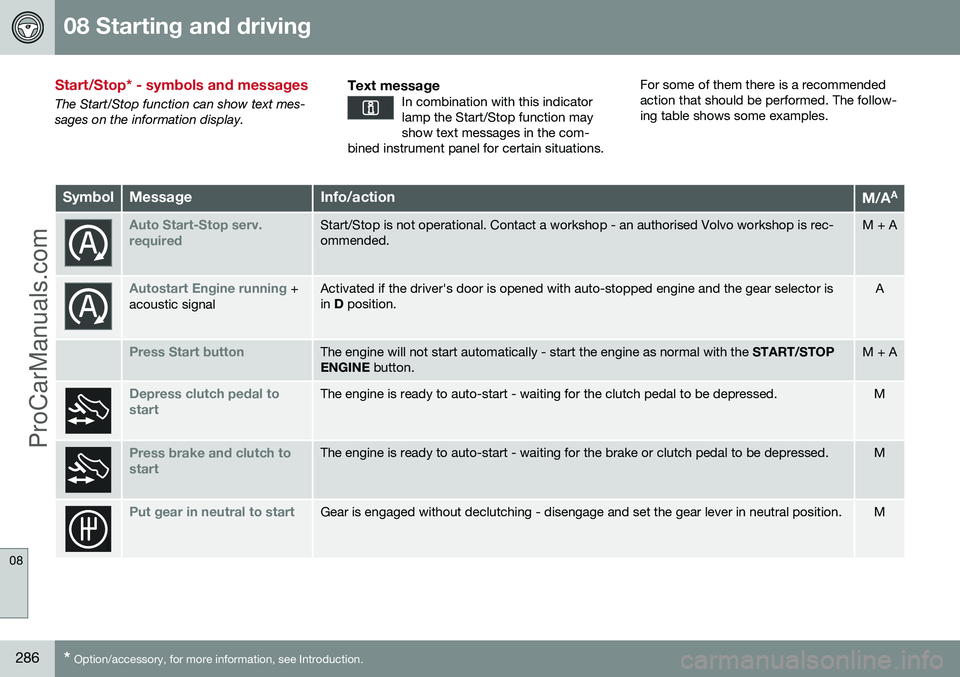
Start/Stop* - symbols and messages
The Start/Stop function can show text mes- sages on the information display.
Text messageIn combination with this indicatorlamp the Start/Stop function mayshow text messages in the com-
bined instrument panel for certain situations.
For some of them there is a recommended action that should be performed. The follow-ing table shows some examples.
SymbolMessageInfo/actionM/A A
Auto Start-Stop serv. requiredStart/Stop is not operational. Contact a workshop - an authorised Volvo workshop is rec- ommended.M + A
Autostart Engine running +
acoustic signalActivated if the driver's door is opened with auto-stopped engine and the gear selector is in D position.A
Press Start buttonThe engine will not start automatically - start the engine as normal with the START/STOP
ENGINE button.M + A
Depress clutch pedal to startThe engine is ready to auto-start - waiting for the clutch pedal to be depressed.M
Press brake and clutch to startThe engine is ready to auto-start - waiting for the brake or clutch pedal to be depressed.M
Put gear in neutral to startGear is engaged without declutching - disengage and set the gear lever in neutral position.M
ProCarManuals.co’
Page 289 of 442
08 Starting and driving
08
* Option/accessory, for more information, see Introduction.287
SymbolMessageInfo/actionM/A A
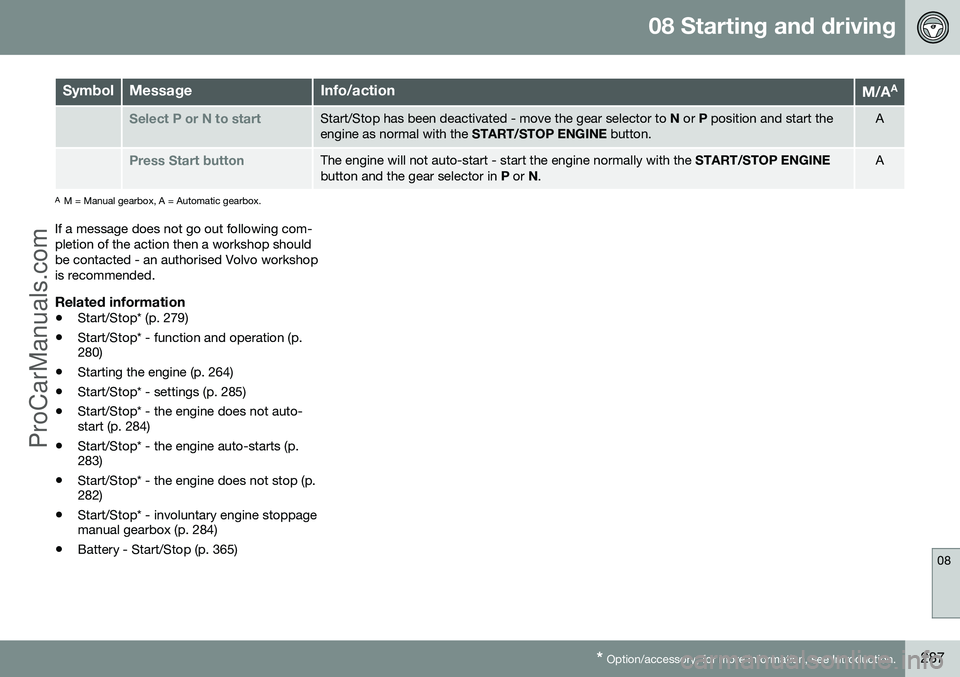
Select P or N to startStart/Stop has been deactivated - move the gear selector to
N or P position and start the
engine as normal with the START/STOP ENGINE button.A
Press Start buttonThe engine will not auto-start - start the engine normally with the START/STOP ENGINE
button and the gear selector in P or N.A
A
M = Manual gearbox, A = Automatic gearbox.
If a message does not go out following com- pletion of the action then a workshop shouldbe contacted - an authorised Volvo workshopis recommended.
Related information
• Start/Stop* (p. 279)
• Start/Stop* - function and operation (p. 280)
• Starting the engine (p. 264)
• Start/Stop* - settings (p. 285)
• Start/Stop* - the engine does not auto-start (p. 284)
• Start/Stop* - the engine auto-starts (p.283)
• Start/Stop* - the engine does not stop (p.282)
• Start/Stop* - involuntary engine stoppagemanual gearbox (p. 284)
• Battery - Start/Stop (p. 365)
ProCarManuals.co’
Page 290 of 442
08 Starting and driving
08
288* Option/accessory, for more information, see Introduction.
ECO*
ECO is an innovative Volvo function for auto- matic-gearbox cars, capable of reducing fuelconsumption by up to 5%, depending on thedriver's driving style. The function gives thedriver the option of a more active environ-mentally conscious way of driving.
GeneralThe following are changedupon activation of the ECOfunction:
• Gearbox gearshift points.
• Engine management and response from the accelerator pedal.
• Start/Stop function - the engine can alsoauto-stop before the car has stopped tobeing fully stationary.
• The Eco Coast function is activated -engine braking ceases.
• Climate control system settings - someelectricity consumers are deactivated oroperate at reduced power.
NOTE
When the ECO function is activated, sev- eral parameters in the climate control sys-tem's settings are changed, and severalelectricity consumer functions are reduced- a press of the
AC button resets the cli-
mate control system, but then withreduced AC function.
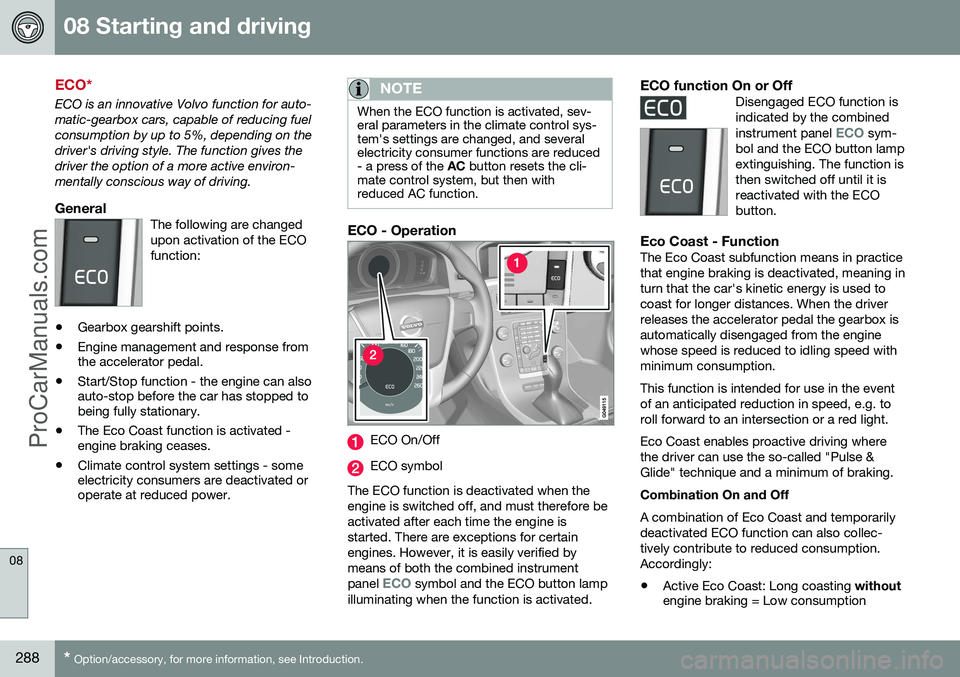
ECO - Operation
ECO On/Off
ECO symbol
The ECO function is deactivated when the engine is switched off, and must therefore beactivated after each time the engine isstarted. There are exceptions for certainengines. However, it is easily verified bymeans of both the combined instrument panel
ECO symbol and the ECO button lamp
illuminating when the function is activated.
ECO function On or OffDisengaged ECO function is indicated by the combined instrument panel
ECO sym-
bol and the ECO button lamp extinguishing. The function isthen switched off until it isreactivated with the ECObutton.
Eco Coast - FunctionThe Eco Coast subfunction means in practice that engine braking is deactivated, meaning inturn that the car's kinetic energy is used tocoast for longer distances. When the driverreleases the accelerator pedal the gearbox isautomatically disengaged from the enginewhose speed is reduced to idling speed withminimum consumption. This function is intended for use in the event of an anticipated reduction in speed, e.g. toroll forward to an intersection or a red light. Eco Coast enables proactive driving where the driver can use the so-called "Pulse &Glide" technique and a minimum of braking. Combination On and Off A combination of Eco Coast and temporarily deactivated ECO function can also collec-tively contribute to reduced consumption.Accordingly:
• Active Eco Coast: Long coasting
without
engine braking = Low consumption
ProCarManuals.co’
Page 295 of 442
08 Starting and driving
08
}}
293
Parking brake
The parking brake holds the car stationary, when the driver's seat is empty, by mechani-cally locking/blocking two wheels.
FunctionA faint electric motor noise can be heardwhen the electrical parking brake is beingapplied. The noise can also be heard duringthe automatic function checking of the park-ing brake. If the car is stationary when the parking brake is applied then it only acts on the rear wheels.If it is applied when the car is moving then thenormal foot brake is used, i.e. the brake actson all four wheels. Brake function changesover to the rear wheels when the car is almoststationary.
Low battery voltageIf the battery voltage is too low then the park-ing brake can neither be released nor applied.Connect a donor battery if the battery voltageis too low, see Jump starting with battery (p.270).
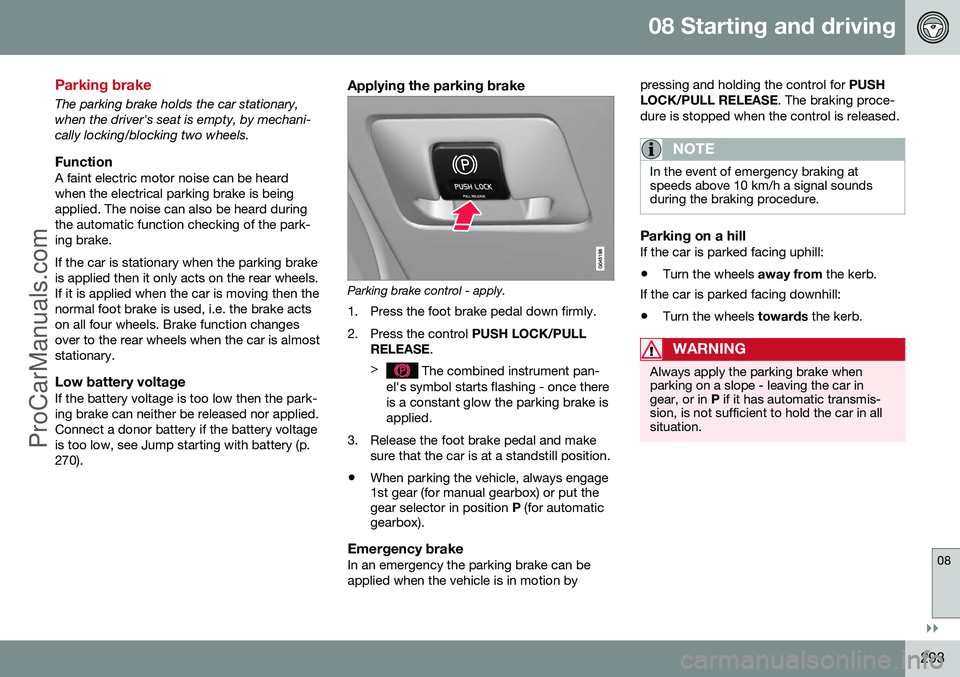
Applying the parking brake
Parking brake control - apply.
1. Press the foot brake pedal down firmly.
2. Press the control PUSH LOCK/PULL
RELEASE .
>
The combined instrument pan-
el's symbol starts flashing - once there is a constant glow the parking brake isapplied.
3. Release the foot brake pedal and make sure that the car is at a standstill position.
• When parking the vehicle, always engage 1st gear (for manual gearbox) or put thegear selector in position
P (for automatic
gearbox).
Emergency brakeIn an emergency the parking brake can be applied when the vehicle is in motion by pressing and holding the control for
PUSH
LOCK/PULL RELEASE . The braking proce-
dure is stopped when the control is released.
NOTE
In the event of emergency braking at speeds above 10 km/h a signal soundsduring the braking procedure.
Parking on a hillIf the car is parked facing uphill:
• Turn the wheels
away from the kerb.
If the car is parked facing downhill: • Turn the wheels
towards the kerb.
WARNING
Always apply the parking brake when parking on a slope - leaving the car ingear, or in P if it has automatic transmis-
sion, is not sufficient to hold the car in allsituation.
ProCarManuals.co’
Page 296 of 442
||
08 Starting and driving
08
294
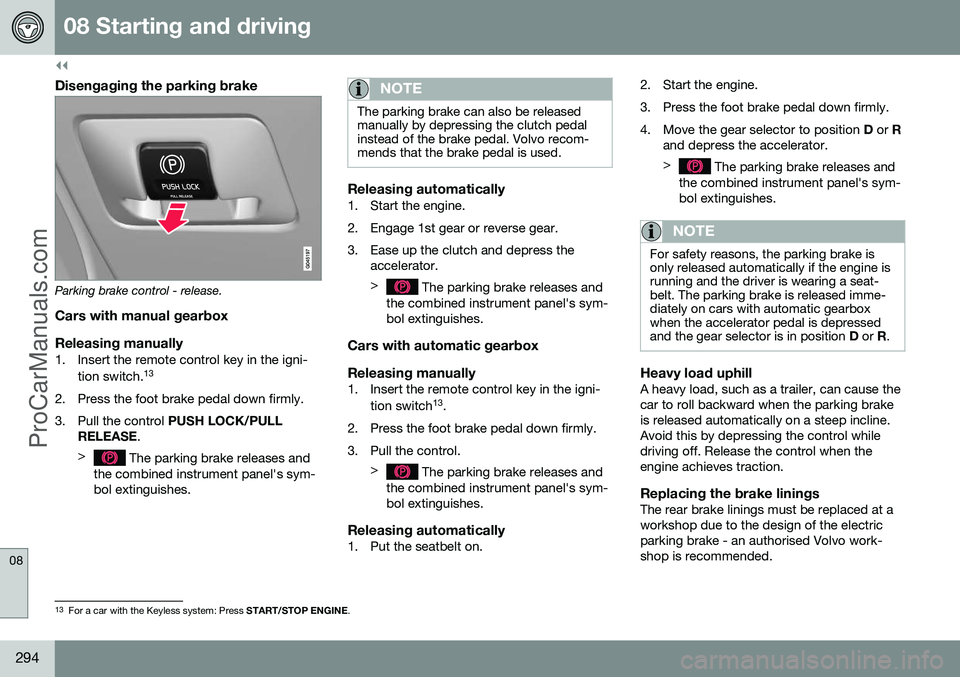
Disengaging the parking brake
Parking brake control - release.
Cars with manual gearbox
Releasing manually
1. Insert the remote control key in the igni- tion switch. 13
2. Press the foot brake pedal down firmly.
3. Pull the control PUSH LOCK/PULL
RELEASE .
>
The parking brake releases and
the combined instrument panel's sym- bol extinguishes.
NOTE
The parking brake can also be released manually by depressing the clutch pedalinstead of the brake pedal. Volvo recom-mends that the brake pedal is used.
Releasing automatically1. Start the engine.
2. Engage 1st gear or reverse gear.
3. Ease up the clutch and depress the accelerator. >
The parking brake releases and
the combined instrument panel's sym- bol extinguishes.
Cars with automatic gearbox Releasing manually
1. Insert the remote control key in the igni-
tion switch 13
.
2. Press the foot brake pedal down firmly.
3. Pull the control. >
The parking brake releases and
the combined instrument panel's sym- bol extinguishes.
Releasing automatically1. Put the seatbelt on. 2. Start the engine.
3. Press the foot brake pedal down firmly.
4. Move the gear selector to position
D or R
and depress the accelerator. >
The parking brake releases and
the combined instrument panel's sym- bol extinguishes.
NOTE
For safety reasons, the parking brake is only released automatically if the engine isrunning and the driver is wearing a seat-belt. The parking brake is released imme-diately on cars with automatic gearboxwhen the accelerator pedal is depressedand the gear selector is in position D or R.
Heavy load uphillA heavy load, such as a trailer, can cause the car to roll backward when the parking brakeis released automatically on a steep incline.Avoid this by depressing the control whiledriving off. Release the control when theengine achieves traction.
Replacing the brake liningsThe rear brake linings must be replaced at aworkshop due to the design of the electricparking brake - an authorised Volvo work-shop is recommended.
13
For a car with the Keyless system: Press START/STOP ENGINE.
ProCarManuals.co’
Page 299 of 442
08 Starting and driving
08
297
Fording
Fording means that the car is driven through a water-covered roadway. Fording must be car-ried out with great caution. The car can be driven through water at a maximum depth of 25 cm at a maximumspeed of 10 km/h. Extra caution should beexercised when passing through flowingwater. During driving in water, maintain a low speed and do not stop the car. When the water hasbeen passed, depress the brake pedal lightlyand check that full brake function is achieved.Water and mud for example can make thebrake linings wet resulting in delayed brakefunction. •Clean the electric contacts of the electric engine block heater and trailer couplingafter driving in water and mud.
• Do not let the car stand with water overthe sills for any long period of time - thiscould cause electrical malfunctions.IMPORTANT
Engine damage can occur if water enters the air filter. In depths greater than 25 cm, water could enter the transmission. This reduces thelubricating ability of the oils and shortensthe service life of these systems. In the event of the engine stalling in water, do not try restart - tow the car from thewater to a workshop - an authorised Volvoworkshop is recommended. Risk of enginebreakdown.
Related information
•Recovery (p. 316)
• Towing (p. 313)
Overheating
Under special conditions, for example hard driving in hilly terrain and hot climate, there isa risk that the engine and drive system mayoverheat - in particular with a heavy load. For information about overheating when driv- ing with a trailer, see Driving with a trailer (p.306). • Remove any auxiliary lamps from in front of the grille when driving in hot climates.
• If the temperature in the engine's coolingsystem is too high then a warning symbolis illuminated in the combined instrumentpanel's information display and a text message
High engine temp Stop safelyis shown there - stop the car in a safe way and allow the engine to run at idlingspeed for several minutes in order to cooldown.
• If the text message
High engine temp
Stop engine or Coolant level low, Stop
engine is shown then the engine must be
switched off after stopping the car.
• In the event of overheating in the gearbox a built-in protection function is activatedwhich, amongst other things, illuminatesa warning symbol in the combined instru-ment panel, and its display shows the text message
Transmission hot Reduce
speed or Transmission hot Stop safely- follow the recommendation given and lower the speed and stop the car in a safeway and allow the engine to run at idling
ProCarManuals.co’
Page 300 of 442
08 Starting and driving
08
298
speed for a few minutes in order to allow the gearbox to cool down.
• If the car overheats, the air conditioningmay be switched off temporarily.
• Do not turn the engine off immediatelyyou stop after a hard drive.
NOTE
It is normal for the engine's cooling fan to operate for a time after the engine hasbeen switched off.
Driving with open tailgate
When driving with the tailgate open, toxic exhaust fumes can be sucked into the carthrough the cargo area.
WARNING
Do not drive with an open tailgate! Toxic exhaust fumes could be drawn into the carthrough the cargo area.
Related information
•Loading (p. 142)
Overload - starter battery
The electrical functions in the car load the starter battery (p. 361) to varying degrees.Avoid using the key position (p. 70)
II when
the engine is switched off. Instead use the I
mode - which uses less power. Also, be aware of different accessories that load the electrical system. Do not use func-tions which use a lot of power when theengine is switched off. Examples of suchfunctions are: • ventilation fan
• headlamps
• windscreen wiper
• audio system (high volume).
If the starter battery voltage is low then the combined instrument panel's information dis- play shows the text
Low battery Power
save mode. The energy-saving function then
shuts down certain functions or reduces cer- tain functions such as the ventilation fanand/or audio system.
–In which case, charge the battery by star- ting the engine and then running it for atleast 15 minutes - starter battery chargingis more effective during driving than run-ning the engine at idling speed while sta-tionary.
ProCarManuals.co’