instrument panel VOLVO V60 2021 Owners Manual
[x] Cancel search | Manufacturer: VOLVO, Model Year: 2021, Model line: V60, Model: VOLVO V60 2021Pages: 661, PDF Size: 12.68 MB
Page 493 of 661
AUDIO, MEDIA AND INTERNET
* Option/accessory.491
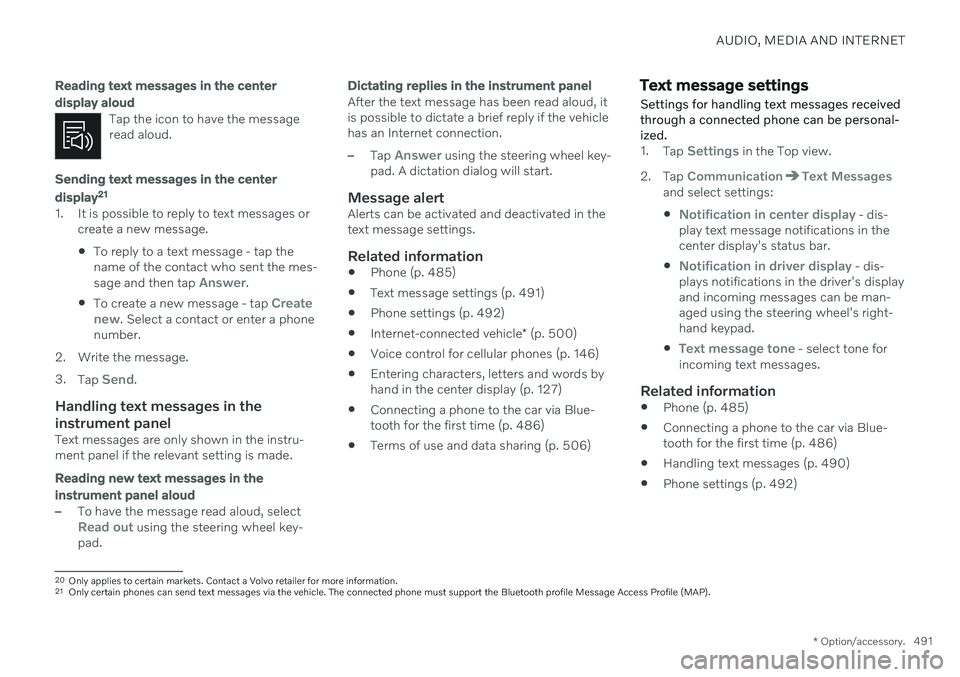
Reading text messages in the center display aloud
Tap the icon to have the message read aloud.
Sending text messages in the center display21
1. It is possible to reply to text messages or
create a new message.
To reply to a text message - tap the name of the contact who sent the mes- sage and then tap
Answer.
To create a new message - tap
Create
new. Select a contact or enter a phone
number.
2. Write the message. 3. Tap
Send.
Handling text messages in the instrument panel
Text messages are only shown in the instru- ment panel if the relevant setting is made.
Reading new text messages in the instrument panel aloud
–To have the message read aloud, selectRead out using the steering wheel key-
pad.
Dictating replies in the instrument panel
After the text message has been read aloud, it is possible to dictate a brief reply if the vehiclehas an Internet connection.
–Tap Answer using the steering wheel key-
pad. A dictation dialog will start.
Message alertAlerts can be activated and deactivated in the text message settings.
Related information
Phone (p. 485)
Text message settings (p. 491)
Phone settings (p. 492)
Internet-connected vehicle
* (p. 500)
Voice control for cellular phones (p. 146)
Entering characters, letters and words byhand in the center display (p. 127)
Connecting a phone to the car via Blue-tooth for the first time (p. 486)
Terms of use and data sharing (p. 506)
Text message settings Settings for handling text messages received through a connected phone can be personal-ized.
1.
Tap Settings in the Top view.
2. Tap
CommunicationText Messagesand select settings:
Notification in center display - dis-
play text message notifications in the center display's status bar.
Notification in driver display - dis-
plays notifications in the driver's display and incoming messages can be man-aged using the steering wheel's right-hand keypad.
Text message tone - select tone for
incoming text messages.
Related information
Phone (p. 485)
Connecting a phone to the car via Blue- tooth for the first time (p. 486)
Handling text messages (p. 490)
Phone settings (p. 492)
20
Only applies to certain markets. Contact a Volvo retailer for more information.21Only certain phones can send text messages via the vehicle. The connected phone must support the Bluetooth profile Message Access Profile (MAP).
Page 536 of 661
WHEELS AND TIRES
* Option/accessory.
534
Tire inflation pressure monitoring system * messages
A number of messages related to the tire inflation pressure monitoring system 12
may
be displayed. Several examples are provided below.
Instrument panel: Tire
pressure low Check CarStatus app incenter displayThe indicator symbol will illuminate to indicate thatinflation pressure is lowin one or more tires. See the
Car Status app in
the center display for more information.
Instrument panel:
Tire
pressure sys- tem
Tempo-
rarily unavaila- ble
The indicator symbol will flash for about 1 minuteand then glow steadily.The system is temporarilyunavailable and will beactivated momentarily.
Instrument panel:
Tire
pressure sys- tem
Service
required
The indicator symbol will flash for about 1 minuteand then glow steadily. Ifthe system is not work-ing properly, contact a workshop A
.
A An authorized Volvo workshop is recommended.
Related information
Tire pressure monitoring system
* (p. 529)
Saving new reference values for tire infla- tion pressure monitoring
* (p. 531)
Action when warned of low tire pressure (p. 533)
Vehicle status (p. 570)
Volvo Cars support site (p. 21)
Changing a wheel
Wheel changes must always be carried out correctly. The following instructions showhow to remove and install a wheel and whatis important to keep in mind. Make sure thatthe tire dimension is approved for use on thevehicle.
WARNING
If a tire must be changed near passing traffic, make sure all passengers moveto a safe location.
Use a jack intended for the vehiclewhen changing a tire. For any otherjob, use stands to support the vehicle.
Never crawl under or allow any part ofyour body to be extended under a vehi-cle supported by a jack.
Never let anyone remain in the vehiclewhen it is raised on a jack.
12
Tire Pressure Monitoring System (TPMS)
Page 573 of 661
MAINTENANCE AND SERVICE
}}
* Option/accessory.571
Scheduling service and repairs 5
This service offers a way to send a booking request for service and workshop appoint-ments directly from the vehicle.
When it is time for service, and in certain cases if the vehicle requires repairs, a mes-sage will be displayed in the instrument paneland at the top of the center display. The timefor service is determined by how much timehas elapsed, the number of hours the enginehas run, or the distance driven since the lastservice.
To use the service
Create a Volvo ID and register it to thevehicle.
To send and receive appointment informa-tion, the vehicle must be connected to the Internet 6
.
Book serviceBook a service request when desired or when a message is displayed indicating that serviceor repairs are needed. 1. Open the
Car Status app from App view
in the center display. 2.
Tap
Appointments.
3. Tap
Request appointment.
4. Check that your
Volvo ID is correct.
5. Make sure your preferred
Workshop
information is correct.
6. In the
Tap to write information to the
workshop field, you can provide details
on what you would like performed during the visit or other important information toyour workshop.
7. Tap
Send appointment request.
> You will receive an appointment sug- gestion by email within a couple of days 7
.
On some markets, the message in the instrument panel indicating that thevehicle requires service will go out oncethe appointment request has been sent.
8. Tap
Cancel request if you would like to
cancel your request.
The appointment request contains information about your vehicle that helps the workshopplan for your visit. The retailer will send you a digital appointmentsuggestion. You also have information aboutyour retailer available in the vehicle so that youcan contact your workshop.
Accepting an appointment suggestionWhen the vehicle has received an appoint-ment suggestion, a message will be displayedat the top of the center display.
1. Tap the message.
2. To accept the suggested appointment, tap
Accept. Otherwise, tap Send new
proposal or Decline.
For some markets, the system reminds you when an appointment time is approaching and the navigation system 8
can also guide you to
the workshop at the appointed time.
NOTE
If you experience any problems with this service, contact your Volvo retailer.
3 AdBlue Diesel models only.
4 Certain markets only.
5 Certain markets only.
6 There may be a charge for transmitting data over the Internet, depending on your service plan.
7 Timespan may vary depending on market.
8 For vehicles with Sensus Navigation *.
Page 579 of 661
MAINTENANCE AND SERVICE
577
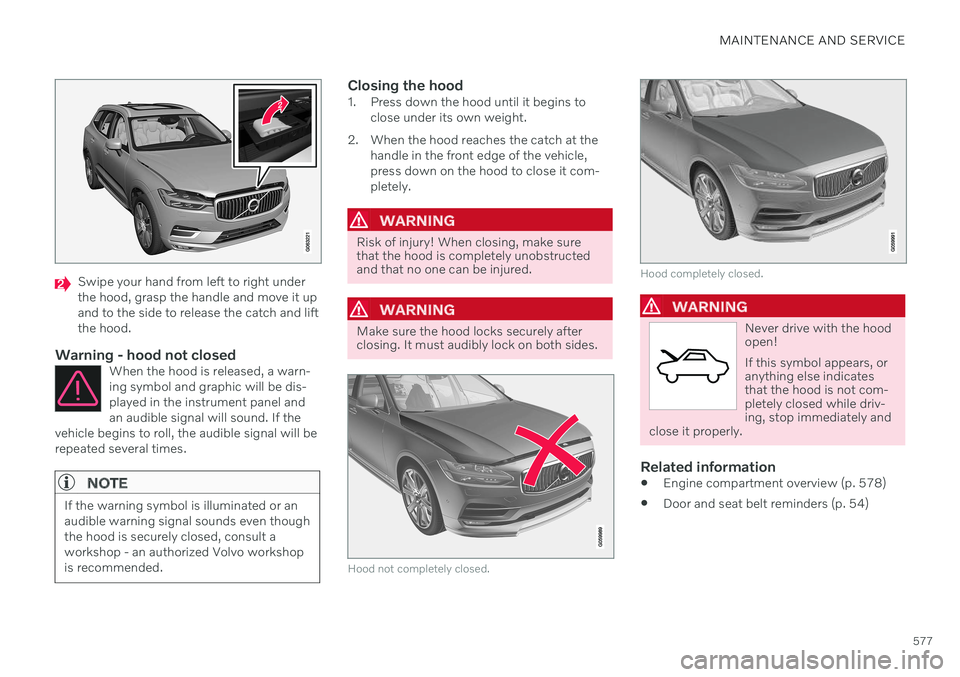
Swipe your hand from left to right under the hood, grasp the handle and move it upand to the side to release the catch and liftthe hood.
Warning - hood not closedWhen the hood is released, a warn-ing symbol and graphic will be dis-played in the instrument panel andan audible signal will sound. If the
vehicle begins to roll, the audible signal will berepeated several times.
NOTE
If the warning symbol is illuminated or an audible warning signal sounds even thoughthe hood is securely closed, consult aworkshop - an authorized Volvo workshopis recommended.
Closing the hood1. Press down the hood until it begins to close under its own weight.
2. When the hood reaches the catch at the handle in the front edge of the vehicle, press down on the hood to close it com-pletely.
WARNING
Risk of injury! When closing, make sure that the hood is completely unobstructedand that no one can be injured.
WARNING
Make sure the hood locks securely after closing. It must audibly lock on both sides.
Hood not completely closed.
Hood completely closed.
WARNING
Never drive with the hood open! If this symbol appears, or anything else indicatesthat the hood is not com-pletely closed while driv-ing, stop immediately and
close it properly.
Related information
Engine compartment overview (p. 578)
Door and seat belt reminders (p. 54)
Page 581 of 661
MAINTENANCE AND SERVICE
}}
579
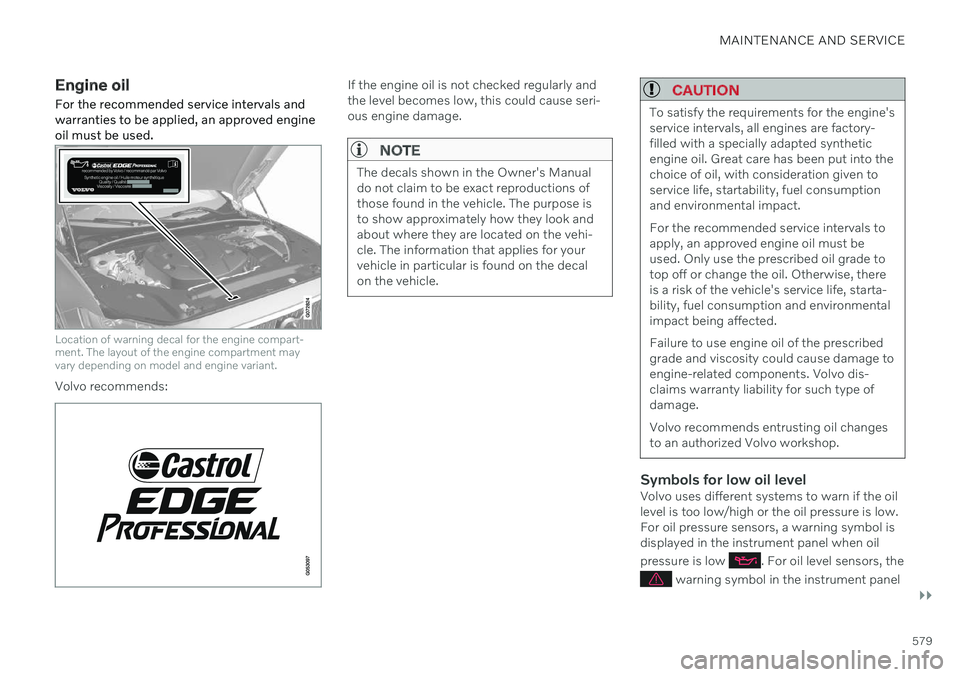
Engine oil For the recommended service intervals and warranties to be applied, an approved engineoil must be used.
Location of warning decal for the engine compart- ment. The layout of the engine compartment mayvary depending on model and engine variant.
Volvo recommends:
If the engine oil is not checked regularly and the level becomes low, this could cause seri-ous engine damage.
NOTE
The decals shown in the Owner's Manual do not claim to be exact reproductions ofthose found in the vehicle. The purpose isto show approximately how they look andabout where they are located on the vehi-cle. The information that applies for yourvehicle in particular is found on the decalon the vehicle.
CAUTION
To satisfy the requirements for the engine's service intervals, all engines are factory-filled with a specially adapted syntheticengine oil. Great care has been put into thechoice of oil, with consideration given toservice life, startability, fuel consumptionand environmental impact. For the recommended service intervals to apply, an approved engine oil must beused. Only use the prescribed oil grade totop off or change the oil. Otherwise, thereis a risk of the vehicle's service life, starta-bility, fuel consumption and environmentalimpact being affected. Failure to use engine oil of the prescribed grade and viscosity could cause damage toengine-related components. Volvo dis-claims warranty liability for such type ofdamage. Volvo recommends entrusting oil changes to an authorized Volvo workshop.
Symbols for low oil levelVolvo uses different systems to warn if the oil level is too low/high or the oil pressure is low.For oil pressure sensors, a warning symbol isdisplayed in the instrument panel when oil pressure is low
. For oil level sensors, the
warning symbol in the instrument panel
Page 600 of 661
||
MAINTENANCE AND SERVICE
* Option/accessory.
598
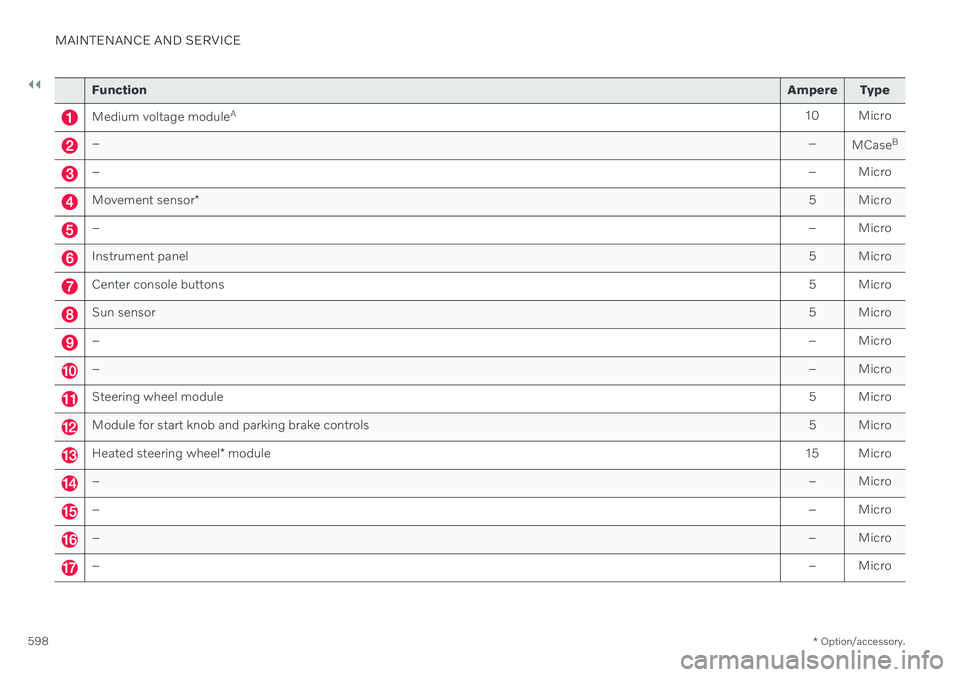
Function Ampere Type
Medium voltage moduleA
10 Micro
– –
MCaseB
–
– Micro
Movement sensor* 5 Micro
–
– Micro
Instrument panel 5 Micro
Center console buttons5 Micro
Sun sensor5 Micro
–– Micro
–– Micro
Steering wheel module 5 Micro
Module for start knob and parking brake controls5 Micro
Heated steering wheel* module 15 Micro
–
– Micro
–– Micro
–– Micro
–– Micro
Page 601 of 661
MAINTENANCE AND SERVICE
}}
* Option/accessory.599
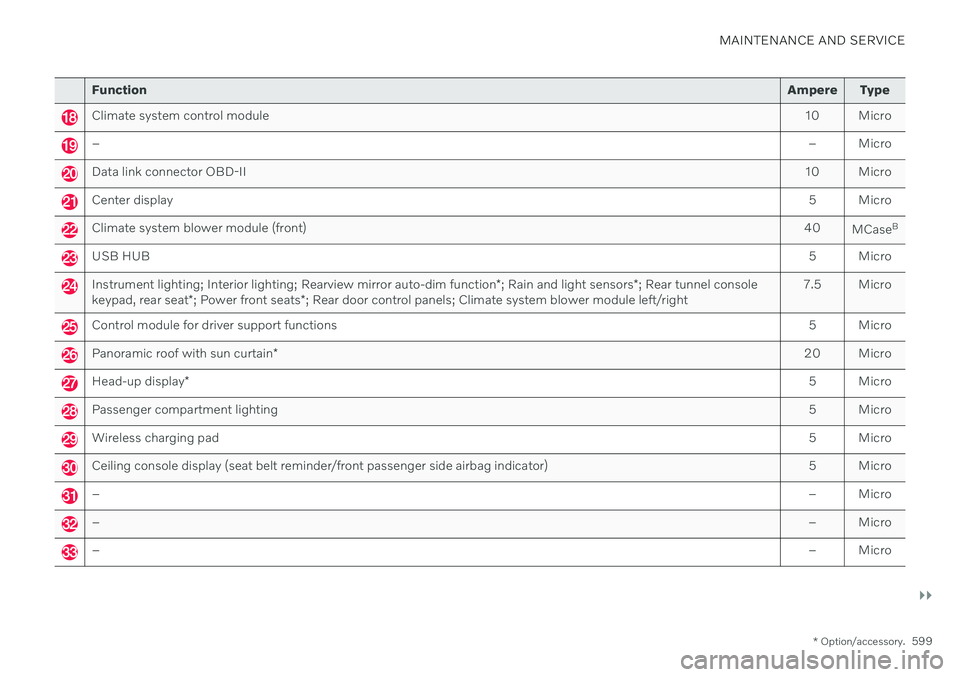
Function Ampere Type
Climate system control module 10 Micro
– – Micro
Data link connector OBD-II10 Micro
Center display 5 Micro
Climate system blower module (front)40
MCaseB
USB HUB
5 Micro
Instrument lighting; Interior lighting; Rearview mirror auto-dim function*; Rain and light sensors *; Rear tunnel console
keypad, rear seat *; Power front seats *; Rear door control panels; Climate system blower module left/right 7.5 Micro
Control module for driver support functions
5 Micro
Panoramic roof with sun curtain* 20 Micro
Head-up display
* 5 Micro
Passenger compartment lighting
5 Micro
Wireless charging pad5 Micro
Ceiling console display (seat belt reminder/front passenger side airbag indicator)5 Micro
–– Micro
–– Micro
–– Micro
Page 611 of 661
MAINTENANCE AND SERVICE
}}
* Option/accessory.609
Cleaning the leather steering wheel (p. 612)
Cleaning interior plastic, metal and woodsurfaces (p. 613)
Cleaning the head-up display
* and
instrument panel
Carefully wipe the glass covering the head-up display unit with a clean and dry microfibercloth. If necessary, the cloth may be slightlymoistened.
Never use strong stain removers. For difficult cleaning conditions, a special cleaning agentcan be purchased at a Volvo retailer.
Related information
Activating and deactivating the head-up display
* (p. 141)
Head-up display
* (p. 140)
Cleaning fabric upholstery and ceiling liner
Use of textile cleaner is recommended when cleaning textile materials. Clean as neededand treat stains immediately.
CAUTION
Never scrape or rub a stain because this may damage the upholstery.
CAUTION
Never use stain removers or strong sol- vents because these may damage theupholstery.
Cleaning textile upholstery1. Start by vacuuming the upholstery.
2. Follow the instructions of the textile cleaner.
3. When cleaning upholstery, a spray extrac- tion cleaner is recommended for sucking up cleaning fluids and rinse water.
CAUTION
Certain dyed clothing (such as denim and suede garments) may stain the upholstery.Difficult stains, like oil, can be difficult toremove.
Page 615 of 661
MAINTENANCE AND SERVICE
* Option/accessory.613
Cleaning interior plastic, metal and wood surfaces
Use cleaning agents and car care products recommended by Volvo. Clean regularly andtreat stains immediately.
A lightly dampened microfiber cloth is recom- mended for cleaning interior details and surfa-ces. These cloths are available for purchase atVolvo retailers. Never scrape or rub a stain. Never use strong stain removers.
CAUTION
Do not use solvent containing alcohol to clean the instrument panel glass.
CAUTION
Keep in mind that glossy surfaces can be easily scratched. Wipe these surfaces witha clean and dry microfiber cloth usingsmall, circular motions. If necessary, mois-ten the cloth lightly with clean water.
Related information
Cleaning the interior (p. 607)
Cleaning the center display (p. 608)
Cleaning fabric upholstery and ceiling liner (p. 609)
Cleaning the seat belt (p. 610)
Cleaning textile floor and inlay mats(p. 611)
Cleaning leather upholstery
* (p. 611)
Cleaning the leather steering wheel(p. 612)
Cleaning the exterior
The vehicle should be washed as soon as it becomes dirty. This makes the vehicle easierto clean because dirt does not attach asstrongly. It also reduces the risk of scratchesand keeps the vehicle looking new. Wash therims at a car wash or garage with an oil sepa-rator. Use a car washing detergent recom-mended by Volvo.
Related information
Cleaning the exterior (p. 613)
Polishing and waxing (p. 614)
Hand washing (p. 615)
Automatic car washes (p. 616)
High-pressure washing (p. 617)
Cleaning the wiper blades (p. 618)
Cleaning exterior plastic, rubber and trim components (p. 618)
Cleaning rims (p. 619)
Corrosion protection (p. 620)
Page 628 of 661
MAINTENANCE AND SERVICE
* Option/accessory.
626
Filling washer fluid Washer fluid is used to keep the headlights, windshield and rear window clean. Washerfluid containing anti-freeze should be used invery cold weather (below-freezing tempera-tures).
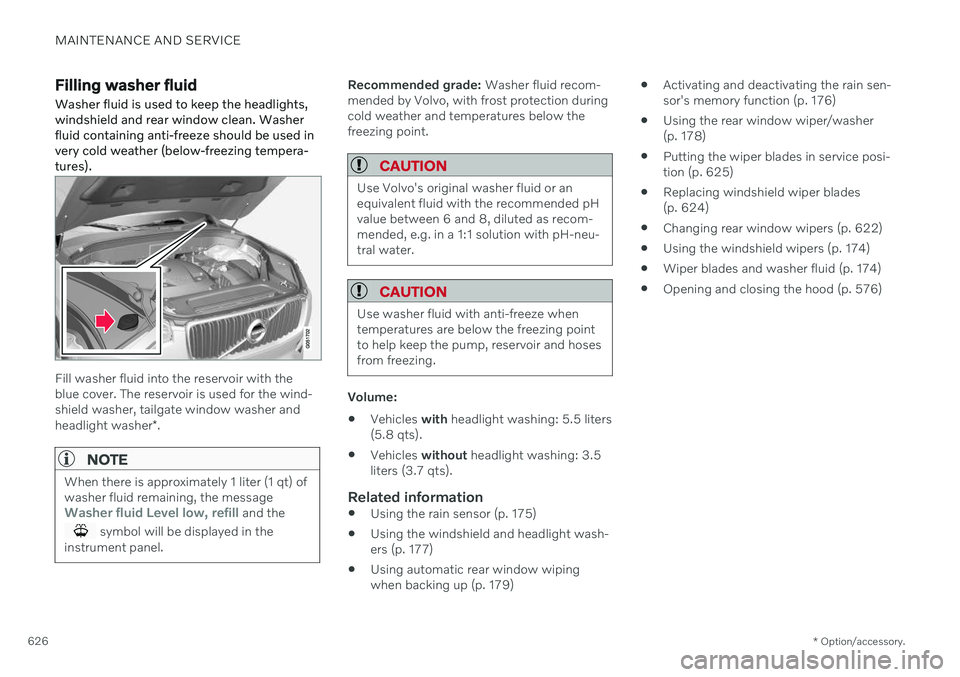
Fill washer fluid into the reservoir with the blue cover. The reservoir is used for the wind-shield washer, tailgate window washer and headlight washer *.
NOTE
When there is approximately 1 liter (1 qt) of washer fluid remaining, the message
Washer fluid Level low, refill and the
symbol will be displayed in the
instrument panel.
Recommended grade: Washer fluid recom-
mended by Volvo, with frost protection during cold weather and temperatures below thefreezing point.
CAUTION
Use Volvo's original washer fluid or an equivalent fluid with the recommended pHvalue between 6 and 8, diluted as recom-mended, e.g. in a 1:1 solution with pH-neu-tral water.
CAUTION
Use washer fluid with anti-freeze when temperatures are below the freezing pointto help keep the pump, reservoir and hosesfrom freezing.
Volume:
Vehicles
with headlight washing: 5.5 liters
(5.8 qts).
Vehicles
without headlight washing: 3.5
liters (3.7 qts).
Related information
Using the rain sensor (p. 175)
Using the windshield and headlight wash- ers (p. 177)
Using automatic rear window wipingwhen backing up (p. 179)
Activating and deactivating the rain sen-sor's memory function (p. 176)
Using the rear window wiper/washer(p. 178)
Putting the wiper blades in service posi-tion (p. 625)
Replacing windshield wiper blades(p. 624)
Changing rear window wipers (p. 622)
Using the windshield wipers (p. 174)
Wiper blades and washer fluid (p. 174)
Opening and closing the hood (p. 576)