instrument panel VOLVO V60 2021 Repair Manual
[x] Cancel search | Manufacturer: VOLVO, Model Year: 2021, Model line: V60, Model: VOLVO V60 2021Pages: 661, PDF Size: 12.68 MB
Page 283 of 661
DRIVER SUPPORT
}}
* Option/accessory.281
The driver can be alerted if the vehicle is exceeding a detected speed limit and isapproaching a speed camera.
Speed Limit Warning warns the driver if the
vehicle's speed has exceeded the applicable speed limit or the stored maximum speed. Thewarning will be repeated once afterabout 30 seconds in that speed limit area ifthe driver does not slow down. An additional warning will not be provided unless the vehicle's speed is reduced by atleast 5 km/h (3 mph) and then exceeds thespeed limit again or the vehicle enters a new/different speed limit area.
NOTE
For an audible alert to be provided if the speed is exceeded, the Speed Limit
Warning function must be activated and
the Road Sign Audio Warning sub-func-
tion must be On. Audible alerts are provi-
ded if the vehicle's speed exceeds the speed displayed by Road Sign Informationin the instrument panel.
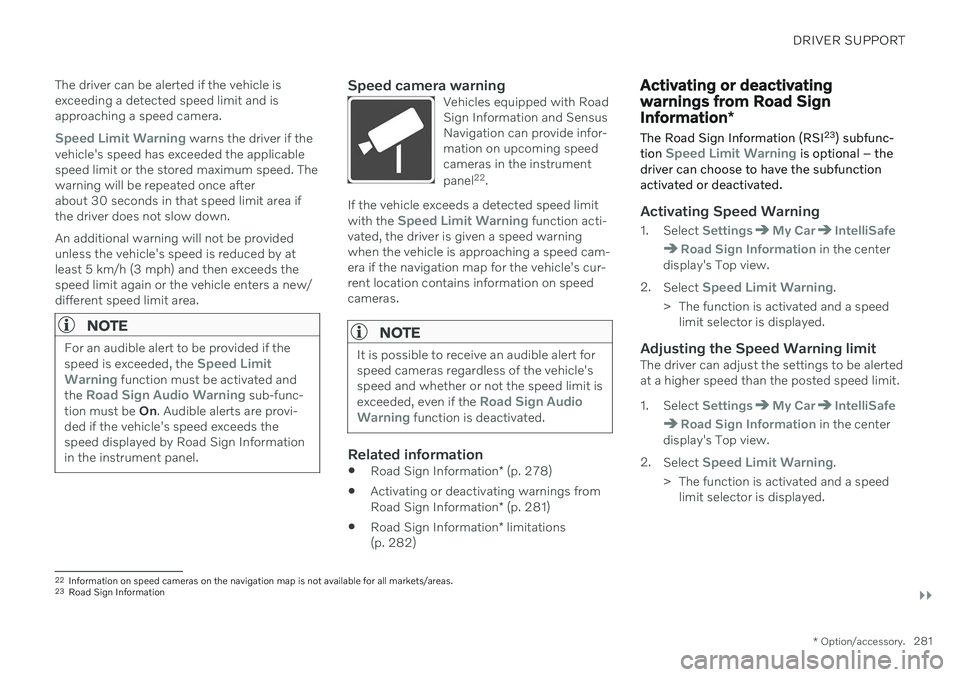
Speed camera warningVehicles equipped with Road Sign Information and SensusNavigation can provide infor-mation on upcoming speedcameras in the instrument panel 22
.
If the vehicle exceeds a detected speed limit with the Speed Limit Warning function acti-
vated, the driver is given a speed warning when the vehicle is approaching a speed cam-era if the navigation map for the vehicle's cur-rent location contains information on speedcameras.
NOTE
It is possible to receive an audible alert for speed cameras regardless of the vehicle'sspeed and whether or not the speed limit is exceeded, even if the
Road Sign Audio
Warning function is deactivated.
Related information
Road Sign Information
* (p. 278)
Activating or deactivating warnings from Road Sign Information
* (p. 281)
Road Sign Information
* limitations
(p. 282)
Activating or deactivating warnings from Road Sign Information *
The Road Sign Information (RSI 23
) subfunc-
tion
Speed Limit Warning is optional – the
driver can choose to have the subfunction activated or deactivated.
Activating Speed Warning
1. Select SettingsMy CarIntelliSafe
Road Sign Information in the center
display's Top view.
2. Select
Speed Limit Warning.
> The function is activated and a speed limit selector is displayed.
Adjusting the Speed Warning limitThe driver can adjust the settings to be alerted at a higher speed than the posted speed limit.
1. Select
SettingsMy CarIntelliSafe
Road Sign Information in the center
display's Top view.
2. Select
Speed Limit Warning.
> The function is activated and a speed limit selector is displayed.
22Information on speed cameras on the navigation map is not available for all markets/areas.
23 Road Sign Information
Page 284 of 661
||
DRIVER SUPPORT
* Option/accessory.
282 3. Tap the up/down arrows on the screen to
adjust the speed at which the Speed Warning will be given.
Please note that the setwarning limit will not be usedwhen a speed camera symbolis displayed in the instrumentpanel.
Activating audible alert for Speed Warning
1. Select SettingsMy CarIntelliSafe
Road Sign Information in the center
display's Top view.
2. Select/deselect
Road Sign Audio
Warning to activate/deactivate the audi-
ble alert.
When
Road Sign Audio Warning is acti-
vated, the driver will also be alerted if the vehi- cle is approaching a one-way/"no-entry" roador entrance.
Activating speed camera alertsIf the vehicle is equipped with Sensus Navigation * and map data contains informa-
tion on speed cameras, the driver can choose to receive an audible alert if the vehicle isapproaching a speed camera. 1. Select
SettingsMy CarIntelliSafe
Road Sign Information in the center
display's Top view.
2. Select/deselect
Speed Camera Audio
Warning to activate/deactivate the speed
camera audible alert.
Related information
Road Sign Information
* (p. 278)
Speed limit and speed camera warnings from Road Sign Information
* (p. 280)
Road Sign Information
* limitations
(p. 282)
Road Sign Information * limitations
Road Sign Information (RSI 24
) functionality
may be reduced in certain situations.
The function could have reduced functionality due to e.g.: faded road signs
signs located in a curve in the road
twisted or damaged signs
signs positioned high above the road
fully/partially obstructed or poorly posi- tioned signs
signs partially or fully covered by frost,snow and/or dirt
digital road maps 25
that are outdated,
incorrect or do not contain speed informa- tion 26
NOTE
In certain markets, the Road Sign Informa- tion
* function is only available in combina-
tion with Sensus Navigation *.
24
Road Sign Information
Page 285 of 661
DRIVER SUPPORT
}}
* Option/accessory.283
NOTE
Certain types of bike carriers that are con- nected to the trailer socket may be inter-preted as a connected trailer by the RSIfunction. In such cases, the instrumentpanel may indicate incorrect speed infor-mation.
NOTE
The function uses the vehicle's camera and radar sensor, which has certain generallimitations.
Related information
Road Sign Information
* (p. 278)
Camera/radar sensor limitations (p. 383)
Cruise control
Cruise Control (CC 27
) can help the driver
maintain an even speed to provide a more relaxing driving experience on highways andlong, straight roads with even traffic flows.
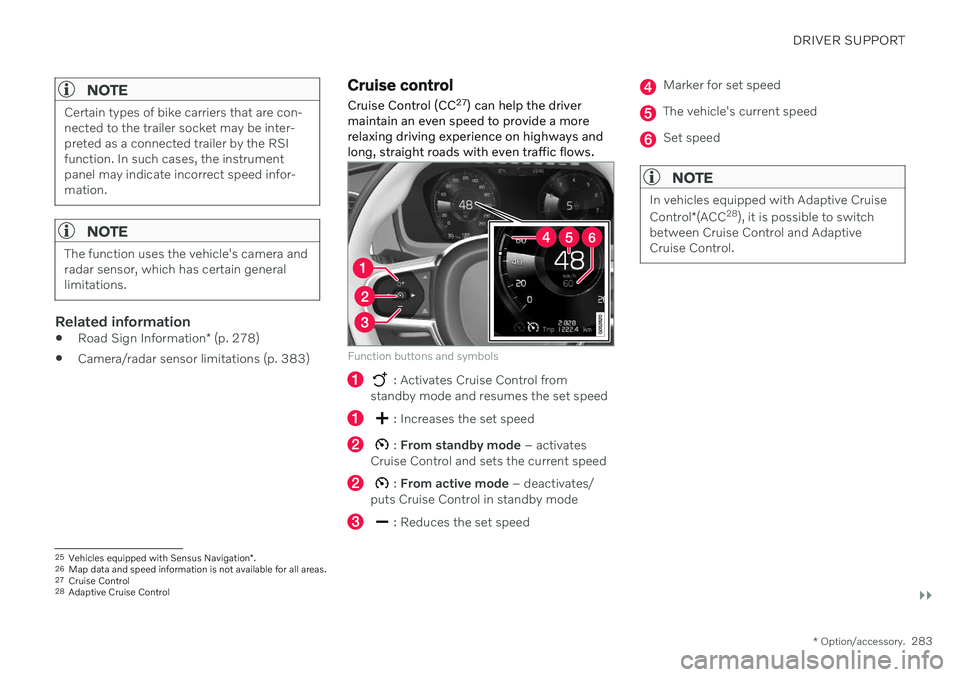
Function buttons and symbols
: Activates Cruise Control from
standby mode and resumes the set speed
: Increases the set speed
: From standby mode – activates
Cruise Control and sets the current speed
: From active mode – deactivates/
puts Cruise Control in standby mode
: Reduces the set speed
Marker for set speed
The vehicle's current speed
Set speed
NOTE
In vehicles equipped with Adaptive Cruise Control *(ACC 28
), it is possible to switch
between Cruise Control and Adaptive Cruise Control.
25 Vehicles equipped with Sensus Navigation *.
26 Map data and speed information is not available for all areas.
27 Cruise Control
28 Adaptive Cruise Control
Page 287 of 661
DRIVER SUPPORT
* Option/accessory.285
2.
When cruise control is selected, press
(2) on the steering wheel keypad to acti- vate.
> White symbol – cruise control starts
and the current speed is stored as the maximum speed. The lowest speedthat can be set is 30 km/h (20 mph).
Reactivating cruise control to the last stored speed
–When cruise control is selected, press on the steering wheel keypad to activate.
> The Cruise Control marking in theinstrument panel will change from GRAY to WHITE and the vehicle willthen return to the most recently setspeed.
WARNING
A noticeable increase in speed may follow when the speed is resumed with the
steering wheel button.
Related information
Cruise control (p. 283)
Deactivating cruise control (p. 285)
Cruise control standby mode (p. 286)
Deactivating cruise control
Cruise control (CC 30
) can be deactivated and
switched off.
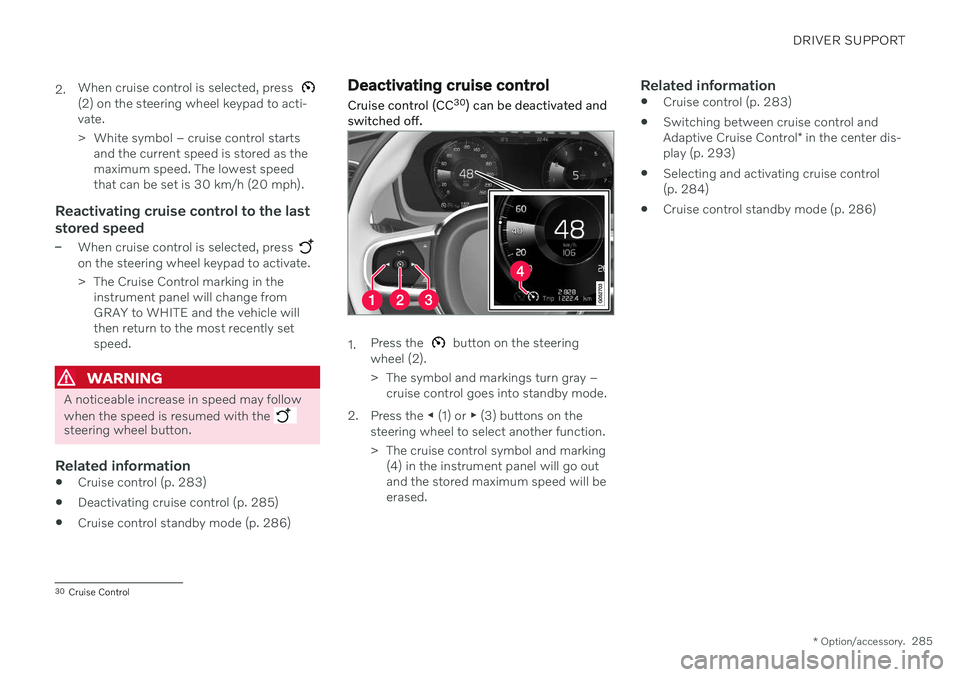
1. Press the button on the steering
wheel (2).
> The symbol and markings turn gray – cruise control goes into standby mode.
2. Press the ◀ (1) or ▶ (3) buttons on the
steering wheel to select another function.
> The cruise control symbol and marking (4) in the instrument panel will go out and the stored maximum speed will beerased.
Related information
Cruise control (p. 283)
Switching between cruise control and Adaptive Cruise Control
* in the center dis-
play (p. 293)
Selecting and activating cruise control (p. 284)
Cruise control standby mode (p. 286)
30
Cruise Control
Page 288 of 661

DRIVER SUPPORT
* Option/accessory.
286
Cruise control standby mode Cruise control (CC 31
) can be deactivated and
put in standby mode. This may happen auto- matically or be due to driver intervention.
Standby mode means that the function is selected in the instrument panel but not acti-vated. In standby mode, cruise control will notregulate speed.
Standby mode due to action by the
driver
Cruise control will be deactivated and put instandby mode if any of the following occurs:
The brakes are applied.
The gear selector is moved to
N.
The vehicle is driven faster than the setspeed for more than 1 minute.
The driver must then control the vehicle'sspeed. Temporarily increasing speed using the accel- erator pedal, e.g. when passing another vehi-cle, will not affect the setting. The vehicle willreturn to the set speed when the acceleratorpedal is released.
Automatic standby modeThe function may automatically go intostandby mode if one of the following occurs: The wheels lose traction.
The engine speed (rpm) is too low/high.
The temperature in the brake system becomes too high.
The vehicle's speed goes below 30 km/h(20 mph).
The driver must then control the vehicle'sspeed.
Related information
Cruise control (p. 283)
Selecting and activating cruise control(p. 284)
Deactivating cruise control (p. 285)
Adaptive Cruise Control
*32
Adaptive Cruise Control (ACC 33
) can help the
driver to maintain a constant speed, com- bined with a preset time interval to the vehi-cle in front.
The camera/radar sensor measures the distance to the vehicle ahead.
Adaptive Cruise Control can help provide a more relaxed driving experience on long tripson highways or long, straight roads with eventraffic flows. The driver sets a speed and a time interval to the vehicle ahead. If the camera/radar sensordetects a slower-moving vehicle ahead, yourvehicle's speed will be automatically adaptedaccording to the set time interval to that vehi-
31 Cruise Control
32 Depending on market, this function can be either standard or optional.
33 Adaptive Cruise Control
Page 292 of 661
||
DRIVER SUPPORT
* Option/accessory.
290 your vehicle's current speed must be at least 15 km/h (9 mph).
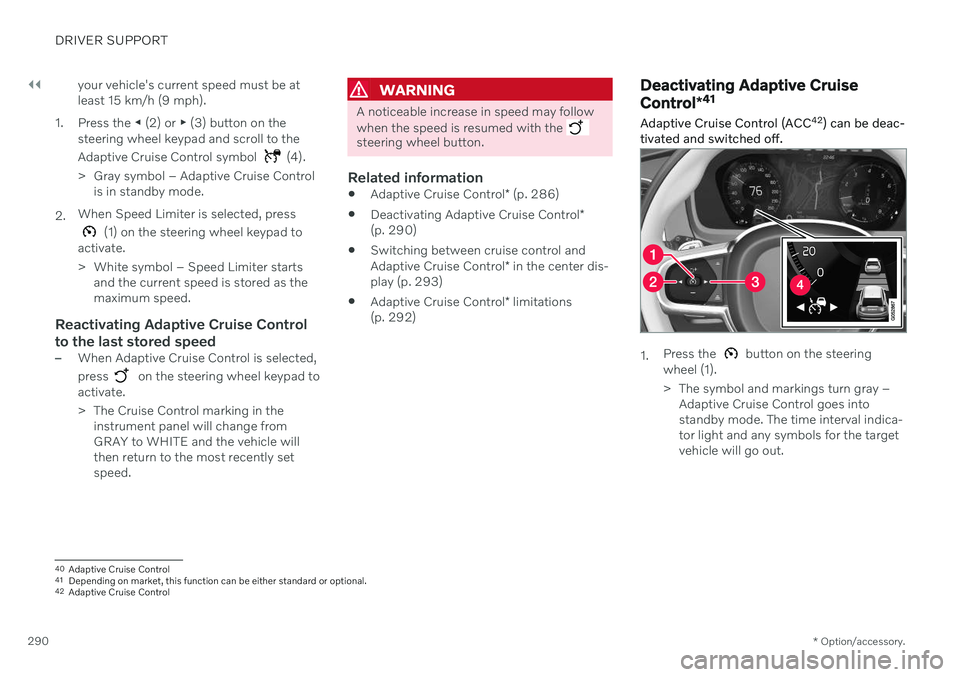
1. Press the ◀ (2) or ▶ (3) button on the
steering wheel keypad and scroll to the Adaptive Cruise Control symbol
(4).
> Gray symbol – Adaptive Cruise Control is in standby mode.
2. When Speed Limiter is selected, press
(1) on the steering wheel keypad to
activate.
> White symbol – Speed Limiter starts and the current speed is stored as the maximum speed.
Reactivating Adaptive Cruise Control to the last stored speed
–When Adaptive Cruise Control is selected, press
on the steering wheel keypad to
activate.
> The Cruise Control marking in the instrument panel will change from GRAY to WHITE and the vehicle willthen return to the most recently setspeed.
WARNING
A noticeable increase in speed may follow when the speed is resumed with the
steering wheel button.
Related information
Adaptive Cruise Control
* (p. 286)
Deactivating Adaptive Cruise Control
*
(p. 290)
Switching between cruise control and Adaptive Cruise Control
* in the center dis-
play (p. 293)
Adaptive Cruise Control
* limitations
(p. 292)
Deactivating Adaptive Cruise Control *41
Adaptive Cruise Control (ACC 42
) can be deac-
tivated and switched off.
1. Press the button on the steering
wheel (1).
> The symbol and markings turn gray – Adaptive Cruise Control goes into standby mode. The time interval indica-tor light and any symbols for the targetvehicle will go out.
40Adaptive Cruise Control
41 Depending on market, this function can be either standard or optional.
42 Adaptive Cruise Control
Page 293 of 661
DRIVER SUPPORT
}}
* Option/accessory.291
2. Press the
◀ (2) or ▶ (3) buttons on the
steering wheel to select another function.
> The Adaptive Cruise Control symbol and marking (4) in the instrument panel will go out and the stored maximumspeed will be erased.
WARNING
If Adaptive Cruise Control is in standby mode, the driver must intervene andregulate both speed and distance tothe vehicle ahead.
If the vehicle comes too close to a vehi-cle ahead when Adaptive Cruise Con-trol is in standby mode, the driver canbe warned of the short distance by the Distance Alert
* function.
Related information
Adaptive Cruise Control
* (p. 286)
Selecting and activating Adaptive CruiseControl
* (p. 289)
Switching between cruise control andAdaptive Cruise Control
* in the center dis-
play (p. 293)
Adaptive Cruise Control
* limitations
(p. 292)
Adaptive Cruise Control *43
standby
mode
Adaptive Cruise Control (ACC 44
) can be deac-
tivated and put in standby mode. This may happen automatically or be due to driverintervention.
Standby mode means that the function is selected in the instrument panel but not acti-vated. In standby mode, Adaptive Cruise Con-trol will not regulate speed or distance to thevehicle ahead.
Standby mode due to action by the
driver
Adaptive Cruise Control will be deactivatedand put in standby mode if any of the follow-ing occurs:
The brakes are applied.
The gear selector is moved to
N.
The vehicle is driven faster than the setspeed for more than 1 minute.
Temporarily increasing speed using the accel-erator pedal, e.g. when passing another vehi-cle, will not affect the setting. The vehicle willreturn to the set speed when the acceleratorpedal is released.
WARNING
If Adaptive Cruise Control is in standby mode, the driver must intervene andregulate both speed and distance tothe vehicle ahead.
If the vehicle comes too close to a vehi-cle ahead when Adaptive Cruise Con-trol is in standby mode, the driver canbe warned of the short distance by the Distance Alert
* function.
Automatic standby mode
WARNING
With automatic standby mode, the driver is warned by an acoustic signal and a mes-sage on the instrument panel.
The driver must then regulate vehicle speed, apply the brakes if necessary,and maintain a safe distance to othervehicles.
The function may automatically go intostandby mode if one of the following occurs: One of the systems that Adaptive Cruise Control is dependent on stops working,
43
Depending on market, this function can be either standard or optional.
44 Adaptive Cruise Control
Page 295 of 661
DRIVER SUPPORT
* Option/accessory.293
Switching between cruise control and Adaptive Cruise Control *48
in
the center display
When the regular cruise control (CC 49
) is
selected in the instrument panel, you can switch to Adaptive Cruise Control (ACC 50
) in
the center display's Function view.
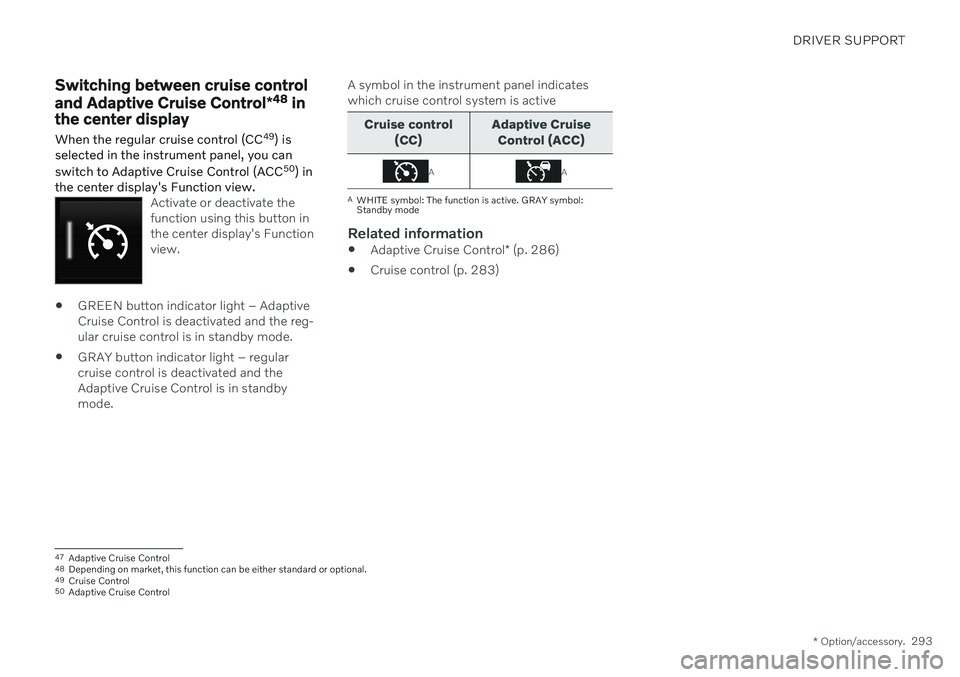
Activate or deactivate the function using this button inthe center display's Functionview.
GREEN button indicator light – Adaptive Cruise Control is deactivated and the reg-ular cruise control is in standby mode.
GRAY button indicator light – regularcruise control is deactivated and theAdaptive Cruise Control is in standbymode. A symbol in the instrument panel indicateswhich cruise control system is active
Cruise control
(CC) Adaptive Cruise
Control (ACC)
AA
A WHITE symbol: The function is active. GRAY symbol: Standby mode
Related information
Adaptive Cruise Control
* (p. 286)
Cruise control (p. 283)
47
Adaptive Cruise Control
48 Depending on market, this function can be either standard or optional.
49 Cruise Control
50 Adaptive Cruise Control
Page 296 of 661
DRIVER SUPPORT
* Option/accessory.
294
Symbols and messages for Adaptive Cruise Control *51
A number of symbols and messages relating to Adaptive Cruise Control (ACC 52
) may be displayed in the instrument panel and/or the head-up display
*.
51
Depending on market, this function can be either standard or optional.
52 Adaptive Cruise Control
Page 303 of 661
DRIVER SUPPORT
}}
* Option/accessory.301
The driver must keep their hands on the steering wheel.
There must be a vehicle ahead (targetvehicle) within a reasonable distance oryour vehicle's current speed must be atleast 15 km/h (9 mph).
1. Press the ◀ (1) or ▶ (3) button on the
steering wheel keypad and scroll to the Pilot Assist symbol
(4).
> Gray symbol – Pilot Assist is in standby mode.
2. When Pilot Assist is selected, press
(2) on the steering wheel keypad to acti- vate.
> White symbol – Pilot Assist starts and
the current speed is stored as the maxi- mum speed.
Reactivating Pilot Assist to the last stored speed
–When Pilot Assist is selected, press on the steering wheel keypad to activate.
> The Cruise Control marking in theinstrument panel will change from GRAY to WHITE and the vehicle willthen return to the most recently setspeed.
WARNING
A noticeable increase in speed may follow when the speed is resumed with the
steering wheel button.
Related information
Pilot Assist
* (p. 296)
Deactivating Pilot Assist
* (p. 301)
Pilot Assist
* limitations (p. 304)
Deactivating Pilot Assist *58
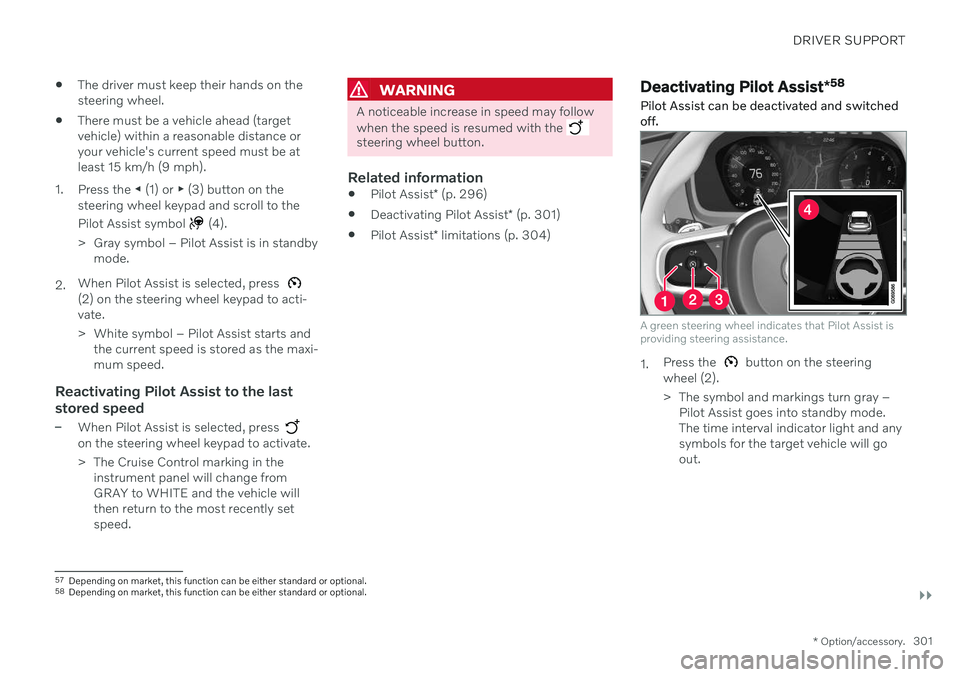
Pilot Assist can be deactivated and switched off.
A green steering wheel indicates that Pilot Assist is providing steering assistance.
1. Press the button on the steering
wheel (2).
> The symbol and markings turn gray – Pilot Assist goes into standby mode. The time interval indicator light and anysymbols for the target vehicle will goout.
57Depending on market, this function can be either standard or optional.
58 Depending on market, this function can be either standard or optional.