instrument panel VOLVO V60 2021 Workshop Manual
[x] Cancel search | Manufacturer: VOLVO, Model Year: 2021, Model line: V60, Model: VOLVO V60 2021Pages: 661, PDF Size: 12.68 MB
Page 246 of 661
||
KEY, LOCKS AND ALARM
* Option/accessory.
244 approx. 1.5 meter (5 feet) along the sides of the vehicle or approx. 1 meter (3 feet) from thetailgate.
NOTE
The functions of the remote control key can be disrupted by ambient radio waves,buildings, topographical conditions, etc.The vehicle can always be locked/unlockedusing the key blade.
If the remote key is removed from the vehicle
If the remote key is removed from the vehicle while the engine is run- ning, the warning message
Vehicle
key not found Removed from
vehicle will be displayed in the instrument
panel and an audible signal will sound when the last door is closed.
The message will disappear when the key is returned to the vehicle and the O button on
the right-side steering wheel keypad ispressed or when the last door is closed again.
Related information
Remote key (p. 238)
Antenna locations for the start and locksystem (p. 257)
Keyless and touch-sensitive surfaces
*
(p. 254)
Replacing the remote key's battery
The battery in the remote key must be replaced when it is discharged.
NOTE
All batteries have a limited service life and must eventually be replaced (does notapply for Key Tag). The battery's service lifevaries depending on how often thevehicle/key is used.
The remote key battery should be replaced if
the information symbol illuminates and the message
Vehicle key bat. low is dis-
played in the instrument panel
the locks do not react after several attempts to lock or unlock the vehicleusing the remote key within approx.20 meter (65 feet) from the vehicle.
NOTE
Move closer to the vehicle and try to unlock it again.
The battery in the smaller key without but- tons 7
(the Key Tag) cannot be replaced. A new key can be ordered from an authorized Volvo workshop.
CAUTION
An end-of-life Key Tag must be turned in to an authorized Volvo workshop. The keymust be deleted from the vehicle becauseit can still be used to start the vehicle viabackup start.
Opening the key and replacing the battery
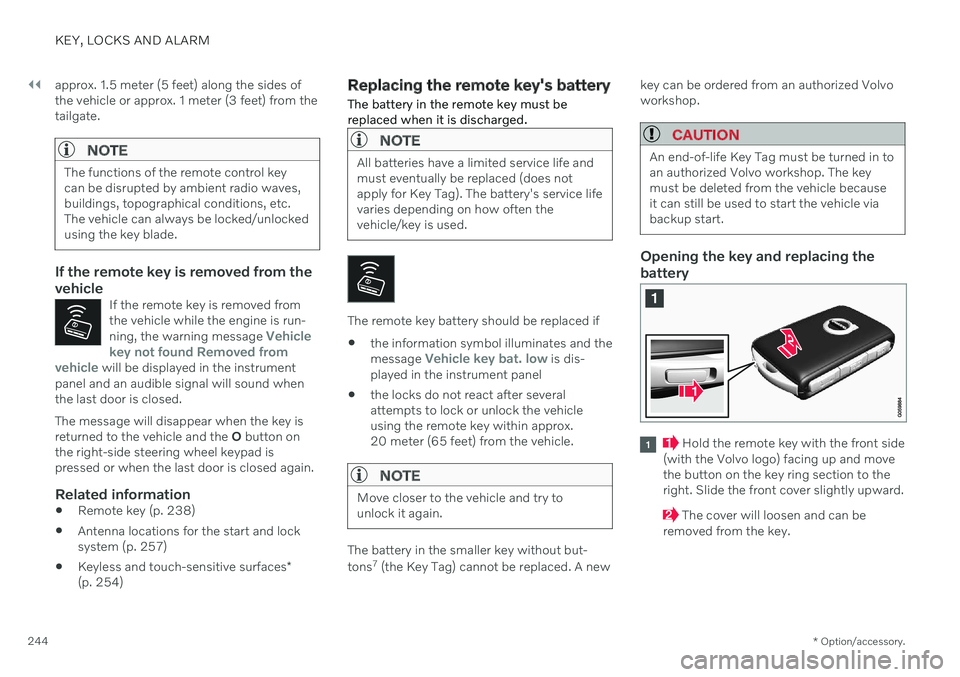
Hold the remote key with the front side
(with the Volvo logo) facing up and move the button on the key ring section to theright. Slide the front cover slightly upward.
The cover will loosen and can be
removed from the key.
Page 254 of 661
KEY, LOCKS AND ALARM
* Option/accessory.
252
Electronic immobilizer The electronic immobilizer is a start inhibitor that helps prevent the vehicle from beingstarted by an unauthorized person.
The vehicle can only be started with the right remote key. The following instrument panel error mes- sages are related to the electronic immobil-izer:
Symbol Message Meaning
Vehicle key not found See Owner'smanualRemote key not recognized dur-ing start. Placethe remote keyon the key sym-bol in the cupholder and try tostart the vehicleagain.
Remote immobilizer with tracking system 9
The vehicle is equipped with a system that makes it possible to track and locate the vehi-cle and to remotely activate the immobilizer toprevent the vehicle from being started. Con-tact your nearest Volvo retailer for more infor-mation and assistance activating the system. The following instrument panel error mes-sages are related to the remote immobilizerwith tracking system:
Symbol Message Meaning
Remotely immobilised Vehicle not possible tostartThe remote immobilizer withtracking systemis activated. Thevehicle cannotbe started. Con-tact Volvo OnCall ServiceCenter.
Related information
Remote key (p. 238)
Ordering additional remote keys (p. 248)
Start and lock system type designations The following information contains type des- ignations for the start and lock system.
Alarm systemUSA FCC ID: MAYDA 5823(3) This device complies with part 15 of the FCC rules. Operation is subject to the followingconditions: (1) This device may not causeharmful interference, and (2) this device mustaccept any interference received, includinginterference that may cause undesired opera-tion. Canada IC: 4405A-DA 5823(3)This device is subject to the following condi- tions: (1) This device may not cause interfer-ence, and (2) this device must accept anyinterference, including interference that maycause undesired operation of the device.
Remote keys (Passive Entry
*/Passive
Start)
USA Volvo Standard Key FCC ID: YGO- HUF8423MS Volvo Tag ID FCC ID: YGOHUF8432MS
9 Only certain markets and in combination with Volvo On Call.
Page 272 of 661

DRIVER SUPPORT
* Option/accessory.
270
Driver support systems
The vehicle is equipped with a number of driver support systems that can provide thedriver with active or passive assistance in var-ious situations.
The systems can, for example, help the driver:
maintain a set speed
maintain a set time interval to the vehicle ahead
help prevent a collision by warning thedriver and applying the brakes
park the vehicle.
Some of the systems are standard and othersare options. This also varies from market tomarket.
Related information
IntelliSafe – driver support and safety(p. 29)
Speed-dependent steering wheel resis-tance (p. 270)
Electronic Stability Control (p. 271)
Connected Safety (p. 276)
City Safety
™ (p. 323)
Road Sign Information
* (p. 278)
Cruise control (p. 283)
Adaptive Cruise Control
* (p. 286)
Pilot Assist
* (p. 296)
Curve Speed Assist (CSA)
* (p. 308)
Passing assistance
* (p. 310)
Lane Keeping Aid (p. 316)
Steering assistance at risk of collision(p. 337)
Rear Collision Warning
* (p. 343)
BLIS
* (p. 344)
Driver Alert Control (p. 348)
Distance Alert
* (p. 350)
Cross Traffic Alert
* (p. 352)
Park Assist
* (p. 356)
Park Assist Camera
* (p. 361)
Radar sensor (p. 380)
Camera (p. 383)
Speed-dependent steering wheel resistance Speed-dependent power steering increases the steering wheel resistance in pace withthe vehicle's speed, which can help give thedriver an enhanced feeling of control and sta-bility. Steering is stiffer on highways. Whenparking and at low speeds, it will be easier tomove the steering wheel.
Reduced powerIn rare situations, the power steering may need to work at reduced power and the steer-ing wheel may then feel more difficult tomove. This may happen when the powersteering becomes too hot and needs to betemporarily cooled. It can also happen if thereis a disturbance in power supply.
If there is reduced power, the message
Power steering
Assistance temporarily reduced
and this symbol are
shown in the instrument panel.
While the power steering is working at reduced power, the driver support functionsand systems with steering assistance are notavailable.
Page 273 of 661
DRIVER SUPPORT
}}
* Option/accessory.271
WARNING
If the temperature rises too high, the power steering may be forced to switch off com-pletely. In such a situation, the driver dis- play shows the message
Power steering
failure Stop safely along with a symbol.
Changing the level of steering wheel resistance *
In INDIVIDUAL drive mode, the level of steer- ing wheel resistance can be adjusted. 1.
Tap
Settings in the center display's Top
view.
2. Select
My CarDrive ModesSteering Force.
Steering wheel resistance settings can only be accessed if the vehicle is stationary or is mov-ing straight ahead at a low speed.
Related information
Driver support systems (p. 270)
Drive modes
* (p. 413)
Electronic Stability Control
The Electronic Stability Control (ESC 1
) func-
tion helps the driver avoid skidding and improves the vehicle's directional stability.
This symbol will be displayed in the instrument panel whenthe system is intervening. When the system has inter- vened to apply the brakes, apulsing sound may be heard
and the vehicle may accelerate more slowlythan expected when the accelerator pedal isdepressed.
The system consists of the following sub-func- tions:
Stability control 2
Spin control and active yaw control
Engine drag control
Trailer Stability Assist
WARNING
The function is supplementary driver support intended to facilitate drivingand help make it safer – it cannot han-dle all situations in all traffic, weatherand road conditions.
The driver is advised to read all sec-tions in the Owner's Manual about thisfunction to learn of its limitations,which the driver must be aware ofbefore using the function.
Driver support functions are not a sub-stitute for the driver's attention andjudgment. The driver is always respon-sible for ensuring the vehicle is drivenin a safe manner, at the appropriatespeed, with an appropriate distance toother vehicles, and in accordance withcurrent traffic rules and regulations.
Stability control 2This function helps control the driving andbraking force of each individual wheel in anattempt to stabilize the vehicle.
Spin control and active yaw controlThis function is active at low speeds andbrakes the wheels that are spinning to transfer
1
Electronic Stability Control
2 Also called traction control.
Page 275 of 661
DRIVER SUPPORT
* Option/accessory.273
Related information
Electronic Stability Control (p. 271)
Activating or deactivating Sport mode for Electronic Stability Control (p. 273)
Trailer Stability Assist
* (p. 436)
Activating or deactivating Sport mode for Electronic StabilityControl
The stability system (ESC 8
) is always acti-
vated and cannot be switched off. However, the driver can select Sport mode, whichoffers more active driving characteristics.
Activate or deactivate the function using this button inthe center display's Functionview.
Illuminated button indicator light – the function is activated.
Extinguished button indicator light – thefunction is deactivated.
When
ESC Sport Mode is
activated, this symbol will illuminate with a steady glowin the instrument panel. It willremain on until the driverdeactivates the function oruntil the engine is turned off.
The system will return to normal mode thenext time the engine is started.
The ESC Sport Mode function cannot be
selected when any of the following functions are activated:
Cruise control
Adaptive Cruise Control
*
Pilot Assist
*
Related information
Electronic Stability Control in sport mode(p. 272)
Electronic Stability Control (p. 271)
8
Electronic Stability Control
Page 276 of 661
DRIVER SUPPORT
274
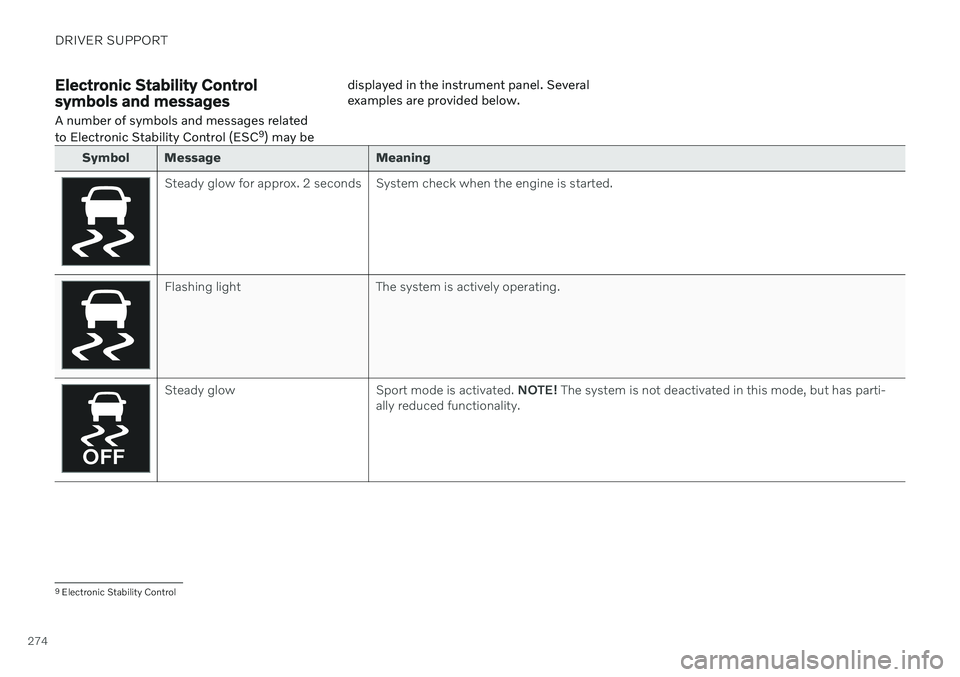
Electronic Stability Control symbols and messagesA number of symbols and messages related to Electronic Stability Control (ESC 9
) may be displayed in the instrument panel. Several examples are provided below.
Symbol Message Meaning
Steady glow for approx. 2 seconds System check when the engine is started.
Flashing light The system is actively operating.
Steady glow Sport mode is activated.
NOTE! The system is not deactivated in this mode, but has parti-
ally reduced functionality.
9 Electronic Stability Control
Page 278 of 661
DRIVER SUPPORT
* Option/accessory.
276
Connected Safety 10
Connected Safety communicates information between your vehicle and other vehicles via the Internet 11
. The function is designed to
notify the driver of any hazardous road condi- tions ahead.
The function can notify the driver if another vehicle further down the road has activated itshazard warning flashers or detected slipperyroad conditions. You will also be notified ifyour own vehicle detects slippery road condi-tions. Connected Safety can assist the driver with the following:
Hazard warning flashers alert
Slippery road alerts
Connected Safety communication betweenvehicles only works for vehicles that are equip-ped with the function and have it activated.
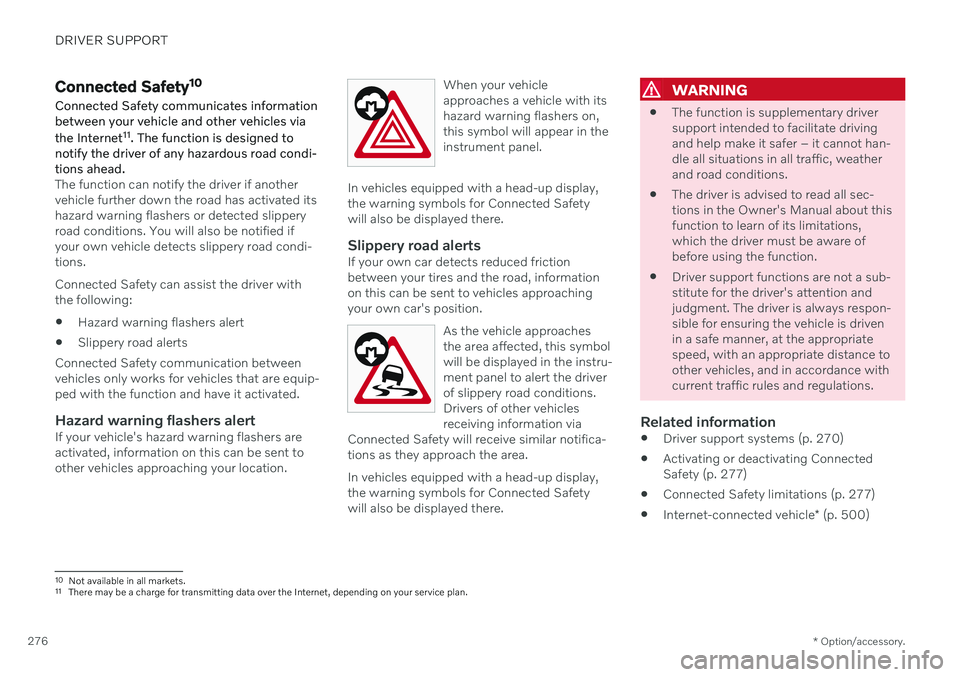
Hazard warning flashers alertIf your vehicle's hazard warning flashers areactivated, information on this can be sent toother vehicles approaching your location. When your vehicleapproaches a vehicle with itshazard warning flashers on,this symbol will appear in theinstrument panel.
In vehicles equipped with a head-up display, the warning symbols for Connected Safetywill also be displayed there.
Slippery road alertsIf your own car detects reduced frictionbetween your tires and the road, informationon this can be sent to vehicles approachingyour own car's position.
As the vehicle approachesthe area affected, this symbolwill be displayed in the instru-ment panel to alert the driverof slippery road conditions.Drivers of other vehiclesreceiving information via
Connected Safety will receive similar notifica-tions as they approach the area.
In vehicles equipped with a head-up display, the warning symbols for Connected Safetywill also be displayed there.
WARNING
The function is supplementary driver support intended to facilitate drivingand help make it safer – it cannot han-dle all situations in all traffic, weatherand road conditions.
The driver is advised to read all sec-tions in the Owner's Manual about thisfunction to learn of its limitations,which the driver must be aware ofbefore using the function.
Driver support functions are not a sub-stitute for the driver's attention andjudgment. The driver is always respon-sible for ensuring the vehicle is drivenin a safe manner, at the appropriatespeed, with an appropriate distance toother vehicles, and in accordance withcurrent traffic rules and regulations.
Related information
Driver support systems (p. 270)
Activating or deactivating ConnectedSafety (p. 277)
Connected Safety limitations (p. 277)
Internet-connected vehicle
* (p. 500)
10
Not available in all markets.
11 There may be a charge for transmitting data over the Internet, depending on your service plan.
Page 280 of 661
||
DRIVER SUPPORT
* Option/accessory.
278 sult a Volvo retailer for more information on covered areas.
WARNING
In certain situations, the function may give false warnings of slippery roadconditions.
The function cannot always detectother vehicles with activated hazardwarning factors or detect all stretchesof road with slippery conditions.
Related information
Connected Safety (p. 276)
Internet-connected vehicle
* (p. 500)
Road Sign Information *
The Road Sign Information (RSI 13
) function
can help the driver observe speed-related road signs.
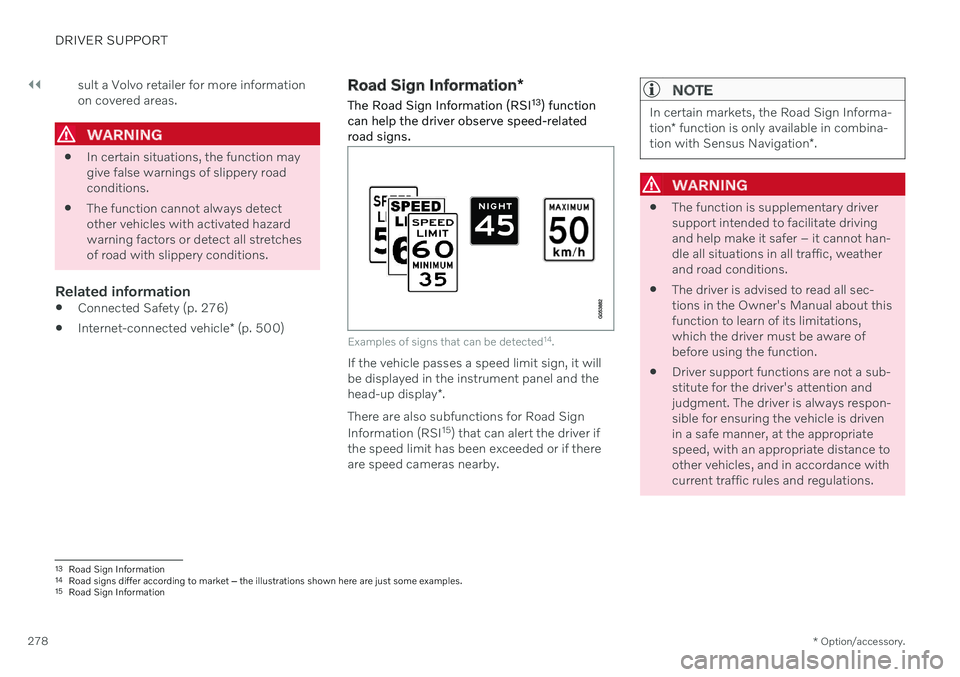
Examples of signs that can be detected 14
.
If the vehicle passes a speed limit sign, it will be displayed in the instrument panel and the head-up display *.
There are also subfunctions for Road Sign Information (RSI 15
) that can alert the driver if
the speed limit has been exceeded or if there are speed cameras nearby.
NOTE
In certain markets, the Road Sign Informa- tion * function is only available in combina-
tion with Sensus Navigation *.
WARNING
The function is supplementary driver support intended to facilitate drivingand help make it safer – it cannot han-dle all situations in all traffic, weatherand road conditions.
The driver is advised to read all sec-tions in the Owner's Manual about thisfunction to learn of its limitations,which the driver must be aware ofbefore using the function.
Driver support functions are not a sub-stitute for the driver's attention andjudgment. The driver is always respon-sible for ensuring the vehicle is drivenin a safe manner, at the appropriatespeed, with an appropriate distance toother vehicles, and in accordance withcurrent traffic rules and regulations.
13
Road Sign Information
14 Road signs differ according to market ‒ the illustrations shown here are just some examples.
15 Road Sign Information
Page 281 of 661
DRIVER SUPPORT
}}
* Option/accessory.279
Related information
Driver support systems (p. 270)
Activating or deactivating Road Sign Infor- mation
* (p. 279)
Road Sign Information
* display (p. 279)
Road Sign Information and SensusNavigation
* (p. 280)
Speed limit and speed camera warningsfrom Road Sign Information
* (p. 280)
Road Sign Information
* limitations
(p. 282)
Activating or deactivating Road Sign Information *
The Road Sign Information (RSI 16
) function is
optional – the driver can choose to have the function activated or deactivated.
Activate or deactivate the function using this button inthe center display's Functionview.
Illuminated button indicator light – the function is activated.
Extinguished button indicator light – thefunction is deactivated.
Related information
Road Sign Information
* (p. 278)
Road Sign Information
* limitations
(p. 282)
Road Sign Information * display
Road Sign Information (RSI 17
) displays road
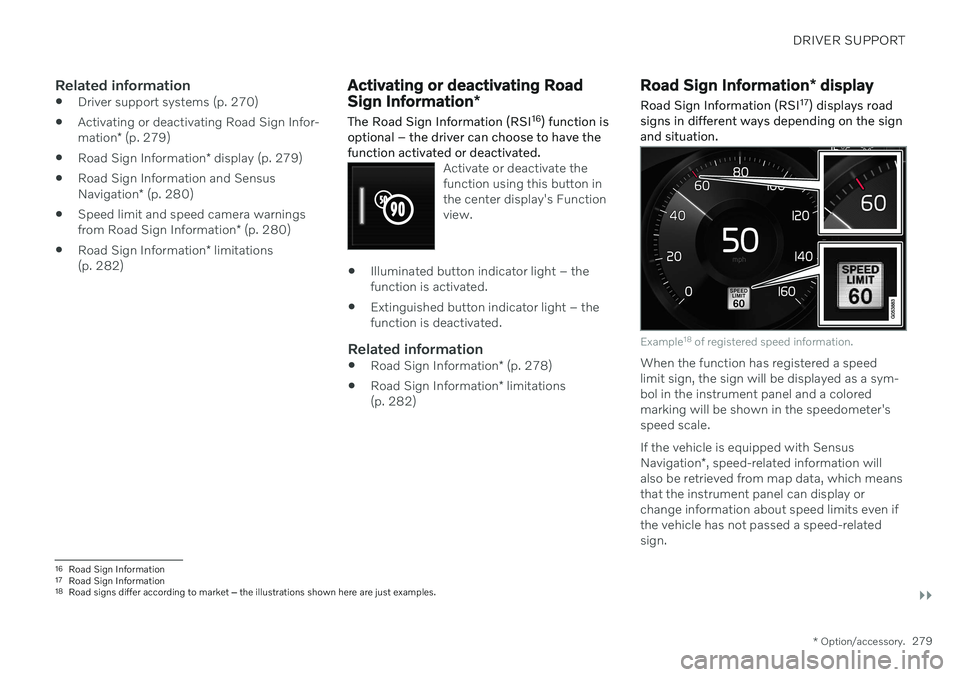
signs in different ways depending on the sign and situation.
Example 18
of registered speed information.
When the function has registered a speed limit sign, the sign will be displayed as a sym-bol in the instrument panel and a coloredmarking will be shown in the speedometer'sspeed scale. If the vehicle is equipped with Sensus Navigation *, speed-related information will
also be retrieved from map data, which means that the instrument panel can display orchange information about speed limits even ifthe vehicle has not passed a speed-relatedsign.
16 Road Sign Information
17 Road Sign Information
18 Road signs differ according to market ‒ the illustrations shown here are just examples.
Page 282 of 661
||
DRIVER SUPPORT
* Option/accessory.
280
Signs for "School" and "Children playing"
If the warning sign "School" or "Children playing" isincluded in the satellite navi- gator's map data 19
, a symbol
of this type will be displayed in the instrument panel.
Related information
Road Sign Information
* (p. 278)
Road Sign Information
* limitations
(p. 282)
Road Sign Information and Sensus Navigation *
If the vehicle is equipped with Sensus Navigation*, speed-related information will be
provided in the following situations:
In cases where the speed limit is given indirectly, e.g. signs for highways or othermajor roads.
If a previously detected speed sign isdeemed to be no longer valid and no newsign has been passed.
NOTE
In certain markets, the Road Sign Informa- tion
* function is only available in combina-
tion with Sensus Navigation *.
NOTE
If a downloaded third-party app is used for navigation, there is no support for speed-related information.
Related information
Road Sign Information
* (p. 278)
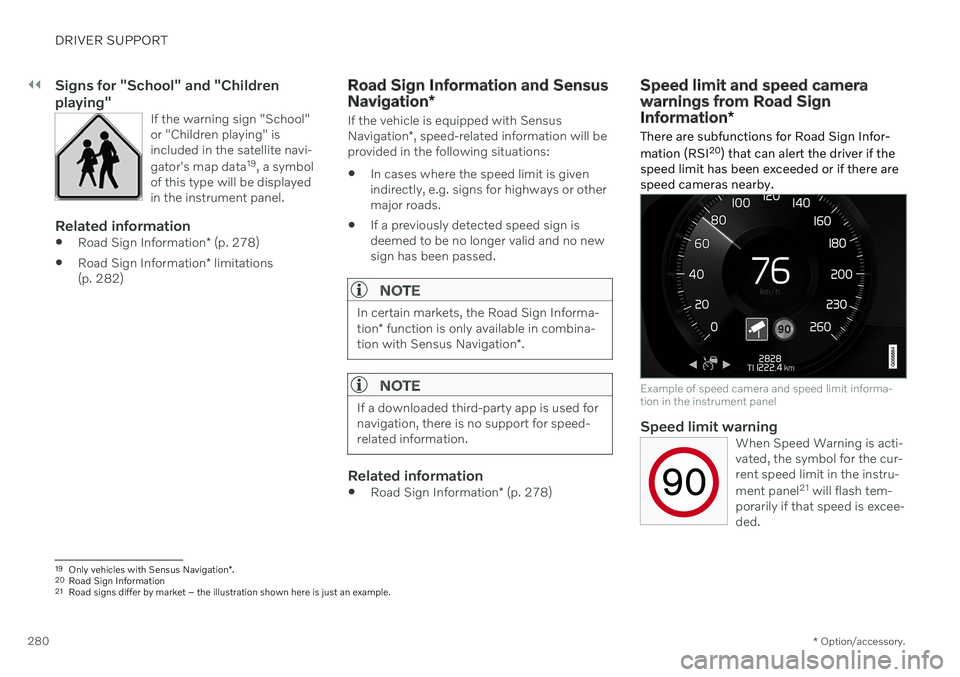
Speed limit and speed camera warnings from Road Sign Information *
There are subfunctions for Road Sign Infor- mation (RSI 20
) that can alert the driver if the
speed limit has been exceeded or if there are speed cameras nearby.
Example of speed camera and speed limit informa- tion in the instrument panel
Speed limit warningWhen Speed Warning is acti- vated, the symbol for the cur-rent speed limit in the instru- ment panel 21
will flash tem-
porarily if that speed is excee- ded.
19 Only vehicles with Sensus Navigation *.
20 Road Sign Information
21 Road signs differ by market – the illustration shown here is just an example.