warning VOLVO V90 2017 Owners Manual
[x] Cancel search | Manufacturer: VOLVO, Model Year: 2017, Model line: V90, Model: VOLVO V90 2017Pages: 594, PDF Size: 15.07 MB
Page 333 of 594
DRIVER SUPPORT
}}
331
WARNING
City Safety is an aid and does not work in all driving situations, traffic, weather and roadconditions. Warning only activated in the event of a high risk for collision. This section and the section"Limitations for City Safety" inform about limi-tations that the driver should be aware ofbefore using City Safety. Warnings and brake interventions for pedes- trians and cyclists are deactivated at vehiclespeeds above 70 km/h (43 mph). City Safety's auto-brake function can prevent a collision or reduce collision speed. Toensure full brake performance, the drivershould always depress the brake pedal - evenif the car auto-brakes. City Safety does not activates any auto-brake functions in the event of heavy acceleration. The driver is always responsible for maintain- ing the correct distance and speed - neverwait for a collision warning or for City Safetyto intervene.
Market limitationCity Safety is not available in all countries. If City Safety does not appear in the centre display's
Settings menu, the car is not equipped with this
function. Search path in the top menu:
SettingsMy
Car
IntelliSafe
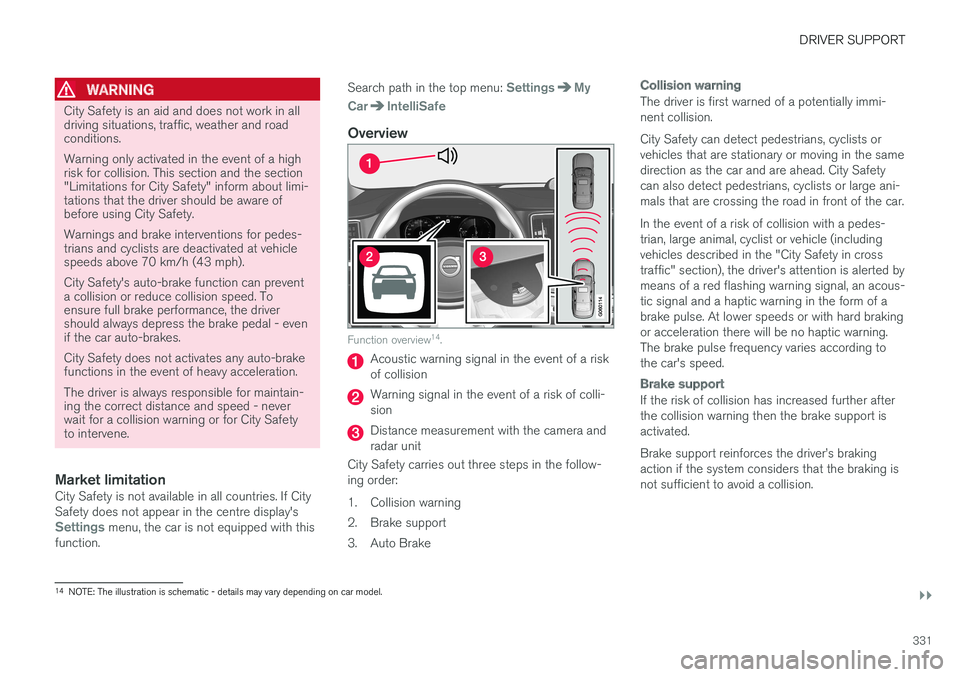
Overview
Function overview 14
.
Acoustic warning signal in the event of a risk of collision
Warning signal in the event of a risk of colli- sion
Distance measurement with the camera and radar unit
City Safety carries out three steps in the follow-ing order:
1. Collision warning
2. Brake support
3. Auto Brake
Collision warning
The driver is first warned of a potentially immi- nent collision. City Safety can detect pedestrians, cyclists or vehicles that are stationary or moving in the samedirection as the car and are ahead. City Safetycan also detect pedestrians, cyclists or large ani-mals that are crossing the road in front of the car. In the event of a risk of collision with a pedes- trian, large animal, cyclist or vehicle (includingvehicles described in the "City Safety in crosstraffic" section), the driver's attention is alerted bymeans of a red flashing warning signal, an acous-tic signal and a haptic warning in the form of abrake pulse. At lower speeds or with hard brakingor acceleration there will be no haptic warning.The brake pulse frequency varies according tothe car's speed.
Brake support
If the risk of collision has increased further after the collision warning then the brake support isactivated. Brake support reinforces the driver
Page 334 of 594
||
DRIVER SUPPORT
332
Auto Brake
The automatic brake function is activated last. If in this situation the driver has not yet started to take evasive action and the risk of collision isimminent then the automatic braking function isdeployed - this takes place irrespective ofwhether or not the driver brakes. Braking thentakes place with full brake force in order toreduce collision speed, or with limited brake forceif it is sufficient to avoid a collision. In connection with automatic braking the seatbelt tensioner may also be activated. For more infor-mation see the "Seatbelt tensioner" section. In some situations, the action of Auto-brake may begin with light braking and then progress to fullbrake action. When City Safety has prevented a collision with a stationary object, the car remains stationary inanticipation of positive action by the driver. If thecar has been braked to avoid collision with aslower vehicle in front, its speed is reduced tomatch that of the vehicle in front.
NOTE
On cars with manual gearbox, the engine stops when the Auto-brake function has stop-ped the car, unless the driver has managed todepress the clutch pedal beforehand.
The driver can always interrupt a braking inter- vention by firmly depressing the acceleratorpedal.
NOTE
When City Safety™ brakes, the brake lights
come on.
When City Safety is activated and brakes the vehicle, the driver display shows a text messageto the effect that the function is/has been active.
WARNING
City Safety must not be used as an excuse for the driver to change his/her driving style. Ifthe driver relies solely on City Safety to do thebraking, there might be a risk of a collisionsooner or later.
Related information
• Setting the warning distance for City Safety (p. 332)
• Detection of obstacles with City Safety
™
(p. 333)
• City Safety when evasive manoeuvres areprevented (p. 336)
• City Safety in cross traffic (p. 335)
• Limitations of City Safety (p. 337)
• Messages for City Safety (p. 339)
• Seatbelt tensioner (p. 59)
Setting the warning distance for City Safety
City Safety is always activated, but it is possible to select the warning distance for the function.
NOTE
The City Safety function cannot be deacti- vated. It is activated automatically when theengine/electric operation is started andremains switched on until the engine/electricoperation is switched off.
The warning distance determines the sensitivity of the system and regulates the distance atwhich the visual, acoustic and haptic warningsshall be triggered. 1. Tap on
Settings in top view in the centre
display.
2. Press
My CarIntelliSafe.
3. Under
City Safety Warning, select Late,Normal or Early to set the desired warning
distance.
If the
Early setting produces too many warnings,
which could be perceived as irritating in certain situations, then use the
Normal or Late warning
distance. If warnings are perceived as being too frequent or disturbing then the warning distance can bereduced. This would lead to the system warning
Page 335 of 594
DRIVER SUPPORT
}}
333
at a later stage, which reduces the total number of warnings. The
Late warning distance should only be used
in exceptional cases, as in dynamic driving.
NOTE
City Safety warns the driver when there is a risk of a collision, but it cannot shorten thedriver
Page 336 of 594
||
DRIVER SUPPORT
334bicycle outline, requiring the ability to identify the bicycle, head, arms, shoulders, legs, upper andlower body plus a normal human pattern of move-ment. If large parts of the cyclist's body or bicycle are not visible to the function's camera then the sys-tem cannot detect a cyclist. For the function to be able to detect a cyclist, he/she must be an adult and riding a bicycledesigned for adults.
WARNING
City Safety is an aid, and cannot detect all cyclists in all situations and, for example, can-not see: •
partially obscured cyclists.
• cyclists wearing clothing that obscures the body outline.
• bicycles loaded with large objects.
The driver is always responsible that the vehi- cle is driven correctly and with a safety dis-tance adapted to the speed.
Pedestrians
Optimal examples of what the system regards as pedes- trians with clear body outlines.
For optimal performance, the system function that detects pedestrians must receive the clear-est possible information about the body outline,requiring the ability to identify the head, arms,shoulders, legs, upper and lower body plus a nor-mal human pattern of movement. In order that it shall be possible to detect a pedestrian there must be a contrast with thebackground and this will be affected by suchthings as clothes, the background and theweather. With poor contrast the pedestrian mayeither be detected late or not at all, which maymean that warnings and braking are late or omit-ted. City Safety can also detect pedestrians in thedark if they are illuminated by the car's head-lamps.
WARNING
City Safety is an aid and cannot detect all pedestrians in all situations and, for example,cannot see:
• partially obscured pedestrians, people in clothing that hides their body contour orpedestrians shorter than 80 cm.
• pedestrians if the background contrast ofthe pedestrians is poor - warning andbrake interventions may then be late ornot occur at all.
• pedestrians who are carrying largerobjects.
The driver is always responsible that the vehi-
cle is driven correctly and with a safety dis- tance adapted to the speed.
Page 337 of 594
DRIVER SUPPORT
}}
335
Large animals
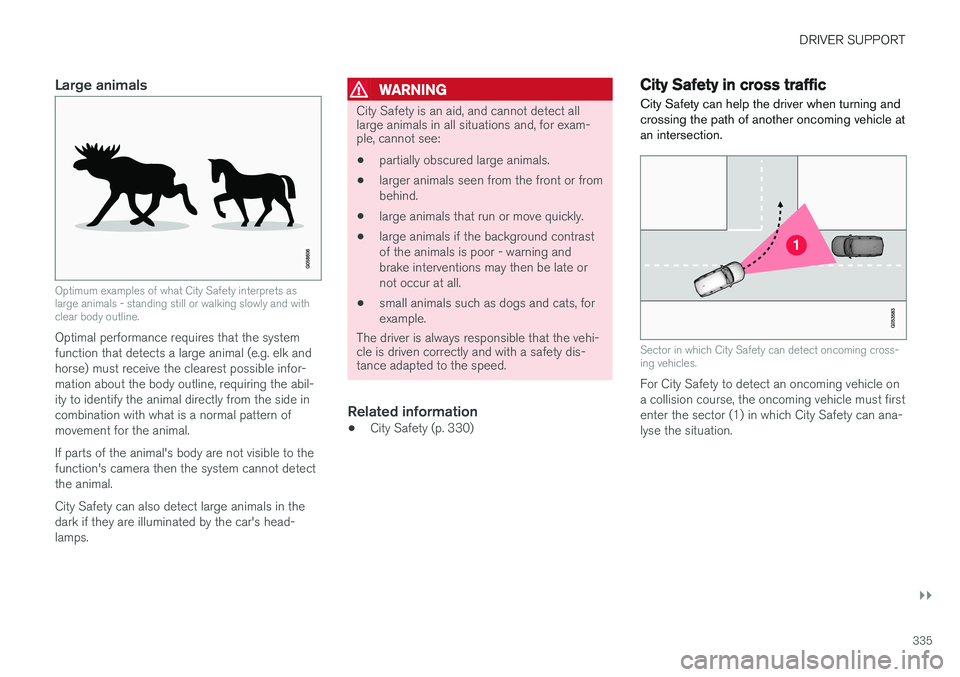
Optimum examples of what City Safety interprets as large animals - standing still or walking slowly and withclear body outline.
Optimal performance requires that the system function that detects a large animal (e.g. elk andhorse) must receive the clearest possible infor-mation about the body outline, requiring the abil-ity to identify the animal directly from the side incombination with what is a normal pattern ofmovement for the animal. If parts of the animal's body are not visible to the function's camera then the system cannot detectthe animal. City Safety can also detect large animals in the dark if they are illuminated by the car's head-lamps.
WARNING
City Safety is an aid, and cannot detect all large animals in all situations and, for exam-ple, cannot see:
• partially obscured large animals.
• larger animals seen from the front or from behind.
• large animals that run or move quickly.
• large animals if the background contrastof the animals is poor - warning andbrake interventions may then be late ornot occur at all.
• small animals such as dogs and cats, forexample.
The driver is always responsible that the vehi- cle is driven correctly and with a safety dis-tance adapted to the speed.
Related information
• City Safety (p. 330)
City Safety in cross traffic
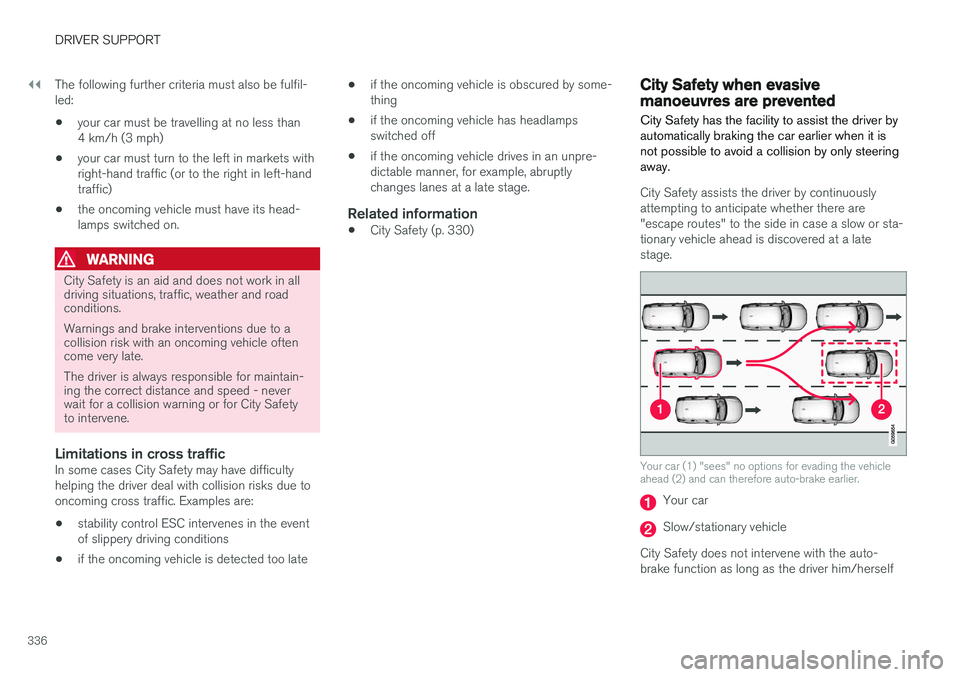
City Safety can help the driver when turning and crossing the path of another oncoming vehicle atan intersection.
Sector in which City Safety can detect oncoming cross- ing vehicles.
For City Safety to detect an oncoming vehicle on a collision course, the oncoming vehicle must firstenter the sector (1) in which City Safety can ana-lyse the situation.
Page 338 of 594
||
DRIVER SUPPORT
336The following further criteria must also be fulfil- led:
• your car must be travelling at no less than4 km/h (3 mph)
• your car must turn to the left in markets withright-hand traffic (or to the right in left-handtraffic)
• the oncoming vehicle must have its head-lamps switched on.
WARNING
City Safety is an aid and does not work in all driving situations, traffic, weather and roadconditions. Warnings and brake interventions due to a collision risk with an oncoming vehicle oftencome very late. The driver is always responsible for maintain- ing the correct distance and speed - neverwait for a collision warning or for City Safetyto intervene.
Limitations in cross trafficIn some cases City Safety may have difficulty helping the driver deal with collision risks due tooncoming cross traffic. Examples are:
• stability control ESC intervenes in the eventof slippery driving conditions
• if the oncoming vehicle is detected too late •
if the oncoming vehicle is obscured by some-thing
• if the oncoming vehicle has headlampsswitched off
• if the oncoming vehicle drives in an unpre-dictable manner, for example, abruptlychanges lanes at a late stage.
Related information
•
City Safety (p. 330)
City Safety when evasive manoeuvres are prevented City Safety has the facility to assist the driver by automatically braking the car earlier when it isnot possible to avoid a collision by only steeringaway.
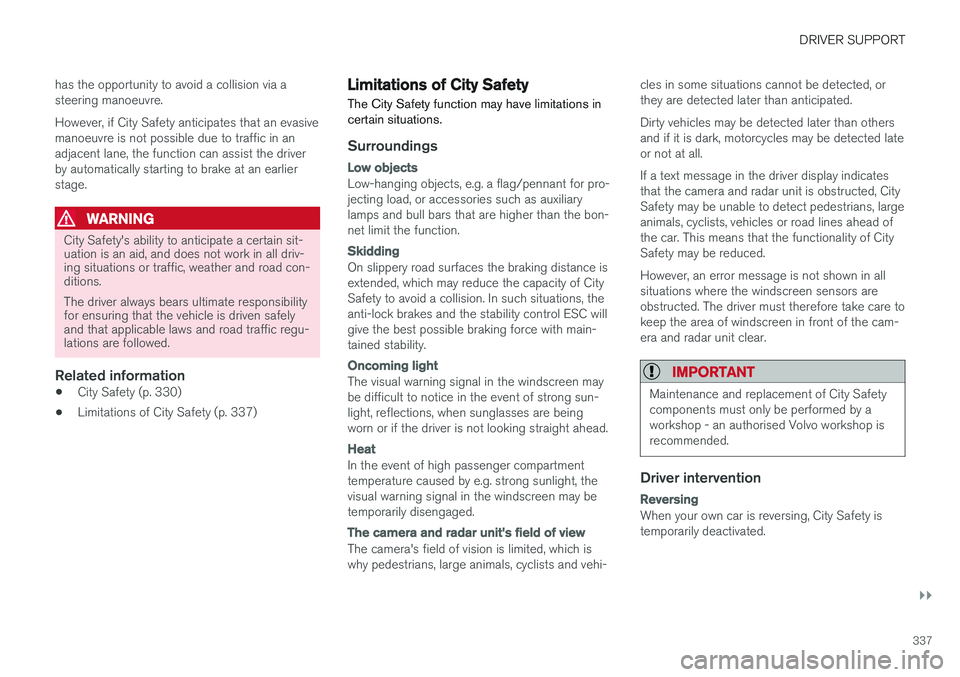
City Safety assists the driver by continuously attempting to anticipate whether there are"escape routes" to the side in case a slow or sta-tionary vehicle ahead is discovered at a latestage.
Your car (1) "sees" no options for evading the vehicle ahead (2) and can therefore auto-brake earlier.
Your car
Slow/stationary vehicle
City Safety does not intervene with the auto- brake function as long as the driver him/herself
Page 339 of 594
DRIVER SUPPORT
}}
337
has the opportunity to avoid a collision via a steering manoeuvre. However, if City Safety anticipates that an evasive manoeuvre is not possible due to traffic in anadjacent lane, the function can assist the driverby automatically starting to brake at an earlierstage.
WARNING
City Safety's ability to anticipate a certain sit- uation is an aid, and does not work in all driv-ing situations or traffic, weather and road con-ditions. The driver always bears ultimate responsibility for ensuring that the vehicle is driven safelyand that applicable laws and road traffic regu-lations are followed.
Related information
•
City Safety (p. 330)
• Limitations of City Safety (p. 337)
Limitations of City Safety
The City Safety function may have limitations in certain situations.
Surroundings
Low objects
Low-hanging objects, e.g. a flag/pennant for pro- jecting load, or accessories such as auxiliarylamps and bull bars that are higher than the bon-net limit the function.
Skidding
On slippery road surfaces the braking distance is extended, which may reduce the capacity of CitySafety to avoid a collision. In such situations, theanti-lock brakes and the stability control ESC willgive the best possible braking force with main-tained stability.
Oncoming light
The visual warning signal in the windscreen may be difficult to notice in the event of strong sun-light, reflections, when sunglasses are beingworn or if the driver is not looking straight ahead.
Heat
In the event of high passenger compartment temperature caused by e.g. strong sunlight, thevisual warning signal in the windscreen may betemporarily disengaged.
The camera and radar unit's field of view
The camera's field of vision is limited, which is why pedestrians, large animals, cyclists and vehi- cles in some situations cannot be detected, orthey are detected later than anticipated. Dirty vehicles may be detected later than others and if it is dark, motorcycles may be detected lateor not at all. If a text message in the driver display indicates that the camera and radar unit is obstructed, CitySafety may be unable to detect pedestrians, largeanimals, cyclists, vehicles or road lines ahead ofthe car. This means that the functionality of CitySafety may be reduced. However, an error message is not shown in all situations where the windscreen sensors areobstructed. The driver must therefore take care tokeep the area of windscreen in front of the cam-era and radar unit clear.
IMPORTANT
Maintenance and replacement of City Safety components must only be performed by aworkshop - an authorised Volvo workshop isrecommended.
Driver intervention
Reversing
When your own car is reversing, City Safety is temporarily deactivated.
Page 340 of 594
||
DRIVER SUPPORT
338
Low speed
City Safety is not activated at very low speeds - below 4 km/h (3 mph) - and the system there-fore does not intervene in situations where yourcar is approaching a vehicle ahead very slowly,e.g. when parking.
Active driver
Driver commands are always prioritised, which is why City Safety does not intervene or postponewarning/intervention in situations where thedriver is steering and accelerating in a decisivemanner, even if a collision is unavoidable. Active and aware driving behaviour can therefore delay a collision warning and intervention in orderto minimise unnecessary warnings.
Miscellaneous
WARNING
Warnings and brake interventions could be implemented late or not at all if a traffic situa-tion or external influences mean that the cam-era and radar unit cannot detect pedestrians,cyclists, large animals or vehicles correctly. For vehicles to be detected at night, their headlamps and rear lamp cluster must beswitched on and shining clearly. The camera and radar unit has a limited range for pedestrians and cyclists. The system canprovide effective warnings and brake interven-tions as long as the relative speed is below50 km/h (30 mph). For stationary or slow-moving vehicles, warnings and brake interven-tions are effective at vehicle speeds up to70 km/h (43 mph). Speed reduction for largeanimals is less than 15 km/h (9 mph) andcan be achieved at vehicle speeds above70 km/h (43 mph). The warning and brakeintervention for large animals is less effectiveat lower speeds. Warnings for stationary or slow-moving vehi- cles and large animals could be disengageddue to darkness or poor visibility. Warnings and brake interventions for pedes- trians and cyclists are deactivated at vehiclespeeds exceeding 70 km/h (43 mph). Do not place, stick or mount anything on the outside or inside of the windscreen in front ofor around the camera and radar unit — thiscan interfere with camera-dependent func-tions.
Objects, snow, ice or dirt in the area of the camera sensor may reduce its function, fullydeactivate it or give incorrect functionresponse.
NOTE
The function uses the car's camera unit, which has some general limitations, see the"Limitations for camera unit" section.
NOTE
The function uses the car's radar unit, which has some general limitations, see the "Limita-tions for radar unit" section.
Related information
•City Safety (p. 330)
• Limitations of the camera unit (p. 327)
• Limitations of the radar unit (p. 319)
Page 342 of 594
DRIVER SUPPORT
* Option/accessory.
340
Rear Collision Warning
The Rear Collision Warning (RCW) function can help the driver to avoid being hit by a vehicleapproaching from behind.
RCW is activated automatically each time the engine is started. The RCW can warn the driver in a vehicle approaching from behind that a collision is immi-nent by rapidly flashing the direction indicators. If, at a vehicle speed below 30 km/h (20 mph), the RCW function detects that the car is in dan-ger of being hit from behind, the seatbelt ten-sioners may tension the front seatbelts and theWhiplash Protection System safety system isactivated. Immediately before the collision, RCW may also activate the foot brake in order to reduce the for-ward acceleration of the car during the collision.However, the foot brake is only activated if thecar is stationary. The foot brake releases immedi-ately if the accelerator pedal is depressed.
LimitationsIn certain cases the RCW may have difficultyhelping the driver in the event of a collision risk.This can be for example:
• if the vehicle approaching from the rear isdetected too late
• if the vehicle approaching from the rearchanges lane at the last moment •
if the vehicle approaching from the rear has aspeed exceeding 80 km/h (50 mph).
NOTE
In certain markets, RCW does
not give a
warning with the direction indicators due to local traffic regulations - in such cases, thispart of the function is deactivated.
NOTE
The warning with direction indicators for Rear Collision Warning is deactivated if the warn-ing distance for collision warning in the CitySafety function is set at the lowest level "
Late".
The seat belt pre-tensioning and braking functions are, however, still active.
Related information
• City Safety (p. 330)
• Setting the warning distance for City Safety (p. 332)
• Seatbelt tensioner (p. 59)
• Whiplash Protection System (p. 57)
Blind Spot Information
*
The Blind Spot Information (BLIS) function is designed to give a warning of vehicles diago-nally behind and to the side of your car so as togive assistance in heavy traffic on roads withseveral lanes in the same direction.
BLIS is a driver aid intended to give a warning of: • vehicles in the car's blind spot
• quickly approaching vehicles in the left and right lanes closest to the car.
Page 343 of 594
DRIVER SUPPORT
}}
341
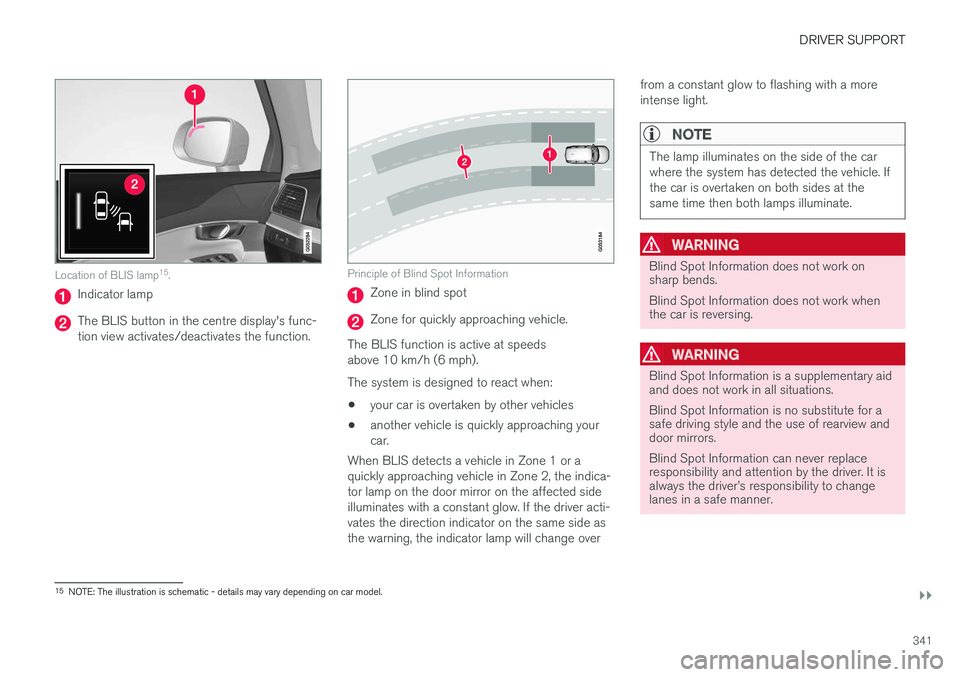
Location of BLIS lamp15
.
Indicator lamp
The BLIS button in the centre display's func- tion view activates/deactivates the function.
Principle of Blind Spot Information
Zone in blind spot
Zone for quickly approaching vehicle.
The BLIS function is active at speeds above 10 km/h (6 mph). The system is designed to react when: • your car is overtaken by other vehicles
• another vehicle is quickly approaching your car.
When BLIS detects a vehicle in Zone 1 or aquickly approaching vehicle in Zone 2, the indica-tor lamp on the door mirror on the affected sideilluminates with a constant glow. If the driver acti-vates the direction indicator on the same side asthe warning, the indicator lamp will change over from a constant glow to flashing with a moreintense light.
NOTE
The lamp illuminates on the side of the car where the system has detected the vehicle. Ifthe car is overtaken on both sides at thesame time then both lamps illuminate.
WARNING
Blind Spot Information does not work on sharp bends. Blind Spot Information does not work when the car is reversing.
WARNING
Blind Spot Information is a supplementary aid and does not work in all situations. Blind Spot Information is no substitute for a safe driving style and the use of rearview anddoor mirrors. Blind Spot Information can never replace responsibility and attention by the driver. It isalways the driver