wheel VOLVO V90 2017 Owners Manual
[x] Cancel search | Manufacturer: VOLVO, Model Year: 2017, Model line: V90, Model: VOLVO V90 2017Pages: 594, PDF Size: 15.07 MB
Page 440 of 594
||
AUDIO AND MEDIA
438
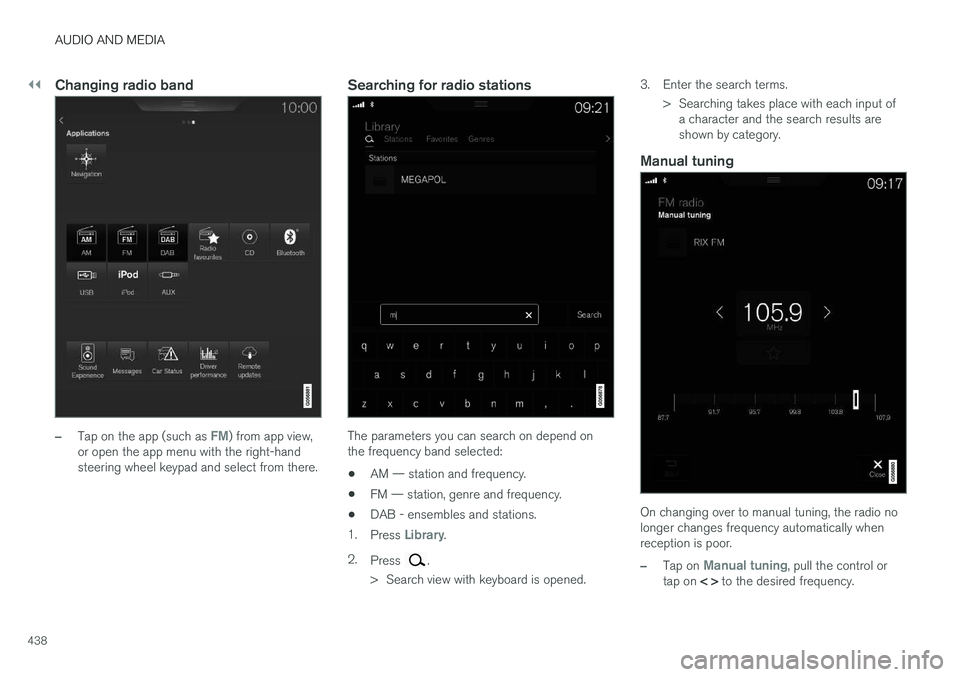
Changing radio band
–Tap on the app (such as FM) from app view,
or open the app menu with the right-hand steering wheel keypad and select from there.
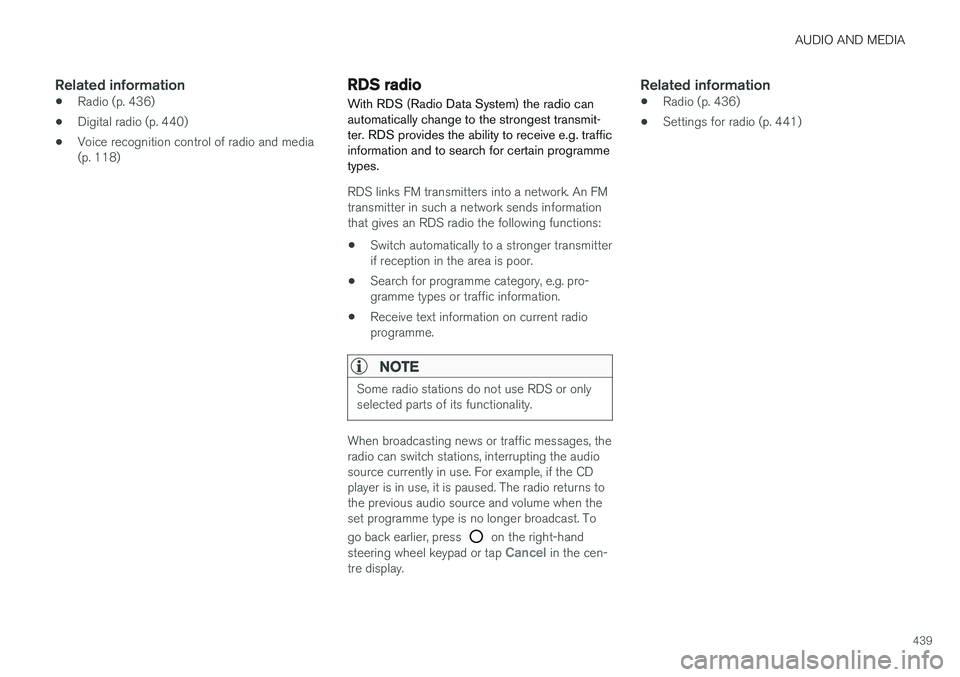
Searching for radio stations
The parameters you can search on depend on the frequency band selected:
• AM — station and frequency.
• FM — station, genre and frequency.
• DAB - ensembles and stations.
1. Press
Library.
2. Press
.
> Search view with keyboard is opened. 3. Enter the search terms.
> Searching takes place with each input ofa character and the search results are shown by category.
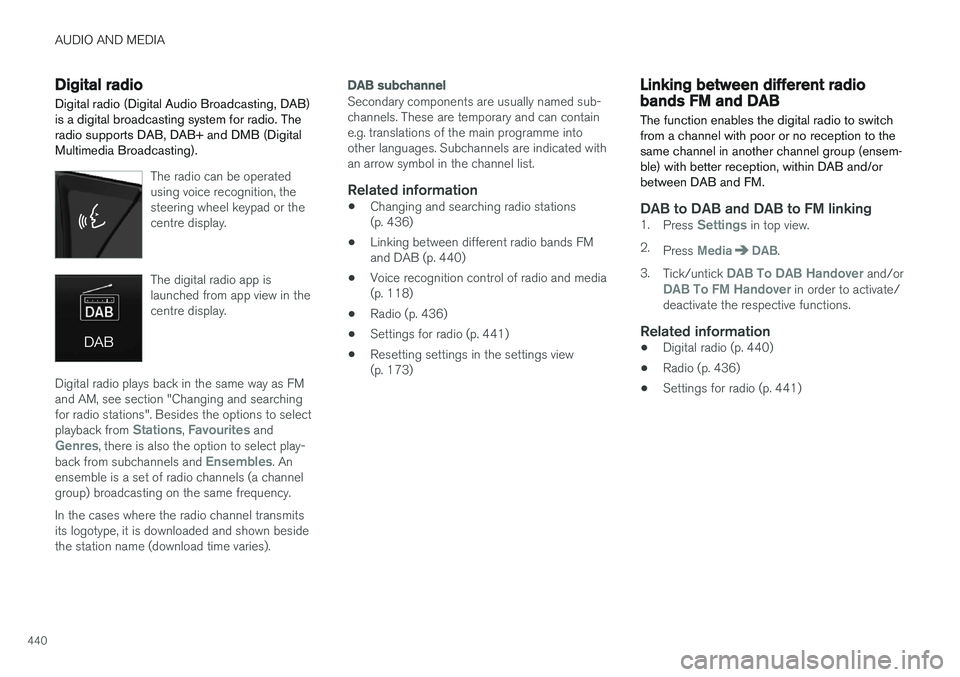
Manual tuning
On changing over to manual tuning, the radio no longer changes frequency automatically whenreception is poor.
–Tap on Manual tuning, pull the control or
tap on < > to the desired frequency.
Page 441 of 594
AUDIO AND MEDIA
439
Related information
•Radio (p. 436)
• Digital radio (p. 440)
• Voice recognition control of radio and media (p. 118)
RDS radio With RDS (Radio Data System) the radio can automatically change to the strongest transmit-ter. RDS provides the ability to receive e.g. trafficinformation and to search for certain programmetypes.
RDS links FM transmitters into a network. An FM transmitter in such a network sends informationthat gives an RDS radio the following functions:
• Switch automatically to a stronger transmitterif reception in the area is poor.
• Search for programme category, e.g. pro-gramme types or traffic information.
• Receive text information on current radioprogramme.
NOTE
Some radio stations do not use RDS or only selected parts of its functionality.
When broadcasting news or traffic messages, the radio can switch stations, interrupting the audiosource currently in use. For example, if the CDplayer is in use, it is paused. The radio returns tothe previous audio source and volume when theset programme type is no longer broadcast. To go back earlier, press
on the right-hand
steering wheel keypad or tap Cancel in the cen-
tre display.
Related information
• Radio (p. 436)
• Settings for radio (p. 441)
Page 442 of 594
AUDIO AND MEDIA
440
Digital radio
Digital radio (Digital Audio Broadcasting, DAB) is a digital broadcasting system for radio. The
radio supports DAB, DAB+ and DMB (DigitalMultimedia Broadcasting).
The radio can be operated using voice recognition, thesteering wheel keypad or thecentre display.
The digital radio app is launched from app view in thecentre display.
Digital radio plays back in the same way as FM and AM, see section "Changing and searchingfor radio stations". Besides the options to select playback from
Stations, Favourites andGenres, there is also the option to select play-
back from subchannels and Ensembles. An
ensemble is a set of radio channels (a channel group) broadcasting on the same frequency. In the cases where the radio channel transmits its logotype, it is downloaded and shown besidethe station name (download time varies).
DAB subchannel
Secondary components are usually named sub- channels. These are temporary and can containe.g. translations of the main programme intoother languages. Subchannels are indicated withan arrow symbol in the channel list.
Related information
• Changing and searching radio stations(p. 436)
• Linking between different radio bands FMand DAB (p. 440)
• Voice recognition control of radio and media(p. 118)
• Radio (p. 436)
• Settings for radio (p. 441)
• Resetting settings in the settings view(p. 173)
Linking between different radio bands FM and DAB
The function enables the digital radio to switch from a channel with poor or no reception to thesame channel in another channel group (ensem-ble) with better reception, within DAB and/orbetween DAB and FM.
DAB to DAB and DAB to FM linking1. Press Settings in top view.
2. Press
MediaDAB.
3. Tick/untick
DAB To DAB Handover and/orDAB To FM Handover in order to activate/
deactivate the respective functions.
Related information
• Digital radio (p. 440)
• Radio (p. 436)
• Settings for radio (p. 441)
Page 443 of 594
AUDIO AND MEDIA
441
Settings for radioSettings for the different radio bands.
The broadcast of traffic messages etc. can be temporarily interrupted by tapping on
in the
right-hand steering wheel keypad or by tapping on
Cancel in the centre display.
Drag down the top view and select
SettingsMedia and the desired radio band. Activating/
deactivating functions.
AM/FM
•Show Broadcast Information — shows
information on programme content, artists, etc.
•
Freeze Program Name — select to stop
the programme service name from scrolling continuously. Instead it freezes after 20 sec-onds.
•
News - interrupts the current media play-
back and broadcasts news. Playback of pre- vious media source is resumed when thenews broadcast is finished.
•
Traffic Announcements - interrupts the
current media playback and broadcasts infor- mation about traffic disruptions. Playback ofprevious media source is resumed when themessage is finished.
•
Local Interruptions — interrupts the cur-
rent media playback and broadcasts informa- tion about traffic disruptions in the neigh- bourhood. Playback of previous media sourceis resumed when the message is finished. The
Local Interruptions function is a geo-
graphically restricted version of the Traffic
Announcements function. The Traffic
Announcements function must be acti-
vated at the same time.
•
Alarm - interrupts the current media play-
back and sends alerts about major accidents and disasters. Playback of previous mediasource is resumed when the message is fin-ished.
DAB
•Sort Services - selection for how channels
will be sorted. Either alphabetically or by service number.
•
DAB To DAB Handover - starts the func-
tion for linking within DAB. If reception of a radio channel is lost, another channel isfound automatically in another channel group(ensemble).
•
DAB To FM Handover - starts the function
for linking between DAB and FM. If reception of a radio channel is lost, an alternative fre-quency is searched for automatically.
•
Select Announcements — select the
types of messages to be received while DAB is playing. Selected messages will interruptthe current media playback to play back themessage. Playback of previous media sourceis resumed when the message is finished.
Alarm - interrupts the current media play-
back and sends alerts about major accidents and disasters. Playback of previous mediasource is resumed when the message is fin-ished.
Traffic Flash — receives information about
traffic disruptions.
News Flash — receives news.
Transport Flash — receives information
about public transport, e.g. ferry and train timetables.
Warning/Services — receives information
about incidents of lower significance than the Alarm function, e.g. power failures.
•
Show Broadcast Information — select to
show radio text or selected types of radio text, e.g. artist.
•
Show Program Related Images — select
whether or not to show images for pro- grammes on the screen.
Related information
• Radio (p. 436)
• Digital radio (p. 440)
• Symbols in the centre display's status bar(p. 45)
Page 444 of 594
AUDIO AND MEDIA
* Option/accessory.
442
Media player
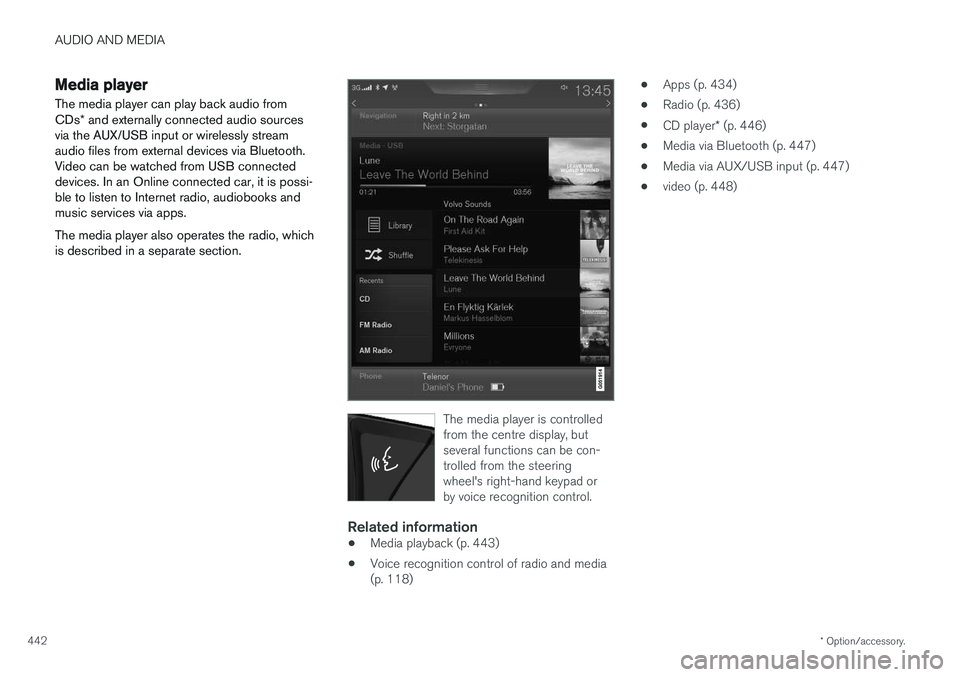
The media player can play back audio from CDs * and externally connected audio sources
via the AUX/USB input or wirelessly stream audio files from external devices via Bluetooth.Video can be watched from USB connecteddevices. In an Online connected car, it is possi-ble to listen to Internet radio, audiobooks andmusic services via apps. The media player also operates the radio, which is described in a separate section.
The media player is controlled from the centre display, butseveral functions can be con-trolled from the steeringwheel's right-hand keypad orby voice recognition control.
Related information
• Media playback (p. 443)
• Voice recognition control of radio and media (p. 118) •
Apps (p. 434)
• Radio (p. 436)
• CD player
* (p. 446)
• Media via Bluetooth (p. 447)
• Media via AUX/USB input (p. 447)
• video (p. 448)
Page 445 of 594
AUDIO AND MEDIA
}}
* Option/accessory.443
Media playback The media player is controlled from the centre display. Several functions can also be controlledfrom the right keypad on the steering wheel orwith voice recognition. The media player also operates the radio, which is described in a separate section.
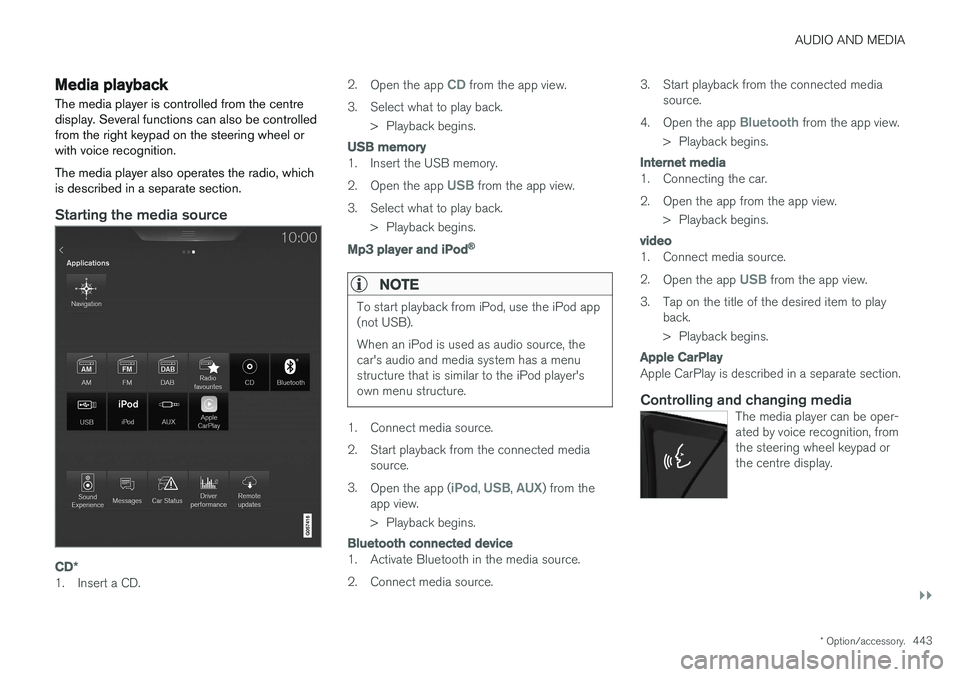
Starting the media source
CD*
1. Insert a CD. 2.
Open the app
CD from the app view.
3. Select what to play back. > Playback begins.
USB memory
1. Insert the USB memory. 2.Open the app
USB from the app view.
3. Select what to play back. > Playback begins.
Mp3 player and iPod®
NOTE
To start playback from iPod, use the iPod app (not USB). When an iPod is used as audio source, the car's audio and media system has a menustructure that is similar to the iPod player'sown menu structure.
1. Connect media source.
2. Start playback from the connected media
source.
3. Open the app (
iPod, USB, AUX) from the
app view.
> Playback begins.
Bluetooth connected device
1. Activate Bluetooth in the media source.
2. Connect media source. 3. Start playback from the connected media
source.
4. Open the app
Bluetooth from the app view.
> Playback begins.
Internet media
1. Connecting the car.
2. Open the app from the app view. > Playback begins.
video
1. Connect media source. 2.Open the app
USB from the app view.
3. Tap on the title of the desired item to play back.
> Playback begins.
Apple CarPlay
Apple CarPlay is described in a separate section.
Controlling and changing mediaThe media player can be oper- ated by voice recognition, fromthe steering wheel keypad orthe centre display.
Page 446 of 594
||
AUDIO AND MEDIA
* Option/accessory.
444
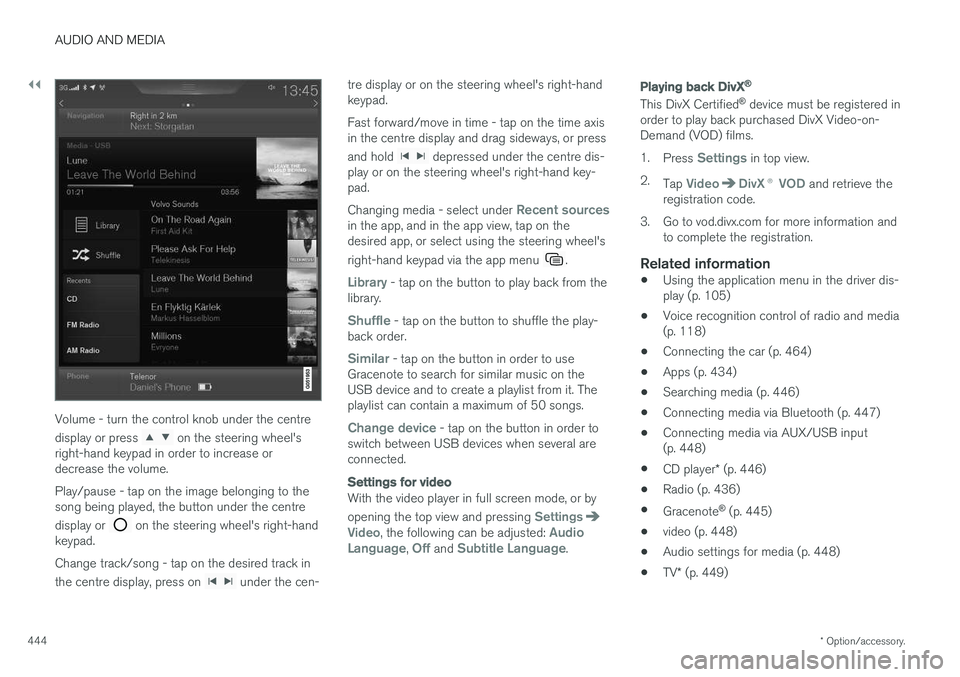
Volume - turn the control knob under the centre display or press
on the steering wheel's
right-hand keypad in order to increase or decrease the volume. Play/pause - tap on the image belonging to the song being played, the button under the centre display or
on the steering wheel's right-hand
keypad. Change track/song - tap on the desired track in the centre display, press on
under the cen- tre display or on the steering wheel's right-hand keypad. Fast forward/move in time - tap on the time axis in the centre display and drag sideways, or press and hold
depressed under the centre dis-
play or on the steering wheel's right-hand key- pad. Changing media - select under
Recent sourcesin the app, and in the app view, tap on the desired app, or select using the steering wheel's right-hand keypad via the app menu
.
Library - tap on the button to play back from the
library.
Shuffle - tap on the button to shuffle the play-
back order.
Similar - tap on the button in order to use
Gracenote to search for similar music on the USB device and to create a playlist from it. Theplaylist can contain a maximum of 50 songs.
Change device - tap on the button in order to
switch between USB devices when several are connected.
Settings for video
With the video player in full screen mode, or by opening the top view and pressing
SettingsVideo, the following can be adjusted: Audio
Language, Off and Subtitle Language.
Playing back DivX®
This DivX Certified ®
device must be registered in
order to play back purchased DivX Video-on- Demand (VOD) films. 1. Press
Settings in top view.
2. Tap
VideoDivX ® VOD and retrieve the
registration code.
3. Go to vod.divx.com for more information and to complete the registration.
Related information
• Using the application menu in the driver dis- play (p. 105)
• Voice recognition control of radio and media(p. 118)
• Connecting the car (p. 464)
• Apps (p. 434)
• Searching media (p. 446)
• Connecting media via Bluetooth (p. 447)
• Connecting media via AUX/USB input(p. 448)
• CD player
* (p. 446)
• Radio (p. 436)
• Gracenote ®
(p. 445)
• video (p. 448)
• Audio settings for media (p. 448)
• TV
* (p. 449)
Page 451 of 594
AUDIO AND MEDIA
}}
* Option/accessory.449
System volumes for media1.
Press Settings in top view.
2. Press
SoundSystem Volumes:
•
AUX - If an external audio source (e.g. an
MP3 player or iPod) is connected to the AUX input then the audio source that isconnected can have a different volumethan the audio system's internal volume(e.g. radio). Correct this by adjusting thevolume of the input. If the volume is toohigh or too low then the quality of thesound can be impaired.
•
Speed and Volume Compensation -
the audio system compensates for dis- rupting noises in the passenger compart-ment by increasing the volume in relationto the speed of the car. Compensationlevel can be set.
Related information
• Audio settings (p. 435)
• Media player (p. 442)
TV
*2
The TV picture is only shown when the car is stationary. There will be no picture when the caris moving, but the audio continues to be playedback. The picture returns once more when thecar is almost or completely stationary.
The TV is controlled from the centre display. Sev- eral functions can also be controlled from theright keypad on the steering wheel or with voicerecognition.
Related information
• Using the TV
* (p. 449)
Using the TV *3
Start the TV1.
Open the app TV from the app view.
2. Select a channel.
Change or search for TV channelsThe TV automatically searches for the channels with best reception.
Change the list of visible channels
1. Press Library
2.Select playback from TV-channels,Favourites or Genres.
3. Select the desired channel.
Change channel from selected list
–Press on <> under the centre display or on the steering wheel keypad.
> The highlight moves up or down one place in the selected playlist
You can also change stations from the centre display.
Favourites
A TV channel can be saved as a Favourite:
–Tap on in order to add/remove a chan-
nel to/from the favourites list.
2 Applies to certain markets.
3 Applies to certain markets.
Page 453 of 594
AUDIO AND MEDIA
}}
* Option/accessory.451
When using map navigation via Apple CarPlay there is no guidance in the driver display or head-up display, but only in the centre display. The Apple CarPlay apps can be controlled via the centre display, mobile phone or with the steeringwheel's right-hand keypad (applies to certainfunctions). The apps can also be voice-controlledusing Siri. A long press on the steering wheel button
starts voice control using Siri and a
short press activates the car's own voice control. If Siri breaks off too early, hold the steering wheel button
depressed.
By using Apple CarPlay you acknowledge the following: Apple CarPlay is a serviceprovided by Apple Inc. under its terms andconditions. Volvo Cars is thus notresponsible for Apple CarPlay or itsfeatures/applications. When using AppleCarPlay, certain information from your car(including its position) is transferred to youriPhone. In relation to Volvo Cars, you arefully responsible for your and any othersperson
Page 455 of 594
AUDIO AND MEDIA
}}
* Option/accessory.453
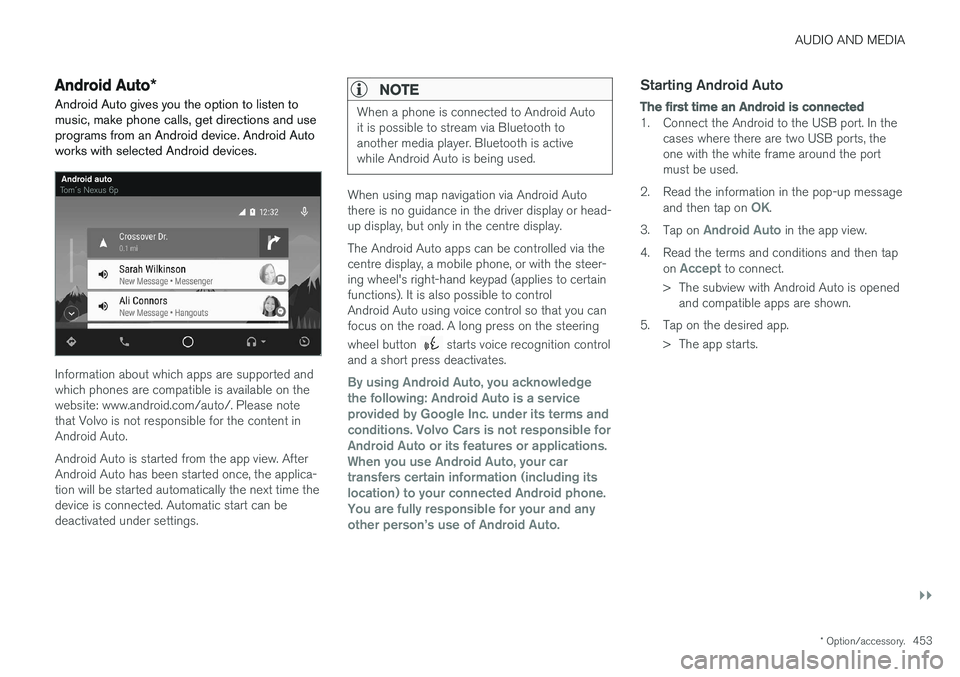
Android Auto *
Android Auto gives you the option to listen to music, make phone calls, get directions and useprograms from an Android device. Android Autoworks with selected Android devices.
Information about which apps are supported and which phones are compatible is available on thewebsite: www.android.com/auto/. Please notethat Volvo is not responsible for the content inAndroid Auto. Android Auto is started from the app view. After Android Auto has been started once, the applica-tion will be started automatically the next time thedevice is connected. Automatic start can bedeactivated under settings.
NOTE
When a phone is connected to Android Auto it is possible to stream via Bluetooth toanother media player. Bluetooth is activewhile Android Auto is being used.
When using map navigation via Android Auto there is no guidance in the driver display or head-up display, but only in the centre display. The Android Auto apps can be controlled via the centre display, a mobile phone, or with the steer-ing wheel's right-hand keypad (applies to certainfunctions). It is also possible to controlAndroid Auto using voice control so that you canfocus on the road. A long press on the steering wheel button
starts voice recognition control
and a short press deactivates.
By using Android Auto, you acknowledge the following: Android Auto is a serviceprovided by Google Inc. under its terms andconditions. Volvo Cars is not responsible forAndroid Auto or its features or applications.When you use Android Auto, your cartransfers certain information (including itslocation) to your connected Android phone.You are fully responsible for your and anyother person