climate control VOLVO V90 2017 User Guide
[x] Cancel search | Manufacturer: VOLVO, Model Year: 2017, Model line: V90, Model: VOLVO V90 2017Pages: 594, PDF Size: 15.07 MB
Page 117 of 594
INSTRUMENTS AND CONTROLS
}}
* Option/accessory.115
When replacing the windscreen - contact an authorised workshop
7
. The correct version of the
windscreen must be fitted in order that the head- up display's graphics shall be displayed correctly.
Related information
• Function view with buttons for car functions(p. 47)
• Settings view (p. 169)
• Steering wheel (p. 131)
• Using the memory function in the power front seat
* (p. 122)
• Driver display (p. 90)
Voice recognition 8
The voice recognition system allows the driver to use voice recognition to control certain functionsof the media player, Bluetooth-connected phone,the climate system and Volvo's navigation sys- tem *.
Voice commands offer convenience and help the driver to avoid being distracted, and instead con-centrate on driving and focus attention on theroad and the traffic conditions.
WARNING
The driver always holds overall responsibility for driving the vehicle in a safe manner andcomplying with all applicable rules of the road.
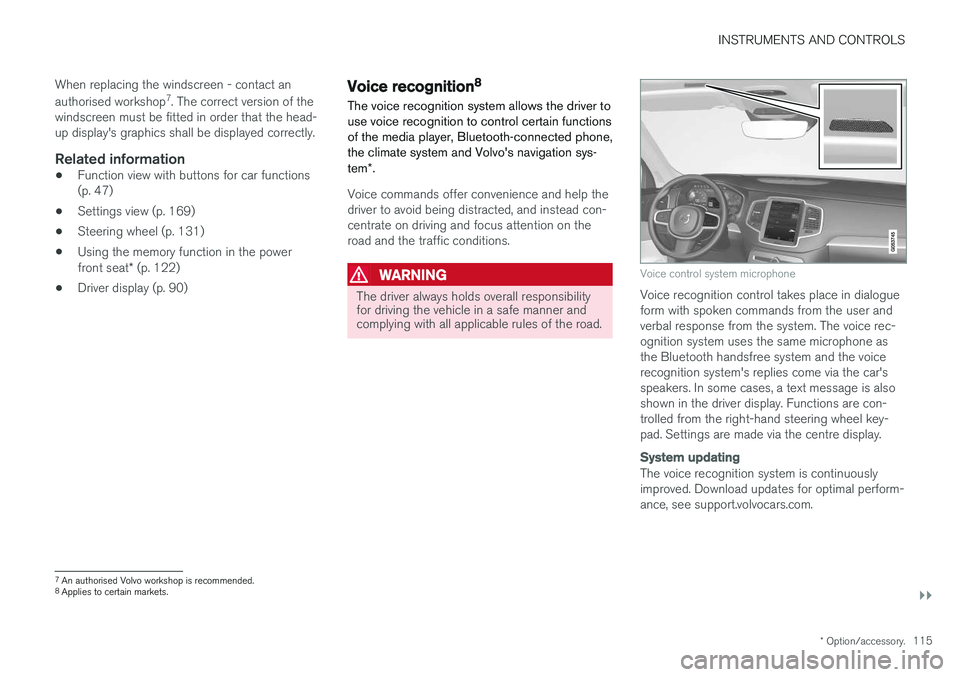
Voice control system microphone
Voice recognition control takes place in dialogue form with spoken commands from the user andverbal response from the system. The voice rec-ognition system uses the same microphone asthe Bluetooth handsfree system and the voicerecognition system's replies come via the car'sspeakers. In some cases, a text message is alsoshown in the driver display. Functions are con-trolled from the right-hand steering wheel key-pad. Settings are made via the centre display.
System updating
The voice recognition system is continuously improved. Download updates for optimal perform-ance, see support.volvocars.com.
7
An authorised Volvo workshop is recommended.
8 Applies to certain markets.
Page 118 of 594
||
INSTRUMENTS AND CONTROLS
116
Related information
•Using voice recognition (p. 116)
• Voice recognition control of the phone (p. 118)
• Voice recognition control of radio and media(p. 118)
• Voice recognition control of climate control(p. 119)
• Voice recognition and map navigation(p. 120)
• Settings for voice recognition (p. 117)Using voice recognition 9
Basic instructions for using voice recognition control.
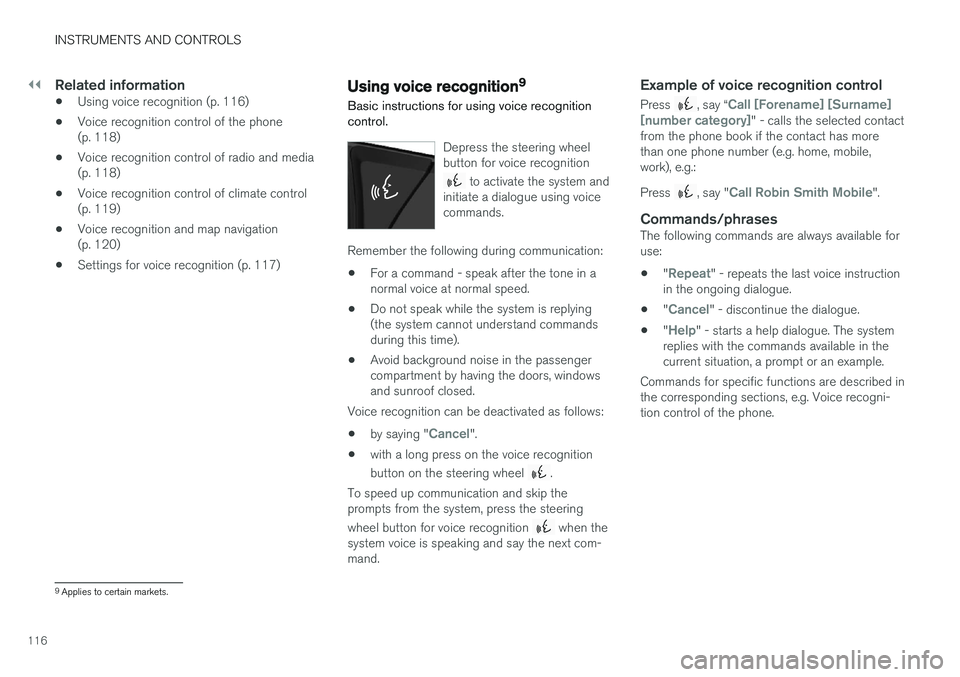
Depress the steering wheel button for voice recognition
to activate the system and
initiate a dialogue using voice commands.
Remember the following during communication:
• For a command - speak after the tone in a normal voice at normal speed.
• Do not speak while the system is replying(the system cannot understand commandsduring this time).
• Avoid background noise in the passengercompartment by having the doors, windowsand sunroof closed.
Voice recognition can be deactivated as follows:
• by saying "
Cancel".
• with a long press on the voice recognition button on the steering wheel
.
To speed up communication and skip the prompts from the system, press the steering wheel button for voice recognition
when the
system voice is speaking and say the next com- mand.
Example of voice recognition control
Press , say “Call [Forename] [Surname]
[number category]" - calls the selected contact
from the phone book if the contact has more than one phone number (e.g. home, mobile,work), e.g.: Press
, say "Call Robin Smith Mobile".
Commands/phrasesThe following commands are always available for use:
• "
Repeat" - repeats the last voice instruction
in the ongoing dialogue.
• "
Cancel" - discontinue the dialogue.
• "
Help" - starts a help dialogue. The system
replies with the commands available in the current situation, a prompt or an example.
Commands for specific functions are described inthe corresponding sections, e.g. Voice recogni-tion control of the phone.
9 Applies to certain markets.
Page 119 of 594
INSTRUMENTS AND CONTROLS
117
Digits
The number commands are stated differently depending on the function to be controlled: •Phone numbers and postcodes
must be
spoken individually, number by number, e.g. zero three one two two four four three(03122443).
• House numbers
can be spoken individually
or in groups, e.g. two two or twenty-two (22).For English and Dutch, several groups canbe said in sequence, e.g. twenty-two twenty-two (22 22). For English, double or triple canbe used, e.g. double zero (00). Numbers canbe given within the range 0-2300.
• Frequencies
can be spoken as ninety eight
point eight (98.8), a hundred and four pointtwo or hundred four point two (104.2).
Related information
• Voice recognition (p. 115)
• Voice recognition control of the phone(p. 118)
• Voice recognition control of radio and media(p. 118)
• Voice recognition control of climate control(p. 119)
• Voice recognition and map navigation(p. 120)
• Settings for voice recognition (p. 117)
Settings for voice recognition 10
Several settings for the voice recognition system can be made.
1. Press Settings in top view.
2. Press
SystemVoice Control and select
settings.
•
Repeat Voice Command
•Gender
•Speech Rate
Audio settings
1. Press Settings in top view.
2. Press
SoundSystem VolumesVoice
Control and select settings.
Change language
Voice recognition is not possible for all lan- guages. Languages available for voice recogni-tion are marked with an icon in the language list -
.
Changing the language also affects menu, mes- sage and help texts. 1. Press
Settings in top view.
2. Press
SystemSystem Language and
select language.
Related information
• Voice recognition (p. 115)
• Using voice recognition (p. 116)
• Voice recognition control of the phone (p. 118)
• Voice recognition control of radio and media(p. 118)
• Voice recognition control of climate control(p. 119)
• Voice recognition and map navigation(p. 120)
10
Applies to certain markets.
Page 121 of 594
INSTRUMENTS AND CONTROLS
* Option/accessory.119
Voice recognition control of climate control13
Voice recognition commands for the climate control system to e.g. change temperature, acti-vate a heated seat or change fan level.
Press and say one of the following com-
mands:
• "
Climate" - starts a dialogue for climate
control and shows examples of commands.
• "
Set temperature to X degrees" - sets
the desired temperature.
• "
Raise temperature"/"Lower
temperature" - raise/lower the temperature
setting one step.
• "
Sync temperature" - synchronises the
temperature for all climate zones in the car with the temperature set for the driver's side.
• "
Air on feet"/"Air on body" - opens the
desired air flow.
• "
Air on feet off"/"Air on body off" - closes
the desired air flow.
• "
Set fan to max"/"Turn off fan" - changes
the air flow to Max/Off.
• "
Raise fan speed"/"Lower fan speed" -
raises/lowers the fan level one step.
• "
Turn on auto" - activates automatic climate
regulation. •
"
Air condition on"/"Air condition off" -
activates/deactivates the air conditioning.
• "
Recirculation on"/"Recirculation off" -
activates/deactivates the air circulation.
• "
Turn on defroster "/"Turn off defroster"
- activates/deactivates defrosting of windows and door mirrors.
• "
Turn on max defroster"/"Turn max
defroster off" - activates/deactivates the
max defroster.
• "
Turn on electric defroster"/"Turn off
electric defroster" - activates/deactivates
the heated windscreen *.
• "
Turn on rear defroster"/"Turn off rear
defroster" - activates/deactivates the
heated rear window and door mirrors.
• "
Turn steering wheel heat on"/"Turn
steering wheel heat off" - activates/deac-
tivates the heated steering wheel *.
• "
Raise steering wheel heat"/"Lower
steering wheel heat" - raises/lowers the
setting for the heated steering wheel * one
step.
• "
Turn on seat heat"/"Turn off seat heat"
- activates/deactivates the heated seat *.
• "
Raise seat heat"/"Lower seat heat" -
raises/lowers the setting for the heated seat * one step. •
"
Turn on seat ventilation"/"Turn off seat
ventilation" - activates/deactivates the seat
ventilation *.
• "
Raise seat ventilation"/"Lower seat
ventilation" - raises/lowers the setting for
the ventilated seat * one step.
Related information
• Voice recognition (p. 115)
• Using voice recognition (p. 116)
• Settings for voice recognition (p. 117)
• Climate control (p. 182)
13
Applies to certain markets.
Page 172 of 594
||
INSTRUMENTS AND CONTROLS
170
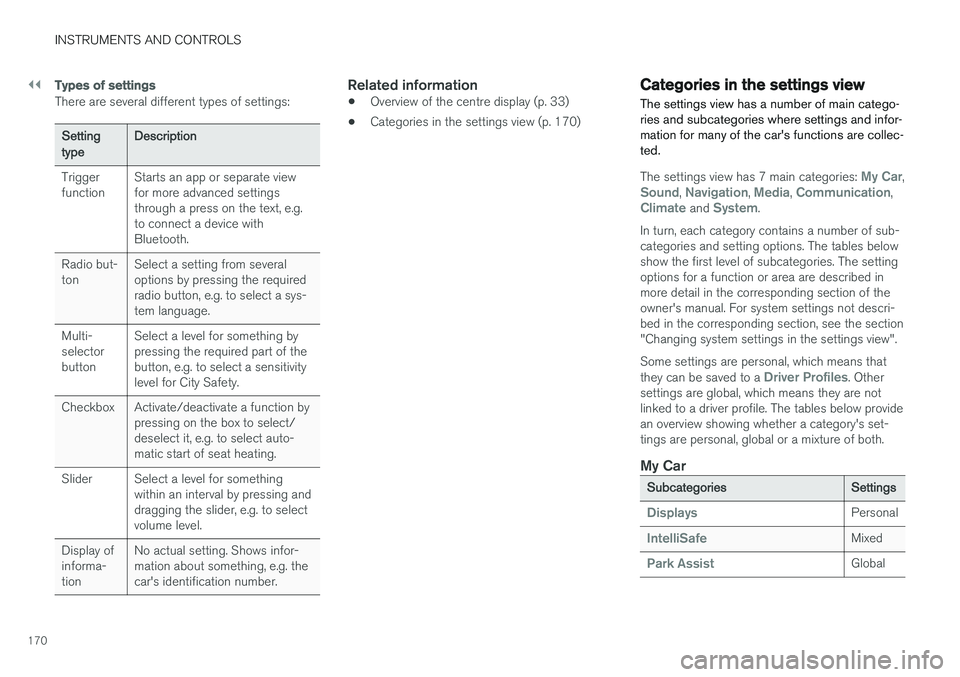
Types of settings
There are several different types of settings:
Setting typeDescription
Trigger function Starts an app or separate viewfor more advanced settingsthrough a press on the text, e.g.to connect a device withBluetooth.
Radio but-ton Select a setting from severaloptions by pressing the requiredradio button, e.g. to select a sys-tem language.
Multi-selectorbutton Select a level for something bypressing the required part of thebutton, e.g. to select a sensitivitylevel for City Safety.
Checkbox Activate/deactivate a function by pressing on the box to select/deselect it, e.g. to select auto-matic start of seat heating.
Slider Select a level for something within an interval by pressing anddragging the slider, e.g. to selectvolume level.
Display ofinforma-tion No actual setting. Shows infor-mation about something, e.g. thecar's identification number.
Related information
•
Overview of the centre display (p. 33)
• Categories in the settings view (p. 170)
Categories in the settings view The settings view has a number of main catego- ries and subcategories where settings and infor-mation for many of the car's functions are collec-ted.
The settings view has 7 main categories: My Car,Sound, Navigation, Media, Communication,Climate and System.
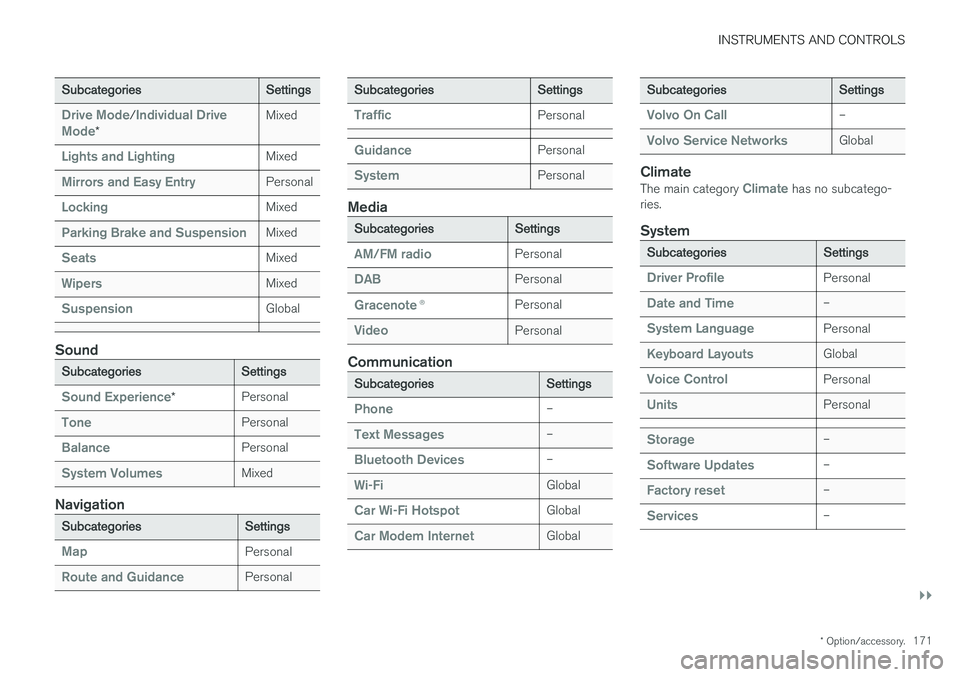
In turn, each category contains a number of sub- categories and setting options. The tables belowshow the first level of subcategories. The settingoptions for a function or area are described inmore detail in the corresponding section of theowner's manual. For system settings not descri-bed in the corresponding section, see the section"Changing system settings in the settings view". Some settings are personal, which means that they can be saved to a
Driver Profiles. Other
settings are global, which means they are not linked to a driver profile. The tables below providean overview showing whether a category's set-tings are personal, global or a mixture of both.
My Car
Subcategories Settings
DisplaysPersonal
IntelliSafeMixed
Park AssistGlobal
Page 173 of 594
INSTRUMENTS AND CONTROLS
}}
* Option/accessory.171
Subcategories Settings
Drive Mode/Individual Drive
Mode* Mixed
Lights and LightingMixed
Mirrors and Easy EntryPersonal
LockingMixed
Parking Brake and SuspensionMixed
SeatsMixed
WipersMixed
SuspensionGlobal
Sound
Subcategories
Settings
Sound Experience*Personal
TonePersonal
BalancePersonal
System VolumesMixed
Navigation
Subcategories
Settings
MapPersonal
Route and GuidancePersonal
SubcategoriesSettings
TrafficPersonal
GuidancePersonal
SystemPersonal
Media
SubcategoriesSettings
AM/FM radioPersonal
DABPersonal
Gracenote®Personal
VideoPersonal
Communication
Subcategories Settings
Phone–
Text Messages–
Bluetooth Devices–
Wi-FiGlobal
Car Wi-Fi HotspotGlobal
Car Modem InternetGlobal
SubcategoriesSettings
Volvo On Call–
Volvo Service NetworksGlobal
ClimateThe main category Climate has no subcatego-
ries.
System
Subcategories Settings
Driver ProfilePersonal
Date and Time–
System LanguagePersonal
Keyboard LayoutsGlobal
Voice ControlPersonal
UnitsPersonal
Storage–
Software Updates–
Factory reset–
Services–
Page 184 of 594
CLIMATE CONTROL
* Option/accessory.
182
Climate control
The car is equipped with electronic climate con- trol. The climate control system cools or heats aswell as dehumidifies the air in the passengercompartment.
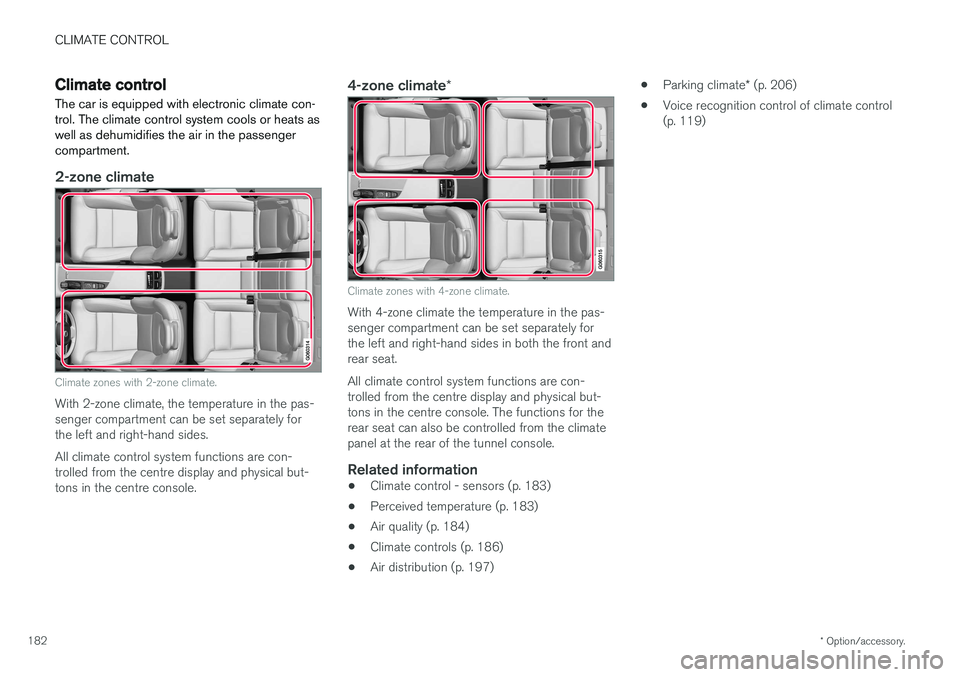
2-zone climate
Climate zones with 2-zone climate.
With 2-zone climate, the temperature in the pas- senger compartment can be set separately forthe left and right-hand sides. All climate control system functions are con- trolled from the centre display and physical but-tons in the centre console.
4-zone climate *
Climate zones with 4-zone climate.
With 4-zone climate the temperature in the pas- senger compartment can be set separately forthe left and right-hand sides in both the front andrear seat. All climate control system functions are con- trolled from the centre display and physical but-tons in the centre console. The functions for therear seat can also be controlled from the climatepanel at the rear of the tunnel console.
Related information
•Climate control - sensors (p. 183)
• Perceived temperature (p. 183)
• Air quality (p. 184)
• Climate controls (p. 186)
• Air distribution (p. 197) •
Parking climate
* (p. 206)
• Voice recognition control of climate control(p. 119)
Page 185 of 594
CLIMATE CONTROL
* Option/accessory.183
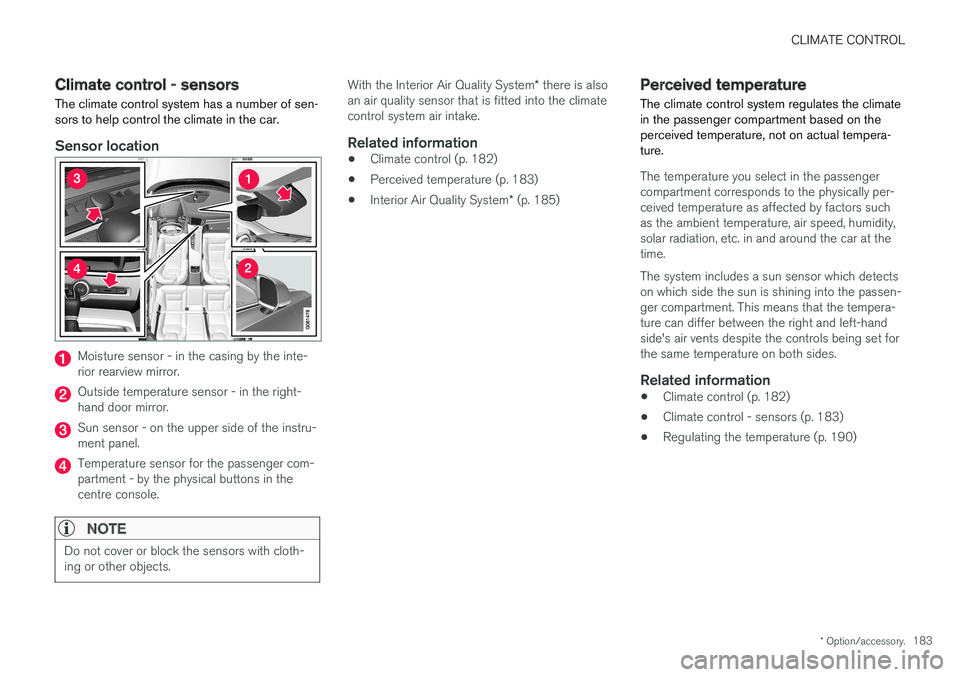
Climate control - sensors The climate control system has a number of sen- sors to help control the climate in the car.
Sensor location
Moisture sensor - in the casing by the inte- rior rearview mirror.
Outside temperature sensor - in the right- hand door mirror.
Sun sensor - on the upper side of the instru- ment panel.
Temperature sensor for the passenger com- partment - by the physical buttons in thecentre console.
NOTE
Do not cover or block the sensors with cloth- ing or other objects.
With the Interior Air Quality System * there is also
an air quality sensor that is fitted into the climate control system air intake.
Related information
• Climate control (p. 182)
• Perceived temperature (p. 183)
• Interior Air Quality System
* (p. 185)
Perceived temperature
The climate control system regulates the climate in the passenger compartment based on theperceived temperature, not on actual tempera-ture.
The temperature you select in the passenger compartment corresponds to the physically per-ceived temperature as affected by factors suchas the ambient temperature, air speed, humidity,solar radiation, etc. in and around the car at thetime. The system includes a sun sensor which detects on which side the sun is shining into the passen-ger compartment. This means that the tempera-ture can differ between the right and left-handside's air vents despite the controls being set forthe same temperature on both sides.
Related information
• Climate control (p. 182)
• Climate control - sensors (p. 183)
• Regulating the temperature (p. 190)
Page 186 of 594
CLIMATE CONTROL
* Option/accessory.
184
Air quality
The materials selected for the passenger com- partment and the air cleaning system ensure thatthe air quality in the passenger compartment ishigh.
Materials in the passenger compartment
The interior of the passenger compartment is designed to be pleasant and comfortable, evenfor people with contact allergies and for asthmasufferers. Tested materials have been developed in order to minimise the quantity of dust in the passengercompartment and to contribute to making thepassenger compartment easier to keep clean. The carpets in both the passenger compartment and the cargo area are removable and easy toremove and clean. Use cleaning agents and car care products rec- ommended by Volvo to clean the interior.
Air cleaning systemIn addition to the passenger compartment filter,the modifications for Clean Zone Interior Package * and the air quality system Interior Air
Quality System * also help to maintain high air
quality in the passenger compartment.
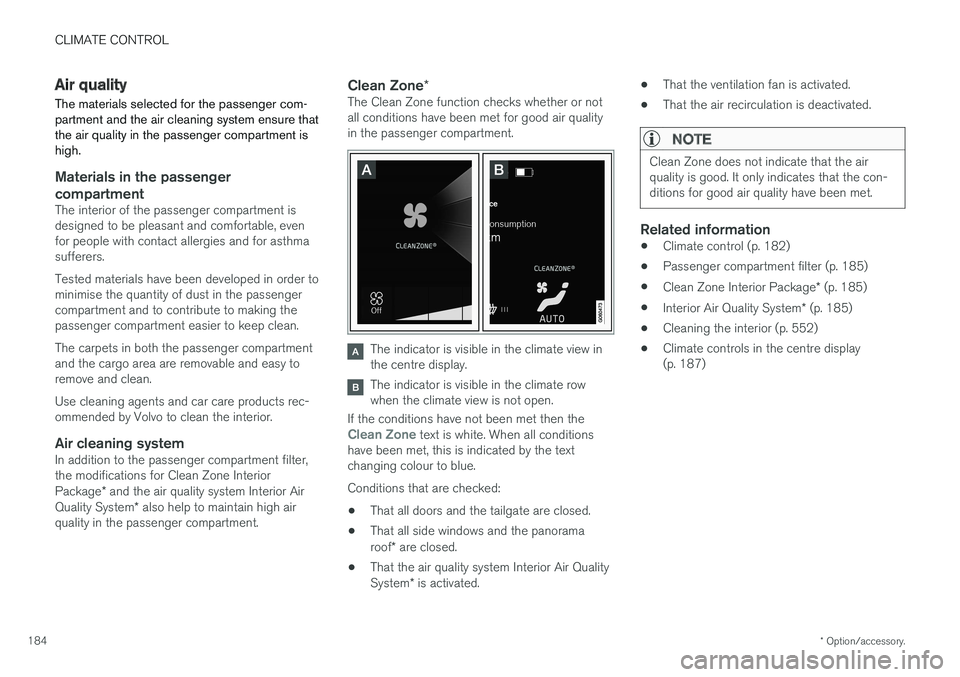
Clean Zone *The Clean Zone function checks whether or not all conditions have been met for good air qualityin the passenger compartment.
The indicator is visible in the climate view in the centre display.
The indicator is visible in the climate row when the climate view is not open.
If the conditions have not been met then the
Clean Zone text is white. When all conditions
have been met, this is indicated by the text changing colour to blue. Conditions that are checked:
• That all doors and the tailgate are closed.
• That all side windows and the panorama roof
* are closed.
• That the air quality system Interior Air QualitySystem
* is activated. •
That the ventilation fan is activated.
• That the air recirculation is deactivated.
NOTE
Clean Zone does not indicate that the air quality is good. It only indicates that the con-ditions for good air quality have been met.
Related information
•Climate control (p. 182)
• Passenger compartment filter (p. 185)
• Clean Zone Interior Package
* (p. 185)
• Interior Air Quality System
* (p. 185)
• Cleaning the interior (p. 552)
• Climate controls in the centre display (p. 187)
Page 187 of 594
CLIMATE CONTROL
}}
* Option/accessory.185
Passenger compartment filter All air entering the car's passenger compartment is cleaned with a filter.
Replacing the passenger compartment
filter
To maintain high climate system performance, the filter must be changed at regular intervals.Follow the Volvo Service Programme for the rec-ommended replacement intervals. If the car isused in a severely contaminated environment, itmay be necessary to replace the filter more often.
NOTE
There are different types of passenger com- partment filter. Make sure that the correct fil-ter is fitted.
Related information
• Air quality (p. 184)
• Clean Zone Interior Package
* (p. 185)
• Interior Air Quality System
* (p. 185)
• Volvo service programme (p. 506)
Clean Zone Interior Package
*
Clean Zone Interior Package (CZIP) comprises a series of modifications that keep the passen-ger compartment even clearer from allergy andasthma-inducing substances.
The following is included:
• An enhanced fan function that means that the fan starts when the car is unlocked withthe remote control key. The fan fills the pas-senger compartment with fresh air. The func-tion starts when required and is disengagedautomatically after a time or when one of thepassenger compartment doors is opened.The amount of time the fan runs is reducedgradually due to reduced need up until thecar is 4 years old.
• The fully automatic air quality system InteriorAir Quality System (IAQS).
Related information
•
Air quality (p. 184)
• Passenger compartment filter (p. 185)
• Interior Air Quality System
* (p. 185)
Interior Air Quality System *
Interior Air Quality System (IAQS) is a fully auto- matic air quality system that separates gasesand particles to reduce the levels of odours andcontaminants in the passenger compartment.
IAQS is a part of the Clean Zone Interior Package (CZIP) and cleans the air in the passen-ger compartment from contaminants such as par-ticles, hydrocarbons, nitrous oxides and ground-level ozone. If the air quality sensor senses that the outside air is contaminated, the air intake is closed andair recirculation is activated.
NOTE
The air quality sensor must always be enabled to ensure the best air in the passenger com-partment. In a cold climate recirculation is limited so as to prevent misting. In the event of misting, the defrost functions for windscreen, side windows and rear win-dow should be used.
Activating/deactivating the air quality sensor
It is possible to set whether the air quality sensor should be activated/deactivated.