wheel VOLVO V90 2017 Owners Manual
[x] Cancel search | Manufacturer: VOLVO, Model Year: 2017, Model line: V90, Model: VOLVO V90 2017Pages: 594, PDF Size: 15.07 MB
Page 5 of 594
3
Table for location of i-Size child seats81
Integrated booster cushion *
82
Folding up the integrated booster cushion * 82
Folding down the integrated boostercushion * 84
INSTRUMENTS AND CONTROLS
Instruments and controls, left-hand drive car
86
Instruments and controls, right-handdrive car 87
Driver display 90
Driver display settings 94
Indicator symbols in the driver display 95
Warning symbols in the driver display 97
Outside temperature gauge 98
Clock 99
License agreement for the driver display 99
Application menu in the driver display 105
Using the application menu in thedriver display 105
Messages in the driver display andthe centre display 106
Managing messages in the driverdisplay and the centre display 108
Managing messages saved from thedriver display and centre display 110
Head-up display *
112
Voice recognition 115
Using voice recognition 116
Settings for voice recognition 117
Voice recognition control of the phone 118
Voice recognition control of radioand media 118
Voice recognition control of climate control119
Voice recognition and map navigation 120
Manual front seat 121
Power front seat *
121
Adjusting the power front seat *
122
Using the memory function in the power front seat * 122
Multi-functional front seat *
123
Adjusting functions in the multi-func-tional front seat * 124
Adjusting the passenger seat fromthe driver's seat * 127
Rear seat 128
Adjusting the head restraints in the rear seat 128
Lowering the backrests in the rear seat 130
Steering wheel 131
Adjusting the steering wheel 132
Headlamp control 134
Headlamp levelling 135
Position lamps 136
Daytime running lights 137
Dipped beam 137
Activating/deactivating main beam 138
Active bending lights *
141
Page 7 of 594
5
Activating/deactivating heating of steering wheel* 205
Parking climate *
206
Starting/stopping preconditioning *
207
Timer for preconditioning *
208
Setting the timer for preconditioning *
208
Activating/deactivating the timer forpreconditioning * 210
Starting/switching off climate com-fort retention * 210
Symbols and messages for parkingclimate control * 212
Heater *
213
Parking heater *
214
Additional heater *
215
LOADING AND STORAGE
Passenger compartment interior
218
Tunnel console 219
Electrical sockets 220
Using the cigarette lighter *
224
Emptying ashtrays *
224
Using the glovebox 225
Sun visors 226
Cargo area 226
Loading 227
Load retaining eyelets 228
Bag hooks 228
Through-load hatch in the rear seat 229
Cargo cover *
230
Safety net *
232
Safety grille *
233
LOCKS AND ALARM
Remote control key
236
Remote control key range 238
Red Key - Restricted remote control key *
239
Antenna locations for the start and lock system 240
Locking/unlocking from the outside 241
Indication on locking/unlocking the car 243
Locking/unlocking from the inside 245
Deadlocks *
246
Locking/unlocking the tailgate 247
Using private locking 249
Detachable key blade 250
Locking/unlocking with the detacha-ble key blade 251
Power operated tailgate *
253
Opening/closing the tailgate with foot movement * 256
Replacing the battery in the remote control key 257
Immobiliser 260
Child safety locks 261
Alarm *
262
Automatic arming/rearming of the alarm *
264
Disarming the alarm * without work-
ing remote control key 264
Page 10 of 594
8
STARTING AND DRIVING
Alcohol lock*
384
Bypass of the alcohol lock *
384
Before starting the engine with the alcohol lock 384
Ignition positions 385
Starting the car 386
Switching off the car 387
Steering lock 388
Using jump starting with another battery 388
Gearbox 389
Gear positions for automatic gearbox 390
Manual gearbox 392
Gear shift indicator *
392
Gear selector inhibitor 394
Changing gear with steering wheel paddles * 395
Start/Stop 396
Using the Start/Stop function 396
Conditions for the Start/Stop function 398
Drive modes *
400
Drive mode ECO 402
Level control * and shock absorption
405
All-wheel drive *
405
Brake functions 406
Foot brake 406
Emergency brake lights408
Brake assistance 408
Auto braking after a collision 408
Parking brake 409
Using the parking brake 410
In the event of a fault in the parking brake 411
Hill start assist 412
Automatic braking when stationary 412
Driving in water 413
Overheating in the engine and drivesystem 414
Overloading the starter battery 415
Preparations for a long trip 415
Winter driving 416
Opening/closing the fuel filler flapand refuelling 417
Handling of fuel 418
Petrol 419
Diesel 420
Empty tank and diesel engine 420
Diesel particulate filter 421
Economical driving 422
Towing bracket *
422
Extendable/retractable towing brackets *
423
Towing bracket specifications *
425
Driving with a trailer 426
Driving with a trailer under special conditions 428
Trailer Stability Assist *
428
Towing eye 430
Towing 431
Recovering the car 432
Page 12 of 594
10
WHEELS AND TYRES
Tyres482
Tyres' rotation direction 483
Tread wear indicators on the tyres 484
Checking the tyre pressures 484
Tyre monitoring *
485
Checking tyre pressure with the tyre monitoring system * 487
Rectifying low tyre pressure with tyremonitoring * 488
Calibrating tyre monitoring *
489
Emergency puncture repair kit 490
Using the emergency puncture repair kit 491
Inflate tyres with the compressor from the emergency puncture repair kit 494
When changing wheels 495
Removing a wheel 495
Fitting the wheels 497
Wheel bolts 498
Spare wheel *
498
Winter wheels 499
Tool kit 500
Warning triangle 500
Jack *
501
First aid kit 501
Dimension designation for wheel rim 502
Dimension designation for tyre502
MAINTENANCE AND SERVICE
Volvo service programme506
Car status 506
Book service and repair 506
Inspection and service of the system for vehicle gas * 509
Remote updates 509
System updates 510
Data transmission between car and workshop 511
Raise the car 512
Opening and closing the bonnet 514
Engine compartment overview 515
Engine oil 516
Checking and filling with engine oil 517
Topping up coolant 518
Servicing the climate control system 520
Bulb replacement 520
Replacing the dipped beam bulb 522
Replacing the main beam lamp 523
Replacing daytime running lightbulb/position lamp bulb, front 524
Replacing the front direction indica-tor bulb 524
Replacing the reversing lamp bulb 525
Replacing the rear fog lamp bulb 526
Bulb specifications 526
Page 25 of 594
INTRODUCTION
}}
* Option/accessory.23
Important information on accessories, extra equipment anddiagnostic socket Incorrect connection and installation of accesso- ries, extra equipment or software/diagnostictools may have a negative effect on the car'selectronic system.
Certain accessories only function when associ- ated software is installed in the car's computersystem. Volvo therefore recommends alwaysmaking contact with an authorised Volvo work-shop before the installation of accessories orextra equipment that are connected to or affectthe electrical system.
Connection of equipment to the car's
diagnostic socket
WARNING
Volvo Cars accepts no responsibility for the consequences of cases where non-authorisedequipment is connected to the car's data linkconnector (On-Board-Diagnostics (OBD-II)).
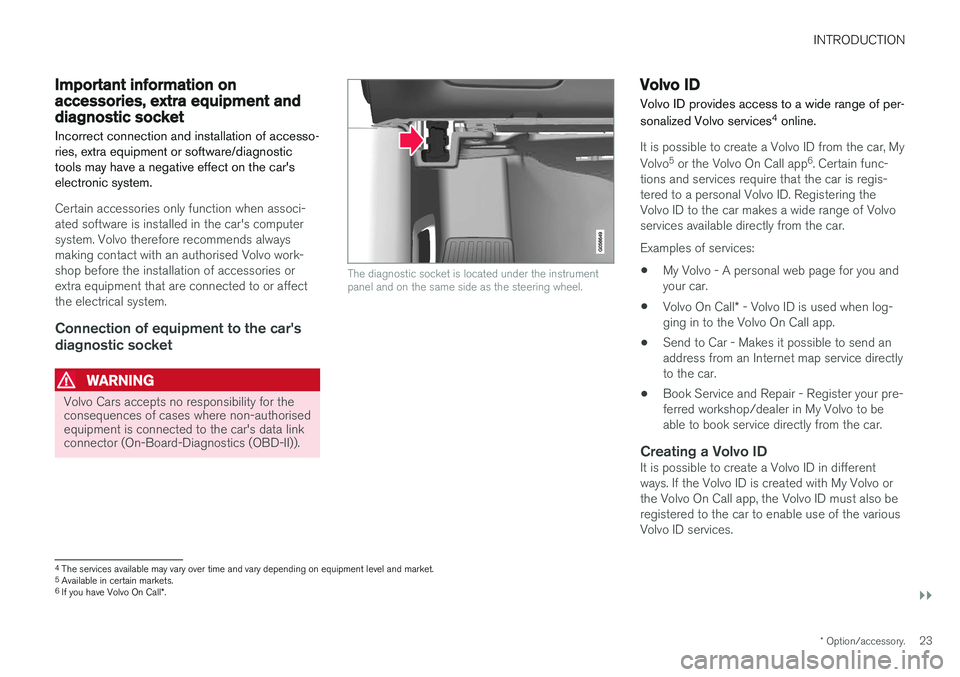
The diagnostic socket is located under the instrument panel and on the same side as the steering wheel.
Volvo ID
Volvo ID provides access to a wide range of per- sonalized Volvo services 4
online.
It is possible to create a Volvo ID from the car, My Volvo 5
or the Volvo On Call app 6
. Certain func-
tions and services require that the car is regis- tered to a personal Volvo ID. Registering theVolvo ID to the car makes a wide range of Volvoservices available directly from the car. Examples of services:
• My Volvo - A personal web page for you and your car.
• Volvo On Call
* - Volvo ID is used when log-
ging in to the Volvo On Call app.
• Send to Car - Makes it possible to send anaddress from an Internet map service directlyto the car.
• Book Service and Repair - Register your pre-ferred workshop/dealer in My Volvo to beable to book service directly from the car.
Creating a Volvo IDIt is possible to create a Volvo ID in differentways. If the Volvo ID is created with My Volvo orthe Volvo On Call app, the Volvo ID must also beregistered to the car to enable use of the variousVolvo ID services.
4
The services available may vary over time and vary depending on equipment level and market.
5 Available in certain markets.
6 If you have Volvo On Call *.
Page 28 of 594
||
INTRODUCTION
* Option/accessory.
26
Contributing to a better environment
An energy-efficient and fuel-efficient car not only contributes to a reduced impact on the environ-ment, but also means reduced costs for theowner of the car. As the driver, it is easy toreduce fuel consumption and thereby savemoney and contribute to a better environment -here is some advice:
• Plan for an effective average speed. Speedsabove approx. 80 km/h (approx. 50 mph)and below 50 km/h (approx. 30 mph) lead toincreased energy consumption.
• Follow the Service and Warranty Booklet'srecommended intervals for service and main-tenance of the car.
• Avoid letting the engine idle - switch off theengine when stationary for longer periods.Pay attention to local regulations.
• Plan the journey - a lot of unnecessary stopsand uneven speed contribute to increasedfuel consumption.
• Use preconditioning
* before starting in cold
conditions - it improves starting capacity andreduces wear in cold weather. The enginereaches normal operating temperature morequickly, which decreases consumption andreduces emissions.
Also remember to always dispose of environmen-tally hazardous waste, such as batteries and oil, inan environmentally safe manner. Consult a work-shop in the event of uncertainty about how this type of waste should be discarded - an author-ised Volvo workshop is recommended.
Efficient emission controlYour Volvo is manufactured following the concept"Clean inside and out" – a concept that encom-passes a clean interior environment as well ashighly efficient emission control. In many casesthe exhaust emissions are well below the applica-ble standards.
Clean air in the passenger
compartment
A passenger compartment filter prevents dustand pollen from entering the passenger compart-ment via the air intake. The Interior Air Quality System (IAQS) * ensures
that the incoming air is cleaner than the air in the traffic outside. The system cleans the air in the passenger com- partment from contaminants such as particles,hydrocarbons, nitrous oxides and ground-levelozone. If the outside air is contaminated then theair intake is closed and the air is recirculated.Such a situation may arise in heavy traffic,queues and tunnels for example. IAQS is a part of the Clean Zone Interior Pack- age (CZIP) *, which also includes a function that
allows the fan to start when the car is unlocked with the remote control key.
InteriorThe material used in the interior of a Volvo iscarefully selected and has been tested in order tobe pleasant and comfortable. Some of the detailsare hand-made, such as the seams of the steer-ing wheel that are sewn by hand. The interior ismonitored in order not to emit strong odours orsubstances that cause discomfort in the event ofe.g. high heat and bright light.
Volvo workshops and the environmentRegular maintenance creates the conditions for along service life and low fuel consumption foryour car. In this way you also contribute to acleaner environment. When Volvo's workshopsare entrusted with the service and maintenanceof your car it becomes part of Volvo's system.Volvo makes clear demands regarding the way inwhich workshop premises shall be designed inorder to prevent spills and discharges into theenvironment. The workshop staff have the knowl-edge and the tools required to guarantee goodenvironmental care.
RecyclingSince Volvo works from a life cycle perspective, itis also important that the car is recycled in anenvironmentally sound manner. Almost all of thecar can be recycled. The last owner of the car istherefore requested to contact a dealer for refer-ral to a certified/approved recycling facility.
Page 32 of 594
||
INTRODUCTION
* Option/accessory.
30
G000000
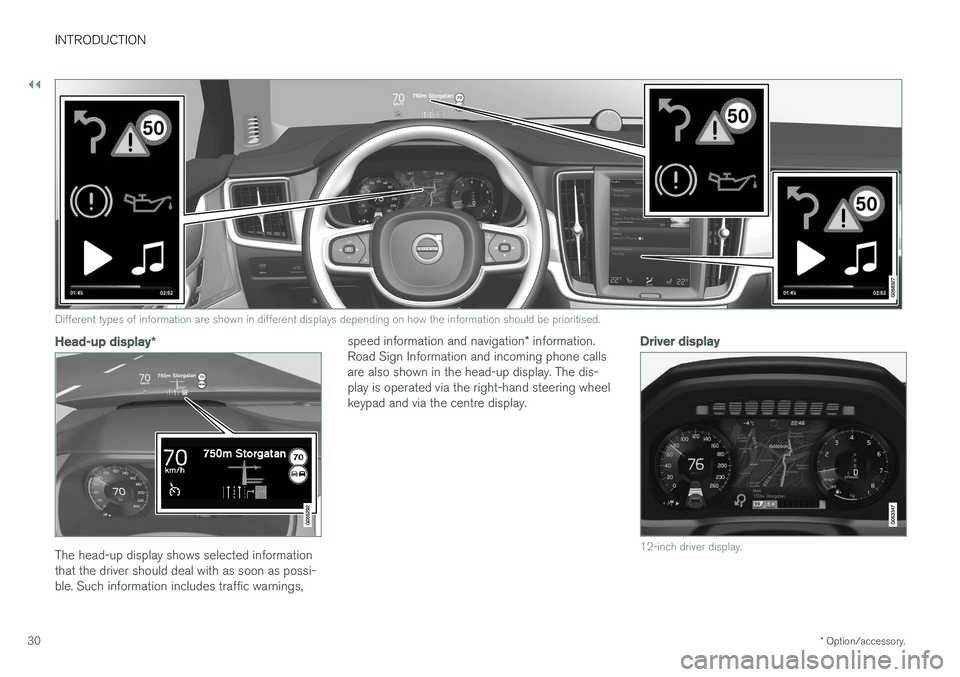
Different types of information are shown in different displays depending on how the information should be prioritised.
Head-up display *
The head-up display shows selected information that the driver should deal with as soon as possi-ble. Such information includes traffic warnings, speed information and navigation
* information.
Road Sign Information and incoming phone callsare also shown in the head-up display. The dis-play is operated via the right-hand steering wheelkeypad and via the centre display.
Driver display
12-inch driver display.
Page 33 of 594
INTRODUCTION
* Option/accessory.31
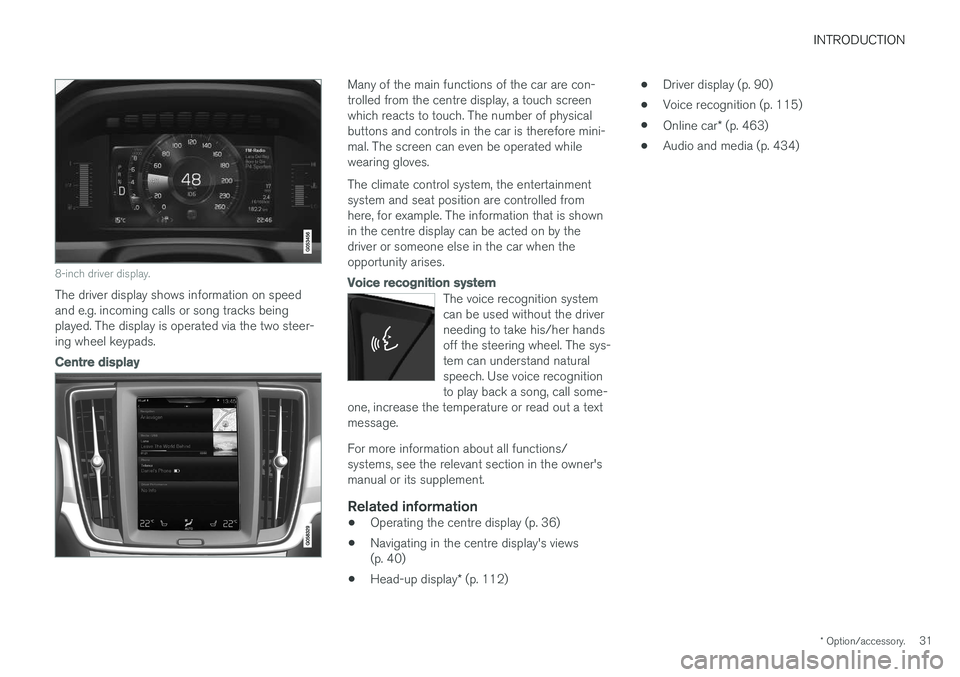
8-inch driver display.
The driver display shows information on speed and e.g. incoming calls or song tracks beingplayed. The display is operated via the two steer-ing wheel keypads.
Centre display
Many of the main functions of the car are con- trolled from the centre display, a touch screenwhich reacts to touch. The number of physicalbuttons and controls in the car is therefore mini-mal. The screen can even be operated whilewearing gloves. The climate control system, the entertainment system and seat position are controlled fromhere, for example. The information that is shownin the centre display can be acted on by thedriver or someone else in the car when theopportunity arises.
Voice recognition system
The voice recognition system can be used without the driverneeding to take his/her handsoff the steering wheel. The sys-tem can understand naturalspeech. Use voice recognitionto play back a song, call some-
one, increase the temperature or read out a textmessage.
For more information about all functions/ systems, see the relevant section in the owner'smanual or its supplement.
Related information
• Operating the centre display (p. 36)
• Navigating in the centre display's views(p. 40)
• Head-up display
* (p. 112) •
Driver display (p. 90)
• Voice recognition (p. 115)
• Online car
* (p. 463)
• Audio and media (p. 434)
Page 58 of 594
SAFETY
56
Safety
The vehicle is equipped with several safety sys- tems that work together to protect the vehicle'sdriver and passengers in the event of an acci-dent.
The car is equipped with a number of sensors that react in the event of an accident and activatedifferent safety systems, such as different typesof airbags and seatbelt tensioners. Depending onthe specific accident situation, such as collisionsat different angles, rollover or driving off the road,the systems react in different ways to provide thebest protection. There are also mechanical safety systems such as Whiplash Protection System. The car is alsoconstructed so that a large part of the force of acollision is distributed to beams, pillars, floor, roofand other parts of the body. The car's safety mode may be activated after a collision if an important function in the car hasbeen damaged.
Warning symbol in driver displayThe warning symbol is illuminated inthe driver display when the car's elec-trical system is set in ignition position II . The symbol is extinguished after
approx. 6 seconds if the car's safety system is fault-free.
WARNING
If the warning symbol remains illuminated or is switched on during driving and the mes- sage
SRS airbag Service urgent Drive to
workshop is shown in the driver display, it
means that part of one of the safety systems does not have full functionality. Volvo recom-mends that an authorised Volvo workshopshould be contacted as soon as possible.
If the specific warning symbol is broken then the general warning symbol is illu-minated instead and the driver displayshows the same message.
Related information
•Safety during pregnancy (p. 56)
• Seatbelt (p. 59)
• Airbags (p. 63)
• Whiplash Protection System (p. 57)
• Pedestrian Protection System (p. 58)
• Safety mode (p. 69)
• Child safety (p. 71)
Safety during pregnancy It is important that the seatbelt is used correctly during pregnancy, and that pregnant driversadjust their seating position.
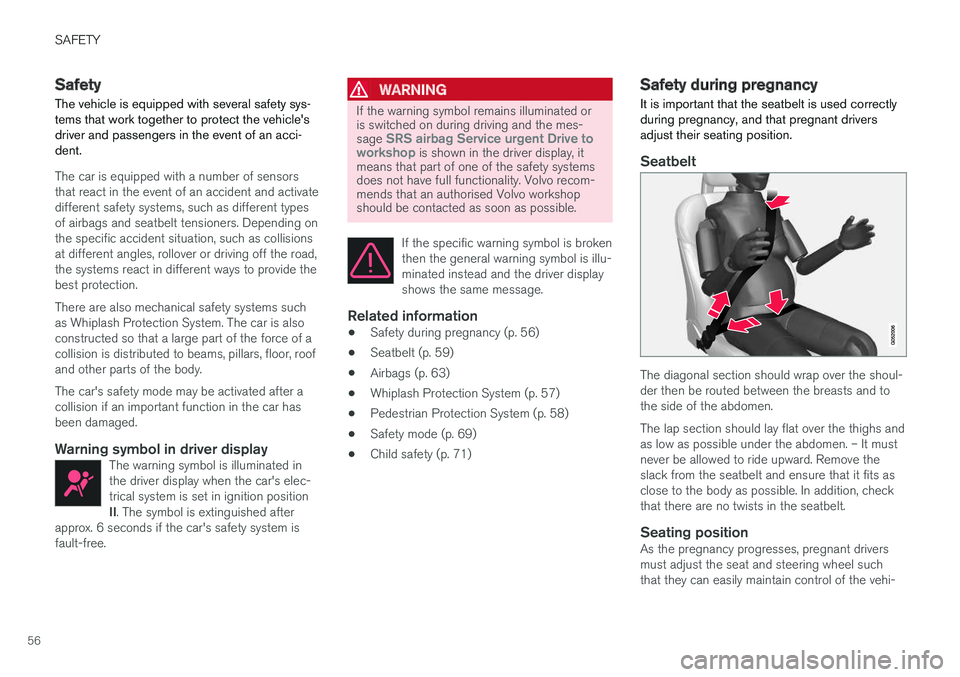
Seatbelt
The diagonal section should wrap over the shoul- der then be routed between the breasts and tothe side of the abdomen. The lap section should lay flat over the thighs and as low as possible under the abdomen. – It mustnever be allowed to ride upward. Remove theslack from the seatbelt and ensure that it fits asclose to the body as possible. In addition, checkthat there are no twists in the seatbelt.
Seating positionAs the pregnancy progresses, pregnant driversmust adjust the seat and steering wheel suchthat they can easily maintain control of the vehi-
Page 59 of 594
SAFETY
}}
* Option/accessory.57
cle as they drive (which means that they must be able to easily operate the foot pedals and steer-ing wheel). The aim should be to position theseat with as large a distance as possible betweenabdomen and steering wheel.
Related information
•
Safety (p. 56)
• Seatbelt (p. 59)
• Manual front seat (p. 121)
• Power front seat
* (p. 121)
Whiplash Protection System Whiplash Protection System (WHIPS) is a pro- tection against whiplash injuries. The systemconsists of energy-absorbing backrests and seatcushions, and specially designed head restraintsin the front seats.
WHIPS is deployed in the event of a rear-end collision, where the angle and speed of the colli-sion and the nature of the colliding vehicle allhave an influence. When WHIPS is deployed, the front seat back- rests are lowered backward and the seat cush-ions move downward to change the seating posi-tion of the driver and front seat passenger. Thisreduces the risk of whiplash injury.
WARNING
WHIPS is a supplement to the seatbelts. Always use a seatbelt.
WARNING
Never modify or repair the seat or WHIPS yourself. Volvo recommends that an author-ised Volvo workshop should be contacted. If the front seats have been subjected to a major load, such as in conjunction with a colli-sion, the seats must be replaced. Some of theseats' protective properties may have beenlost even if they do not appear damaged.
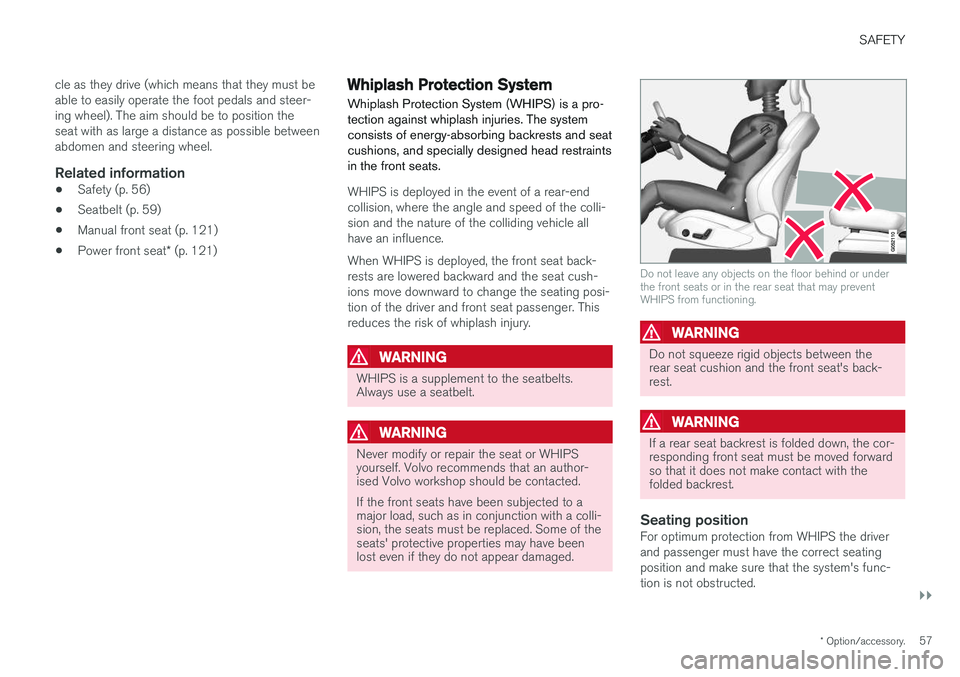
Do not leave any objects on the floor behind or under the front seats or in the rear seat that may preventWHIPS from functioning.
WARNING
Do not squeeze rigid objects between the rear seat cushion and the front seat's back-rest.
WARNING
If a rear seat backrest is folded down, the cor- responding front seat must be moved forwardso that it does not make contact with thefolded backrest.
Seating positionFor optimum protection from WHIPS the driver and passenger must have the correct seatingposition and make sure that the system's func-tion is not obstructed.