gearbox VOLVO V90 2017 User Guide
[x] Cancel search | Manufacturer: VOLVO, Model Year: 2017, Model line: V90, Model: VOLVO V90 2017Pages: 594, PDF Size: 15.07 MB
Page 307 of 594
DRIVER SUPPORT
}}
305
WARNING
Pilot Assist is an aid which cannot handle all traffic, weather and road conditions. The driver must always be observant with regard to the prevailing traffic conditions andintervene if Pilot Assist does not provide suit-able steering assistance or maintain a suita-ble speed or suitable time interval. Read all the sections about this function in the owner's manual in order to learn about itslimitations, of which the driver should beaware before the function is used. Pilot Assist must only be used if there are clear lane lines painted on the road surfaceon each side of the lane. All other useinvolves increased risk of contact with sur-rounding obstacles that are not detected bythe function. The driver always bears responsibility for how the car is controlled as well as for maintainingthe correct distance and speed, even whenPilot Assist is being used.
Pilot Assist regulates the speed with acceleration and braking. It is normal for the brakes to emit alow sound when they are being used to adjustthe speed. Pilot Assist attempts to regulate the speed smoothly. In situations that demand sudden brak-ing the driver must brake himself/herself. Thisapplies in case of large speed differences or ifthe vehicle in front brakes suddenly. Due to the limitations of the camera and radar unit, brakingmay come unexpectedly or not at all. Pilot Assist aims to follow the vehicle ahead in the same lane at a time interval set by the driver.If the radar unit cannot see any vehicle in frontthen the car will instead maintain the speed setand stored by the driver. This also takes place ifthe speed of the vehicle ahead increases andexceeds the stored speed. The following applies for cars with automatic gearbox:
• Pilot Assist can follow another vehicle atspeeds from 0 km/h up to 200 km/h(125 mph).
• Pilot Assist can give steering assistance fromalmost stationary up to 140 km/h (87 mph).
The following applies for cars with manual gear-box: • Pilot Assist can follow another vehicle at speeds from 30 km/h (20 mph) up to200 km/h (125 mph).
• Pilot Assist can give steering assistance from30 km/h (20 mph) up to 140 km/h(87 mph).
WARNING
Pilot Assist is not a collision avoidance sys- tem. The driver must intervene if the systemdoes not detect a vehicle in front. Pilot Assist does not brake for people, ani- mals, objects, small vehicles (e.g. cycles andmotorcycles), low trailers as well as oncoming,slow or stationary vehicles. Do not use Pilot Assist, for example, in city traffic, at junctions, on slippery surfaces, witha lot of water or slush on the road, in heavyrain/snow, in poor visibility, on winding roads,on slip roads, or with a trailer connected tothe car.
IMPORTANT
Maintenance of Pilot Assist components must only be performed at a workshop - an author-ised Volvo workshop is recommended.
Page 309 of 594
DRIVER SUPPORT
}}
* Option/accessory.307
WARNING
Pilot Assist only gives warning about vehicles whose camera and radar unit has beendetected - therefore a warning may not occuror be delayed. Do not wait for a warning with-out braking when so required.
Head-up display *
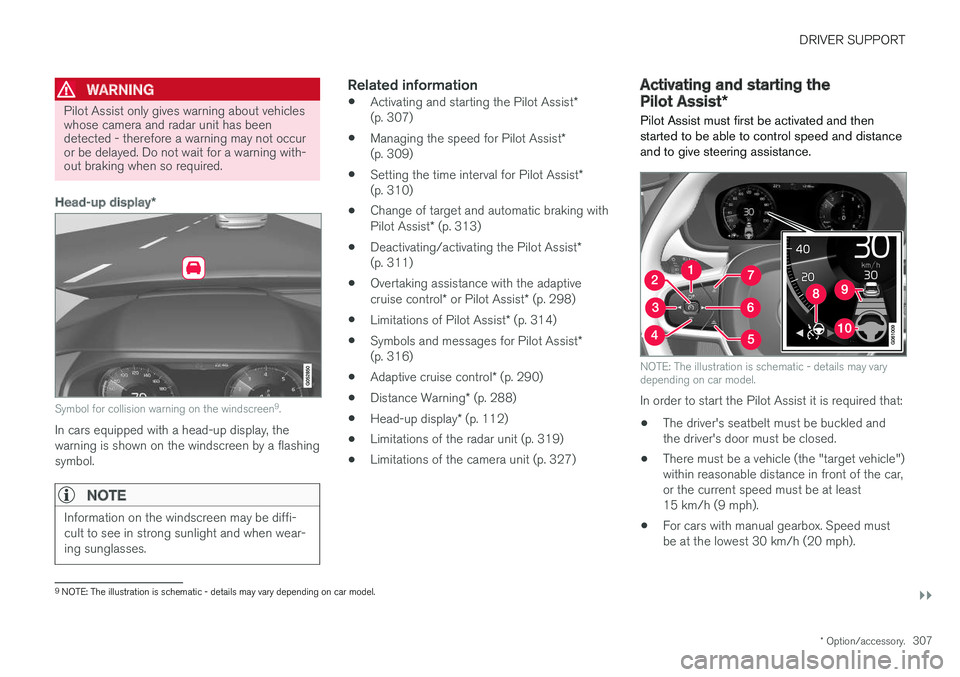
Symbol for collision warning on the windscreen 9
.
In cars equipped with a head-up display, the warning is shown on the windscreen by a flashingsymbol.
NOTE
Information on the windscreen may be diffi- cult to see in strong sunlight and when wear-ing sunglasses.
Related information
• Activating and starting the Pilot Assist
*
(p. 307)
• Managing the speed for Pilot Assist
*
(p. 309)
• Setting the time interval for Pilot Assist
*
(p. 310)
• Change of target and automatic braking with Pilot Assist
* (p. 313)
• Deactivating/activating the Pilot Assist
*
(p. 311)
• Overtaking assistance with the adaptivecruise control
* or Pilot Assist * (p. 298)
• Limitations of Pilot Assist
* (p. 314)
• Symbols and messages for Pilot Assist
*
(p. 316)
• Adaptive cruise control
* (p. 290)
• Distance Warning
* (p. 288)
• Head-up display
* (p. 112)
• Limitations of the radar unit (p. 319)
• Limitations of the camera unit (p. 327)
Activating and starting the Pilot Assist
*
Pilot Assist must first be activated and then started to be able to control speed and distanceand to give steering assistance.
NOTE: The illustration is schematic - details may vary depending on car model.
In order to start the Pilot Assist it is required that:
• The driver's seatbelt must be buckled and the driver's door must be closed.
• There must be a vehicle (the "target vehicle")within reasonable distance in front of the car,or the current speed must be at least15 km/h (9 mph).
• For cars with manual gearbox. Speed mustbe at the lowest 30 km/h (20 mph).
9
NOTE: The illustration is schematic - details may vary depending on car model.
Page 313 of 594
DRIVER SUPPORT
}}
* Option/accessory.311
Deactivating/activating the Pilot Assist*
Pilot Assist can be temporarily deactivated so that it is set in the standby mode and can bereactivated later.
Deactivating and setting Pilot Assist in
standby mode
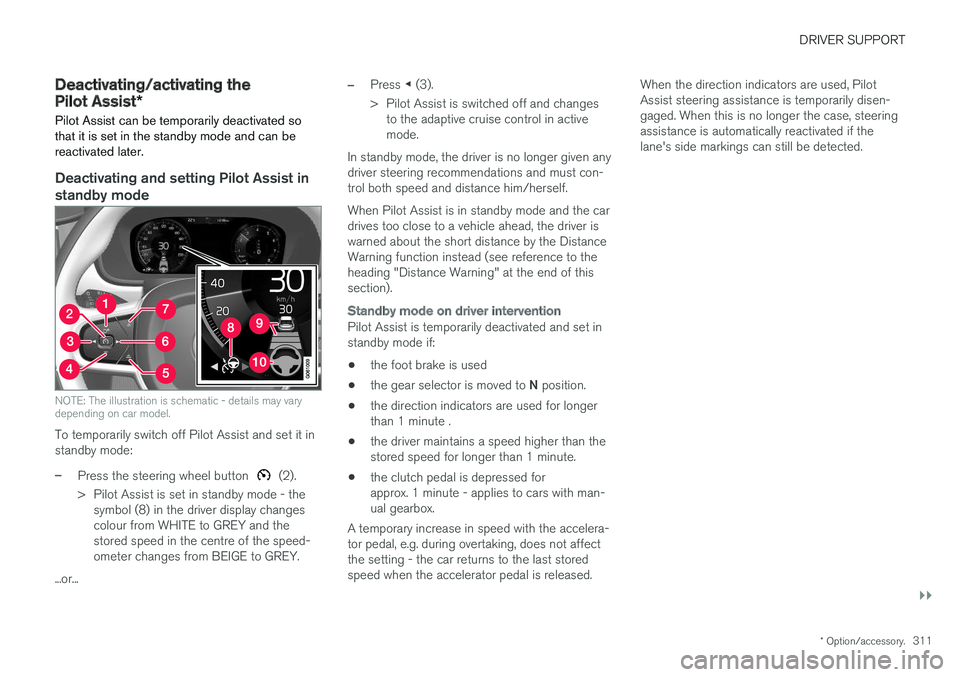
NOTE: The illustration is schematic - details may vary depending on car model.
To temporarily switch off Pilot Assist and set it in standby mode:
–Press the steering wheel button (2).
> Pilot Assist is set in standby mode - the symbol (8) in the driver display changes colour from WHITE to GREY and thestored speed in the centre of the speed-ometer changes from BEIGE to GREY.
...or...
–Press ◀ (3).
> Pilot Assist is switched off and changes to the adaptive cruise control in active mode.
In standby mode, the driver is no longer given anydriver steering recommendations and must con-trol both speed and distance him/herself. When Pilot Assist is in standby mode and the car drives too close to a vehicle ahead, the driver iswarned about the short distance by the DistanceWarning function instead (see reference to theheading "Distance Warning" at the end of thissection).
Standby mode on driver intervention
Pilot Assist is temporarily deactivated and set in standby mode if:
• the foot brake is used
• the gear selector is moved to
N position.
• the direction indicators are used for longerthan 1 minute .
• the driver maintains a speed higher than thestored speed for longer than 1 minute.
• the clutch pedal is depressed forapprox. 1 minute - applies to cars with man-ual gearbox.
A temporary increase in speed with the accelera-tor pedal, e.g. during overtaking, does not affectthe setting - the car returns to the last storedspeed when the accelerator pedal is released. When the direction indicators are used, PilotAssist steering assistance is temporarily disen-gaged. When this is no longer the case, steeringassistance is automatically reactivated if thelane's side markings can still be detected.
Page 314 of 594
||
DRIVER SUPPORT
* Option/accessory.
312
Automatic standby mode
Pilot Assist is dependent on other systems, e.g. stability control/anti-skid ESC. If any of theseother systems stops working, Pilot Assist isswitched off automatically. In the event of automatic deactivation a signal will sound and a message is shown in the driver dis-play. The driver must then intervene and adaptthe speed and distance to the vehicle ahead. Automatic deactivation may occur if:
• the speed is below 5 km/h (3 mph) and Pilot Assist is uncertain whether the vehicle aheadis a stationary vehicle or an object, such as aspeed bump.
• the speed is below 5 km/h (3 mph) and thevehicle ahead turns off so that Pilot Assist nolonger has a vehicle to follow.
• speed is reduced to below 30 km/h(20 mph) - only applies to cars with manualgearbox.
• the driver's hands are not on the steeringwheel
• the driver opens the door
• the driver takes off the seatbelt
• engine speed is too low/high
• wheels lose traction
• brake temperature is high
• the parking brake is applied •
the camera and radar unit is covered by e.g.snow or heavy rainfall (camera lens/radiowaves are blocked).
Reactivating Pilot Assist from the
standby mode
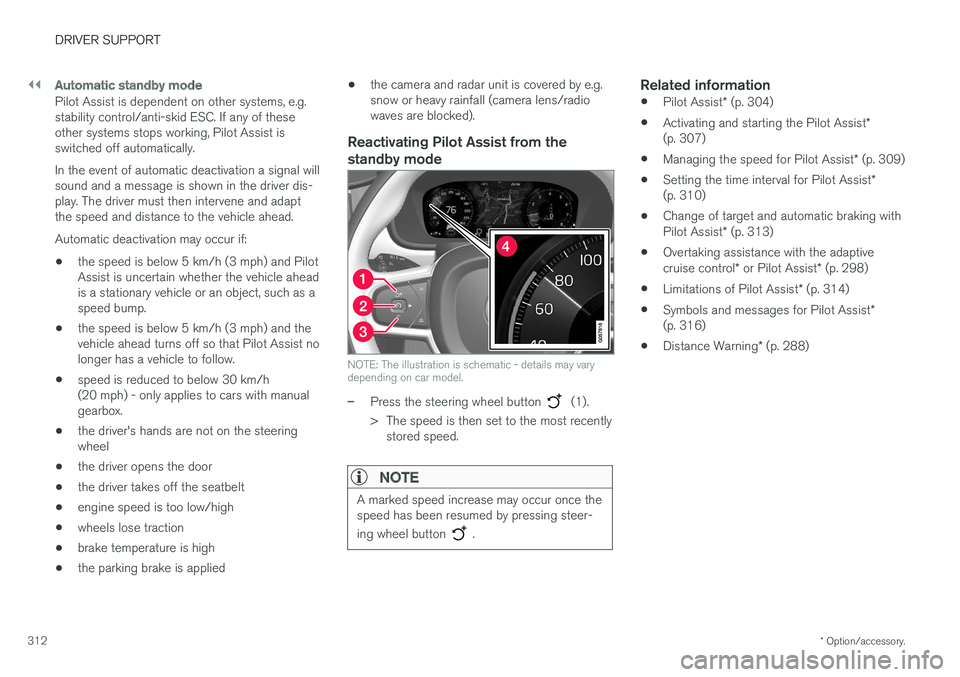
NOTE: The illustration is schematic - details may vary depending on car model.
–Press the steering wheel button (1).
> The speed is then set to the most recently stored speed.
NOTE
A marked speed increase may occur once the speed has been resumed by pressing steer- ing wheel button
.
Related information
• Pilot Assist
* (p. 304)
• Activating and starting the Pilot Assist
*
(p. 307)
• Managing the speed for Pilot Assist
* (p. 309)
• Setting the time interval for Pilot Assist
*
(p. 310)
• Change of target and automatic braking with Pilot Assist
* (p. 313)
• Overtaking assistance with the adaptivecruise control
* or Pilot Assist * (p. 298)
• Limitations of Pilot Assist
* (p. 314)
• Symbols and messages for Pilot Assist
*
(p. 316)
• Distance Warning
* (p. 288)
Page 315 of 594
DRIVER SUPPORT
}}
* Option/accessory.313
Change of target and automatic braking with Pilot Assist *
In combination with automatic gearbox, Pilot Assist has functionality for change of target and braking at certain speeds.
Change of target
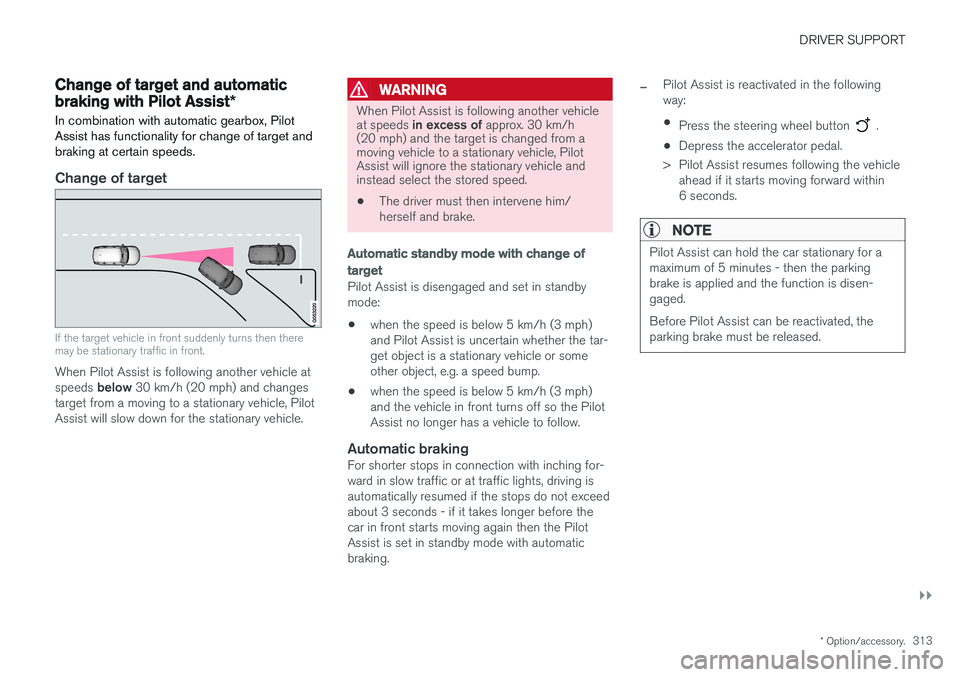
If the target vehicle in front suddenly turns then there may be stationary traffic in front.
When Pilot Assist is following another vehicle at speeds below 30 km/h (20 mph) and changes
target from a moving to a stationary vehicle, Pilot Assist will slow down for the stationary vehicle.
WARNING
When Pilot Assist is following another vehicle at speeds in excess of approx. 30 km/h
(20 mph) and the target is changed from a moving vehicle to a stationary vehicle, PilotAssist will ignore the stationary vehicle andinstead select the stored speed.
• The driver must then intervene him/ herself and brake.
Automatic standby mode with change of target
Pilot Assist is disengaged and set in standby mode: •when the speed is below 5 km/h (3 mph) and Pilot Assist is uncertain whether the tar-get object is a stationary vehicle or someother object, e.g. a speed bump.
• when the speed is below 5 km/h (3 mph)and the vehicle in front turns off so the PilotAssist no longer has a vehicle to follow.
Automatic brakingFor shorter stops in connection with inching for-ward in slow traffic or at traffic lights, driving isautomatically resumed if the stops do not exceedabout 3 seconds - if it takes longer before thecar in front starts moving again then the PilotAssist is set in standby mode with automaticbraking.
–Pilot Assist is reactivated in the following way:
• Press the steering wheel button
.
• Depress the accelerator pedal.
> Pilot Assist resumes following the vehicle ahead if it starts moving forward within 6 seconds.
NOTE
Pilot Assist can hold the car stationary for a maximum of 5 minutes - then the parkingbrake is applied and the function is disen-gaged. Before Pilot Assist can be reactivated, the parking brake must be released.
Page 334 of 594
||
DRIVER SUPPORT
332
Auto Brake
The automatic brake function is activated last. If in this situation the driver has not yet started to take evasive action and the risk of collision isimminent then the automatic braking function isdeployed - this takes place irrespective ofwhether or not the driver brakes. Braking thentakes place with full brake force in order toreduce collision speed, or with limited brake forceif it is sufficient to avoid a collision. In connection with automatic braking the seatbelt tensioner may also be activated. For more infor-mation see the "Seatbelt tensioner" section. In some situations, the action of Auto-brake may begin with light braking and then progress to fullbrake action. When City Safety has prevented a collision with a stationary object, the car remains stationary inanticipation of positive action by the driver. If thecar has been braked to avoid collision with aslower vehicle in front, its speed is reduced tomatch that of the vehicle in front.
NOTE
On cars with manual gearbox, the engine stops when the Auto-brake function has stop-ped the car, unless the driver has managed todepress the clutch pedal beforehand.
The driver can always interrupt a braking inter- vention by firmly depressing the acceleratorpedal.
NOTE
When City Safety™ brakes, the brake lights
come on.
When City Safety is activated and brakes the vehicle, the driver display shows a text messageto the effect that the function is/has been active.
WARNING
City Safety must not be used as an excuse for the driver to change his/her driving style. Ifthe driver relies solely on City Safety to do thebraking, there might be a risk of a collisionsooner or later.
Related information
• Setting the warning distance for City Safety (p. 332)
• Detection of obstacles with City Safety
™
(p. 333)
• City Safety when evasive manoeuvres areprevented (p. 336)
• City Safety in cross traffic (p. 335)
• Limitations of City Safety (p. 337)
• Messages for City Safety (p. 339)
• Seatbelt tensioner (p. 59)
Setting the warning distance for City Safety
City Safety is always activated, but it is possible to select the warning distance for the function.
NOTE
The City Safety function cannot be deacti- vated. It is activated automatically when theengine/electric operation is started andremains switched on until the engine/electricoperation is switched off.
The warning distance determines the sensitivity of the system and regulates the distance atwhich the visual, acoustic and haptic warningsshall be triggered. 1. Tap on
Settings in top view in the centre
display.
2. Press
My CarIntelliSafe.
3. Under
City Safety Warning, select Late,Normal or Early to set the desired warning
distance.
If the
Early setting produces too many warnings,
which could be perceived as irritating in certain situations, then use the
Normal or Late warning
distance. If warnings are perceived as being too frequent or disturbing then the warning distance can bereduced. This would lead to the system warning
Page 366 of 594
||
DRIVER SUPPORT
* Option/accessory.
364
Along the sides
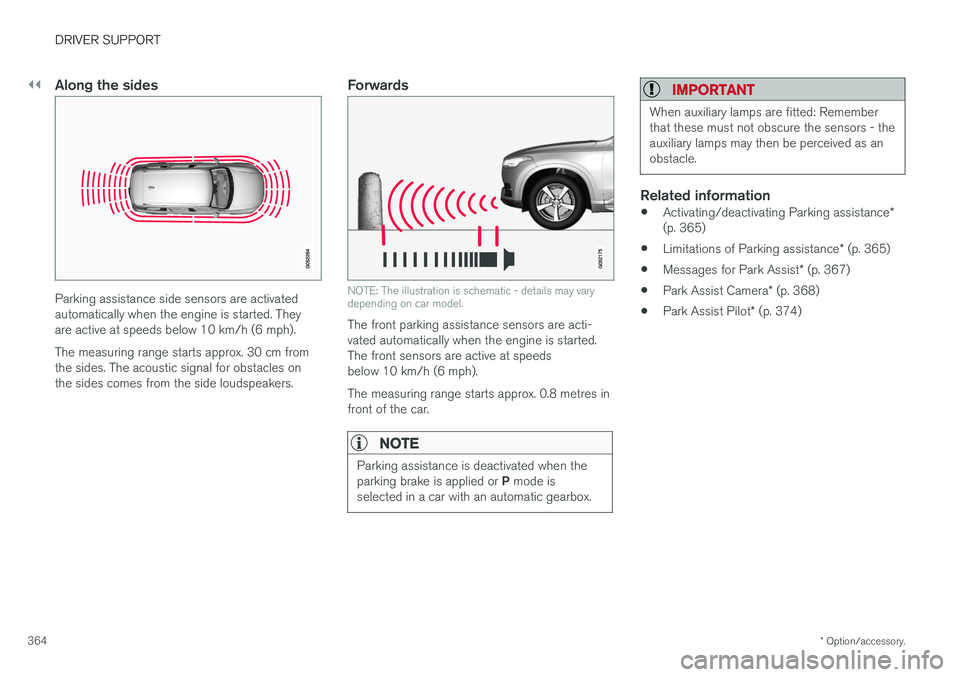
Parking assistance side sensors are activated automatically when the engine is started. Theyare active at speeds below 10 km/h (6 mph). The measuring range starts approx. 30 cm from the sides. The acoustic signal for obstacles onthe sides comes from the side loudspeakers.
Forwards
NOTE: The illustration is schematic - details may vary depending on car model.
The front parking assistance sensors are acti- vated automatically when the engine is started.The front sensors are active at speedsbelow 10 km/h (6 mph). The measuring range starts approx. 0.8 metres in front of the car.
NOTE
Parking assistance is deactivated when the parking brake is applied or P mode is
selected in a car with an automatic gearbox.
IMPORTANT
When auxiliary lamps are fitted: Remember that these must not obscure the sensors - theauxiliary lamps may then be perceived as anobstacle.
Related information
• Activating/deactivating Parking assistance
*
(p. 365)
• Limitations of Parking assistance
* (p. 365)
• Messages for Park Assist
* (p. 367)
• Park Assist Camera
* (p. 368)
• Park Assist Pilot
* (p. 374)
Page 391 of 594
STARTING AND DRIVING
}}
389
11. Start the engine in the car with the dis-
charged battery.
IMPORTANT
Do not touch the connections between cable and car during the starting attempt. There is arisk of sparks forming.
12. Remove the jump leads in reverse order -first the black and then the red. Make sure that none of the black jump lead's clamps comes into contact with the car'spositive jump-starting point/donor battery'spositive terminal or the clamp connected tothe red jump lead.
WARNING
• The battery can generate oxyhydrogen gas, which is highly explosive. A spark canbe formed if a jump lead is connectedincorrectly, and this can be enough forthe battery to explode.
• The battery contains sulphuric acid, whichcan cause serious burns.
• If sulphuric acid comes into contact witheyes, skin or clothing, flush with largequantities of water. If acid splashes intothe eyes - seek medical attention imme-diately.
Related information
•Starter battery (p. 530)
• Ignition positions (p. 385)
• Starting the car (p. 386)
• Opening and closing the bonnet (p. 514)
Gearbox
The gearbox is part of the car's driveline (power transmission) between engine and drive wheels.The function of the gearbox is to change thegear ratio depending on speed and powerrequirements.
There are two main types of gearbox, manual and automatic. The manual gearbox has six gears. The automatic gearbox can have either eight gears or six gearsdepending on which engine the car is equippedwith. The number of gear changes means thatthe engine's torque and power range can beused effectively. It is also possible to select gears manually with the automatic gearbox. The driver display respec-tively shows which gear or gear position is cur-rently in use.
IMPORTANT
To prevent damage to any drive system com- ponents, the working temperature of thegearbox is checked. If there is a risk of over-heating, a warning symbol illuminates in thedriver display and a text message is shown -follow the recommendation given.
Symbols in the driver displayIf a fault should occur in the gearbox, the driver display shows a symbol and a message.
Page 392 of 594
||
STARTING AND DRIVING
* Option/accessory.
390
Symbol Specification
Information or error message for gearbox. Follow the recommenda-tion given.
Hot or overheated gearbox. Follow the recommendation given.
Related information
•Gear positions for automatic gearbox (p. 390)
• Manual gearbox (p. 392)
• Gear shift indicator
* (p. 392)
Gear positions for automatic gearbox
With an automatic gearbox, the system chooses the gear so that driving is optimal. The gearboxalso has a manual gearshift mode.
Gear positions in the driver display
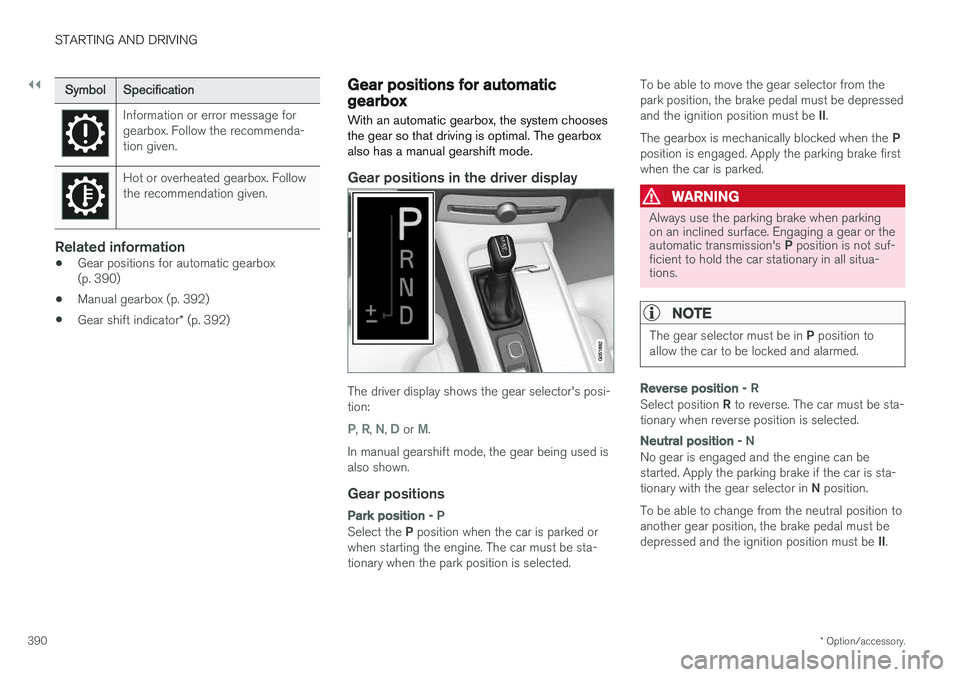
The driver display shows the gear selector's posi- tion:
P, R, N, D or M.
In manual gearshift mode, the gear being used is also shown.
Gear positions
Park position - P
Select the P position when the car is parked or
when starting the engine. The car must be sta- tionary when the park position is selected. To be able to move the gear selector from thepark position, the brake pedal must be depressed and the ignition position must be
II.
The gearbox is mechanically blocked when the P
position is engaged. Apply the parking brake first when the car is parked.
WARNING
Always use the parking brake when parking on an inclined surface. Engaging a gear or the automatic transmission's P position is not suf-
ficient to hold the car stationary in all situa- tions.
NOTE
The gear selector must be in P position to
allow the car to be locked and alarmed.
Reverse position - R
Select position R to reverse. The car must be sta-
tionary when reverse position is selected.
Neutral position - N
No gear is engaged and the engine can be started. Apply the parking brake if the car is sta- tionary with the gear selector in N position.
To be able to change from the neutral position to another gear position, the brake pedal must be depressed and the ignition position must be II.
Page 393 of 594
STARTING AND DRIVING
* Option/accessory.391
Drive position - D
D is the normal driving position. Shifting up and
down takes place automatically based on the level of acceleration and speed. The car must be stationary when changing gear from R position to
D position.
Manual gearshift mode - M
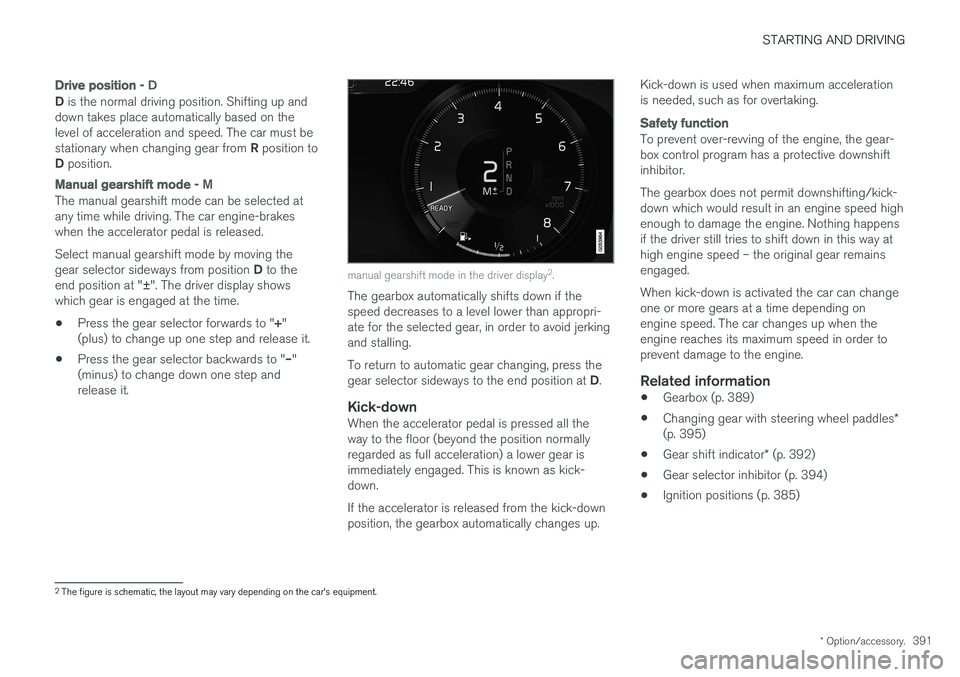
The manual gearshift mode can be selected at any time while driving. The car engine-brakeswhen the accelerator pedal is released. Select manual gearshift mode by moving the gear selector sideways from position D to the
end position at " ±". The driver display shows
which gear is engaged at the time.
• Press the gear selector forwards to "
+"
(plus) to change up one step and release it.
• Press the gear selector backwards to "
–"
(minus) to change down one step and release it.
manual gearshift mode in the driver display 2
.
The gearbox automatically shifts down if the speed decreases to a level lower than appropri-ate for the selected gear, in order to avoid jerkingand stalling. To return to automatic gear changing, press the gear selector sideways to the end position at D.
Kick-downWhen the accelerator pedal is pressed all the way to the floor (beyond the position normallyregarded as full acceleration) a lower gear isimmediately engaged. This is known as kick-down. If the accelerator is released from the kick-down position, the gearbox automatically changes up. Kick-down is used when maximum accelerationis needed, such as for overtaking.
Safety function
To prevent over-revving of the engine, the gear- box control program has a protective downshiftinhibitor. The gearbox does not permit downshifting/kick- down which would result in an engine speed highenough to damage the engine. Nothing happensif the driver still tries to shift down in this way athigh engine speed – the original gear remainsengaged. When kick-down is activated the car can change one or more gears at a time depending onengine speed. The car changes up when theengine reaches its maximum speed in order toprevent damage to the engine.
Related information
•
Gearbox (p. 389)
• Changing gear with steering wheel paddles
*
(p. 395)
• Gear shift indicator
* (p. 392)
• Gear selector inhibitor (p. 394)
• Ignition positions (p. 385)
2
The figure is schematic, the layout may vary depending on the car's equipment.