engine VOLVO V90 2017 Workshop Manual
[x] Cancel search | Manufacturer: VOLVO, Model Year: 2017, Model line: V90, Model: VOLVO V90 2017Pages: 594, PDF Size: 15.07 MB
Page 346 of 594
||
DRIVER SUPPORT
* Option/accessory.
344 If CTA has sensed that something is approaching from the side, this is also indicated with:
• an acoustic signal - the sound is heard in theleft-hand or right-hand speaker according tothe direction from which the objectapproaches.
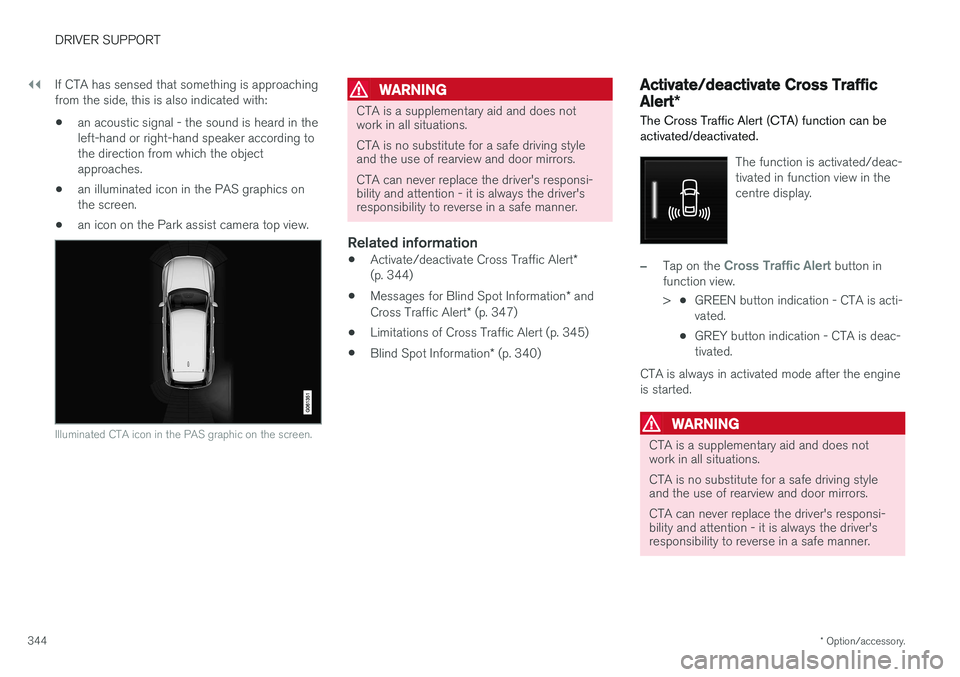
• an illuminated icon in the PAS graphics onthe screen.
• an icon on the Park assist camera top view.
Illuminated CTA icon in the PAS graphic on the screen.
WARNING
CTA is a supplementary aid and does not work in all situations. CTA is no substitute for a safe driving style and the use of rearview and door mirrors. CTA can never replace the driver's responsi- bility and attention - it is always the driver'sresponsibility to reverse in a safe manner.
Related information
•
Activate/deactivate Cross Traffic Alert
*
(p. 344)
• Messages for Blind Spot Information
* and
Cross Traffic Alert * (p. 347)
• Limitations of Cross Traffic Alert (p. 345)
• Blind Spot Information
* (p. 340)
Activate/deactivate Cross Traffic Alert *
The Cross Traffic Alert (CTA) function can be activated/deactivated.
The function is activated/deac- tivated in function view in thecentre display.
–Tap on the Cross Traffic Alert button in
function view. > •GREEN button indication - CTA is acti- vated.
• GREY button indication - CTA is deac-tivated.
CTA is always in activated mode after the engine
is started.
WARNING
CTA is a supplementary aid and does not work in all situations. CTA is no substitute for a safe driving style and the use of rearview and door mirrors. CTA can never replace the driver's responsi- bility and attention - it is always the driver'sresponsibility to reverse in a safe manner.
Page 362 of 594
DRIVER SUPPORT
360
Run-off Mitigation
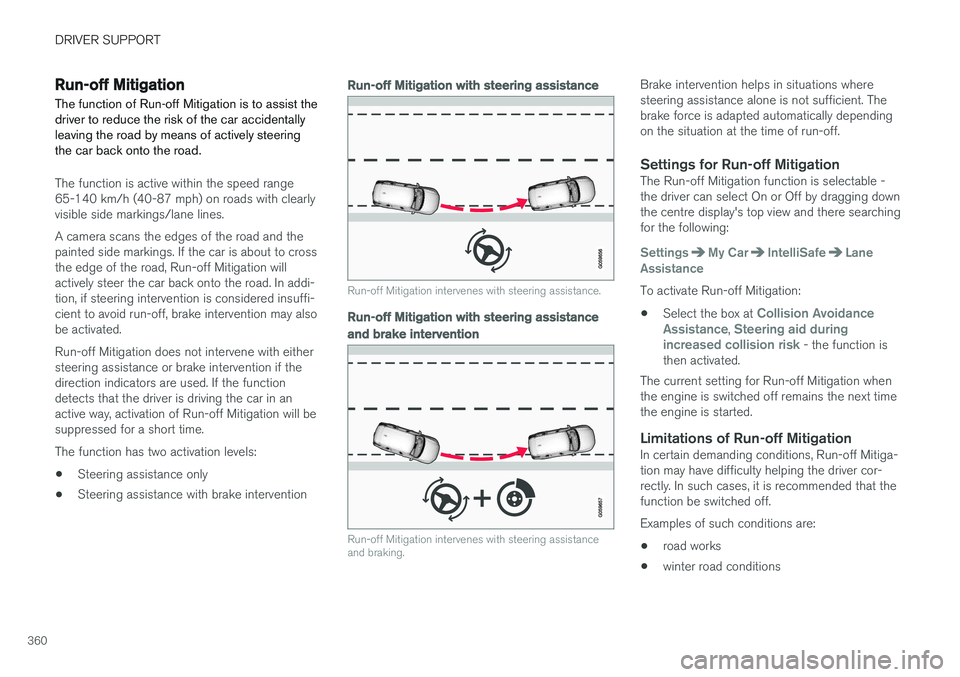
The function of Run-off Mitigation is to assist the driver to reduce the risk of the car accidentallyleaving the road by means of actively steeringthe car back onto the road.
The function is active within the speed range 65-140 km/h (40-87 mph) on roads with clearlyvisible side markings/lane lines. A camera scans the edges of the road and the painted side markings. If the car is about to crossthe edge of the road, Run-off Mitigation willactively steer the car back onto the road. In addi-tion, if steering intervention is considered insuffi-cient to avoid run-off, brake intervention may alsobe activated. Run-off Mitigation does not intervene with either steering assistance or brake intervention if thedirection indicators are used. If the functiondetects that the driver is driving the car in anactive way, activation of Run-off Mitigation will besuppressed for a short time. The function has two activation levels: • Steering assistance only
• Steering assistance with brake intervention
Run-off Mitigation with steering assistance
Run-off Mitigation intervenes with steering assistance.
Run-off Mitigation with steering assistance
and brake intervention
Run-off Mitigation intervenes with steering assistance and braking.
Brake intervention helps in situations where steering assistance alone is not sufficient. Thebrake force is adapted automatically dependingon the situation at the time of run-off.
Settings for Run-off MitigationThe Run-off Mitigation function is selectable -the driver can select On or Off by dragging downthe centre display's top view and there searchingfor the following:
SettingsMy CarIntelliSafeLane
Assistance
To activate Run-off Mitigation:
• Select the box at
Collision Avoidance
Assistance, Steering aid during
increased collision risk - the function is
then activated.
The current setting for Run-off Mitigation when the engine is switched off remains the next timethe engine is started.
Limitations of Run-off MitigationIn certain demanding conditions, Run-off Mitiga-tion may have difficulty helping the driver cor-rectly. In such cases, it is recommended that thefunction be switched off. Examples of such conditions are:
• road works
• winter road conditions
Page 366 of 594
||
DRIVER SUPPORT
* Option/accessory.
364
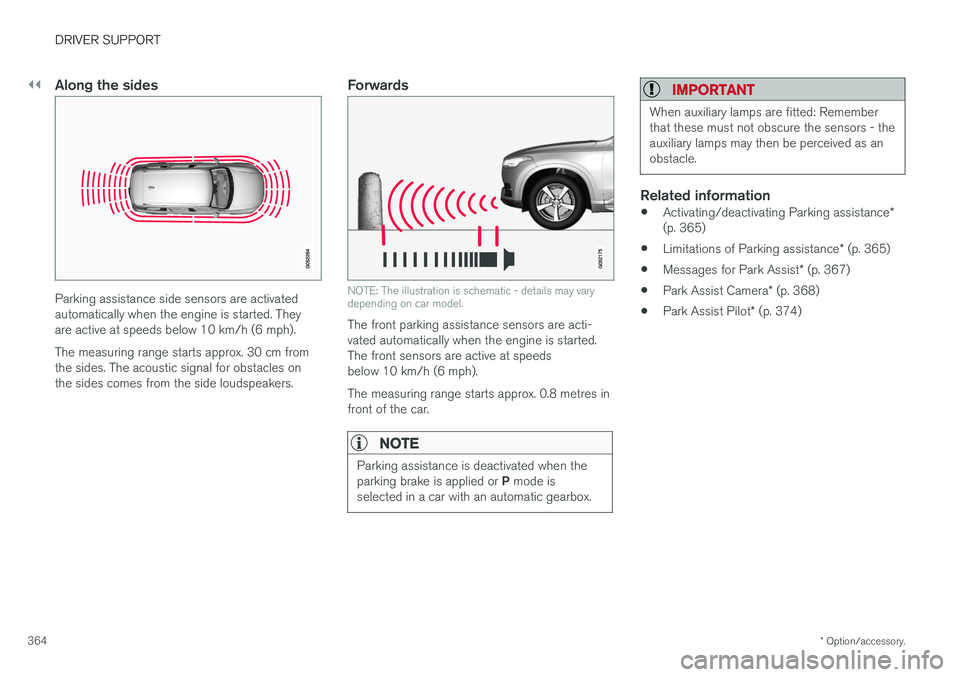
Along the sides
Parking assistance side sensors are activated automatically when the engine is started. Theyare active at speeds below 10 km/h (6 mph). The measuring range starts approx. 30 cm from the sides. The acoustic signal for obstacles onthe sides comes from the side loudspeakers.
Forwards
NOTE: The illustration is schematic - details may vary depending on car model.
The front parking assistance sensors are acti- vated automatically when the engine is started.The front sensors are active at speedsbelow 10 km/h (6 mph). The measuring range starts approx. 0.8 metres in front of the car.
NOTE
Parking assistance is deactivated when the parking brake is applied or P mode is
selected in a car with an automatic gearbox.
IMPORTANT
When auxiliary lamps are fitted: Remember that these must not obscure the sensors - theauxiliary lamps may then be perceived as anobstacle.
Related information
• Activating/deactivating Parking assistance
*
(p. 365)
• Limitations of Parking assistance
* (p. 365)
• Messages for Park Assist
* (p. 367)
• Park Assist Camera
* (p. 368)
• Park Assist Pilot
* (p. 374)
Page 367 of 594
DRIVER SUPPORT
}}
* Option/accessory.365
Activating/deactivating Parking assistance*
The Parking assistance function can be acti- vated/deactivated.
The front and side parking assistance sensors are activated automatically when the engine isstarted. The rear sensors activate if the car rollsbackwards or if reverse gear in engaged.
The function is activated/deac-tivated in function view in thecentre display. Parking assistance can also be activated/deactivated from thecamera views.
–Tap on the Park Assist button in function
view.
> Parking assistance is activated/deacti- vated, a green/grey indicator is displayed in the button.
Related information
• Park Assist
* (p. 363)
• Cross Traffic Alert
* (p. 343)
Limitations of Parking assistance *
The Parking assistance function may have limita- tions in certain situations.
NOTE
Since a towbar is configured with the car's electrical system, towbar protrusion isincluded when the function measures the dis-tance to an object behind the car.
IMPORTANT
Objects e.g. chains, thin glossy poles or low barriers may be in the "signal shadow" andare then temporarily not detected by the sen-sors - the pulsating tone may then unexpect-edly stop instead of changing over to theexpected constant tone. The sensors cannot detect high objects, such as projecting loading docks.
• In such situations, pay extra attention andmanoeuvre/reposition the car particularlyslowly or stop the current parkingmanoeuvre - there may be a high risk ofdamage to vehicles or other objects sinceinformation from the sensors is notalways reliable in such situations.
IMPORTANT
In certain conditions the parking assistance system may produce incorrect warning sig-nals that are caused by external soundsources that emit the same ultrasonic fre-quencies that the system works with. Examples of such sources include horns, wet tyres on asphalt, pneumatic brakes andexhaust noises from motorcycles, etc.
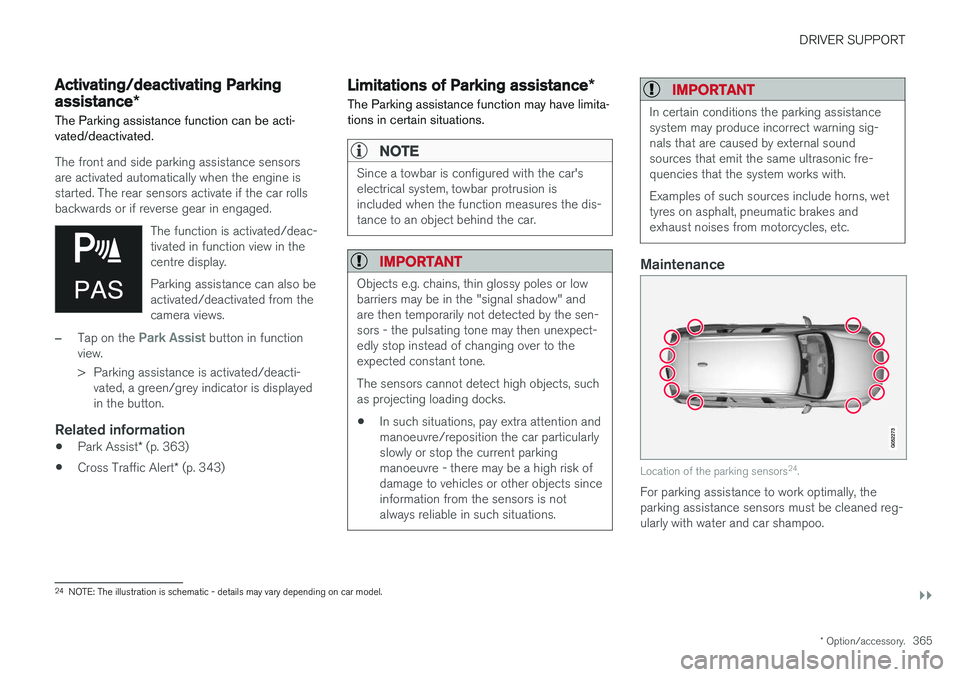
Maintenance
Location of the parking sensors 24
.
For parking assistance to work optimally, the parking assistance sensors must be cleaned reg-ularly with water and car shampoo.
24 NOTE: The illustration is schematic - details may vary depending on car model.
Page 378 of 594
DRIVER SUPPORT
* Option/accessory.
376
Parking with Active parking assistance *
The Active parking assistance (Park Assist Pilot - PAP) helps the driver park in three steps. Thefunction can also help the driver to leave a park-ing space.
NOTE
The PAP function measures the space and steers the car - the driver's task is to:
• keep a close watch around the car
• follow the instructions in the centre dis-play
• change gear (reverse/forward)
• control and maintain a safe speed
• brake and stop.
PAP can be activated if the following criteria are met once the engine has been started:
• No trailer is attached to the car.
• Speed must be lower than 30 km/h(20 mph).
NOTE
The distance between the car and parking spaces should be 0.5-1.5 metres while PAPis searching for a parking space.
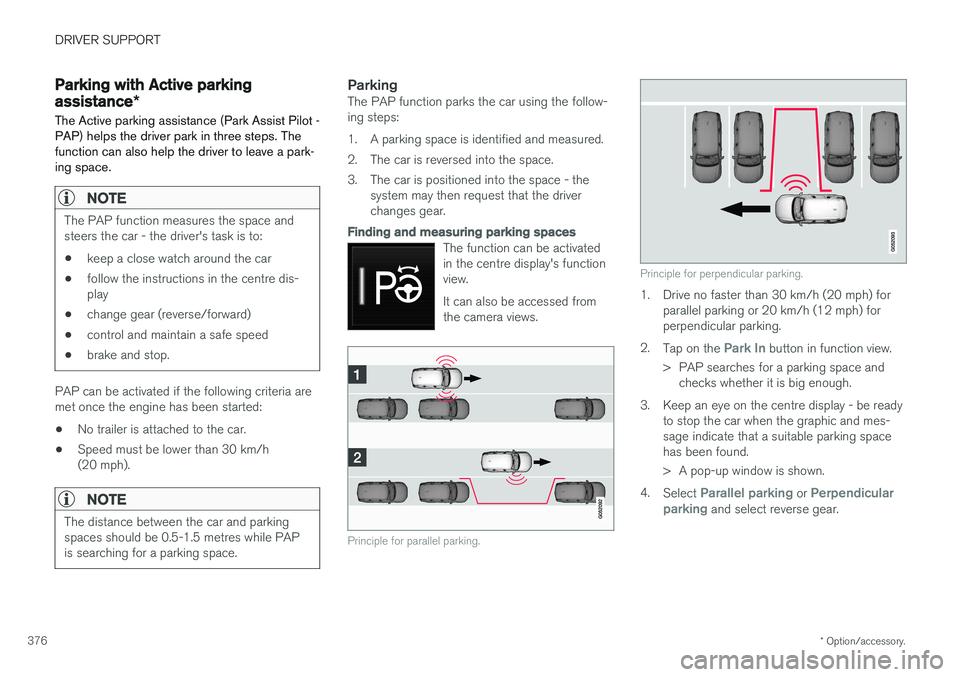
ParkingThe PAP function parks the car using the follow- ing steps:
1. A parking space is identified and measured.
2. The car is reversed into the space.
3. The car is positioned into the space - the
system may then request that the driver changes gear.
Finding and measuring parking spaces
The function can be activated in the centre display's functionview. It can also be accessed from the camera views.
Principle for parallel parking.
Principle for perpendicular parking.
1. Drive no faster than 30 km/h (20 mph) forparallel parking or 20 km/h (12 mph) for perpendicular parking.
2. Tap on the
Park In button in function view.
> PAP searches for a parking space and checks whether it is big enough.
3. Keep an eye on the centre display - be ready to stop the car when the graphic and mes- sage indicate that a suitable parking spacehas been found.
> A pop-up window is shown.
4. Select
Parallel parking or Perpendicular
parking and select reverse gear.
Page 386 of 594
STARTING AND DRIVING
* Option/accessory.
384
Alcohol lock *
The function of the alcohol lock is to prevent the car from being driven by individuals under theinfluence of alcohol. Before the engine can bestarted the driver must take a breath test thatverifies that he/she is not under the influence ofalcohol. Alcohol lock calibration takes place inaccordance with each market's limit value inforce for driving legally.
The car has an interface for the electrical con- nection of the different makes and models ofalcohol lock recommended by Volvo. The inter-face facilitates alcohol lock connection, and givesthe option of an integrated function includingmessages related to the alcohol lock in the car'smain display. For information about a specificalcohol lock, please refer to its owner's manual.
WARNING
The alcohol lock is an aid and does not exempt the driver from responsibility. It isalways the responsibility of the driver to besober and to drive the car safely.
Bypass of the alcohol lock *
In the event of an emergency situation or the alcohol lock is out of order, it is possible tobypass the alcohol lock in order to drive the car.
For deactivation via the alcohol lock, see the sep- arate instructions for that specific lock. Activating the bypass function (Bypass)
NOTE
All bypass activation is logged and saved in the memory in the alcohol lock's control unit.It is not possible to undo a bypass.
The message, Blow into alcolock Bypass
instead?, is shown in the screen:
–Select Bypass by pressing once on the O
button on the steering wheel's right-hand keypad.
> The alcohol lock is now bypassed and the car can be started.
The number of bypasses possible before service is required is selected during alcohol lock instal-lation.
Related information
• Before starting the engine with the alcohollock (p. 384)
• Starting the car (p. 386)
Before starting the engine with the alcohol lock
The alcohol lock is activated automatically and is then ready for use when the car is opened.
To bear in mindIn order to obtain correct function and as accu- rate a measurement result as possible: • Avoid eating or drinking approx. 5 minutes before the breath test.
• Avoid excess windscreen washing - the alco-hol in the washer fluid may result in an incor-rect measurement result.
NOTE
After a completed period of driving, the engine can be restarted within 30 minuteswithout a new breath test.
Related information
•
Bypass of the alcohol lock
* (p. 384)
• Starting the car (p. 386)
Page 387 of 594
STARTING AND DRIVING
}}
385
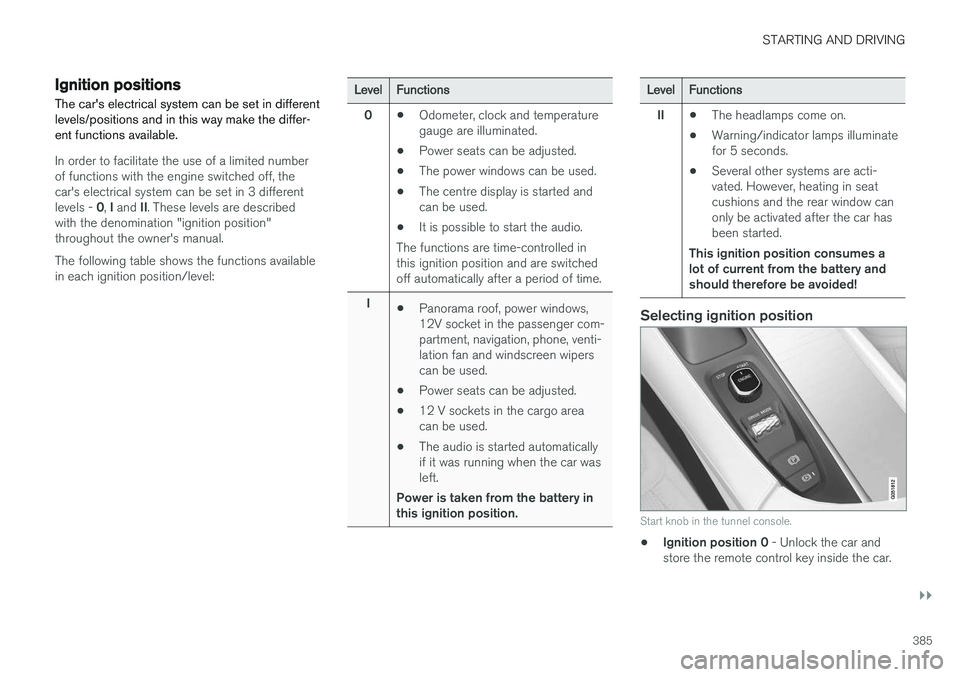
Ignition positions The car's electrical system can be set in different levels/positions and in this way make the differ-ent functions available.
In order to facilitate the use of a limited number of functions with the engine switched off, thecar's electrical system can be set in 3 different levels - 0, I and II. These levels are described
with the denomination "ignition position" throughout the owner's manual. The following table shows the functions available in each ignition position/level:
Level Functions
0 •Odometer, clock and temperature gauge are illuminated.
• Power seats can be adjusted.
• The power windows can be used.
• The centre display is started andcan be used.
• It is possible to start the audio.
The functions are time-controlled inthis ignition position and are switchedoff automatically after a period of time.
I •Panorama roof, power windows,12V socket in the passenger com-partment, navigation, phone, venti-lation fan and windscreen wiperscan be used.
• Power seats can be adjusted.
• 12 V sockets in the cargo areacan be used.
• The audio is started automaticallyif it was running when the car wasleft.
Power is taken from the battery inthis ignition position.Level Functions
II •The headlamps come on.
• Warning/indicator lamps illuminate for 5 seconds.
• Several other systems are acti-vated. However, heating in seatcushions and the rear window canonly be activated after the car hasbeen started.
This ignition position consumes alot of current from the battery andshould therefore be avoided!
Selecting ignition position
Start knob in the tunnel console.
• Ignition position 0
- Unlock the car and
store the remote control key inside the car.
Page 388 of 594
||
STARTING AND DRIVING
* Option/accessory.
386
NOTE
To reach level I or II without starting the
engine - do not depress the brake pedal, or
the clutch pedal for cars with manual gear changing, when these ignition positions are tobe selected.
• Ignition position I
- Turn the ignition dial to
START and release it. The control automati-
cally returns to its starting position.
• Ignition position II
- Turn the ignition dial to
START and hold it in the START position for
approx. 4 seconds. Then release the knob, which automatically returns to its startingposition.
• Back to ignition position 0
- To return to
ignition position 0 from position I and II -
Turn the ignition dial to STOP and release it.
The control automatically returns to its star-ting position.
Related information
• Starting the car (p. 386)
• Switching off the car (p. 387)
• Driver display (p. 90)
Starting the car
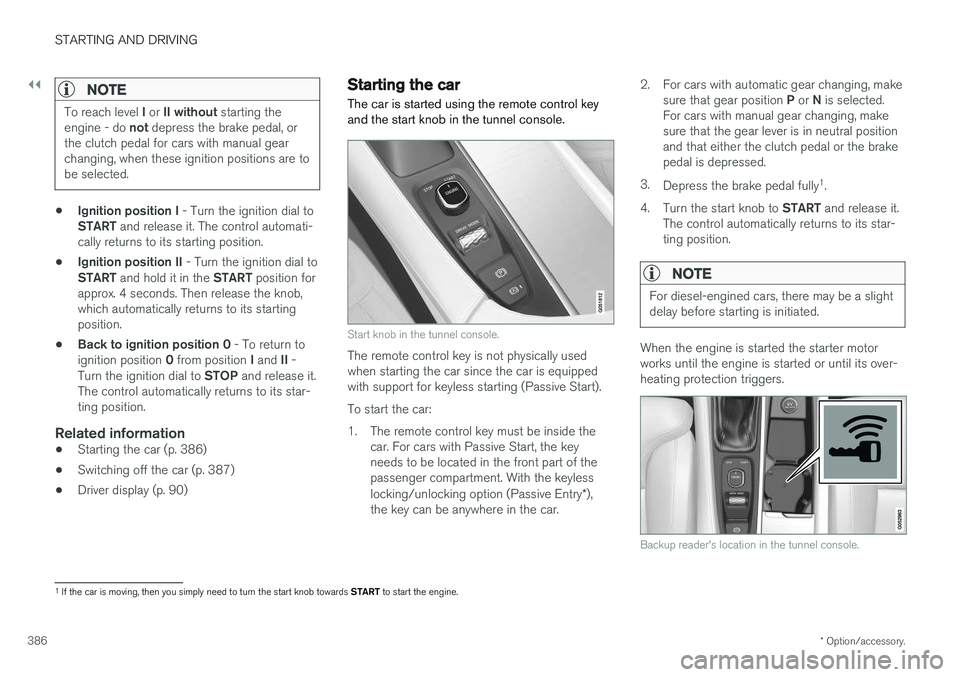
The car is started using the remote control key and the start knob in the tunnel console.
Start knob in the tunnel console.
The remote control key is not physically used when starting the car since the car is equippedwith support for keyless starting (Passive Start). To start the car:
1. The remote control key must be inside the car. For cars with Passive Start, the key needs to be located in the front part of thepassenger compartment. With the keyless locking/unlocking option (Passive Entry *),
the key can be anywhere in the car. 2. For cars with automatic gear changing, make
sure that gear position P or N is selected.
For cars with manual gear changing, make sure that the gear lever is in neutral positionand that either the clutch pedal or the brakepedal is depressed.
3. Depress the brake pedal fully 1
.
4. Turn the start knob to START and release it.
The control automatically returns to its star-ting position.
NOTE
For diesel-engined cars, there may be a slight delay before starting is initiated.
When the engine is started the starter motor works until the engine is started or until its over-heating protection triggers.
Backup reader's location in the tunnel console.
1 If the car is moving, then you simply need to turn the start knob towards START to start the engine.
Page 389 of 594
STARTING AND DRIVING
387
If the message
Car key not found is shown in
the driver display when starting, place the remote control key on the backup reader in the cupholder. Then try to start again.
NOTE
When the remote control key is placed in the cup holder, make sure that no other car keys,metal objects or electronic apparatus (e.g.mobile phones, tablets, laptops or chargers)are in the cup holder. Several car keys closeto each other in the cup holder can causeinterference with each other.
IMPORTANT
If the engine fails to start after 3 attempts - wait for 3 minutes before making a furtherattempt. Starting capacity increases if the bat-tery is allowed to recover.
WARNING
Never remove the remote control key from
the car while driving or during towing.
WARNING
Always take the remote control key out from the car when leaving the car and make surethe car's electrical system is in ignition posi- tion 0 - especially if there are children in the
car.
NOTE
The idling speed can be noticeably higher than normal for certain engine types duringcold starting. This is done in order that theemissions system can reach normal operatingtemperature as quickly as possible, whichminimises exhaust emissions and protects theenvironment.
Related information
• Ignition positions (p. 385)
• Switching off the car (p. 387)
• Remote control key (p. 236)
• Replacing the battery in the remote control key (p. 257)
Switching off the car
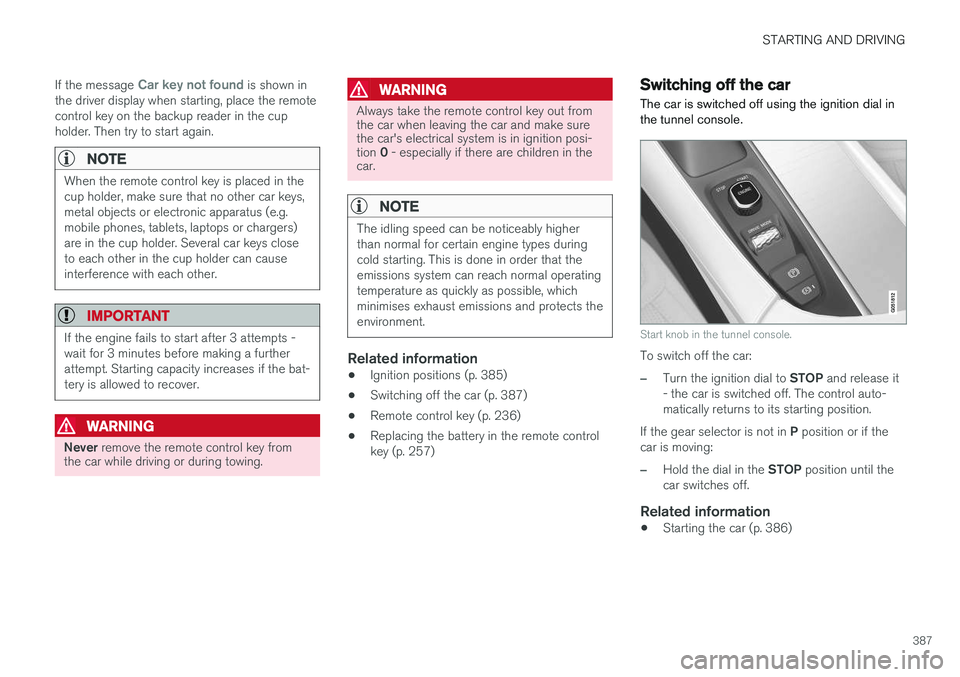
The car is switched off using the ignition dial in the tunnel console.
Start knob in the tunnel console.
To switch off the car:
–Turn the ignition dial to STOP and release it
- the car is switched off. The control auto- matically returns to its starting position.
If the gear selector is not in P position or if the
car is moving:
–Hold the dial in the STOP position until the
car switches off.
Related information
• Starting the car (p. 386)
Page 390 of 594
STARTING AND DRIVING
388
Steering lock
The steering lock makes steering difficult if the car is e.g. taken unlawfully. A mechanical noisecan be perceived when the steering lock locksor unlocks.
Activating the steering lockThe steering lock is activated when the car is locked from the outside and the engine isswitched off. If the car is left unlocked then thesteering lock will lock automatically after a while.
Deactivating the steering lockThe steering lock is deactivated when the car isunlocked from outside. If the car is not locked, itis sufficient that the remote control key is insidethe passenger compartment and the engine is started by turning the start knob towards START
in order to unlock the steering lock.
Related information
• Starting the car (p. 386)
• Switching off the car (p. 387)
• Steering wheel (p. 131)
Using jump starting with another battery
If the starter battery is discharged then the car can be started with current from another battery.
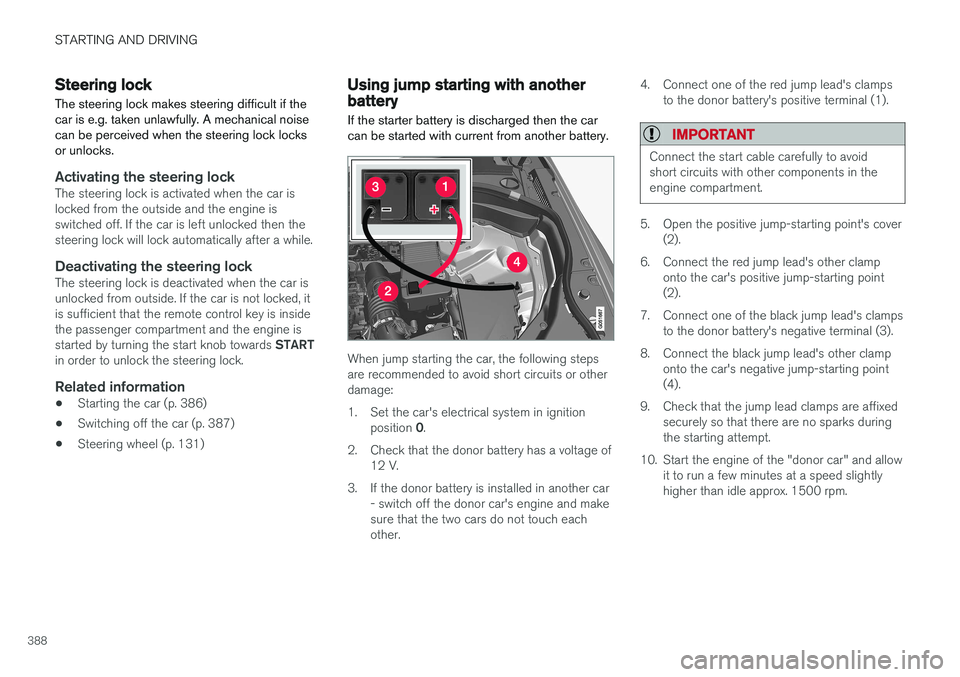
When jump starting the car, the following steps are recommended to avoid short circuits or otherdamage:
1. Set the car's electrical system in ignition position 0.
2. Check that the donor battery has a voltage of 12 V.
3. If the donor battery is installed in another car - switch off the donor car's engine and make sure that the two cars do not touch eachother. 4. Connect one of the red jump lead's clamps
to the donor battery's positive terminal (1).
IMPORTANT
Connect the start cable carefully to avoid short circuits with other components in theengine compartment.
5. Open the positive jump-starting point's cover(2).
6. Connect the red jump lead's other clamp onto the car's positive jump-starting point (2).
7. Connect one of the black jump lead's clamps to the donor battery's negative terminal (3).
8. Connect the black jump lead's other clamp onto the car's negative jump-starting point(4).
9. Check that the jump lead clamps are affixed securely so that there are no sparks duringthe starting attempt.
10. Start the engine of the "donor car" and allow it to run a few minutes at a speed slightlyhigher than idle approx. 1500 rpm.