phone VOLVO V90 2017 Workshop Manual
[x] Cancel search | Manufacturer: VOLVO, Model Year: 2017, Model line: V90, Model: VOLVO V90 2017Pages: 594, PDF Size: 15.07 MB
Page 467 of 594
AUDIO AND MEDIA
}}
* Option/accessory.465
When a phone is connected to the car, it is saved for future use. When the maximum number ofsaved phones (50) is reached, the first con-nected phones are deleted. To show the list ofsaved networks or manually delete saved net- works, press
SettingsWi-FiSaved
networks.
For network connection requirements, see the section “Technology and security for Wi-Fi”.
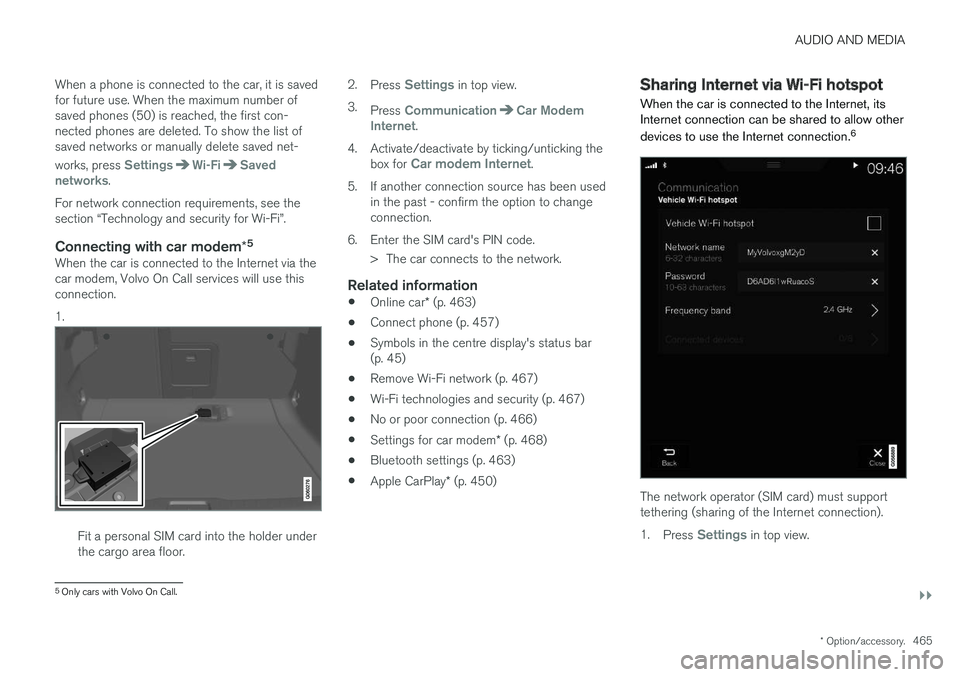
Connecting with car modem *5When the car is connected to the Internet via thecar modem, Volvo On Call services will use thisconnection. 1.
Fit a personal SIM card into the holder under the cargo area floor. 2.
Press
Settings in top view.
3. Press
CommunicationCar Modem
Internet.
4. Activate/deactivate by ticking/unticking the box for
Car modem Internet.
5. If another connection source has been used in the past - confirm the option to change connection.
6. Enter the SIM card's PIN code. > The car connects to the network.
Related information
• Online car
* (p. 463)
• Connect phone (p. 457)
• Symbols in the centre display's status bar(p. 45)
• Remove Wi-Fi network (p. 467)
• Wi-Fi technologies and security (p. 467)
• No or poor connection (p. 466)
• Settings for car modem
* (p. 468)
• Bluetooth settings (p. 463)
• Apple CarPlay
* (p. 450)
Sharing Internet via Wi-Fi hotspot
When the car is connected to the Internet, its Internet connection can be shared to allow other devices to use the Internet connection. 6
The network operator (SIM card) must support tethering (sharing of the Internet connection). 1.
Press
Settings in top view.
5
Only cars with Volvo On Call.
Page 468 of 594
||
AUDIO AND MEDIA
* Option/accessory.
466 2.
Press
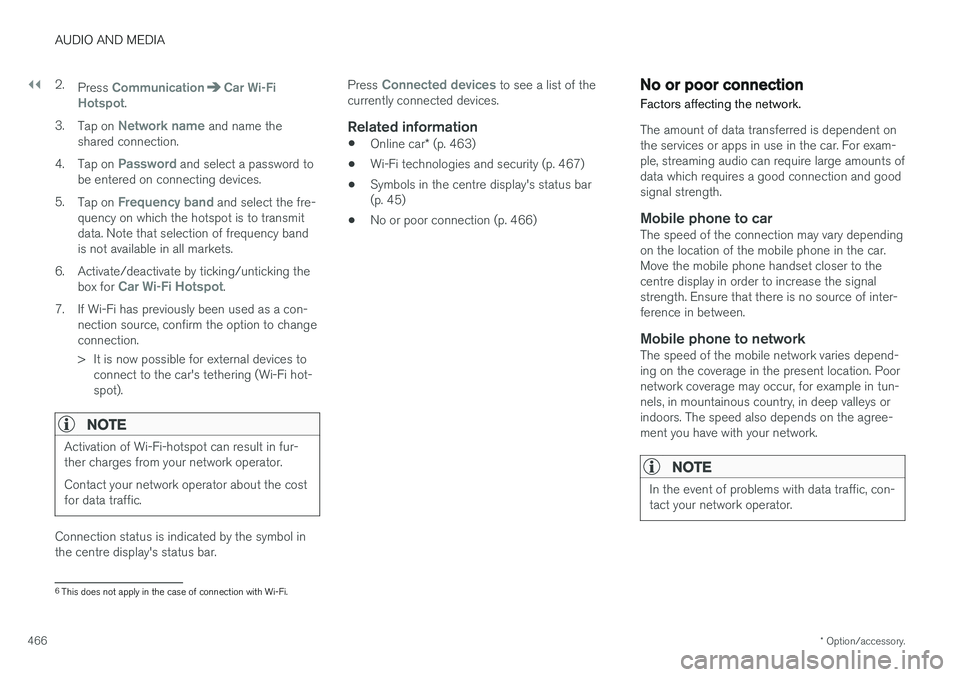
CommunicationCar Wi-Fi
Hotspot.
3. Tap on
Network name and name the
shared connection.
4. Tap on
Password and select a password to
be entered on connecting devices.
5. Tap on
Frequency band and select the fre-
quency on which the hotspot is to transmit data. Note that selection of frequency bandis not available in all markets.
6. Activate/deactivate by ticking/unticking the box for
Car Wi-Fi Hotspot.
7. If Wi-Fi has previously been used as a con- nection source, confirm the option to change connection.
> It is now possible for external devices toconnect to the car's tethering (Wi-Fi hot- spot).
NOTE
Activation of Wi-Fi-hotspot can result in fur- ther charges from your network operator. Contact your network operator about the cost for data traffic.
Connection status is indicated by the symbol in the centre display's status bar. Press
Connected devices to see a list of the
currently connected devices.
Related information
• Online car
* (p. 463)
• Wi-Fi technologies and security (p. 467)
• Symbols in the centre display's status bar (p. 45)
• No or poor connection (p. 466)
No or poor connection
Factors affecting the network.
The amount of data transferred is dependent on the services or apps in use in the car. For exam-ple, streaming audio can require large amounts ofdata which requires a good connection and goodsignal strength.
Mobile phone to carThe speed of the connection may vary dependingon the location of the mobile phone in the car.Move the mobile phone handset closer to thecentre display in order to increase the signalstrength. Ensure that there is no source of inter-ference in between.
Mobile phone to networkThe speed of the mobile network varies depend-ing on the coverage in the present location. Poornetwork coverage may occur, for example in tun-nels, in mountainous country, in deep valleys orindoors. The speed also depends on the agree-ment you have with your network.
NOTE
In the event of problems with data traffic, con- tact your network operator.
6 This does not apply in the case of connection with Wi-Fi.
Page 469 of 594
AUDIO AND MEDIA
* Option/accessory.467
Restarting the phoneIf there are problems with the connection then it may help to restart the phone.
Related information
•Online car
* (p. 463)
• Connecting the car (p. 464)
Remove Wi-Fi network
Removing a network that is not to be used.
1. Press Settings in top view.
2. Press
Wi-FiSaved networks.
3. Tap on
Forget alongside the network to be
removed.
4. Confirm the selection. > The car will no longer connect to the net-work in future.
Remove all networksAll networks can be removed simultaneously by restoring factory settings. Please note that alluser data and system settings are reset to origi-nal factory settings.
Related information
• Online car
* (p. 463)
• Connecting the car (p. 464)
• Resetting settings in the settings view(p. 173)
Wi-Fi technologies and security
Possible network types to connect to.
It is only possible to connect to the following types of network:
• Frequency — 2.4 or 5 GHz 7
.
• Standards — 802.11 a/b/g/n.
• Security type - WPA2-AES-CCMP.
The car
Page 473 of 594
AUDIO AND MEDIA
}}
471
Parts of the content are copyright
© of
Gracenote or its suppliers. Gracenote,Gracenote logo and logotype, "Powered by Gracenote" and Gracenote MusicIDare either registered trademarks or trademarks ofGracenote, Inc. in the USA and/or other coun-tries.
Gracenote ®
End User License Agreement
This program or device contains software from Gracenote, Inc. of Emeryville, California, USA("Gracenote"). The software from Gracenote("Gracenote software") activates this program toperform disc and/or file identification and obtainmusic-related information, including name, artist,track and title ("Gracenote data") from onlineservers or embedded databases (together called"Gracenote servers") and in order to performother actions. You may only use Gracenote datain accordance with the intended end-user func-tions for this program or this device. You agree to only use Gracenote data, Gracenote software and Gracenote servers for your ownpersonal non-commercial use. You agree not toassign, copy, transfer or transmit this Gracenotesoftware or any Gracenote data to any third party.YOU AGREE NOT TO USE OR EXPLOITGRACENOTE DATA, GRACENOTE SOFTWAREOR GRACENOTE SERVERS, EXCEPT ASEXPRESSLY PERMITTED IN THIS AGREEMENT. You agree that your non-exclusive right to use Gracenote data, Gracenote software and Grace- note servers will be terminated if you violatethese restrictions. If your license is terminatedyou agree to cease all use of Gracenote data,Gracenote software and Gracenote servers.Gracenote holds exclusive rights to all Gracenotedata, all Gracenote software and all Gracenoteservers, including all ownership rights. Gracenotewill under no circumstances have any obligationto pay you for any information you provide. Youagree that Gracenote, Inc. may enforce the com-pany's rights under this agreement against youdirectly in its own name. The Gracenote service uses a unique identifier to track enquiries for statistical purposes. The pur-pose of a randomly assigned numeric identifier isto enable the Gracenote service to count enqui-ries without knowing anything about who you are.Additional information is available on the webpage for Gracenote's privacy policy for the Grace-note service. The Gracenote software and everything included in Gracenote data are licensed to you "as is".Gracenote provides no undertakings or warran-ties, express or implied, as to the accuracy of theGracenote data contained in the Gracenote serv-ers. Gracenote reserves the right to delete datafrom the Gracenote servers or to change datacategories for any reason that Gracenote deemssufficient. No warranty is provided that the Grace-note software or Gracenote servers are fault-freeor that the Gracenote software or Gracenoteservers will operate without interruption. Grace-
note has no obligation to provide you with new,improved or additional data types or categoriesthat Gracenote may provide in the future, and thecompany reserves the right to discontinue itsservices at any time. GRACENOTE DISCLAIMS ALL WARRANTIES, EITHER EXPRESS OR IMPLIED, INCLUDING,BUT NOT LIMITED TO, THE IMPLIED WARRAN-TIES OF MERCHANTABILITY, FITNESS FOR APARTICULAR PURPOSE, TITLE AND NON-INFRINGEMENT OF INTELLECTUAL PROP-ERTY RIGHTS. GRACENOTE DOES NOT GUAR-ANTEE THE RESULTS OBTAINED THROUGHYOUR USE OF THE GRACENOTE SOFTWAREOR A GRACENOTE SERVER. GRACENOTEWILL IN NO EVENT BE LIABLE FOR ANY CON-SEQUENTIAL DAMAGE OR FOR ANY LOSTPROFITS OR REVENUES.
©
Gracenote, Inc. 2009
Sensus software
This software uses parts of sources from clib2 and Prex Embedded Real-time OS - Source(Copyright (c) 1982, 1986, 1991, 1993, 1994),and Quercus Robusta (Copyright (c) 1990,1993), The Regents of the University ofCalifornia. All or some portions are derived frommaterial licensed to the University of California byAmerican Telephone and Telegraph Co. or UnixSystem Laboratories, Inc. and are reproducedherein with the permission of UNIX SystemLaboratories, Inc. Redistribution and use in
Page 475 of 594
AUDIO AND MEDIA
}}
473
The website provides the Source Code "As Is" and without warranty of any kind. By downloading Source Code, you expressly assume all risk and liability associated withdownloading and using the Source Code andcomplying with the user agreements thataccompany each Source Code. Please note that we cannot respond to any inquiries regarding the source code.
camellia:1.2.0Copyright (c) 2006, 2007 NTT (Nippon Telegraph and Telephone Corporation). All rights reserved. Redistribution and use in source and binary forms, with or without modification, are permittedprovided that the following conditions are met:
1. Redistributions of source code must retain
the above copyright notice, this list of conditions and the following disclaimer asthe first lines of this file unmodified.
2. Redistributions in binary form must reproduce the above copyright notice, this listof conditions and the following disclaimer inthe documentation and/or other materialsprovided with the distribution.
THIS SOFTWARE IS PROVIDED BY NTT ``ASIS'' AND ANY EXPRESS OR IMPLIEDWARRANTIES, INCLUDING, BUT NOT LIMITEDTO, THE IMPLIED WARRANTIES OFMERCHANTABILITY AND FITNESS FOR A PARTICULAR PURPOSE ARE DISCLAIMED. INNO EVENT SHALL NTT BE LIABLE FOR ANYDIRECT, INDIRECT, INCIDENTAL, SPECIAL,EXEMPLARY, OR CONSEQUENTIAL DAMAGES(INCLUDING, BUT NOT LIMITED TO,PROCUREMENT OF SUBSTITUTE GOODS ORSERVICES; LOSS OF USE, DATA, OR PROFITS;OR BUSINESS INTERRUPTION) HOWEVERCAUSED AND ON ANY THEORY OF LIABILITY,WHETHER IN CONTRACT, STRICT LIABILITY,OR TORT (INCLUDING NEGLIGENCE OROTHERWISE) ARISING IN ANY WAY OUT OFTHE USE OF THIS SOFTWARE, EVEN IFADVISED OF THE POSSIBILITY OF SUCHDAMAGE.
Unicode: 5.1.0COPYRIGHT AND PERMISSION NOTICE Copyright c 1991-2013 Unicode, Inc. All rights reserved. Distributed under the Terms of Use inhttp://www.unicode.org/copyright.html. Permission is hereby granted, free of charge, to any person obtaining a copy of the Unicode datafiles and any associated documentation (the"Data Files") or Unicode software and anyassociated documentation (the "Software") todeal in the Data Files or Software withoutrestriction, including without limitation the rightsto use, copy, modify, merge, publish, distribute,and/or sell copies of the Data Files or Software,and to permit persons to whom the Data Files orSoftware are furnished to do so, provided that (a)
the above copyright notice(s) and this permissionnotice appear with all copies of the Data Files orSoftware, (b) both the above copyright notice(s)and this permission notice appear in associateddocumentation, and (c) there is clear notice ineach modified Data File or in the Software aswell as in the documentation associated with theData File(s) or Software that the data or softwarehas been modified. THE DATA FILES AND SOFTWARE ARE PROVIDED "AS IS", WITHOUT WARRANTY OFANY KIND, EXPRESS OR IMPLIED, INCLUDINGBUT NOT LIMITED TO THE WARRANTIES OFMERCHANTABILITY, FITNESS FOR APARTICULAR PURPOSE ANDNONINFRINGEMENT OF THIRD PARTYRIGHTS. IN NO EVENT SHALL THECOPYRIGHT HOLDER OR HOLDERSINCLUDED IN THIS NOTICE BE LIABLE FORANY CLAIM, OR ANY SPECIAL INDIRECT ORCONSEQUENTIAL DAMAGES, OR ANYDAMAGES WHATSOEVER RESULTING FROMLOSS OF USE, DATA OR PROFITS, WHETHERIN AN ACTION OF CONTRACT, NEGLIGENCEOR OTHER TORTIOUS ACTION, ARISING OUTOF OR IN CONNECTION WITH THE USE ORPERFORMANCE OF THE DATA FILES ORSOFTWARE. Except as contained in this notice, the name of a copyright holder shall not be used in advertisingor otherwise to promote the sale, use or other
Page 579 of 594
ALPHABETICAL INDEX
577
1, 2, 3 ...
4WD 405
A
A/C (Air conditioning) 190 ABSanti-lock brakes 406
ACC – Adaptive cruise control 290, 299
Accessories and extra equipment 23
Active bending lights 141
Active main beam 138
Active Park Assist 374 function 374
Limitations 379
operation 376
Symbols and messages 381
Active Yaw Control 273
Adaptation of headlamp beam 141
Adapting driving characteristics 272, 400
Adaptive Cruise Control 290, 299 change cruise control functionality 301
fault tracing 300
function 290
managing speed 294, 295
overtaking 298
radar sensor 318
setting the time interval 296
standby mode 297
temporary deactivation 297
Additional heater (Auxiliary heater) 215
Adjusting the steering wheel 132Aerial location 240
Airbag 63 Activating/deactivating 66
driver's side 64
passenger side 64, 66
Airbag, see Airbag 63
Air conditioning 190Air conditioning, fluid volume and grade 571
Air conditioning system 182, 186 repair 520
Air distribution 197 Air vents 197, 199
change 198
defrosting 194
Recirculation 196
table of options 201
Air quality 184, 185 allergies and asthma 185
passenger compartment filter 185Air recirculation 196
Alarm 262automatic re-arming 264
deactivation 264
reduced alarm level 262
Alcohol lock 384
Allergy and asthma inducing substances. 185
All Wheel Drive, (AWD) 405
All Wheel Drive (AWD) 405
Android Auto 453
Apple CarPlay 450, 451Applications settings 178
Approach lighting 148
Apps 434 download, update and uninstall 468
Ashtray 224
Audio and media 434
Audio settings 435, 463 media 448
phone 462
play media 443
Text message 461
Auto climate control 189
Automatic brake 412 after collision 408
ALPHABETICAL INDEX
Page 580 of 594
ALPHABETICAL INDEX
578Automatic car washes 549 Automatic engine stop
auto-stop 396
Automatic gearbox 390 trailer 428
Automatic relocking 242
Automatic speed limiter 281AUX jack for connecting media 448
Auxiliary heater 215
AWD, All Wheel Drive 405
B
Backrest front seat, adjusting 121, 122, 124
rear seat, lowering 130
Bag holder 228
Battery 388, 530 jump starting 388
maintenance 530
overload 415
start 530
support 533
symbols on the battery 533
warning symbols 533
Bi-Fuel introduction 54
BLIS 340, 342, 343 Bluetooth connect 447
connect car to Internet 464
phone 456
settings 463
Bonnet, opening 514
Book service and repair 506Brake assist after collision 408
Brake fluid grade 570
Brake functions 406
Brake light 143
Brakes 406 Anti-lock braking system, ABS 406
automatic when stationary 412
brake assist system, BAS 408
brake light 143
brake system 406
emergency brake lights 408
handbrake 409, 410, 411
bulbs, specifications 526C
Camera sensor 337
Car care 549 Leather upholstery 552
Car functions in centre display 47
Cargo area 226 electrical socket 220
lighting 146
mounting points 228
protective net 232
Cargo cover 230
Cargo grille 233
Car holiday 415
Car key battery low 257Car modem connect car to Internet 464
settings 468
Car status 506 Tyre pressure 487
Car upholstery 552
Car washing 549Catalytic converter Recovery 432
CD player 446
central locking 245
Page 586 of 594
ALPHABETICAL INDEX
584Misting
condensation in headlamps 549
Mobile phone, see Phone 457
Mood lighting 146
N
Net cargo area 232
O
octane rating 419
Oil, see also Engine oil 567, 569
Oil level low 517
Online car 463book service and repair 506
connect car 464
no or poor connection 466
system updates 510
Options/accessories 19
Output 566
outside temperature gauge 98
Overheating 414, 428
Owner's manual 19 ecolabelling 32
in centre display 15, 16
Owner information 14
Owner
Page 590 of 594
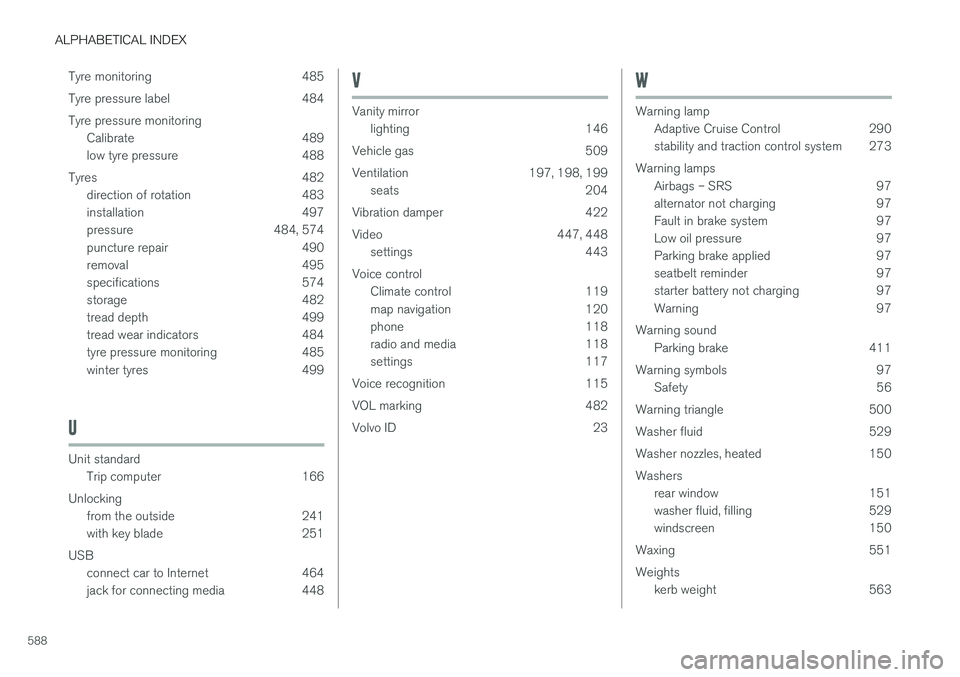
ALPHABETICAL INDEX
588Tyre monitoring 485
Tyre pressure label 484Tyre pressure monitoring
Calibrate 489
low tyre pressure 488
Tyres 482 direction of rotation 483
installation 497
pressure 484, 574
puncture repair 490
removal 495
specifications 574
storage 482
tread depth 499
tread wear indicators 484
tyre pressure monitoring 485
winter tyres 499
U
Unit standardTrip computer 166
Unlocking from the outside 241
with key blade 251
USB connect car to Internet 464
jack for connecting media 448
V
Vanity mirror lighting 146
Vehicle gas 509
Ventilation 197, 198, 199 seats 204
Vibration damper 422
Video 447, 448 settings 443
Voice control Climate control 119
map navigation 120
phone 118
radio and media 118
settings 117
Voice recognition 115
VOL marking 482
Volvo ID 23
W
Warning lamp Adaptive Cruise Control 290
stability and traction control system 273
Warning lamps Airbags – SRS 97
alternator not charging 97
Fault in brake system 97
Low oil pressure 97
Parking brake applied 97
seatbelt reminder 97
starter battery not charging 97
Warning 97
Warning sound Parking brake 411
Warning symbols 97 Safety 56
Warning triangle 500
Washer fluid 529
Washer nozzles, heated 150Washers rear window 151
washer fluid, filling 529
windscreen 150
Waxing 551 Weights kerb weight 563