phone VOLVO V90 2017 Owner's Manual
[x] Cancel search | Manufacturer: VOLVO, Model Year: 2017, Model line: V90, Model: VOLVO V90 2017Pages: 594, PDF Size: 15.07 MB
Page 120 of 594
INSTRUMENTS AND CONTROLS
* Option/accessory.
118
Voice recognition control of the phone 11
Command for voice recognition control of a Bluetooth-connected mobile phone to e.g. call acontact, a number, or to listen to a message.
To specify a contact in the phone book, the voice recognition command must include contact infor-mation that is entered in the phone book. If a contact, e.g.
Robyn Smith, has several phone
numbers then the number category can also be stated, e.g.
Home or Mobile: "Call Robin
Smith Mobile".
Tap on
and say one of the following com-
mands:
• "
Call [contact]" - dials the selected contact
from the phone book.
• "
Call [phone number]" - dials the phone
number.
• "
Recent calls" - displays the call list.
• "
Read message" - message is read out. If
there are several messages - select which message should be read out.
Related information
• Voice recognition (p. 115)
• Using voice recognition (p. 116)
• Settings for voice recognition (p. 117)
Voice recognition control of radio and media 12
Command for voice recognition control of radio and media player.
Tap on and say one of the following com-
mands:
• "
Media" - starts a dialogue for media and
radio and shows examples of commands.
• "
Play [artist]" - plays back music by the
selected artist.
• "
Play [song title]" - plays back the selected
song.
• "
Play [song title] from [album]" - plays
back the selected song from the selected album.
• "
Play [TV channel name]" - starts the
selected TV channel.
• "
Play [radio station]" - starts playing back
the selected radio channel.
• "
Tune to [frequency]" - starts the selected
radio frequency in the current frequency band. If no radio source is active, the FMband is started by default.
• "
Tune to [frequency] [wavelength]" -
starts the selected radio frequency in the selected frequency band. •
"
Radio" - starts FM radio.
• "
Radio FM" - starts FM radio.
• "
Radio AM" - starts AM radio.
• "
DAB " - starts DAB radio.
• "
TV" - starts playback from TV
*.
• "
CD" - starts playback from CD
*.
• "
USB" - starts playback from USB.
• "
iPod" - starts playback from iPod.
• "
Bluetooth" - starts playback from a Blue-
tooth-connected media source.
• "
Similar music" — plays back music similar
to the music currently playing back from USB devices.
Related information
• Voice recognition (p. 115)
• Using voice recognition (p. 116)
• Settings for voice recognition (p. 117)
11
Applies to certain markets.
12 Applies to certain markets.
Page 122 of 594
INSTRUMENTS AND CONTROLS
120
Voice recognition and map navigation14
Command for voice control of the navigation system, e.g. set destination or pause guidance.
Tap on and say one of the following com-
mands:
• “
Navigation” - Initiates a navigation dialogue
and shows examples of commands.
• "
Take me home" - Guidance is given to theHome position.
• "
Go to [City]" - Specifies a city as a desti-
nation. Example "Drive to London".
• "
Go to [Address]" - Specifies an address
as a destination. An address must contain city and street. Example "Drive to 5 KingStreet".
• "
Add intersection" - Starts a dialogue
where two streets must be specified. The intersection point of the specified streetsthen becomes the destination. •
"
Go to [Post code]" - Specifies a post
code as a destination. Example "Drive to 1 2 3 4 5".
• "
Go to [contact]" - Specifies an address
from the phone book as a destination. Exam- ple "Drive to Robyn Smith".
• "
Search [POI category]" - Searches for
adjacent points of interest (POI) within a cer- tain category (e.g. restaurants). 15
To have the
list sorted along the route - say "
Along the
route" when the results list is shown.
• "
Search [POI category] in [City]" -
Searches for points of interest (POI) within a certain category and city. The results list issorted according to the city's centre point.Example "Search for restaurant in London".
• "
Search [POI name]". Example "Search
Hyde Park".
• "
Change country/Change state16,
17
" -
Changes the search area for navigation.
• "
Show favourites" - Shows favourited posi-
tions in the driver display.
• "
Clear itinerary" - Erases all the stored
intermediate destinations and final destina- tion in an itinerary. •
"
Repeat voice guidance" - Repeats the
last spoken guidance.
• "
Turn off voice guidance" - Switches off
voice guidance.
• "
Turn on voice guidance" - Starts the
switched-off voice guidance.
Related information
• Voice recognition (p. 115)
• Using voice recognition (p. 116)
• Settings for voice recognition (p. 117)
14
Applies to certain markets.
15 The user has the option of calling the POI or specifying it as a destination.
16 In European countries, “Country” is used instead of “State”.
17 For Brazil and India, the search area is changed via the centre display.
Page 133 of 594
INSTRUMENTS AND CONTROLS
}}
* Option/accessory.131
1. Lower the centre head restraint manually.
2. Pull forward the handles that are fitted in the
car's left and right-hand rear seat backrests.
3. The backrest disengages from the lock and is automatically lowered to the horizontal position.
Car without electronic folding
If the car is only equipped with manual lowering of rear seat:
1. Lower the centre seat's head restraint man-ually.
2. Pull forward the handles that are fitted in the car's left and right-hand rear seat backrests.
3. The seat is released from the lock but remains in the same position. Lower the backrest to the horizontal position.
Raising the backrestRaising the backrest to upright position is carriedout manually:
1. Move the backrest up/down manually.
2. Slide the backrest until the catch engages.
3. The head restraint is raised manually.
4. If necessary, raise the centre seat's headrestraint.
Related information
• Rear seat (p. 128)
• Adjusting the head restraints in the rear seat (p. 128)
Steering wheel The steering wheel has controls for horn, driver support systems and voice recognition, amongstother things.
Keypads and paddles
* in the steering wheel.
Controls for driver support systems 18
.
Paddle shifter * for manual gear changing in
an automatic gearbox.
Controls for voice recognition, head-up dis- play settings, and menu, message and phonehandling.
18 Speed Limiter *, Cruise Control, Adaptive Cruise Control *, Distance Warning * and Pilot Assist *.
Page 134 of 594
||
INSTRUMENTS AND CONTROLS
* Option/accessory.
132
Horn
The horn is located in the centre of the steering wheel.
Related information
• Adjusting the steering wheel (p. 132)
• Activating/deactivating heating of steering wheel
* (p. 205)
• Speed limiter
* (p. 277)
• Cruise control (p. 284)
• Adaptive cruise control
* (p. 290)
• Distance Warning
* (p. 288)
• Pilot Assist
* (p. 304)
• Changing gear with steering wheel paddles
*
(p. 395)
• Voice recognition (p. 115)
• Head-up display
* (p. 112) •
Using the application menu in the driver dis- play (p. 105)
• Managing messages in the driver display andthe centre display (p. 108)
• Phone (p. 456)
Adjusting the steering wheel
The steering wheel can be adjusted in different positions.
The steering wheel can be adjusted for height and for depth.
Page 173 of 594
INSTRUMENTS AND CONTROLS
}}
* Option/accessory.171
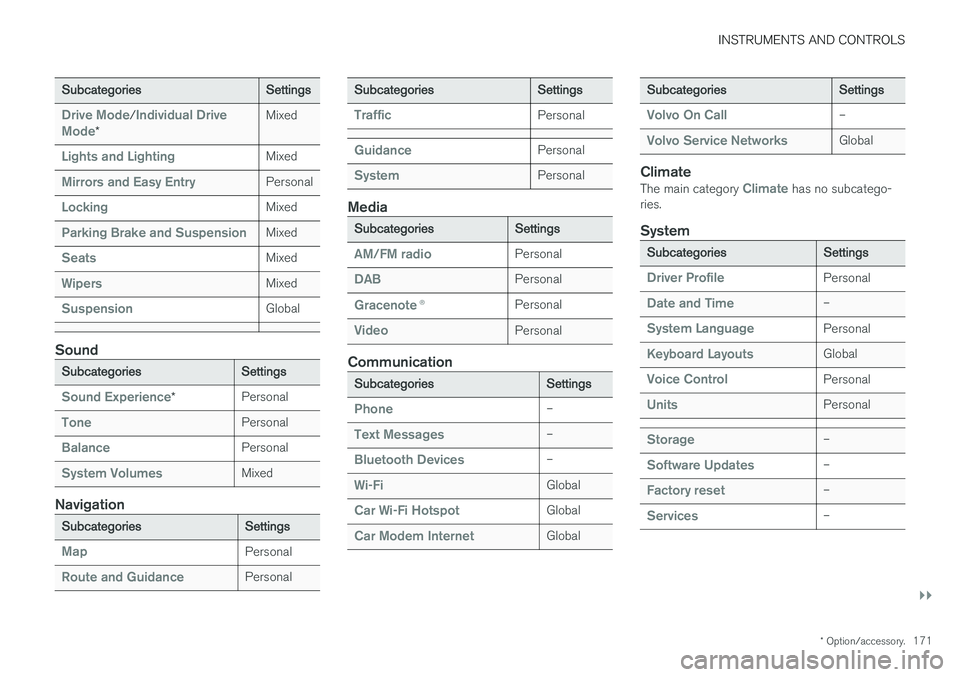
Subcategories Settings
Drive Mode/Individual Drive
Mode* Mixed
Lights and LightingMixed
Mirrors and Easy EntryPersonal
LockingMixed
Parking Brake and SuspensionMixed
SeatsMixed
WipersMixed
SuspensionGlobal
Sound
Subcategories
Settings
Sound Experience*Personal
TonePersonal
BalancePersonal
System VolumesMixed
Navigation
Subcategories
Settings
MapPersonal
Route and GuidancePersonal
SubcategoriesSettings
TrafficPersonal
GuidancePersonal
SystemPersonal
Media
SubcategoriesSettings
AM/FM radioPersonal
DABPersonal
Gracenote®Personal
VideoPersonal
Communication
Subcategories Settings
Phone–
Text Messages–
Bluetooth Devices–
Wi-FiGlobal
Car Wi-Fi HotspotGlobal
Car Modem InternetGlobal
SubcategoriesSettings
Volvo On Call–
Volvo Service NetworksGlobal
ClimateThe main category Climate has no subcatego-
ries.
System
Subcategories Settings
Driver ProfilePersonal
Date and Time–
System LanguagePersonal
Keyboard LayoutsGlobal
Voice ControlPersonal
UnitsPersonal
Storage–
Software Updates–
Factory reset–
Services–
Page 209 of 594
CLIMATE CONTROL
}}
* Option/accessory.207
The function utilises several systems in different cases: •
Residual heat from the engine, in a cold cli- mate, heats the passenger compartment tocomfort temperature.
• The ventilation, in a hot climate, cools thepassenger compartment to the current outertemperature.
NOTE
Climate comfort retention is switched off when the car is locked from the outside toavoid using residual heat unnecessarily. Useof the function is intended to maintain climatecomfort when driver or passengers remaininside the car.
Related information
• Climate control (p. 182)
• Starting/stopping preconditioning
* (p. 207)
• Timer for preconditioning
* (p. 208)
• Starting/switching off climate comfort reten- tion
* (p. 210)
• Symbols and messages for parking climatecontrol
* (p. 212)
• Heater
* (p. 213)
• Parking heater
* (p. 214)
Starting/stopping preconditioning *
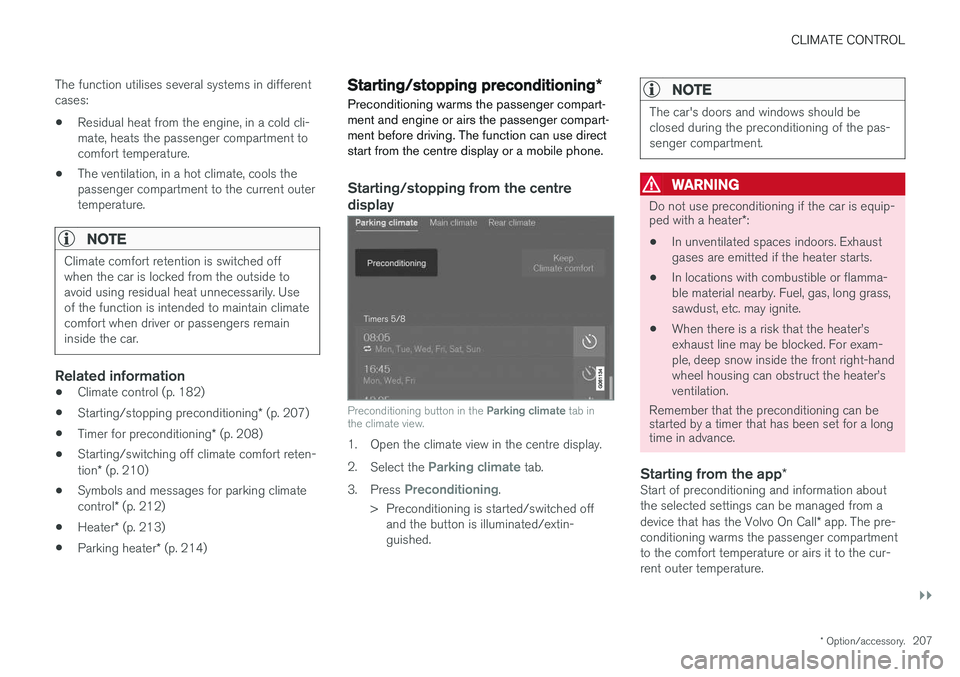
Preconditioning warms the passenger compart- ment and engine or airs the passenger compart-ment before driving. The function can use directstart from the centre display or a mobile phone.
Starting/stopping from the centre
display
Preconditioning button in the Parking climate tab in
the climate view.
1. Open the climate view in the centre display. 2. Select the
Parking climate tab.
3. Press
Preconditioning.
> Preconditioning is started/switched off and the button is illuminated/extin- guished.
NOTE
The car's doors and windows should be closed during the preconditioning of the pas-senger compartment.
WARNING
Do not use preconditioning if the car is equip- ped with a heater *:
• In unventilated spaces indoors. Exhaust gases are emitted if the heater starts.
• In locations with combustible or flamma-ble material nearby. Fuel, gas, long grass,sawdust, etc. may ignite.
• When there is a risk that the heater
Page 220 of 594
LOADING AND STORAGE
* Option/accessory.
218
Passenger compartment interior
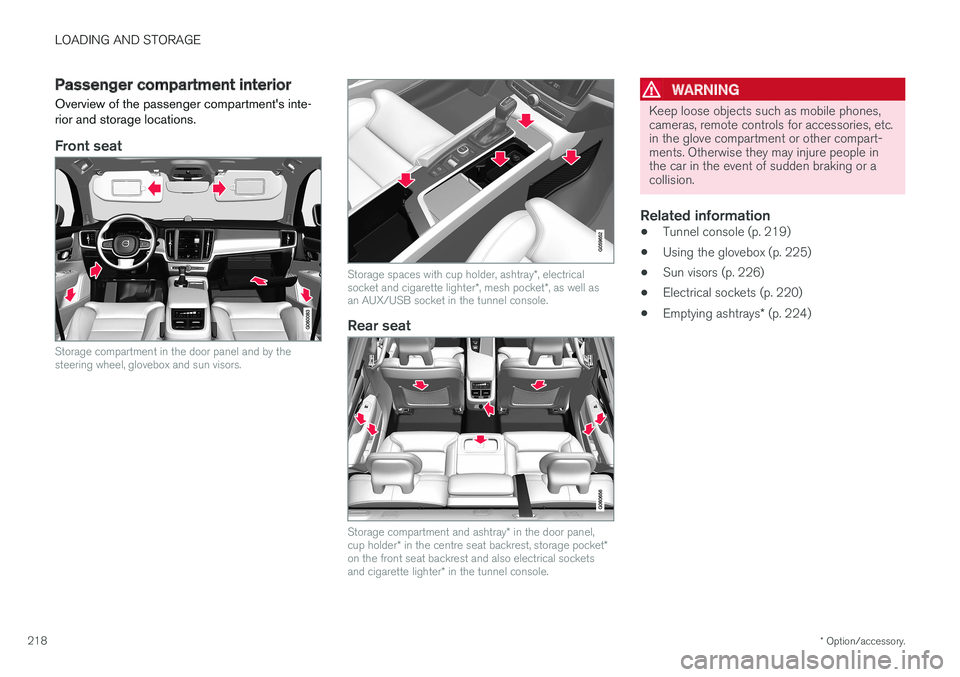
Overview of the passenger compartment's inte- rior and storage locations.
Front seat
Storage compartment in the door panel and by the steering wheel, glovebox and sun visors.
Storage spaces with cup holder, ashtray *, electrical
socket and cigarette lighter *, mesh pocket *, as well as
an AUX/USB socket in the tunnel console.
Rear seat
Storage compartment and ashtray * in the door panel,
cup holder * in the centre seat backrest, storage pocket *
on the front seat backrest and also electrical sockets and cigarette lighter * in the tunnel console.
WARNING
Keep loose objects such as mobile phones, cameras, remote controls for accessories, etc.in the glove compartment or other compart-ments. Otherwise they may injure people inthe car in the event of sudden braking or acollision.
Related information
• Tunnel console (p. 219)
• Using the glovebox (p. 225)
• Sun visors (p. 226)
• Electrical sockets (p. 220)
• Emptying ashtrays
* (p. 224)
Page 224 of 594
||
LOADING AND STORAGE
* Option/accessory.
222
Status indication Reason Action
Diode not illuminated The socket does not sense that a plug has been inserted. Check that the plug is properly inserted into the socket.
The socket is not active. Switch the car's electrical system to the lowest igni- tion position I.
The socket has been active but is now deactivated. Start the engine and/or charge the starter battery.
If the problem persists, contact a workshop - an authorised Volvo workshop is recommended.
WARNING
Never modify or repair the 230 V electrical socket yourself. Volvo recommends that anauthorised Volvo workshop should be contac-ted.
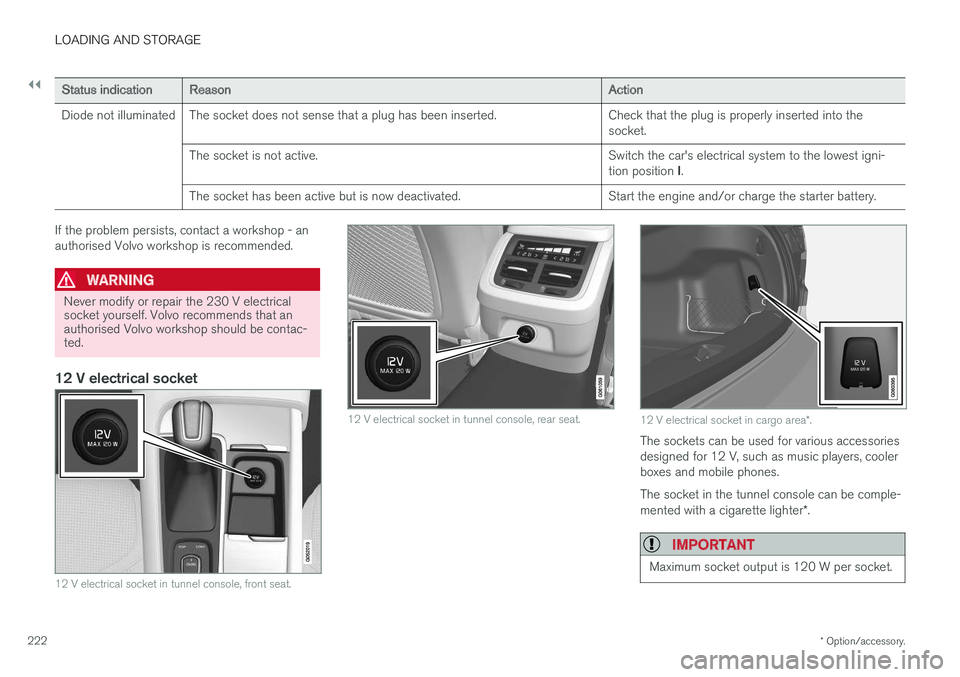
12 V electrical socket
12 V electrical socket in tunnel console, front seat.
12 V electrical socket in tunnel console, rear seat.12 V electrical socket in cargo area *.
The sockets can be used for various accessories designed for 12 V, such as music players, coolerboxes and mobile phones. The socket in the tunnel console can be comple- mented with a cigarette lighter *.
IMPORTANT
Maximum socket output is 120 W per socket.
Page 239 of 594
LOCKS AND ALARM
}}
* Option/accessory.237
simultaneously, also called Global opening
1
.
See the section "Locking/unlocking from the outside".
Tailgate - Unlocks the tailgate only and
disarms its alarm. On cars with power oper- ated tailgate *, the tailgate is opened auto-
matically when the button is held depressed. The tailgate is also closed with a long press -acoustic warning signals sound. See the sec-tion "Power operated tailgate".
Panic function – Used to attract attention
in an emergency. Press and hold the button for at least 3 seconds or press it twice within3 seconds to activate the direction indicatorsand the horn. The function can be turned offwith the same button once it has been activefor at least 5 seconds. Otherwise the func-tion switches off automatically after3 minutes.
WARNING
If anyone is left in the car, make sure the power windows and sunroof are de-energisedby always taking the remote control key withyou when you leave the car.
NOTE
Be aware of the risk of locking the remote control key/Key Tag in the car. A remote control key/Key Tag left in the car will be deactivated when the car is locked andthe alarm is armed using another valid key.The deactivated key is reactivated when thecar is unlocked.
InterferenceRemote control key functions for keyless starting and keyless locking/unlocking * can be disrupted
by electromagnetic fields and screening.
NOTE
Avoid storing the remote control key close to metal objects or electronic apparatus, e.g.mobile phones, tablets, laptops or chargers -preferably no closer than 10-15 cm.
If there is still interference - use the remote con- trol key's key blade and then place the key in thebackup reader in the cup holder to disarm thecar. See section "Locking/unlocking with thedetachable key blade".
NOTE
When the remote control key is placed in the cup holder, make sure that no other car keys,metal objects or electronic apparatus (e.g.mobile phones, tablets, laptops or chargers)are in the cup holder. Several car keys closeto each other in the cup holder can causeinterference with each other.
Loss of a remote control keyIf you lose a remote control key then a new one can be ordered at a workshop - an authorisedVolvo workshop is recommended. The remainingremote control keys must be taken to the work-shop. The code of the missing key must beerased from the system as a theft preventionmeasure. The current number of keys registered to the car can be checked in the centre display's top view.
Related information
• Remote control key range (p. 238)
• Detachable key blade (p. 250)
• Replacing the battery in the remote controlkey (p. 257)
• Locking/unlocking from the inside (p. 245)
• Locking/unlocking from the outside (p. 241)
• Driver profiles (p. 174)
1
Used, for example, to quickly air the car during hot weather.
Page 387 of 594
STARTING AND DRIVING
}}
385
Ignition positions The car's electrical system can be set in different levels/positions and in this way make the differ-ent functions available.
In order to facilitate the use of a limited number of functions with the engine switched off, thecar's electrical system can be set in 3 different levels - 0, I and II. These levels are described
with the denomination "ignition position" throughout the owner's manual. The following table shows the functions available in each ignition position/level:
Level Functions
0 •Odometer, clock and temperature gauge are illuminated.
• Power seats can be adjusted.
• The power windows can be used.
• The centre display is started andcan be used.
• It is possible to start the audio.
The functions are time-controlled inthis ignition position and are switchedoff automatically after a period of time.
I •Panorama roof, power windows,12V socket in the passenger com-partment, navigation, phone, venti-lation fan and windscreen wiperscan be used.
• Power seats can be adjusted.
• 12 V sockets in the cargo areacan be used.
• The audio is started automaticallyif it was running when the car wasleft.
Power is taken from the battery inthis ignition position.Level Functions
II •The headlamps come on.
• Warning/indicator lamps illuminate for 5 seconds.
• Several other systems are acti-vated. However, heating in seatcushions and the rear window canonly be activated after the car hasbeen started.
This ignition position consumes alot of current from the battery andshould therefore be avoided!
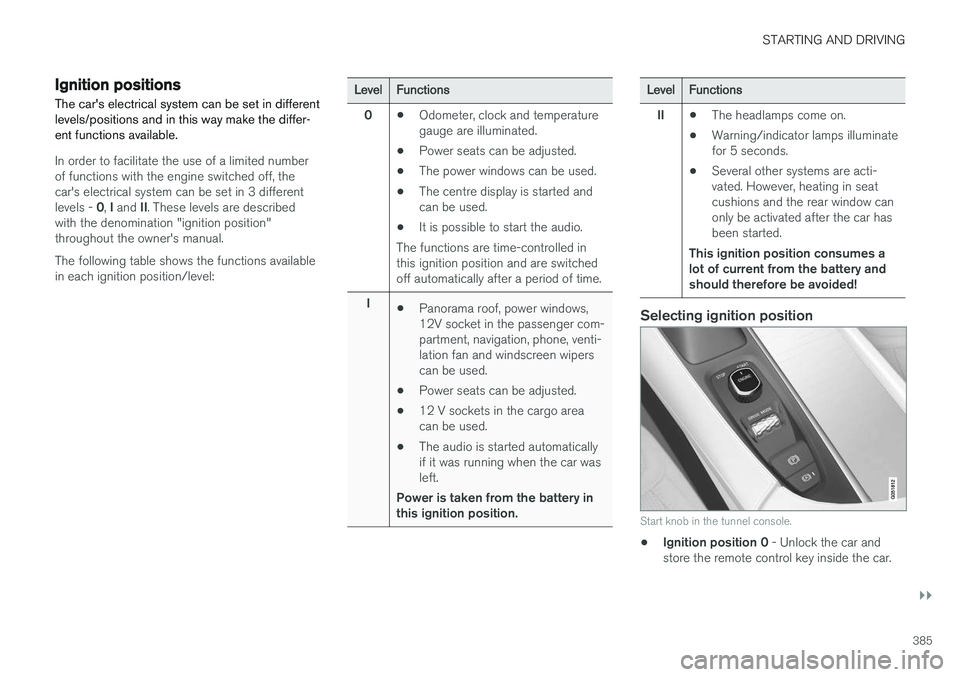
Selecting ignition position
Start knob in the tunnel console.
• Ignition position 0
- Unlock the car and
store the remote control key inside the car.