phone VOLVO V90 2017 Service Manual
[x] Cancel search | Manufacturer: VOLVO, Model Year: 2017, Model line: V90, Model: VOLVO V90 2017Pages: 594, PDF Size: 15.07 MB
Page 456 of 594
||
AUDIO AND MEDIA
* Option/accessory.
454
Previously connected Android
1. Connect the phone to the USB input.
>If the setting for automatic start is selected - the subview with Android Auto
is opened and compatible apps areshown.
2. If the setting for automatic start is not selected - open the
Android Auto app from
the app view.
> The subview with Android Auto is opened and compatible apps are shown.
3. Tap on the desired app. > The app starts.
Android Auto runs in the background if another app is started in the same subview. To showAndroid Auto in the subview again - tap on theAndroid Auto icon in the app view.
Related information
• Media player (p. 442)
• Media playback (p. 443)
• Connecting media via AUX/USB input(p. 448)
• Settings for Android Auto
* (p. 454)
• Connecting the car (p. 464)
• Overview of the centre display (p. 33)
Settings for Android Auto
*
Settings for a phone that has been connected
the first time with Android Auto.
Automatic start1. Press Settings in top view.
2. Press
CommunicationAndroid Autoand select setting: •Tick the box - Android Auto starts auto- matically when the USB cable is con-nected.
• Untick the box - Android Auto does notstart automatically when the USB cable isconnected.
A maximum of 20 Android devices can be storedin the list. When the list is full and a new device isconnected the oldest one is deleted. A factory reset is required in order to delete the list, see the section "Resetting settings in thesettings view".
System volumes1. Press Settings in top view.
2. Tap on
SoundSystem Volumes and
make the settings for the following:
•
Voice Control
•Navi Voice Guidance
•Phone Ringtone
Related information
• Android Auto
* (p. 453)
• Resetting settings in the settings view (p. 173)
• Overview of the centre display (p. 33)
Page 458 of 594
||
AUDIO AND MEDIA
456
Technical specification for USB connector
•Type A socket
• Version 2.0
• Voltage supply 5 V
• Current supply max. 2.1 A
Related information
• Media player (p. 442)
• Media playback (p. 443)
Phone
A mobile phone equipped with Bluetooth can be connected wirelessly to the car's built-in hands-free system.
The audio and media system acts as a handsfree,
with the facility to remotely control a selection of the mobile phone's functions. The mobile phonecan still be operated with its own keys if it is con-nected to the car. When a mobile phone has been connected with the car and connected, it can be used make calls,send/receive messages, stream media and pro-vide an Internet connection.
The phone is operated from thecentre display, but some opera-tions are also available via voicerecognition and the app menu,which are accessed from theright-hand steering wheel key-pad.
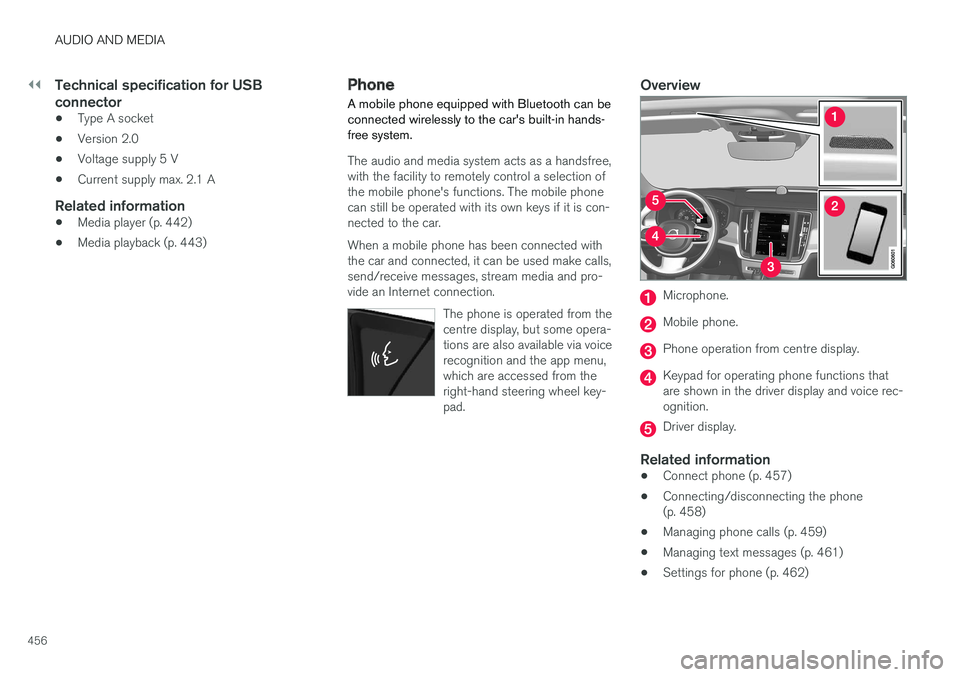
Overview
Microphone.
Mobile phone.
Phone operation from centre display.
Keypad for operating phone functions that are shown in the driver display and voice rec-ognition.
Driver display.
Related information
•Connect phone (p. 457)
• Connecting/disconnecting the phone (p. 458)
• Managing phone calls (p. 459)
• Managing text messages (p. 461)
• Settings for phone (p. 462)
Page 459 of 594
AUDIO AND MEDIA
}}
457
•
Settings for text messages (p. 463)
• Bluetooth settings (p. 463)
• Voice recognition (p. 115)
• Using the application menu in the driver dis- play (p. 105)
• Media player (p. 442)
Connect phone
Connect a Bluetooth-activated phone to the car to make calls, send/receive messages, streammedia and connect the car to the Internet.
It is possible to have two Bluetooth devices con- nected at once, in which case one of them canonly be streaming media. The most recently con-nected phone will automatically be connected tomake calls, send/receive messages, streammedia and provide an Internet connection. Tochange the use of the phone, see section"Bluetooth settings". Connection is performed once per device. After connection, the Bluetooth device no longerneeds to be visible/searchable but only needs tohave Bluetooth activated. To connect the car tothe Internet via a phone, tethering must be acti-vated on the phone. A maximum of 20 connectedBluetooth devices can be stored in the car. There are two options for connecting. Either search the phone from the car or search the carfrom the phone.
Option 1 - search phone from car1. Make the phone searchable/visible via Bluetooth.
2. To connect the car to the Internet via the phone
Page 460 of 594
||
AUDIO AND MEDIA
* Option/accessory.
458
Option 2 - search car from phone1. Open the subview for phone.
•If there is no phone connected to the car, tap on
Add phoneMake car
discoverable.
• If there is a phone connected to the car, tap on
Change. In the pop-up win-
dow, tap on
Add phoneMake car
discoverable.
2. Activate Bluetooth on the phone.
3. To connect the car to the Internet via the phone
Page 461 of 594
AUDIO AND MEDIA
}}
* Option/accessory.459
When the phone is out of range of the car it is automatically disconnected. If disconnectionoccurs during an active call then the call can becontinued on the phone.
Changing phones1. Open the subview for phone. 2.
Press
Change.
> Available Bluetooth devices are listed.
3. Tap on the phone to be connected.
Removing a phone1. Open the subview for phone. 2. Press
SettingsCommunicationBluetooth Devices.
> A list of connected Bluetooth devices is displayed.
3. Tap on the phone to be removed. 4. Tap on
Remove device and confirm your
selection.
> The phone is no longer connected with the car.
Related information
• Phone (p. 456)
• Connect phone (p. 457)
• Settings for phone (p. 462)
• Bluetooth settings (p. 463)
• Ignition positions (p. 385) •
Online car
* (p. 463)
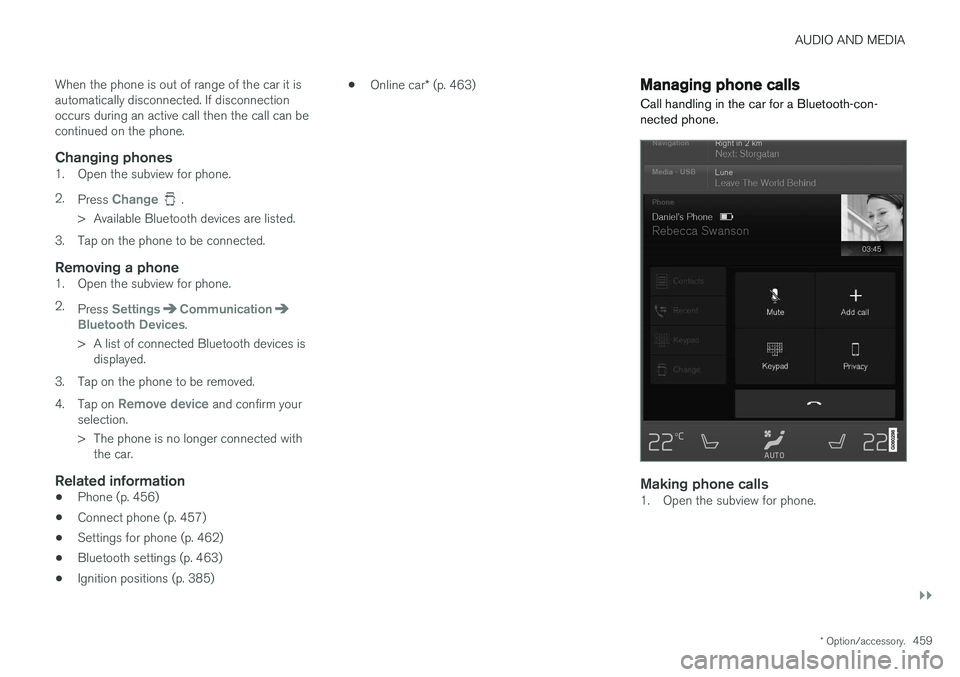
Managing phone calls
Call handling in the car for a Bluetooth-con- nected phone.
Making phone calls1. Open the subview for phone.
Page 462 of 594
||
AUDIO AND MEDIA
4602. Select call from: call history, enter number
using the keypad or via the contact list. It is possible to search or browse in the contact list. Tap on
in the contact list in order to
add a contact under Favourites.
3. Tap on
Call or .
4. Tap on
End call to end the call.
You can also make calls from the call log via the app menu, which is accessed from the right-hand steering wheel keypad
.
Making multi-party calls
During a call: 1. Press
Add call.
2. Choose to make a call from the call log, favourites or the contact list.
3. Tap on an entry/row in the call log, or tap on
alongside the contact in the contact list.
4. Tap on
Swap call to switch between the
parties.
5. Tap on
End call to end the active call.
Conference calls
During an active multi-party call: 1. Tap on
Join calls to merge the active multi-
party call.
2. Tap on
End call to end the call.
Incoming phone callsIncoming phone calls are shown in the driver dis- play and the centre display. Manage the call onthe right-hand steering wheel keypad or in thecentre display. 1.Tap on
Answer/Reject.
2. Tap on
End call to end the call.
Incoming phone call during an active call
1.Tap on Answer/Reject.
2. Tap on
End call to end the call.
Private call
–During the current call, press Privacy and
select setting:
•
Switch to mobile phone - the hands-
free function is disconnected and the call continues on your mobile phone.
•
Driver focused - the microphone in the
roof on the passenger side is switched off and the call continues with the car'shandsfree function.
Related information
• Phone (p. 456)
• Voice recognition control of the phone(p. 118)
• Using the application menu in the driver dis-play (p. 105)
• Using the keyboard in the centre display(p. 49) •
Settings for phone (p. 462)
Page 463 of 594
AUDIO AND MEDIA
461
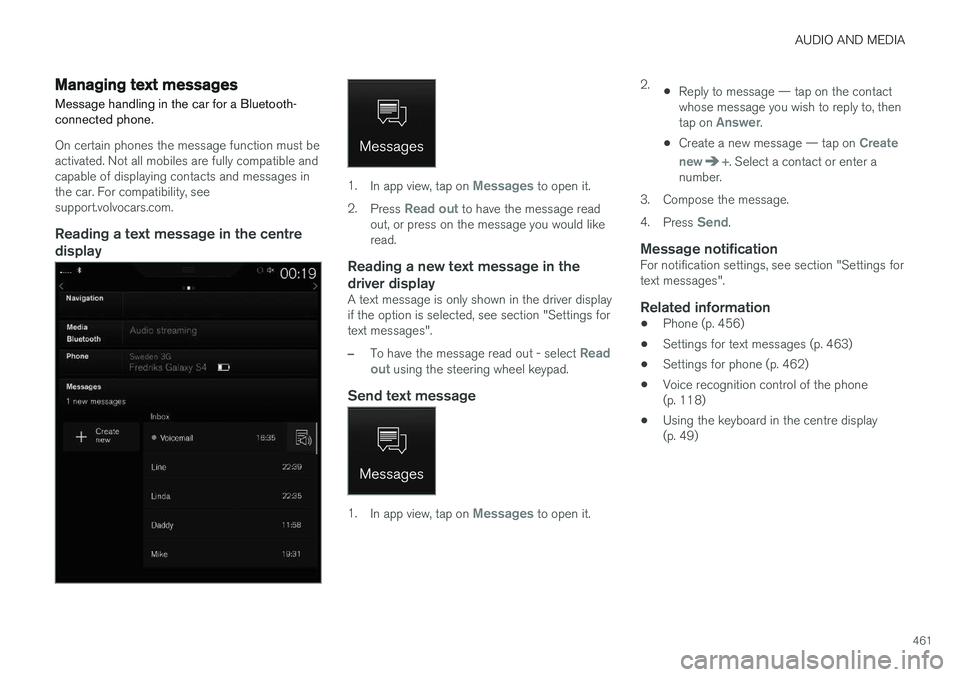
Managing text messages Message handling in the car for a Bluetooth- connected phone.
On certain phones the message function must be activated. Not all mobiles are fully compatible andcapable of displaying contacts and messages inthe car. For compatibility, seesupport.volvocars.com.
Reading a text message in the centredisplay
1. In app view, tap on Messages to open it.
2. Press
Read out to have the message read
out, or press on the message you would like read.
Reading a new text message in the driver display
A text message is only shown in the driver display if the option is selected, see section "Settings fortext messages".
–To have the message read out - select Read
out using the steering wheel keypad.
Send text message
1. In app view, tap on Messages to open it. 2.
•Reply to message — tap on the contact whose message you wish to reply to, then tap on
Answer.
• Create a new message — tap on
Create
new
+. Select a contact or enter a
number.
3. Compose the message. 4. Press
Send.
Message notificationFor notification settings, see section "Settings for text messages".
Related information
• Phone (p. 456)
• Settings for text messages (p. 463)
• Settings for phone (p. 462)
• Voice recognition control of the phone(p. 118)
• Using the keyboard in the centre display(p. 49)
Page 464 of 594
AUDIO AND MEDIA
* Option/accessory.
462
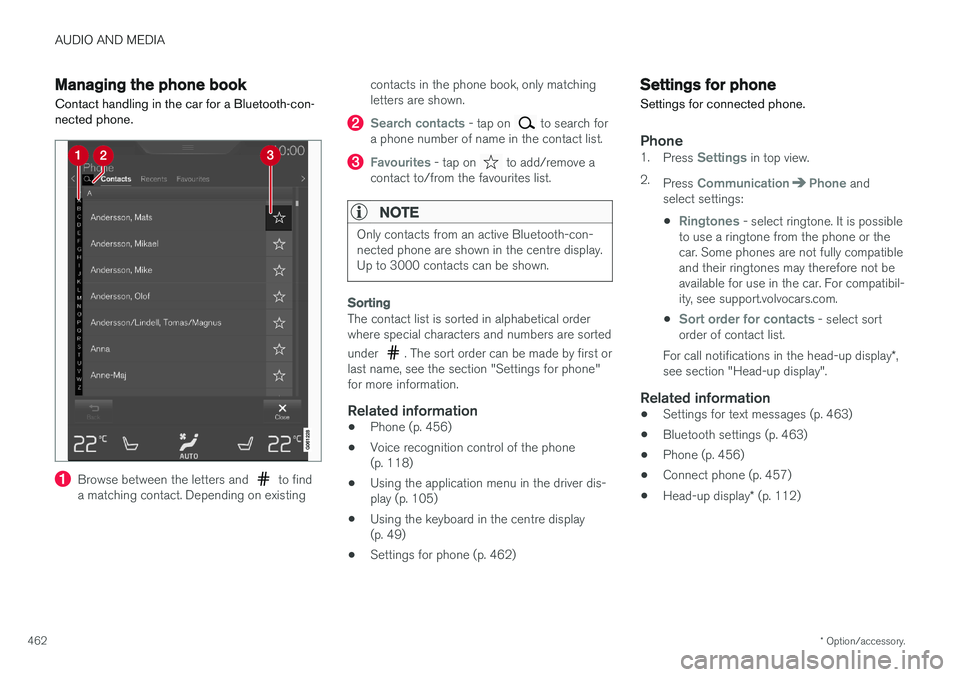
Managing the phone book
Contact handling in the car for a Bluetooth-con- nected phone.
Browse between the letters and to find
a matching contact. Depending on existing contacts in the phone book, only matching letters are shown.
Search contacts - tap on to search for
a phone number of name in the contact list.
Favourites - tap on to add/remove a
contact to/from the favourites list.
NOTE
Only contacts from an active Bluetooth-con- nected phone are shown in the centre display.Up to 3000 contacts can be shown.
Sorting
The contact list is sorted in alphabetical order where special characters and numbers are sorted under
. The sort order can be made by first or
last name, see the section "Settings for phone" for more information.
Related information
• Phone (p. 456)
• Voice recognition control of the phone(p. 118)
• Using the application menu in the driver dis-play (p. 105)
• Using the keyboard in the centre display(p. 49)
• Settings for phone (p. 462)
Settings for phone
Settings for connected phone.
Phone1. Press Settings in top view.
2. Press
CommunicationPhone and
select settings:
•
Ringtones - select ringtone. It is possible
to use a ringtone from the phone or the car. Some phones are not fully compatibleand their ringtones may therefore not beavailable for use in the car. For compatibil-ity, see support.volvocars.com.
•
Sort order for contacts - select sort
order of contact list.
For call notifications in the head-up display *,
see section "Head-up display".
Related information
• Settings for text messages (p. 463)
• Bluetooth settings (p. 463)
• Phone (p. 456)
• Connect phone (p. 457)
• Head-up display
* (p. 112)
Page 465 of 594
AUDIO AND MEDIA
}}
* Option/accessory.463
Settings for text messages
Settings for text messages on connected phone.
Message1. Press Settings in top view.
2. Press
CommunicationText Messagesand select settings:
•
Notification in centre display - shows
message notifications in the centre dis- play's status bar.
•
Notification in driver display - shows
notifications in the driver display. When notifications in the driver display areactive, it is possible to manage incomingmessages with the steering wheel's right-hand keypad.
•
Text message tone - select tone for
incoming text message.
Related information
• Phone (p. 456)
• Connect phone (p. 457)
• Managing text messages (p. 461)
• Settings for phone (p. 462)
Bluetooth settings
Settings for Bluetooth-connected phone.
Bluetooth1. Press Settings in top view.
2. Press
CommunicationBluetooth
Devices and select settings:
•
Previously paired devices - lists con-
nected devices.
Remove device - removes the connected
device.
Allowed services for this device - phone
usage options: calling, sending/receiving messages, streaming media and as Internetconnection.
•
Internet connection - option for connecting
the car to the Internet via the device's Bluetooth connection.
•
Add device - starts the pairing of a new
device.
Related information
• Online car
* (p. 463)
• Phone (p. 456)
• Connect phone (p. 457)
• Media player (p. 442)
Online car
*
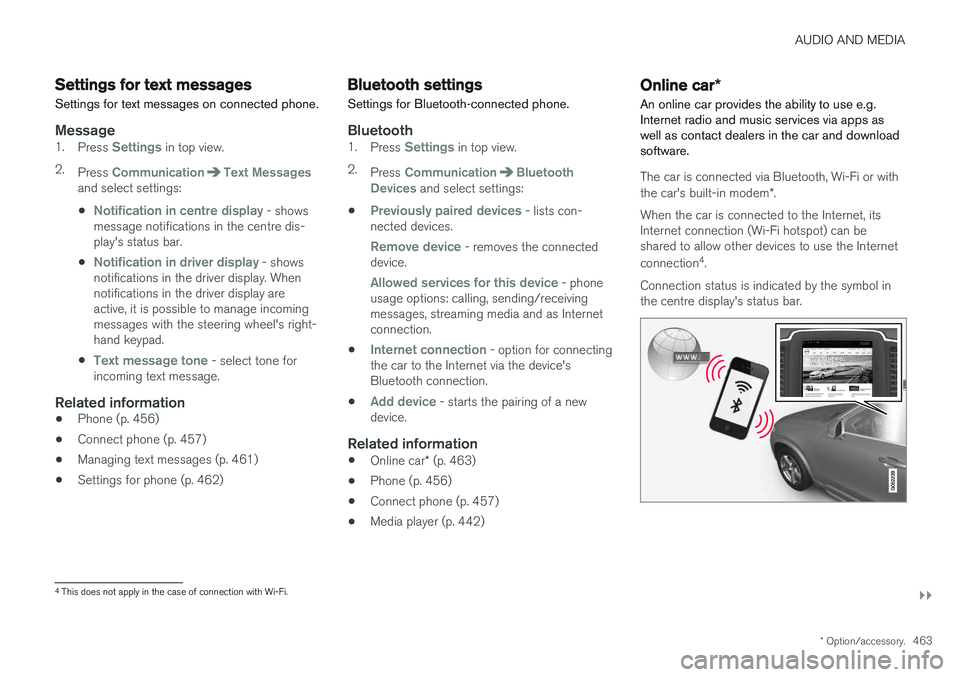
An online car provides the ability to use e.g. Internet radio and music services via apps aswell as contact dealers in the car and downloadsoftware.
The car is connected via Bluetooth, Wi-Fi or with the car's built-in modem *.
When the car is connected to the Internet, its Internet connection (Wi-Fi hotspot) can beshared to allow other devices to use the Internet connection 4
.
Connection status is indicated by the symbol in the centre display's status bar.
4 This does not apply in the case of connection with Wi-Fi.
Page 466 of 594
||
AUDIO AND MEDIA
* Option/accessory.
464
Related information
• Connecting the car (p. 464)
• Apps (p. 434)
• Book service and repair (p. 506)
• System updates (p. 510)
• Volvo ID (p. 23)
• Symbols in the centre display's status bar (p. 45)
• Sharing Internet via Wi-Fi hotspot (p. 465)
Connecting the car Connect the car to the phone via Bluetooth, Wi-Fi or with the car's built-in modem
*.
The mobile phone and network operator must support tethering (sharing the Internet connec-tion) and the plan must include data.
NOTE
Data is transferred when using the internet (data traffic), which can have a cost. Activation of data roaming can result in fur- ther charges. Contact your network operator about the cost for data traffic.
NOTE
When using Apple CarPlay, it is only possible to connect the car to the Internet using Wi-Fi or car modem *.
NOTE
When using Android Auto, it is possible to connect the car to the Internet using Wi-Fi, Bluetooth or car modem *.
Read Terms and Conditions for Services and
Customer Privacy Policy at
support.volvocars.com before connecting.
Connecting with BluetoothSee Connecting a phone.
Connecting with Wi-Fi
1. Activate tethering (portable/personal hot- spot) on the mobile phone.
2. Press
Settings in top view.
3. Press
CommunicationWi-Fi.
4. Activate/deactivate by ticking/unticking the box for Wi-Fi.
5. Tap on the network name of the network to be connected.
6. Enter the network password.
7. If another connection source has been used in the past - confirm the option to change connection.
> The car connects to the network.
Note that certain phones switch off tethering after the contact with the car has been discon-nected, e.g. when leaving the car and until thenext time it is used. The tethering in the phonetherefore needs to be reactivated the next time itis used.