service VOLVO V90 2017 Repair Manual
[x] Cancel search | Manufacturer: VOLVO, Model Year: 2017, Model line: V90, Model: VOLVO V90 2017Pages: 594, PDF Size: 15.07 MB
Page 501 of 594
WHEELS AND TYRES
* Option/accessory.499
Related information
•Removing a wheel (p. 495)
• Fitting the wheels (p. 497)
• Tool kit (p. 500)
• Jack
* (p. 501)
Winter wheels
Winter wheels are adapted for winter road con- ditions.
Volvo recommends winter tyres with particular dimensions. Tyre dimensions are dependent onengine variant. When driving on winter tyres, thecorrect type of tyres must be fitted to all fourwheels.
NOTE
Contact a Volvo dealer for advice about which wheel rim and type of tyre are most suitable.
Tips for changing to winter tyresWhen summer and winter wheels are changed, mark which side of the car they were mounted on, for example L for left and R for right.
Studded tyresStudded winter tyres should be run in gently for 500-1000 km so the studs settle properly intothe tyres. This gives the tyre, and especially thestuds, a longer service life.
NOTE
The legal provisions for the use of studded tyres vary from country to country.
Tread depthRoad conditions with ice, slush and low tempera- tures place considerably higher demands on tyresthan summer conditions. Volvo therefore recom-mends not to drive on winter tyres that have atread depth of less than 4 mm.
Snow chainsVolvo recommends that snow chains are notused on wheel dimensions greater than18 inches. Mounting instructions are supplied with Volvo original snow chains. Snow chains may only be used on the front wheels (also applies to all-wheel drive cars).Never drive faster than 50 km/h (30 mph) withsnow chains. Avoid driving on bare ground as thiswears out both the snow chains and tyres.
WARNING
Use Volvo genuine snow chains or equivalent chains designed for the car model, and tyre and rim dimensions. Only single-sided snow
chains are permitted. In the event of uncertainty about the show chain, Volvo recommends that an authorisedVolvo workshop should be contacted. Thewrong snow chains may cause serious dam-age to the car and lead to an accident.
Related information
• When changing wheels (p. 495)
Page 508 of 594
MAINTENANCE AND SERVICE
* Option/accessory.
506
Volvo service programme
To keep the car as safe and reliable as possible, follow the Volvo service programme as specifiedin the Service and Warranty Booklet.
Volvo recommends engaging an authorised Volvo workshop to perform the service and mainte-nance work. Volvo workshops have the personnel,special tools and service literature to guaranteethe highest quality of service.
IMPORTANT
For the Volvo warranty to apply, check and follow the instructions in the Service andWarranty Booklet.
Related information
• Servicing the climate control system (p. 520)
• Book service and repair (p. 506)
Car status The car's general status can be shown in the centre display along with the opportunity to bookservice.
The Car status app is started
from app view in the centre dis- play and has three tabs:
•Messages - saved status messages
•
Status - check of tyre pressure and engine
oil level
•
Appointments - booking of service and
repair work.
Related information
• Managing messages saved from the driver display and centre display (p. 110)
• Checking tyre pressure with the tyre monitor- ing system
* (p. 487)
• Checking and filling with engine oil (p. 517)
• Book service and repair (p. 506)
Book service and repair 1
Manage service, repair and booking information directly from your online car. The information is handled in the
Car statusapp, which is opened from the app view in the centre display.
This service provides, for certain markets, a con- venient way to book service and workshop visitsdirectly from your car. Vehicle data is sent to yourdealer, who can prepare the workshop visit. Thedealer will get back to you with a booking sug-gestion. For certain markets, the system willremind you of a scheduled appointment time as it approaches and the navigation system 2
can also
guide you to the workshop when the time comes. You also have information on your dealer availa-ble in the car and can contact your workshop atany time.
Before the service can be used
Volvo ID
• Create a Volvo ID, see section "Volvo ID".
• Register the Volvo ID for your car, see sec- tion "Volvo ID". If a Volvo ID already exists,use the same e-mail address that was usedwhen the Volvo ID was created.
1
Applies to certain markets.
2 Applies to Sensus Navigation *.
Page 509 of 594
MAINTENANCE AND SERVICE
}}
507
Changing contact address
If you would like to change to another e-mail address, you can contact a Volvo dealer.
Selecting a Volvo dealer
Select the Volvo dealer you would like to contact for service and repairs by going towww.volvocars.com and navigating to My Volvo.
Prerequisite for booking from car
For the car to send and receive booking informa- tion, it must be connected to the Internet, seesection "Online car".
Using the serviceWhen it is time for service, and in some caseswhen the car is in need of repair, a message willappear in the driver display and at the top of thecentre display. The service date is determined byhow much time has passed, hours that theengine has been running, or distance drivensince the last service. You can also book a workshop visit later via the My Volvo owner's portal. To ensure that yourdealer has the latest information on your car youcan send vehicle data, see section "SendingVehicle Data" below.
Book service or repair
Fill in the appointment request when desired or when a message stating that service or repairsare needed is shown in the driver display and atthe top of the centre display.
Filling in and sending an appointment request.
1.Open the Car status app from the app view
in the centre display.
2. Press the
Appointments button.
3. Press the
Request appointment button.
4. Make sure that the correct
Volvo ID is filled
in.
5. Make sure that the desired
Workshop is
filled in. 6. Fill in information for the workshop in the
field
Tap to write information to the
workshop, e.g. if there is anything you would
like done during the workshop visit or any other important information to your work-shop.
Or press the button and speak the informa- tion. The information is then entered in theinformation field in your appointment request.
7. Press the
Send appointment request but-
ton.
> You will receive an appointment sugges-
tion to your car within a couple of days. 3
.
You will also receive the same communi- cation via e-mail and when you visit MyVolvo. In certain markets, once you have sent the appointment request, the message thatthe car needs service is extinguished inthe driver display.
8. Press the
Cancel request button to cancel
your request.
3 This time frame may vary depending on market.
Page 510 of 594
||
MAINTENANCE AND SERVICE
* Option/accessory.
508 The appointment request contains vehicle data when it is sent from your car to the workshop viayour Internet connection. This information facili-tates planning for the workshop.
Accept the appointment suggestion
The car will retrieve appointment suggestions via your Internet connection when it is available.When the car has received an appointment sug-gestion, a message will be shown at the top ofthe centre display.
1. Tap the message.
2. If the suggested booking is acceptable, tap
on the
Accept button. Otherwise press
either of the Send new proposal orDecline buttons.
When an appointment suggestion is accepted, the reply will be sent to the workshop via yourInternet connection.
Sending vehicle data
You can send vehicle data at any time from your car, e.g. if you book a workshop visit directly viathe My Volvo owner's portal, and will help yourworkshop with better basic information. The vehicle data sent is the last saved (last time the car was running).
1. Open the Car status app from the app view
in the centre display.
2. Press the
Appointments button.
3. Press the
Send car data button.
> A message that vehicle data are being sent is shown at the top of the centre dis- play. You can cancel data transmission bytapping the X in the activity indicator. The vehicle data are sent via your Internet connection.
See workshop information
1. Open the Car status app from the app view
in the centre display.
2. Press the
Appointments button. 3.
Press the
Workshop information button.
> A pop-up window with information on your dealer will open.
4. Call your dealer if you like, or tap on the address or GPS coordinates to start naviga- tion to your workshop 2
.
Booking information and vehicle dataWhen you decide to book a service or send data from your car, the booking information and vehi-cle data will be sent via you Internet connection.The vehicle data make it easier for your workshopto plan your next visit. The vehicle data consists of information in the following areas:
• service requirement
• time since last service
• function status
• fluid levels
• meter reading
• the car's vehicle identification number (VIN 4
)
• the car's software version
• the car's diagnostics data.
2
Applies to Sensus Navigation *.
4 Vehicle Identification Number.
Page 511 of 594
MAINTENANCE AND SERVICE
* Option/accessory.509
Related information
•Volvo ID (p. 23)
• Online car
* (p. 463)
• Car status (p. 506)
Inspection and service of the system for vehicle gas
*5
The system for vehicle gas must be inspected regularly by an authorised workshop - an author-ised Volvo workshop is recommended.
WARNING
The gas is compressed to high pressure. This system must only be serviced and repaired byan authorised workshop. Never attempt to disassemble or adjust the gas system or its component parts yourself-risk of serious personal injury.
Remote updates Several of the car's systems can be updated from the centre display with an online car.
The Download Centre app is
started from app view in the centre display and enables:
• searching for and updating system software
• updating map data for Sensus Navigation
*
• downloading, updating and uninstalling apps.
Related information
•
System updates (p. 510)
• Downloading, updating and uninstalling apps (p. 468)
5
Applies to the Bi-Fuel model variant.
Page 512 of 594
MAINTENANCE AND SERVICE
* Option/accessory.
510
System updates
System updates are intended for the Internet- connected and infotainment components of thecar. If system software updates are available, theupdates can be made all at once or one at atime.
System updates are handled via the Download Centre app
in the centre display's applica- tion view. A tap on the buttonstarts a download application inthe home view's bottom sub-view. If no search for available
updates has been performed since the last timethe infotainment system was started, a search isperformed. No search is performed if a softwareinstallation is in progress. An icon in the down- load application's button
System updatesshows how many updates are available. A tap on the button shows a list of updates that can beinstalled in the car. For more information andanswers to common questions regarding functionand to download certain system updates, go in tosupport.volvocars.com. For system updates to be possible, the car must be connected to the Internet, see section "Onlinecar".
Searching for software updates is activated when the car is supplied from the factory.
NOTE
Data download may affect other services that transmit data, e.g. Internet radio. If the effecton other services is experienced as disruptivethen the download can be interrupted. Alter-natively, it may be appropriate to switch off orinterrupt other services.
NOTE
An update can be interrupted when the igni- tion is switched off and the car is left. However, the update does not have to be completed before the car is left, this isbecause the update is resumed the next timethe car is used.
Update all system software
–Select Install all at the bottom of the list.
If no list is desired, then
Install all can be
selected at the System updates button instead.
Update individual system software
programs
–Select Install for the software required.
Cancelling the download
–Tap on X in the activity indicator that has replaced the button Install at the start of the
download. Note that only the download can be cancelled, when the installation phase has started, this can-not be cancelled.
Background search for software
updates
The function can be deactivated via the centredisplay: 1. Press
Settings in the top view.
2. Press
SystemDownload Centre.
3. Deselect
Auto Software Update.
If an update is available, the message
New
software updates available is shown in the
centre display's status bar. A tap on the message starts a download application in the home view'sbottom subview. As soon as the download appli-cation has started, an icon in the download appli- cation's button
System updates shows how
many updates are available.
Related information
• Online car
* (p. 463)
• Downloading, updating and uninstalling apps (p. 468)
• Remote updates (p. 509)
Page 513 of 594

MAINTENANCE AND SERVICE
* Option/accessory.511
Data transmission between car and workshop6
The time required for a booked visit to a Volvo workshop can be shortened by transmitting trou-bleshooting data as soon as the car stops at theworkshop. The data can be transmitted most conveniently by selecting the option
Automatically connect
when I arrive in settings view in the centre dis-
play.
Each time the car slows to a slow enough speed it starts searching for a Wi-Fi network. If anauthorised Volvo network (at a workshop) isfound, a message is displayed or a pop-up win-dow opens in the centre display. (This does notapply when you connect manually, see the sec-tion "Connecting to a workshop manually"below).
Connecting to a workshop automatically
NOTE
To avoid the driver being disturbed by unwan- ted connection inquiries (for example, if thecar is often parked in the neighbourhood of aworkshop with an authorised Volvo network),the connection mode will change to manual ifthe driver declines connection twice within aperiod of 5 days.
Without driver confirmation
This option provides the most convenient way of transmitting troubleshooting data. The car con-nects without the need for the driver to confirm. If the car stops at the workshop and is switched off with the start knob, a message is shown atthe top in the centre display. The car will connectautomatically when the driver
Page 514 of 594
MAINTENANCE AND SERVICE
* Option/accessory.
512
Raise the car
When raising the car it is important that the car jack or the workshop/garage jack is fitted to theintended points on the car
Page 515 of 594
MAINTENANCE AND SERVICE
* Option/accessory.513
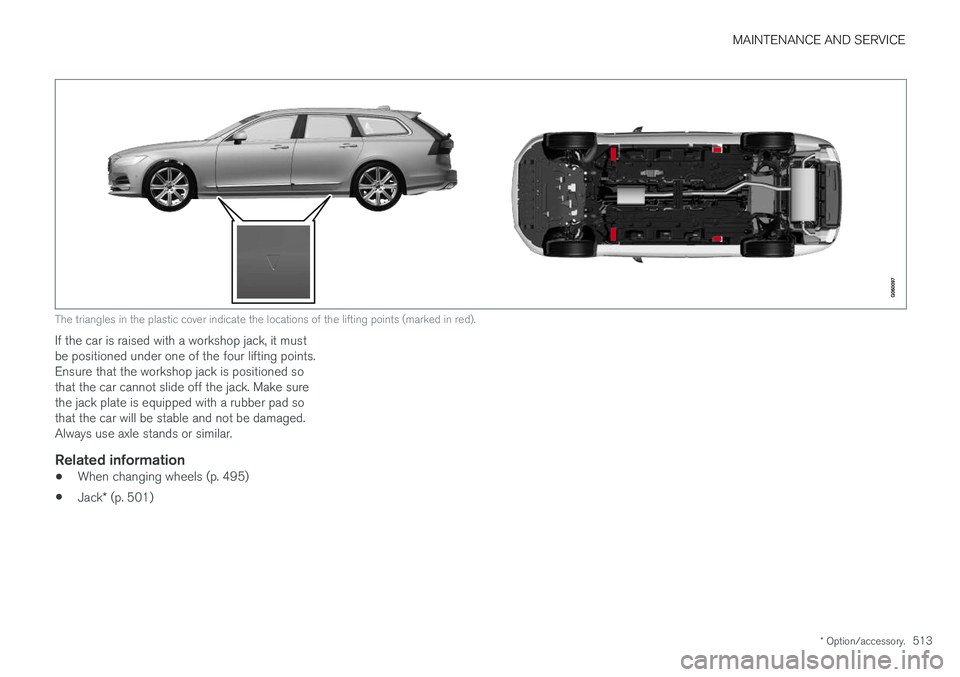
The triangles in the plastic cover indicate the locations of the lifting points (marked in red).
If the car is raised with a workshop jack, it must be positioned under one of the four lifting points.Ensure that the workshop jack is positioned sothat the car cannot slide off the jack. Make surethe jack plate is equipped with a rubber pad sothat the car will be stable and not be damaged.Always use axle stands or similar.
Related information
•When changing wheels (p. 495)
• Jack
* (p. 501)
Page 516 of 594
MAINTENANCE AND SERVICE
514
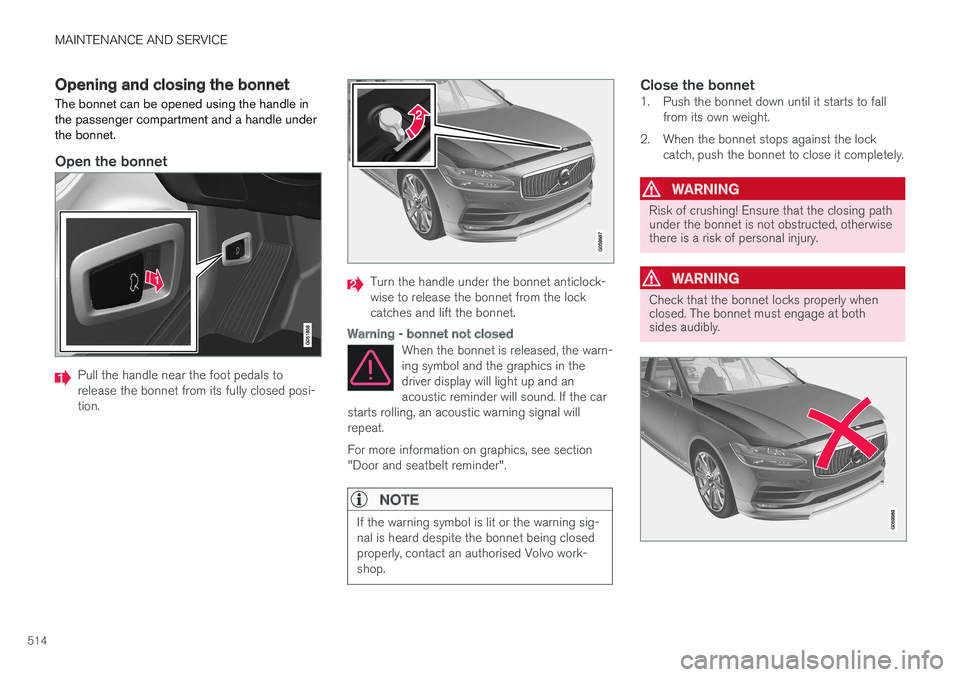
Opening and closing the bonnet
The bonnet can be opened using the handle in the passenger compartment and a handle underthe bonnet.
Open the bonnet
Pull the handle near the foot pedals to release the bonnet from its fully closed posi-tion.
Turn the handle under the bonnet anticlock- wise to release the bonnet from the lockcatches and lift the bonnet.
Warning - bonnet not closed
When the bonnet is released, the warn- ing symbol and the graphics in thedriver display will light up and anacoustic reminder will sound. If the car
starts rolling, an acoustic warning signal willrepeat. For more information on graphics, see section "Door and seatbelt reminder".
NOTE
If the warning symbol is lit or the warning sig- nal is heard despite the bonnet being closedproperly, contact an authorised Volvo work-shop.
Close the bonnet1. Push the bonnet down until it starts to fall from its own weight.
2. When the bonnet stops against the lock catch, push the bonnet to close it completely.
WARNING
Risk of crushing! Ensure that the closing path under the bonnet is not obstructed, otherwisethere is a risk of personal injury.
WARNING
Check that the bonnet locks properly when closed. The bonnet must engage at bothsides audibly.