service VOLVO XC60 2009 Owner´s Manual
[x] Cancel search | Manufacturer: VOLVO, Model Year: 2009, Model line: XC60, Model: VOLVO XC60 2009Pages: 297, PDF Size: 21.16 MB
Page 128 of 297
04 Comfort and driving pleasureClimate system 04
126
* Option/accessory, for more information, see Introduction.
Introduction
Air conditioningThe vehicle is equipped with Electronic Climate
Control (ECC). The climate control system
cools, heats or dehumidifies the air in the pas-
senger compartment.
NOTE
\b
The air conditioning can be switched
off, but to ensure the best possible cli-
mate comfort in the passenger com-
partment and to prevent the windows
from misting, it should always be on.
\b In warm weather, a small amount of
water may accumulate under the car
when it has been parked. This water is
condensation from the A/C system and
is normal.
Sensor location
\b
The sunlight sensor is located on the top
side of the dashboard.
NOTE The sunlight sensor monitors which side of
the car that is most exposed to sunlight.
This can mean that the temperature may
differ between the right and left-side air
vents, even if the temperatures set for both
sides of the passenger compartment are the
same.
\b
The temperature sensor for the passenger
compartment is located below the climate
control panel.
\b The outside temperature sensor is located
on the door mirror.
\b The humidity sensor
* is located in the inte-
rior rearview mirror.
NOTE Do not cover or block the sensors with
clothing or other objects.
Side windows and moonroofTo ensure that the air conditioning works opti-
mally, the side windows, and the optional
moonroof should be closed.
Fog on the inside of the windowsThe defroster function should be used to
remove fog or mist from the inside of the win-
dows. Keeping the windows clean with a com-mercially available window washing spray will
also help prevent fogging or misting.
Temporary shut-off of the air
conditioning
The air conditioning is momentarily disen-
gaged during full-throttle acceleration or when
driving uphill with a trailer. This may result in a
temporary increase in cabin temperature.
Ice and snowAlways keep the air intake grille at the base of
the windshield free of snow.
Climate system maintenanceSpecial tools and equipment are required to
maintain and carry out repairs on the climate
system. Work of this type should only be done
by a trained and qualified Volvo service tech-
nician.
RefrigerantVolvo cares about the environment. The air
conditioning system in your car contains a
CFC-free refrigerant – R134a. This substance
will not deplete the ozone layer. The air condi-
tioning system contains 1.8 lbs (800 g) of
R134a. The systems uses PAG oil.
Passenger compartment filterReplace the cabin air filter with a new one at
the recommended intervals. Please refer to
Page 129 of 297
04 Comfort and driving pleasure
Climate system04
}}
127
your Warranty and Service Records Informa-
tion booklet, or consult a trained and qualified
Volvo service technician for these intervals.
The filter should be replaced more often when
driving under dirty and dusty conditions. The
filter cannot be cleaned and therefore should
always be replaced with a new one.
NOTE
There are different types of cabin air filters.
Ensure that the correct type is installed.
Interior Air Quality System (IAQS)A multifilter helps reduce gases and particles
in the incoming air, thereby reducing the levels
of odors and contaminants entering the vehi-
cle. The air quality sensor detects increased
levels of contaminants in the outside air. When
the air quality sensor detects contaminated
outside air, the air intake closes and the air
inside the passenger compartment is recircu-
lated, i.e. no outside air enters the vehicle. The
filter also cleans recirculated passenger com-
partment air.
NOTE
Contact your Volvo retailer for IAQS air filter
replacement intervals.
Menu settingsThe default settings for three of the climate
system\fs functions can be changed in the
menu system, see page 122:
\b
Blower speed in automatic mode.
\b Recirculation timer for passenger com-
partment air.
\b Automatic rear window defrosting.
The functions can also be returned to factory
settings in the menu system.
Air distribution The incoming air is distributed from 20 different
vents in the passenger compartment.
Air distribution is fully automatic in
AUTO
mode. If desired, air distribution can be controlled
manually, see page 128.
Air vents in the dashboard
Open
Closed
Horizontal airflow
Vertical airflow
Direct the outer air vents toward the side win-
dows to defrost. G032070 G031437
Page 142 of 297
04 Comfort and driving pleasureAudio system 04
140
Sub-channels Example of an HD Radio station with sub-channels
In many cases, a main HD Radio station (FM
wavebands only) will also have sub-channels
offering additional types of programming or
music.
In such cases, the “>” symbol will be displayed
to the left of the frequency number and a num-
ber will be displayed to the right of the fre-
quency number indicating that the currently
tuned frequency has at least one sub-channel.
The "2" in the illustration indicates that you are
currently listening to the first sub-channel on
frequency 93.9.
Selecting sub-channelsTo listen to a frequency\fs sub-channel(s), press
the left or right arrow keys (see the illustration
on page 138). If you are currently tuned to a frequency\fs main channel, pressing the left
arrow key will tune to the next lower radio fre-
quency.
NOTE
\b
When the radio has gone into HD mode,
it may take several seconds before a
number (if the current frequency has
any sub-channels) is displayed to the
right of the frequency. Pressing the
arrow keys before the number is dis-
played will cause the radio to tune to the
next available radio station, not to the
current station\fs sub-channels.
\b When you are no longer in broadcasting
range of the current
sub-channel, No
HD reception will be displayed. It will
then be necessary to tune to or search
for a new radio station. Sub-channels can also be stored as pre-
sets,See page 138 for information on storing
stations.
Once a sub-channel has been stored on a pre-
set button, if you press this button while you
are out of digital range of the transmitter,
No
HD reception will be displayed. Digital Audio Broadcasting (DAB) -
Canadian models only
IntroductionDigital Audio Broadcasting (DAB) is a digital
radio broadcasting system.
NOTE
This system does not support DAB+.
Service and Ensemble
\b
Service - Radio stations (only audio serv-
ices are supported by the system).
\b Ensemble - a collection of radio stations
that are broadcast on the same frequency.
Ensemble learnWhen you drive into a new broadcasting area,
the system can learn (store) the existing groups
of channels in the area.
Learning (storing) a group of channels creates
an updated list of all available groups of chan-
nels. This list is not updated automatically.
Learning is done by using the menu selection
Ensemble learn or can be done directly by
pressing and holding the
AUTO button. It may
take up to one minute to learn a group of chan-
nels if both Band III and LBand have been
selected.
Page 143 of 297
04 Comfort and driving pleasure
Audio system04
}}
* Option/accessory, for more information, see Introduction. 141
Wavebands
DAB is broadcast on two wavebands
6
: Band
III and LBand
\b Band III 7
- nationwide
\b LBand – broadcasting primarily in metro-
politan areas
By selecting Band III only, learning channels
will take less time than if both Band III and
LBand are selected. It may not be possible to
find all ensembles (groups of stations). The
choice of waveband does not affect learned
(stored) ensembles.
Navigating via lists
\b Ensemble list – shows groups of channels
that the radio receiver has acquired
through the learn function.
\b Service list – shows channels regardless
which group of channels that they are in.
The list can also be filtered using the DAB
PTY function (see below).
\b Subchannel list – shows subchannels
that may be available on the selected
channel.
The lists can be accessed via the menu.
Groups of channels can also be accessed by
pressing ENTER.
ScanningSCAN automatically searches through the list
of available channels
Sirius satellite radio*
Listening to satellite radioThe Sirius satellite system consists of a number
of high elevation satellites that orbit over North
America. They are supplemented by a number
of ground repeaters that enhance radio cover-
age in urban areas.
NOTE \b
The digital signals from the Sirius satel-
lites are line-of-sight, which means that
physical obstructions such as bridges,
tunnels, etc, may temporarily interfere
with signal reception.
\b Avoid any obstructions, such as metal-
lic objects transported on roof racks or
in a ski box, or other antennas that may
impede signals from the SIRIUS satel-
lites.
Selecting Sirius radio mode1.
Press Power to switch on the audio sys-
tem (see page 136 for information on the
standard audio and radio functions).
2. Press the MODE button repeatedly until
Sirius 1 or 2 is displayed.
Activating Sirius radio1. Tune to a satellite channel that has no
audio, which means that the channel is
unsubscribed and the text "Call 888-539-
SIRIUS TO SUBSCRIBE" is displayed (see
also "Selecting a channel". This only needs
to be done once.
2. Call Sirius at 1-888-539-SIRIUS (7474).
3. When asked for the Sirius ID number press
AUTO to display this number. It is also
possible to retrieve the Sirius ID from the
menu.
4. UPDATING SUBSCRIPTION will be dis-
played while the subscription is being
updated, after which the display will return
to the normal view.
SIRIUS IDThe SIRIUS ID is required when contacting the
Sirius Call Center. It is used to activate your
account and when making any account trans- 6
All areas may not broadcast both wavebands.
7 During a transitional period, DAB may not have nationwide coverage and w\
ill only be available in metropolitan areas.
Page 157 of 297
04 Comfort and driving pleasure
Stability system04
}}
155
Introduction
The Dynamic Stability and Traction Control
system (DSTC) consists of a number of func-
tions designed help reduce wheel spin, coun-
teract skidding, and to generally help improve
directional stability.
CAUTION
A pulsating sound will be audible when the
system is actively operating and is normal.
Traction control (TC)This function is designed to help reduce wheel
spin by transferring power from a drive wheel
that begins to lose traction to the wheel on the
opposite side of the vehicle (on the same axle).
TC is most active at low speeds.
This is one of DSTC\fs permanent functions and
cannot be switched off.
Active Yaw Control (AYC)This function helps maintain directional stabil-
ity, for example when cornering, by braking
one or more of the wheels if the vehicle shows
a tendency to skid or slide laterally.
This is one of DSTC\fs permanent functions and
cannot be switched off.
Spin control (SC)The spin control function is designed to help
prevent the drive wheels from spinning while
the vehicle is accelerating.
Under certain circumstances, such as when
driving with snow chains, or driving in deep
snow or loose sand, it may be advisable to
temporarily switch off this function for maxi-
mum tractive force.
WARNING
The car\fs handling and stability characteris-
tics will be altered if the spin control function
has been disabled.
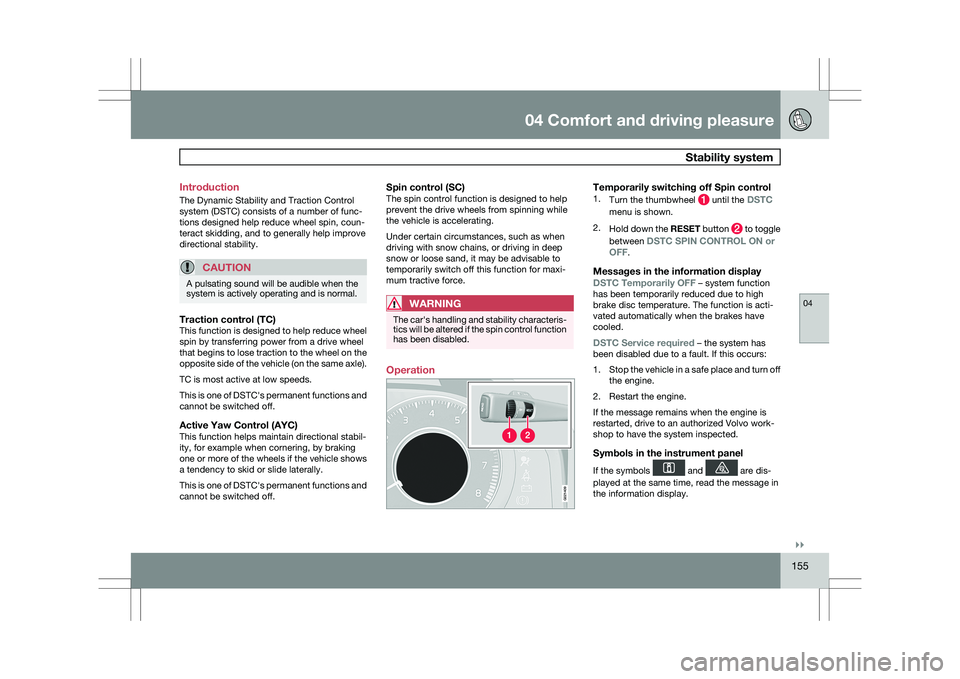
Operation
Temporarily switching off Spin control1.
Turn the thumbwheel until the DSTC
menu is shown.
2. Hold down the RESET button to toggle
between DSTC SPIN CONTROL ON or
OFF.
Messages in the information display
DSTC Temporarily OFF – system function
has been temporarily reduced due to high
brake disc temperature. The function is acti-
vated automatically when the brakes have
cooled.
DSTC Service required – the system has
been disabled due to a fault. If this occurs:
1. Stop the vehicle in a safe place and turn off
the engine.
2. Restart the engine.
If the message remains when the engine is
restarted, drive to an authorized Volvo work-
shop to have the system inspected.
Symbols in the instrument panel
If the symbols and are dis-
played at the same time, read the message in
the information display. G02140
9
Page 166 of 297
04 Comfort and driving pleasureCollision warning with Auto-brake* 04
164
* Option/accessory, for more information, see Introduction.Cause Action
The surface of the windshield is clean but the message remains in the
display. Wait a short time. It may take several minutes for the camera to registe\
r
visibility.
The surface between the inside of the windshield and the camera is dirty\
. Contact an authorized Volvo retailer or service technician to have this
surface cleaned.
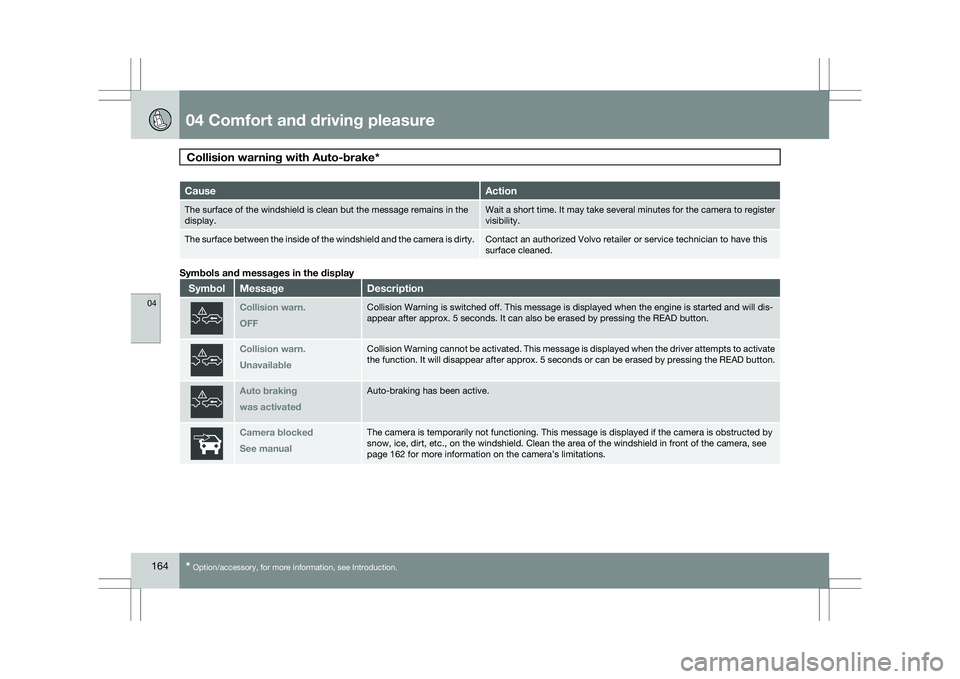
Symbols and messages in the display
Symbol Message Description
Collision warn.
OFF Collision Warning is switched off. This message is displayed when the en\
gine is started and will dis-
appear after approx. 5 seconds. It can also be erased by pressing the RE\
AD button.
Collision warn.
Unavailable Collision Warning cannot be activated. This message is displayed when th\
e driver attempts to activate
the function. It will disappear after approx. 5 seconds or can be erased\
by pressing the READ button.
Auto braking
was activated Auto-braking has been active.
Camera blocked
See manual The camera is temporarily not functioning. This message is displayed if \
the camera is obstructed by
snow, ice, dirt, etc., on the windshield. Clean the area of the windshie\
ld in front of the camera, see
page 162 for more information on the camera’s limitations.
Page 167 of 297
04 Comfort and driving pleasure
Collision warning with Auto-brake*04
* Option/accessory, for more information, see Introduction. 165Symbol Message Description
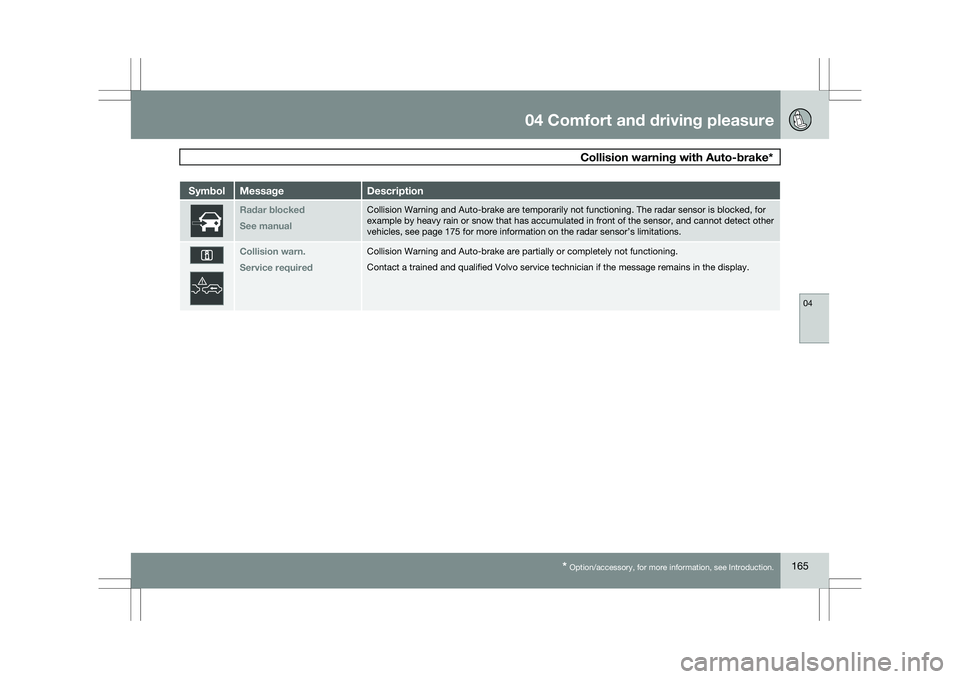
Radar blocked
See manual Collision Warning and Auto-brake are temporarily not functioning. The ra\
dar sensor is blocked, for
example by heavy rain or snow that has accumulated in front of the senso\
r, and cannot detect other
vehicles, see page 175
for more information on the radar sensor’s limitations. Collision warn.
Service required Collision Warning and Auto-brake are partially or completely not functio\
ning.
Contact a trained and qualified Volvo service technician if the message \
remains in the display.
Page 171 of 297
04 Comfort and driving pleasure
City Safety™ 04
}}
169
The following table shows some of the situa-
tions that can cause the message to be dis-
played and suggested actions.
Cause Action
The area of the
windshield in front of
the sensor is dirty or
covered by ice or
snow. Clean the wind-
shield or remove the
ice/snow.
The laser sensor\fs
field of view is
obstructed. Remove the
obstruction.
CAUTION If a crack, scratch or stone chip should
occur in the section of the windshield in
front the laser sensor and covers an area of
approximately 1/50 x 1/10 in. (0.5 x 3 mm)
or larger, contact a trained and qualified
Volvo service technician to repair or replace
the windshield (see the illustration showing
the location of the sensor on page
167).
Failing to do so may result in reduced City
Safety™ functionality.
To help prevent reduced functionality,
please also observe the following:
\b If the windshield is replaced, use the
same type or a windshield approved by
Volvo.
\b When replacing windshield wipers, use
the same type or ones approved by
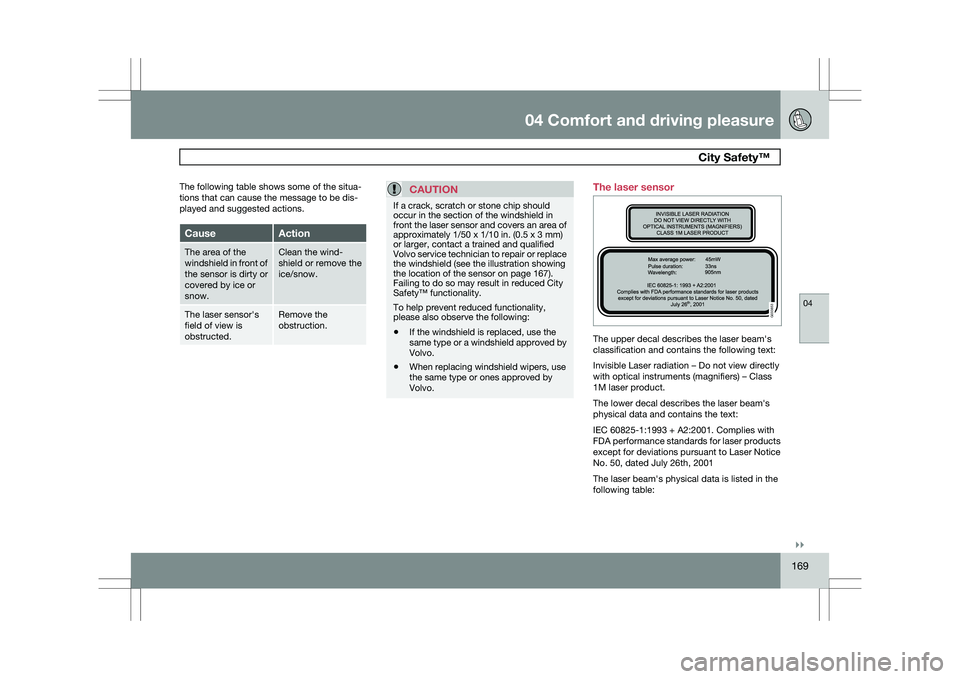
Volvo. The laser sensor
The upper decal describes the laser beam\fs
classification and contains the following text:
Invisible Laser radiation – Do not view directly
with optical instruments (magnifiers) – Class
1M laser product.
The lower decal describes the laser beam\fs
physical data and contains the text:
IEC 60825-1:1993 + A2:2001
. Complies with
FDA performance standards for laser products
except for deviations pursuant to Laser Notice
No. 50, dated July 26th, 2001
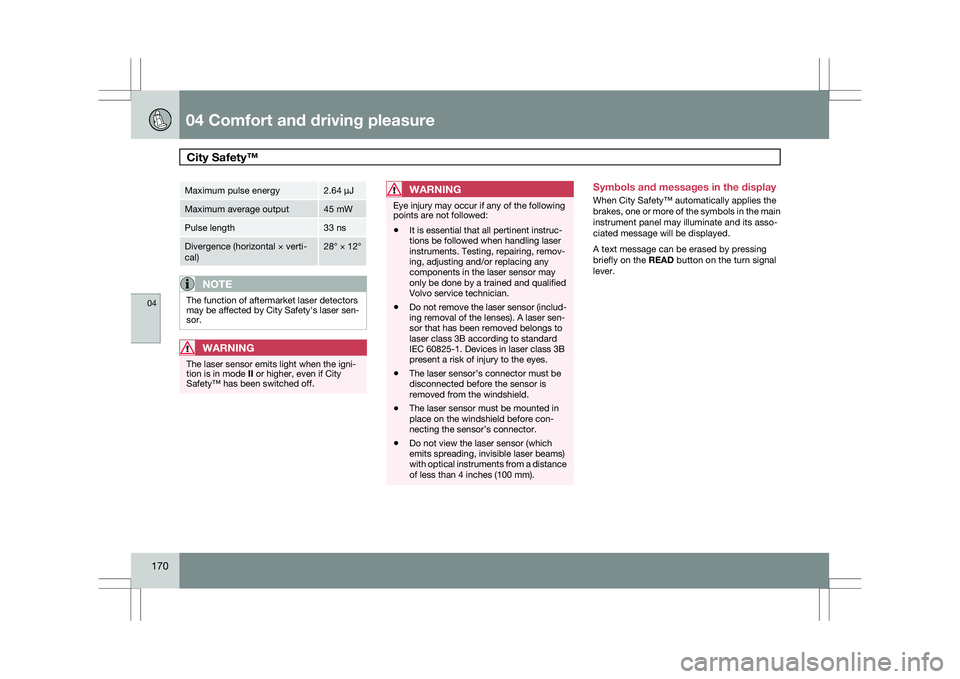
The laser beam\fs physical data is listed in the
following table:
G033853
Page 172 of 297
04 Comfort and driving pleasureCity Safety™ 04
170 Maximum pulse energy 2.64 μJ
Maximum average output 45 mW
Pulse length 33 ns
Divergence (horizontal × verti-
cal) 28° × 12°
NOTE
The function of aftermarket laser detectors
may be affected by City Safety\fs laser sen-
sor.
WARNING
The laser sensor emits light when the igni-
tion is in mode II or higher, even if City
Safety™ has been switched off.
WARNING Eye injury may occur if any of the following
points are not followed:
\b
It is essential that all pertinent instruc-
tions be followed when handling laser
instruments. Testing, repairing, remov-
ing, adjusting and/or replacing any
components in the laser sensor may
only be done by a trained and qualified
Volvo service technician.
\b Do not remove the laser sensor (includ-
ing removal of the lenses). A laser sen-
sor that has been removed belongs to
laser class 3B according to standard
IEC 60825-1. Devices in laser class 3B
present a risk of injury to the eyes.
\b The laser sensor’s connector must be
disconnected before the sensor is
removed from the windshield.
\b The laser sensor must be mounted in
place on the windshield before con-
necting the sensor’s connector.
\b Do not view the laser sensor (which
emits spreading, invisible laser beams)
with optical instruments from a distance
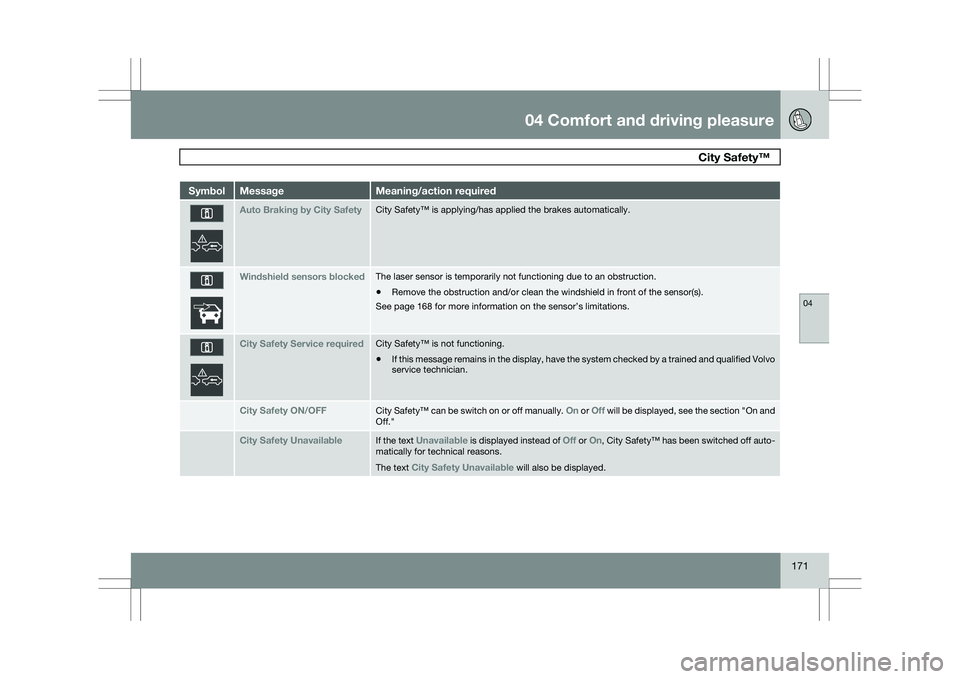
of less than 4 inches (100 mm). Symbols and messages in the display
When City Safety™ automatically applies the
brakes, one or more of the symbols in the main
instrument panel may illuminate and its asso-
ciated message will be displayed.
A text message can be erased by pressing
briefly on the READ button on the turn signal
lever.
Page 173 of 297
04 Comfort and driving pleasure
City Safety™ 04
171Symbol Message Meaning/action required
Auto Braking by City Safety City Safety™ is applying/has applied the brakes automatically.
Windshield sensors blocked The laser sensor is temporarily not functioning due to an obstruction.
\b
Remove the obstruction and/or clean the windshield in front of the senso\
r(s).
See page 168 for more information on the sensor’s limitations. City Safety Service required City Safety™ is not functioning.
\b
If this message remains in the display, have the system checked by a tra\
ined and qualified Volvo
service technician. City Safety ON/OFF City Safety™ can be switch on or off manually.
On or Off will be displayed, see the section "On and
Off." City Safety Unavailable If the text
Unavailable is displayed instead of Off or On,
City Safety™ has been switched off auto-
matically for technical reasons.
The text City Safety Unavailable will also be displayed.