service VOLVO XC60 2009 Owner´s Manual
[x] Cancel search | Manufacturer: VOLVO, Model Year: 2009, Model line: XC60, Model: VOLVO XC60 2009Pages: 297, PDF Size: 21.16 MB
Page 180 of 297
04 Comfort and driving pleasureAdaptive Cruise Control (ACC)* 04
178
* Option/accessory, for more information, see Introduction. Symbol Message Description
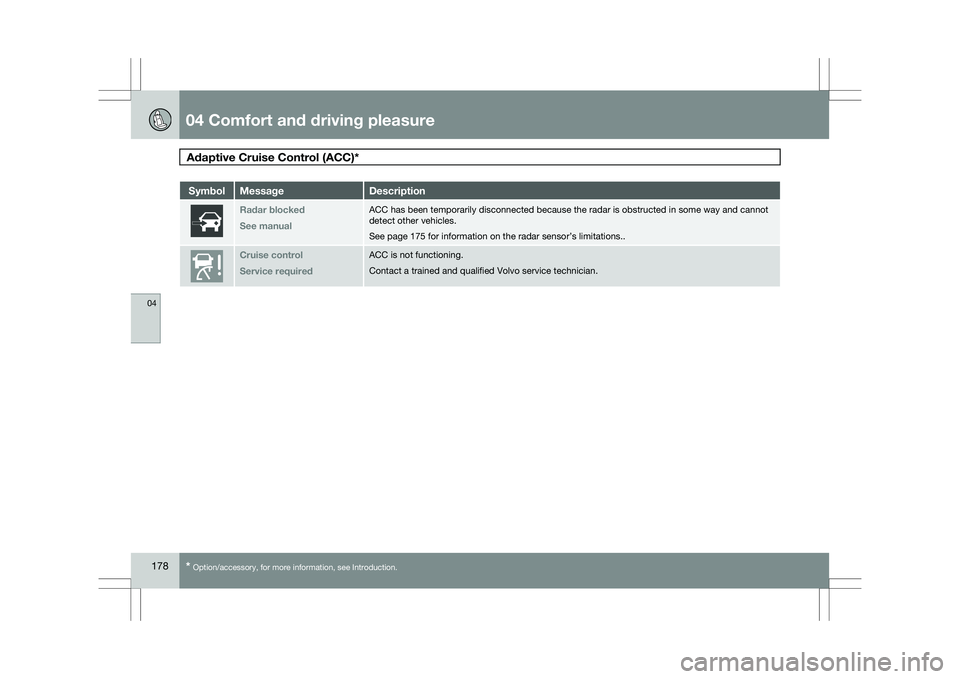
Radar blocked
See manual ACC has been temporarily disconnected because the radar is obstructed in\
some way and cannot
detect other vehicles.
See page 175 for information on the radar sensor’s limitations..
Cruise control
Service required ACC is not functioning.
Contact a trained and qualified Volvo service technician.
Page 183 of 297

04 Comfort and driving pleasure
Distance alert04
181Symbol Message Description
Radar blockd
See manual Distance Alert has been temporarily disconnected because the radar is ob\
structed in some way and
cannot detect other vehicles.
See page 175 for information on the radar sensor’s limitations.Collision warn.
Service required Distance Alert or Collision Warning with Auto-brake is not functioning p\
roperly. Contact a trained and
qualified Volvo service technician.
Page 186 of 297
04 Comfort and driving pleasureDriver Alert System* 04
184
* Option/accessory, for more information, see Introduction.
Symbols and messages in the display
Symbol Message Description
-
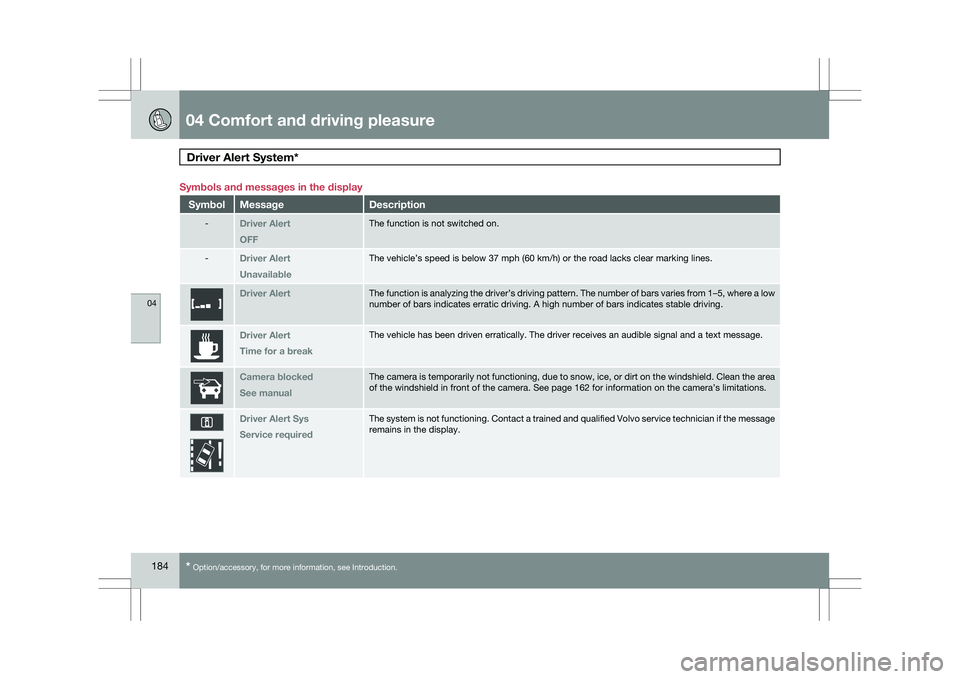
Driver Alert
OFF The function is not switched on.
-
Driver Alert
Unavailable The vehicle’s speed is below 37 mph (60 km/h) or the road lacks cle\
ar marking lines.
Driver Alert The function is analyzing the driver’s driving pattern. The number of\
bars varies from 1–5, where a low
number of bars indicates erratic driving. A high number of bars indicate\
s stable driving.
Driver Alert
Time for a break The vehicle has been driven erratically. The driver receives an audible \
signal and a text message.
Camera blocked
See manual The camera is temporarily not functioning, due to snow, ice, or dirt on \
the windshield. Clean the area
of the windshield in front of the camera. See page 162 for information o\
n the camera’s limitations.
Driver Alert Sys
Service required The system is not functioning. Contact a trained and qualified Volvo ser\
vice technician if the message
remains in the display.
Page 188 of 297
04 Comfort and driving pleasureDriver Alert System* 04
186
* Option/accessory, for more information, see Introduction.
Symbols and messages in the display
Symbol Message Description
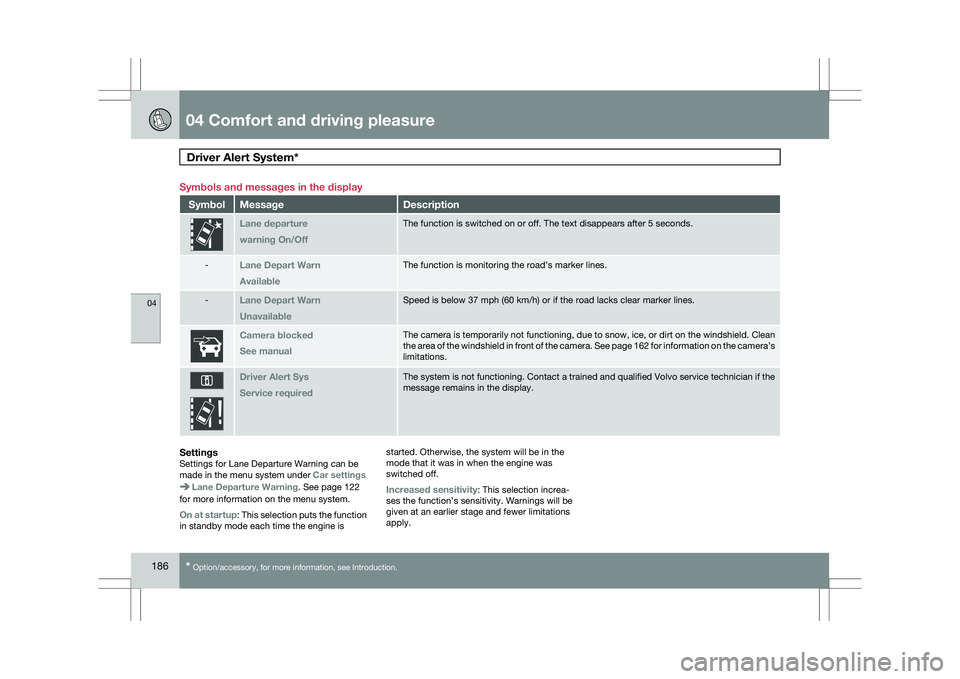
Lane departure
warning On/Off The function is switched on or off. The text disappears after 5 seconds.\
-
Lane Depart Warn
Available The function is monitoring the road’s marker lines.
-
Lane Depart Warn
Unavailable Speed is below 37 mph (60 km/h) or if the road lacks clear marker line\
s.
Camera blocked
See manual The camera is temporarily not functioning, due to snow, ice, or dirt on \
the windshield. Clean
the area of the windshield in front of the camera. See page
162 for information on the camera’s
limitations. Driver Alert Sys
Service required The system is not functioning. Contact a trained and qualified Volvo ser\
vice technician if the
message remains in the display.
SettingsSettings for Lane Departure Warning can be
made in the menu system under
Car settingsLane Departure Warning. See page 122
for more information on the menu system.
On at startup: This selection puts the function
in standby mode each time the engine is started. Otherwise, the system will be in the
mode that it was in when the engine was
switched off.
Increased sensitivity: This selection increa-
ses the function’s sensitivity. Warnings will be
given at an earlier stage and fewer limitations
apply.
Page 191 of 297
04 Comfort and driving pleasure
Park assist*04
* Option/accessory, for more information, see Introduction. 189
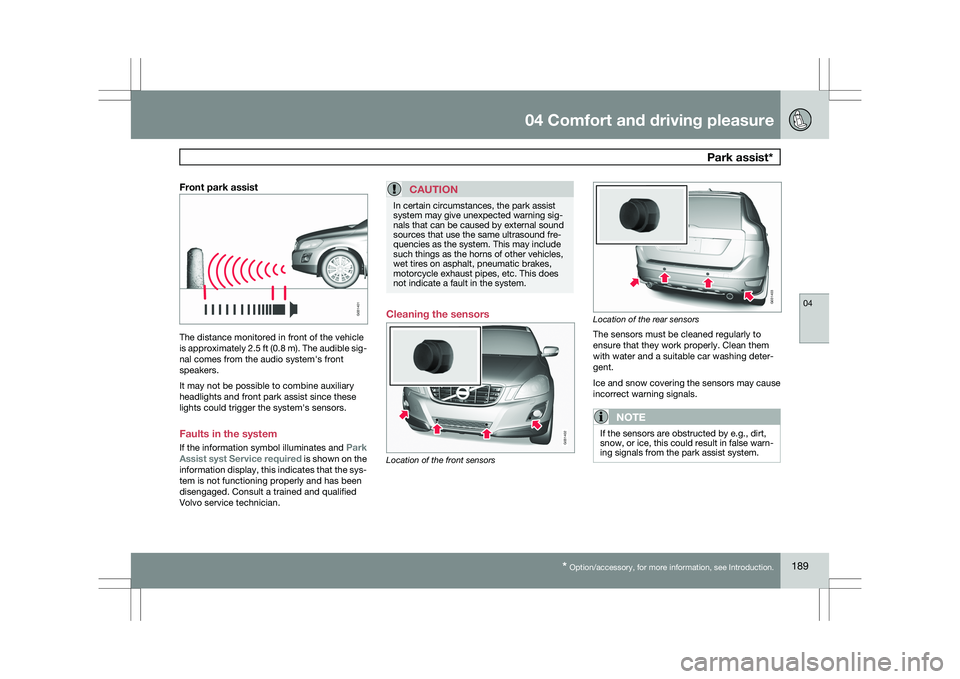
Front park assistThe distance monitored in front of the vehicle
is approximately 2.5 ft (0.8 m). The audible sig-
nal comes from the audio system\fs front
speakers.
It may not be possible to combine auxiliary
headlights and front park assist since these
lights could trigger the system\fs sensors.
Faults in the system
If the information symbol illuminates and
Park
Assist syst Service required is shown on the
information display, this indicates that the sys-
tem is not functioning properly and has been
disengaged. Consult a trained and qualified
Volvo service technician.CAUTION In certain circumstances, the park assist
system may give unexpected warning sig-
nals that can be caused by external sound
sources that use the same ultrasound fre-
quencies as the system. This may include
such things as the horns of other vehicles,
wet tires on asphalt, pneumatic brakes,
motorcycle exhaust pipes, etc. This does
not indicate a fault in the system.
Cleaning the sensors
Location of the front sensors Location of the rear sensors
The sensors must be cleaned regularly to
ensure that they work properly. Clean them
with water and a suitable car washing deter-
gent.
Ice and snow covering the sensors may cause
incorrect warning signals.
NOTE
If the sensors are obstructed by e.g., dirt,
snow, or ice, this could result in false warn-
ing signals from the park assist system. G031401 G031402 G031403
Page 195 of 297
04 Comfort and driving pleasure
Blind Spot Information System*04
}}
* Option/accessory, for more information, see Introduction. 193
Introduction
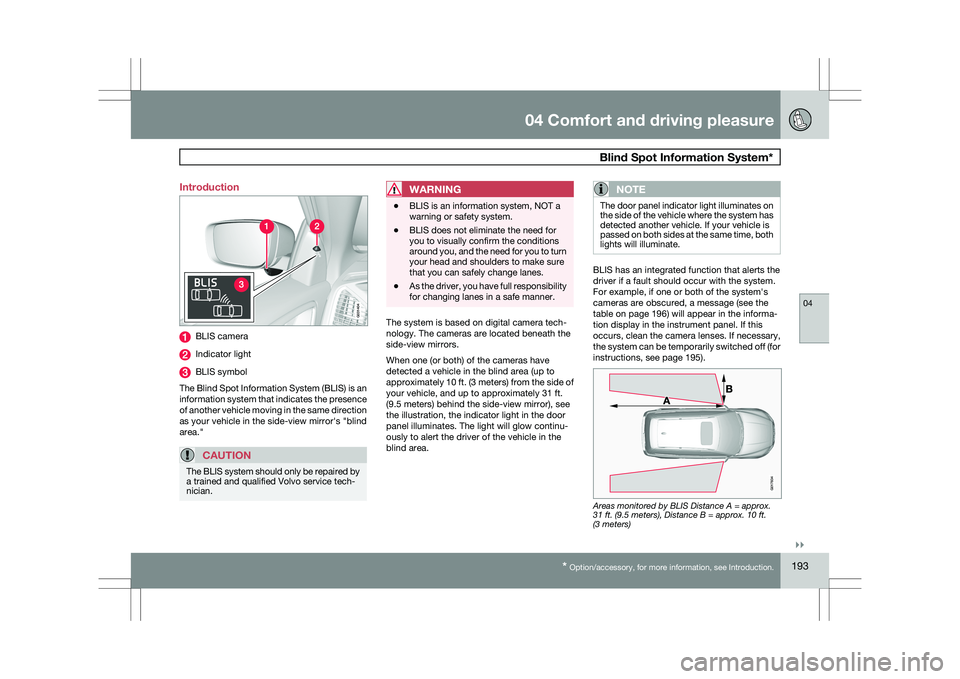
BLIS camera
Indicator light
BLIS symbol
The Blind Spot Information System (BLIS) is an
information system that indicates the presence
of another vehicle moving in the same direction
as your vehicle in the side-view mirror\fs "blind
area."
CAUTION The BLIS system should only be repaired by
a trained and qualified Volvo service tech-
nician.
WARNING \b
BLIS is an information system, NOT a
warning or safety system.
\b BLIS does not eliminate the need for
you to visually confirm the conditions
around you, and the need for you to turn
your head and shoulders to make sure
that you can safely change lanes.
\b As the driver, you have full responsibility
for changing lanes in a safe manner. The system is based on digital camera tech-
nology. The cameras are located beneath the
side-view mirrors.
When one (or both) of the cameras have
detected a vehicle in the blind area (up to
approximately 10 ft. (3 meters) from the side of
your vehicle, and up to approximately 31 ft.
(9.5 meters) behind the side-view mirror), see
the illustration, the indicator light in the door
panel illuminates. The light will glow continu-
ously to alert the driver of the vehicle in the
blind area.NOTE The door panel indicator light illuminates on
the side of the vehicle where the system has
detected another vehicle. If your vehicle is
passed on both sides at the same time, both
lights will illuminate.
BLIS has an integrated function that alerts the
driver if a fault should occur with the system.
For example, if one or both of the system\fs
cameras are obscured, a message (see the
table on page 196) will appear in the informa-
tion display in the instrument panel. If this
occurs, clean the camera lenses. If necessary,
the system can be temporarily switched off (for
instructions, see page 195).
Areas monitored by BLIS Distance A = approx.
31 ft. (9.5 meters), Distance B = approx. 10 ft.
(3 meters) G031404 G01783
4
Page 197 of 297
04 Comfort and driving pleasure
Blind Spot Information System*04
}}
* Option/accessory, for more information, see Introduction. 195
LimitationsIn certain situations, the BLIS indicator light(s)
may illuminate even when there are no other
vehicles in the area monitored by the system.
NOTEIf the BLIS indicator lights illuminate occa-
sionally even when there are no other vehi-
cles in the blind area, this does not indicate
a fault in the system.
In the event of a fault, Blind spot syst.
service required will be displayed.
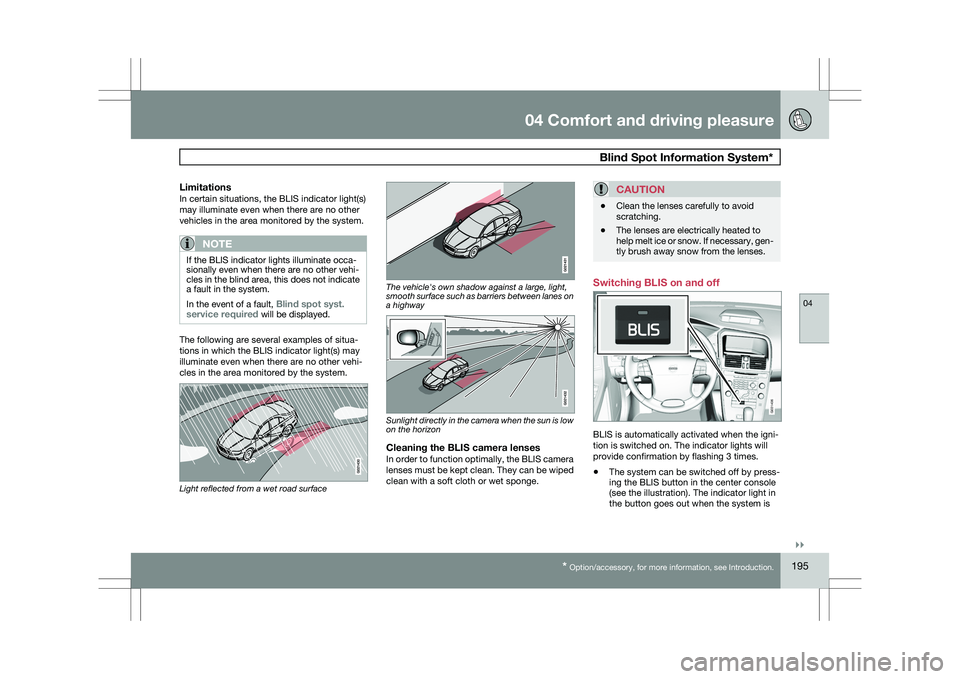
The following are several examples of situa-
tions in which the BLIS indicator light(s) may
illuminate even when there are no other vehi-
cles in the area monitored by the system.
Light reflected from a wet road surface The vehicle's own shadow against a large, light,
smooth surface such as barriers between lanes on
a highway
Sunlight directly in the camera when the sun is low
on the horizon
Cleaning the BLIS camera lensesIn order to function optimally, the BLIS camera
lenses must be kept clean. They can be wiped
clean with a soft cloth or wet sponge.
CAUTION \b
Clean the lenses carefully to avoid
scratching.
\b The lenses are electrically heated to
help melt ice or snow. If necessary, gen-
tly brush away snow from the lenses. Switching BLIS on and off
BLIS is automatically activated when the igni-
tion is switched on. The indicator lights will
provide confirmation by flashing 3 times.
\b
The system can be switched off by press-
ing the BLIS button in the center console
(see the illustration). The indicator light in
the button goes out when the system is BLIS
G031406
Page 198 of 297
04 Comfort and driving pleasureBlind Spot Information System* 04
196
* Option/accessory, for more information, see Introduction.switched off, and a text message is dis-
played.
\b BLIS can be switched on again by pressing
the button. The indicator light in the button
will illuminate and a new text message will
be displayed. Press the READ button (
see
page 123) to erase the message.
BLIS system messages Text in the dis-
play System status
Blind spot syst.
service required BLIS not functioning
properly. Contact an
authorized Volvo
service technician.
Blind spot syst.
camera blocked BLIS camera
obscured. Clean the
lenses.
Blind-spot info
system ON BLIS system on Text in the dis-
play System status
Blind-spot info
system off BLIS system off
Blind spot syst.
reduced function The BLIS cameras\f
function has been
reduced by e.g., fog,
or strong sunlight
directly into the
camea. The camera
will reset itself when
these conditions
have changed. have
been function
reduced
Page 205 of 297
05 During your trip
Driving recommendations05
}}
203
Driving through water
\b
The vehicle can be driven through water up
to a depth of approximately 10 in. (25 cm),
at a maximum speed of 6 mph (10 km/h).
\b Take particular care when driving through
flowing water.
\b Clean the electrical connections for trailer
wiring after driving in mud or water.
\b When driving through water, maintain low
speed and do not stop in the water.
WARNING After driving through water, press lightly on
the brake pedal to ensure that the brakes
are functioning normally. Water or mud can
make the brake linings slippery, resulting in
delayed braking effect.
CAUTION \b
Engine damage will occur if water is
drawn into the air cleaner.
\b If the vehicle is driven through water
deeper than 10 in (25 cm), water may
enter the differential and the transmis-
sion. This reduces the oil\fs lubricating
capacity and may shorten the service
life of these components.
\b Do not allow the vehicle to stand in
water up to the door sills longer than
absolutely necessary. This could result
in electrical malfunctions.
\b If the engine has been stopped while the
vehicle is in water, do not attempt to
restart it. Have the vehicle towed out of
the water.
Engine and cooling systemUnder special conditions, for example when
driving in hilly terrain, extreme heat or with
heavy loads, there is a risk that the engine and
cooling system will overheat. Proceed as fol-
lows to avoid overheating the engine.
\b
Maintain a low speed when driving with a
trailer up long, steep hills.
\b Do not turn the engine off immediately
when stopping after a hard drive.
WARNING The cooling fan may start or continue to
operate (for up to 6 minutes) after the engine
has been switched off.
\b
Remove any auxiliary lights from in front of
the grille when driving in hot weather con-
ditions.
\b Do not exceed engine speeds of 4500 rpm
if driving with a trailer in hilly terrain. The oil
temperature could become too high.
Conserving electrical currentKeep the following in mind to help minimize
battery drain:
\bWhen the engine is not running, avoid
using ignition mode
II. Many electrical sys-
tems (the audio system, the optional navi-
gation system, power windows, etc) will
function in ignition modes 0 and I. These
modes reduce drain on the battery.
\b Please keep in mind that using systems,
accessories, etc., that consume a great
deal of current when the engine is not run-
ning could result in the battery being com-
pletely drained.
\b The optional 12 volt socket in the cargo
area provides electrical current even with
the ignition switched off, which drains the
battery.
Page 206 of 297
05 During your tripDriving recommendations 05
204
Before a long distance tripIt is always worthwhile to have your vehicle
checked by a trained and qualified Volvo serv-
ice technician before driving long distances.
Your retailer will also be able to supply you with
bulbs, fuses, spark plugs and wiper blades for
your use in the event that problems occur.
As a minimum, the following items should be
checked before any long trip:
\b
Check that engine runs smoothly and that
fuel consumption is normal.
\b Check for fuel, oil, and fluid leakage
\b Have the transmission oil level checked.
\b Check condition of drive belts.
\b Check state of the battery\fs charge.
\b Examine tires carefully (the spare tire as
well), and replace those that are worn.
Check tire pressures.
\b The brakes, front wheel alignment, and
steering gear should be checked by a
trained and qualified Volvo service techni-
cian only.
\b Check all lights, including high beams.
\b Reflective warning triangles are legally
required in some states/provinces.
\b Have a word with a trained and qualified
Volvo service technician if you intend to
drive in countries where it may be difficult
to obtain the correct fuel. \b
Consider your destination. If you will be
driving through an area where snow or ice
are likely to occur, consider snow tires.
Cold weather precautionsIf you wish to check your vehicle before the
approach of cold weather, the following advice
is worth noting:
\bMake sure that the engine coolant contains
50 percent antifreeze. Any other mixture
will reduce freeze protection. This gives
protection against freezing down to
–31 °F (–35 °C). The use of "recycled" anti-
freeze is not approved by Volvo. Different
types of antifreeze must not be mixed.
\b Volvo recommends using only genuine
Volvo antifreeze in your vehicle\fs radiator.
\b Try to keep the fuel tank well filled – this
helps prevent the formation of condensa-
tion in the tank. In addition, in extremely
cold weather conditions it is worthwhile to
add fuel line de-icer before refueling.
\b The viscosity of the engine oil is important.
Oil with low viscosity (thinner oil) improves
cold-weather starting as well as decreas-
ing fuel consumption while the engine is
warming up. For winter use, 5W-30 oil, par-
ticularly the synthetic type, is recom-
mended. Be sure to use good quality oil but
do not use cold-weather oil for hard driving
or in warm weather, see page 283 for more
information on engine oil.
NOTE Synthetic oil is not used when the oil is
changed at the normal maintenance inter-
vals except at owner request and at addi-
tional charge.
\b
The load placed on the battery is greater
during the winter since the windshield wip-
ers, lighting, etc. are used more often.
Moreover, the capacity of the battery
decreases as the temperature drops. In
very cold weather, a poorly charged bat-
tery can freeze and be damaged. It is there-
fore advisable to check the state of charge
more frequently and spray an anti-rust oil
on the battery posts.
\b Volvo recommends the use of snow tires
on all four wheels for winter driving, see
page 262.
\b To prevent the washer fluid reservoir from
freezing, add washer solvents containing
antifreeze. This is important since dirt is
often splashed on the windshield during
winter driving, requiring the frequent use of
the washers and wipers. Volvo Washer
Solvent should be diluted as follows: Down
to 14 °F (–10 °C): 1 part washer solvent and
4 parts water Down to 5 °F (–15 °C): 1 part
washer solvent and 3 parts water Down to
0 °F (–18 °C): 1 part washer solvent and