service VOLVO XC60 2009 Owner´s Manual
[x] Cancel search | Manufacturer: VOLVO, Model Year: 2009, Model line: XC60, Model: VOLVO XC60 2009Pages: 297, PDF Size: 21.16 MB
Page 68 of 297
02 Locks and alarmAlarm 02
66 The alarm system
The alarm is automatically armed whenever the
vehicle is locked with the remote key or
optional Personal Car Communicator.
USA FCC ID: NWD5481
This device complies with part 15 of the FCC
rules. Operation is subject to the following con-
ditions: (1) This device may not cause harmful
interference, and (2) this device must accept
any interference received, including interfer-
ence that may cause undesired operation.
When armed, the alarm continuously monitors
a number of points on the vehicle. The follow-
ing conditions will trigger the alarm:
\b
The hood is forced open.
\b The tailgate is forced open.
\b A door is forced open.
\b The ignition slot is tampered with.
\b An attempt is made to start the vehicle with
a non-approved key (a key not coded to
the car\fs ignition).
\b If there is movement in the passenger com-
partment (if the vehicle is equipped with
the accessory movement sensor).
\b The vehicle is lifted or towed (if the vehicle
is equipped with the accessory inclination
sensor). \b
The battery is disconnected (while the
alarm is armed).
\b The siren is disconnected when the alarm
is disarmed.
A message will appear in the information dis-
play if a fault should occur in the alarm system.
Contact an authorized Volvo service techni-
cian.
NOTE Do not attempt to repair any of the compo-
nents in the alarm system yourself. This
could affect the insurance policy on the
vehicle.
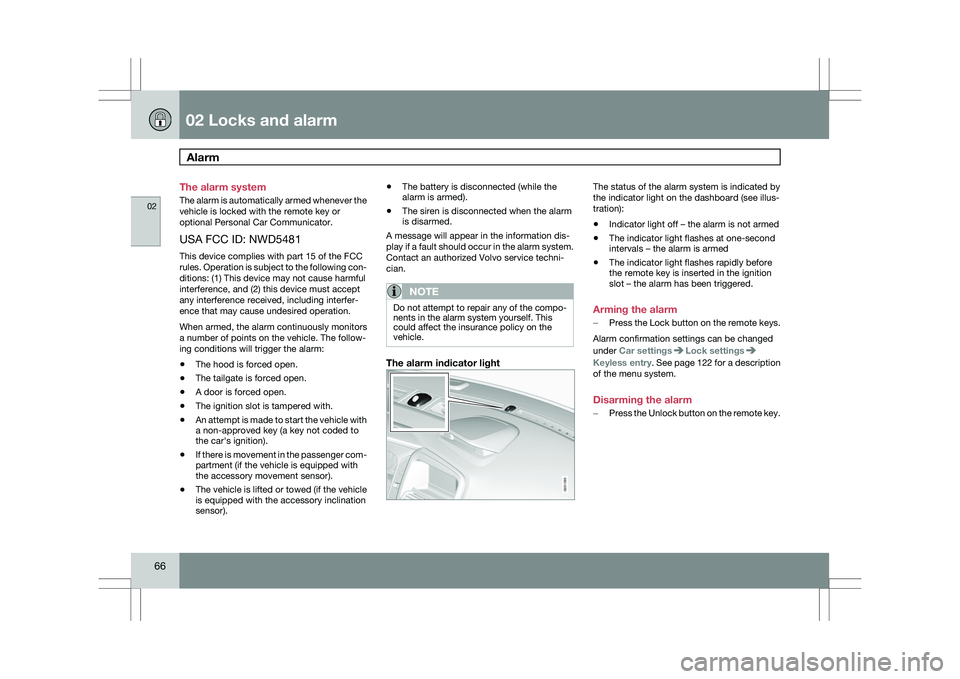
The alarm indicator light The status of the alarm system is indicated by
the indicator light on the dashboard (see illus-
tration):
\b
Indicator light off – the alarm is not armed
\b The indicator light flashes at one-second
intervals – the alarm is armed
\b The indicator light flashes rapidly before
the remote key is inserted in the ignition
slot – the alarm has been triggered.
Arming the alarm
– Press the Lock button on the remote keys.
Alarm confirmation settings can be changed
under Car settings Lock settings
Keyless entry
. See page 122 for a description
of the menu system.
Disarming the alarm
– Press the Unlock button on the remote key. G031385
Page 77 of 297
03 Your driving environment
Instruments and controls03
}}
* Option/accessory, for more information, see Introduction. 75Symbol Description
Left turn signal indicator
Right turn signal indicator
Trailer turn signal indicator
If you are towing a trailer, this light will flash
simultaneously with the trailer\fs turn signals. If
the light does not flash, or if they flash faster
than usual when signaling a turn, the turn sig-
nals on the trailer or on the vehicle are not
functioning properly.
Malfunction Indicator Light
As you drive, a computer called On-Board
Diagnostics II (OBDII) monitors your vehicle\fs
engine, transmission, electrical and emission
systems.
The malfunction indicator (CHECK ENGINE)
light will illuminate if the computer senses a
condition that potentially may need correcting.
When this happens, please have your vehicle
checked by a trained and qualified Volvo serv-
ice technician as soon as possible.
A malfunction indicator (CHECK ENGINE) light
may have many causes. Sometimes, you may
not notice a change in your car\fs behavior.
Even so, an uncorrected condition could hurt
fuel economy, emission controls, and drivabil-
ity. Extended driving without correcting the
cause could even damage other components
in your vehicle.
This light may illuminate if the fuel filler cap is
not closed tightly or if the engine was running
while the vehicle was refueled.
Canadian models are equipped with this sym-
bol:
Anti-lock Brake System (ABS)
warning light
If the warning light comes on, there may be a
malfunction in the ABS system (the standard
braking system will still function). Check the
system by:
1. Stopping in a safe place and switching off the ignition.
2. Restart the engine.
3. If the warning light goes off, no further action is required.
If the warning light remains on, the vehicle
should be driven to a trained and qualified
Volvo service technician for inspection,
See
page 112 for additional information.
Canadian models are equipped with this sym-
bol:
Rear fog light
This symbol indicates that the rear fog light
(located in the driver\fs side tail light cluster) is
on.
Stability system
This indicator symbol flashes when the DSTC
(Dynamic Stability and Traction Control sys-
tem) is actively working to stabilize the vehicle,
155 for more detailed information.
Tire pressure monitoring system
(TPMS)*
This symbol illuminates to indicate that tire
pressure in one or more tires is low, see
page 271 for detailed information.
Low fuel level
When this light comes on, the vehicle should
be refueled as soon as possible.
Information symbol
The information symbol illuminates and a text
message is displayed if a fault is detected in
one of the vehicle\fs systems. The message can
be erased and the symbol can be turned off by
pressing the READ button (see page 123 for
information) or this will take place automati-
cally after a short time (the length of time varies,
depending on the function affected).
Page 78 of 297
03 Your driving environmentInstruments and controls 03
76 The information symbol may also illuminate
together with other symbols.
High beam indicator
This symbol illuminates when the high beam
headlights are on, or if the high beam flash
function is used.
Left turn signal indicator
Right turn signal indicator
NOTE
\b
Both turn signal indicators will flash
when the hazard warning flashers are
used.
\b If either of these indicators flash faster
than normal, the direction indicators are
not functioning properly.
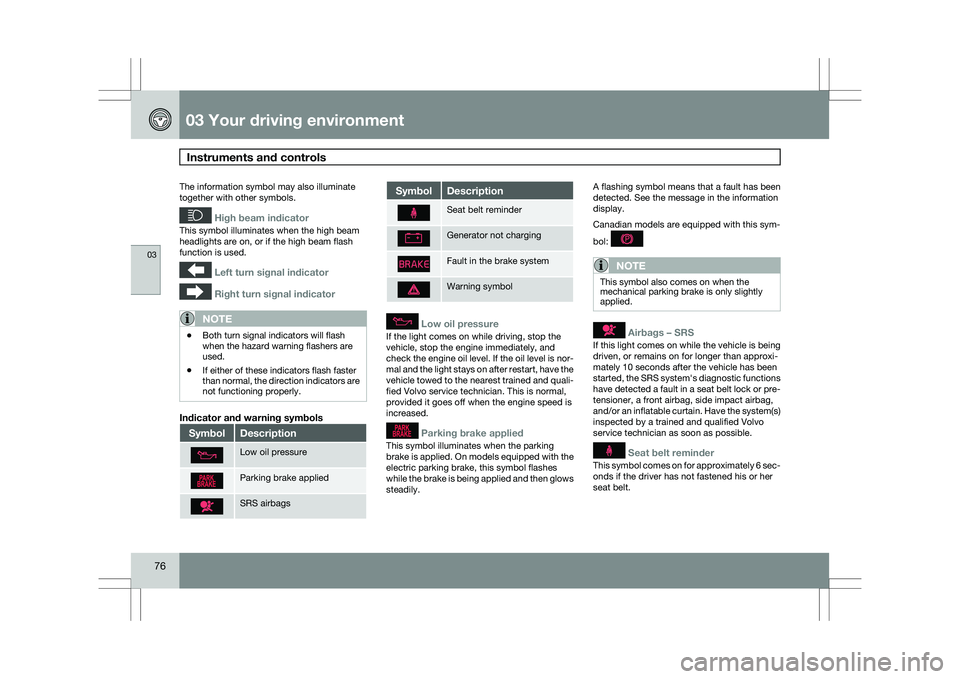
Indicator and warning symbols Symbol Description
Low oil pressure
Parking brake applied
SRS airbags Symbol Description
Seat belt reminder
Generator not charging
Fault in the brake system
Warning symbol
Low oil pressure
If the light comes on while driving, stop the
vehicle, stop the engine immediately, and
check the engine oil level. If the oil level is nor-
mal and the light stays on after restart, have the
vehicle towed to the nearest trained and quali-
fied Volvo service technician. This is normal,
provided it goes off when the engine speed is
increased.
Parking brake applied
This symbol illuminates when the parking
brake is applied. On models equipped with the
electric parking brake, this symbol flashes
while the brake is being applied and then glows
steadily.A flashing symbol means that a fault has been
detected. See the message in the information
display.
Canadian models are equipped with this sym-
bol:
NOTE
This symbol also comes on when the
mechanical parking brake is only slightly
applied.
Airbags – SRS
If this light comes on while the vehicle is being
driven, or remains on for longer than approxi-
mately 10 seconds after the vehicle has been
started, the SRS system\fs diagnostic functions
have detected a fault in a seat belt lock or pre-
tensioner, a front airbag, side impact airbag,
and/or an inflatable curtain. Have the system(s)
inspected by a trained and qualified Volvo
service technician as soon as possible.
Seat belt reminder
This symbol comes on for approximately 6 sec-
onds if the driver has not fastened his or her
seat belt.
Page 79 of 297
03 Your driving environment
Instruments and controls03
}}
77
Generator not charging
This symbol comes on during driving if a fault
has occurred in the electrical system. Contact
an authorized Volvo workshop.
Engine temperatureEngine overheating can result from low oil or
coolant levels, towing or hard driving at high
heat and altitude, or mechanical malfunction.
Engine overheating will be signaled with text
and a red warning triangle in the middle of the
instrument display. The exact text will depend
on the degree of overheating. It may range
from "HIGH ENGINE TEMP – SLOW
DOWN" to "
HIGH ENGINE TEMP – STOP
ENGINE." If appropriate, other messages,
such as "COOLANT LEVEL LOW" will also be
displayed. If your engine does overheat so that
you must stop the engine, always allow the
engine to cool before attempting to check oil
and coolant levels.
Fault in brake system
If this symbol lights, the brake fluid level may
be too low. Stop the vehicle in a safe place and
check the level in the brake fluid reservoir, see
page 112. If the level in the reservoir is below
MIN, the vehicle should be transported to an
authorized Volvo workshop to have the brake
system checked. Canadian models are equipped with this sym-
bol: If the and symbols come on
at the same time, there may be a fault in the
brake force distribution system.
1. Stop the vehicle in a safe place and turn off
the engine.
2. Restart the engine.
\b If both symbols extinguish, continue driv-
ing.
\b If the symbols remain on, check the level in
the brake fluid reservoir, see page 227. If
the brake fluid level is normal but the sym-
bols are still lit, the vehicle can be driven,
with great care, to an authorized Volvo
workshop to have the brake system
checked.
\b If the level in the reservoir is below
MIN, the
vehicle should be transported to an author-
ized Volvo workshop to have the brake
system checked.
WARNING \b
If the fluid level is below the MIN mark
in the reservoir or if a warning message
is displayed in the text window:
DO
NOT DRIVE. Have the vehicle towed to
a trained and qualified Volvo service
technician and have the brake system
inspected.
\b If the ABS and Brake system lights are
on at the same time, there is a risk of
reduced vehicle stability.
Warning symbol
The red warning symbol comes on when a fault
has been indicated which could affect the
safety and/or drivability of the vehicle. An
explanatory text is shown on the information
display at the same time. The symbol remains
visible until the fault has been rectified but the
text message can be cleared with the READ
button, see page 123. The warning symbol can
also come on in conjunction with other sym-
bols.
Action:
1.
Stop in a safe place. Do not drive the vehi-
cle further.
2. Read the information on the information display. Implement the action in accord-
Page 89 of 297
03 Your driving environment
Lighting03
}}
87
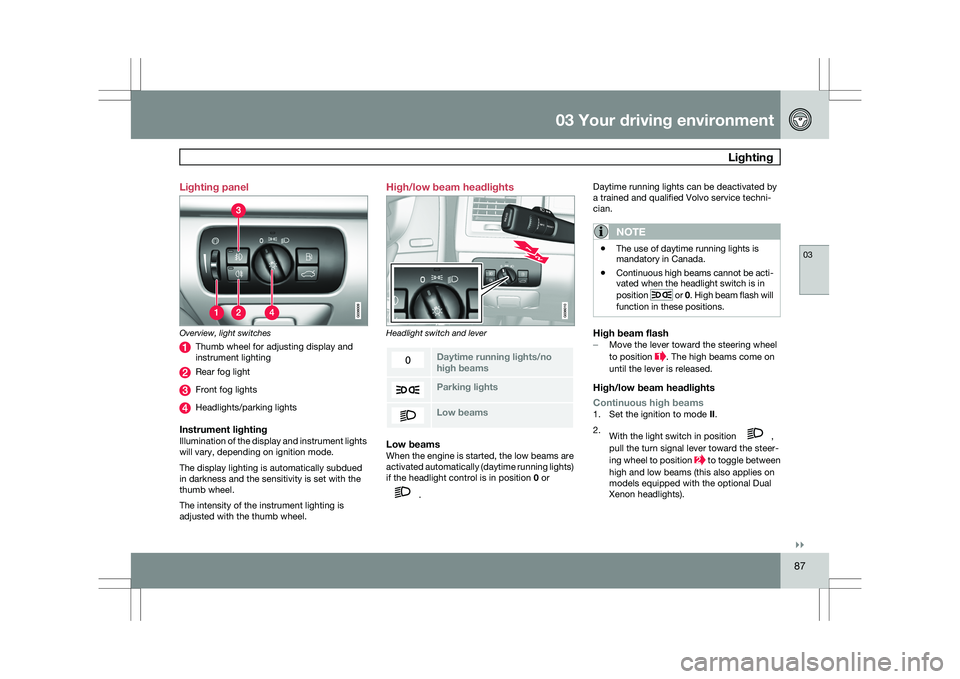
Lighting panel
Overview, light switches
Thumb wheel for adjusting display and
instrument lighting
Rear fog light
Front fog lights
Headlights/parking lights
Instrument lightingIllumination of the display and instrument lights
will vary, depending on ignition mode.
The display lighting is automatically subdued
in darkness and the sensitivity is set with the
thumb wheel.
The intensity of the instrument lighting is
adjusted with the thumb wheel. High/low beam headlights
Headlight switch and lever
Daytime running lights/no
high beams
Parking lights
Low beamsLow beamsWhen the engine is started, the low beams are
activated automatically (daytime running lights)
if the headlight control is in position
0 or .Daytime running lights can be deactivated by
a trained and qualified Volvo service techni-
cian.
NOTE \b
The use of daytime running lights is
mandatory in Canada.
\b Continuous high beams cannot be acti-
vated when the headlight switch is in
position or 0. High beam flash will
function in these positions.
High beam flash– Move the lever toward the steering wheel
to position . The high beams come on
until the lever is released.
High/low beam headlights
Continuous high beams
1. Set the ignition to mode II.
2. With the light switch in position ,
pull the turn signal lever toward the steer-
ing wheel to position to toggle between
high and low beams (this also applies on
models equipped with the optional Dual
Xenon headlights).
Page 113 of 297
03 Your driving environment
Transmission03
111
All Wheel Drive – AWD
4Your Volvo can be equipped with permanent
All Wheel Drive, which means that power is
distributed automatically between the front
and rear wheels. Under normal driving condi-
tions, most of the engine\fs power is directed to
the front wheels. However, if there is any ten-
dency for the front wheels to spin, an electron-
ically controlled coupling distributes power to
the wheels that have the best traction.
NOTEThe message
AWD disabled Service
required will be appear in the information
display if an electrical fault should occur in
the AWD system. A warning light will also
illuminate in the instrument panel. If this
occurs, have the system checked by a
trained and qualified Volvo service techni-
cian.
4 Standard on certain models.
Page 114 of 297
03 Your driving environmentBrakes 03
112 Brake system
The brake system is a hydraulic system con-
sisting of two separate brake circuits. If a prob-
lem should occur in one of these circuits, it is
still possible to stop the vehicle with the other
brake circuit.
If the brake pedal must be depressed farther
than normal and requires greater foot pressure,
the stopping distance will be longer.
A warning light in the instrument panel will light
up to warn the driver that a fault has occurred.
If this light comes on while driving or braking,
stop immediately and check the brake fluid
level in the reservoir.
NOTE
Press the brake pedal hard and maintain
pressure on the pedal – do not pump the
brakes.
WARNING
If the fluid level is below the MIN mark in the
reservoir or if a brake system message is
shown in the information display:
DO NOT
DRIVE. Have the vehicle towed to a trained
and qualified Volvo service technician and
have the brake system inspected.
Power brakes function only when the
engine is running
The power brakes utilize vacuum pressure
which is only created when the engine is run-
ning. Never let the vehicle roll to a stop with the
engine switched off.
If the power brakes are not working, the brake
pedal must be pressed approximately five
times harder than usual to make up for the lack
of power assistance. This can happen for
example when towing your vehicle or if the
engine is switched off when the vehicle is roll-
ing. The brake pedal feels harder than usual.
Water on brake discs and brake pads
affects braking
Driving in rain and slush or passing through an
automatic car wash can cause water to collect
on the brake discs and pads. This will cause a
delay in braking effect when the pedal is
depressed. To avoid such a delay when the
brakes are needed, depress the pedal occa-
sionally when driving through rain, slush, etc.
This will remove the water from the brakes.
Check that brake application feels normal. This
should also be done after washing or starting
in very damp or cold weather.
Severe strain on the brake systemThe brakes will be subject to severe strain
when driving in mountains or hilly areas, or
when towing a trailer. Vehicle speed is usually slower, which means that the cooling of the
brakes is less efficient than when driving on
level roads. To reduce the strain on the brakes,
shift into a lower gear and let the engine help
with the braking. Do not forget that if you are
towing a trailer, the brakes will be subjected to
a greater than normal load.
Anti-lock braking systemThe Anti-lock Braking System (ABS) helps to
improve vehicle control (stopping and steering)
during severe braking conditions by limiting
brake lockup. When the system "senses"
impending lockup, braking pressure is auto-
matically modulated in order to help prevent
lockup that could lead to a skid.
The system performs a brief self-diagnostic
test when the engine has been started and
driver releases the brake pedal. Another auto-
matic test may be performed when the vehicle
first reaches a speed of approximately 25 mph
(40 km/h
). The brake pedal will pulsate several
times and a sound may be audible from the
ABS control module. This is normal.
Cleaning the brake discsCoatings of dirt and water on the brake discs
may result in delayed brake function. This delay
is minimized by cleaning the brake linings.
Cleaning the brake pads is advisable in wet
weather, prior to long-term parking, and after
the vehicle has been washed. Do this by brak-
Page 120 of 297
03 Your driving environmentParking brake 03
118 shop. If you drive off with this error message
showing, a warning signal sounds.
Parking brake not applied – A fault is pre-
venting the parking brake from being applied.
Try to apply and release. Contact a Volvo work-
shop if the message remains.
Parking brake Service required – A fault has
arisen. Contact a Volvo workshop if the fault
remains.
WARNING
If the vehicle must be parked before the fault
has been corrected, always put the gear
selector in
P and turn the wheels so that
they point away from the curb if the vehicle
is pointing uphill or toward the curb if it is
pointing downhill.
Page 126 of 297
04 Comfort and driving pleasureMenus and messages 04
124
Menu overviewDriving distance on current fuel reserve
Average
Instantaneous:
Average speed
Current speed in mph (Canadian models
only)
DSTC
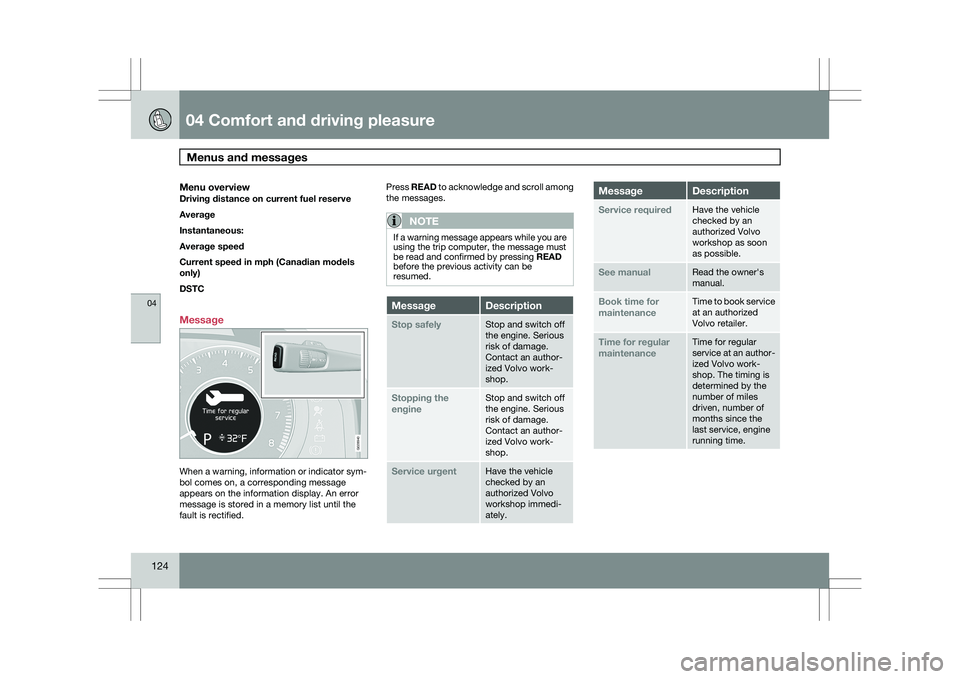
Message When a warning, information or indicator sym-
bol comes on, a corresponding message
appears on the information display. An error
message is stored in a memory list until the
fault is rectified. Press READ to acknowledge and scroll among
the messages.
NOTE If a warning message appears while you are
using the trip computer, the message must
be read and confirmed by pressing READ
before the previous activity can be
resumed.
Message Description
Stop safely Stop and switch off
the engine. Serious
risk of damage.
Contact an author-
ized Volvo work-
shop.
Stopping the
engine Stop and switch off
the engine. Serious
risk of damage.
Contact an author-
ized Volvo work-
shop.
Service urgent Have the vehicle
checked by an
authorized Volvo
workshop immedi-
ately. Message Description
Service required Have the vehicle
checked by an
authorized Volvo
workshop as soon
as possible.
See manual Read the owner\fs
manual.
Book time for
maintenance Time to book service
at an authorized
Volvo retailer.
Time for regular
maintenance Time for regular
service at an author-
ized Volvo work-
shop. The timing is
determined by the
number of miles
driven, number of
months since the
last service, engine
running time. G028940
Page 127 of 297
04 Comfort and driving pleasure
Menus and messages04
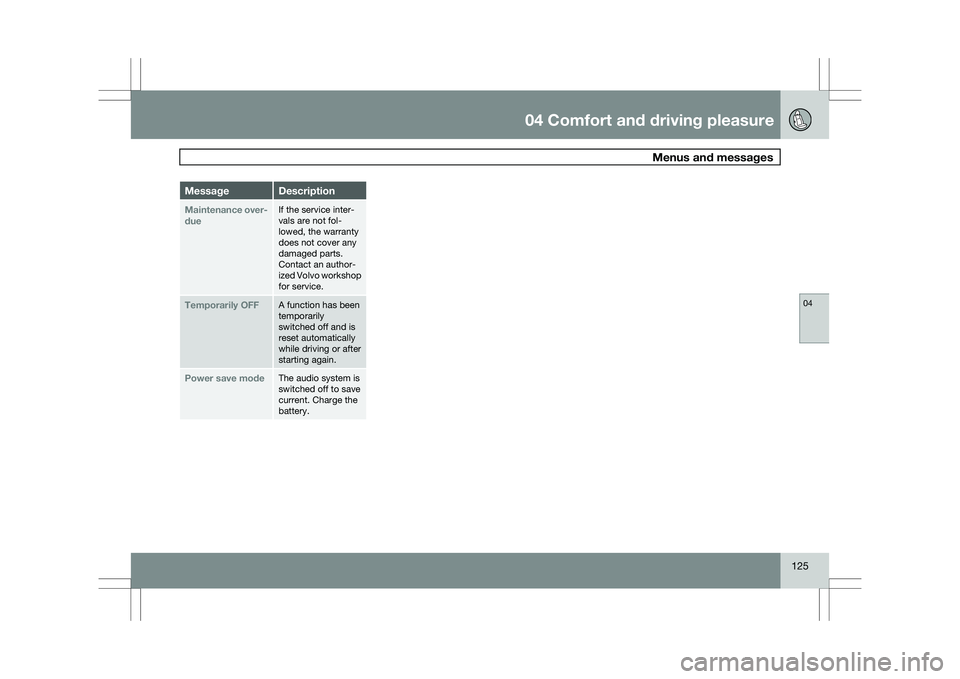
125Message Description
Maintenance over-
due If the service inter-
vals are not fol-
lowed, the warranty
does not cover any
damaged parts.
Contact an author-
ized Volvo workshop
for service.
Temporarily OFF A function has been
temporarily
switched off and is
reset automatically
while driving or after
starting again.
Power save mode The audio system is
switched off to save
current. Charge the
battery.