service VOLVO XC60 TWIN ENGINE 2019 Owner's Manual
[x] Cancel search | Manufacturer: VOLVO, Model Year: 2019, Model line: XC60 TWIN ENGINE, Model: VOLVO XC60 TWIN ENGINE 2019Pages: 695, PDF Size: 14.96 MB
Page 59 of 695
SAFETY
}}
57
NOTE
When the ignition is switched on, the OWSindicator light will illuminate for several sec-onds while the system performs a self-diag-nostic test.
However, if a fault is detected in the system:
The OWS indicator light will stay on
The SRS warning light will come on and stayon and a text message will be displayed.
WARNING
If a fault in the system is detected and indi-cated as described, be aware that the pas-senger's side front airbag will not deploy inthe event of a collision. In this case, the SRSsystem and Occupant Weight Sensor shouldbe inspected by a trained and qualified Volvoservice technician as soon as possible.
WARNING
Never try to open, remove or repair anycomponents in the OWS system. Thiscould cause the system to malfunction.Maintenance or repairs should only becarried out by an a trained and qualifiedVolvo service technician.
The front passenger's seat should not bemodified in any way. This could reducepressure on the seat cushion, whichmight interfere with the OWS system'sfunction.
Passenger'sseat occu-pancy status
OWS indi-cator lightstatus
Passenger'sside front air-bag status
Seat unoccu-piedOWS indi-cator lightlights up
Passenger'sside front air-bag disabled
Seat occu-pied by lowweight occu-
pant/objectA
OWS indi-cator lightlights up
Passenger'sside front air-bag disabled
Seat occu-pied by heavyoccupant/object
OWS indi-cator light isnot lit
Passenger'sside front air-bag enabled
AVolvo recommends that children always be properly restrainedin appropriate child restraints in the rear seats. Do not assumethat the passenger's side front airbag is disabled unless thePASSENGER AIRBAG OFF indicator lamp is lit. Make sure thechild restraint is properly installed. If there is any doubt as to thestatus of the passenger's side front airbag, move the childrestraint to the rear seat.
The OWS is designed to enable (may inflate) thepassenger's side front airbag in the event of acollision anytime the system senses that a per-son of adult size is sitting properly in the frontpassenger's seat. The PASSENGER AIRBAGOFF indicator lamp will be off and remain off.
If a person of adult size is sitting in the front pas-senger's seat, but the PASSENGER AIRBAGOFF indicator lamp is on, it is possible that the
Page 78 of 695
||
SAFETY
* Option/accessory.76
Canadian models
Stage 1Stage 2
Weight22 - 36 kg
50 - 80 lbs
18 - 25 kg
40 - 55 lbs
Length 115 - 140 cm
45 - 55 in.
102 - 120 cm
40 - 47 in.
18 kg (40 lbs) is the minimum weight require-ment for a child using booster seats according tothe Canadian regulation CMVSS 213.4.
WARNING
DEATH or SERIOUS INJURY can
occur
Follow all instructions on this
child restraint and in the vehicle's
owner's manual.
Make sure the booster cushion is
securely locked before the child
is seated.
Use this booster cushion only with chil-dren whose height and weight are withinthe permitted limits shown in the table.
Use only the vehicle's lap and shoulderbelt system when restraining the child inthis booster cushion.
In the event of a collision while the inte-grated booster cushion was occupied, theentire booster cushion and seat belt mustbe replaced. The booster cushion shouldalso be replaced if it is badly worn ordamaged in any way. This work should beperformed by a trained and qualifiedVolvo service technician only.
Related information
Child restraints (p. 65)
Folding up the integrated booster cushion*(p. 77)
Folding down the integrated booster cush-ion* (p. 78)
Page 80 of 695
||
SAFETY
* Option/accessory.78
WARNING
DEATH or SERIOUS INJURY can
occur
Follow all instructions on this
child restraint and in the vehicle's
owner's manual.
Make sure the booster cushion is
securely locked before the child
is seated.
Use this booster cushion only with chil-dren whose height and weight are withinthe permitted limits shown in the table.
Use only the vehicle's lap and shoulderbelt system when restraining the child inthis booster cushion.
In the event of a collision while the inte-grated booster cushion was occupied, theentire booster cushion and seat belt mustbe replaced. The booster cushion shouldalso be replaced if it is badly worn ordamaged in any way. This work should beperformed by a trained and qualifiedVolvo service technician only.
NOTE
The integrated booster cushion cannot bemoved directly from the upper position to thelower position. From the upper position, thebooster cushion must first be folded downcompletely into the rear seat and then raisedto the lower position.
Related information
Integrated booster cushion* (p. 75)
Folding down the integrated booster cush-ion* (p. 78)
Folding down the integrated
booster cushion*
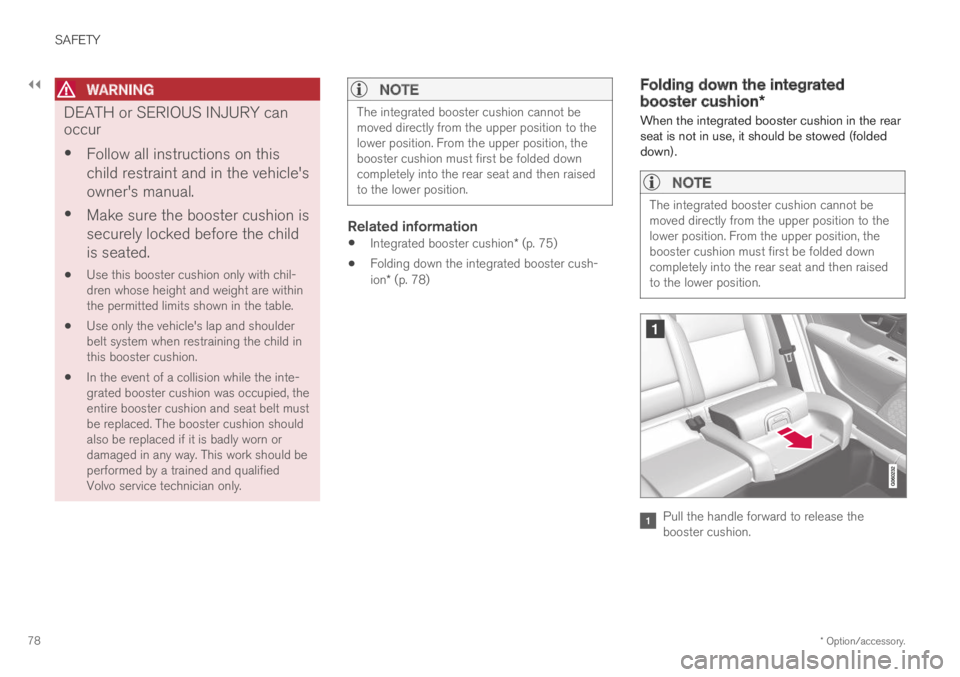
When the integrated booster cushion in the rearseat is not in use, it should be stowed (foldeddown).
NOTE
The integrated booster cushion cannot bemoved directly from the upper position to thelower position. From the upper position, thebooster cushion must first be folded downcompletely into the rear seat and then raisedto the lower position.
Pull the handle forward to release thebooster cushion.
Page 81 of 695
SAFETY
* Option/accessory.79
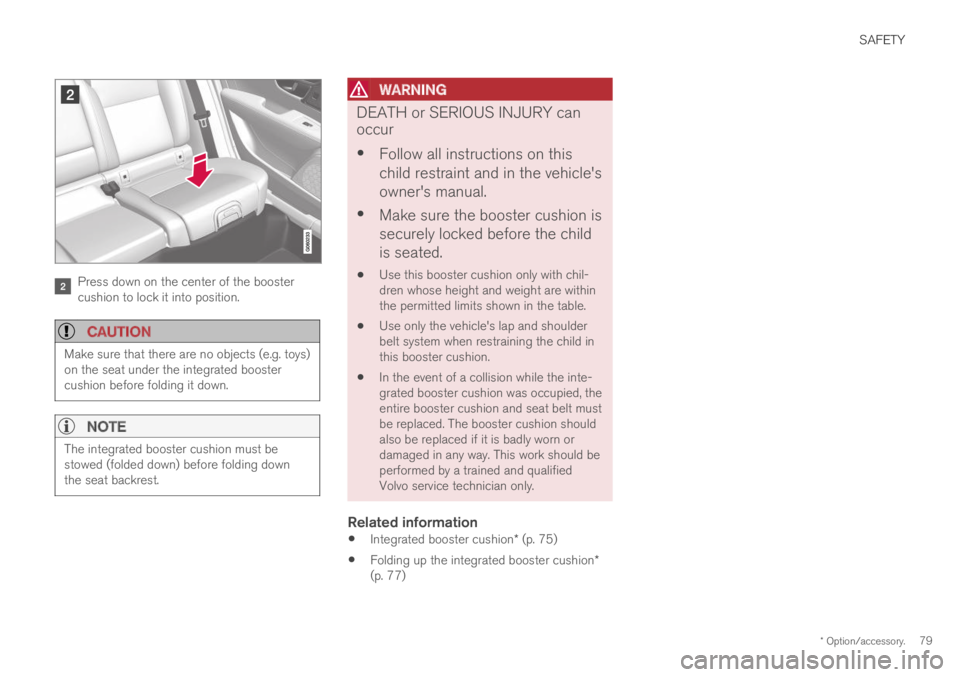
Press down on the center of the boostercushion to lock it into position.
CAUTION
Make sure that there are no objects (e.g. toys)on the seat under the integrated boostercushion before folding it down.
NOTE
The integrated booster cushion must bestowed (folded down) before folding downthe seat backrest.
WARNING
DEATH or SERIOUS INJURY can
occur
Follow all instructions on this
child restraint and in the vehicle's
owner's manual.
Make sure the booster cushion is
securely locked before the child
is seated.
Use this booster cushion only with chil-dren whose height and weight are withinthe permitted limits shown in the table.
Use only the vehicle's lap and shoulderbelt system when restraining the child inthis booster cushion.
In the event of a collision while the inte-grated booster cushion was occupied, theentire booster cushion and seat belt mustbe replaced. The booster cushion shouldalso be replaced if it is badly worn ordamaged in any way. This work should beperformed by a trained and qualifiedVolvo service technician only.
Related information
Integrated booster cushion* (p. 75)
Folding up the integrated booster cushion*(p. 77)
Page 100 of 695
DISPLAYS AND VOICE CONTROL
98
Instrument panel licenses
A license is an agreement on the right to con-duct a certain activity or the right to use some-one else's right according to terms and condi-tions specified in the agreement. The followingtext is Volvo's agreement with the manufactureror developer.
Boost Software License 1.0
Permission is hereby granted, free of charge, toany person or organization obtaining a copy ofthe software and accompanying documentationcovered by this license (the "Software") to use,reproduce, display, distribute, execute, andtransmit the Software, and to prepare derivativeworks of the Software, and to permit third-partiesto whom the Software is furnished to do so, allsubject to the following: The copyright notices inthe Software and this entire statement, includingthe above license grant, this restriction and thefollowing disclaimer, must be included in allcopies of the Software, in whole or in part, and allderivative works of the Software, unless suchcopies or derivative works are solely in the formof machine-executable object code generated bya source language processor.
THE SOFTWARE IS PROVIDED "AS IS",WITHOUT WARRANTY OF ANY KIND,EXPRESS OR IMPLIED, INCLUDING BUT NOTLIMITED TO THE WARRANTIES OFMERCHANTABILITY, FITNESS FOR APARTICULAR PURPOSE, TITLE AND NON-INFRINGEMENT. IN NO EVENT SHALL THE
COPYRIGHT HOLDERS OR ANYONEDISTRIBUTING THE SOFTWARE BE LIABLEFOR ANY DAMAGES OR OTHER LIABILITY,WHETHER IN CONTRACT, TORT OROTHERWISE, ARISING FROM, OUT OF OR INCONNECTION WITH THE SOFTWARE OR THEUSE OR OTHER DEALINGS IN THESOFTWARE.
BSD 4-clause "Original" or "Old" License
Copyright (c) 1982, 1986, 1990, 1991, 1993The Regents of the University of California. Allrights reserved.
Redistribution and use in source and binaryforms, with or without modification, are permittedprovided that the following conditions are met:
1. Redistributions of source code must retainthe above copyright notice, this list ofconditions and the following disclaimer.
2. Redistributions in binary form mustreproduce the above copyright notice, this listof conditions and the following disclaimer inthe documentation and/or other materialsprovided with the distribution.
3. All advertising materials mentioning featuresor use of this software must display thefollowing acknowledgement: This productincludes software developed by theUniversity of California, Berkeley and itscontributors.
4. Neither the name of the University nor thenames of its contributors may be used to
endorse or promote products derived fromthis software without specific prior writtenpermission.
THIS SOFTWARE IS PROVIDED BY THEREGENTS AND CONTRIBUTORS ``AS IS'' ANDANY EXPRESS OR IMPLIED WARRANTIES,INCLUDING, BUT NOT LIMITED TO, THEIMPLIED WARRANTIES OF MERCHANTABILITYAND FITNESS FOR A PARTICULAR PURPOSEARE DISCLAIMED. IN NO EVENT SHALL THEREGENTS OR CONTRIBUTORS BE LIABLEFOR ANY DIRECT, INDIRECT, INCIDENTAL,SPECIAL, EXEMPLARY, OR CONSEQUENTIALDAMAGES (INCLUDING, BUT NOT LIMITED TO,PROCUREMENT OF SUBSTITUTE GOODS ORSERVICES; LOSS OF USE, DATA, OR PROFITS;OR BUSINESS INTERRUPTION) HOWEVERCAUSED AND ON ANY THEORY OF LIABILITY,WHETHER IN CONTRACT, STRICT LIABILITY,OR TORT (INCLUDING NEGLIGENCE OROTHERWISE) ARISING IN ANY WAY OUT OFTHE USE OF THIS SOFTWARE, EVEN IFADVISED OF THE POSSIBILITY OF SUCHDAMAGE.
Page 101 of 695
DISPLAYS AND VOICE CONTROL
}}
99
BSD 3-clause "New" or "Revised" License
Copyright (c) 2011-2014, Yann Collet.
Redistribution and use in source and binaryforms, with or without modification, are permittedprovided that the following conditions are met:
1. Redistributions of source code must retainthe above copyright notice, this list ofconditions and the following disclaimer.
2. Redistributions in binary form mustreproduce the above copyright notice, this listof conditions and the following disclaimer inthe documentation and/or other materialsprovided with the distribution.
3. Neither the name of the organisation nor thenames of its contributors may be used toendorse or promote products derive from thissoftware without specific prior writtenpermission.
THIS SOFTWARE IS PROVIDED BY THECOPYRIGHT HOLDERS AND CONTRIBUTORS"AS IS" AND ANY EXPRESS OR IMPLIEDWARRANTIES, INCLUDING, BUT NOT LIMITEDTO, THE IMPLIED WARRANTIES OFMERCHANTABILITY AND FITNESS FOR APARTICULAR PURPOSE ARE DISCLAIMED. INNO EVENT SHALL THE COPYRIGHT HOLDEROR CONTRIBUTORS BE LIABLE FOR ANYDIRECT, INDIRECT, INCIDENTAL, SPECIAL,EXEMPLARY, OR CONSEQUENTIAL DAMAGES(INCLUDING, BUT NOT LIMITED TO,PROCUREMENT OF SUBSTITUTE GOODS OR
SERVICES; LOSS OF USE, DATA, OR PROFITS;OR BUSINESS INTERRUPTION) HOWEVERCAUSED AND ON ANY THEORY OF LIABILITY,WHETHER IN CONTRACT, STRICT LIABILITY,OR TORT (INCLUDING NEGLIGENCE OROTHERWISE) ARISING IN ANY WAY OUT OFTHE USE OF THIS SOFTWARE, EVEN IFADVISED OF THE POSSIBILITY OF SUCHDAMAGE.
BSD 2-clause “Simplified” license
Copyright (c)
Redistribution and use in source and binaryforms, with or without modification, are permittedprovided that the following conditions are met:
1. Redistributions of source code must retainthe above copyright notice, this list ofconditions and the following disclaimer.
2. Redistributions in binary form mustreproduce the above copyright notice, this listof conditions and the following disclaimer inthe documentation and/or other materialsprovided with the distribution.
THIS SOFTWARE IS PROVIDED BY THECOPYRIGHT HOLDERS AND CONTRIBUTORS"AS IS" AND ANY EXPRESS OR IMPLIEDWARRANTIES, INCLUDING, BUT NOT LIMITEDTO, THE IMPLIED WARRANTIES OFMERCHANTABILITY AND FITNESS FOR APARTICULAR PURPOSE ARE DISCLAIMED. INNO EVENT SHALL THE COPYRIGHT OWNER
OR CONTRIBUTORS BE LIABLE FOR ANYDIRECT, INDIRECT, INCIDENTAL, SPECIAL,EXEMPLARY, OR CONSEQUENTIAL DAMAGES(INCLUDING, BUT NOT LIMITED TO,PROCUREMENT OF SUBSTITUTE GOODS ORSERVICES; LOSS OF USE, DATA, OR PROFITS;OR BUSINESS INTERRUPTION) HOWEVERCAUSED AND ON ANY THEORY OF LIABILITY,WHETHER IN CONTRACT, STRICT LIABILITY,OR TORT (INCLUDING NEGLIGENCE OROTHERWISE) ARISING IN ANY WAY OUT OFTHE USE OF THIS SOFTWARE, EVEN IFADVISED OF THE POSSIBILITY OF SUCHDAMAGE.
The views and conclusions contained in thesoftware and documentation are those of theauthors and should not be interpreted asrepresenting official policies, either expressed orimplied, of the FreeBSD Project.
Page 107 of 695
DISPLAYS AND VOICE CONTROL
}}
105
Related information
App menu in instrument panel (p. 103)
Messages in the instrument panel (p. 105)
Messages in the instrument panel
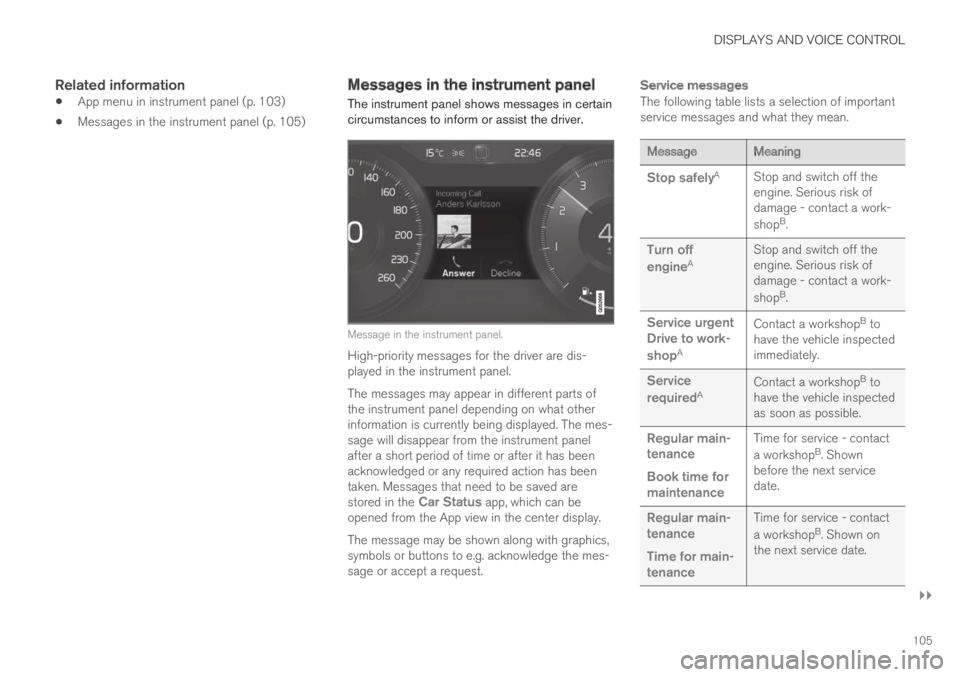
The instrument panel shows messages in certaincircumstances to inform or assist the driver.
Message in the instrument panel.
High-priority messages for the driver are dis-played in the instrument panel.
The messages may appear in different parts ofthe instrument panel depending on what otherinformation is currently being displayed. The mes-sage will disappear from the instrument panelafter a short period of time or after it has beenacknowledged or any required action has beentaken. Messages that need to be saved arestored in the Car Status app, which can beopened from the App view in the center display.
The message may be shown along with graphics,symbols or buttons to e.g. acknowledge the mes-sage or accept a request.
Service messages
The following table lists a selection of importantservice messages and what they mean.
MessageMeaning
Stop safelyAStop and switch off theengine. Serious risk ofdamage - contact a work-
shopB.
Turn off
engineAStop and switch off theengine. Serious risk ofdamage - contact a work-
shopB.
Service urgentDrive to work-
shopA
Contact a workshopB tohave the vehicle inspectedimmediately.
Service
requiredAContact a workshopB tohave the vehicle inspectedas soon as possible.
Regular main-tenance
Book time formaintenance
Time for service - contact
a workshopB. Shownbefore the next servicedate.
Regular main-tenance
Time for main-tenance
Time for service - contact
a workshopB. Shown onthe next service date.
Page 108 of 695
||
DISPLAYS AND VOICE CONTROL
106
MessageMeaning
Regular main-tenance
Maintenanceoverdue
Time for service - contact
a workshopB. Shown whenthe date for service haspassed.
Temporarily
offAA function has been tem-porarily deactivated andwill be reactivated auto-matically while driving orafter the engine is restar-ted.
APart of message, shown along with information on the locationof the problem.BAn authorized Volvo workshop is recommended.
Related information
Handling messages in the instrument panel(p. 106)
Handling messages saved from the instru-ment panel (p. 107)
Messages in the center display (p. 140)
Handling messages in theinstrument panel
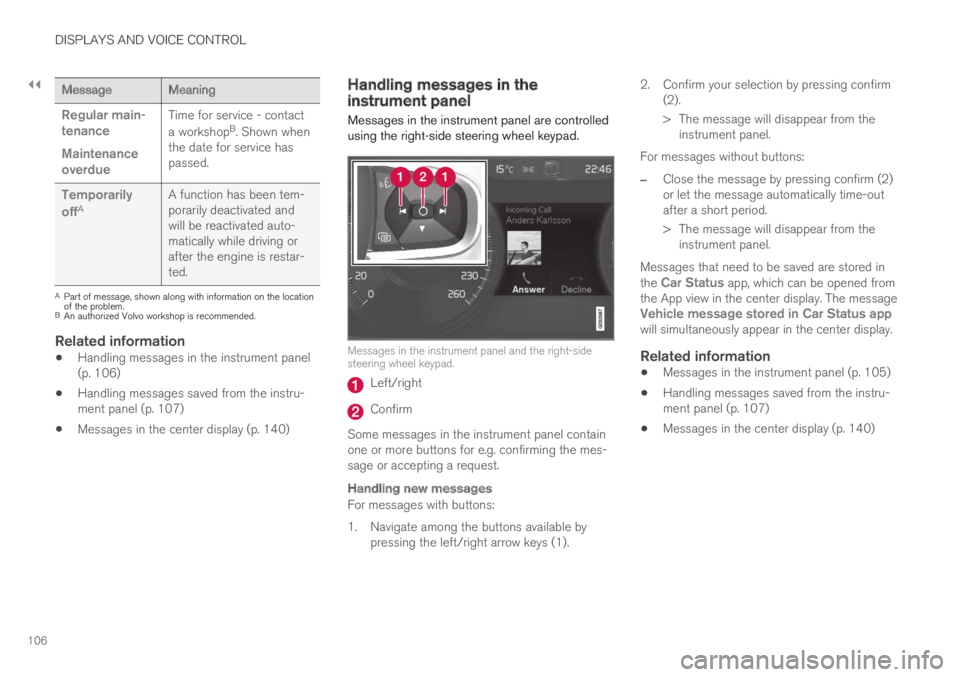
Messages in the instrument panel are controlledusing the right-side steering wheel keypad.
Messages in the instrument panel and the right-sidesteering wheel keypad.
Left/right
Confirm
Some messages in the instrument panel containone or more buttons for e.g. confirming the mes-sage or accepting a request.
Handling new messages
For messages with buttons:
1. Navigate among the buttons available bypressing the left/right arrow keys (1).
2. Confirm your selection by pressing confirm(2).
> The message will disappear from theinstrument panel.
For messages without buttons:
–Close the message by pressing confirm (2)or let the message automatically time-outafter a short period.
>The message will disappear from theinstrument panel.
Messages that need to be saved are stored inthe Car Status app, which can be opened fromthe App view in the center display. The messageVehicle message stored in Car Status appwill simultaneously appear in the center display.
Related information
Messages in the instrument panel (p. 105)
Handling messages saved from the instru-ment panel (p. 107)
Messages in the center display (p. 140)
Page 109 of 695
DISPLAYS AND VOICE CONTROL
}}
107
Handling messages saved from theinstrument panel
Messages saved from the instrument panel andcenter displays are handled in the center display.
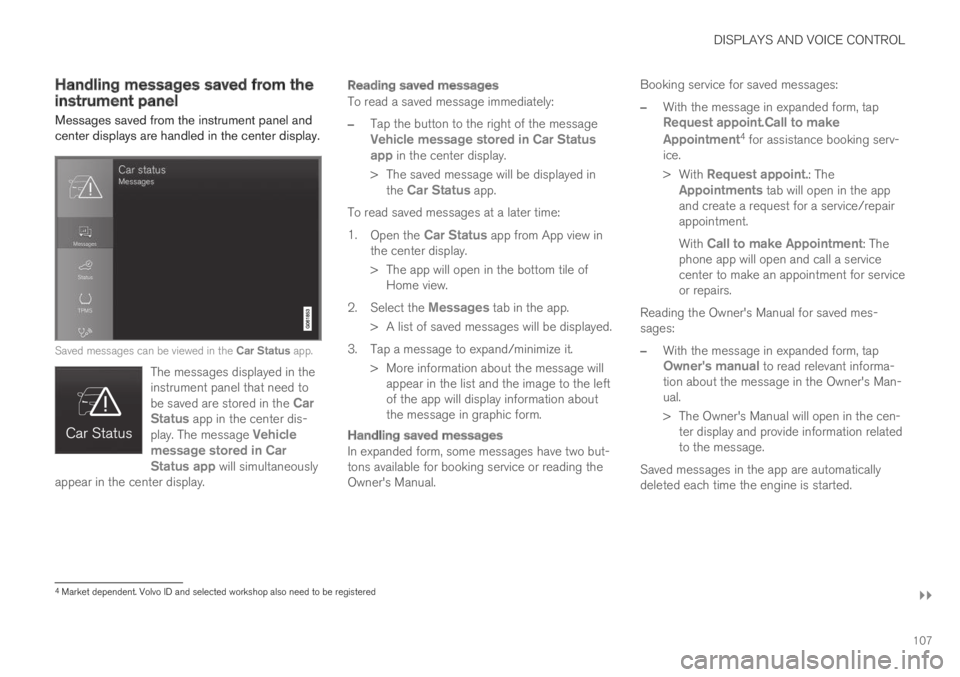
Saved messages can be viewed in the Car Status app.
The messages displayed in theinstrument panel that need tobe saved are stored in the CarStatus app in the center dis-play. The message Vehiclemessage stored in CarStatus app will simultaneouslyappear in the center display.
Reading saved messages
To read a saved message immediately:
–Tap the button to the right of the messageVehicle message stored in Car Statusapp in the center display.
>The saved message will be displayed inthe Car Status app.
To read saved messages at a later time:
1.Open the Car Status app from App view inthe center display.
>The app will open in the bottom tile ofHome view.
2.Select the Messages tab in the app.
>A list of saved messages will be displayed.
3. Tap a message to expand/minimize it.
> More information about the message willappear in the list and the image to the leftof the app will display information aboutthe message in graphic form.
Handling saved messages
In expanded form, some messages have two but-tons available for booking service or reading theOwner's Manual.
Booking service for saved messages:
–With the message in expanded form, tapRequest appoint.Call to make
Appointment4 for assistance booking serv-ice.
>With Request appoint.: TheAppointments tab will open in the appand create a request for a service/repairappointment.
With Call to make Appointment: Thephone app will open and call a servicecenter to make an appointment for serviceor repairs.
Reading the Owner's Manual for saved mes-sages:
–With the message in expanded form, tapOwner's manual to read relevant informa-tion about the message in the Owner's Man-ual.
>The Owner's Manual will open in the cen-ter display and provide information relatedto the message.
Saved messages in the app are automaticallydeleted each time the engine is started.
4Market dependent. Volvo ID and selected workshop also need to be registered
Page 136 of 695
DISPLAYS AND VOICE CONTROL
134
Resetting user data when thevehicle changes owners
If the vehicle changes owners, all user data andsystem settings should be reset to factorydefaults.
Vehicle settings can be reset at different levels.Reset all user data and system settings to theiroriginal factory defaults when the vehiclechanges owner. It is also important to change theowner of the Volvo On Call service.
Related information
Resetting center display settings (p. 134)
Resetting driver profile settings (p. 139)
Resetting center display settings
All settings made in the center display's Settingsmenu can be reset to default values.
Two types of reset
There are two ways to reset the settings in theSettings menu:
Factory Reset- erases all data and files andresets all settings to factory default.
Reset Personal Settings- erases personaldata and resets personalized settings to fac-tory default.
Resetting settings
Follow these instructions to reset the settings.
NOTE
Factory Reset is only possible when thevehicle is stationary.
1.Tap Settings in the Top view in the centerdisplay.
2.Proceed to SystemFactory Reset.
3. Select the type of reset you would like to do.
> A pop-up window will appear.
4.Tap OK to confirm the reset.
For Reset Personal Settings, confirm thereset by tapping Reset for the activeprofile or Reset for all profiles.
>The selected settings will be reset.
Related information
Center display overview (p. 109)
Changing settings in the center display's Topview (p. 132)
Table of settings in the center display(p. 135)