audio VOLVO XC90 2006 Owners Manual
[x] Cancel search | Manufacturer: VOLVO, Model Year: 2006, Model line: XC90, Model: VOLVO XC90 2006Pages: 254, PDF Size: 8.43 MB
Page 40 of 254
39 Instrumentsandcontrols
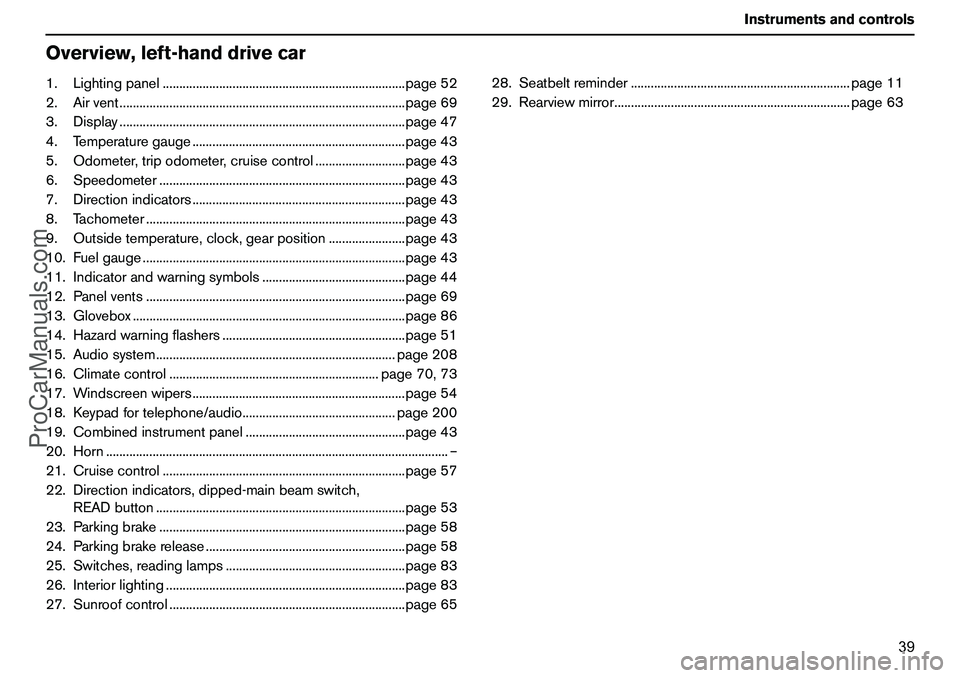
Overview,left-handdrivecar1.Lightingpanel.........................................................................page52
2.Airvent......................................................................................page69
3.Display......................................................................................page47
4.Temperaturegauge................................................................page43
5.Odometer,tripodometer,cruisecontrol...........................page43
6.Speedometer..........................................................................page43
7.Directionindicators................................................................page43
8.Tachometer..............................................................................page43
9.Outsidetemperature,clock,gearposition.......................page43
10.Fuelgauge...............................................................................page43
11.Indicatorandwarningsymbols...........................................page44
12.Panelvents..............................................................................page69
13.Glovebox..................................................................................page86
14.Hazardwarningflashers.......................................................page51
15.Audiosystem........................................................................page208
16.Climatecontrol...............................................................page70,73
17.Windscreenwipers................................................................page54
18.Keypadfortelephone/audio..............................................page200
19.Combinedinstrumentpanel................................................page43
20.Horn.......................................................................................................–
21.Cruisecontrol.........................................................................page57
22.Directionindicators,dipped-mainbeamswitch,
READbutton...........................................................................page53
23.Parkingbrake..........................................................................page58
24.Parkingbrakerelease............................................................page58
25.Switches,readinglamps......................................................page83
26.Interiorlighting........................................................................page83
27.Sunroofcontrol.......................................................................page6528.Seatbeltreminder..................................................................page11
29.Rearviewmirror.......................................................................page63
ProCarManuals.com
Page 42 of 254
41 Instrumentsandcontrols
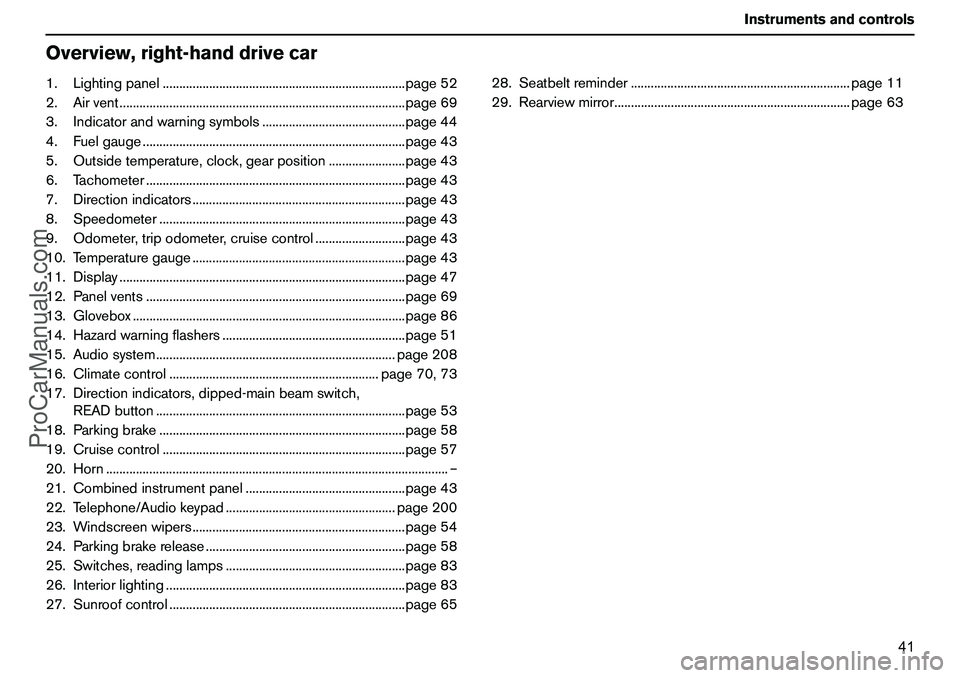
Overview,right-handdrivecar1.Lightingpanel.........................................................................page52
2.Airvent......................................................................................page69
3.Indicatorandwarningsymbols...........................................page44
4.Fuelgauge...............................................................................page43
5.Outsidetemperature,clock,gearposition.......................page43
6.Tachometer..............................................................................page43
7.Directionindicators................................................................page43
8.Speedometer..........................................................................page43
9.Odometer,tripodometer,cruisecontrol...........................page43
10.Temperaturegauge................................................................page43
11.Display......................................................................................page47
12.Panelvents..............................................................................page69
13.Glovebox..................................................................................page86
14.Hazardwarningflashers.......................................................page51
15.Audiosystem........................................................................page208
16.Climatecontrol...............................................................page70,73
17.Directionindicators,dipped-mainbeamswitch,
READbutton...........................................................................page53
18.Parkingbrake..........................................................................page58
19.Cruisecontrol.........................................................................page57
20.Horn.......................................................................................................–
21.Combinedinstrumentpanel................................................page43
22.Telephone/Audiokeypad...................................................page200
23.Windscreenwipers................................................................page54
24.Parkingbrakerelease............................................................page58
25.Switches,readinglamps......................................................page83
26.Interiorlighting........................................................................page83
27.Sunroofcontrol.......................................................................page6528.Seatbeltreminder..................................................................page11
29.Rearviewmirror.......................................................................page63
ProCarManuals.com
Page 114 of 254
113 Startinganddriving
GeneralDonotoverloadthebatteryTheelectricalfunctionsinthecarloadthe
batterytovaryingdegrees.Avoidhavingthe
ignitionkeyinpositionIIwhentheengineis
turnedoff.UsepositionIinstead,asless
powerisused.The12voltoutletinthecargo
areasuppliespowerevenwhentheignition
keyisremoved.
Examplesoffunctionsthatusealotofpower:
ventilationfan
windscreenwipers
audiosystem
parkinglights.
Alsotakenoteofdifferentaccessoriesthat
loadtheelectricalsystem.Donotuse
functionstheconsumealotofcurrentwhen
theengineisswitchedoff.Atextisshownon
thedisplayinthecombinedinstrumentpanel
ifbatteryvoltageislowandremainsuntilthe
enginehasstarted.Theenergyeconomy
functionshutsdowncertainfunctionsor
reducestheloadonthebattery,e.g.by
loweringventilationfanspeedandswitching
offtheaudiosystem.
Chargethebatterybystartingtheengine.
Donotallowtheengineand
coolingsystemtooverheatUndercertainconditions,e.g.whendrivingin
hillyterrainorwithaheavyload,especiallyin
warmweather,thereisariskoftheengine
andcoolingsystemoverheating.
Toavoidthecoolingsystemoverheating
Driveatlowspeedsifdrivingwithatrailer
upalongincline.
Donotturntheengineoffimmediately
youstop,ifthecarhasbeendrivenhard.
Removeanyauxiliarylampsfrominfront
ofthegrilleifdrivinginextremehigh
temperatures.
Toavoidtheengineoverheating
Donotexceedenginespeedsof4500rpm
(dieselengine:3500rpm)ifdrivingwitha
trailerorcaravaninhillyterrain.Theoil
temperaturecanbecometoohigh.Donotdrivewiththetailgate
openIfyoudrivewiththetailgateopen,someofthe
exhaustgasesandpoisonouscarbon
monoxidecouldbesuckedintothecar
throughthecargoarea.Ifyoumustdrivea
shortdistancewiththetailgateopen,
proceedasfollows:
Closeallwindows.Distributetheairbetweenthewindscreen
andfloorwhilerunningthefanathigh
speed.
ProCarManuals.com
Page 126 of 254

125 Startinganddriving
Parkingassistance(option)ParkingassistancefrontandrearGeneralParkingassistanceisusedasanaidto
parking.Asignalindicatesthedistancetoa
detectedobject.
Thefrequencyofthesignalincreasesasyou
comeclosertoanobject
1infrontofor
behindthecar.
Thetonebecomesconstantatadistanceof
about30cm.Ifthereareobjectswithinthis
distancebothbehindandinfront
1ofthecar,
thesignalalternatesbetweenfrontandrear
speakers.Ifthevolumeofanothersoundsourcefrom
theaudiosystemishigh,thisisautomatically
lowered.
Thesystemisalwaysactivatedwhenthecar
isstarted.
Frontparkingassistance
Themeasurementareastraightinfrontofthe
carisapprox.0.8m.ThetextmessagePARK
ASSISTACTIVEappearsintheaudiodisplay
whenthesensorsreacttoanobstacleinfront
ofthecar.
Frontparkingassistancecannotbe
combinedwithextralightsbecausethe
sensorsareaffectedbytheextralights.
Rearparkingassistance
Themeasurementareastraightbehindthe
carisapprox.1.5m.ThetextmessagePARK
ASSISTACTIVEappearsintheaudiodisplay
whenreversegearisengaged.
Thesystemmustbedeactivatedwhen
drivingwithatrailer,bikecarrieronthetowbarorthelikeastheywouldtriggerthe
sensors.
Rearparkingassistanceisdeactivated
automaticallywhentowingatrailerifaVolvo
genuinetrailercableisused.
1.Providedthattheparkingassistance
ismountedbothfrontandrear.
WARNING!
Parkingassistancedoesnotrelinquishthe
driver’sownresponsibilityduringparking.
Thesensorshaveblindspotswhere
objectscannotbedetected.Beawareof
childrenandanimalsnearthecar.
ProCarManuals.com
Page 198 of 254
197
Infotainmentsystem
Infotainmentsystem198
Controlpanels,audio199
Audiosystemfunctions204
Radiofunctions208
CD/MD(option)216
CDchanger(option)218
Menustructure–Audio220
Telephone(option)222
Telephonefunctions224
Menusettingsandoptions–Telephone231
ProCarManuals.com
Page 199 of 254
198 InfotainmentsystemInfotainmentsystemInformation–EntertainmentInfotainmentisasystemwithintegrated
audioandtelephonefunctions.Youcan
easilyandconvenientlyuseyourInfotainment
systembymeansofthejointcontrolpanelor
thesteeringwheelkeypad.Thecontrolpanel
displayindicatesthecurrentfunction.
XC90canbeequippedwithDolbySurround
ProLogicII(PremiumSound),whichoffers
anoptimalsoundexperienceverycloseto
beingtherewithabroad,naturalsound
profile.
Thesystemalsoallowsyourpassengersto
useheadphones(option)withseparate
soundsources.
ProCarManuals.com
Page 200 of 254
199 Infotainmentsystem
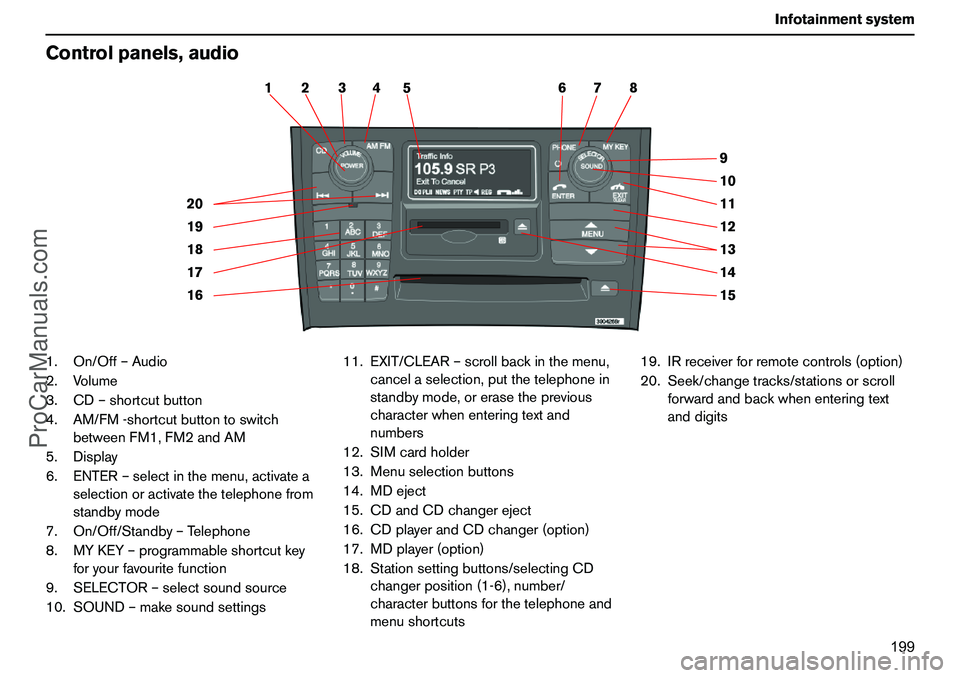
Controlpanels,audio1.On/Off–Audio
2.Volume
3.CD–shortcutbutton
4.AM/FM-shortcutbuttontoswitch
betweenFM1,FM2andAM
5.Display
6.ENTER–selectinthemenu,activatea
selectionoractivatethetelephonefrom
standbymode
7.On/Off/Standby–Telephone
8.MYKEY–programmableshortcutkey
foryourfavouritefunction
9.SELECTOR–selectsoundsource
10.SOUND–makesoundsettings11.EXIT/CLEAR–scrollbackinthemenu,
cancelaselection,putthetelephonein
standbymode,orerasetheprevious
characterwhenenteringtextand
numbers
12.SIMcardholder
13.Menuselectionbuttons
14.MDeject
15.CDandCDchangereject
16.CDplayerandCDchanger(option)
17.MDplayer(option)
18.Stationsettingbuttons/selectingCD
changerposition(1-6),number/
characterbuttonsforthetelephoneand
menushortcuts19.IRreceiverforremotecontrols(option)
20.Seek/changetracks/stationsorscroll
forwardandbackwhenenteringtext
anddigits
15 14 13 12 11 9
10 2 1
20
19
18
16 177 6 5 4 38
ProCarManuals.com
Page 201 of 254
200 InfotainmentsystemControlpanels,audioSteeringwheelkeypadAudio–Telephone
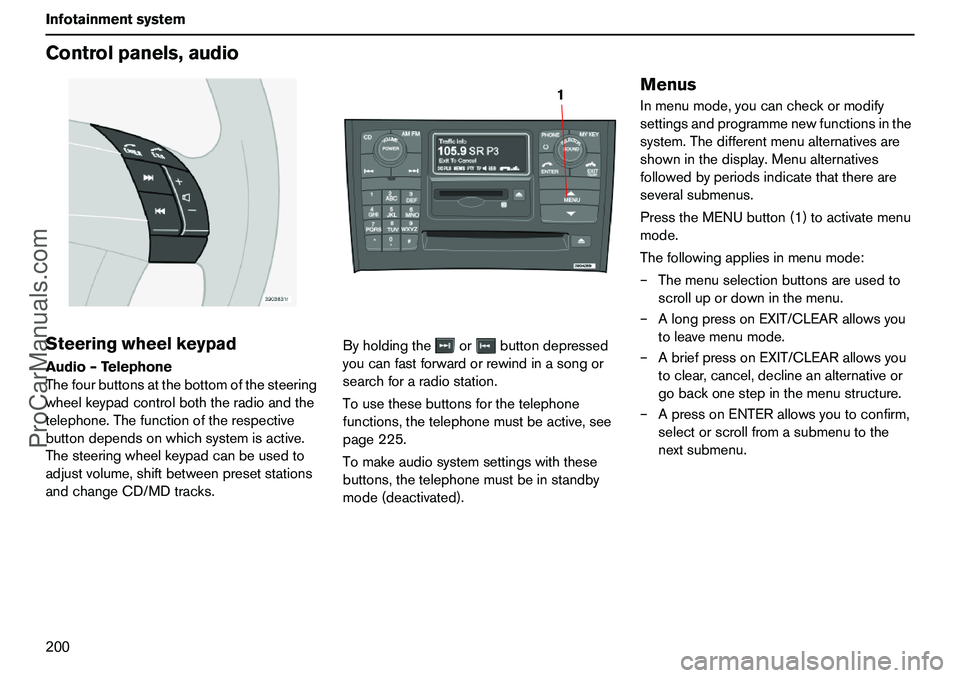
Thefourbuttonsatthebottomofthesteering
wheelkeypadcontrolboththeradioandthe
telephone.Thefunctionoftherespective
buttondependsonwhichsystemisactive.
Thesteeringwheelkeypadcanbeusedto
adjustvolume,shiftbetweenpresetstations
andchangeCD/MDtracks.Byholdingtheorbuttondepressed
youcanfastforwardorrewindinasongor
searchforaradiostation.
Tousethesebuttonsforthetelephone
functions,thetelephonemustbeactive,see
page225.
Tomakeaudiosystemsettingswiththese
buttons,thetelephonemustbeinstandby
mode(deactivated).
MenusInmenumode,youcancheckormodify
settingsandprogrammenewfunctionsinthe
system.Thedifferentmenualternativesare
showninthedisplay.Menualternatives
followedbyperiodsindicatethatthereare
severalsubmenus.
PresstheMENUbutton(1)toactivatemenu
mode.
Thefollowingappliesinmenumode:
–Themenuselectionbuttonsareusedto
scrollupordowninthemenu.
–AlongpressonEXIT/CLEARallowsyou
toleavemenumode.
–AbriefpressonEXIT/CLEARallowsyou
toclear,cancel,declineanalternativeor
gobackonestepinthemenustructure.
–ApressonENTERallowsyoutoconfirm,
selectorscrollfromasubmenutothe
nextsubmenu.
1
ProCarManuals.com
Page 202 of 254
201 Infotainmentsystem
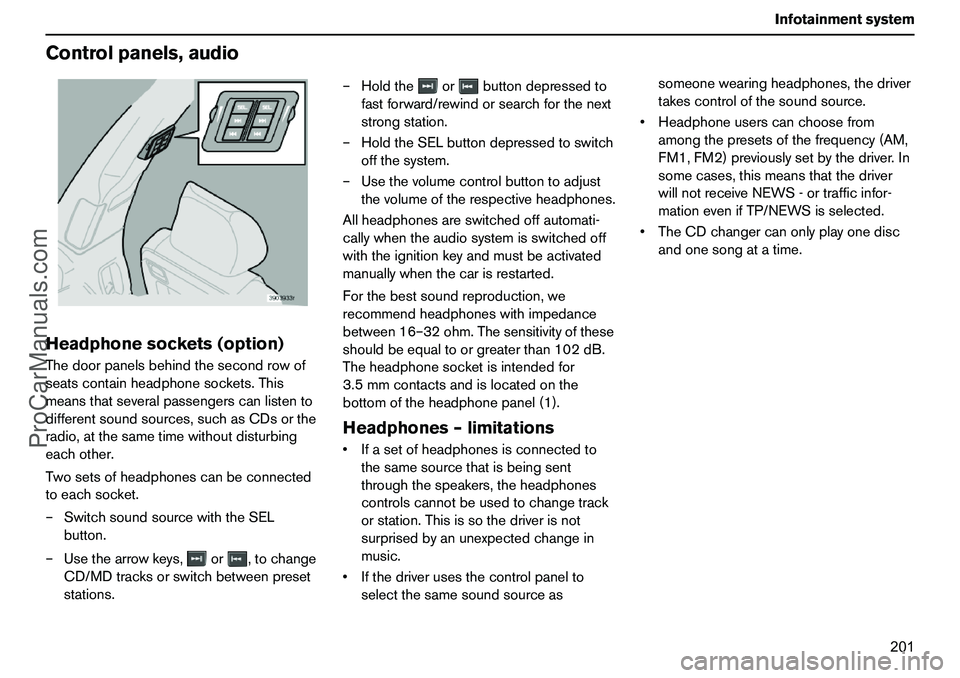
Controlpanels,audioHeadphonesockets(option)Thedoorpanelsbehindthesecondrowof
seatscontainheadphonesockets.This
meansthatseveralpassengerscanlistento
differentsoundsources,suchasCDsorthe
radio,atthesametimewithoutdisturbing
eachother.
Twosetsofheadphonescanbeconnected
toeachsocket.
–SwitchsoundsourcewiththeSEL
button.
–Usethearrowkeys,or,tochange
CD/MDtracksorswitchbetweenpreset
stations.–Holdtheorbuttondepressedto
fastforward/rewindorsearchforthenext
strongstation.
–HoldtheSELbuttondepressedtoswitch
offthesystem.
–Usethevolumecontrolbuttontoadjust
thevolumeoftherespectiveheadphones.
Allheadphonesareswitchedoffautomati-
callywhentheaudiosystemisswitchedoff
withtheignitionkeyandmustbeactivated
manuallywhenthecarisrestarted.
Forthebestsoundreproduction,we
recommendheadphoneswithimpedance
between16–32ohm.Thesensitivityofthese
shouldbeequaltoorgreaterthan102dB.
Theheadphonesocketisintendedfor
3.5mmcontactsandislocatedonthe
bottomoftheheadphonepanel(1).
Headphones–limitationsIfasetofheadphonesisconnectedto
thesamesourcethatisbeingsent
throughthespeakers,theheadphones
controlscannotbeusedtochangetrack
orstation.Thisissothedriverisnot
surprisedbyanunexpectedchangein
music.
Ifthedriverusesthecontrolpanelto
selectthesamesoundsourceassomeonewearingheadphones,thedriver
takescontrolofthesoundsource.
Headphoneuserscanchoosefrom
amongthepresetsofthefrequency(AM,
FM1,FM2)previouslysetbythedriver.In
somecases,thismeansthatthedriver
willnotreceiveNEWS-ortrafficinfor-
mationevenifTP/NEWSisselected.
TheCDchangercanonlyplayonedisc
andonesongatatime.
ProCarManuals.com
Page 203 of 254
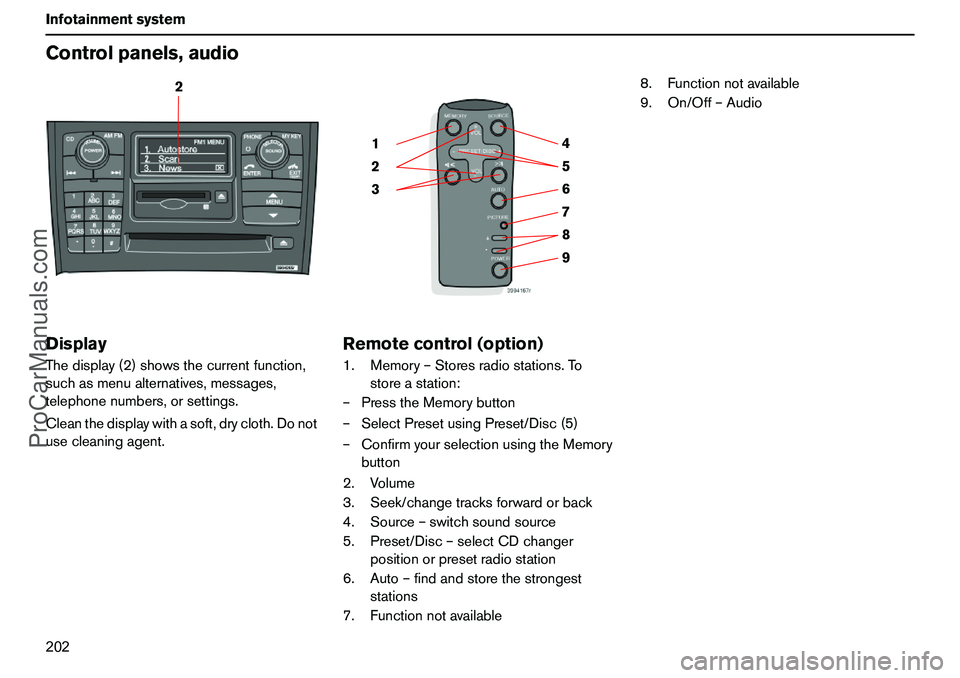
202 InfotainmentsystemControlpanels,audioDisplayThedisplay(2)showsthecurrentfunction,
suchasmenualternatives,messages,
telephonenumbers,orsettings.
Cleanthedisplaywithasoft,drycloth.Donot
usecleaningagent.
Remotecontrol(option)1.Memory–Storesradiostations.To
storeastation:
–PresstheMemorybutton
–SelectPresetusingPreset/Disc(5)
–ConfirmyourselectionusingtheMemory
button
2.Volume
3.Seek/changetracksforwardorback
4.Source–switchsoundsource
5.Preset/Disc–selectCDchanger
positionorpresetradiostation
6.Auto–findandstorethestrongest
stations
7.Functionnotavailable8.Functionnotavailable
9.On/Off–Audio
2
9 876 5 4
3 21
ProCarManuals.com