display VOLVO XC90 2015 Owners Manual
[x] Cancel search | Manufacturer: VOLVO, Model Year: 2015, Model line: XC90, Model: VOLVO XC90 2015Pages: 570, PDF Size: 12.44 MB
Page 257 of 570
DRIVER SUPPORT
* Option/accessory, for more information, see Introduction.255
•
The driver's seat belt must be buckled and the driver's door must be closed.
• There must be a vehicle ahead (a target vehi-cle) or your vehicle's current speed must beat least 10 mph (15 km/h).
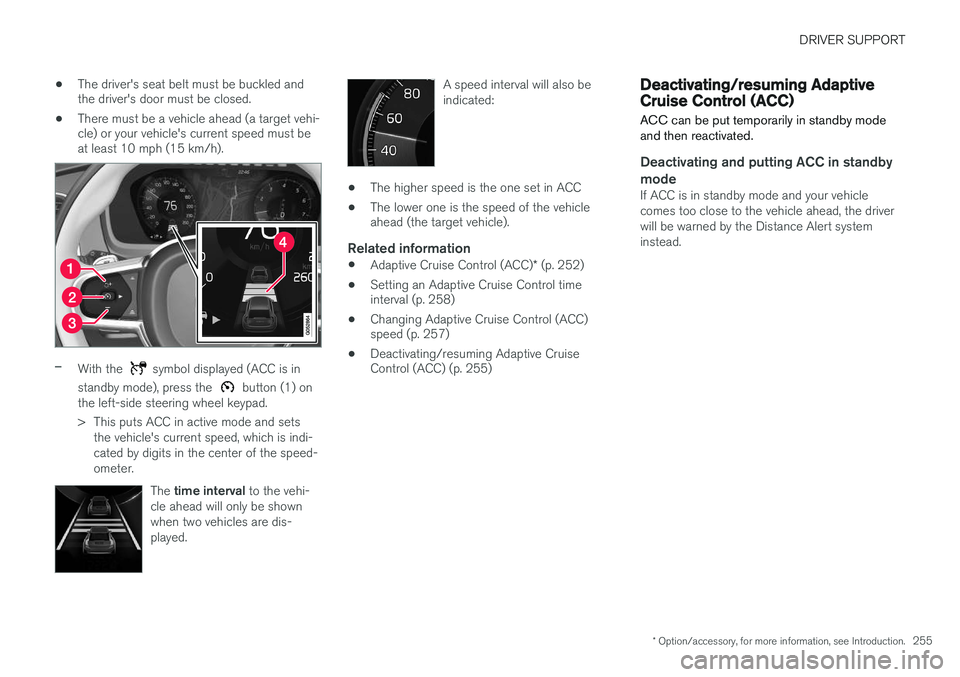
–With the symbol displayed (ACC is in
standby mode), press the
button (1) on
the left-side steering wheel keypad.
> This puts ACC in active mode and sets the vehicle's current speed, which is indi- cated by digits in the center of the speed-ometer.
The time interval to the vehi-
cle ahead will only be shownwhen two vehicles are dis-played.
A speed interval will also be indicated:
• The higher speed is the one set in ACC
• The lower one is the speed of the vehicle ahead (the target vehicle).
Related information
•
Adaptive Cruise Control (ACC)
* (p. 252)
• Setting an Adaptive Cruise Control timeinterval (p. 258)
• Changing Adaptive Cruise Control (ACC)speed (p. 257)
• Deactivating/resuming Adaptive CruiseControl (ACC) (p. 255)
Deactivating/resuming Adaptive Cruise Control (ACC)
ACC can be put temporarily in standby mode and then reactivated.
Deactivating and putting ACC in standby mode
If ACC is in standby mode and your vehicle comes too close to the vehicle ahead, the driverwill be warned by the Distance Alert systeminstead.
Page 260 of 570
DRIVER SUPPORT
* Option/accessory, for more information, see Introduction.
258
Related information
• Adaptive Cruise Control (ACC)
* (p. 252)
• Starting and activating Pilot Assist (p. 262)
• Setting an Adaptive Cruise Control time interval (p. 258)
Setting an Adaptive Cruise Control time interval
ACC makes it possible to set various time inter- vals to the vehicle ahead.
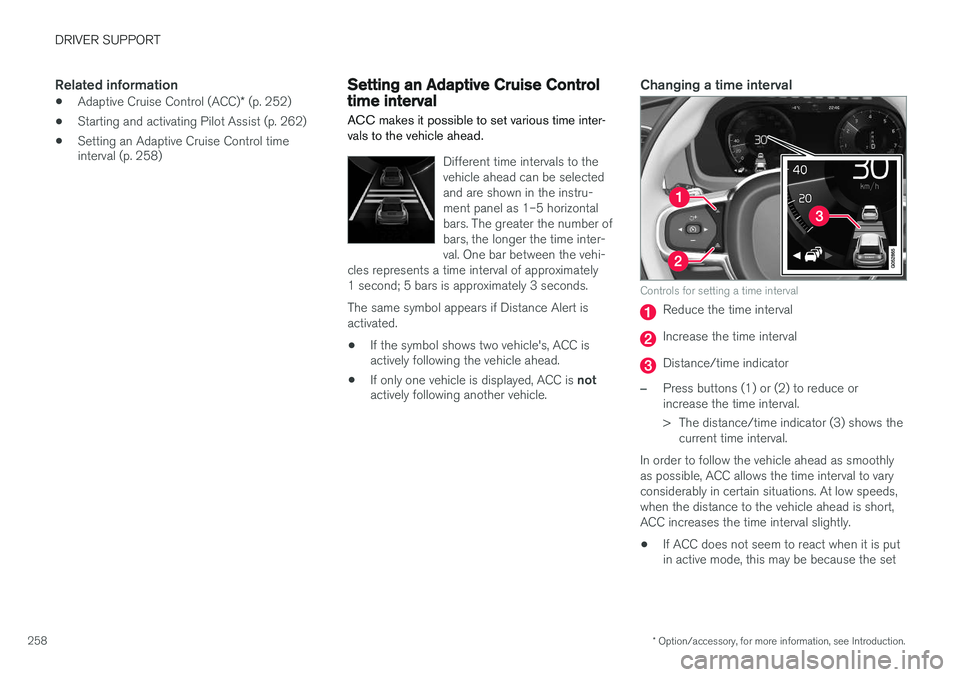
Different time intervals to the vehicle ahead can be selectedand are shown in the instru-ment panel as 1–5 horizontalbars. The greater the number ofbars, the longer the time inter-val. One bar between the vehi-
cles represents a time interval of approximately1 second; 5 bars is approximately 3 seconds. The same symbol appears if Distance Alert is activated.
• If the symbol shows two vehicle's, ACC is actively following the vehicle ahead.
• If only one vehicle is displayed, ACC is
not
actively following another vehicle.
Changing a time interval
Controls for setting a time interval
Reduce the time interval
Increase the time interval
Distance/time indicator
–Press buttons (1) or (2) to reduce or increase the time interval.
> The distance/time indicator (3) shows the
current time interval.
In order to follow the vehicle ahead as smoothly as possible, ACC allows the time interval to varyconsiderably in certain situations. At low speeds,when the distance to the vehicle ahead is short,ACC increases the time interval slightly. • If ACC does not seem to react when it is put in active mode, this may be because the set
Page 263 of 570
DRIVER SUPPORT
* Option/accessory, for more information, see Introduction.261
Instrument panel
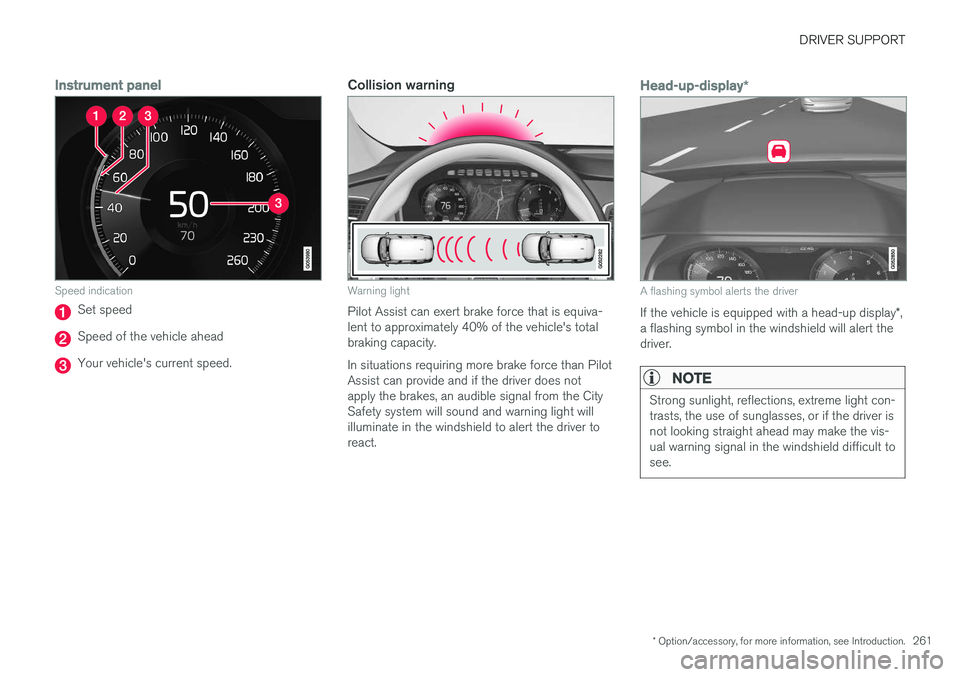
Speed indication
Set speed
Speed of the vehicle ahead
Your vehicle's current speed.
Collision warning
Warning light
Pilot Assist can exert brake force that is equiva- lent to approximately 40% of the vehicle's totalbraking capacity. In situations requiring more brake force than Pilot Assist can provide and if the driver does notapply the brakes, an audible signal from the CitySafety system will sound and warning light willilluminate in the windshield to alert the driver toreact.
Head-up-display*
A flashing symbol alerts the driver
If the vehicle is equipped with a head-up display *,
a flashing symbol in the windshield will alert the driver.
NOTE
Strong sunlight, reflections, extreme light con- trasts, the use of sunglasses, or if the driver isnot looking straight ahead may make the vis-ual warning signal in the windshield difficult tosee.
Page 264 of 570
DRIVER SUPPORT
* Option/accessory, for more information, see Introduction.
262
WARNING
Pilot Assist only provides warnings for vehi- cles that its radar sensor and camera havedetected. For this reason, a warning may begiven later than expected or not at all. Thedriver should never wait for a warning beforeapplying the brakes.
Related information
• Pilot Assist limitations (p. 266)
• Pilot Assistauto-hold brake function (p. 266)
• Distance Alert
* (p. 314)
• Other Adaptive Cruise Control (ACC) func- tions (p. 268)
• Setting an Adaptive Cruise Control timeinterval (p. 258)
Starting and activating Pilot Assist
The Pilot Assist feature helps keep the vehicle in its current traffic lane, at a set speed and a settime interval to the vehicle ahead.
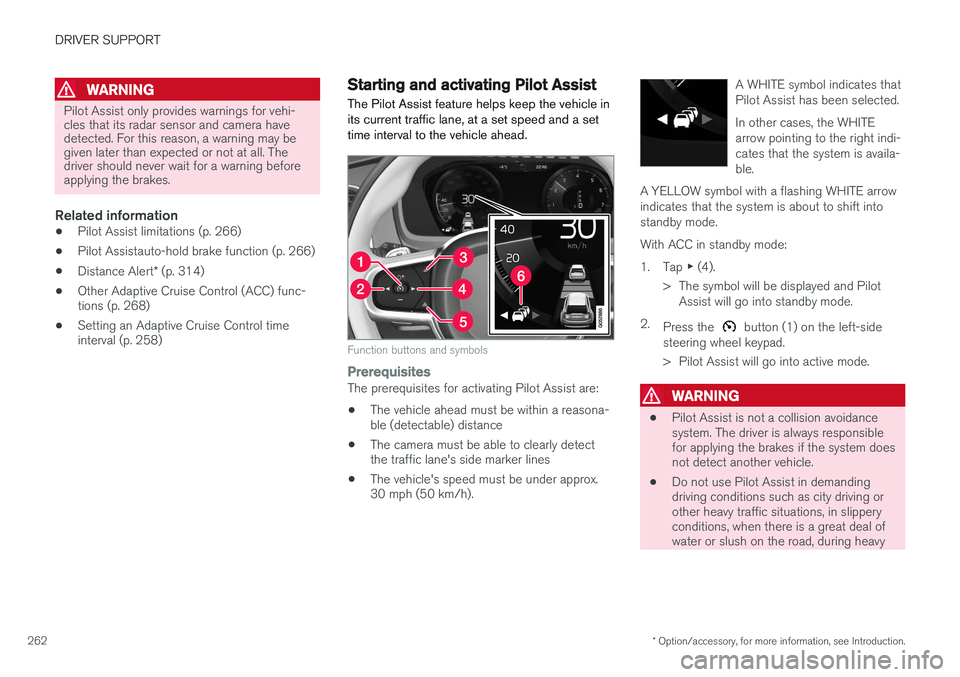
Function buttons and symbols
PrerequisitesThe prerequisites for activating Pilot Assist are:
• The vehicle ahead must be within a reasona- ble (detectable) distance
• The camera must be able to clearly detectthe traffic lane's side marker lines
• The vehicle's speed must be under approx.30 mph (50 km/h). A WHITE symbol indicates that Pilot Assist has been selected. In other cases, the WHITE arrow pointing to the right indi-cates that the system is availa-ble.
A YELLOW symbol with a flashing WHITE arrowindicates that the system is about to shift intostandby mode.
With ACC in standby mode: 1. Tap ▶ (4).
> The symbol will be displayed and Pilot Assist will go into standby mode.
2. Press the
button (1) on the left-side
steering wheel keypad.
> Pilot Assist will go into active mode.
WARNING
• Pilot Assist is not a collision avoidance system. The driver is always responsiblefor applying the brakes if the system doesnot detect another vehicle.
• Do not use Pilot Assist in demandingdriving conditions such as city driving orother heavy traffic situations, in slipperyconditions, when there is a great deal ofwater or slush on the road, during heavy
Page 273 of 570

DRIVER SUPPORT
* Option/accessory, for more information, see Introduction.271
Adaptive Cruise Control (ACC) - fault tracing
ACC is an optional system designed to assist the driver by maintaining a set speed or a settime interval to the vehicle ahead.
If this symbol is displayed in the instru- ment panel and the message
Windscreen sensor Sensor
blocked, see Owner's manual
appears, the ACC radar sensor is blocked and cannot detect vehicles ahead.
This message also indicates that the following systems may have reduced functionality:
• Distance Alert
• City Safety
• Driver Alert Control
• Pilot Assist
• Lane Departure Warning (LDW)
• Lane Keeping Aid (LKA)
• Traffic Sign Information (TSI) The following table lists possible causes for thismessage being displayed and suitable actions:
CauseAction
The windshield in front of the radar is dirty or covered with snow/ice.Clean/clear the windshield in front of the radar.
Heavy rain or snow is interfering with the radar signals.No action possible. Heavy precipitation may affect the function of the radar.
Swirling water or snow from the surface of the road may interfere with the radar signals.No action possible. A very wet or snow-covered road surface may affect the function of the radar.
The windshield in front of the radar is clean but the message remains in the display.Wait a short time. It may take several minutes for the radar to detect that it is no longer obstructed.
A text message can be erased by briefly pressing the
O button on the right-side steering wheel
keypad. If the message recurs, contact a trained and authorized Volvo service technician orretailer.
Related information
• Adaptive Cruise Control (ACC)
* (p. 252)
Page 274 of 570

DRIVER SUPPORT
* Option/accessory, for more information, see Introduction.
272
Adaptive Cruise Control (ACC) symbols and messages In certain cases, ACC will display symbols (in different colors) and text messages.The following table lists several ACC-related symbols and messages.
SymbolMessageExplanation
WHITE symbolACC is in active mode and maintaining the set speed.
GRAY symbol and UnavailableACC is in standby mode.
Adaptive cruise Service requiredThe system is not functioning properly. Contact a trained and qualified Volvo Service technician.
Windscreen sensor Sensor blocked, see
Owner's manualClean the windshield in front of the camera/radar sensor.
Related information
• Adaptive Cruise Control (ACC)
* (p. 252)
Page 276 of 570
DRIVER SUPPORT
274When triggered, City Safety carries out three steps in the following order: 1.
Collision warning
2. Brake assistance
3. Auto-brake
1: Collision warningThe driver is first alerted to the risk of an immi- nent collision. City Safety can detect pedestrians, cyclists or vehicles that are stationary or that are moving inthe same direction as your vehicle. The driver isalerted by a flashing red warning signal, an audi-ble signal and pulsations in the brake pedal.
2: Brake assistanceIf the risk of a collision increases, brake supportwill be activated. This function increases pressure on the brake pedal if the driver does not apply enough pres-sure to the pedal.
3: Auto-brakeThe brakes will be applied automatically. If the driver has not taken action at this stage and a collision is imminent, auto-braking will be trig-gered. Full braking effect will be used to avoidthe collision if possible or to make the speed atthe point of impact as low as possible. In certain situations, auto-braking may begin with limited effect before full braking is used. If City Safety has prevented a collision, the vehi-cle will be kept at a standstill until the drivertakes action. If the vehicle has slowed to avoidcolliding with the vehicle ahead, your speed willbe reduced to that vehicle's speed. When auto-break is triggered, the seat belt pre- tensioners may also be activated, see the article"Seat belts" for additional information. Auto-braking can be cancelled if the driver presses hard on the accelerator pedal. When City Safety applies the brakes, the brake lights will illuminate. When City Safety is triggered and applies the brakes, a text message will be displayed in theinstrument panel.
WARNING
Warnings will only be provided if there is an imminent risk of a collision taking place. Thedriver should be aware of the system's limita-tions before operating the vehicle. Warnings for pedestrians and cyclists will not be provided if the vehicle's speed is above50 mph (80 km/h). City Safety's auto-brake function can help prevent a collision or reduce the speed atwhich a collision occurs. However, the drivershould always apply the brakes, even if auto-brake is operating. The driver is always responsible for maintain- ing the correct speed and distance in relationto the vehicle ahead. Never wait for a collisionwarning or for City Safety to intervene. City Safety maintenance may only be carried out by a trained and qualified Volvo servicetechnician.
Related information
•
City Safety
™ troubleshooting (p. 280)
• City Safety in crossing traffic (p. 277)
• City Safety limitations (p. 278)
• City Safety symbols and messages (p. 282)
• Detecting cyclists and pedestrians with City Safety (p. 275)
• Rear Collision Warning (RCW) (p. 277)
• City Safety warning level settings (p. 275)
Page 277 of 570
DRIVER SUPPORT
275
City Safety warning level settingsCity Safety is always activated but the function's warning distance can be adjusted.
NOTE
City Safety cannot be turned off and activates automatically each time the engine is started.
Setting a warning level (distance)The distance set for warnings determines the system's responsiveness and sets the distance atwhich visual, audible and tangible (haptic) warn-ings will be triggered. If the driver feels that warnings are given too often, the warning level can be lowered. Thismeans that warnings will be provided later, result-ing in fewer warnings being given. To do so:1. Tap
Settings in the center display's Top
view.
2. Tap
My CarIntelliSafeCity Safety.
3. Choose among
Earlier, Normal or Later.
Begin by choosing
Earlier. If too many warnings
are given, change to Normal.
The setting
Later should only used in exceptional
circumstances, e.g., for a more dynamic driving style.
WARNING
• No automatic system can be guaranteed to function 100% correctly in all situa-tions. For that reason, never test CitySafety by driving toward a person orobject. This could result in serious injuryor death.
• Even if the setting
Earlier has been
selected, warnings may be perceived as being given late, e.g., if the difference inspeed is great or if the vehicle aheadbrakes suddenly.
• City Safety can provide a warning for apotential collision but it can never shortenthe driver's reaction time.
• To help make City Safety as effective as possible, always using the setting
Earlieris recommended.
Related information
•City Safety limitations (p. 278)
• City Safety
™ (p. 273)
• Rear Collision Warning (RCW) (p. 277)
Detecting cyclists and pedestrians with City Safety
City Safety can detect vehicles, cyclists and pedestrians.
VehiclesCity Safety detects most types of vehicles that are either stationary, moving in the same direc-tion as your vehicle or approaching when you areabout to turn left. In order for City Safety to detect a vehicle in darkness, its headlights and taillights must be onand clearly visible.
Cyclists
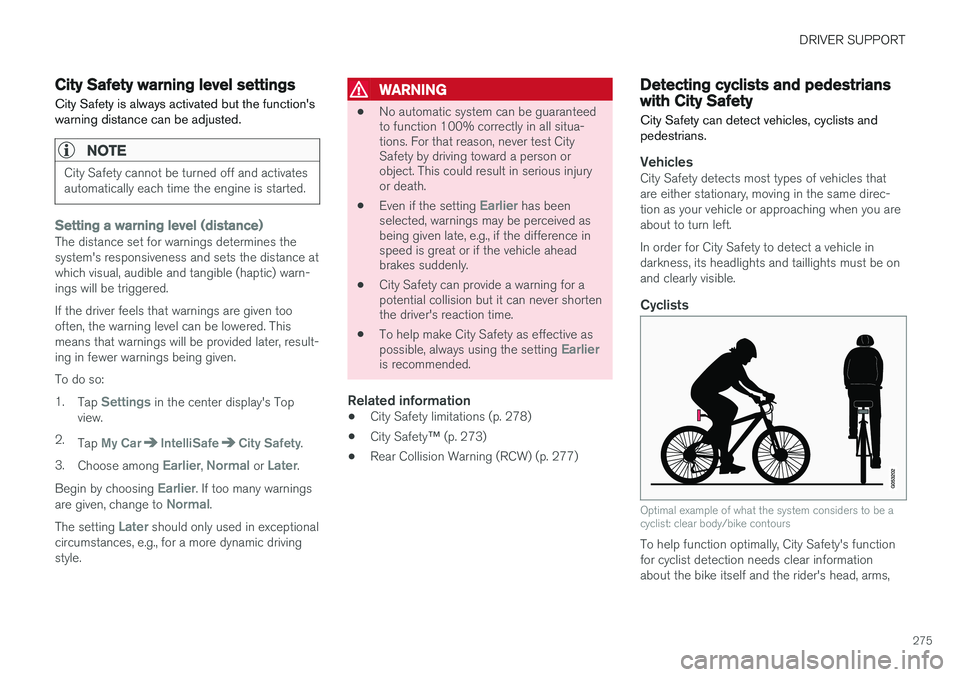
Optimal example of what the system considers to be a cyclist: clear body/bike contours
To help function optimally, City Safety's function for cyclist detection needs clear informationabout the bike itself and the rider's head, arms,
Page 281 of 570

DRIVER SUPPORT
279
HeatIf the temperature in the passenger compartment is very high, the camera and radar sensor may betemporarily turned off for approx. 15 minutesafter the engine has been started to protect theirelectronic components. When the temperaturehas cooled sufficiently, the camera and radarsensor will restart automatically. The visual warning signal may also be temporarily disabled due to high passenger compartmenttemperatures caused by strong sunlight. Warnings may not be given if the distance to the vehicle ahead is short and the driver is activelyoperating the vehicle (clearly depressing a pedalor turning the steering wheel).
Reduced visibilityCity Safety's functions may be greatly impeded or deactivated by e.g., intense snowfall or rain, indense fog, in very dusty conditions or if there isblowing snow in front of the vehicle. Condensa-tion, ice, snow or dirt on the windshield may alsoreduce the system's functionality.
NOTE
•Keep the windshield in front of the radar sensor free of ice, snow, dirt, etc.
• Snow or ice on the hood deeper than2 inches (5 cm) may obstruct the sensor.Keep the hood free of ice and snow.
• Do not mount or in any way attach any-thing on the windshield that couldobstruct the radar sensor.
Camera and radar sensor's field of visionThe camera and radar sensor have limited fields of vision. In some situations they may detect avehicle, pedestrian or cyclist later than expectedor not detect them at all. Other vehicles that are dirty may be detected later than others and in dark conditions, motorcy-cles may be detected late or not at all. If a text message is displayed in the instrument panel indicates that the camera or radar sensorare blocked, it may be difficult for City Safety todetect a vehicle, pedestrian or cyclist and thesystem's functionality may be reduced. Camera and radar sensor components should only be serviced or replaced by a trained andqualified Volvo service technician.
Other limitations
WARNING
• Warnings and braking may be delayed or not occur at all if traffic, weather or otherconditions prevent the camera and/orradar sensor from detecting pedestrians,cyclists or other vehicles correctly.
• Other vehicles can only be detected indarkness if their headlights and taillightsare clearly visible.
• The sensors have a limited range forpedestrians and cyclists. The systemfunctions best at speeds up to 30 mph(50 km/h). For stationary or slow-movingvehicles, the system functions best atspeeds up to approx. 43 mph (70 km/h).
• Warnings for stationary or slow-movingvehicles may be impeded by darkness orpoor visibility.
• Warnings and braking for pedestrians andcyclists will not be provided at speedsabove approx. 50 mph (80 km/h).
• Do not place, attach or mount any objectson the inside or outside of the windshieldnear or over the sensor. This could affectthe camera-based functions.
Page 282 of 570

DRIVER SUPPORT
280
Action by the driver
Backing upCity Safety is temporarily deactivated while the vehicle is backing up.
Low speedCity Safety is not activated at very low speeds (under approx. 3 mph (4 km/h). This means thatthe system will not be triggered if your vehicleapproaches a vehicle ahead, such as when park-ing.
Active driverAction by the driver always has priority. For this reason, City Safety may not react or react laterthan expected in situations in which the driver isactively operating the vehicle, even if a collision isimminent. This is also done to help eliminateexcessive warnings.
Related information
•City Safety
™ (p. 273)
City Safety ™ troubleshooting
Messages pertaining to any possible problems with City Safety will be displayed in the instru-ment panel.
Troubleshooting and remedial action
Location of the camera and the radar sensor
If a message is displayed in the instrument panel saying that the camera/radar sensor is blocked,
City Safety cannot detect vehicles, cyclists orpedestrians ahead of you, which means that thesystem is not functioning properly. However, this message will not be displayed in all situations in which the camera/radar sensor isobstructed. For this reason, the driver mustensure that the area of the windshield in front ofthe camera/radar sensor is always kept clean. The following table shows some of the situationsthat can cause the message to be displayed andsuggested actions.
CauseAction
The area of the wind- shield in front of thecamera/radar sensor isdirty or covered by ice orsnow.Clean the wind- shield or removethe ice/ snow.
Thick fog or heavy rain/ snow blocks reduces thecamera/radar sensor'srange of visibility.No action. The driver should beextra alert in condi-tions of this type.
There is dirt between the inside of the wind-shield and the camera/radar sensor.Have the area of the windshieldcleaned by atrained and quali-fied Volvo servicetechnician.