display VOLVO XC90 2015 Owners Manual
[x] Cancel search | Manufacturer: VOLVO, Model Year: 2015, Model line: XC90, Model: VOLVO XC90 2015Pages: 570, PDF Size: 12.44 MB
Page 191 of 570
CLIMATE
* Option/accessory, for more information, see Introduction.189
Automatically activating/deactivating the defrosting function when the engine isstarted
The rear window/door mirror/windshield heating*
can be set to start automatically when the engine is started. 1. Tap
Settings in the center display's Top
view and select Climate.
2. Activate/deactivate the respective defroster functions when the engine is started by selecting/deselecting the boxes for
Auto
Electric Front Defroster and Auto Electric
Rear Defroster.
The heating function will switch off automatically
when the window/mirror is sufficiently warm and the ice/condensation has disappeared.
Related information
• Climate system controls (p. 180)
• Climate system controls in the center display (p. 180)
• Defrosting windows and mirrors (p. 187)
• Air conditioning (p. 190)
• Turning recirculation on and off (p. 186)
• Adjusting air distribution (p. 195)
• Setting the blower speed (p. 183)
• Automatic climate control (p. 179)
• Turning front seat ventilation
* on and off
(p. 193) •
Turning steering wheel heating
* on and off
(p. 189)
Turning steering wheel heating * on
and off
The steering wheel can be heated electrically for added comfort.
Activating/deactivating steering wheel
heating
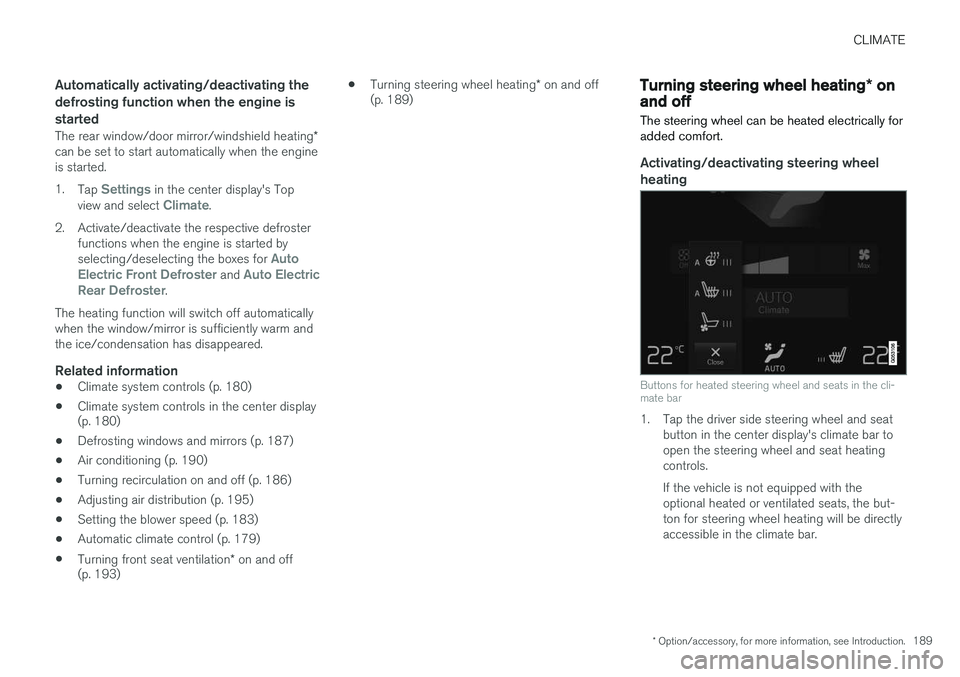
Buttons for heated steering wheel and seats in the cli- mate bar
1. Tap the driver side steering wheel and seat button in the center display's climate bar to open the steering wheel and seat heatingcontrols. If the vehicle is not equipped with the optional heated or ventilated seats, the but-ton for steering wheel heating will be directlyaccessible in the climate bar.
Page 192 of 570
CLIMATE
* Option/accessory, for more information, see Introduction.
190 2. Tap the steering wheel heating button
repeatedly to select one of four levels:
Off,High, Middle or Low.
> The level changes and is displayed in the button.
Automatic steering wheel heatingThe automatic function starts heating the steer- ing wheel when the temperature is sufficientlycold and turns it off automatically when the wheelis sufficiently warm. 1. Tap
Settings in the center display's Top
view.
2. Tap
Climate.
3. Under
Auto Steering Wheel Heating
Level, select Off, Low, Middle or High to
activate/deactivate the automatic function.
Related information
• Climate system controls (p. 180)
• Climate system controls in the center display (p. 180)
• Steering wheel (p. 157)
Air conditioning
The air conditioning cools and dehumidifies the air in the passenger compartment.
Activating/deactivating the main air conditioning unit
1. For the air conditioning to function optimally, close the side windows and laminated panor- amic roof *.
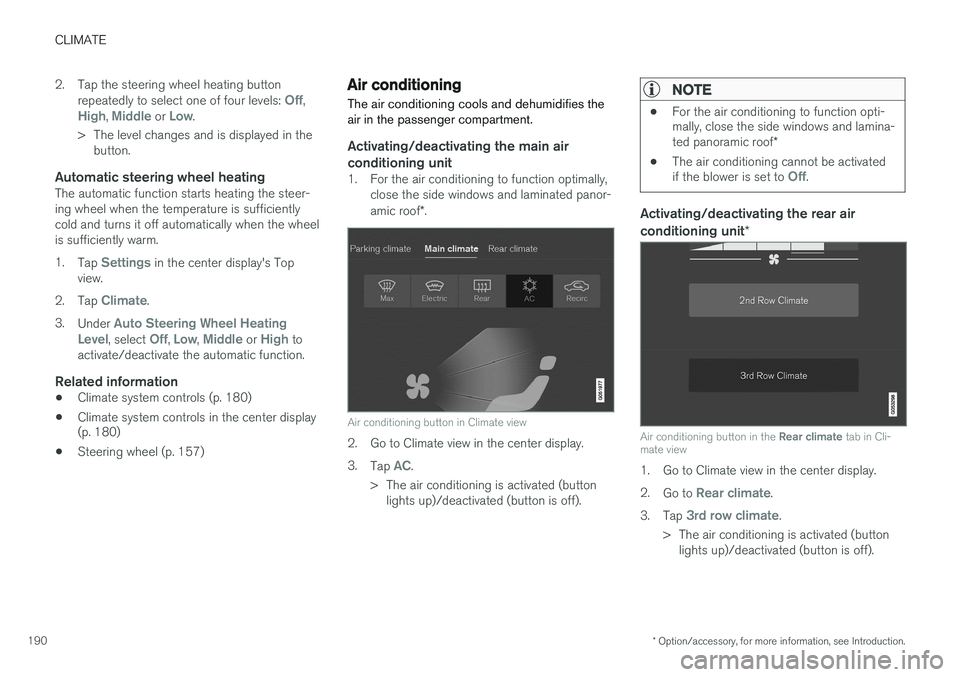
Air conditioning button in Climate view
2. Go to Climate view in the center display. 3.
Tap
AC.
> The air conditioning is activated (button lights up)/deactivated (button is off).
NOTE
• For the air conditioning to function opti- mally, close the side windows and lamina- ted panoramic roof
*
• The air conditioning cannot be activated if the blower is set to
Off.
Activating/deactivating the rear air conditioning unit
*
Air conditioning button in the Rear climate tab in Cli-
mate view
1. Go to Climate view in the center display. 2. Go to
Rear climate.
3. Tap
3rd row climate.
> The air conditioning is activated (button lights up)/deactivated (button is off).
Page 193 of 570
CLIMATE
* Option/accessory, for more information, see Introduction.191
NOTE
Air conditioning for the third row of seats*
cannot be activated if the main air condition- ing unit or the air conditioning for the second row of seats * is/are deactivated.
Activating/deactivating the third row air conditioning when the engine is started
The air conditioning for the optional third row of seats 7
can be set to start automatically when the
engine is started. 1. Tap
Settings in the center display's Top
view.
2. Tap
Climate.
3. Select
Third Row Climate On At Engine
Start to activate/deactivate the air condition-
ing for the third row of seats when the engine is started.
Related information
• Climate system controls in the center display (p. 180)
Turning seat heating
* on and off
The seats can be heated for added comfort in cold weather.
Activating/deactivating front seat heating
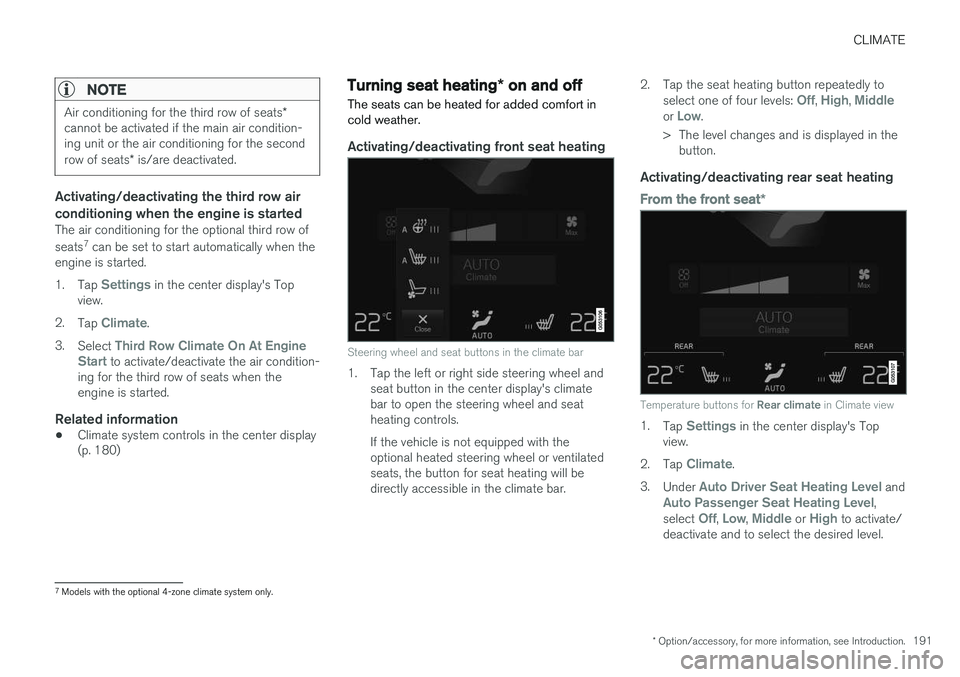
Steering wheel and seat buttons in the climate bar
1. Tap the left or right side steering wheel and seat button in the center display's climate bar to open the steering wheel and seatheating controls. If the vehicle is not equipped with the optional heated steering wheel or ventilatedseats, the button for seat heating will bedirectly accessible in the climate bar. 2. Tap the seat heating button repeatedly to
select one of four levels:
Off, High, Middleor Low.
> The level changes and is displayed in the button.
Activating/deactivating rear seat heating
From the front seat *
Temperature buttons for Rear climate in Climate view
1.
Tap Settings in the center display's Top
view.
2. Tap
Climate.
3. Under
Auto Driver Seat Heating Level andAuto Passenger Seat Heating Level,
select Off, Low, Middle or High to activate/
deactivate and to select the desired level.
7 Models with the optional 4-zone climate system only.
Page 194 of 570
CLIMATE
* Option/accessory, for more information, see Introduction.
192
From the rear seatWith the 2-zone climate system
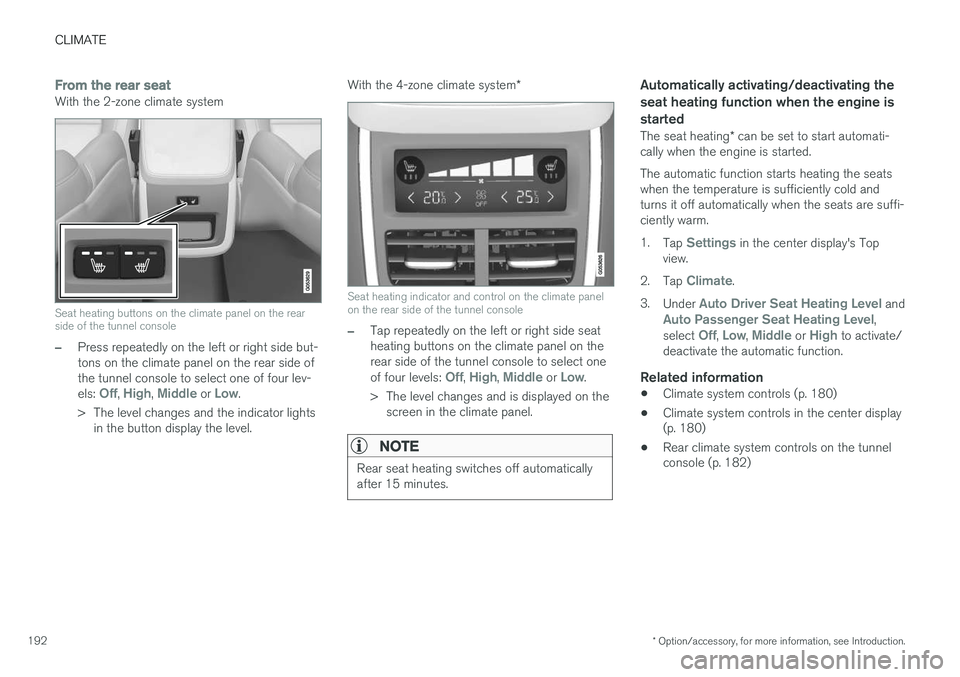
Seat heating buttons on the climate panel on the rear side of the tunnel console
–Press repeatedly on the left or right side but- tons on the climate panel on the rear side ofthe tunnel console to select one of four lev- els:
Off, High, Middle or Low.
> The level changes and the indicator lights in the button display the level. With the 4-zone climate system
*
Seat heating indicator and control on the climate panel on the rear side of the tunnel console
–Tap repeatedly on the left or right side seat heating buttons on the climate panel on therear side of the tunnel console to select one of four levels:
Off, High, Middle or Low.
> The level changes and is displayed on the screen in the climate panel.
NOTE
Rear seat heating switches off automatically after 15 minutes.
Automatically activating/deactivating the seat heating function when the engine isstarted
The seat heating * can be set to start automati-
cally when the engine is started. The automatic function starts heating the seats when the temperature is sufficiently cold andturns it off automatically when the seats are suffi-ciently warm. 1. Tap
Settings in the center display's Top
view.
2. Tap
Climate.
3. Under
Auto Driver Seat Heating Level andAuto Passenger Seat Heating Level,
select Off, Low, Middle or High to activate/
deactivate the automatic function.
Related information
• Climate system controls (p. 180)
• Climate system controls in the center display (p. 180)
• Rear climate system controls on the tunnelconsole (p. 182)
Page 195 of 570
CLIMATE
* Option/accessory, for more information, see Introduction.193
Turning front seat ventilation* on
and off
Seat ventilation can be used e.g., to help remove dampness from the seat occupant's clothing.
The ventilation system consists of fans in the seats and backrests that draw air through theseat upholstery. The cooling effect increases asthe air in the passenger compartment becomescooler. This feature can be activated when theengine is running and it monitors the seat's tem-perature, sunlight in the passenger compartmentand the ambient temperature.
Activating/deactivating front seat ventilation
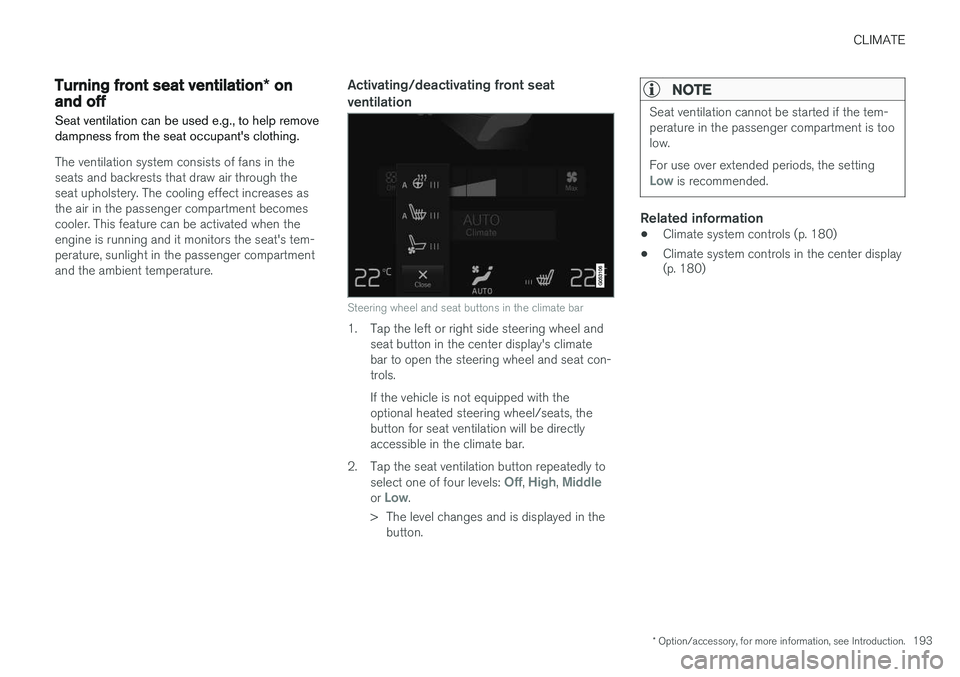
Steering wheel and seat buttons in the climate bar
1. Tap the left or right side steering wheel and seat button in the center display's climate bar to open the steering wheel and seat con-trols. If the vehicle is not equipped with the optional heated steering wheel/seats, thebutton for seat ventilation will be directlyaccessible in the climate bar.
2. Tap the seat ventilation button repeatedly to select one of four levels:
Off, High, Middleor Low.
> The level changes and is displayed in the button.
NOTE
Seat ventilation cannot be started if the tem- perature in the passenger compartment is toolow. For use over extended periods, the setting
Low is recommended.
Related information
• Climate system controls (p. 180)
• Climate system controls in the center display (p. 180)
Page 197 of 570
CLIMATE
195
Directing air flow
Air flow control 8
–Move the control from side to side or up/ down to direct the flow of air from the vent.
Related information
•
Air distribution (p. 194)
• Adjusting air distribution (p. 195)
• Air distribution table (p. 196)
Adjusting air distribution
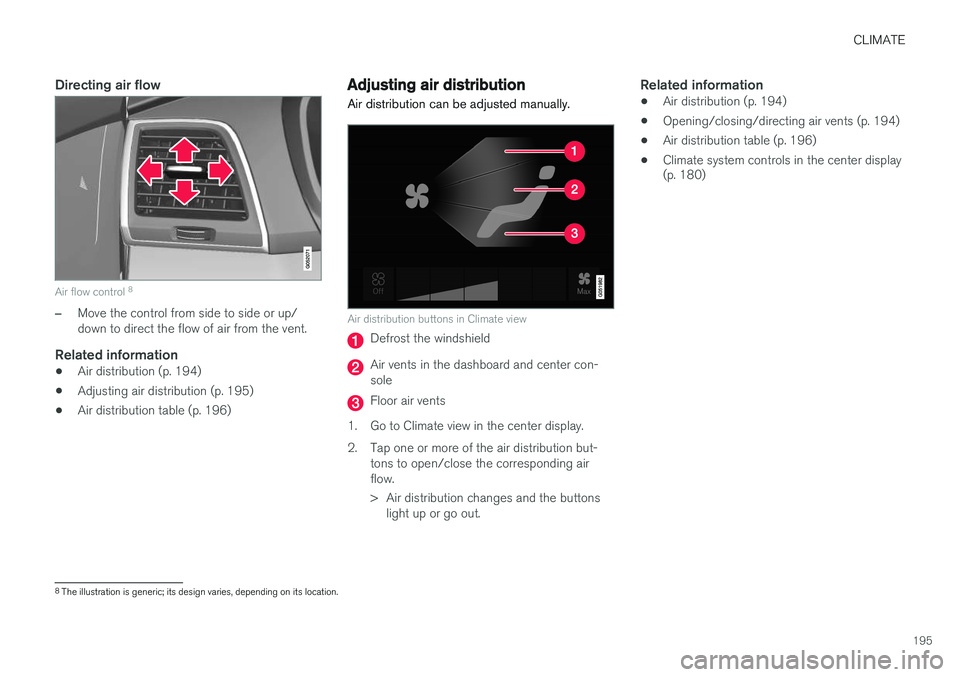
Air distribution can be adjusted manually.
Air distribution buttons in Climate view
Defrost the windshield
Air vents in the dashboard and center con- sole
Floor air vents
1. Go to Climate view in the center display.
2. Tap one or more of the air distribution but- tons to open/close the corresponding air flow.
> Air distribution changes and the buttonslight up or go out.
Related information
• Air distribution (p. 194)
• Opening/closing/directing air vents (p. 194)
• Air distribution table (p. 196)
• Climate system controls in the center display (p. 180)
8
The illustration is generic; its design varies, depending on its location.
Page 199 of 570
CLIMATE
197
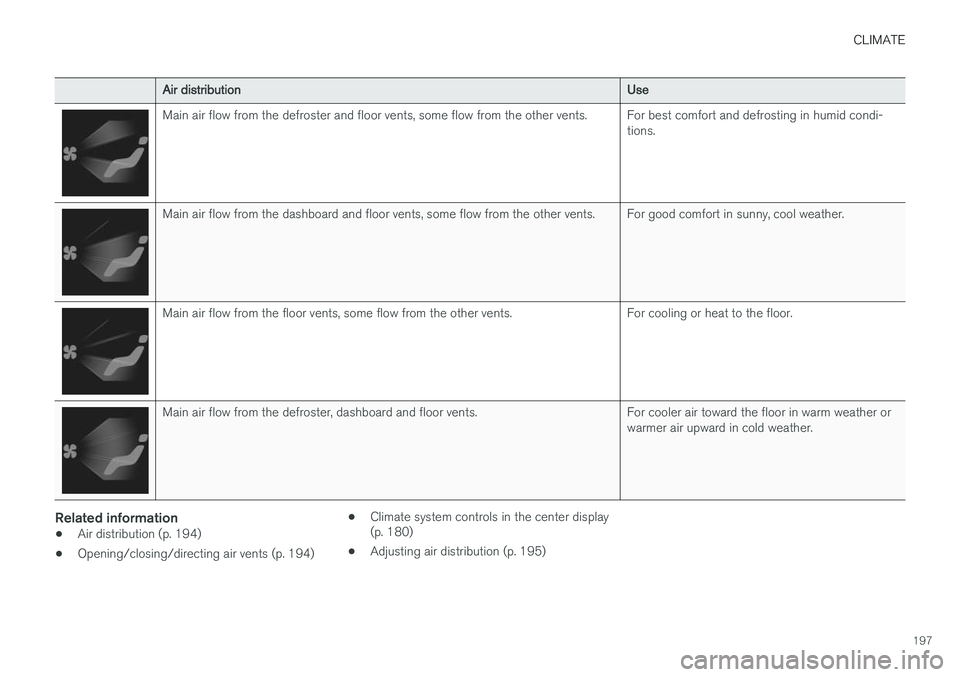
Air distributionUse
Main air flow from the defroster and floor vents, some flow from the other vents.For best comfort and defrosting in humid condi- tions.
Main air flow from the dashboard and floor vents, some flow from the other vents.For good comfort in sunny, cool weather.
Main air flow from the floor vents, some flow from the other vents.For cooling or heat to the floor.
Main air flow from the defroster, dashboard and floor vents.For cooler air toward the floor in warm weather or warmer air upward in cold weather.
Related information
•Air distribution (p. 194)
• Opening/closing/directing air vents (p. 194) •
Climate system controls in the center display (p. 180)
• Adjusting air distribution (p. 195)
Page 203 of 570
LOADING AND STORAGE
* Option/accessory, for more information, see Introduction.201
Third row of seats*
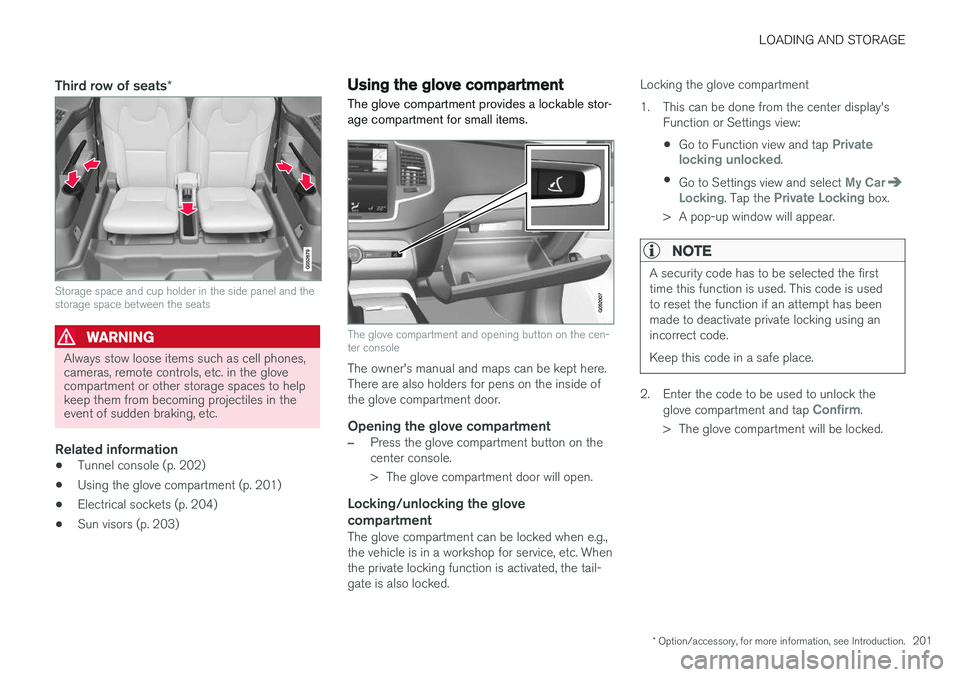
Storage space and cup holder in the side panel and the storage space between the seats
WARNING
Always stow loose items such as cell phones, cameras, remote controls, etc. in the glovecompartment or other storage spaces to helpkeep them from becoming projectiles in theevent of sudden braking, etc.
Related information
•Tunnel console (p. 202)
• Using the glove compartment (p. 201)
• Electrical sockets (p. 204)
• Sun visors (p. 203)
Using the glove compartment
The glove compartment provides a lockable stor- age compartment for small items.
The glove compartment and opening button on the cen- ter console
The owner's manual and maps can be kept here. There are also holders for pens on the inside ofthe glove compartment door.
Opening the glove compartment
–Press the glove compartment button on the center console.
> The glove compartment door will open.
Locking/unlocking the glove compartment
The glove compartment can be locked when e.g., the vehicle is in a workshop for service, etc. Whenthe private locking function is activated, the tail-gate is also locked. Locking the glove compartment
1. This can be done from the center display's
Function or Settings view:
• Go to Function view and tap
Private
locking unlocked.
• Go to Settings view and select
My CarLocking. Tap the Private Locking box.
> A pop-up window will appear.
NOTE
A security code has to be selected the first time this function is used. This code is usedto reset the function if an attempt has beenmade to deactivate private locking using anincorrect code. Keep this code in a safe place.
2. Enter the code to be used to unlock the glove compartment and tap Confirm.
> The glove compartment will be locked.
Page 204 of 570

LOADING AND STORAGE
* Option/accessory, for more information, see Introduction.
202 Unlocking the glove compartment
1. This function can be deactivated from the
center display's Function or Settings view:
• Go to Function view and tap
Private
locking locked.
• Go to settings and select
My CarLocking. Deselect the Private Lockingbox.
> A pop-up window will appear.
2. Specify the code to be used to lock the glove compartment and tap
Confirm.
> The glove compartment will be unlocked.
Using the glove compartment as a cooler *The glove compartment can be used to cool drinks or food and the cooling feature functionswhen the climate system is active (i.e., when the ignition is in mode II or when the engine is run-
ning).
Cooling activated
Cooling deactivated
–Activate/deactivate cooling by moving the control as far as possible toward the passen-ger compartment/glove compartment.
Related information
• Passenger compartment storage spaces (p. 200)
• Locking/unlocking the tailgate (p. 233)
Tunnel console The tunnel console, located between the front seats, contains a 12-volt electrical socket, cupholders and storage spaces, etc.
Storage space
Storage space with cup holders for the driver and passenger and a 12-volt socket
Storage space and USB/AUX sockets under the armrest
Climate control panel for the rear seats
*
NOTE
One of the alarm sensors, which is sensitive to metallic objects, is located under the tunnelconsole cup holders. Avoid leaving coins,keys, etc., in the cup holders because theymay inadvertently trigger the alarm.
Page 218 of 570

LOCKS AND ALARM
* Option/accessory, for more information, see Introduction.
216
Locks and remote keys
The vehicle can be locked and unlocked in vari- ous ways and there are several types of remotekeys that can be used. These keys can also belinked to a driver profile, which contains vehicle-related settings that have been stored.
Locking/unlocking/opening/closingThe vehicle can be locked/unlocked from the passenger compartment, using the buttons onthe remote key or by using the optional PassiveEntry system where it is only necessary to have akey in your possession to lock or unlock thedoors. On models equipped with a power tailgate *, the
tailgate can be opened/closed by moving your foot under a sensor * beneath the rear bumper.
If for any reason a remote key does not function properly, it may be necessary to replace its bat-teries but the vehicle can always be locked orunlocked manually using the remote key'sdetachable key blade.
Remote keyThe remote key does not have to be physicallyhandled in order to start the engine because thevehicle is equipped with the standard PassiveStart system (the key only needs to be in thefront part of the passenger compartment). If thevehicle is equipped with the optional PassiveEntry system that enables keyless entry and start, the key can be anywhere in the vehicle when theengine is started. Models with Passive Entry
* also have an extra,
smaller key without buttons called a Key Tag. A special restricted Red Key makes it possible to limit some of the vehicle's functionality, such asby setting a maximum speed or limiting the maxi-mum volume from the infotainment system'sspeakers. The various keys can also be linked to driver pro- files, which make it possible to store differentpersonal preferences (settings) in the vehicle. Additional keys can be ordered from a Volvo retailer.
Related information
• Immobilizer (p. 221)
• Alarm (p. 216)
• Child safety locks (p. 218)
• Remote key (p. 224)
• Restricted key
* (p. 226)
• Foot movement tailgate operation
* (p. 228)
• Locking/unlocking from inside the vehicle (p. 231)
• Locking/unlocking from outside the vehicle(p. 232)
• Locking/unlocking the tailgate (p. 233)
• Starting the engine (p. 356)
Alarm
The alarm system provides a warning if an attempt is made to break into the vehicle.
The following conditions will trigger the alarm:
• a door/hood/tailgate are opened
• the battery is disconnected
• the alarm siren is disconnected
If a problem is detected in the alarm system, a message will be displayed in the instrumentpanel. Do not attempt to repair any of the components in the alarm system yourself; this could affect theinsurance policy on the vehicle. Contact a trainedand qualified Volvo service technician.
NOTE
One of the alarm sensors, which is sensitive to metallic objects, is located under the tunnelconsole cup holders. Avoid leaving coins,keys, etc., in the cup holders because theymay inadvertently trigger the alarm.