display VOLVO XC90 2015 Owners Manual
[x] Cancel search | Manufacturer: VOLVO, Model Year: 2015, Model line: XC90, Model: VOLVO XC90 2015Pages: 570, PDF Size: 12.44 MB
Page 224 of 570
LOCKS AND ALARM
222
Changing the remote key's battery The remote key can be opened if the battery needs to be replaced.
The battery should be replaced if:• The information symbol illuminates and
Unavailable Battery level too low is
shown in the display
and/or
• if the locks do not react after several attempts to unlock or lock the vehicle
Replacing the battery
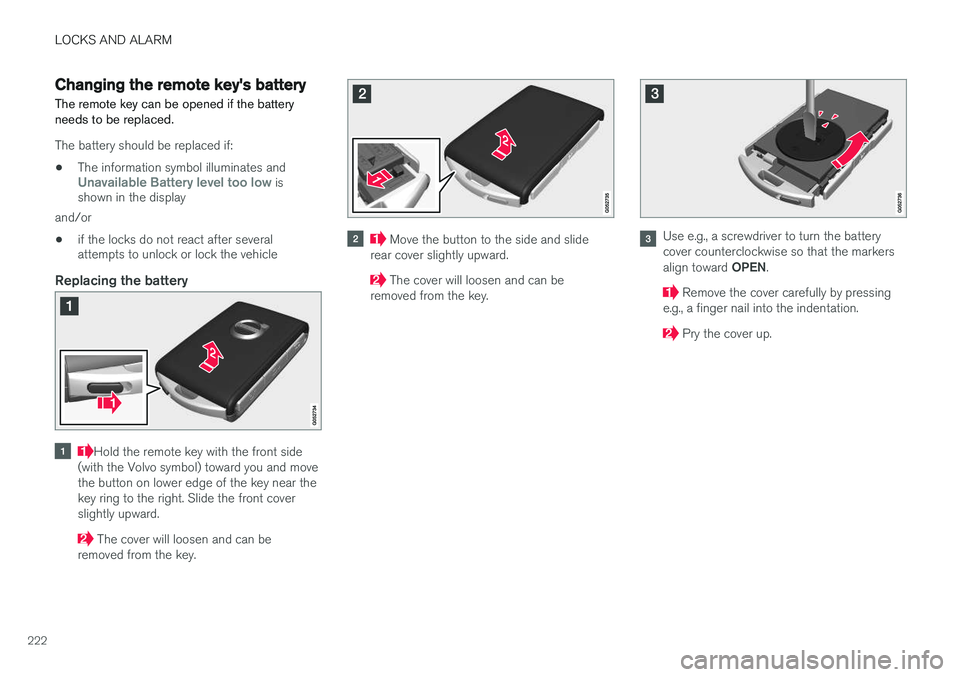
Hold the remote key with the front side
(with the Volvo symbol) toward you and move the button on lower edge of the key near thekey ring to the right. Slide the front coverslightly upward.
The cover will loosen and can be
removed from the key.
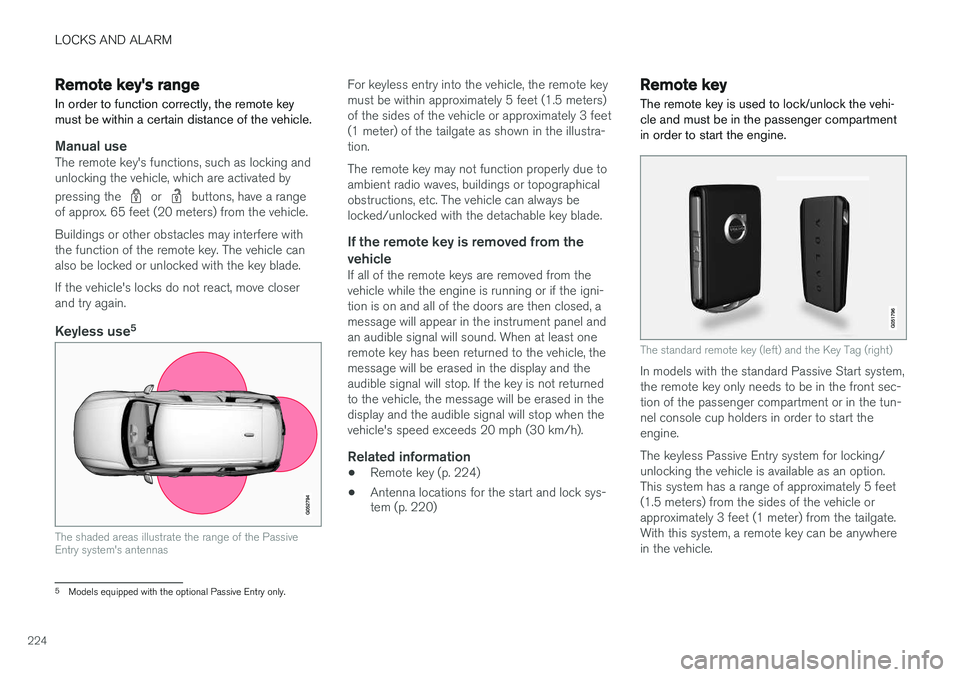
Move the button to the side and slide
rear cover slightly upward.
The cover will loosen and can be
removed from the key.
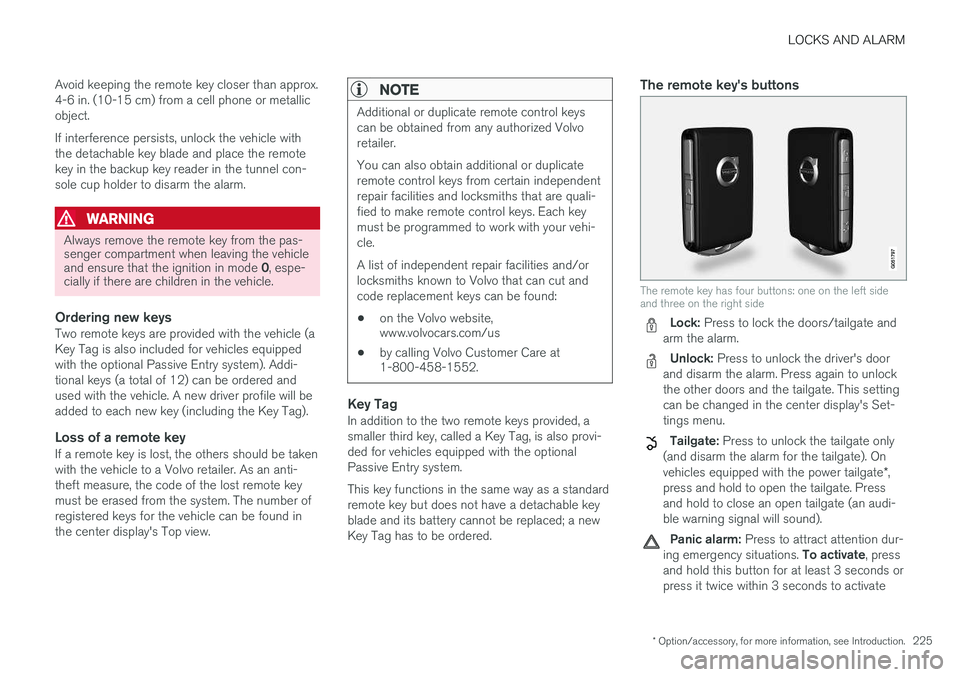
Use e.g., a screwdriver to turn the battery cover counterclockwise so that the markers align toward OPEN.
Remove the cover carefully by pressing
e.g., a finger nail into the indentation.
Pry the cover up.
Page 226 of 570
LOCKS AND ALARM
224
Remote key's range
In order to function correctly, the remote key must be within a certain distance of the vehicle.
Manual useThe remote key's functions, such as locking and unlocking the vehicle, which are activated by pressing the
or buttons, have a range
of approx. 65 feet (20 meters) from the vehicle. Buildings or other obstacles may interfere with the function of the remote key. The vehicle canalso be locked or unlocked with the key blade. If the vehicle's locks do not react, move closer and try again.
Keyless use 5
The shaded areas illustrate the range of the Passive Entry system's antennas
For keyless entry into the vehicle, the remote key must be within approximately 5 feet (1.5 meters)of the sides of the vehicle or approximately 3 feet(1 meter) of the tailgate as shown in the illustra-tion. The remote key may not function properly due to ambient radio waves, buildings or topographicalobstructions, etc. The vehicle can always belocked/unlocked with the detachable key blade.
If the remote key is removed from the
vehicle
If all of the remote keys are removed from thevehicle while the engine is running or if the igni-tion is on and all of the doors are then closed, amessage will appear in the instrument panel andan audible signal will sound. When at least oneremote key has been returned to the vehicle, themessage will be erased in the display and theaudible signal will stop. If the key is not returnedto the vehicle, the message will be erased in thedisplay and the audible signal will stop when thevehicle's speed exceeds 20 mph (30 km/h).
Related information
• Remote key (p. 224)
• Antenna locations for the start and lock sys- tem (p. 220)
Remote key
The remote key is used to lock/unlock the vehi- cle and must be in the passenger compartmentin order to start the engine.
The standard remote key (left) and the Key Tag (right)
In models with the standard Passive Start system, the remote key only needs to be in the front sec-tion of the passenger compartment or in the tun-nel console cup holders in order to start theengine. The keyless Passive Entry system for locking/ unlocking the vehicle is available as an option.This system has a range of approximately 5 feet(1.5 meters) from the sides of the vehicle orapproximately 3 feet (1 meter) from the tailgate.With this system, a remote key can be anywherein the vehicle.
5 Models equipped with the optional Passive Entry only.
Page 227 of 570
LOCKS AND ALARM
* Option/accessory, for more information, see Introduction.225
Avoid keeping the remote key closer than approx. 4-6 in. (10-15 cm) from a cell phone or metallicobject. If interference persists, unlock the vehicle with the detachable key blade and place the remotekey in the backup key reader in the tunnel con-sole cup holder to disarm the alarm.
WARNING
Always remove the remote key from the pas- senger compartment when leaving the vehicle and ensure that the ignition in mode
0, espe-
cially if there are children in the vehicle.
Ordering new keysTwo remote keys are provided with the vehicle (a Key Tag is also included for vehicles equippedwith the optional Passive Entry system). Addi-tional keys (a total of 12) can be ordered andused with the vehicle. A new driver profile will beadded to each new key (including the Key Tag).
Loss of a remote keyIf a remote key is lost, the others should be takenwith the vehicle to a Volvo retailer. As an anti-theft measure, the code of the lost remote keymust be erased from the system. The number ofregistered keys for the vehicle can be found inthe center display's Top view.
NOTE
Additional or duplicate remote control keys can be obtained from any authorized Volvoretailer. You can also obtain additional or duplicate remote control keys from certain independentrepair facilities and locksmiths that are quali-fied to make remote control keys. Each keymust be programmed to work with your vehi-cle. A list of independent repair facilities and/or locksmiths known to Volvo that can cut andcode replacement keys can be found: • on the Volvo website, www.volvocars.com/us
• by calling Volvo Customer Care at1-800-458-1552.
Key TagIn addition to the two remote keys provided, a smaller third key, called a Key Tag, is also provi-ded for vehicles equipped with the optionalPassive Entry system. This key functions in the same way as a standard remote key but does not have a detachable keyblade and its battery cannot be replaced; a newKey Tag has to be ordered.
The remote key's buttons
The remote key has four buttons: one on the left side and three on the right side
Lock: Press to lock the doors/tailgate and
arm the alarm.
Unlock: Press to unlock the driver's door
and disarm the alarm. Press again to unlock the other doors and the tailgate. This settingcan be changed in the center display's Set-tings menu.
Tailgate: Press to unlock the tailgate only
(and disarm the alarm for the tailgate). On vehicles equipped with the power tailgate *,
press and hold to open the tailgate. Press and hold to close an open tailgate (an audi-ble warning signal will sound).
Panic alarm: Press to attract attention dur-
ing emergency situations. To activate, press
and hold this button for at least 3 seconds or press it twice within 3 seconds to activate
Page 228 of 570
LOCKS AND ALARM
* Option/accessory, for more information, see Introduction.
226 the turn signals and horn.
To deactivate,
wait approximately 5 seconds and press the button again (the panic alarm will also deac-tivate automatically after several minutes).
InterferenceMetallic objects or electromagnetic fields mayinterfere with the remote key's function. Avoidplacing the remote key within 4-6 in. (10-15 cm)of a cell phone or a metallic object. If interference persists, use the remote key's detachable key blade to unlock the vehicle andplace the remote key in the backup key reader inthe tunnel console cup holder.
Loss of a remote keyIf a remote keys is lost, a new one can beordered. The other keys should be taken with thevehicle to a Volvo retailer or authorized independ-ent locksmith. As an anti-theft measure, the codeof the lost remote key must be erased from thesystem. The number of registered keys for thevehicle can be found in the center display's Topview.
NOTE
Additional or duplicate remote control keys can be obtained from any authorized Volvoretailer. You can also obtain additional or duplicate remote control keys from certain independentrepair facilities and locksmiths that are quali-fied to make remote control keys. Each keymust be programmed to work with your vehi-cle. A list of independent repair facilities and/or locksmiths known to Volvo that can cut andcode replacement keys can be found: • on the Volvo website, www.volvocars.com/us
• by calling Volvo Customer Care at1-800-458-1552.
Related information
•
Driver profiles (p. 112)
• Remote key's range (p. 224)
• Restricted key
* (p. 226)
• Detachable key blade (p. 227)
• Changing the remote key's battery (p. 222)
Restricted key
*
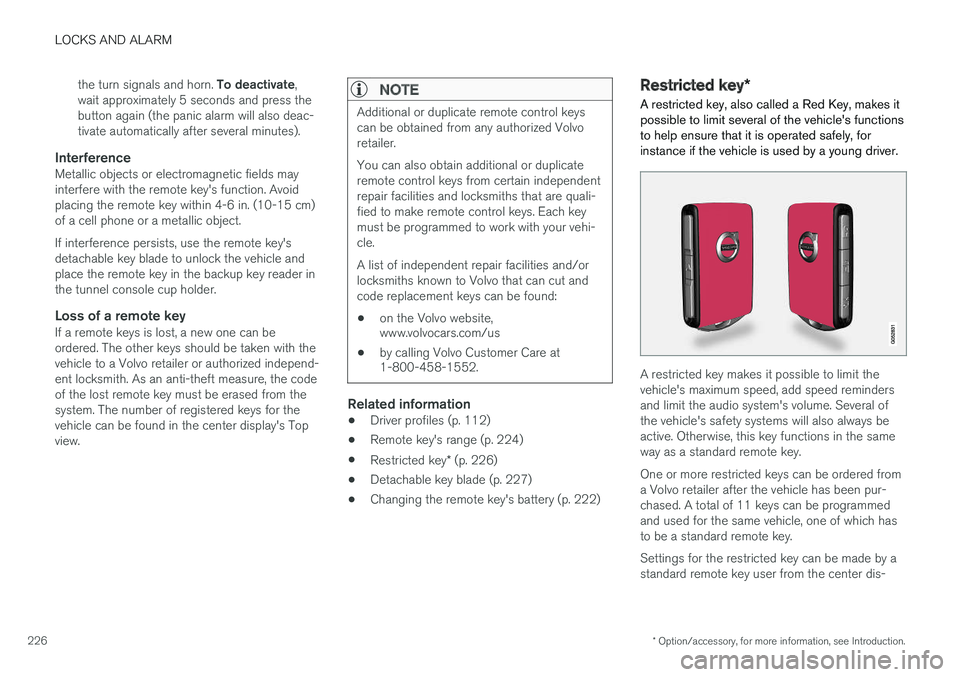
A restricted key, also called a Red Key, makes it possible to limit several of the vehicle's functionsto help ensure that it is operated safely, forinstance if the vehicle is used by a young driver.
A restricted key makes it possible to limit the vehicle's maximum speed, add speed remindersand limit the audio system's volume. Several ofthe vehicle's safety systems will also always beactive. Otherwise, this key functions in the sameway as a standard remote key. One or more restricted keys can be ordered from a Volvo retailer after the vehicle has been pur-chased. A total of 11 keys can be programmedand used for the same vehicle, one of which hasto be a standard remote key. Settings for the restricted key can be made by a standard remote key user from the center dis-
Page 232 of 570
LOCKS AND ALARM
230
Indicators in the interior lock buttons
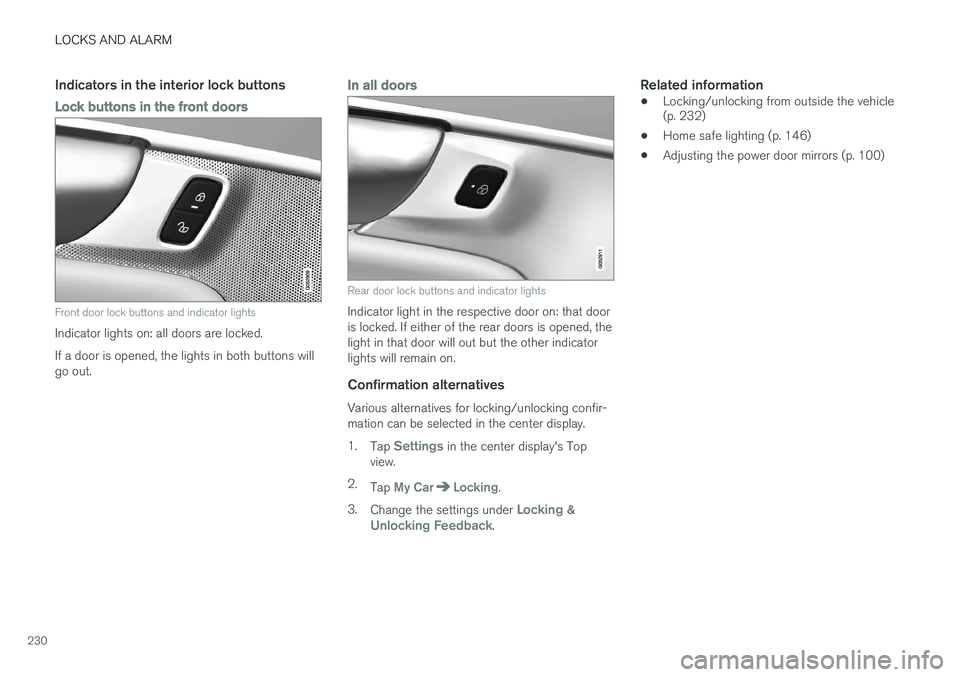
Lock buttons in the front doors
Front door lock buttons and indicator lights
Indicator lights on: all doors are locked. If a door is opened, the lights in both buttons will go out.
In all doors
Rear door lock buttons and indicator lights
Indicator light in the respective door on: that door is locked. If either of the rear doors is opened, thelight in that door will out but the other indicatorlights will remain on.
Confirmation alternatives
Various alternatives for locking/unlocking confir-mation can be selected in the center display. 1.Tap
Settings in the center display's Top
view.
2. Tap
My CarLocking.
3. Change the settings under
Locking &
Unlocking Feedback.
Related information
• Locking/unlocking from outside the vehicle (p. 232)
• Home safe lighting (p. 146)
• Adjusting the power door mirrors (p. 100)
Page 234 of 570

LOCKS AND ALARM
* Option/accessory, for more information, see Introduction.
232
Automatic lockingAll of the doors/tailgate can be locked automati- cally when the vehicle begins to move. To acti-vate/deactivate this setting: 1.
Tap
Settings in the center display's Top
view.
2. Tap
My CarLocking
3. Select Auto Door Locking
>Doors and tailgate lock when the vehicle moves will be displayed and the
doors and tailgate will lock automatically when the vehicle begins to move.
Related information
• Locking/unlocking from outside the vehicle (p. 232)
• Child safety locks (p. 218)
Locking/unlocking from outside the vehicle The buttons on the remote key can be used to lock or unlock all doors and the tailgate at thesame time. This can also be done without press-ing the remote key buttons on models equippedwith the optional keyless Passive Entry system. The power tailgate
* can also be opened/closed
by moving your foot under a sensor beneath therear bumper *.
The lock/unlock settings can be changed in the center display's Top view. Go to:
SettingsMy CarRemote Unlockand select Unlock All Doors or Driver Door
Only.
In order to lock the vehicle, the driver's door must be closed. If the tailgate or any of the other doorsare open, they will be locked and the alarm will bearmed when they are closed.
NOTE
Be sure the remote key is outside of the vehi- cle before the other doors/tailgate are closedto help avoid locking the remote inside thevehicle.
If the locks repeatedly do not react when the unlock button is pressed, it may be necessary toreplace the battery in the remote. In this case, the driver's door can be unlocked with the detacha-ble key blade.
Keyless Passive Entry
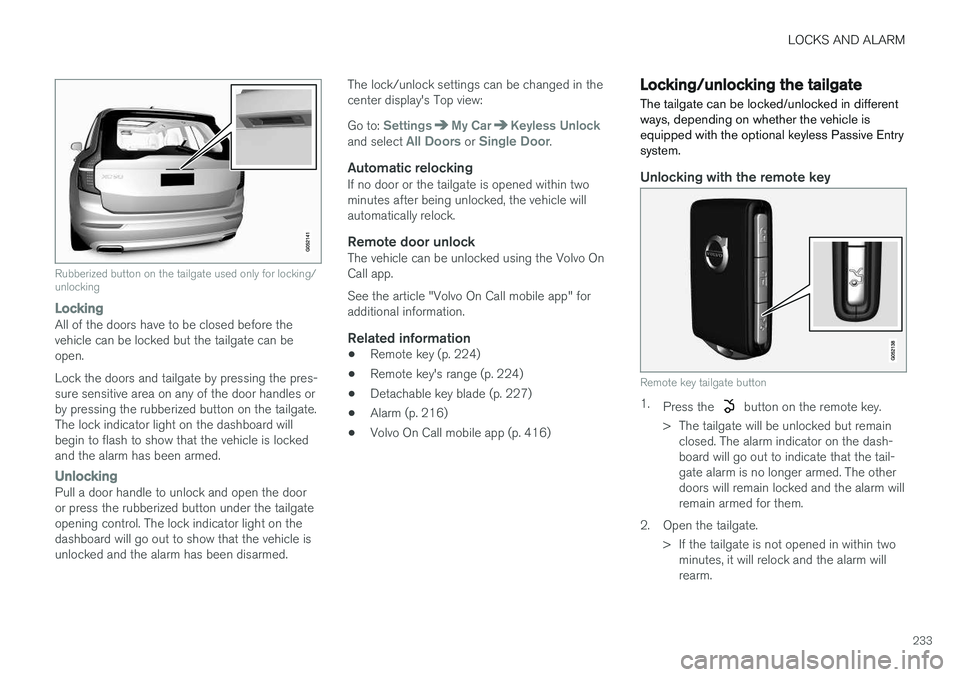
*If the vehicle is equipped with this system, it isonly necessary to have a remote key in your pos-session to operate the central locking system. Models with Passive Entry have an indentation on the outside of the handle for locking the vehicleand a pressure-sensitive area on the inside of thehandle for unlocking. The tailgate has a rubber-ized button used only for locking/unlocking.
Outer indentation for locking, the pressure sensitive area on the inside of the handle is for unlocking
Page 235 of 570
LOCKS AND ALARM
233
Rubberized button on the tailgate used only for locking/ unlocking
LockingAll of the doors have to be closed before the vehicle can be locked but the tailgate can beopen. Lock the doors and tailgate by pressing the pres- sure sensitive area on any of the door handles orby pressing the rubberized button on the tailgate.The lock indicator light on the dashboard willbegin to flash to show that the vehicle is lockedand the alarm has been armed.
UnlockingPull a door handle to unlock and open the door or press the rubberized button under the tailgateopening control. The lock indicator light on thedashboard will go out to show that the vehicle isunlocked and the alarm has been disarmed.The lock/unlock settings can be changed in thecenter display's Top view: Go to:
SettingsMy CarKeyless Unlockand select All Doors or Single Door.
Automatic relockingIf no door or the tailgate is opened within two minutes after being unlocked, the vehicle willautomatically relock.
Remote door unlockThe vehicle can be unlocked using the Volvo OnCall app. See the article "Volvo On Call mobile app" for additional information.
Related information
•
Remote key (p. 224)
• Remote key's range (p. 224)
• Detachable key blade (p. 227)
• Alarm (p. 216)
• Volvo On Call mobile app (p. 416)
Locking/unlocking the tailgate The tailgate can be locked/unlocked in different ways, depending on whether the vehicle isequipped with the optional keyless Passive Entrysystem.
Unlocking with the remote key
Remote key tailgate button
1.
Press the button on the remote key.
> The tailgate will be unlocked but remain closed. The alarm indicator on the dash- board will go out to indicate that the tail-gate alarm is no longer armed. The otherdoors will remain locked and the alarm willremain armed for them.
2. Open the tailgate. > If the tailgate is not opened in within twominutes, it will relock and the alarm willrearm.
Page 247 of 570

DRIVER SUPPORT
245
Radar sensor limitations
The radar sensor used by several of the driver support systems has certain limitations, whichalso affect the systems using it.
Obstructions
The marked area must not be obstructed in any way. This area of the windshield should always be kept clean
The radar sensor is located at the upper, center section of the windshield along with the camera.
WARNING
Never place any objects, decals, etc., on the windshield in front of the camera/radar unit.This could reduce or block these components'functions, and could cause one or more of thesystems that utilize the them to stop function-ing.
If this symbol and
Windscreen
sensor Sensor blocked, see
Owner's manual appear in the instru-
ment panel, this indicates that the
camera and/or radar sensor cannot detect other vehicles ahead.
The following table shows some of the situations that can cause the message to be displayed andsuggested actions.
CauseAction
The area of the windshield in front of the camera/radar sensor is dirty or covered by ice or snow.Clean the windshield or remove the ice/ snow.
Thick fog or heavy rain/snow blocks reduces the camera/radar sensor's range of visibility.No action. The driver should be extra alert in conditions of this type.
Page 251 of 570
DRIVER SUPPORT
249
Activating CC (putting it in active mode and setting a speed)
–With the symbol displayed (CC is in
standby mode), press the
button (2) on
the left-side steering wheel keypad. The symbol will change colors from GRAY toWHITE.
> This puts CC in active mode and sets the vehicle's current speed.
Related information
• Cruise Control (CC) (p. 248)
Changing Cruise Control speed
Cruise Control (CC) helps the driver maintain a set speed.
Changing a set speed
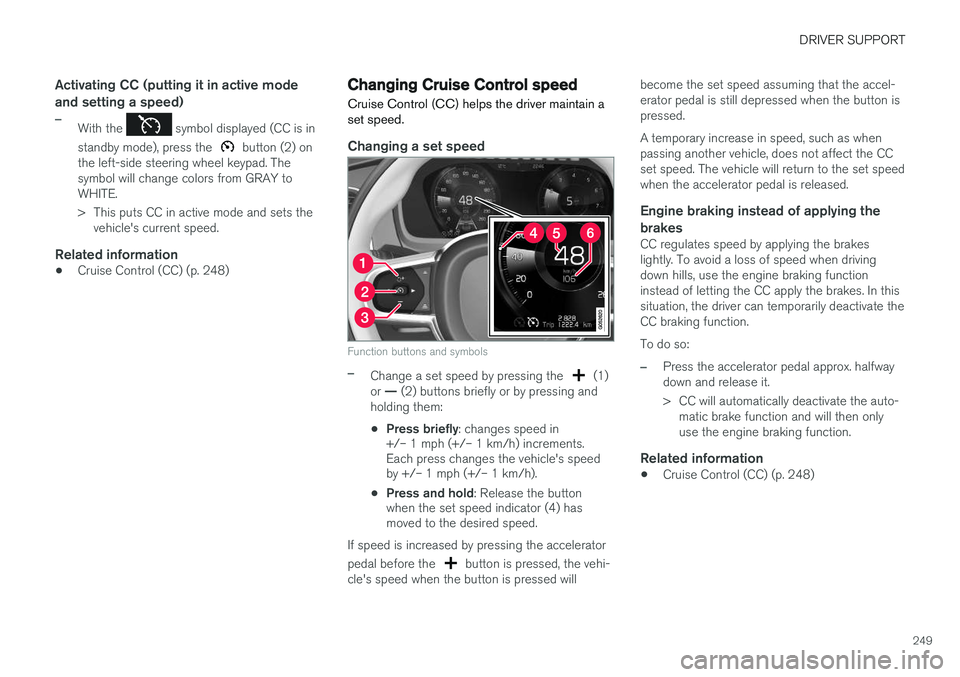
Function buttons and symbols
–Change a set speed by pressing the (1)
or
Page 256 of 570

DRIVER SUPPORT
* Option/accessory, for more information, see Introduction.
254
Head-up-display *
A flashing light alerts the driver
A flashing icon will appear in the head-up dis- play* to alert the driver of a collision risk.
WARNING
Adaptive Cruise Control only warns of vehicles detected by the radar sensor. In some casesthere may be no warning or the warning maybe delayed. The driver should always apply thebrakes when necessary.
Related information
• Adaptive Cruise Control (ACC) - fault tracing (p. 271)
• Starting and activating Adaptive CruiseControl (ACC) (p. 254)
• Adaptive cruise control passing assistance(p. 270) •
Setting an Adaptive Cruise Control timeinterval (p. 258)
• Changing Adaptive Cruise Control (ACC)speed (p. 257)
• Deactivating/resuming Adaptive CruiseControl (ACC) (p. 255)
• Adaptive Cruise Control (ACC) symbols andmessages (p. 272)
Starting and activating Adaptive Cruise Control (ACC)
ACC must first be put in active mode before it can be started in order to regulate speed or aset time interval to the vehicle ahead.
Starting ACC (putting it in standby mode)
Function buttons and symbols
–Press ◀ (2) or ▶ (3) to scroll to the ACC
(
) function. The symbol (4) will be dis-
played in the instrument panel.
> The symbol indicates that ACC has been
started and is in standby mode . In
standby mode, the vehicle will not main-
tain a set speed or a time interval to the vehicle ahead.
Activating ACC (putting it in active mode and setting a speed)
Before ACC can be put in active mode: