display VOLVO XC90 2015 Owners Manual
[x] Cancel search | Manufacturer: VOLVO, Model Year: 2015, Model line: XC90, Model: VOLVO XC90 2015Pages: 570, PDF Size: 12.44 MB
Page 283 of 570

DRIVER SUPPORT
* Option/accessory, for more information, see Introduction.281
CAUTION
•Service and maintenance on City Safety may only be carried out by a trained andqualified Volvo service technician.
• If a crack, scratch or stone chip shouldoccur in the section of the windshield infront the camera/radar sensor, contact atrained and qualified Volvo service techni-cian to repair or replace the windshield.Failing to do so may result in reducedCity Safety functionality.
To help prevent limited or reduced functional- ity, please also observe the following:
• Volvo recommends that cracks, scratches or stone chips on the windshield in front of the camera/radar sensor should
not
be repaired; in such cases, the entire windshield should be replaced.
• Before the windshield is replaced, con-tact a Volvo retailer to ensure that thecorrect windshield is ordered and instal-led. If the wrong type of windshield isused, this may cause City Safety to func-tion improperly or not at all.
• Volvo recommends the use of only Genu-ine Volvo Replacement Windshields.
• When replacing windshield wipers, usethe same type or ones approved by Volvo.
After the windshield has been replaced, the camera/radar sensor will have to be recalibra-ted by a trained and qualified Volvo servicetechnician to help ensure proper function ofall of the vehicle's camera-/radar-based sys-tems.
MaintenanceIn order for City Safety to function properly, the area of the windshield must be kept free of dirt,ice, snow, etc.
Other vehicle functionsIf a message is displayed in the instrument panel,this means that the other systems using the cam-era/radar sensor (see the list below) will not havefull functionality or may not function at all. The radar sensor is used by the following func- tions:
• Distance Alert
*
• Driver Alert Control
*
• Adaptive Cruise Control
*
• Pilot Assist
*
• Road Sign Information
*
• Active High Beams
*
• Lane Keeping Aid
*
Do not mount or in any way attach anything onthe windshield that could obstruct the camera/radar sensor.
WARNING
• The camera has the same type of limita- tions as the human eye, i.e., it cannot seeas well in heavy snowfall or rain, thick fogor in heavy blowing dust or snow. In suchconditions, systems depending on thecamera may experience greatly reducedfunctionality or may be temporarily deacti-vated.
• Never place any objects, decals, etc., onthe windshield in front of the camera. Thiscould reduce or block the camera
Page 284 of 570
DRIVER SUPPORT
282
City Safety symbols and messages
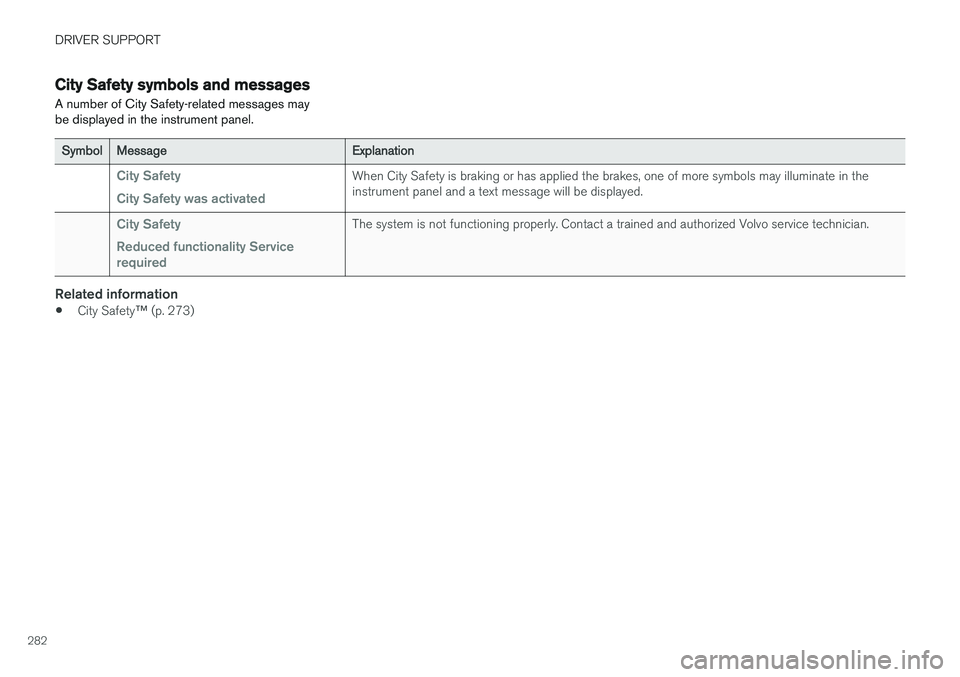
A number of City Safety-related messages may be displayed in the instrument panel.
SymbolMessageExplanation
City Safety City Safety was activatedWhen City Safety is braking or has applied the brakes, one of more symbols may illuminate in the instrument panel and a text message will be displayed.
City Safety Reduced functionality Service requiredThe system is not functioning properly. Contact a trained and authorized Volvo service technician.
Related information
• City Safety
™ (p. 273)
Page 286 of 570
DRIVER SUPPORT
* Option/accessory, for more information, see Introduction.
284
Starting and activating the Speed Limiter (SL) *
The Speed Limiter (SL) is a feature that helps prevent the driver from exceeding a preset maxi-mum speed.
Starting SL (putting it in standby mode)
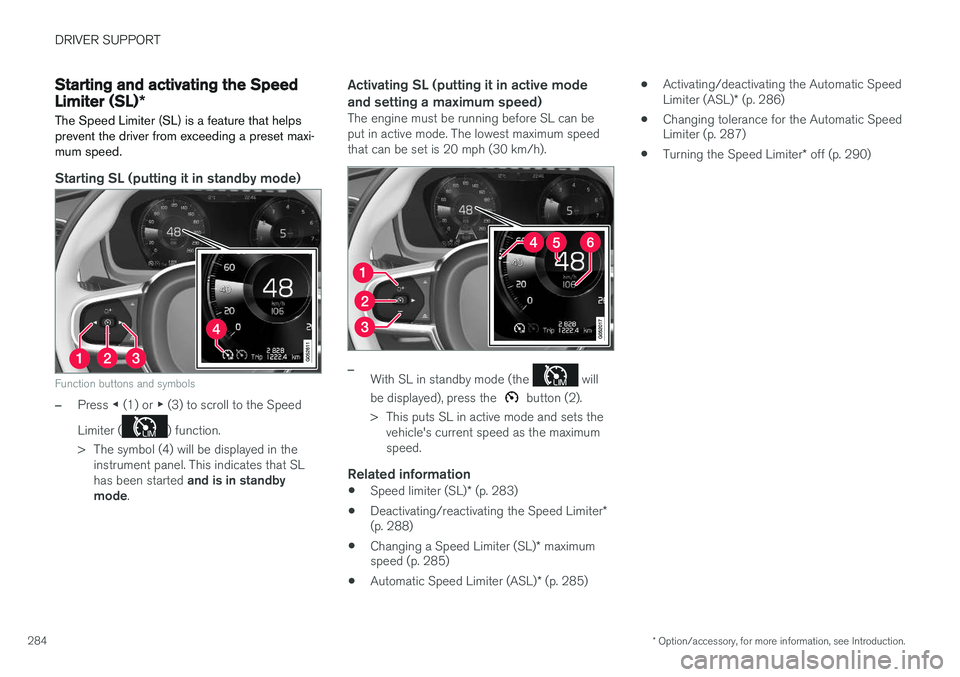
Function buttons and symbols
–Press ◀ (1) or ▶ (3) to scroll to the Speed
Limiter (
) function.
> The symbol (4) will be displayed in the instrument panel. This indicates that SL has been started and is in standby
mode .
Activating SL (putting it in active mode and setting a maximum speed)
The engine must be running before SL can be put in active mode. The lowest maximum speedthat can be set is 20 mph (30 km/h).
–With SL in standby mode (the will
be displayed), press the
button (2).
> This puts SL in active mode and sets the vehicle's current speed as the maximum speed.
Related information
• Speed limiter (SL)
* (p. 283)
• Deactivating/reactivating the Speed Limiter
*
(p. 288)
• Changing a Speed Limiter (SL)
* maximum
speed (p. 285)
• Automatic Speed Limiter (ASL)
* (p. 285) •
Activating/deactivating the Automatic Speed Limiter (ASL)
* (p. 286)
• Changing tolerance for the Automatic Speed Limiter (p. 287)
• Turning the Speed Limiter
* off (p. 290)
Page 288 of 570
DRIVER SUPPORT
* Option/accessory, for more information, see Introduction.
286
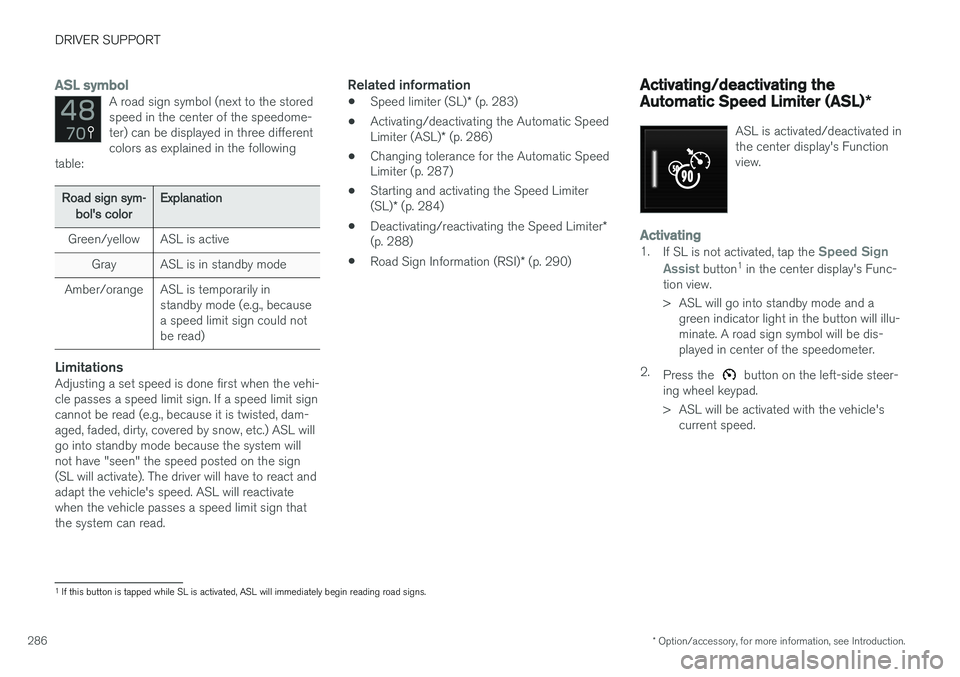
ASL symbolA road sign symbol (next to the stored speed in the center of the speedome-ter) can be displayed in three differentcolors as explained in the following
table:
Road sign sym-
bol's colorExplanation
Green/yellowASL is active
GrayASL is in standby mode
Amber/orangeASL is temporarily in standby mode (e.g., becausea speed limit sign could notbe read)
LimitationsAdjusting a set speed is done first when the vehi- cle passes a speed limit sign. If a speed limit signcannot be read (e.g., because it is twisted, dam-aged, faded, dirty, covered by snow, etc.) ASL willgo into standby mode because the system willnot have "seen" the speed posted on the sign(SL will activate). The driver will have to react andadapt the vehicle's speed. ASL will reactivatewhen the vehicle passes a speed limit sign thatthe system can read.
Related information
• Speed limiter (SL)
* (p. 283)
• Activating/deactivating the Automatic Speed Limiter (ASL)
* (p. 286)
• Changing tolerance for the Automatic Speed Limiter (p. 287)
• Starting and activating the Speed Limiter (SL)
* (p. 284)
• Deactivating/reactivating the Speed Limiter
*
(p. 288)
• Road Sign Information (RSI)
* (p. 290)
Activating/deactivating the Automatic Speed Limiter (ASL) *
ASL is activated/deactivated in the center display's Functionview.
Activating1.
If SL is not activated, tap the Speed Sign
Assist
button 1
in the center display's Func-
tion view.
> ASL will go into standby mode and a green indicator light in the button will illu- minate. A road sign symbol will be dis-played in center of the speedometer.
2. Press the
button on the left-side steer-
ing wheel keypad.
> ASL will be activated with the vehicle's current speed.
1If this button is tapped while SL is activated, ASL will immediately begin reading road signs.
Page 289 of 570
DRIVER SUPPORT
* Option/accessory, for more information, see Introduction.287
Deactivating1.
Tap the Speed Sign Assist button in the
center display's Function view.
> ASL will be deactivated and the Speed limiter (SL) will be activated.
2. Press the
button on the left-side steer-
ing wheel keypad.
> SL will go into standby mode.
WARNING
After switching from ASL to SL, the vehicle will no longer adapt speed to posted speedlimits. It will only limit the vehicle's maximumspeed.
Related information
• Speed limiter (SL)
* (p. 283)
• Automatic Speed Limiter (ASL)
* (p. 285)
Changing tolerance for the Automatic Speed Limiter
Posted speed limit toleranceASL can be set to allow the vehicle to drive a maximum of 5 mph (10 km/h) above or belowthe posted speed limit. For example, if the currentposted speed limit is 50 mph (70 km/h), thedriver can opt to allow the vehicle to drive at aspeed of 55 mph (80 km/h).
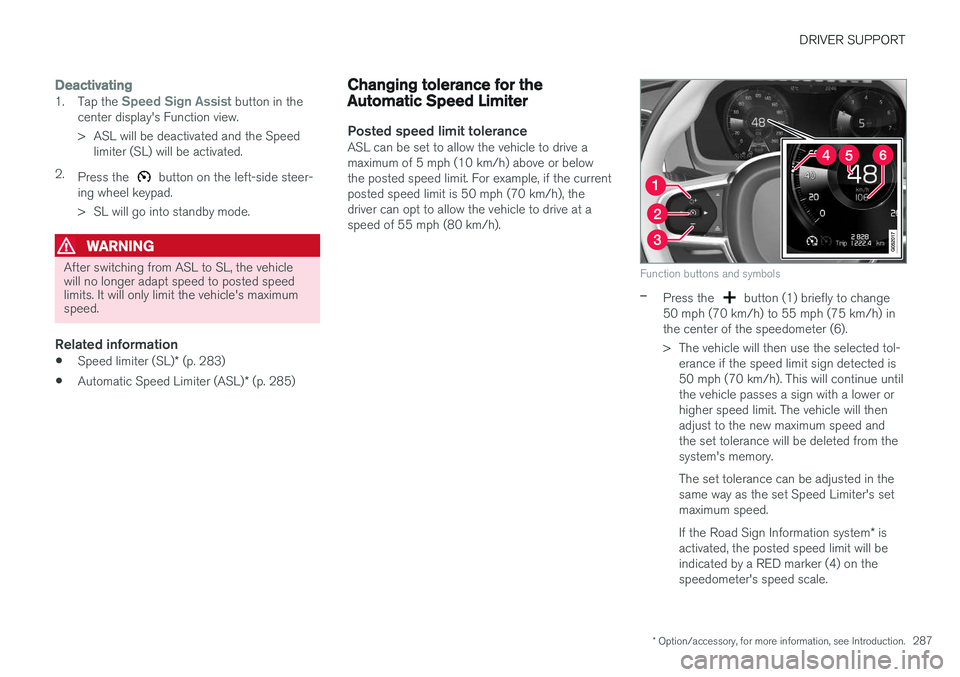
Function buttons and symbols
–Press the button (1) briefly to change
50 mph (70 km/h) to 55 mph (75 km/h) in the center of the speedometer (6).
> The vehicle will then use the selected tol- erance if the speed limit sign detected is 50 mph (70 km/h). This will continue untilthe vehicle passes a sign with a lower orhigher speed limit. The vehicle will thenadjust to the new maximum speed andthe set tolerance will be deleted from thesystem's memory. The set tolerance can be adjusted in the same way as the set Speed Limiter's setmaximum speed. If the Road Sign Information system * is
activated, the posted speed limit will be indicated by a RED marker (4) on thespeedometer's speed scale.
Page 292 of 570
DRIVER SUPPORT
* Option/accessory, for more information, see Introduction.
290
Turning the Speed Limiter * off
The Speed Limiter (SL) can be turned off.
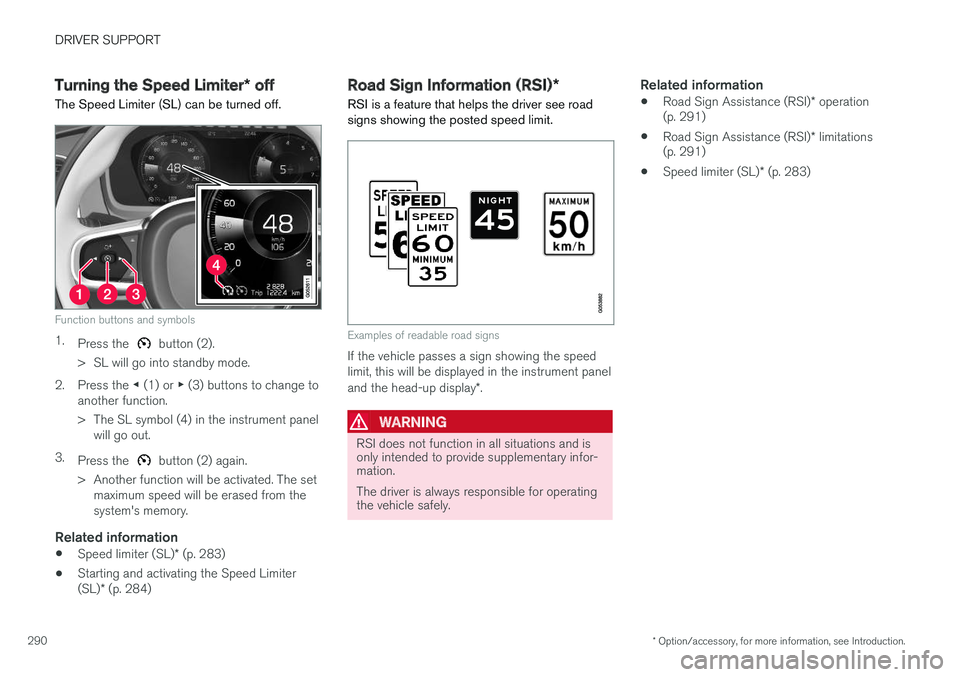
Function buttons and symbols
1. Press the button (2).
> SL will go into standby mode.
2. Press the ◀ (1) or ▶ (3) buttons to change to
another function.
> The SL symbol (4) in the instrument panel will go out.
3. Press the
button (2) again.
> Another function will be activated. The set maximum speed will be erased from the system's memory.
Related information
• Speed limiter (SL)
* (p. 283)
• Starting and activating the Speed Limiter (SL)
* (p. 284)
Road Sign Information (RSI) *
RSI is a feature that helps the driver see road signs showing the posted speed limit.
Examples of readable road signs
If the vehicle passes a sign showing the speed limit, this will be displayed in the instrument panel and the head-up display *.
WARNING
RSI does not function in all situations and is only intended to provide supplementary infor-mation. The driver is always responsible for operating the vehicle safely.
Related information
• Road Sign Assistance (RSI)
* operation
(p. 291)
• Road Sign Assistance (RSI)
* limitations
(p. 291)
• Speed limiter (SL)
* (p. 283)
Page 293 of 570
DRIVER SUPPORT
* Option/accessory, for more information, see Introduction.291
Road Sign Assistance (RSI)*
operation
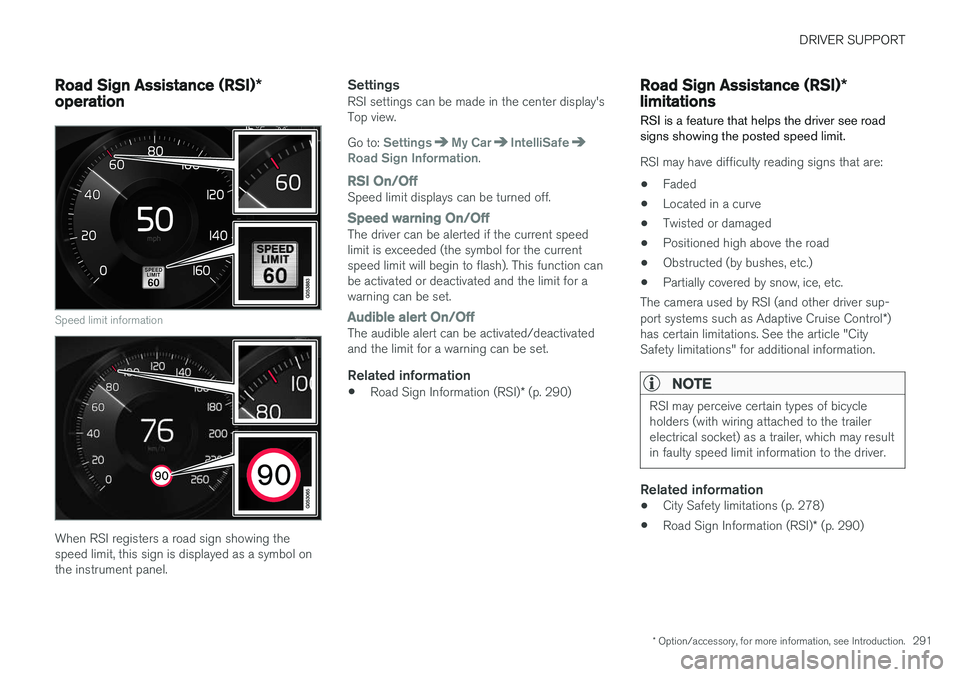
Speed limit information
When RSI registers a road sign showing the speed limit, this sign is displayed as a symbol onthe instrument panel.
SettingsRSI settings can be made in the center display'sTop view. Go to:
SettingsMy CarIntelliSafeRoad Sign Information.
RSI On/OffSpeed limit displays can be turned off.
Speed warning On/OffThe driver can be alerted if the current speed limit is exceeded (the symbol for the currentspeed limit will begin to flash). This function canbe activated or deactivated and the limit for awarning can be set.
Audible alert On/OffThe audible alert can be activated/deactivated and the limit for a warning can be set.
Related information
• Road Sign Information (RSI)
* (p. 290)
Road Sign Assistance (RSI) *
limitations
RSI is a feature that helps the driver see road signs showing the posted speed limit.
RSI may have difficulty reading signs that are:
• Faded
• Located in a curve
• Twisted or damaged
• Positioned high above the road
• Obstructed (by bushes, etc.)
• Partially covered by snow, ice, etc.
The camera used by RSI (and other driver sup- port systems such as Adaptive Cruise Control *)
has certain limitations. See the article "City Safety limitations" for additional information.
NOTE
RSI may perceive certain types of bicycle holders (with wiring attached to the trailerelectrical socket) as a trailer, which may resultin faulty speed limit information to the driver.
Related information
• City Safety limitations (p. 278)
• Road Sign Information (RSI)
* (p. 290)
Page 294 of 570

DRIVER SUPPORT
* Option/accessory, for more information, see Introduction.
292
Park Assist *
The Park Assist system is designed to assist you
when driving into parking spaces, garages, etc. An audible signal and symbols in the instrumentpanel and center display indicate the distance tothe object.
Display view showing object zones and sensor sectors
The center display shows an overview of the vehi- cle in relation to objects that have been detected. The highlighted sector shows which of the sen- sors has detected the object. The closer the vehi-cle symbol is to the highlighted sector, the closerthe actual object is to your vehicle. The Park Assist system uses an intermittent tone that pulses faster as you come closer to anobject. Sound from the infotainment system willbe temporarily turned down. The tone becomes constant when you are withinapproximately 1 ft (30 cm) of an object and theactive sensor fields will be completely filled in. Ifthere are objects within this distance both behindand in front of the vehicle, the tone alternatesbetween front and rear speakers. While an audible signal is being given, its volume level can be raised/lowered using the
>II control
in the center console.
WARNING
Park Assist is an information system, NOT a safety system. This system is designed to bea supplementary aid when parking the vehicle.It is not, however, intended to replace the driv-er's attention and judgement.
Rear park assist
The system's rear sensors are activated automat- ically when the engine is started and are active ifthe vehicle rolls rearward with the gear selector in N or if R has been selected.
The distance monitored behind the vehicle is approximately 5 ft (1.5 m). The audible signalcomes from the rear speakers. The rear sensors will be deactivated automatically when towing a trailer if Volvo genuine trailer wir-ing is used. If a non-Volvo trailer hitch is beingused, it may be necessary to switch off the sys-tem manually.
Side park assist
The system's side sensors are activated automat- ically when the engine is started and are active atspeeds below approximately 6 mph (10 km/h).
Page 298 of 570
DRIVER SUPPORT
* Option/accessory, for more information, see Introduction.
296
Park Assist Camera (PAC) *
The Park Assist Camera system is designed to provide the driver with a view of the area aroundthe vehicle in the form of a camera image andgraphics in the center display.
PAC is a supplementary parking aid that can be activated automatically when the gear selector is in R or by tapping a button in the center display,
depending on the selected settings. See also the article "Park Assist Camera settings."
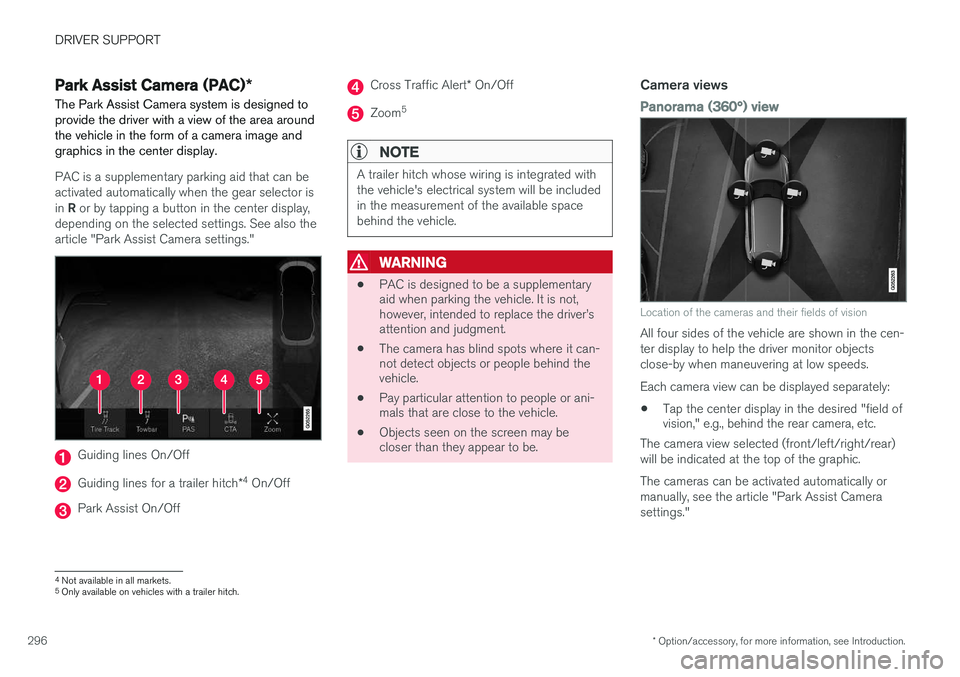
Guiding lines On/Off
Guiding lines for a trailer hitch *4
On/Off
Park Assist On/Off
Cross Traffic Alert * On/Off
Zoom 5
NOTE
A trailer hitch whose wiring is integrated with the vehicle's electrical system will be includedin the measurement of the available spacebehind the vehicle.
WARNING
•
PAC is designed to be a supplementary aid when parking the vehicle. It is not,however, intended to replace the driver
Page 301 of 570

DRIVER SUPPORT
* Option/accessory, for more information, see Introduction.299
Guiding lines for a trailer hitch (towbar)
Towbar: activate guiding lines for a trailer
hitch
Zoom: zoom in/out 6
The camera can help make hitching a trailer eas- ier by showing the "line" that the trailer hitch willtake toward the trailer. 1. Tap
Towbar (2).
> The guiding lines will be displayed and the guiding lines for the vehicle will disappear.
2. Tap
Zoom (5) for a close-up view.
> The camera will zoom in.
Guiding lines for the trailer hitch and the vehicle cannot be shown at the same time.
Front and rear sensor fields
Front and rear sensors
If the vehicle is also equipped with the optional Park Assist system, distance will also be indi-cated by colored fields for each sensor that hasdetected an object. The front and rear fields change colors (yellow- orange-red) as the vehicle moves closer to anobject.
Front/rear field colorsDistance to the object
Yellow2–4.9 ft (06.–1.5 m )
Orange1.3–2 ft (0.4–0.6 m)
Red0–1.3 ft (0–0.4 m)
Side sensors
The side fields will only be shown in 360° viewand the color will only be orange.
Side field colorDistance to the object
Orange0–1 ft (0–0.3 m)
Related information
• Park Assist Camera (PAC)
* (p. 296)
• Starting the Park Assist Camera (PAC)
*
(p. 300)
6 Only models with a trailer hitch.