change time VOLVO XC90 TWIN ENGINE 2018 Owner's Manual
[x] Cancel search | Manufacturer: VOLVO, Model Year: 2018, Model line: XC90 TWIN ENGINE, Model: VOLVO XC90 TWIN ENGINE 2018Pages: 686, PDF Size: 17 MB
Page 251 of 686
KEY, LOCKS AND ALARM
* Option/accessory.249
secure when handing over the vehicle to e.g. a
young driver, parking attendant or workshop. The
settings for a Red Key cannot be changed by its
user; a regular remote key is needed to change
settings.
Related information
•
Red Key* settings (p. 249)
• Remote key (p. 239) Red Key*
settings
The holder of a regular remote key can adjust
settings for a Red Key. Certain driver support
functions are always active. 1. Tap Settings in the center display's Top
view.
2.
Tap System Driver Profiles Red Key
.
> The following settings can be made:
• Set Time Gap For Adaptive Cruise
Control
• Reduced Maximum Volume
• Max Speed Limit
• Speed Limit Warning
Adaptive Cruise Control*:
• Default setting: Longest interval
Reduced maximum volume (On/Off):
•Default setting: On
Speed Limiter (On/Off):
•Setting interval: 50-250 km/h (30-160 mph)
• The default setting is 120 km/h (75 mph)
• Increments: 1 km/h (1 mph)
The following symbol and message will
be shown in the instrument panel
Red key Speed limitation cannot
be exceeded.
Speed reminder (On/Off):
• Setting interval: 0-250 km/h (0-160 mph)
• Default setting: 50, 70 and 90 km/h (30, 45
and 55 mph)
• Increments: 1 km/h (1 mph)
• Maximum number of simultaneous remind-
ers: 6
Driver support functionsThe following driver support functions will always
be active for a Red Key user:
• Blind Spot Information (BLIS)*
• Lane Keeping Aid (LKA)*
• Distance Alert*
• City Safety
• Driver Alert Control (DAC)*
• Road Sign Information*
Related information
• Red Key - restricted remote key* (p. 248)
Page 260 of 686

||KEY, LOCKS AND ALARM
* Option/accessory.
258
Alternative unlocking method Alternative unlocking method using side door opening
handle.
–
Pull either of the side door inside opening
handles and release.
>
Depending on the remote key settings,
either all doors will be unlocked or just the
selected door will be unlocked and
opened.
To change this setting, tap SettingsMy Car Locking Remote and
Interior Unlock in the Top view of the
center display.
Locking using the front door buttons
– Press the button (both front doors must
be closed).
>
All doors and the tailgate will lock.
Press and hold the button to close all side
windows at the same time.
Locking using the rear door button* Button with indicator light for locking/unlocking in rear
door.
The lock buttons in the rear doors only lock/
unlock that particular door.
Unlocking the rear door1. Pull the opening handle to unlock the rear door.
2. Pull the opening handle again to open the rear door 16
.
Related information
• Settings for remote and inside door unlock
(p. 242)
• Unlocking the tailgate from inside the vehicle
(p. 259)
• Activating and deactivating child safety locks
(p. 259) 16
Provided the child safety lock is not activated.
Page 290 of 686
DRIVER SUPPORT
288Managing Cruise Control speed
Cruise Control (CC 29
) can be set to various
speeds.
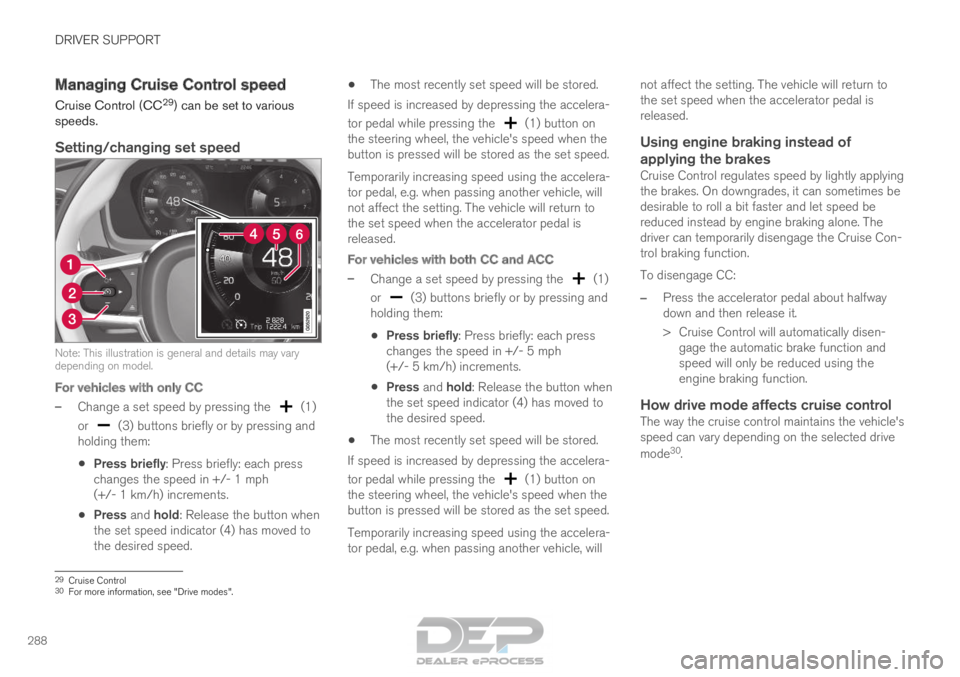
Setting/changing set speed Note: This illustration is general and details may vary
depending on model.
For vehicles with only CC
–
Change a set speed by pressing the (1)
or (3) buttons briefly or by pressing and
holding them:
• Press briefly: Press briefly: each press
changes the speed in +/- 1 mph
(+/- 1 km/h) increments.
• Press and hold: Release the button when
the set speed indicator (4) has moved to
the desired speed. •
The most recently set speed will be stored.
If speed is increased by depressing the accelera-
tor pedal while pressing the (1) button on
the steering wheel, the vehicle's speed when the
button is pressed will be stored as the set speed.
Temporarily increasing speed using the accelera-
tor pedal, e.g. when passing another vehicle, will
not affect the setting. The vehicle will return to
the set speed when the accelerator pedal is
released.
For vehicles with both CC and ACC
– Change a set speed by pressing the (1)
or (3) buttons briefly or by pressing and
holding them:
• Press briefly: Press briefly: each press
changes the speed in +/- 5 mph
(+/- 5 km/h) increments.
• Press and hold: Release the button when
the set speed indicator (4) has moved to
the desired speed.
• The most recently set speed will be stored.
If speed is increased by depressing the accelera-
tor pedal while pressing the (1) button on
the steering wheel, the vehicle's speed when the
button is pressed will be stored as the set speed.
Temporarily increasing speed using the accelera-
tor pedal, e.g. when passing another vehicle, will not affect the setting. The vehicle will return to
the set speed when the accelerator pedal is
released.
Using engine braking instead of
applying the brakes
Cruise Control regulates speed by lightly applying
the brakes. On downgrades, it can sometimes be
desirable to roll a bit faster and let speed be
reduced instead by engine braking alone. The
driver can temporarily disengage the Cruise Con-
trol braking function.
To disengage CC:
– Press the accelerator pedal about halfway
down and then release it.
>
Cruise Control will automatically disen-
gage the automatic brake function and
speed will only be reduced using the
engine braking function.
How drive mode affects cruise controlThe way the cruise control maintains the vehicle's
speed can vary depending on the selected drive
mode 30
. 29
Cruise Control
30 For more information, see "Drive modes".
Page 302 of 686
||DRIVER SUPPORT
* Option/accessory.
300 –
With the (4) function displayed, press
(1) on the steering wheel keypad.
>
Adaptive Cruise Control will start and the
current speed will be stored, which will be
shown by numbers in the center of the
speedometer.
ACC will only regulate the time
interval to the vehicle ahead
when the distance symbol
shows two vehicles. A speed interval will be marked
at the same time.
The higher speed is the set
speed for your vehicle and the
lower speed is the speed of the
vehicle ahead (target vehicle).
Related information
•
Adaptive Cruise Control* (p. 295) Managing Adaptive Cruise Control
speed
Adaptive Cruise Control (ACC 46
) can be set to
various speeds.
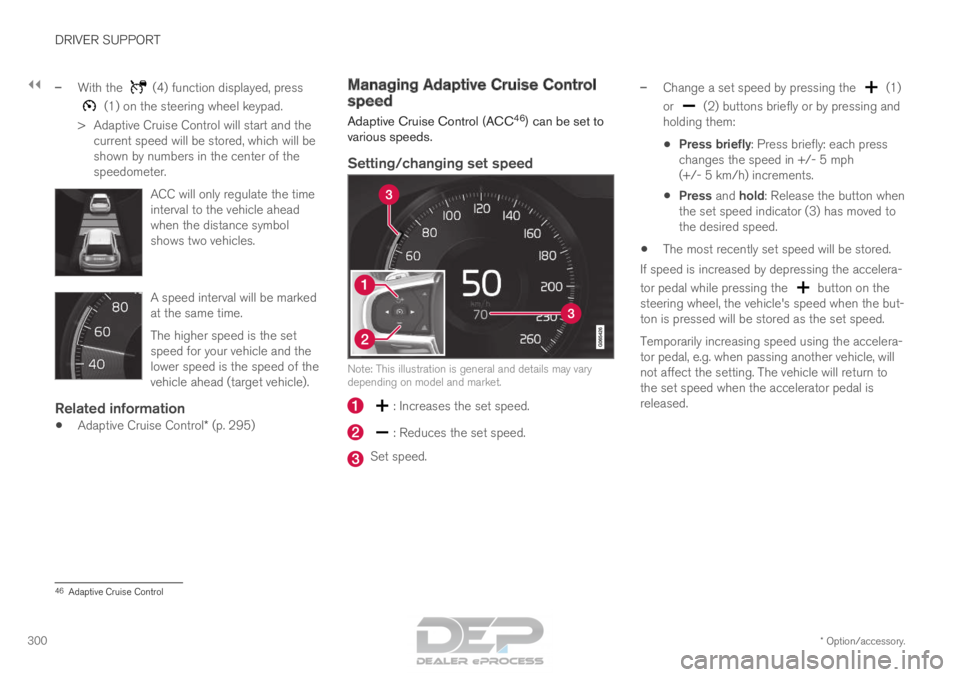
Setting/changing set speed Note: This illustration is general and details may vary
depending on model and market.
: Increases the set speed.
: Reduces the set speed.
Set speed.–
Change a set speed by pressing the (1)
or (2) buttons briefly or by pressing and
holding them:
• Press briefly: Press briefly: each press
changes the speed in +/- 5 mph
(+/- 5 km/h) increments.
• Press and hold: Release the button when
the set speed indicator (3) has moved to
the desired speed.
• The most recently set speed will be stored.
If speed is increased by depressing the accelera-
tor pedal while pressing the button on the
steering wheel, the vehicle's speed when the but-
ton is pressed will be stored as the set speed.
Temporarily increasing speed using the accelera-
tor pedal, e.g. when passing another vehicle, will
not affect the setting. The vehicle will return to
the set speed when the accelerator pedal is
released. 46
Adaptive Cruise Control
Page 307 of 686
DRIVER SUPPORT
* Option/accessory.305
Limitations of passing assistance
with Adaptive Cruise Control
Passing assistance functionality may be reduced
in certain situations.
WARNING The driver should be aware that if conditions
suddenly change when using Parking Assis-
tance, the function may implement an unde-
sired acceleration in certain conditions.
Some situations should be avoided, e.g. if:
•
the vehicle is approaching an exit in the
same direction as passing would normally
occur
• the vehicle ahead slows before your vehi-
cle has had time to switch to the passing
lane
• traffic in the passing lane slows down
• a vehicle for right-hand traffic is driven in
a country with left-hand traffic (or vice
versa).
Situations of this type can be avoided by tempo-
rarily putting ACC 53
in standby mode.
Related information
• Adaptive Cruise Control* (p. 295) Switching target vehicles with
Adaptive Cruise Control
At certain speeds, models with automatic trans-
missions and Adaptive Cruise Control (ACC 54
)
can switch target vehicles.
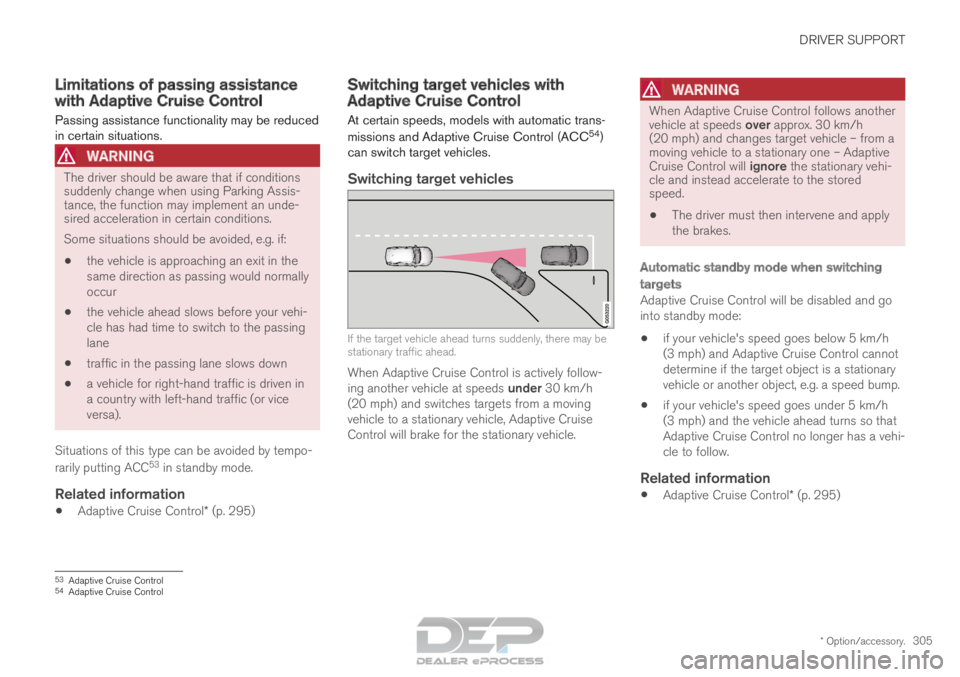
Switching target vehicles If the target vehicle ahead turns suddenly, there may be
stationary traffic ahead.
When Adaptive Cruise Control is actively follow-
ing another vehicle at speeds under 30 km/h
(20 mph) and switches targets from a moving
vehicle to a stationary vehicle, Adaptive Cruise
Control will brake for the stationary vehicle.
WARNING When Adaptive Cruise Control follows another
vehicle at speeds over approx. 30 km/h
(20 mph) and changes target vehicle – from a
moving vehicle to a stationary one – Adaptive
Cruise Control will ignore the stationary vehi-
cle and instead accelerate to the stored
speed.
•
The driver must then intervene and apply
the brakes.
Automatic standby mode when switching
targets
Adaptive Cruise Control will be disabled and go
into standby mode:
• if your vehicle's speed goes below 5 km/h
(3 mph) and Adaptive Cruise Control cannot
determine if the target object is a stationary
vehicle or another object, e.g. a speed bump.
• if your vehicle's speed goes under 5 km/h
(3 mph) and the vehicle ahead turns so that
Adaptive Cruise Control no longer has a vehi-
cle to follow.
Related information
•
Adaptive Cruise Control* (p. 295) 53
Adaptive Cruise Control
54 Adaptive Cruise Control
Page 310 of 686
||DRIVER SUPPORT
* Option/accessory.
308 2.
Tap the Cruise Control button in the center
display's Function view. The button's indica-
tor will change from GRAY to GREEN.
>
The symbol in the instrument panel will
change from ACC to
CC, indicating that Adaptive Cruise Con-
trol is off and Cruise Control is in standby
mode.
3. Pressing the button on the steering
wheel keypad.
>
Cruise Control will start and the vehicle's
current speed will be set.
WARNING Switching from ACC to CC means that the
vehicle:
• will no longer maintain a preset time
interval to the vehicle ahead.
• will only follow the stored speed and the
driver must therefore apply the brakes
when necessary.
If CC is active when the engine is turned off, ACC
will be automatically activated the next time the
engine is started.
Switching from CC to ACCTo do so:
1. Press the button on the steering wheel
keypad to put Cruise Control in standby
mode.
2. Tap the Cruise Control button in Function
view. The button's indicator will change from
GREEN to GRAY.
>
The symbols in the instrument panel will
switch from CC to ACC
to indicate that Adaptive Cruise Control is
in standby mode.
3. Pressing the button on the steering
wheel keypad.
>
Adaptive Cruise Control will go into active
mode and set the vehicle's current speed
and the selected time interval to the vehi-
cle ahead.
Related information
• Adaptive Cruise Control* (p. 295) 57
Adaptive Cruise Control
58 Cruise Control
Page 313 of 686

DRIVER SUPPORT
}}
311
Pilot Assist
Pilot Assist helps the driver keep the vehicle in
the current traffic lane by providing steering
assistance and maintaining an even speed and a
set time interval to the vehicle ahead.
How Pilot Assist worksThe Pilot Assist function is primarily intended for
use on highways and other major roads where it
can help provide a more comfortable and relaxing
driving experience. The camera/radar sensor monitors the distance to the
vehicle ahead and detects lane markings
62
. Camera and radar sensor
Distance monitor
Lane marker line monitors The driver sets the desired speed and distance to
the vehicle ahead. Pilot Assist monitors the dis-
tance to the vehicle ahead and the traffic lane's
side markers using the camera and radar sensor.
The system maintains the set time interval to the
vehicle ahead by automatically adjusting your
vehicle's speed and keeps your vehicle in its lane
by providing steering assistance.
Pilot Assist's steering assistance is based on
monitoring the direction of the vehicle ahead and
the traffic lane's side marker lines. The driver can
override Pilot Assist's steering recommendations
at any time and steer in another direction, e.g. to
change lanes or avoid obstacles on the road.
If the camera/radar sensor cannot detect the
lane's side marker lines or if Pilot Assist is unable
for some other reason to clearly interpret the
lane, Pilot Assist will temporarily deactivate steer-
ing assistance until it can once again interpret
the lane markings. However, the speed and dis-
tance warnings will remain active.
WARNING
Pilot Assist is deactivated automatically and
resumes working without prior notice. The color of the steering wheel
symbol indicates the current
status of steering assistance:
• GREEN indicates that steer-
ing assistance is active
• GRAY (as shown in illustra-
tion) indicates that steering assistance is deacti-
vated. 62
Note: This illustration is general and details may vary depending on mod\
el.
Page 318 of 686

||DRIVER SUPPORT
316
With Adaptive Cruise Control in standby mode:
1. Press the ▶ button on the steering wheel (6).
>
The symbol will change to Pilot
Assist in standby mode (8).
2. Press the button on the steering wheel
(2).
>
Pilot Assist will start and the current
speed will be stored, which will be shown
by numbers in the center of the speedom-
eter.
...or...
With Adaptive Cruise Control started:
– Press the ▶ button on the steering wheel (6).
>
Pilot Assist will start.
Pilot Assist's steering assis-
tance is only active when the
steering wheel symbol (2)
changes from GRAY to
GREEN.
Pilot Assist will only regulate
the time interval to the vehicle ahead when the
distance symbol shows a vehicle (1) over the
steering wheel symbol. A speed interval will be marked
at the same time.
The higher speed is the set
speed for your vehicle and the
lower speed is the speed of the
vehicle ahead (target vehicle).
Hands on the steering wheelPilot Assist only functions if the driver's hands
are on the steering wheel. If Pilot Assist detects
that the driver's hands are not on the steering
wheel, the driver will be instructed to actively
steer the vehicle by a text message and an audi-
ble signal.
If Pilot Assist still cannot detect the driver's
hands on the steering wheel, the function will go
into standby mode. Pilot Assist must then be
reactivated by pressing the
button on the
steering wheel.
NOTE Note that the Pilot Assist function only works
when the driver's hands are on the steering
wheel.
Related information
•
Pilot Assist (p. 311) Managing Pilot Assist speed
Pilot Assist can be set to various speeds.
Setting/changing set speed
Note: This illustration is general and details may vary
depending on model and market.
: Increases the set speed
: Reduces the set speed
Set speed
Page 319 of 686

DRIVER SUPPORT
}}
317
–
Change a set speed by pressing the (1)
or (2) buttons briefly or by pressing and
holding them:
• Press briefly: Press briefly: each press
changes the speed in +/- 5 mph
(+/- 5 km/h) increments.
• Press and hold: Release the button when
the set speed indicator (3) has moved to
the desired speed.
• The most recently set speed will be stored.
If speed is increased by depressing the accelera-
tor pedal while pressing the button on the
steering wheel, the vehicle's speed when the but-
ton is pressed will be stored as the set speed.
Temporarily increasing speed using the accelera-
tor pedal, e.g. when passing another vehicle, will
not affect the setting. The vehicle will return to
the set speed when the accelerator pedal is
released.
Automatic transmission
Pilot Assist can follow another vehicle at speeds
from a standstill up to 200 km/h (125 mph).
The lowest speed that can be set for Pilot Assist
is 30 km/h (20 mph). When following another
vehicle, ACC can monitor that vehicle's speed
and slow your own vehicle down to a standstill,
but it is not possible to set speeds lower than
30 km/h (20 mph). The highest possible speed that can be set is
200 km/h (125 mph).
Related information
•
Pilot Assist (p. 311) Setting a time interval for Pilot
Assist
Pilot Assist
can be set to different time intervals.
Different time intervals to the
vehicle ahead can be selected
and are shown in the instru-
ment panel as 1–5 horizontal
bars. The more bars, the longer
the time interval. One bar rep-
resents an interval of
approx. 1 second to the vehicle ahead. 5 bars
represents approx. 3 seconds.
NOTE When the symbol in the instrument panel
shows a vehicle and a steering wheel, Pilot
Assist follows a vehicle ahead at a preset
time interval.
When only a steering wheel is shown, there is
no vehicle ahead within a reasonable dis-
tance.
Page 323 of 686
DRIVER SUPPORT
321
Passing assistance with Pilot Assist
Pilot Assist can assist the driver when passing
other vehicles.
How passing assistance worksWhen Pilot Assist is following another vehicle
and you indicate that you intend to pass that
vehicle by using the turn signal 67
, Pilot Assist will
begin accelerating toward the vehicle ahead
before your vehicle has moved into the passing
lane.
The function will then delay a speed reduction to
avoid early braking as your vehicle approaches a
slower-moving vehicle.
The function remains active until your vehicle has
passed the other vehicle.
WARNING Please note that this function can be acti-
vated in more situations than just passing
another vehicle, such as when a direction indi-
cator is used to indicate a lane change or
before exiting to another road – the vehicle
will then briefly accelerate.
Related information
•
Pilot Assist (p. 311) Starting passing assistance with
Pilot Assist
Requirements for passing assistanceIn order to activate passing assistance:
• your vehicle must be following a vehicle
ahead (target vehicle)
• your vehicle's current speed must be
at least 70 km/h (43 mph)
• the set speed for Pilot Assist must be high
enough to safely pass another vehicle.
Starting parking assistanceTo start passing assistance:
–
Turn on the left turn signal.
>
Passing assistance will start.
Related information
• Pilot Assist (p. 311) Passing assistance with Pilot Assist
limitations
Passing assistance functionality may be reduced
in certain situations.
WARNING The driver should be aware that if conditions
suddenly change when using Parking Assis-
tance, the function may implement an unde-
sired acceleration in certain conditions.
Some situations should be avoided, e.g. if:
•
the vehicle is approaching an exit in the
same direction as passing would normally
occur
• the vehicle ahead slows before your vehi-
cle has had time to switch to the passing
lane
• traffic in the passing lane slows down
• a vehicle for right-hand traffic is driven in
a country with left-hand traffic (or vice
versa).
Situations of this type can be avoided by tempo-
rarily putting Pilot Assist in standby mode.
Related information
• Pilot Assist (p. 311) 67
Only the left-hand turn signal for left-hand drive vehicles, or right-ha\
nd turn signal for right-hand drive vehicles.