change time VOLVO XC90 TWIN ENGINE 2018 Owner's Guide
[x] Cancel search | Manufacturer: VOLVO, Model Year: 2018, Model line: XC90 TWIN ENGINE, Model: VOLVO XC90 TWIN ENGINE 2018Pages: 686, PDF Size: 17 MB
Page 324 of 686

DRIVER SUPPORT
322Switching target vehicles with Pilot
Assist
At certain speeds, models with automatic trans-
missions and
Pilot Assist can switch target vehi-
cles.
Switching target vehicles If the target vehicle ahead turns suddenly, there may be
stationary traffic ahead.
When Pilot Assist is actively following another
vehicle at speeds under 30 km/h (20 mph) and
switches targets from a moving vehicle to a sta-
tionary vehicle,
Pilot Assist will brake for the sta-
tionary vehicle.
WARNING When Pilot Assist follows another vehicle at
speeds over approx. 30 km/h (20 mph) and
changes target vehicle – from a moving vehi-
cle to a stationary one – Pilot Assist will
ignore the stationary vehicle and instead
accelerate to the stored speed.
• The driver must then intervene and apply
the brakes.
Automatic standby mode when switching
targets
Pilot Assist disengages and goes into standby
mode if:
• your vehicle's speed goes below 5 km/h
(3 mph) and Pilot Assist cannot determine if
the target object is a stationary vehicle or
another object, e.g. a speed bump.
• your vehicle's speed goes under 5 km/h
(3 mph) and the vehicle ahead turns so that
Pilot Assist no longer has a vehicle to follow.
Related information
•Pilot Assist (p. 311) Automatic braking with Pilot Assist
Pilot Assist has a special braking function in
slow traffic and at a standstill.
Braking function in slow traffic and at a
standstill
In slow-moving, stop-and-go traffic or when stop-
ped at a traffic light, driving will resume automati-
cally if the vehicle is stopped for less than
approx. 3 seconds. If it takes more than 3 sec-
onds for the vehicle ahead to begin moving again,
Pilot Assist will go into standby mode and the
Auto-hold brake function will activate.
– Pilot Assist can be reactivated by:
• Pressing the button on the steering
wheel keypad.
• Pressing the accelerator pedal.
>
Pilot Assist will resume following the vehi-
cle ahead if it begins to move within
approx. 6 seconds.
NOTE Pilot Assist can keep the vehicle stationary
for no more than 5 minutes – after that time
the parking brake is applied and the function
is deactivated.
The parking brake must be released before
Pilot Assist can be reactivated.
Page 337 of 686

DRIVER SUPPORT
}}
335
Recommended maintenance for the
camera/radar sensor
In order for the camera/radar sensor to function
properly, the area of the windshield in front of the
unit must be kept free of dirt, ice, snow, etc. and
should be washed regularly with water and car
washing detergent.
NOTE
Dirt, ice and snow covering the camera and
radar unit reduce their function and can make
measurement impossible.
It could cause functions to be reduced, deac-
tivated completely or produce an incorrect
function response.
Related information
•
Camera (p. 331) City Safety™
City Safety can alert the driver with light, sound
and pulsations in the brake pedal to help the
driver detect pedestrians, cyclists, large animals
and vehicles that appear suddenly – the vehicle
will then attempt to automatically brake if the
driver does not act within a reasonable amount
of time. Location of the camera and radar sensor
75
.
City Safety can help prevent a collision or lower
the vehicle's speed at the point of impact.
City Safety is an aid intended to assist the driver
if a collision with a pedestrian, large animal,
cyclist or vehicle is imminent.
City Safety can help the driver avoid a collision
when e.g. driving in stop-and-go traffic, when changes in the traffic ahead and driver distraction
could lead to an incident.
The function assists the driver by automatically
applying the brakes if there is an imminent risk of
a collision and the driver does not react in time by
braking and/or steering away.
City Safety activates a brief, forceful braking in an
attempt to stop your vehicle immediately behind
the vehicle or object ahead.
City Safety is activated in situations in which the
driver should have applied the brakes much ear-
lier, which means that the system will not be able
to assist the driver in all situations.
City Safety is designed to be activated as late as
possible to help avoid unnecessary intervention.
Normally, the occupants of the vehicle will not be
aware of City Safety except when the system
intervenes when a collision is imminent.
75
Note: This illustration is general and details may vary depending on mod\
el.
Page 340 of 686

||DRIVER SUPPORT
338
3 - Auto-brake
The automatic braking function is activated at the
last moment.
If the driver has not taken evasive action by this
stage and a collision is imminent, the automatic
braking function will be triggered. This occurs
whether or not the driver is pressing the brake
pedal. Full braking force will be applied to reduce
the speed at impact or reduced braking effect will
be applied if this is sufficient to avoid the colli-
sion.
The seat belt tensioners may be activated along
with the automatic braking function. See "Seat
belt tensioners" for more information.
In certain situations, auto-braking may begin with
a limited braking force before applying full brak-
ing force.
If City Safety has prevented a collision, the vehi-
cle will be kept at a standstill until the driver
takes action. If the vehicle has slowed to avoid
colliding with a slower-moving vehicle ahead, your
speed will be reduced to that vehicle's speed.
Auto-braking can always be cancelled if the
driver presses hard on the accelerator pedal.
NOTE
When City Safety activates the brakes, the
brake lights come on. When City Safety applies the brakes, a text mes-
sage will appear in the instrument panel to notify
the driver that the function is/was activated.
WARNING
City Safety may not be used to change how
the driver operates the vehicle. The driver
must not only rely on City Safety to brake the
vehicle.
Related information
•
City Safety™ (p. 335) Setting a warning distance for City
Safety
City Safety is always active, but the function's
warning distance can be adjusted.
NOTE The City Safety function cannot be deacti-
vated. It is activated automatically each time
the engine/electric motor is started.
The alert distance determines the sensitivity of
the system and regulates the distance at which
the light, sound and brake pulsations will be acti-
vated.
To select warning distance:
1.
Select Settings My Car IntelliSafe
in
the center display's Top view.
2. Under City Safety Warning, tap Late,
Normal or Early to set the desired warning distance.
If the driver feels that the Early setting is giving
too many warnings or finds them irritating, the
Normal or Late warning distance settings can
be selected instead.
If the driver feels that the warnings are too fre-
quent and distracting, the warning distance can
be reduced. This will reduce the total number of
warnings, but it will also result in City Safety pro-
viding warnings at a later stage.
Page 349 of 686

DRIVER SUPPORT
347
Rear Collision Warning
The Rear Collision Warning (
RCW) function can
help the driver avoid rear-end collisions from
vehicles approaching from behind.
RCW is automatically activated each time the
engine is started.
RCW can warn the driver of a potential collision
with vehicles approaching from behind by rapidly
flashing the turn signals.
If, at a speed below 30 km/h (20 mph), the RCW
function detects that the car is in danger of being
hit from behind, the seatbelt tensioners may ten-
sion the front seatbelts and activate the Whiplash
Protection System safety system.
Immediately before a collision from behind, RCW
may also activate the foot brake in order to
reduce the forward acceleration of the car during
the collision. However, the brakes will only be
applied if your vehicle is stationary. The brakes
will be immediately released if the accelerator
pedal is depressed.
Related information
• Rear Collision Warning limitations (p. 347)
• Whiplash Protection System (p. 46) Rear Collision Warning limitations
In some situations, it may be difficult for RCW to
warn the driver of a collision risk. This may be the case if:
• the vehicle approaching from the rear is
detected at a late stage
• the vehicle approaching from the rear
changes lanes at a late stage
• the vehicle approaching from the rear is mov-
ing at a speed above 80 km/h (50 mph)
• a trailer, bicycle holder or similar is con-
nected to the vehicle's electrical system - the
RCW function will then be automatically
deactivated.
NOTE In certain markets RCW does not warn with
the direction indicators due to local traffic
regulations – in such cases, that part of the
function is deactivated.
NOTE The warning with direction indicators for Rear
Collision Warning is deactivated if the colli-
sion warning distance in the City Safety func-
tion is set to the lowest level "
Late".
The seat belt tensioning and braking func-
tions remain active.
Related information
• Rear Collision Warning (p. 347)
Page 356 of 686

DRIVER SUPPORT
* Option/accessory.
354 Activating/deactivating Cross Traffic
Alert
The driver can choose to deactivate the CTA 90
function as follows: Press the Cross Traffic Alertbutton in the center display's
Function view. •
GRAY button indicator light - CTA is deacti-
vated.
• GREEN button indicator light - CTA is acti-
vated.
CTA is automatically activated each time the
engine is started.
Related information
• Cross Traffic Alert* (p. 353) Cross Traffic Alert limitations
CTA 91
functionality may be reduced in certain
situations.
CTA does not function optimally in all situations
and has certain limitations. The CTA sensors, for
example, cannot "see" through other parked
vehicles or objects blocking the vehicle.
Below are a few examples of situations in which
CTA's field of vision may be initially limited and
approaching vehicles may therefore not be
detected until they are very close to your vehicle: The vehicle is parked very far into a parking space. In a diagonal parking space, CTA may be completely
"blind" on one side of your vehicle.
CTA's blind zone.
CTA's field of vision.
However, as you back your vehicle slowly out of a
parking space, CTA's field of vision changes in
relation to the obstructing vehicle/object and its
blind zone is reduced. 90
Cross Traffic Alert
91 Cross Traffic Alert
Page 365 of 686
DRIVER SUPPORT
363
The warnings will be repeated after a short time if
driving behavior does not improve.
WARNING
•
The Driver Alert Control function is sup-
plementary driver support intended to
facilitate driving and help make it safer –
it cannot handle all situations in all traffic,
weather and road conditions.
• Driver Alert Control must not be used to
extend a period of driving. The driver
should plan in breaks at regular intervals
and make sure they are well rested.
• Driver Alert Control is not a substitute for
the driver's attention and judgment. The
driver is always responsible for ensuring
the vehicle is driven in a safe manner, at
the appropriate speed, with an appropri-
ate distance to other vehicles, and in
accordance with current traffic rules and
regulations.
WARNING An alarm from Driver Alert Control should be
taken very seriously since a sleepy driver is
often not aware of their own condition.
If the alarm sounds or you feel fatigued:
• Stop the vehicle safely as soon as possi-
ble and rest.
Studies have shown that it is just as danger-
ous to drive while tired as it is to drive under
the influence of alcohol or other stimulants.
Related information
• Activating/deactivating Driver Alert Control
(p. 363)
• Selecting guidance to a rest area if the
Driver Alert Control warning has been given
(p. 364)
• Driver Alert Control limitations (p. 364) Activating/deactivating Driver Alert
Control
The Driver Alert Control (DAC) function can be
activated/deactivated.
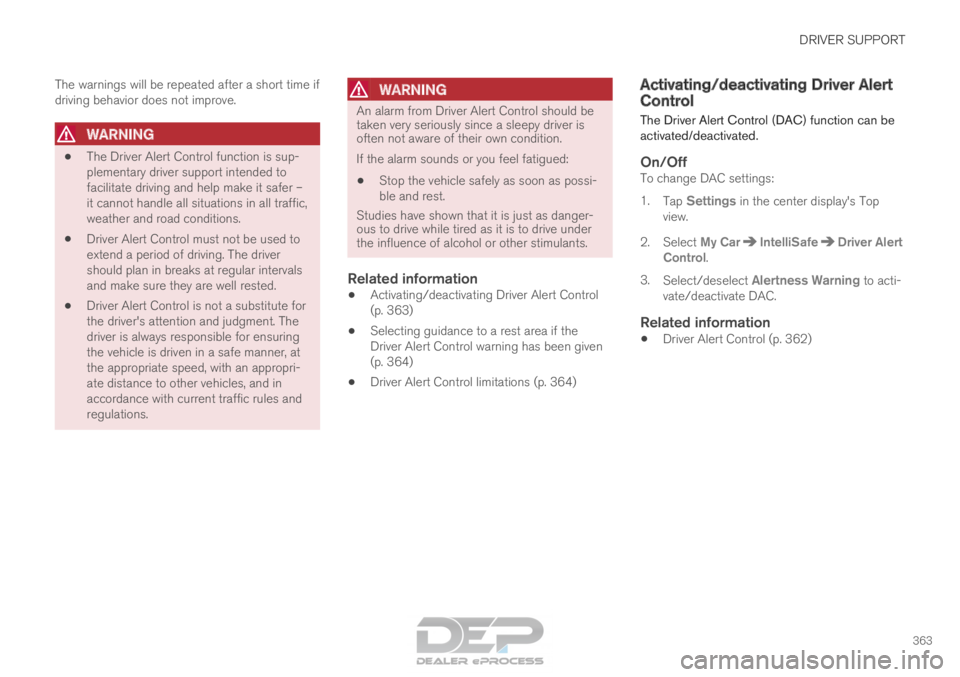
On/OffTo change DAC settings:
1. Tap Settings in the center display's Top
view.
2.
Select My Car IntelliSafe Driver Alert
Control .
3. Select/deselect Alertness Warning to acti-
vate/deactivate DAC.
Related information
• Driver Alert Control (p. 362)
Page 392 of 686
||DRIVER SUPPORT
* Option/accessory.
390 1.
Tap Towbar (1).
>
The trajectory line for the towbar's antici-
pated path toward the vehicle will appear
and the vehicle's trajectory lines will dis-
appear.
Trajectory lines cannot be displayed for
both the vehicle and the towbar at the
same time.
2. Tap Zoom (2) for a close-up view for more
precise maneuvering.
>
The camera will zoom in.
Related information
• Park Assist Camera* (p. 386) Sensor field from Park Assist for
Park Assist Camera
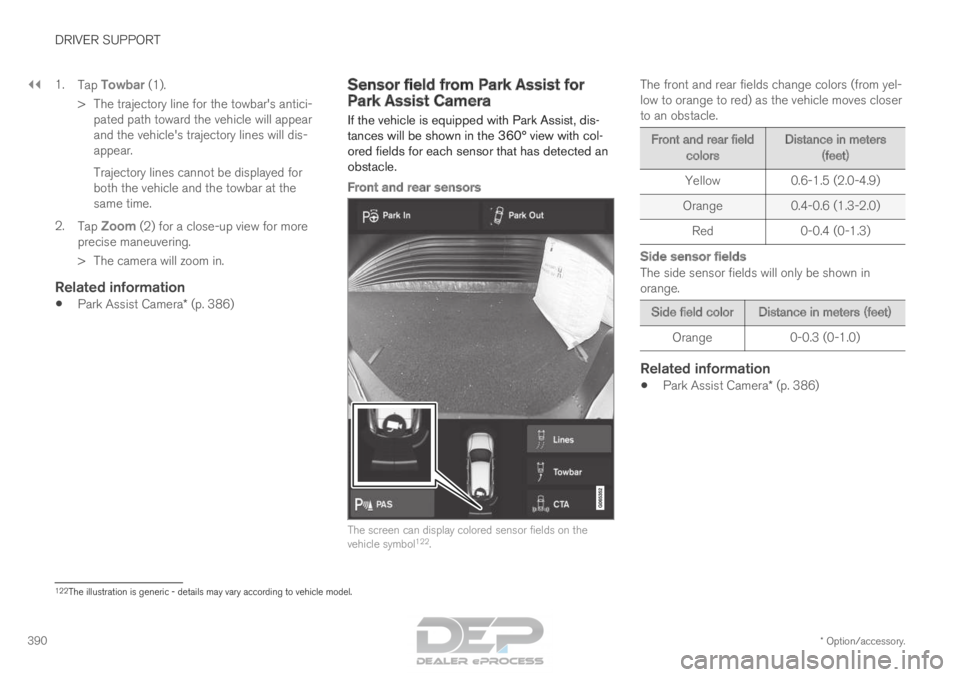
If the vehicle is equipped with Park Assist, dis-
tances will be shown in the 360° view with col-
ored fields for each sensor that has detected an
obstacle.
Front and rear sensors The screen can display colored sensor fields on the
vehicle symbol
122
. The front and rear fields change colors (from yel-
low to orange to red) as the vehicle moves closer
to an obstacle. Front and rear field
colors Distance in meters
(feet)
Yellow
0.6-1.5 (2.0-4.9)
Orange 0.4-0.6 (1.3-2.0)
Red 0-0.4 (0-1.3)
Side sensor fields
The side sensor fields will only be shown in
orange. Side field color
Distance in meters (feet)
Orange
0-0.3 (0-1.0)
Related information
•Park Assist Camera* (p. 386) 122
The illustration is generic - details may vary according to vehicle mode\
l.
Page 432 of 686

||STARTING AND DRIVING
430
augment braking. This is indicated in the instru-
ment panel with the pointer down in the red area.
Symbols in the instrument panel
Symbol
Meaning A
B
Check the brake fluid level. If the
level is low, fill brake fluid and
check to determine the reason for
the loss of brake fluid. A
B
Fault in pedal sensor. Symbol
Meaning A
B
Steady glow for 2 seconds after
the engine is started: Automatic
function check.
Steady glow for more than 2 sec-
onds: Fault in the ABS system. The
vehicle's regular brake system is
still working, but without the ABS
function. If the message Brake pedal Cha-
racteristics changed Service
required is displayed, the "Brake-
by-wire" system is not functioning
properly. The brake pedal will go
down further than normal and
greater pressure will be needed on
the pedal to achieve braking effect. A
Canadian models.
B US models.
WARNING •
If both symbols illuminate at the same
time and the brake level is below the MIN
mark in the reservoir or if a brake system-
related message is shown in the instru-
ment panel: DO NOT DRIVE. Have the
vehicle towed to a trained and qualified
Volvo service technician and have the
brake system inspected.
• If both symbols illuminate at the same
time and the brake level is normal (not
below the MIN mark in the reservoir) or if
a brake system-related message is
shown in the instrument panel: drive the
vehicle carefully to an authorized Volvo
workshop and have the brake system
inspected by a trained and qualified Volvo
service technician.
Related information
• Brake Assist System (p. 431)
• Auto-hold brakes (p. 436)
• Hill Start Assist (p. 437)
• Braking on wet roads (p. 431)
• Braking on salted roads (p. 431)
• Maintenance of the brake system (p. 432)
• Brake lights (p. 160)
Page 443 of 686

STARTING AND DRIVING
* Option/accessory.441
Using the steering wheel paddles*
to shift
The steering wheel paddles are a supplement to
the gear selector and make it possible to shift
manually without removing your hands from the
steering wheel.
Activating the steering wheel paddlesIn order to shift gears using the paddles, they
must first be activated:
– Pull one of the paddles toward the steering
wheel.
>
A number in the instrument panel indi-
cates the current gear being used. Instrument panel when the paddles are activated for
shifting.
ChangeTo shift one gear: –
Pull one of the paddles toward the steering
wheel and then release. "-": Shift down one gear.
"+": Shift up one gear.
As long as the engine speed (rpm) is within the
permissible range for the selected gear, a gear
shift will take place each time a paddle is pulled.
After each gear shift, a number indicating the
current gear will be displayed in the instrument
panel.
Turning off Start/Stop
Manual deactivation in gear D and B
– Deactivate the paddles by pulling the right
paddle (+) toward the steering wheel and
holding it until the number of the current
gear is no longer displayed in the instrument
panel.
> The transmission will revert to gear D or B
depending on which gear was selected
before the paddles were activated.
Automatic deactivation
In gear position D, the steering wheel paddles
are deactivated after a short period of time if they
are not used. The number of the current gear will
no longer be displayed in the instrument panel.
In gear position B, the paddles will not activate
automatically.
Related information
• Gear selector positions for automatic trans-
missions (p. 439)
• Gear indicator* (p. 442)
Page 457 of 686

STARTING AND DRIVING
}}
455
the hill is and without the brakes needing to be
applied. The brake lights will illuminate when the
function is activated.
The driver can brake to stop or slow the vehicle
at any time by depressing the brake pedal.
HDC is activated along with Low Speed Control
(LSC), which facilitates and improves traction and
control on rough and slippery surfaces. The sys-
tem is intended to be used at low speeds, up to
approximately 40 km/h (25 mph).
To keep in mind when using HDC
•
If the function is switched off while driving on
a steep downhill gradient, braking effect will
be gradually reduced.
• HDC can be used in gear positions D and R,
and in manual gears 1 or 2.
• It is not possible to manually shift to third
gear or higher when HDC is active.
NOTE When LSC with HDC is activated in the OFF
ROAD drive mode, the feel of the accelerator
pedal and engine response will change.
NOTE
This drive mode is not designed to be used
for normal street driving.
NOTE The function is deactivated when driving at
high speeds and must be reactivated at lower
speeds if so desired.
Related information
•
Activating and deactivating Hill Descent Con-
trol using the function button (p. 455)
• Changing drive mode (p. 449)
• Low Speed Control (p. 453)
• All Wheel Drive (AWD) (p. 443) Activating and deactivating Hill
Descent Control using the function
button
Vehicles that are not equipped with drive mode
controls in the tunnel console have a function
button for Hill Descent Control with Hill
Descent Control in the center display's Func-
tion view.
Selecting Hill Descent Control in the
center display's Function view
HDC only works at low speeds.
– Tap the
Hill Descent Control button to
activate or deactivate the function. > An indicator light in the button will illumi-
nate when the function is activated.
When the engine is switched off, the function will
be automatically deactivated.
NOTE The function is deactivated when driving at
high speeds and must be reactivated at lower
speeds if so desired.