change time VOLVO XC90 TWIN ENGINE 2018 User Guide
[x] Cancel search | Manufacturer: VOLVO, Model Year: 2018, Model line: XC90 TWIN ENGINE, Model: VOLVO XC90 TWIN ENGINE 2018Pages: 686, PDF Size: 17 MB
Page 130 of 686
||DISPLAYS AND VOICE CONTROL
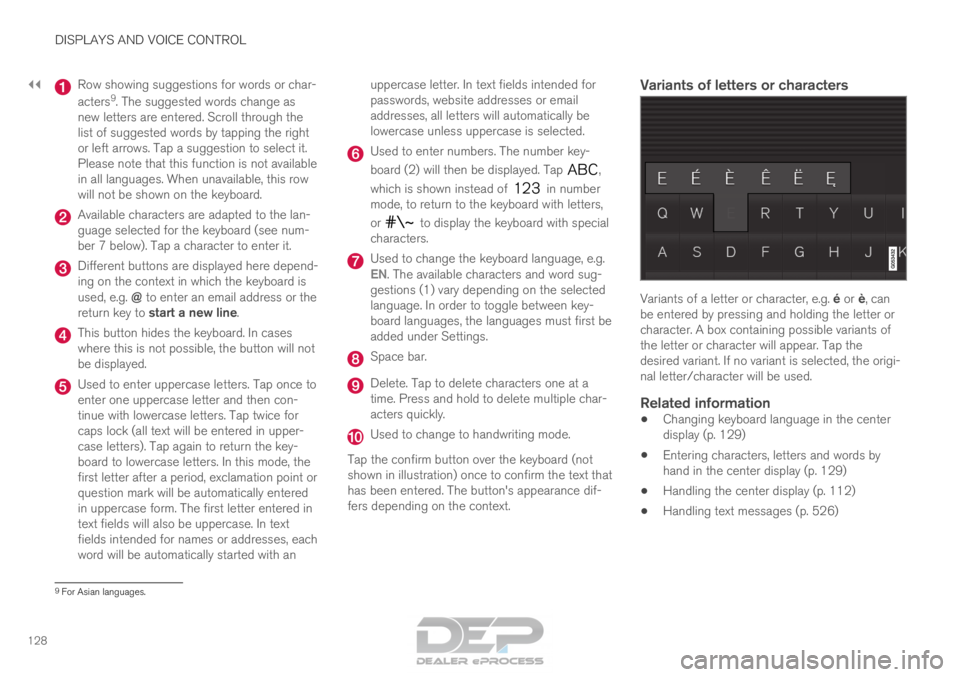
128 Row showing suggestions for words or char-
acters
9
. The suggested words change as
new letters are entered. Scroll through the
list of suggested words by tapping the right
or left arrows. Tap a suggestion to select it.
Please note that this function is not available
in all languages. When unavailable, this row
will not be shown on the keyboard. Available characters are adapted to the lan-
guage selected for the keyboard (see num-
ber 7 below). Tap a character to enter it.
Different buttons are displayed here depend-
ing on the context in which the keyboard is
used, e.g. @ to enter an email address or the
return key to start a new line. This button hides the keyboard. In cases
where this is not possible, the button will not
be displayed.
Used to enter uppercase letters. Tap once to
enter one uppercase letter and then con-
tinue with lowercase letters. Tap twice for
caps lock (all text will be entered in upper-
case letters). Tap again to return the key-
board to lowercase letters. In this mode, the
first letter after a period, exclamation point or
question mark will be automatically entered
in uppercase form. The first letter entered in
text fields will also be uppercase. In text
fields intended for names or addresses, each
word will be automatically started with an uppercase letter. In text fields intended for
passwords, website addresses or email
addresses, all letters will automatically be
lowercase unless uppercase is selected. Used to enter numbers. The number key-
board (2) will then be displayed. Tap
,
which is shown instead of in number
mode, to return to the keyboard with letters,
or to display the keyboard with special
characters. Used to change the keyboard language, e.g.
EN
. The available characters and word sug-
gestions (1) vary depending on the selected
language. In order to toggle between key-
board languages, the languages must first be
added under Settings. Space bar.
Delete. Tap to delete characters one at a
time. Press and hold to delete multiple char-
acters quickly.
Used to change to handwriting mode.
Tap the confirm button over the keyboard (not
shown in illustration) once to confirm the text that
has been entered. The button's appearance dif-
fers depending on the context.
Variants of letters or characters Variants of a letter or character, e.g. é or è, can
be entered by pressing and holding the letter or
character. A box containing possible variants of
the letter or character will appear. Tap the
desired variant. If no variant is selected, the origi-
nal letter/character will be used.
Related information
• Changing keyboard language in the center
display (p. 129)
• Entering characters, letters and words by
hand in the center display (p. 129)
• Handling the center display (p. 112)
• Handling text messages (p. 526) 9
For Asian languages.
Page 132 of 686
||DISPLAYS AND VOICE CONTROL
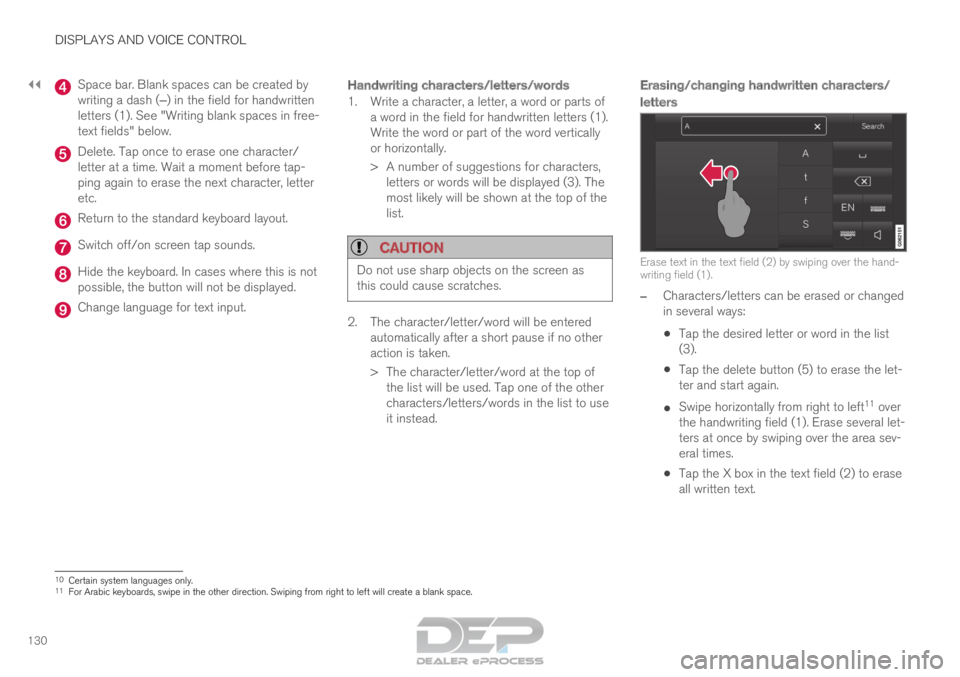
130 Space bar. Blank spaces can be created by
writing a dash (‒) in the field for handwritten
letters (1). See "Writing blank spaces in free-
text fields" below. Delete. Tap once to erase one character/
letter at a time. Wait a moment before tap-
ping again to erase the next character, letter
etc.
Return to the standard keyboard layout.
Switch off/on screen tap sounds.
Hide the keyboard. In cases where this is not
possible, the button will not be displayed.
Change language for text input.
Handwriting characters/letters/words
1. Write a character, a letter, a word or parts of
a word in the field for handwritten letters (1).
Write the word or part of the word vertically
or horizontally.
> A number of suggestions for characters,letters or words will be displayed (3). The
most likely will be shown at the top of the
list.
CAUTION Do not use sharp objects on the screen as
this could cause scratches.
2. The character/letter/word will be entered
automatically after a short pause if no other
action is taken.
>
The character/letter/word at the top of
the list will be used. Tap one of the other
characters/letters/words in the list to use
it instead.
Erasing/changing handwritten characters/
letters Erase text in the text field (2) by swiping over the hand-
writing field (1).
–
Characters/letters can be erased or changed
in several ways:
•Tap the desired letter or word in the list
(3).
• Tap the delete button (5) to erase the let-
ter and start again.
• Swipe horizontally from right to left 11
over
the handwriting field (1). Erase several let-
ters at once by swiping over the area sev-
eral times.
• Tap the X box in the text field (2) to erase
all written text. 10
Certain system languages only.
11 For Arabic keyboards, swipe in the other direction. Swiping from right t\
o left will create a blank space.
Page 139 of 686
DISPLAYS AND VOICE CONTROL
}}
* Option/accessory. 137Sub-categories
Gracenote®
Video
Communication
Sub-categories
Phone
Text Messages
Android Auto
*
Apple CarPlay*
Bluetooth Devices
Wi-Fi
Vehicle Wi-Fi Hotspot
Vehicle Modem Internet
Volvo On Call
Volvo Service Networks
ClimateThe Climate main category does not have any sub-categories.
System Sub-categories
Driver Profile
Date and Time
System Languages and Units
Privacy and data
Keyboard Layouts
Voice Control
*
Factory Reset
System Information
Related information
• Center display overview (p. 109)
• Changing settings in the center display
(p. 134)
• Resetting center display settings (p. 135) Driver profiles
Many of the vehicle's settings can be custom-
ized to the driver's personal preferences and
saved in one or more driver profiles. These personal settings are automatically saved
in the active driver profile. Each key can be linked
to one driver profile. When the linked key is used,
the vehicle is customized to the specific settings
of that driver profile.
Which settings are saved in driver
profiles?
The vehicle has settings that can be made either
personal or global. The personal settings are
saved in driver profiles.
Settings that can be saved in a driver profile
include, among other things, screens, mirrors,
front seats, navigation*, audio and media system,
language and voice control.
Some settings are global settings. These settings
can be changed but are not saved to a specific
driver profile. Changes to global settings affect all
profiles.
Page 140 of 686
||DISPLAYS AND VOICE CONTROL
138
Global settings
Global settings and parameters do not change
when driver profiles are changed. They remain
the same regardless of which driver profile is cur-
rently active.
Keyboard layout is an example of a global setting.
If driver profile X is used to add additional key-
board languages, these languages will also be
available for driver profile Y. The settings for key-
board layout are not saved to a specific driver
profile - the settings are global.
Personal settings
If driver profile X has been used to e.g., set the
brightness for the center display, driver profile Y
will not be affected by this setting. It will only be
saved to driver profile X because brightness set-
ting is a personal setting.
Related information
•
Selecting a driver profile (p. 138)
• Changing a driver profile's name (p. 139)
• Resetting driver profile settings (p. 139)
• Linking a remote key to a driver profile
(p. 139)
• Table of settings in the center display
(p. 136) Selecting a driver profile
When the center display starts up, the selected
driver profile will be shown at the top of the
screen. The most recently used driver profile will
be active the next time the vehicle is unlocked. A
different driver profile can be selected once the
vehicle has been unlocked. However, if the
remote key has been linked to a driver profile,
this profile will be used instead.
There are two options for switching between
driver profiles.
Option 1:
1.
Tap the name of the driver profile shown at
the top of the center display when the dis-
play starts up.
> A list will appear, showing driver profiles that can be selected.
2. Select desired driver profile.
3. Tap Confirm.
>
The driver profile has now been selected
and the system will load the settings
stored in that profile.
Option 2:
1. Pull down Top view in the center display.
2. Tap Profile.
>
The same list as in option 1 will be dis-
played.
3. Select desired driver profile. 4.
Tap Confirm.
>
The driver profile has now been selected
and the system will load the settings
stored in that profile.
Related information
• Driver profiles (p. 137)
• Navigating in the center display's views
(p. 115)
• Changing a driver profile's name (p. 139)
• Linking a remote key to a driver profile
(p. 139)
Page 141 of 686
DISPLAYS AND VOICE CONTROL
}}
139
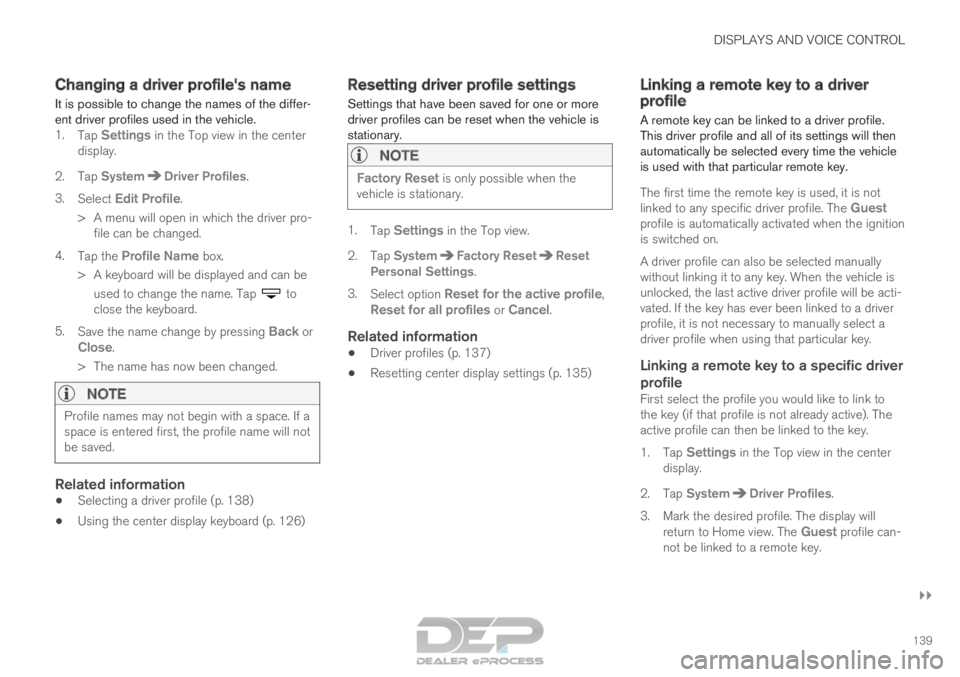
Changing a driver profile's name
It is possible to change the names of the differ-
ent driver profiles used in the vehicle. 1. Tap Settings in the Top view in the center
display.
2.
Tap System Driver Profiles
.
3. Select Edit Profile.
>
A menu will open in which the driver pro-
file can be changed.
4. Tap the Profile Name box.
>
A keyboard will be displayed and can be
used to change the name. Tap to
close the keyboard.
5. Save the name change by pressing Back or
Close.
>
The name has now been changed.
NOTE Profile names may not begin with a space. If a
space is entered first, the profile name will not
be saved.
Related information
•
Selecting a driver profile (p. 138)
• Using the center display keyboard (p. 126) Resetting driver profile settings
Settings that have been saved for one or more
driver profiles can be reset when the vehicle is
stationary.
NOTE Factory Reset is only possible when the
vehicle is stationary. 1.
Tap Settings in the Top view.
2.
Tap System Factory Reset Reset
Personal Settings .
3. Select option Reset for the active profile,
Reset for all profiles or Cancel.
Related information
• Driver profiles (p. 137)
• Resetting center display settings (p. 135) Linking a remote key to a driver
profile
A remote key can be linked to a driver profile.
This driver profile and all of its settings will then
automatically be selected every time the vehicle
is used with that particular remote key.
The first time the remote key is used, it is not
linked to any specific driver profile. The
Guest
profile is automatically activated when the ignition
is switched on.
A driver profile can also be selected manually
without linking it to any key. When the vehicle is
unlocked, the last active driver profile will be acti-
vated. If the key has ever been linked to a driver
profile, it is not necessary to manually select a
driver profile when using that particular key.Linking a remote key to a specific driver
profile
First select the profile you would like to link to
the key (if that profile is not already active). The
active profile can then be linked to the key.
1. Tap Settings in the Top view in the center
display.
2.
Tap System Driver Profiles
.
3. Mark the desired profile. The display will return to Home view. The Guest profile can-not be linked to a remote key.
Page 172 of 686
WINDOWS, GLASS AND MIRRORS
* Option/accessory.
170 •
Storing memory settings in power front
seats* (p. 186)
• Activating and deactivating the heated rear
window and door mirrors (p. 223) Adjusting the rearview mirror
dimming function
Bright light entering the vehicle from behind, e.g.
from the headlights of following vehicles, could
reflect in the rearview mirror and door mirrors
and cause a glare. Use the dimming function
when light from behind is distracting.
Auto-dimIf bright light enters the vehicle from behind, the
door mirrors will automatically dim. Auto-dim is
always active when the engine is running, except
when reverse gear is engaged.
NOTE When the level of sensitivity is changed, this
change will not be noticeable immediately but
will instead take effect after a short period of
time.
The sensitivity level for dimming will affect both
the rearview mirror and door mirrors.
1.
Tap Settings in the Top view in the center
display.
2.
Tap My Car Mirrors and Convenience
.
3. Under Rearview Mirror Auto Dimming ,
select
Normal, Dark or Light.
The rearview mirror instead has two sensors -
one pointing forward and one pointing rearward -
which work together to identify and eliminate glare. The forward-pointing sensor monitors
ambient light, while the rearward-pointing sensor
monitors light from the headlights of following
vehicles.
For the door mirrors to be equipped with auto-
dim, the rearview mirror must also be equipped
with auto-dim.
NOTE
If the sensors are obstructed by e.g. a parking
permit, transponder, sunshade or objects on
the seats or in the cargo compartment in a
way that prevents light from reaching the sen-
sors, the auto-dim function in the door and
rearview mirrors will be reduced.
Related information
•
Rearview/door mirrors (p. 169)
• Adjusting the door mirrors (p. 171)
Page 187 of 686
SEATS AND STEERING WHEEL
}}
* Option/accessory. 185
Power front seats*
The power front seats can be adjusted in a num-
ber of different ways for optimal comfort and
ergonomics. The power seats can be moved for-
ward/backward and up/down. The height and
length* of the seat cushion and the tilt of the
backrest can be adjusted. Lumbar support can
be adjusted up, down, forward and backward.
The power seats have an overload protector that
is triggered if a seat is blocked by any object. If
this occurs, remove the object and attempt to
adjust the seat again.
The power seats can be adjusted for a certain
period of time after the door is unlocked without
the engine running. The seats can always be
adjusted while the engine is running. They can
also be adjusted for a short period after the
engine is turned off.
Related information
• Manual front seats (p. 184)
• Adjusting the power front seats* (p. 185)
• Storing memory settings in power front
seats* (p. 186)
• Using stored memory in a powered front seat
(p. 187)
• Adjusting front seat massage settings*
(p. 188)
• Adjusting front seat cushion length (p. 189)
• Front seat massage settings* (p. 188) •
Adjusting front seat side bolster settings*
(p. 190)
• Adjusting front seat lumbar support* (p. 190)
• Adjusting the passenger seat from the driv-
er's seat* (p. 191) Adjusting the power front seats*
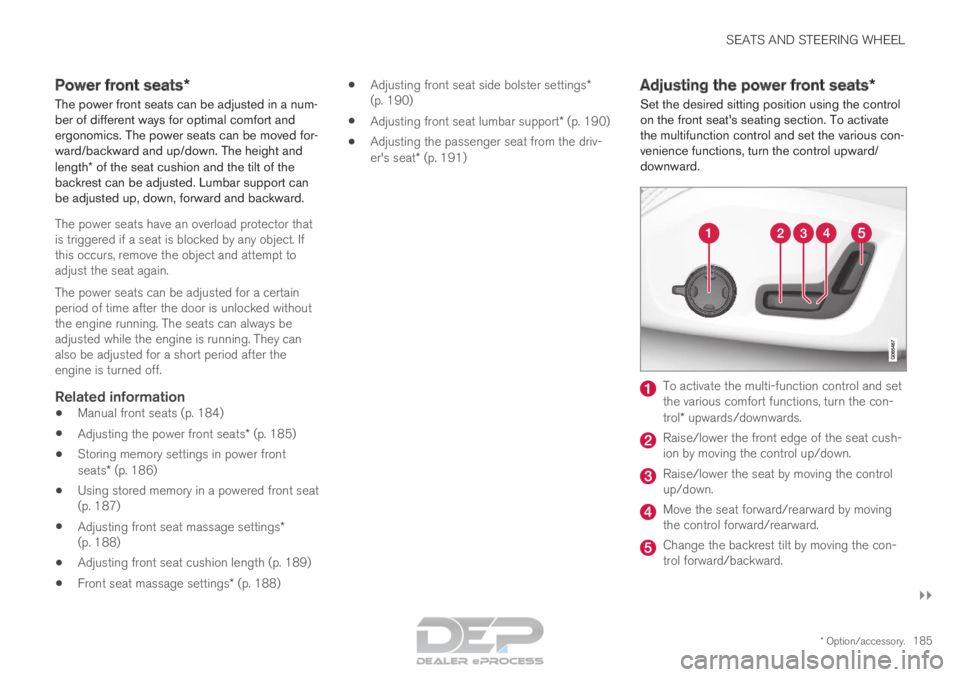
Set the desired sitting position using the control
on the front seat's seating section. To activate
the multifunction control and set the various con-
venience functions, turn the control upward/
downward. To activate the multi-function control and set
the various comfort functions, turn the con-
trol* upwards/downwards.
Raise/lower the front edge of the seat cush-
ion by moving the control up/down.
Raise/lower the seat by moving the control
up/down.
Move the seat forward/rearward by moving
the control forward/rearward.
Change the backrest tilt by moving the con-
trol forward/backward.
Page 193 of 686
SEATS AND STEERING WHEEL
}}
* Option/accessory. 191
2.
Select Lumbar in the seat settings view.
• Press the four-way button (the round but-
ton) up/down to move the lumbar support
upward/downward.
• Press the front part of the four-way button
to increase lumbar support.
• Press the rear part of the four-way button
to decrease lumbar support.
Related information
• Manual front seats (p. 184)
• Power front seats* (p. 185)
• Adjusting the power front seats* (p. 185)
• Storing memory settings in power front
seats* (p. 186)
• Using stored memory in a powered front seat
(p. 187)
• Adjusting front seat massage settings*
(p. 188)
• Adjusting front seat cushion length (p. 189)
• Front seat massage settings* (p. 188)
• Adjusting front seat side bolster settings*
(p. 190)
• Adjusting the passenger seat from the driv-
er's seat* (p. 191) Adjusting the passenger seat from
the driver's seat*
The front passenger seat can be adjusted from
the driver's seat.
Activating the functionThe function is activated via the function view in
the center display:
Tap the Adjust PassengerSeat button to activate.
Adjust passenger seatThe driver must adjust the passenger seat within
10 seconds of activating the function. If no
adjustment is made within this time, the function
will be deactivated.
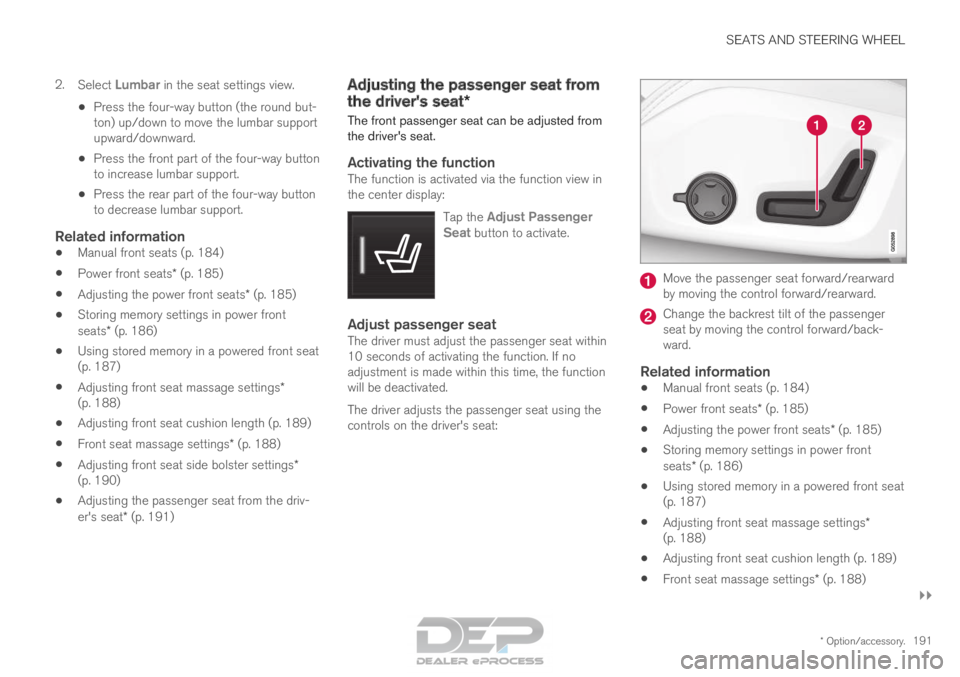
The driver adjusts the passenger seat using the
controls on the driver's seat: Move the passenger seat forward/rearward
by moving the control forward/rearward.
Change the backrest tilt of the passenger
seat by moving the control forward/back-
ward.
Related information
•
Manual front seats (p. 184)
• Power front seats* (p. 185)
• Adjusting the power front seats* (p. 185)
• Storing memory settings in power front
seats* (p. 186)
• Using stored memory in a powered front seat
(p. 187)
• Adjusting front seat massage settings*
(p. 188)
• Adjusting front seat cushion length (p. 189)
• Front seat massage settings* (p. 188)
Page 235 of 686
CLIMATE CONTROL
233
Adding and editing timer setting for
preconditioning
The preconditioning timer can store up to 8 pre-
set timer settings.
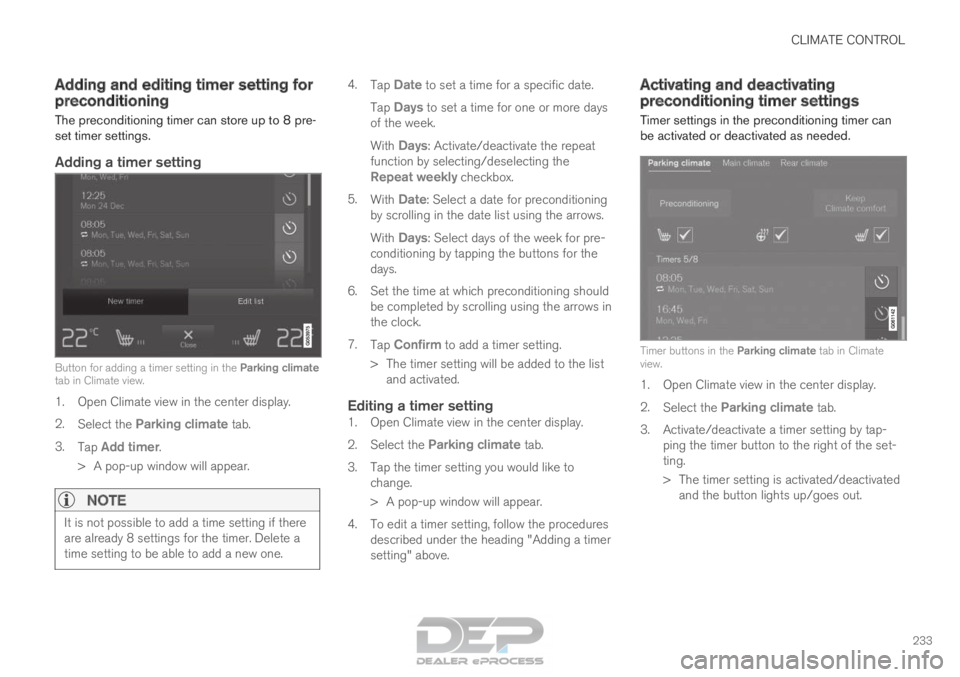
Adding a timer setting Button for adding a timer setting in the Parking climate
tab in Climate view.
1. Open Climate view in the center display.
2.
Select the Parking climate tab.
3. Tap Add timer.
>
A pop-up window will appear.
NOTE It is not possible to add a time setting if there
are already 8 settings for the timer. Delete a
time setting to be able to add a new one. 4.
Tap Date to set a time for a specific date.
Tap Days to set a time for one or more days
of the week.
With Days: Activate/deactivate the repeat
function by selecting/deselecting the
Repeat weekly checkbox.
5. With Date: Select a date for preconditioning
by scrolling in the date list using the arrows.
With Days: Select days of the week for pre-conditioning by tapping the buttons for the
days.
6.
Set the time at which preconditioning should
be completed by scrolling using the arrows in
the clock.
7. Tap Confirm to add a timer setting.
>
The timer setting will be added to the list
and activated.
Editing a timer setting1. Open Climate view in the center display.
2. Select the Parking climate tab.
3.
Tap the timer setting you would like to
change.
> A pop-up window will appear.
4. To edit a timer setting, follow the procedures described under the heading "Adding a timer
setting" above. Activating and deactivating
preconditioning timer settings
Timer settings in the preconditioning timer can
be activated or deactivated as needed. Timer buttons in the Parking climate tab in Climate
view.
1. Open Climate view in the center display.
2.
Select the Parking climate tab.
3.
Activate/deactivate a timer setting by tap-
ping the timer button to the right of the set-
ting.
> The timer setting is activated/deactivated and the button lights up/goes out.
Page 236 of 686

CLIMATE CONTROL
234Deleting preconditioning timer
settings
The button for editing a list/deleting a timer setting in
the Parking climate tab in Climate view.
1. Open Climate view in the center display.
2.
Select the Parking climate tab.
3. Tap Edit list.
4.
Tap the editing icon to the right in the list.
> The icon will change to the text Delete.
5. Tap Delete to confirm.
>
The timer setting will be deleted from the
list. Climate comfort retaining function
The climate in the passenger compartment can
be maintained when the vehicle is parked, e.g. if
the engine is turned off but the driver or passen-
gers remain in the vehicle. This function can only be direct-started.
The function utilizes several of the vehicle's sys-
tems:
• Residual heat from the engine is used to
help heat the passenger compartment to a
comfortable temperature.
• In warm weather, the ventilation system cools
the passenger compartment by blowing air in
from outside.
NOTE Climate comfort maintenance will be deacti-
vated if the vehicle is locked from the outside
in order to avoid using residual engine heat
unnecessarily. This function is intended to be
used to maintain climate comfort when the
driver or a passenger remains in the vehicle
after the engine is turned off.
Related information
•
Parking climate (p. 230)
• Switching on and off the climate retaining
function when parking (p. 234) Switching on and off the climate
retaining function when parking
The climate retaining function maintains the cli-
mate settings in the vehicle after the engine has
been switched off. The function can be activated
in the center display. Button for retaining climate comfort in the Parking
climate tab in Climate view.
1. Open Climate view in the center display.
2.
Select the Parking climate tab.
3. Tap Keep climate comfort.
>
The climate comfort retaining function will
be activated/deactivated and the button
light will go on/off.