instrument panel VOLVO XC90 TWIN ENGINE 2018 Service Manual
[x] Cancel search | Manufacturer: VOLVO, Model Year: 2018, Model line: XC90 TWIN ENGINE, Model: VOLVO XC90 TWIN ENGINE 2018Pages: 686, PDF Size: 17 MB
Page 160 of 686
||LIGHTING
158
Related information
•
Lighting panel and controls (p. 152)
• Using high beam (p. 156)
• Camera limitations (p. 332) Using turn signals
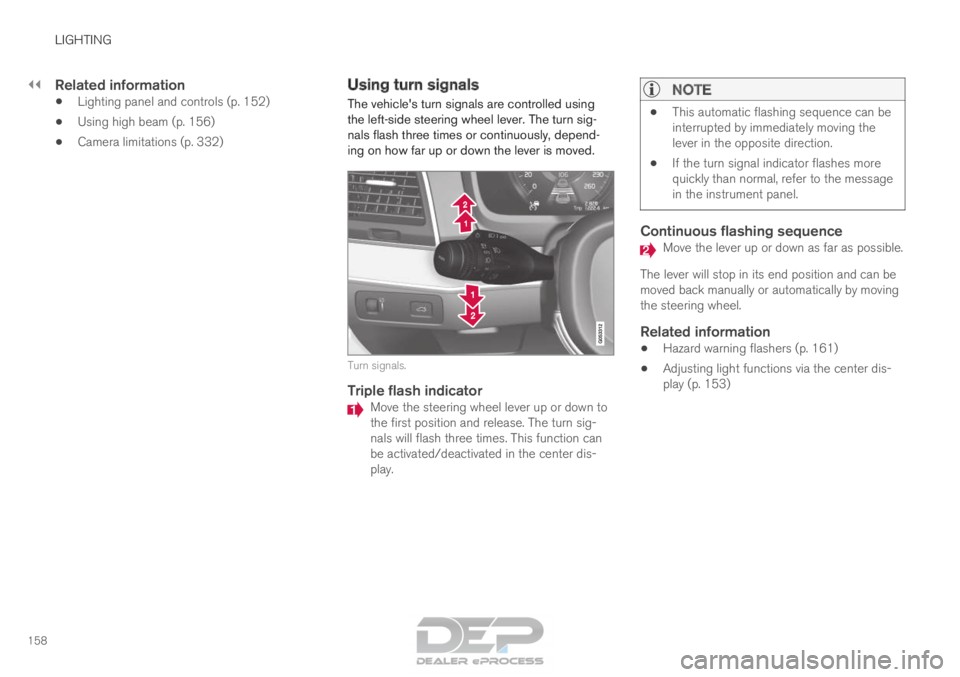
The vehicle's turn signals are controlled using
the left-side steering wheel lever. The turn sig-
nals flash three times or continuously, depend-
ing on how far up or down the lever is moved. Turn signals.
Triple flash indicator
Move the steering wheel lever up or down to
the first position and release. The turn sig-
nals will flash three times. This function can
be activated/deactivated in the center dis-
play.
NOTE •
This automatic flashing sequence can be
interrupted by immediately moving the
lever in the opposite direction.
• If the turn signal indicator flashes more
quickly than normal, refer to the message
in the instrument panel.
Continuous flashing sequence Move the lever up or down as far as possible.
The lever will stop in its end position and can be
moved back manually or automatically by moving
the steering wheel.
Related information
• Hazard warning flashers (p. 161)
• Adjusting light functions via the center dis-
play (p. 153)
Page 161 of 686

LIGHTING
}}
* Option/accessory. 159
Active Bending Lights*
Active Bending Lights (ABL) are designed to
help provide maximum illumination in curves and
intersections. Depending on equipment level,
vehicles with LED 5
headlights* may be equipped
with Active Bending Lights. Headlight pattern with function deactivated (left) and
activated (right).
Active Bending Lights follow the movement of
the steering wheel to help provide maximum illu-
mination in curves and intersections, improving
visibility for the driver.
The function is automatically activated when the
engine is started. If a fault is detected in the sys-
tem, the symbol will illuminate in the
instrument panel and a message will be dis-
played. The function is only active in weak daylight or
dark conditions and only when the vehicle is mov-
ing and the low beams are on.
Deactivating/activating the functionThe function is activated as the default factory
setting and can be activated and deactivated in
the center display's Function view:
Tap the Active BendingLights button.
Related information
• Adjusting light functions via the center dis-
play (p. 153) Rear fog light
The rear fog light is considerably brighter than
ordinary taillights and should only be used to
help other road users see the vehicle when visi-
bility is reduced by conditions such as fog,
snow, smoke or dust. Rear fog light button.
The rear fog light consists of a light on the rear
of the vehicle on the driver's side.
The rear fog light can only be switched on when
the ignition is in II mode or when the engine is
running and the lighting ring is in position or .
Press the button for On/Off. The symbol in
the instrument panel illuminates when the rear
fog light is on. 5
LED (Light Emitting Diode)
Page 163 of 686
LIGHTING
* Option/accessory.161
Hazard warning flashers
Hazard warning flashers warn other road users
by all of the vehicle's turn signals being activated
at the same time. The function can be used to
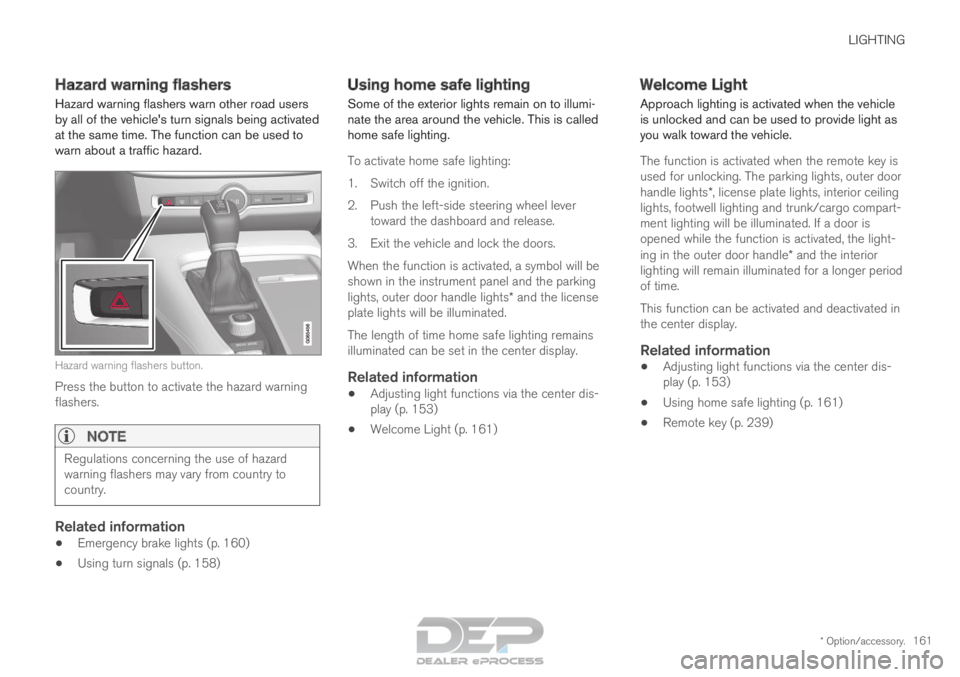
warn about a traffic hazard. Hazard warning flashers button.
Press the button to activate the hazard warning
flashers.
NOTE Regulations concerning the use of hazard
warning flashers may vary from country to
country.
Related information
•
Emergency brake lights (p. 160)
• Using turn signals (p. 158) Using home safe lighting
Some of the exterior lights remain on to illumi-
nate the area around the vehicle. This is called
home safe lighting.
To activate home safe lighting:
1.
Switch off the ignition.
2. Push the left-side steering wheel lever toward the dashboard and release.
3. Exit the vehicle and lock the doors.
When the function is activated, a symbol will be
shown in the instrument panel and the parking
lights, outer door handle lights* and the license
plate lights will be illuminated.
The length of time home safe lighting remains
illuminated can be set in the center display.
Related information
• Adjusting light functions via the center dis-
play (p. 153)
• Welcome Light (p. 161) Welcome Light
Approach lighting is activated when the vehicle
is unlocked and can be used to provide light as
you walk toward the vehicle.
The function is activated when the remote key is
used for unlocking. The parking lights, outer door
handle lights*, license plate lights, interior ceiling
lights, footwell lighting and trunk/cargo compart-
ment lighting will be illuminated. If a door is
opened while the function is activated, the light-
ing in the outer door handle* and the interior
lighting will remain illuminated for a longer period
of time.
This function can be activated and deactivated in
the center display.
Related information
• Adjusting light functions via the center dis-
play (p. 153)
• Using home safe lighting (p. 161)
• Remote key (p. 239)
Page 179 of 686

WINDOWS, GLASS AND MIRRORS
}}
* Option/accessory. 177
•
Filling washer fluid (p. 650)
• Windshield wipers in the service position
(p. 649)
• Replacing windshield wiper blades (p. 648)
• Changing rear window wipers (p. 647) Heated windshield washer nozzles*
The washer nozzles are heated automatically in
cold weather to prevent the washer fluid from
freezing.
Related information
• Using the rain sensor (p. 177)
• Using the windshield and headlight washers
(p. 179)
• Using automatic rear window wiping when
backing up (p. 181)
• Using the rain sensor's memory function
(p. 178)
• Using the rear window wiper/washer
(p. 180)
• Filling washer fluid (p. 650)
• Windshield wipers in the service position
(p. 649)
• Replacing windshield wiper blades (p. 648)
• Changing rear window wipers (p. 647)
• Using the windshield wipers (p. 176) Using the rain sensor
The rain sensor monitors the amount of water on
the windshield and automatically starts the wind-
shield wipers. Rain sensor sensitivity can be
adjusted using the thumb wheel on the right-
hand steering wheel lever.
Right-hand steering wheel lever.
Rain sensor button
Thumb wheel, sensitivity/interval wiper speed
When the rain sensor is activated, the rain
sensor symbol will be displayed in the instrument
panel.
Activating the rain sensorWhen the rain sensor is activated, the engine
must be running or the ignition must be in mode I
or II. The windshield wiper lever must also be in
position 0 or in the single sweep position.
Page 180 of 686

||WINDOWS, GLASS AND MIRRORS
* Option/accessory.
178 Activate the rain sensor by pressing the rain sen-
sor button .
If the lever is pressed down, the wipers will make
additional sweeps across the windshield.
Turn the thumb wheel upward for increased sen-
sitivity and downward for decreased sensitivity.
The wipers will make one extra sweep when the
thumb wheel is turned upward.
Deactivate the rain sensor
Deactivate the rain sensor by pressing the rain sensor button or moving the lever upward to
another wiper mode.
The rain sensor is automatically deactivated in
ignition mode 0 or when the engine is switched
off.
The rain sensor is also automatically deactivated
when the wiper blades are put in the service
position. The rain sensor will reactivate when
service mode is switched off.
CAUTION The windshield wipers may start inadvertently
and be damaged in automatic car washes.
Deactivate the rain sensor when the engine is
running or when the ignition is in mode I or II.
The symbol in the instrument panel will go
out.
Related information
• Using the windshield and headlight washers
(p. 179)
• Using automatic rear window wiping when
backing up (p. 181)
• Heated windshield washer nozzles* (p. 177)
• Using the rain sensor's memory function
(p. 178)
• Using the rear window wiper/washer
(p. 180)
• Filling washer fluid (p. 650)
• Windshield wipers in the service position
(p. 649)
• Replacing windshield wiper blades (p. 648)
• Changing rear window wipers (p. 647)
• Using the windshield wipers (p. 176) Using the rain sensor's memory
function
The rain sensor monitors the amount of water on
the windshield and automatically starts the wind-
shield wipers.
Activating/deactivating memory
function
The rain sensor's memory function can be set to
activate so that the rain sensor button does not
need to be pressed each time the engine is
started:
1.
Tap Settings in the Top view in the center
display.
2.
Tap My Car Wipers
.
3. Select Rain Sensor Memory to activate/
deactivate the memory function.
Related information
• Using the rain sensor (p. 177)
• Using the windshield and headlight washers
(p. 179)
• Using automatic rear window wiping when
backing up (p. 181)
• Heated windshield washer nozzles* (p. 177)
• Using the rear window wiper/washer
(p. 180)
• Filling washer fluid (p. 650)
Page 181 of 686

WINDOWS, GLASS AND MIRRORS
}}
* Option/accessory. 179
•
Windshield wipers in the service position
(p. 649)
• Replacing windshield wiper blades (p. 648)
• Changing rear window wipers (p. 647)
• Using the windshield wipers (p. 176) Using the windshield and headlight
washers
The windshield and headlight washers clean the
windshield and headlights. Use the right-side
steering wheel lever to start the windshield and
headlight washers.
Starting the windshield and headlight
washers Washing function, right-hand steering wheel lever.
–
Move the right-hand steering wheel lever
toward the steering wheel to start the wind-
shield and headlight washers.
>
After the lever is released, the wipers
make several extra sweeps.
CAUTION Avoid activating the washer system when it is
frozen or the fluid reservoir is empty. Other-
wise, there is a risk of damaging the pump.
Headlight washer*To save washer fluid, the headlights are washed
automatically according to a defined interval
when the headlights are on.
Reduced washingWhen there is about 1 liter (1 qt) of washer fluid
left in the reservoir and the
Washer fluid Level
low, refill message is displayed in the instrument
panel together with the symbol, the washer
fluid supply to the headlights is cut off. This is to
prioritize windshield cleaning and visibility
through it. The headlights are only washed if high
or low beam is on.
Related information
• Using the rain sensor (p. 177)
• Using automatic rear window wiping when
backing up (p. 181)
• Heated windshield washer nozzles* (p. 177)
• Using the rain sensor's memory function
(p. 178)
• Using the rear window wiper/washer
(p. 180)
• Filling washer fluid (p. 650)
Page 246 of 686
||KEY, LOCKS AND ALARM
* Option/accessory.
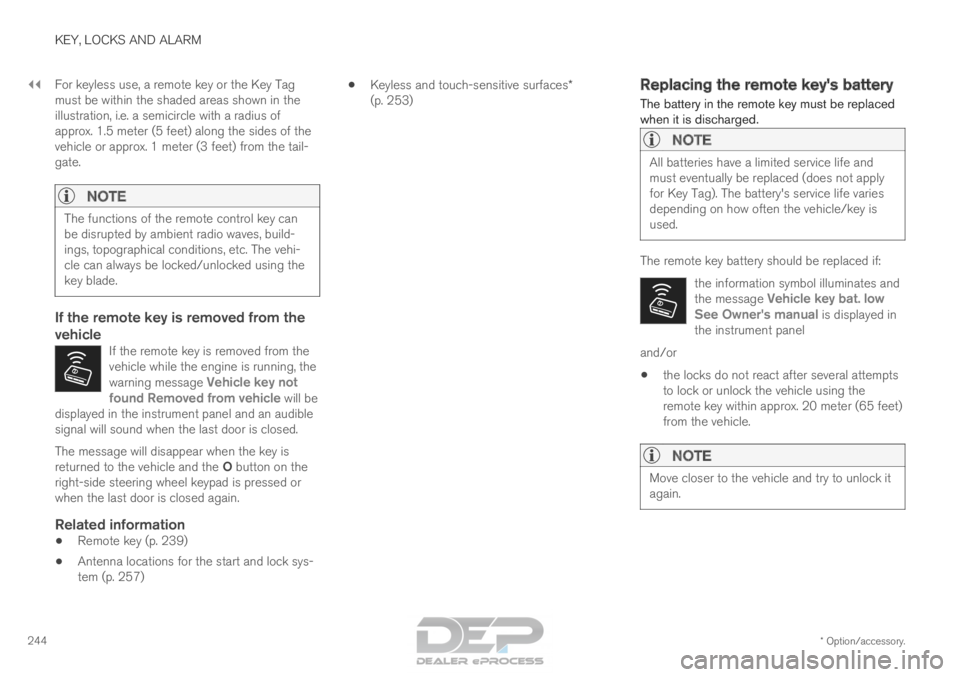
244 For keyless use, a remote key or the Key Tag
must be within the shaded areas shown in the
illustration, i.e. a semicircle with a radius of
approx. 1.5 meter (5 feet) along the sides of the
vehicle or approx. 1 meter (3 feet) from the tail-
gate.
NOTE
The functions of the remote control key can
be disrupted by ambient radio waves, build-
ings, topographical conditions, etc. The vehi-
cle can always be locked/unlocked using the
key blade.
If the remote key is removed from the
vehicle
If the remote key is removed from the
vehicle while the engine is running, the
warning message
Vehicle key not
found Removed from vehicle will be
displayed in the instrument panel and an audible
signal will sound when the last door is closed. The message will disappear when the key is
returned to the vehicle and the O button on the
right-side steering wheel keypad is pressed or
when the last door is closed again.
Related information
• Remote key (p. 239)
• Antenna locations for the start and lock sys-
tem (p. 257) •
Keyless and touch-sensitive surfaces*
(p. 253) Replacing the remote key's battery
The battery in the remote key must be replaced
when it is discharged.
NOTE All batteries have a limited service life and
must eventually be replaced (does not apply
for Key Tag). The battery's service life varies
depending on how often the vehicle/key is
used.
The remote key battery should be replaced if:
the information symbol illuminates and
the message Vehicle key bat. low
See Owner's manual is displayed in
the instrument panel and/or
• the locks do not react after several attempts
to lock or unlock the vehicle using the
remote key within approx. 20 meter (65 feet)
from the vehicle.
NOTE Move closer to the vehicle and try to unlock it
again.
Page 251 of 686
KEY, LOCKS AND ALARM
* Option/accessory.249
secure when handing over the vehicle to e.g. a
young driver, parking attendant or workshop. The
settings for a Red Key cannot be changed by its
user; a regular remote key is needed to change
settings.
Related information
•
Red Key* settings (p. 249)
• Remote key (p. 239) Red Key*
settings
The holder of a regular remote key can adjust
settings for a Red Key. Certain driver support
functions are always active. 1. Tap Settings in the center display's Top
view.
2.
Tap System Driver Profiles Red Key
.
> The following settings can be made:
• Set Time Gap For Adaptive Cruise
Control
• Reduced Maximum Volume
• Max Speed Limit
• Speed Limit Warning
Adaptive Cruise Control*:
• Default setting: Longest interval
Reduced maximum volume (On/Off):
•Default setting: On
Speed Limiter (On/Off):
•Setting interval: 50-250 km/h (30-160 mph)
• The default setting is 120 km/h (75 mph)
• Increments: 1 km/h (1 mph)
The following symbol and message will
be shown in the instrument panel
Red key Speed limitation cannot
be exceeded.
Speed reminder (On/Off):
• Setting interval: 0-250 km/h (0-160 mph)
• Default setting: 50, 70 and 90 km/h (30, 45
and 55 mph)
• Increments: 1 km/h (1 mph)
• Maximum number of simultaneous remind-
ers: 6
Driver support functionsThe following driver support functions will always
be active for a Red Key user:
• Blind Spot Information (BLIS)*
• Lane Keeping Aid (LKA)*
• Distance Alert*
• City Safety
• Driver Alert Control (DAC)*
• Road Sign Information*
Related information
• Red Key - restricted remote key* (p. 248)
Page 254 of 686
||KEY, LOCKS AND ALARM
* Option/accessory.
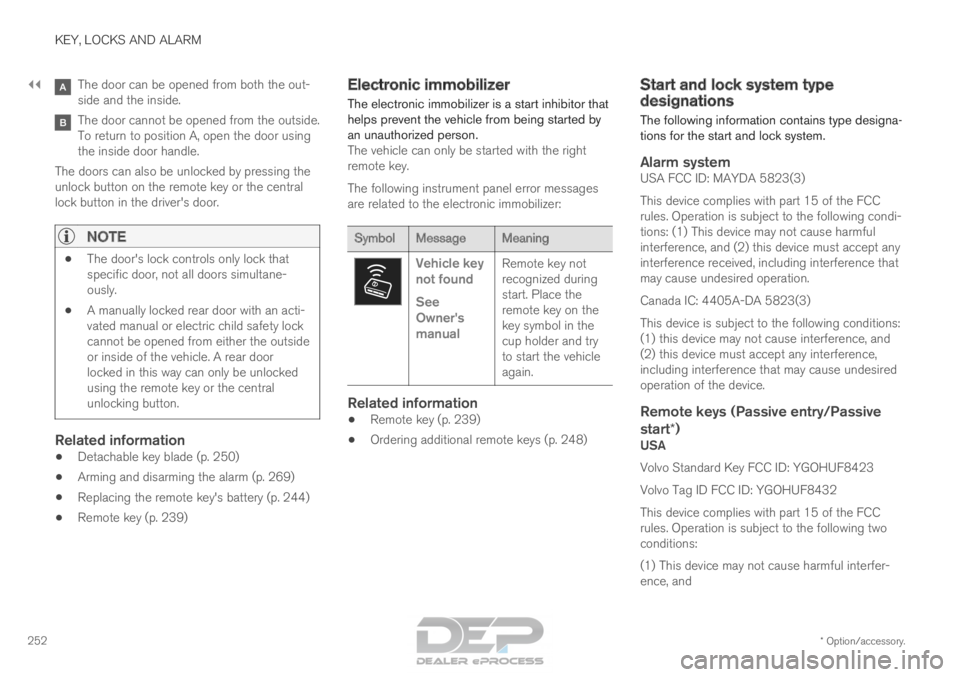
252 The door can be opened from both the out-
side and the inside.
The door cannot be opened from the outside.
To return to position A, open the door using
the inside door handle.
The doors can also be unlocked by pressing the
unlock button on the remote key or the central
lock button in the driver's door.
NOTE •
The door's lock controls only lock that
specific door, not all doors simultane-
ously.
• A manually locked rear door with an acti-
vated manual or electric child safety lock
cannot be opened from either the outside
or inside of the vehicle. A rear door
locked in this way can only be unlocked
using the remote key or the central
unlocking button.
Related information
•Detachable key blade (p. 250)
• Arming and disarming the alarm (p. 269)
• Replacing the remote key's battery (p. 244)
• Remote key (p. 239) Electronic immobilizer
The electronic immobilizer is a start inhibitor that
helps prevent the vehicle from being started by
an unauthorized person. The vehicle can only be started with the right
remote key.
The following instrument panel error messages
are related to the electronic immobilizer: Symbol
Message Meaning Vehicle key
not found
See
Owner's
manual
Remote key not
recognized during
start. Place the
remote key on the
key symbol in the
cup holder and try
to start the vehicle
again.
Related information
•
Remote key (p. 239)
• Ordering additional remote keys (p. 248) Start and lock system type
designations
The following information contains type designa-
tions for the start and lock system.
Alarm systemUSA FCC ID: MAYDA 5823(3)
This device complies with part 15 of the FCC
rules. Operation is subject to the following condi-
tions: (1) This device may not cause harmful
interference, and (2) this device must accept any
interference received, including interference that
may cause undesired operation.
Canada IC: 4405A-DA 5823(3)
This device is subject to the following conditions:
(1) this device may not cause interference, and
(2) this device must accept any interference,
including interference that may cause undesired
operation of the device.
Remote keys (Passive entry/Passive
start*)
USA
Volvo Standard Key FCC ID: YGOHUF8423
Volvo Tag ID FCC ID: YGOHUF8432
This device complies with part 15 of the FCC
rules. Operation is subject to the following two
conditions:
(1) This device may not cause harmful interfer-
ence, and
Page 262 of 686

||KEY, LOCKS AND ALARM
260
2. Press the button on the driver's door control
panel.
>The message Rear child lock Activated
will be shown in the instrument panel and
the indicator light will illuminate to show
that the child safety locks are activated.
When the electric child safety locks are activated:
• the rear windows can only be opened using
the driver's door control panel
• the rear doors cannot be opened from the
inside.
To deactivate the child safety locks:
– Press the button on the driver's door control
panel.
>
The message Rear child lock
Deactivated will be shown in the instru-
ment panel and the indicator light will go
out to show that the child safety locks are
deactivated.
When the engine is turned off, the current setting
will be saved. If the locks were activated when
the engine was turned off, they will remain acti-
vated the next time the engine is started. Symbol
Message Meaning Rear child
lock Acti-
vated The child safety
locks are acti-
vated. Rear child
lock Deacti-
vated The child safety
locks are deacti-
vated.
Activating and deactivating manual
child safety locks Manual child safety lock (this is not the manual door
lock).
–
Use the detachable key blade in the remote
key to turn the control. The door cannot be opened from the inside.
The door can be opened from both the out-
side and the inside.
NOTE •
The door's knob control only locks that
specific door, not both rear doors simulta-
neously.
• There are no manual child safety locks on
models equipped with electronic child
safety locks.
Related information
•Locking and unlocking from inside the vehi-
cle (p. 257)
• Detachable key blade (p. 250)