instrument panel VOLVO XC90 TWIN ENGINE 2018 Manual PDF
[x] Cancel search | Manufacturer: VOLVO, Model Year: 2018, Model line: XC90 TWIN ENGINE, Model: VOLVO XC90 TWIN ENGINE 2018Pages: 686, PDF Size: 17 MB
Page 321 of 686
DRIVER SUPPORT
}}
319
Deactivating/reactivating Pilot
Assist
Pilot Assist
can be temporarily put into standby
mode and then reactivated.
Deactivating and putting Pilot Assist in
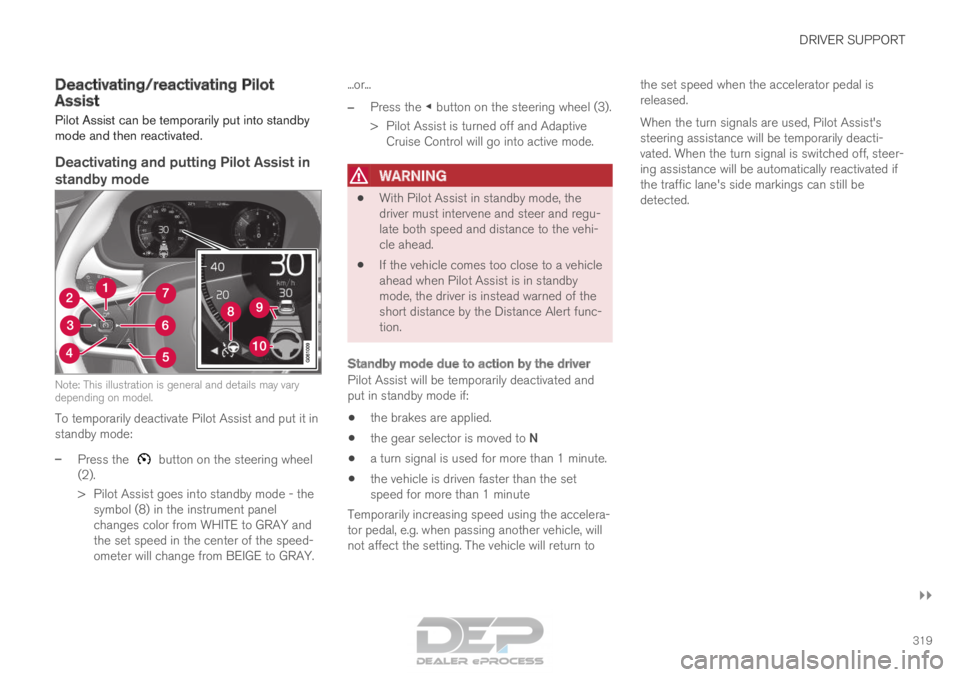
standby mode Note: This illustration is general and details may vary
depending on model.
To temporarily deactivate Pilot Assist and put it in
standby mode:
–
Press the button on the steering wheel
(2).
>
Pilot Assist goes into standby mode - the
symbol (8) in the instrument panel
changes color from WHITE to GRAY and
the set speed in the center of the speed-
ometer will change from BEIGE to GRAY. ...or...
– Press the ◀ button on the steering wheel (3).
>
Pilot Assist is turned off and Adaptive
Cruise Control will go into active mode.
WARNING •
With Pilot Assist in standby mode, the
driver must intervene and steer and regu-
late both speed and distance to the vehi-
cle ahead.
• If the vehicle comes too close to a vehicle
ahead when Pilot Assist is in standby
mode, the driver is instead warned of the
short distance by the Distance Alert func-
tion.
Standby mode due to action by the driver
Pilot Assist will be temporarily deactivated and
put in standby mode if:
• the brakes are applied.
• the gear selector is moved to N
• a turn signal is used for more than 1 minute.
• the vehicle is driven faster than the set
speed for more than 1 minute
Temporarily increasing speed using the accelera-
tor pedal, e.g. when passing another vehicle, will
not affect the setting. The vehicle will return to the set speed when the accelerator pedal is
released.
When the turn signals are used, Pilot Assist's
steering assistance will be temporarily deacti-
vated. When the turn signal is switched off, steer-
ing assistance will be automatically reactivated if
the traffic lane's side markings can still be
detected.
Page 322 of 686
||DRIVER SUPPORT
320
Automatic standby mode
Pilot Assist is dependent on other systems, such
as Electronic Stability Control (ESC
66
). If any of
these other systems stops working, Pilot Assist
will automatically switch off.
WARNING With automatic standby mode, the driver is
warned by an acoustic signal and a message
on the instrument panel.
•
The driver must then regulate vehicle
speed, apply the brakes if necessary, and
maintain a safe distance to other vehicles.
Adaptive Cruise Control may go into standby
mode if, e.g.:
• the driver opens the door.
• the brake temperature is high.
• the driver's hands are not on the steering
wheel.
• the parking brake is applied.
• the engine speed (rpm) is too low/high.
• the driver unbuckles the seat belt.
• one or more of the wheels lose traction.
• the camera/radar sensor is covered by snow
or heavy rain (the camera lens/radar waves
are blocked) •
your vehicle's speed goes below 5 km/h
(3 mph) and Pilot Assist cannot determine if
the vehicle ahead is stationary or if it is
another object, e.g. a speed bump.
• your vehicle's speed goes under 5 km/h
(3 mph) and the vehicle ahead turns so that
Pilot Assist no longer has a vehicle to follow.
Reactivating Pilot Assist from standby
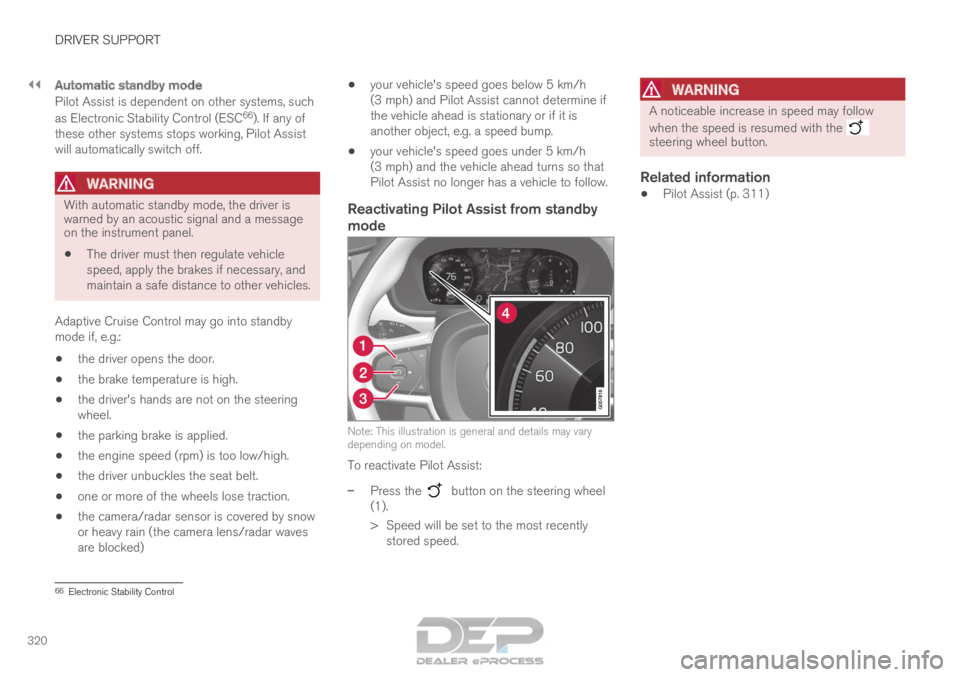
mode Note: This illustration is general and details may vary
depending on model.
To reactivate Pilot Assist:
–
Press the button on the steering wheel
(1).
>
Speed will be set to the most recently
stored speed.
WARNING A noticeable increase in speed may follow
when the speed is resumed with the
steering wheel button.
Related information
•
Pilot Assist (p. 311) 66
Electronic Stability Control
Page 326 of 686
||DRIVER SUPPORT
* Option/accessory.
324 The driver is responsible for ensuring that
the vehicle maintains a suitable distance
from such obstacles.
• The camera and radar sensors do not
have the capacity to detect all oncoming
objects and obstacles in traffic environ-
ments, e.g. potholes, stationary obstacles
or objects that completely or partially
block the route.
• Pilot Assist does not "see" pedestrians,
animals, etc.
• The recommended steering input is lim-
ited in force, which means that it cannot
always help the driver to steer and keep
the vehicle within the lane.
• Pilot Assist is switched off if the power
steering is working with reduced power -
e.g. during cooling due to overheating
(see section "Speed-dependent steering
force").
The driver can always correct or adjust steering
assistance provided by Pilot Assist by turning the
steering wheel to the desired position.
Steep roads and/or heavy loadsPilot Assist is primarily intended to be driven on
flat roads. The function may not be able to main-
tain the correct time interval to the vehicle ahead
when driving down steep hills. The driver should be extra attentive and prepared to apply the
brakes.
• Do not use Pilot Assist if the vehicle is carry-
ing a heavy load or towing a trailer.
NOTE Pilot Assist cannot be activated if a trailer,
bike carrier or similar is connected to the
vehicle electrical system.
Other limitations
•
The
Off Road drive mode cannot be
selected when Pilot Assist is activated.
NOTE The function uses the vehicle's camera unit,
which has some general limitations – see the
section "Camera unit limitations".
NOTE
The function uses the vehicle's radar unit,
which has some general limitations – see the
section "Radar unit limitations".
Related information
•
Pilot Assist (p. 311)
• Speed-dependent steering wheel resistance
(p. 272) Pilot Assist* symbols and messages
A number of symbols and messages relating to
Pilot Assist may be displayed in the instrument
panel and/or the head-up display*.
Page 329 of 686
DRIVER SUPPORT
}}
327
Radar sensor limitations
The radar sensor used by several of the driver
support functions has certain limitations, which
also affect the functions using the radar sensor.
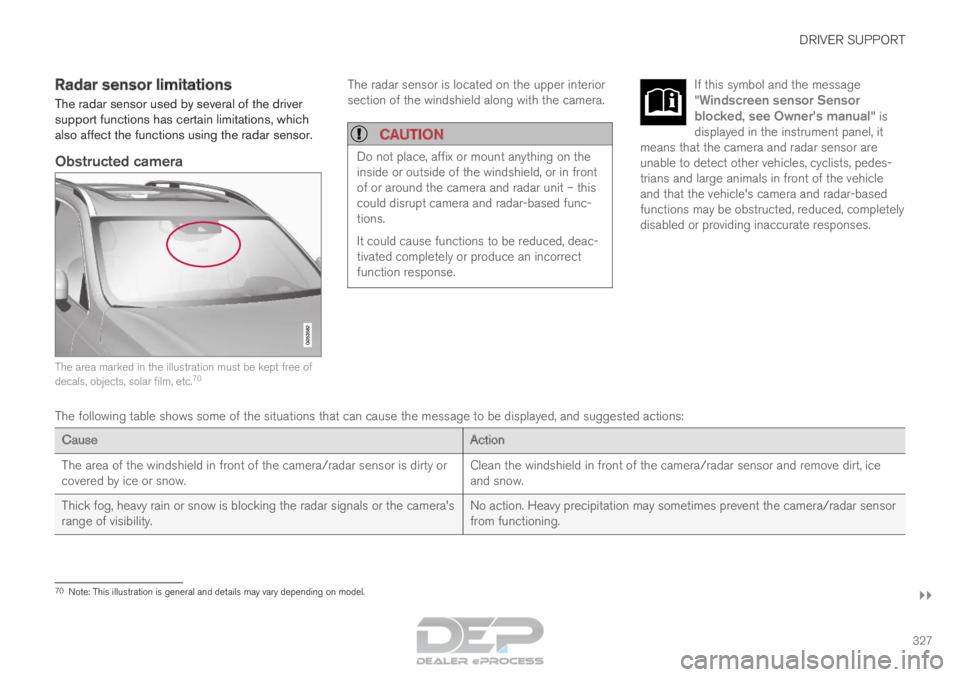
Obstructed camera The area marked in the illustration must be kept free of
decals, objects, solar film, etc.
70 The radar sensor is located on the upper interior
section of the windshield along with the camera.
CAUTION Do not place, affix or mount anything on the
inside or outside of the windshield, or in front
of or around the camera and radar unit – this
could disrupt camera and radar-based func-
tions.
It could cause functions to be reduced, deac-
tivated completely or produce an incorrect
function response. If this symbol and the message
"
Windscreen sensor Sensor
blocked, see Owner's manual" is
displayed in the instrument panel, it
means that the camera and radar sensor are
unable to detect other vehicles, cyclists, pedes-
trians and large animals in front of the vehicle
and that the vehicle's camera and radar-based
functions may be obstructed, reduced, completely
disabled or providing inaccurate responses. The following table shows some of the situations that can cause the mess\
age to be displayed, and suggested actions:
Cause
Action
The area of the windshield in front of the camera/radar sensor is dirty \
or
covered by ice or snow. Clean the windshield in front of the camera/radar sensor and remove dirt\
, ice
and snow.
Thick fog, heavy rain or snow is blocking the radar signals or the camer\
a's
range of visibility. No action. Heavy precipitation may sometimes prevent the camera/radar se\
nsor
from functioning.70
Note: This illustration is general and details may vary depending on mod\
el.
Page 340 of 686

||DRIVER SUPPORT
338
3 - Auto-brake
The automatic braking function is activated at the
last moment.
If the driver has not taken evasive action by this
stage and a collision is imminent, the automatic
braking function will be triggered. This occurs
whether or not the driver is pressing the brake
pedal. Full braking force will be applied to reduce
the speed at impact or reduced braking effect will
be applied if this is sufficient to avoid the colli-
sion.
The seat belt tensioners may be activated along
with the automatic braking function. See "Seat
belt tensioners" for more information.
In certain situations, auto-braking may begin with
a limited braking force before applying full brak-
ing force.
If City Safety has prevented a collision, the vehi-
cle will be kept at a standstill until the driver
takes action. If the vehicle has slowed to avoid
colliding with a slower-moving vehicle ahead, your
speed will be reduced to that vehicle's speed.
Auto-braking can always be cancelled if the
driver presses hard on the accelerator pedal.
NOTE
When City Safety activates the brakes, the
brake lights come on. When City Safety applies the brakes, a text mes-
sage will appear in the instrument panel to notify
the driver that the function is/was activated.
WARNING
City Safety may not be used to change how
the driver operates the vehicle. The driver
must not only rely on City Safety to brake the
vehicle.
Related information
•
City Safety™ (p. 335) Setting a warning distance for City
Safety
City Safety is always active, but the function's
warning distance can be adjusted.
NOTE The City Safety function cannot be deacti-
vated. It is activated automatically each time
the engine/electric motor is started.
The alert distance determines the sensitivity of
the system and regulates the distance at which
the light, sound and brake pulsations will be acti-
vated.
To select warning distance:
1.
Select Settings My Car IntelliSafe
in
the center display's Top view.
2. Under City Safety Warning, tap Late,
Normal or Early to set the desired warning distance.
If the driver feels that the Early setting is giving
too many warnings or finds them irritating, the
Normal or Late warning distance settings can
be selected instead.
If the driver feels that the warnings are too fre-
quent and distracting, the warning distance can
be reduced. This will reduce the total number of
warnings, but it will also result in City Safety pro-
viding warnings at a later stage.
Page 346 of 686

DRIVER SUPPORT
344City Safety limitations
City Safety functionality may be reduced in cer-
tain situations.
Surroundings
Low objects
Hanging objects, such as flags for overhanging
loads or accessories such as auxiliary lights or
front protective grids that extend beyond the
height of the hood, may limit City Safety function-
ality.
Slippery road conditions
The extended braking distance on slippery roads
may reduce City Safety's capacity to help avoid a
collision. In these types of situations, the Anti-
lock Braking System and Electronic Stability Con-
trol (ESC 77
) will help provide optimal braking
power with maintained stability.
Backlighting
The visual warning signal in the windshield may
be difficult to detect in bright sunlight, if there are
reflections, or if the driver is wearing sunglasses
or not looking straight ahead.
Heat
If the temperature in the passenger compartment
is high due to e.g. bright sunlight, the visual warn-
ing signal in the windshield may be temporarily
disabled.
Camera and radar sensor's field of vision
The camera's field of vision is limited and in cer-
tain situations, it may be unable to detect pedes-
trians, large animals, cyclists or vehicles, or it may
detect them later than expected.
Vehicles that are dirty may be detected later than
clean vehicles, and in dark conditions, motorcy-
cles may be detected late or not at all.
If a text message displayed in the instrument
panel indicates that the camera/radar sensor is
obstructed, it may be difficult for City Safety to
detect pedestrians, large animals, cyclists, vehi-
cles or lane markings in front of the vehicle. City
Safety functionality may therefore be reduced.
Text messages may not be displayed for all situa-
tions in which the windshield sensors are
blocked. The driver must therefore always keep
the windshield in front of the camera/radar sen-
sor clean.
CAUTION Maintenance and replacement of City Safety
components may only be performed by a
workshop – an authorized Volvo workshop is
recommended.
Driver intervention
Backing up
City Safety is temporarily deactivated when the
vehicle is backing up.
Low speed
City Safety is not activated at very low speeds
under 4 km/h (3 mph). The system will therefore
not intervene in situations in which your vehicle is
approaching another vehicle very slowly, such as
when parking.
Active driver
Action by the driver always has priority. City
Safety will therefore not react or will react at a
later stage with a warning or intervention in situa-
tions in which the driver is clearly steering and
operating the accelerator pedal, even if a collision
is unavoidable.
An active and aware driving style may therefore
delay collision warnings and intervention in order
to minimize unnecessary warnings.
77
Electronic Stability Control
Page 348 of 686

DRIVER SUPPORT
346City Safety messages
A number of messages related to City Safety
may be displayed in the instrument panel.
Some examples of symbols and messages are shown in the table below.
Message
Meaning
City Safety
Automatic intervention When City Safety is braking or has activated the automatic braking funct\
ion, one or more symbols may illuminate in
the instrument panel and a text message may be displayed.
City Safety
Reduced functionality Service
required The system is not functioning as intended. Contact a workshop ‒ an authorized Volvo workshop is recommended.A text message can be erased by briefly pressing
the
button in the center of the right-side
steering wheel keypad.
If the message persists: Contact a workshop ‒ an
authorized Volvo workshop is recommended.
Related information
• City Safety™ (p. 335)
Page 354 of 686

DRIVER SUPPORT
* Option/accessory.
352 BLIS messages
A number of messages related to BLIS 85
may
be displayed in the instrument panel.
Some examples of symbols and messages are shown in the table below. Message
Meaning
Blind spot sensor
Service required The system is not functioning as intended. Contact a workshop ‒ an authorized Volvo workshop is recommended.
Blind spot system off
Trailer attached BLIS and CTA have been deactivated because a trailer has been connected \
to the vehicle's electrical system.A text message can be erased by briefly pressing
the
button in the center of the right-side
steering wheel keypad.
If the message persists: Contact a workshop ‒ an
authorized Volvo workshop is recommended.
Related information
• BLIS* (p. 348) 85
Blind Spot Information
Page 358 of 686
DRIVER SUPPORT
* Option/accessory.
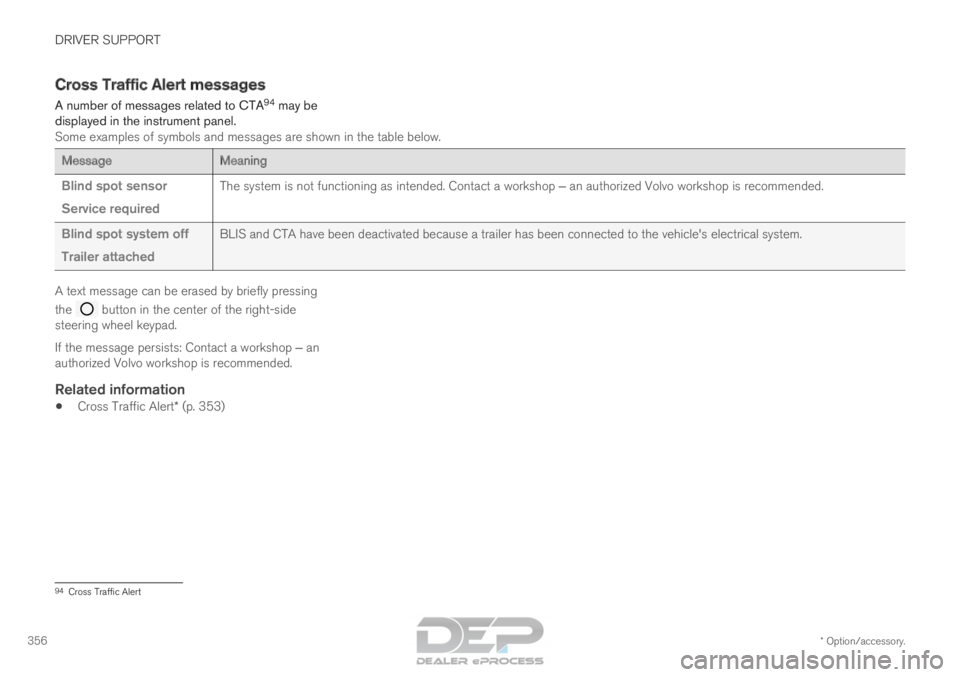
356 Cross Traffic Alert messages
A number of messages related to CTA 94
may be
displayed in the instrument panel.
Some examples of symbols and messages are shown in the table below. Message
Meaning
Blind spot sensor
Service required The system is not functioning as intended. Contact a workshop ‒ an authorized Volvo workshop is recommended.
Blind spot system off
Trailer attached BLIS and CTA have been deactivated because a trailer has been connected \
to the vehicle's electrical system.A text message can be erased by briefly pressing
the
button in the center of the right-side
steering wheel keypad.
If the message persists: Contact a workshop ‒ an
authorized Volvo workshop is recommended.
Related information
• Cross Traffic Alert* (p. 353) 94
Cross Traffic Alert
Page 359 of 686

DRIVER SUPPORT
* Option/accessory.357
Road Sign Information*
The Road Sign Information (RSI
95
) function noti-
fies the driver of speed-related road signs the
vehicle is passing. Examples of signs that can be detected
96
.
If the vehicle passes a speed limit sign, it will be
displayed in the instrument panel and the head-
up display*.
NOTE In certain markets, the Road Sign Information
function (RSI) is only available in combination
with Sensus Navigation.
WARNING •
The Road Sign Information function is
supplementary driver support intended to
facilitate driving and help make it safer –
it cannot handle all situations in all traffic,
weather and road conditions.
• Road Sign Information is not a substitute
for the driver's attention and judgment.
The driver is always responsible for
ensuring the vehicle is driven in a safe
manner, at the appropriate speed, with an
appropriate distance to other vehicles,
and in accordance with current traffic
rules and regulations.
Related information
•Activating/deactivating Road Sign Informa-
tion (p. 358)
• Road Sign Information and sign displays
(p. 358)
• Road Sign Information and Sensus
Navigation (p. 359)
• Road Sign Information with Speed Warning
and Settings (p. 359)
• Activating/deactivating Speed Warning in
Road Sign Information (p. 360) •
Road Sign Information with speed camera
information (p. 361)
• Road Sign Information limitations (p. 361) 95
Road Sign Information
96 Road signs differ according to market ‒ the illustrations shown here are just some examples.