brake VOLVO XC90 TWIN ENGINE 2018 Workshop Manual
[x] Cancel search | Manufacturer: VOLVO, Model Year: 2018, Model line: XC90 TWIN ENGINE, Model: VOLVO XC90 TWIN ENGINE 2018Pages: 686, PDF Size: 17 MB
Page 341 of 686

DRIVER SUPPORT
}}
339
The
Late warning distance setting should there-
fore only be used in exceptional cases, such as
when a more dynamic driving style is preferred.
WARNING •
No automatic system can guarantee
100% correct function in all situations.
You should therefore never test use of
City Safety in the direction of people, ani-
mals or vehicles – this could lead to
severe damage, serious personal injury or
even death.
• City Safety warns the driver if there is a
risk of collision, but the function cannot
reduce the driver's reaction time.
• Even if the warning distance has been set
to Early, warnings may be perceived as
late in certain situations – e.g. when there
are large speed differences or if the vehi-
cle ahead suddenly brakes heavily.
• With the warning distance set to
Early,
warnings come further in advance. This
may cause the warnings to come more
frequently than with warning distance
Normal, but is recommended since it can
make City Safety more effective.
NOTE The warning with direction indicators for Rear
Collision Warning is deactivated if the colli-
sion warning distance in the City Safety func-
tion is set to the lowest level "
Late".
The seat belt tensioning and braking func-
tions remain active.
Related information
• City Safety™ (p. 335) Detecting obstacles with City Safety
City Safety can detect vehicles, cyclists, large
animals and pedestrians.
VehiclesCity Safety detects most types of vehicles that
are either stationary, moving in the same direc-
tion as your vehicle or those described in "City
Safety in crossing traffic".
For City Safety to be able to detect a vehicle in
the dark, its headlights and taillights must be on
and clearly visible.
Cyclists Optimal examples of what City Safety would interpret to
be a cyclist: clear body and bicycle shapes.
For optimal performance, the system's function
for cyclist detection needs the clearest possible
information about the contours of the bicycle and
of the cyclist's head, arm, shoulders, legs, torso
Page 342 of 686

||DRIVER SUPPORT
340
and lower body in combination with normal
human movements.
If large portions of the cyclist's body or the bicy-
cle itself are not visible to the function's camera,
it will not be able to detect a cyclist.
The system can only detect adult cyclists riding
on bicycles intended for adults.
WARNING
City Safety is supplementary driver support,
but it cannot detect all cyclists in all situations
and, for example, cannot see:
• partially obscured cyclists.
• cyclists if the background contrast of the
cyclist is poor - warning and brake inter-
ventions may then be late or not occur at
all.
• cyclists in clothing that hides their body
contour.
• bikes loaded with large objects.
The driver is always responsible for ensuring
that the vehicle is driven correctly and with a
safety distance suitable for the speed.
Pedestrians Optimal examples of what the system considers to be a
pedestrian: clear body contours.
For optimal performance, the system's function
for pedestrian detection needs the clearest pos-
sible information about body and bicycle con-
tours. This entails being able to detect the con-
tours of the pedestrian's head, arm, shoulders,
legs, torso and lower body in combination with
normal human movements.
In order to detect a pedestrian, there must be a
contrast to the background, which could depend
on clothing, weather conditions, etc. If there is lit-
tle contrast, the person may be detected late or
not at all, which may result in a delayed reaction
from the system or no reaction at all.
City Safety can detect pedestrians even in dark
conditions if they are illuminated by the vehicle's
headlights.WARNING City Safety is supplementary driver support,
but it cannot detect all pedestrians in all sit-
uations and, for example, cannot see:
• partially obscured pedestrians, people in
clothing that hides their body contour or
pedestrians shorter than 80 cm (32 in.).
• pedestrians if the background contrast of
the pedestrians is poor - warning and
brake interventions may then be late or
not occur at all.
• pedestrians who are carrying large
objects.
The driver is always responsible for ensuring
that the vehicle is driven correctly and with a
safety distance suitable for the speed.
Page 343 of 686

DRIVER SUPPORT
}}
341
Large animals Optimal examples of what City Safety would interpret as
a large animal: stationary or moving slowly and with clear
body contours.
For optimal performance, the system's function
for detecting large animals (e.g. moose, horses,
etc.) needs the clearest possible information
about body contours. This entails being able to
detect the animal straight from the side in combi-
nation with normal movements for that animal.
If parts of the animal's body are not visible to the
function's camera, the system will not be able to
detect the animal.
City Safety can detect large animals even in dark
conditions if they are illuminated by the vehicle's
headlights.WARNING City Safety is supplementary driver support,
but it cannot detect all large animals in all sit-
uations and, for example, cannot see:
• partially obscured larger animals.
• larger animals seen from the front or from
behind.
• running or fast moving larger animals.
• larger animals if the contrast of the ani-
mal's background is poor - warning and
brake interventions may then occur late
or not at all.
• smaller animals such as cats and dogs.
The driver is always responsible for ensuring
that the vehicle is driven correctly and with a
safety distance suitable for the speed.
Related information
• City Safety™ (p. 335) City Safety in crossing traffic
City Safety
can assist the driver when turning in
the path of an oncoming vehicle in an intersec-
tion. : Sector in which City Safety can detect an oncoming
vehicle in crossing traffic.
In order for City Safety to detect an oncoming
vehicle in situations where there is a risk of a col-
lision, that vehicle must be within the sector in
which City Safety can analyze the situation.
The following criteria must also be met:
• your vehicle's speed must be at least 4 km/h
(3 mph)
• your vehicle must be making a left turn
• the oncoming vehicle's headlights must be
on
Page 344 of 686

||DRIVER SUPPORT
342
WARNING
•
The "City Safety in crossing traffic" func-
tion is supplementary driver support
intended to improve driving safety – it
cannot handle all situations in all traffic,
weather and road conditions.
• Warnings and brake interventions due to
a collision risk with an oncoming vehicle
often come very late.
• Never wait for a collision warning or for
City Safety to intervene.
• City Safety is not a substitute for the driv-
er's attention and judgment. The driver is
always responsible for ensuring the vehi-
cle is driven in a safe manner, at the
appropriate speed, with an appropriate
distance to other vehicles, and in accord-
ance with current traffic rules and regula-
tions.
Related information
•
City Safety™ (p. 335) Limitations of City Safety in
crossing traffic
In certain situations, it may be difficult for City
Safety to help the driver avoid a collision with
crossing traffic. For example:
• on slippery roads when Electronic Stability
Control (ESC) is actively operating
• if an approaching vehicle is detected at a late
stage
• if the oncoming vehicle is partially obstructed
by another vehicle or object
• if the oncoming vehicle's headlights are off
• if the oncoming vehicle is moving erratically
and e.g. suddenly changes lanes at a late
stage.
NOTE The function uses the vehicle's camera unit,
which has some general limitations – see the
section "Camera unit limitations".
NOTE
The function uses the vehicle's radar unit,
which has some general limitations – see the
section "Radar unit limitations".
Related information
•
City Safety™ (p. 335)
Page 345 of 686

DRIVER SUPPORT
343
City Safety and delayed evasive
maneuvers
City Safety can assist the driver by automatically
braking the vehicle when it is not possible to
avoid a collision by steering alone.
City Safety assists the driver by periodically
attempting to predict possible "escape routes" to
the sides of the vehicle in the event a slow-mov-
ing or stationary vehicle were to be detected at a
late stage.
Your vehicle (1) cannot detect any potential escape
routes for veering away from the vehicle ahead (2) and
may therefore apply the brakes at an earlier stage.
Own vehicle
Slow-moving/stationary vehicles
City Safety will not intervene to automatically
apply the brakes if it is possible for the driver to
avoid a collision by steering the vehicle. However, if City Safety determines that an eva-
sive maneuver would not be possible due to traf-
fic in the adjacent lane(s), the function can assist
the driver by automatically starting to apply the
brakes at an earlier stage.
WARNING
•
The possibility of City Safety predicting a
certain situation is supplementary driver
support intended to improve driving safety
– it cannot handle all situations in all traf-
fic, weather and road conditions.
• City Safety is not a substitute for the driv-
er's attention and judgment. The driver is
always responsible for ensuring the vehi-
cle is driven in a safe manner, at the
appropriate speed, with an appropriate
distance to other vehicles, and in accord-
ance with current traffic rules and regula-
tions.
Limitations of City Safety during evasive
maneuvers
NOTE The function uses the vehicle's camera unit,
which has some general limitations – see the
section "Camera unit limitations".
NOTE The function uses the vehicle's radar unit,
which has some general limitations – see the
section "Radar unit limitations".
Related information
•
City Safety™ (p. 335)
Page 347 of 686
DRIVER SUPPORT
345
Other limitations
WARNING•
Warnings and brake interventions can be
triggered late or not at all if the traffic sit-
uation or external influences prevent the
camera and radar unit from properly
detecting pedestrians, cyclists, large ani-
mals or vehicles ahead of the vehicle.
• To be able to detect vehicles at night, its
front and rear lights must work and illumi-
nate clearly.
• The camera and radar unit have a limited
range for pedestrians and cyclists – the
system can provide effective warnings
and brake interventions if the relative
speed is lower than 50 km/h (30 mph).
For stationary or slow-moving vehicles,
warnings and brake interventions are
effective at vehicle speeds of up to
70 km/h (43 mph). Speed reduction for
large animals is less than 15 km/h
(9 mph) and can be achieved at vehicle
speeds over 70 km/h (43 mph). At lower
speeds, the warning and brake interven-
tion for large animals is less effective.
• Warnings for stationary or slow-moving
vehicles and large animals can be disen-
gaged due to darkness or poor visibility. •
Warnings and brake interventions for
pedestrians and cyclists are disengaged
at vehicle speeds over 80 km/h
(50 mph).
• Do not place, affix or mount anything on
the inside or outside of the windshield, or
in front of or around the camera and
radar unit – this could disrupt camera-
based functions.
• Objects, snow, ice or dirt in the area of
the camera sensor can reduce the func-
tion, disengage it completely or give an
improper function response.
NOTE The function uses the vehicle's camera unit,
which has some general limitations – see the
section "Camera unit limitations".
NOTE
The function uses the vehicle's radar unit,
which has some general limitations – see the
section "Radar unit limitations".
Market limitationsCity Safety is not available in all countries. If City
Safety is not shown in the center display's
Settings menu, your vehicle is not equipped with
this function. In the center display's Top view, tap:
• Settings My Car IntelliSafe
Related information
•
City Safety™ (p. 335)
Page 349 of 686

DRIVER SUPPORT
347
Rear Collision Warning
The Rear Collision Warning (
RCW) function can
help the driver avoid rear-end collisions from
vehicles approaching from behind.
RCW is automatically activated each time the
engine is started.
RCW can warn the driver of a potential collision
with vehicles approaching from behind by rapidly
flashing the turn signals.
If, at a speed below 30 km/h (20 mph), the RCW
function detects that the car is in danger of being
hit from behind, the seatbelt tensioners may ten-
sion the front seatbelts and activate the Whiplash
Protection System safety system.
Immediately before a collision from behind, RCW
may also activate the foot brake in order to
reduce the forward acceleration of the car during
the collision. However, the brakes will only be
applied if your vehicle is stationary. The brakes
will be immediately released if the accelerator
pedal is depressed.
Related information
• Rear Collision Warning limitations (p. 347)
• Whiplash Protection System (p. 46) Rear Collision Warning limitations
In some situations, it may be difficult for RCW to
warn the driver of a collision risk. This may be the case if:
• the vehicle approaching from the rear is
detected at a late stage
• the vehicle approaching from the rear
changes lanes at a late stage
• the vehicle approaching from the rear is mov-
ing at a speed above 80 km/h (50 mph)
• a trailer, bicycle holder or similar is con-
nected to the vehicle's electrical system - the
RCW function will then be automatically
deactivated.
NOTE In certain markets RCW does not warn with
the direction indicators due to local traffic
regulations – in such cases, that part of the
function is deactivated.
NOTE The warning with direction indicators for Rear
Collision Warning is deactivated if the colli-
sion warning distance in the City Safety func-
tion is set to the lowest level "
Late".
The seat belt tensioning and braking func-
tions remain active.
Related information
• Rear Collision Warning (p. 347)
Page 375 of 686
DRIVER SUPPORT
}}
373
Run-Off Mitigation with steering
assistance
This sub-function is intended to help reduce the
risk of the vehicle inadvertently running off the
road by actively steering the vehicle back onto
the road.
The function is active at speeds between
65-140 km/h (40-87 mph) on roads with clearly
visible traffic lane markings/lines.
The system uses a camera to monitor the edges
of the road and the painted side marker lines. If
the vehicle is about to cross the edge of the road,
the function will attempt to steer the vehicle back
onto the road. If this is not sufficient to keep the
vehicle on the road, the brakes will also be
applied.
However, the function will not provide either
steering assistance or braking if the turn signal is
used. The function will also not be activated if it
detects that the driver is actively operating the
vehicle.
After the system has automatically intervened,
this text message will appear in the instrument
panel: • Collision avoidance assistance –
Automatic intervention
WARNING •
The "Steering assistance at risk of run-
off" subfunction is supplementary driver
support intended to help improve driving
safety – it cannot handle all situations in
all traffic, weather and road conditions.
• The function cannot detect barriers, rails
or similar obstacles at the side of the
road.
• "Steering assistance at risk of run-off" is
not a substitute for the driver's attention
and judgment. The driver is always
responsible for ensuring the vehicle is
driven in a safe manner, at the appropri-
ate speed, with an appropriate distance to
other vehicles, and in accordance with
current traffic rules and regulations.
Related information
•Steering assistance at risk of collision
(p. 372) Run-Off Mitigation with steering
assistance levels
This function has two activation levels for inter-
vention:
•
Steering assistance only
• Steering assistance with braking
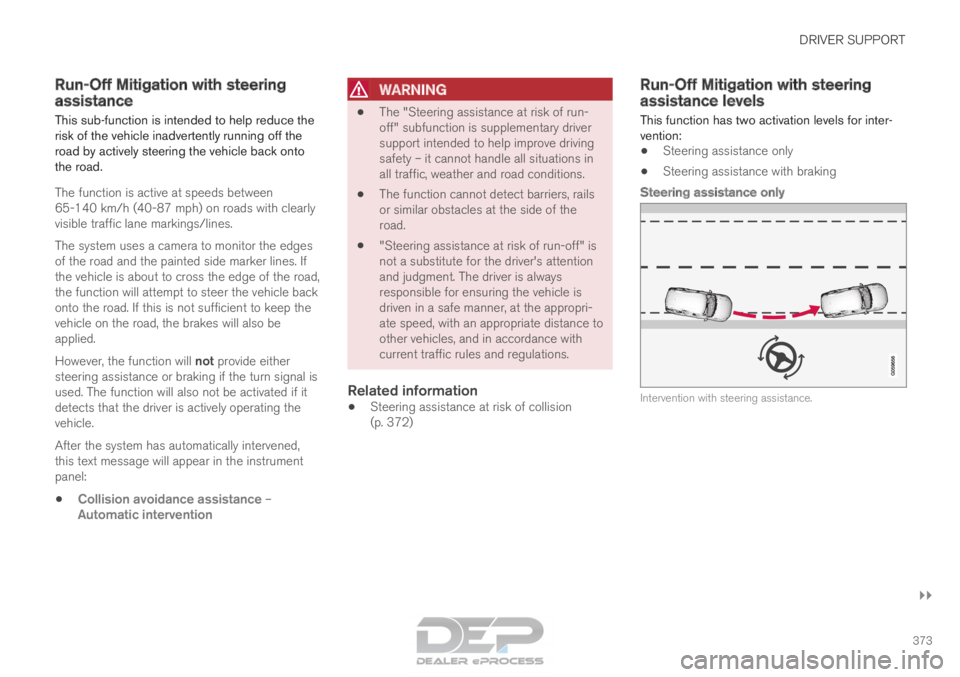
Steering assistance only Intervention with steering assistance.
Page 384 of 686

DRIVER SUPPORT
382Park Assist front, rear and sides
Park Assist has different parameters depending
on which part of the vehicle is approaching an
obstacle.
Back Note: This illustration is general and details may vary
depending on model.
The rear sensors will be activated if the vehicle
begins rolling backward or if reverse gear is
engaged.
The distance monitored begins
approx. 1.5 meters (5 feet) behind the vehicle.
The rear sensors will be automatically deactivated
if the vehicle is backing up with a trailer attached.
NOTE When reversing with e.g. a trailer or bike car-
rier on the trailer hitch – without Volvo original
trailer cables – the Parking Assist system may
have to be turned off manually to prevent the
sensors from reacting to these.
Side sensors
Park Assist's side sensors are automatically acti-
vated when the engine is started. They are active
at speeds below 10 km/h (6 mph).
The distance monitored begins approx. 30 cm
(1 ft) from the sides. The audible signal for obsta-
cles along the sides of the vehicle is emitted
from the side speakers.
Front camera Note: This illustration is general and details may vary
depending on model.
Park Assist's front sensors are automatically acti-
vated when the engine is started. The front sen-
sors are active at speeds below 10 km/h
(6 mph).
The distance monitored begins approx. 80 cm
(2.5 ft) in front of the vehicle.
NOTE
The Parking Assist system is deactivated
when the parking brake is applied or when P
is selected on vehicles with automatic trans-
mission.
Page 386 of 686
||DRIVER SUPPORT
* Option/accessory.
384
CAUTION Objects such as chains, thin and glossy poles
or low obstacles may end up in the "signal
shadow" and then go temporarily undetected
by the sensors – the pulsating tone may then
unexpectedly stop instead of becoming a
constant tone as expected.
The sensors cannot detect high objects, such
as protruding ramps.
• In such situations, pay extra attention and
maneuver/drive the vehicle very slowly or
stop the current parking maneuver –
there may be a high risk of damage to
the vehicle or other objects since infor-
mation from the sensors is not always
reliable in such situations.
CAUTION In some circumstances, the Park Assist Sys-
tem may produce false warnings due to exter-
nal sound sources with the same ultrasonic
frequencies as those the system works with.
Examples of such sources are horns, wet tires
on asphalt, pneumatic brakes, exhaust noise
from motorcycles, etc.
NOTE When a trailer hitch is configured with the
vehicle electrical system, the trailer hitch pro-
trusion is included when the function meas-
ures the distance to objects behind the vehi-
cle.
Related information
•
Park Assist* (p. 381) Recommended maintenance for
Park Assist
For Park Assist to function optimally, its sensors
must be cleaned regularly with water and car
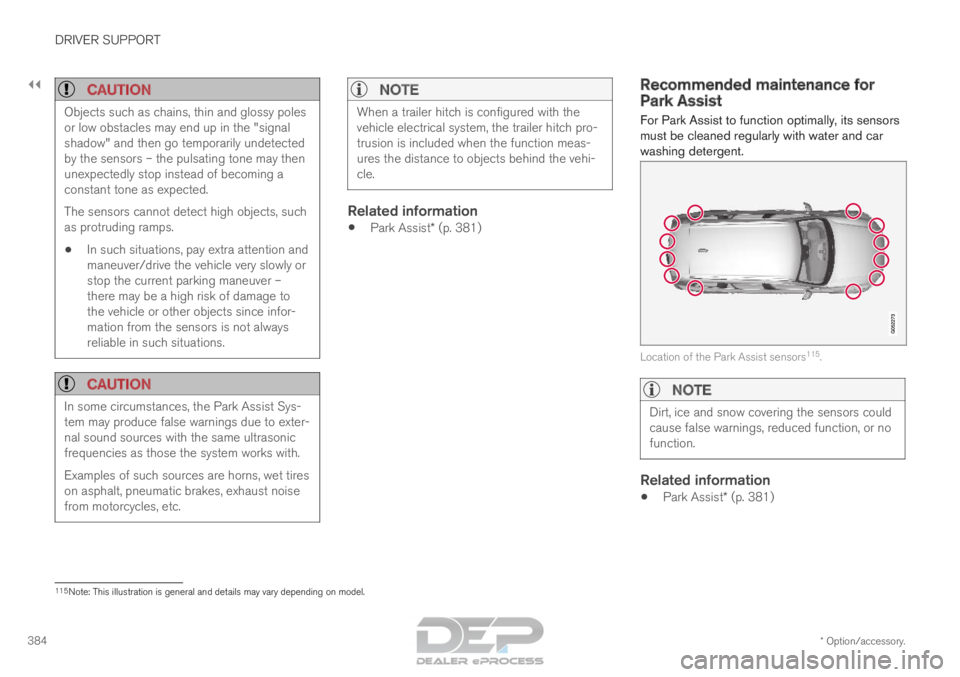
washing detergent. Location of the Park Assist sensors
115
.
NOTE Dirt, ice and snow covering the sensors could
cause false warnings, reduced function, or no
function.
Related information
•
Park Assist* (p. 381) 115
Note: This illustration is general and details may vary depending on mod\
el.