battery VOLVO XC90 TWIN ENGINE 2018 Repair Manual
[x] Cancel search | Manufacturer: VOLVO, Model Year: 2018, Model line: XC90 TWIN ENGINE, Model: VOLVO XC90 TWIN ENGINE 2018Pages: 686, PDF Size: 17 MB
Page 463 of 686
STARTING AND DRIVING
461
•
Speed limiter (p. 278)
• Tire sealing system (p. 572) Winter driving
It is important to check the vehicle before driving
in cold/snowy conditions to make sure it can be
driven safely.
Before the cold season arrives:• Make sure the engine coolant contains 50%
antifreeze. This mixture helps protect the
engine from frost erosion down to
approx. -35 °C (-31 °F). Do not mix different
types of antifreeze as this could pose a
health risk.
• Keep the fuel tank well filled to prevent con-
densation from forming.
• Check the viscosity of the engine oil. Oil with
low viscosity (thinner oil) improves cold-
weather starting and reduces fuel consump-
tion when driving with a cold engine.
CAUTION Low-viscosity oil should not be used with hard
driving or in hot weather.
•
Check the condition and charge level of the
start battery. Cold weather places greater
demands on the start battery and reduces its
capacity.
• Use washer fluid containing antifreeze to
help prevent ice from forming in the washer
fluid reservoir.
Slippery driving conditionsFor optimal traction and roadholding, Volvo rec-
ommends using snow tires on all wheels when-
ever there is a risk of snow or ice on the road.
NOTE Certain countries require use of winter tires
by law. Not all countries permit the use of
studded tires.
Practice driving on slippery surfaces under con-
trolled conditions to learn how the vehicle reacts.
Related information
•
Snow tires (p. 571)
• Snow chains (p. 571)
• Braking on salted roads (p. 431)
• Braking on wet roads (p. 431)
• Filling washer fluid (p. 650)
• Start battery (p. 615)
• Replacing windshield wiper blades (p. 648)
• Changing rear window wipers (p. 647)
• Refilling coolant (p. 612)
Page 471 of 686
STARTING AND DRIVING
}}
469
Battery drain
The electrical functions in the vehicle drain the
battery to varying degrees. Avoid using ignition
mode II when the engine is switched off. Use
ignition mode I instead, as this uses less electri-
cal current.
Note that certain accessories may also drain
power from the electrical system. Do not use
functions that use a lot of electrical current when
the engine is turned off. Examples of such func-
tions are: • blower
• headlights
• windshield wipers
• audio system (especially at high volume).
If the starter battery voltage is low, a message is
shown in the driver display. The vehicle's energy-
saving function will then turn off or reduce certain
functions, such as the blower and/or the audio
system.
– Charge the battery by starting the engine
and let it run for at least 15 minutes (driving
charges the battery faster than letting the
engine idle).
Related information
• Start battery (p. 615)
• Ignition modes (p. 427) Jump starting using another battery
If the start battery is discharged, current from
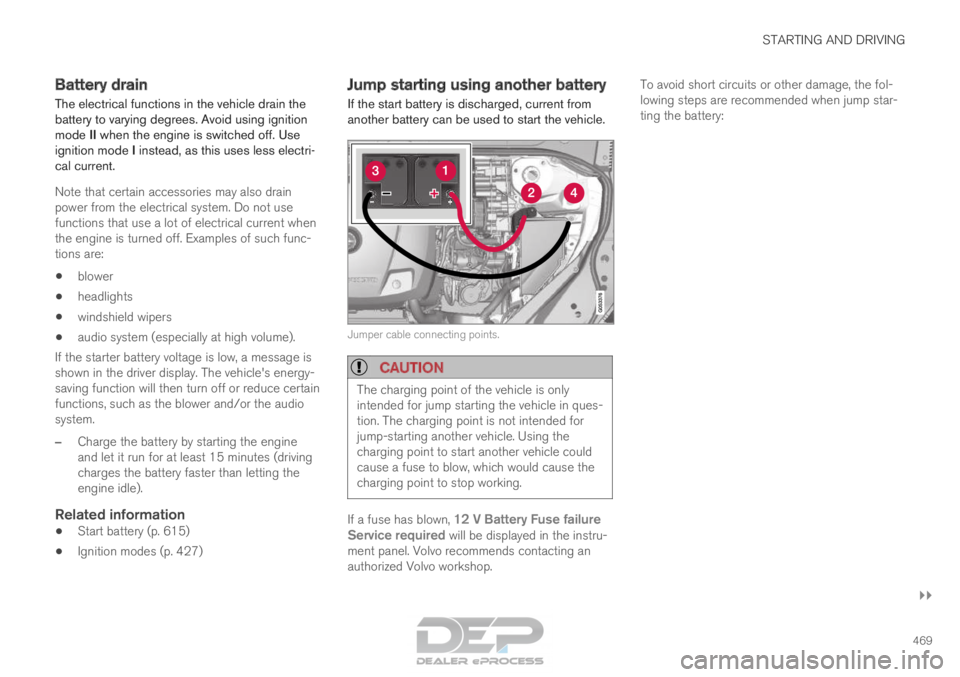
another battery can be used to start the vehicle. Jumper cable connecting points.
CAUTION
The charging point of the vehicle is only
intended for jump starting the vehicle in ques-
tion. The charging point is not intended for
jump-starting another vehicle. Using the
charging point to start another vehicle could
cause a fuse to blow, which would cause the
charging point to stop working.
If a fuse has blown, 12 V Battery Fuse failure
Service required will be displayed in the instru-
ment panel. Volvo recommends contacting an
authorized Volvo workshop. To avoid short circuits or other damage, the fol-
lowing steps are recommended when jump star-
ting the battery:
Page 472 of 686
||STARTING AND DRIVING
470
1.
Put the ignition in mode 0.
2. Make sure the auxiliary battery (the battery used to jump start the discharged battery)
has a voltage of 12 volts.
3. If the auxiliary battery is in another vehicle, turn off that vehicle's engine and make sure
that the vehicles are not touching each other.
4. Clamp the red jumper cable onto the auxiliary battery's positive (+) terminal (1).
CAUTION Connect the jump cable carefully to prevent
short circuits with other components in the
engine compartment.
5. Fold back the cover over your vehicle's posi-
tive (+) jump start terminal (2).
6.
Clamp the other end of the red jumper cable
to your vehicle's positive (+) jump start termi-
nal (2).
7. Clamp the black jumper cable onto the auxili- ary battery's negative (-) terminal (3).
8. Clamp the other end of the black jumper cable to your vehicle's negative (-) ground
point (4).
9. Make sure the jumper cables are securely attached to help prevent sparks while jump
starting. 10. Start the engine of the assisting vehicle and
let it run for a few minutes at a higher idling
speed than normal, about 1500 rpm.
11. Start your vehicle's engine. If the engine does not start, allow an additional 10
minutes of charging time and then try to start
the engine again.
NOTE When the engine is started under normal
conditions, the vehicle's electrical drive motor
is prioritized – the gasoline engine remains
off. This means that the electric motor has
"started" and the vehicle is ready to be driven
once the start knob has been turned clock-
wise. Start of the electric motor is indicated
by the indicator lights on the instrument panel
going out and its preselected theme illuminat-
ing.
CAUTION
Do not touch the connections between the
cable and the vehicle during the start attempt.
Risk of sparking. 12. Remove the jumper cables in the reverse
order ‒ first the black cables and then the
red cables.
Make sure that none of the clamps of the
black jumper cables come into contact with
either vehicle's positive (+) jump start termi-
nals or either of the red jumper cable's con-
nected clamps.
WARNING PROPOSITION 65 VARNING!WARNING!
Battery posts, terminals, and related accesso-
ries contain lead and lead compounds, chemi-
cals known to the state of California to cause
cancer and reproductive harm. Wash hands
after handling.
WARNING
•
Batteries generate hydrogen gas, which
is flammable and explosive.
• Do not connect the jumper cable to any
part of the fuel system or to any moving
parts. Avoid touching hot manifolds.
• Battery fluid contains sulfuric acid. Do not
allow battery fluid to contact eyes, skin,
fabrics or painted surfaces.
Page 473 of 686
STARTING AND DRIVING
}}
* Option/accessory. 471•
If contact occurs, flush the affected area
immediately with water. Obtain medical
help immediately if eyes are affected.
• Never expose the battery to open flame
or electric spark. Do not smoke near the
battery. Failure to follow the instructions
for jump starting can lead to injury.
NOTE The vehicle cannot be started if the hybrid
battery is discharged.
Related information
•
Starting the vehicle (p. 424)
• Ignition modes (p. 427)
• Adjusting the steering wheel (p. 199)
• Selecting ignition mode (p. 428) Detachable towbar*
Volvo recommends the use of Volvo towbars
that are specially designed for the vehicle.
NOTE The optional detachable trailer hitch may not
be available in all markets or on all models.
Consult your Volvo retailer.
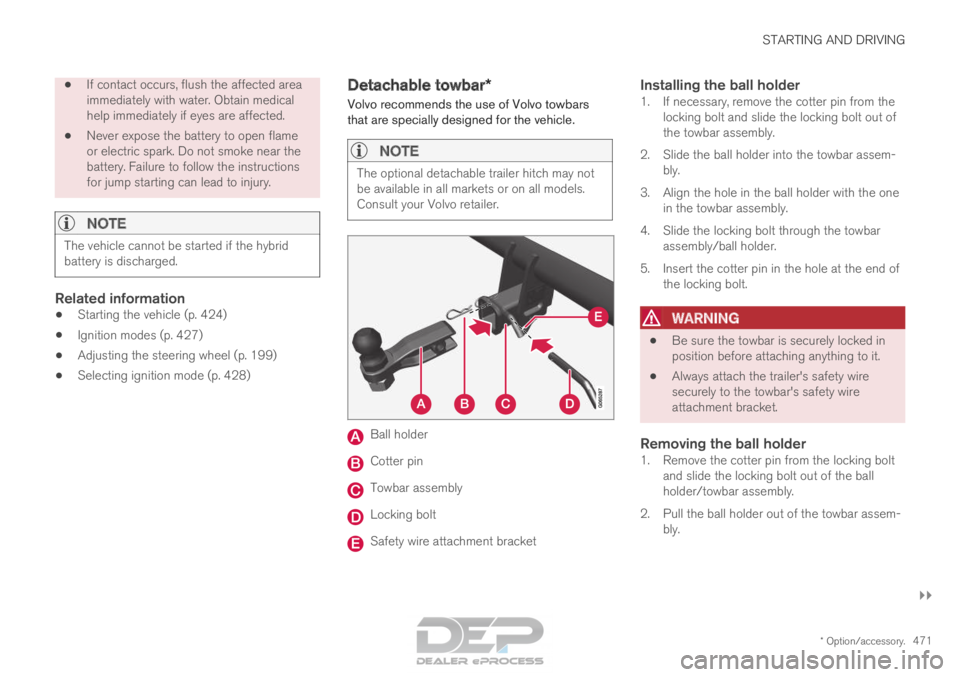
Ball holder
Cotter pin
Towbar assembly
Locking bolt
Safety wire attachment bracket
Installing the ball holder1. If necessary, remove the cotter pin from the
locking bolt and slide the locking bolt out of
the towbar assembly.
2. Slide the ball holder into the towbar assem- bly.
3. Align the hole in the ball holder with the one in the towbar assembly.
4. Slide the locking bolt through the towbar assembly/ball holder.
5. Insert the cotter pin in the hole at the end of the locking bolt.
WARNING •
Be sure the towbar is securely locked in
position before attaching anything to it.
• Always attach the trailer's safety wire
securely to the towbar's safety wire
attachment bracket.
Removing the ball holder1. Remove the cotter pin from the locking bolt
and slide the locking bolt out of the ball
holder/towbar assembly.
2. Pull the ball holder out of the towbar assem- bly.
Page 478 of 686
STARTING AND DRIVING
476Towing using a towline
This section refers to one vehicle being towed
behind another using a towline.
Twin Engine vehicles may not be towed behind
another vehicle due to the risk of damage to the
electric motor. If the vehicle cannot be driven and
needs to be moved, it must be transported on a
tow truck with all four wheels on the bed of the
truck.
Towing another vehicleTowing another vehicle requires a lot of power -
use the AWD drive mode. This helps charge the
hybrid battery and improve the vehicle's driving
and roadholding characteristics.
Before towing another vehicle, check applicable
speed limit regulations.
Jump startingDo not tow the vehicle to start the engine. Use an
auxiliary battery if the start battery's charge level
is so low that the engine cannot be started.
CAUTION Attempts to tow-start the vehicle could cause
damage to the electrical drive motor and
three-way catalytic converter.
Related information
•
Attaching and removing the towing eyelet
(p. 476)
• Hazard warning flashers (p. 161)
• Recovery (p. 477)
• Jump starting using another battery (p. 469)
• Selecting ignition mode (p. 428) Attaching and removing the towing
eyelet
Use the towing eyelet to tow another vehicle.
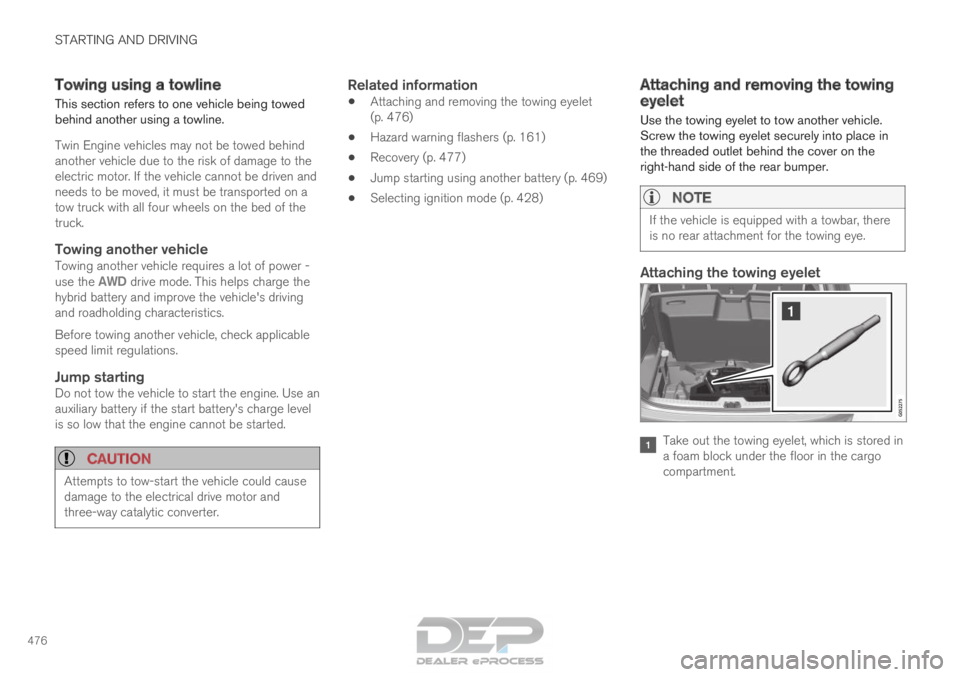
Screw the towing eyelet securely into place in
the threaded outlet behind the cover on the
right-hand side of the rear bumper.
NOTE If the vehicle is equipped with a towbar, there
is no rear attachment for the towing eye.
Attaching the towing eyelet
Take out the towing eyelet, which is stored in
a foam block under the floor in the cargo
compartment.
Page 585 of 686

LOADING, STORAGE AND PASSENGER COMPARTMENT
583Status indicator light
Cause Action
Steady green light
The socket is providing electrical current to a connected device. None.
Flashing orange light The socket's voltage converter is too hot (e.g. if the device draws \
too much cur- rent or if the temperature in the passenger compartment is very high). Unplug the device, let the voltage converter cool
down and plug in the device again.
The connected device is drawing too much current (at the moment or con-\
stantly) or is not functioning properly. None. The device cannot be used in the socket.
Indicator light off The socket has not detected a device plugged into the socket. Make sure the device is correctly plugged into the
socket.
The socket is not active. Make sure the vehicle's ignition is in at least
mode I.
The socket has been active but has been deactivated. Start the engine and/or charge the start battery.
Related information
•Passenger compartment interior (p. 580)
• Using the electrical outlets (p. 584)
Page 586 of 686

LOADING, STORAGE AND PASSENGER COMPARTMENT
* Option/accessory.
584 Using the electrical outlets
The 12 V outlet can be used for devices
intended for this such as MP3 players, coolers
and cellular phones.
The high-voltage outlet* can be used for devices
intended for this, such as chargers, laptops, etc. The ignition must be in at least mode I for the
outlets to supply current. The outlets will then be
active as long as there is sufficient charge in the
start battery.
If the engine is turned off and the vehicle is
locked, the outlets will be deactivated. If the
engine is turned off and the vehicle remains
unlocked, the sockets will remain active for up to
7 minutes.
NOTE Bear in mind that using the electrical outlets
when the engine is off could cause the starter
battery to have too low of a charge level,
which could limit other functionality.
Accessories connected to the electrical out-
lets can be activated even when the vehicle
electrical system is off or if preconditioning is
used. For this reason, disconnect plugs when
they are not in use to prevent the starter bat-
tery from becoming discharged.
WARNING •
Do not use accessories with large or
heavy plugs – they could damage the out-
let or come loose while you are driving.
• Do not use accessories that could cause
disruptions to e.g. the vehicle's radio
receiver or electrical system.
• Position the accessory so that there is no
risk of it injuring the driver or passengers
in the event of heavy braking or a colli-
sion.
• Pay attention to connected accessories
as they can generate heat that could burn
passengers or the interior.
Using 12 V outlets1. Remove the stopper (tunnel console) or fold
down the cover (trunk/cargo compartment)
over the socket and plug in the device.
2. Unplug the device and put the stopper back in (tunnel console) or fold up the cover
(trunk/cargo compartment) when the socket
is not in use or left unattended.
CAUTION The maximum power is 120 W (10 A) per
outlet.
Using high-voltage outletsThe ignition must be in at least mode I for outlets
to supply current. The outlets will then be active
as long as there is sufficient charge in the start
battery.
1. Slide down the cover over the outlet and plug
in the device.
>
The LED 2
light on the outlet will indicate
its status.
2. The outlet is supplying electrical current when the light is glowing steadily green.
3. Disconnect the device by pulling out the plug (do not pull on the cord).
Pull up the cover when the outlet is not in
use or is left unattended.
CAUTION The maximum power is 150 W.
WARNING
Do not attempt to alter or repair the high-volt-
age outlet on your own. Volvo recommends
contacting an authorized Volvo workshop.
2
LED (Light Emitting Diode)
Page 601 of 686
MAINTENANCE AND SERVICE
}}
599
Periodic maintenance helps minimize
emissions
NOTE •
Refer to your Service and Warranty Book-
let for a comprehensive service and main-
tenance schedule up to 240,000 km
(150,000 miles). This program contains
inspections and services necessary for
the proper function of your vehicle and
includes components that affect vehicle
emissions.
• The Warranty and Service Records Infor-
mation booklet also contains detailed
information concerning the warranties
that apply to your vehicle.
On-board Diagnostic SystemOBD II is part of your vehicle's computerized
engine management system. It stores diagnostic
information about your vehicle's emission con-
trols. It can light the Check Engine light (MIL) if it
detects an emission control "fault." A "fault" is a
component or system that is not performing
within an expected range. A fault may be perma-
nent or temporary. OBD II will store a message
about any fault.
Emission inspection readiness
How do states use OBD II for emission
inspections?
Many states connect a computer directly to a
vehicle's OBD II system. The inspector can then
read "faults." In some states, this type of inspec-
tion has replaced the tailpipe emission test.
How can my vehicle fail OBD II emission
inspection?
Your vehicle can fail OBD II emission inspection
for any of the following reasons:
• If your Check Engine (MIL) light is lit, your
vehicle may fail inspection.
• If your vehicle's Check Engine light was lit,
but went out without any action on your part,
OBD II will still have a recorded fault. Your
vehicle may pass or fail, depending on the
inspection practices in your area.
• If you had recent service that required dis-
connecting the battery, OBD II diagnostic
information may be incomplete and "not
ready" for inspection. A vehicle that is not
ready may fail inspection.
How can I prepare for my next
OBD II
emission inspection?
• If your Check Engine (MIL) light is lit - or was
lit but went out without service, have your vehicle diagnosed and, if necessary, serviced
by a qualified Volvo technician.
• If you recently had service for a lit Check
Engine light, or if you had service that
required disconnecting the battery, a period
of driving is necessary to bring the OBD II
system to "ready" for inspection. Two half-
hour trips of mixed stop-and-go/highway
driving are typically needed to allow OBD II to
reach readiness. Your Volvo retailer can pro-
vide you with more information on planning a
trip.
• Maintain your vehicle in accordance with your
vehicle's maintenance schedule.
Owner maintenancePeriodic maintenance requirements and intervals
are described in your vehicle's Warranty and
Service Records Information booklet.
The following points can be carried out between
the normally scheduled maintenance services.
Each time the car is refueled:
•Check the engine oil level.
• Clean the windshield, windshield wipers,
headlights, and taillights.
Page 602 of 686

||MAINTENANCE AND SERVICE
600
Monthly:
•
Check cold tire pressure in all tires. Inspect
the tires for wear.
• Check that engine coolant and other fluid
levels are between the indicated "min" and
"max" markings.
• Clean interior glass surfaces with a glass
cleaner and soft paper towels.
• Wipe driver information displays with a soft
cloth.
• Visually inspect battery terminals for corro-
sion. Corrosion may indicate a loose terminal
connector, or a battery near the end of its
useful service life. Consult your Volvo retailer
for additional information.
As needed:
Wash the car, including the undercarriage, to
reduce wear that can be caused by a buildup of
dirt, and corrosion that can be caused by salt res-
idues.
Clean leaves and twigs from air intake vents at
the base of the windshield, and from other places
where they may collect.
NOTE Complete service information for qualified
technicians is available online for purchase or
subscription at www.volvotechinfo.com.
Related information
•
Vehicle status (p. 602)
• Scheduling service and repairs (p. 603)
• Connecting equipment to the vehicle's data
link connector (p. 36)
• Technician certification (p. 37)
• Climate control system service (p. 608)
• Maintenance of the brake system (p. 432)
• Engine compartment overview (p. 609) Data transfer between vehicle and
workshop over Wi-Fi
Volvo workshops have a designated Wi-Fi net-
work for secure data transfer between your vehi-
cle and the workshop. Your visit to the workshop
will be easier and more effective when diagnos-
tics information and software can be transferred
over the workshop's network.
When you arrive at the workshop, your technician
can connect your vehicle to the workshop's Wi-Fi
network to perform troubleshooting and down-
load software. For this type of communication,
the vehicle only connects to the workshop's net-
work. The vehicle can only be connected to the
designated workshop networks, not to any other
network, e.g. your home network.
Manual connection to workshop Wi-FiManual connection is usually performed by a
service technician. Because the technician uses
the buttons on your remote key to connect the
vehicle, it is important that you bring a key with
buttons when taking the vehicle in to a workshop.
Pressing the lock button on the remote key three
times will connect the vehicle to the workshop's
Wi-Fi network.
When the car is connected to a Wi-Fi network,
the symbol appears in the center display.
Page 617 of 686
MAINTENANCE AND SERVICE
}}
615
Start battery
The vehicle has a single-pole electrical system
that uses the chassis and engine mount as con-
ductors.
The start battery is used to start the electrical
system and power electrical equipment in the
vehicle. The hybrid battery is used to start the
combustion engine.
The start battery should only be replaced by a
workshop 15
.
The start battery is a 12 V AGM (Absorbed Glass
Mat) battery, dimensioned for regenerative charg-
ing and to support the function of the vehicle's
various systems.
The service life and performance of the start bat-
tery are affected by factors such as driving style,
driving conditions, climate, battery discharges,
number of starts, etc.
• Never disconnect the start battery while the
engine is running.
• Make sure the cables to the start battery are
correctly connected and the clamps are
securely tightened.
WARNING •
Batteries generate hydrogen gas, which
is flammable and explosive.
• Do not connect the jumper cable to any
part of the fuel system or to any moving
parts. Avoid touching hot manifolds.
• Battery fluid contains sulfuric acid. Do not
allow battery fluid to contact eyes, skin,
fabrics or painted surfaces.
• If contact occurs, flush the affected area
immediately with water. Obtain medical
help immediately if eyes are affected.
• Never expose the battery to open flame
or electric spark. Do not smoke near the
battery. Failure to follow the instructions
for jump starting can lead to injury.
Connection points
WARNING PROPOSITION 65 WARNING
Battery posts, terminals, and related accesso-
ries contain lead and lead compounds, chemi-
cals known to the state of California to cause
cancer and reproductive harm. Wash hands
after handling.Use the vehicle's connection points in the engine
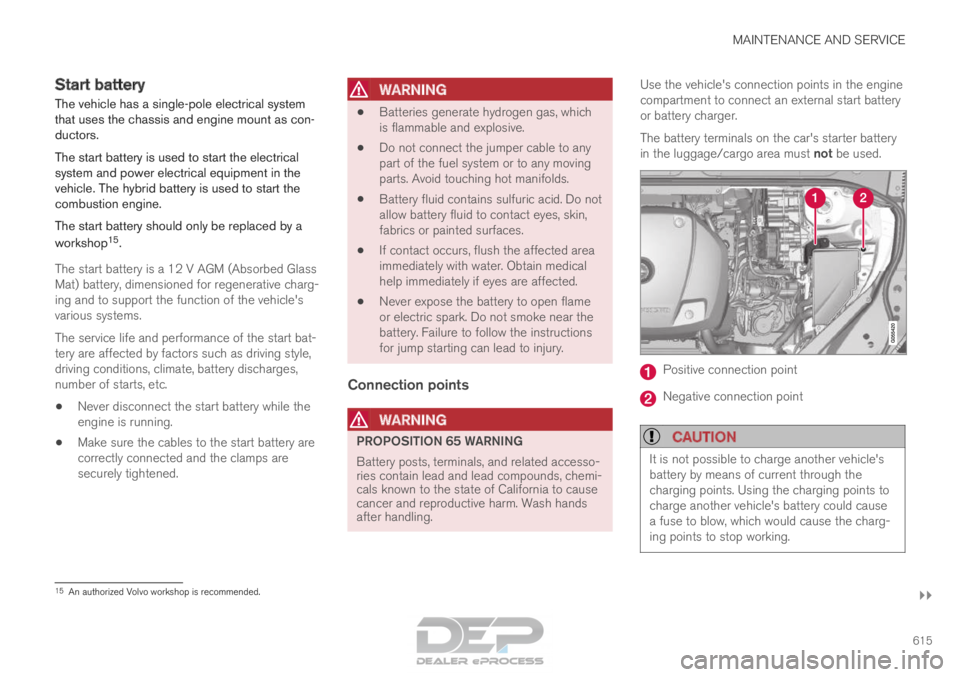
compartment to connect an external start battery
or battery charger.
The battery terminals on the car's starter battery
in the luggage/cargo area must not be used.
Positive connection point
Negative connection point
CAUTION
It is not possible to charge another vehicle's
battery by means of current through the
charging points. Using the charging points to
charge another vehicle's battery could cause
a fuse to blow, which would cause the charg-
ing points to stop working.
15
An authorized Volvo workshop is recommended.