wheel VOLVO XC90 TWIN ENGINE 2019 Owners Manual
[x] Cancel search | Manufacturer: VOLVO, Model Year: 2019, Model line: XC90 TWIN ENGINE, Model: VOLVO XC90 TWIN ENGINE 2019Pages: 697, PDF Size: 10.33 MB
Page 378 of 697
DRIVER SUPPORT
376Lane Keeping Aid limitations
In certain demanding driving conditions, Lane
Keeping Aid may not be able to properly assist
the driver. In these situations, it is recommended
that the function be deactivated.
Examples of such situations include:
road work
winter driving conditions
poor road surfaces
a very sporty driving style
bad weather with reduced visibility
roads with indistinct or no lane markings
sharp edges or lines other than the lane's
side markings
when the power steering works at reduced
power, e.g. during cooling due to overheating
(see section “Speed-dependent steering
force”).
NOTE The function uses the vehicle's camera unit,
which has some general limitations – see the
section "Camera unit limitations".
Related information
Lane Keeping Aid (p. 372)
Speed-dependent steering wheel resistance
(p. 278)
Camera limitations (p. 338)
Page 379 of 697

DRIVER SUPPORT
}}
377
Lane Keeping Aid symbols and
messages
A number of symbols and messages related to
Lane Keeping Aid LKA 110
may be displayed in
the instrument panel. Some examples of symbols and messages are shown in the table below. Symbol
Message MeaningDriver support system
Reduced functionality Service required
The system is not functioning as intended. Contact a workshop ‒ an authorized Volvo work-
shop is recommended. Windscreen sensor
Sensor blocked, see Owner's manual
The camera's ability to detect the lane in front of the vehicle is re\
duced.Lane Keeping Aid
Apply steering
LKA's steering assistance is disabled when the driver's hands are \
not on the wheel. Follow
the instructions and steer the vehicle.Lane Keeping Aid
Apply steering
LKA will go into standby mode until the driver begins steering the vehic\
le again.110
Lane Keeping Aid
Page 380 of 697

||DRIVER SUPPORT
378
A text message can be erased by briefly pressing
the button in the center of the right-side
steering wheel keypad.
If the message persists: Contact a workshop ‒ an
authorized Volvo workshop is recommended.
Related information
Lane Keeping Aid (p. 372)
Page 385 of 697
DRIVER SUPPORT
}}
383
Limitations of Run-Off Mitigation
with steering assistance
In certain demanding driving conditions, the
function may not be able to properly assist the
driver. In these situations, it is recommended
that it is turned off.
Examples of such situations include:
road work
winter driving conditions
narrow roads
poor road surfaces
a very sporty driving style
bad weather with reduced visibility
roads with indistinct or no lane markings
sharp edges or lines other than the lane's
side markings
when the power steering works at reduced
power, e.g. during cooling due to overheating
(see section “Speed-dependent steering
force”).
NOTE The function uses the vehicle's combined
camera and radar unit, which has certain gen-
eral limitations; see sections "Camera limita-
tions" and "Radar sensor limitations".
Related information
Steering assistance at risk of collision
(p. 380)
Speed-dependent steering wheel resistance
(p. 278)
Camera limitations (p. 338)
Radar sensor limitations (p. 333) Steering assistance during collision
risks from oncoming traffic
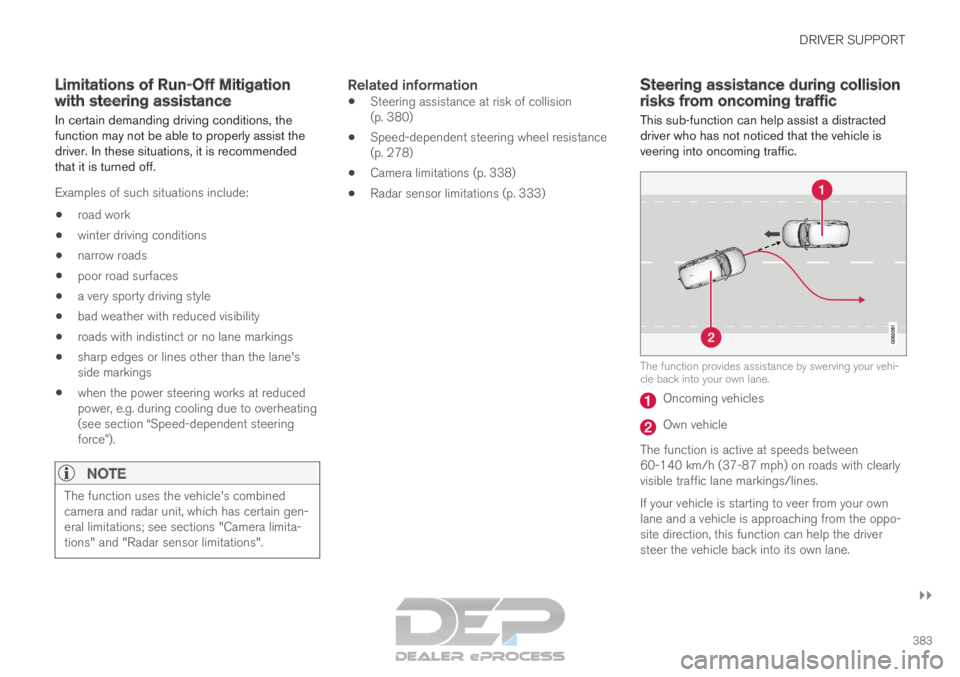
This sub-function can help assist a distracted
driver who has not noticed that the vehicle is
veering into oncoming traffic. The function provides assistance by swerving your vehi-
cle back into your own lane.
Oncoming vehicles
Own vehicle
The function is active at speeds between
60-140 km/h (37-87 mph) on roads with clearly
visible traffic lane markings/lines.
If your vehicle is starting to veer from your own
lane and a vehicle is approaching from the oppo-
site direction, this function can help the driver
steer the vehicle back into its own lane.
Page 387 of 697
DRIVER SUPPORT
385
Related information
Steering assistance at risk of collision
(p. 380)
Steering assistance during collision risks
from oncoming traffic (p. 383) Limitations of steering assistance
during collision risks from
oncoming traffic
The function may have limited functionality in
certain situations and not intervene, e.g.:
for smaller vehicles such as motorcycles
on roads that do not have clear lane mark-
ings
if more than half of your vehicle has moved
into the adjacent lane
outside the speed range 60-140 km/h
(37-87 mph)
when the power steering works at reduced
power - e.g. during cooling due to overheat-
ing (see section "Speed-dependent steering
force").
Functionality may also be reduced in other situa-
tions, such as:
road work
winter driving conditions
narrow roads
poor road surfaces
a very sporty driving style
bad weather with reduced visibility.
In these demanding driving conditions, the func-
tion may not be able to properly assist the driver. In these situations, it is recommended that it is
turned off.
NOTE The function uses the vehicle's combined
camera and radar unit, which has certain gen-
eral limitations; see sections "Camera limita-
tions" and "Radar sensor limitations".
Related information
Steering assistance at risk of collision
(p. 380)
Steering assistance during collision risks
from oncoming traffic (p. 383)
Speed-dependent steering wheel resistance
(p. 278)
Camera limitations (p. 338)
Radar sensor limitations (p. 333)
Page 390 of 697
||DRIVER SUPPORT
* Option/accessory.
388
NOTE The function uses the vehicle's combined
camera and radar unit, which has certain gen-
eral limitations; see sections "Camera limita-
tions" and "Radar sensor limitations".
In addition to the camera and radar sensor, the
function also uses the vehicle's rearward-facing
radar, which has certain general limitations the
driver should be aware of. See additional informa-
tion in the section "BLIS limitations".
Related information
Steering assistance at risk of collision
(p. 380)
Steering assistance during collision risks
from behind* (p. 386)
Speed-dependent steering wheel resistance
(p. 278)
Camera limitations (p. 338)
Radar sensor limitations (p. 333)
BLIS limitations (p. 357)
Page 391 of 697

DRIVER SUPPORT
389
Symbols and messages for steering
assistance during collision risks
A number of symbols and messages related to
the function may be displayed in the instrument
panel.
Some examples of symbols and messages are shown in the table below.
Symbol
Message MeaningCollision avoidance assistance
Automatic intervention
When the function is activated, a message will appear to alert the drive\
r.Windscreen sensor
Sensor blocked, see Owner's manual
The camera's ability to detect the lane in front of the vehicle is re\
duced.A text message can be erased by briefly pressing
the
button in the center of the right-side
steering wheel keypad.
If the message persists: Contact a workshop ‒ an
authorized Volvo workshop is recommended.
Related information
Steering assistance at risk of collision
(p. 380)
Page 394 of 697

||DRIVER SUPPORT
* Option/accessory.
392
Side sensors Rapid pulsing warning signal when the obstacle is less
than approx. 25 cm (0.8 ft) from the vehicle
112
.
Park Assist's side sensors are automatically acti-
vated when the engine is started. They are active
at speeds below 10 km/h (6 mph).
The distance monitored is approx. 25 cm (0.8 ft)
out from the sides.
The detection area increases significantly when
the steering angle of the front wheels increases
and depending on the steering wheel position,
obstacles up to approx. 90 cm (3 ft) directly
behind or in front of the vehicle can be detected
(also see “Side sensor fields” in the section “Sen-
sor field from Park Assist for Park Assist Cam-
era”).Related information
Park Assist* (p. 390)
Sensor field from Park Assist for Park Assist
Camera (p. 401) Activating/deactivating Park Assist
The Park Assist Pilot function can be activated/
deactivated.
On/OffPark Assist's front and side sensors are automat-
ically activated when the engine is started. The
rear sensors are activated if the vehicle is moving
backward or reverse gear is engaged.
The function can be activated/
deactivated in the center dis-
play's Function view. –
Tap the
Park Assist button in Function view.
>
The Park Assist Pilot indicator light shows
the status of the function: GREEN (on) or
GRAY (off).
In vehicles equipped with Park Assist Camera,
Park Assist can also be activated/deactivated
from the relevant camera view.
Related information
Park Assist* (p. 390) 112
The illustration is generic - details may vary according to vehicle mode\
l.
Page 397 of 697

DRIVER SUPPORT
* Option/accessory.395
Park Assist symbols and messages
Symbols and messages for the Park Assist may
be displayed in the instrument panel and/or the
center display. Some examples of symbols and messages are shown in the table below. Symbol
Message Meaning The rear Park Assist sensors are turned off and no acoustic warnings for obstacles/objects will
be provided.
Park Assist System
Sensors blocked, cleaning nee-
ded One or more of the sensors are blocked. Check and clean/remove the obsta\
cle as soon as pos-
sible.
Park Assist System
Unavailable Service required The system is not functioning as intended. Contact a workshop ‒ an authorized Volvo workshop
is recommended. A text message can be erased by briefly pressing
the
button in the center of the right-side
steering wheel keypad.
If the message persists: Contact a workshop ‒ an
authorized Volvo workshop is recommended.
Related information
Park Assist* (p. 390)
Page 401 of 697

DRIVER SUPPORT
}}
399
Park Assist Camera trajectory lines
The Park Assist Camera uses trajectory lines
and fields on the screen to indicate the vehicle's
position in relation to its immediate surround-
ings. Example
119
of trajectory lines.
The trajectory lines show the anticipated trajec-
tory for the vehicle's outermost dimensions based
on the current position of the steering wheel to help simplify parallel parking, backing into tight
spaces or attaching a trailer.
The lines on the screen are projected as if they
were painted lines on the ground behind the
vehicle and are directly affected by the way in
which the steering wheel is turned. This enables
the driver to see path the vehicle will take, even if
he/she turns the steering wheel.
These lines also indicate the outermost limits that
any object (towbar, rearview mirrors, corners of
the body, etc.) extends out from the vehicle.
NOTE
When reversing with a trailer that is not
electrically connected to the vehicle, the
screen guide lines show the path the
vehicle will take – not the trailer.
The screen does not show guide lines
when a trailer is electrically connected to
the vehicle's electrical system.
Guide lines are not shown when zooming
in.
CAUTION
Bear in mind that when the rearward
camera view is selected, the screen only
shows the area behind the vehicle – pay
attention to the sides and front of the
vehicle when steering while reversing.
The same applies to the reverse – pay
attention to what is happening with the
rear parts of the vehicle when the front
camera view is selected.
Note that the guide lines show the short-
est path – pay extra attention to ensure
that the vehicle sides do not come in
contact with/travel over anything when
steering while driving forward or that the
vehicle front moves toward/over anything
when steering while reversing. 119
The illustration is generic - details may vary according to vehicle mode\
l.