engine VOLVO XC90 TWIN ENGINE 2019 Owner's Guide
[x] Cancel search | Manufacturer: VOLVO, Model Year: 2019, Model line: XC90 TWIN ENGINE, Model: VOLVO XC90 TWIN ENGINE 2019Pages: 697, PDF Size: 10.33 MB
Page 180 of 697
||WINDOWS, GLASS AND MIRRORS
178
Activate the rain sensor by pressing the rain sen-
sor button .
If the lever is pressed down, the wipers will make
additional sweeps across the windshield.
Turn the thumb wheel upward for increased sen-
sitivity and downward for decreased sensitivity.
The wipers will make one extra sweep when the
thumb wheel is turned upward.
Deactivate the rain sensor
Deactivate the rain sensor by pressing the rain sensor button or moving the lever upward to
another wiper mode.
The rain sensor is automatically deactivated in
ignition mode 0 or when the engine is switched
off.
The rain sensor is also automatically deactivated
when the wiper blades are put in the service
position. The rain sensor will reactivate when
service mode is switched off.
CAUTION The windshield wipers may start inadvertently
and be damaged in automatic car washes.
Deactivate the rain sensor when the engine is
running or when the ignition is in mode I or II.
The symbol in the instrument panel will go
out.
Related information
Using the windshield and headlight washers
(p. 179)
Using automatic rear window wiping when
backing up (p. 181)
Wiper blades and washer fluid (p. 176)
Using the rain sensor's memory function
(p. 178)
Using the rear window wiper/washer
(p. 180)
Filling washer fluid (p. 662)
Windshield wipers in the service position
(p. 661)
Replacing windshield wiper blades (p. 660)
Changing rear window wipers (p. 659)
Using the windshield wipers (p. 176) Using the rain sensor's memory
function
The rain sensor monitors the amount of water on
the windshield and automatically starts the wind-
shield wipers.
Activating/deactivating memory
function
The rain sensor's memory function can be set to
activate so that the rain sensor button does not
need to be pressed each time the engine is
started:
1.
Tap Settings in the Top view in the center
display.
2.
Tap My Car Wipers
.
3. Select Rain Sensor Memory to activate/
deactivate the memory function.
Related information
Using the rain sensor (p. 177)
Using the windshield and headlight washers
(p. 179)
Using automatic rear window wiping when
backing up (p. 181)
Wiper blades and washer fluid (p. 176)
Using the rear window wiper/washer
(p. 180)
Filling washer fluid (p. 662)
Page 187 of 697
SEATS AND STEERING WHEEL
}}
* Option/accessory. 185
Power* front seats
The power front seats can be adjusted in a num-
ber of different ways for optimal comfort and
ergonomics. The power seat can be moved for-
ward/backward and up/down. The height and
length* of the seat cushion and the tilt of the
backrest can be adjusted. Lumbar support* can
be adjusted up, down, forward and backward 3
.
The power seats can be adjusted for a certain
period of time after the door is unlocked without
the engine running. The seats can always be
adjusted while the engine is running. They can
also be adjusted for a short period after the
engine is turned off.
CAUTION The power seats have an overload protector
that is triggered if a seat is blocked by any
object. If this occurs, remove the object and
attempt to adjust the seat again.
Related information
Manual front seats (p. 184)
Adjusting the power* front seats (p. 185)
Storing positions for seats, mirrors and head-
up display* (p. 186)
Using stored positions for seats, mirrors and
head-up display* (p. 187)
Adjusting front seat massage settings*
(p. 189)
Adjusting* front seat cushion length (p. 189)
Front seat massage* settings (p. 188)
Adjusting front seat side bolster settings*
(p. 190)
Adjusting front seat lumbar support* (p. 191)
Adjusting the passenger seat from the driv-
er's seat* (p. 192) Adjusting the power* front seats
Set the desired seating position using the con-
trols on the front seat cushion. To set the con-
venience functions, turn the multifunction con-
trol 4
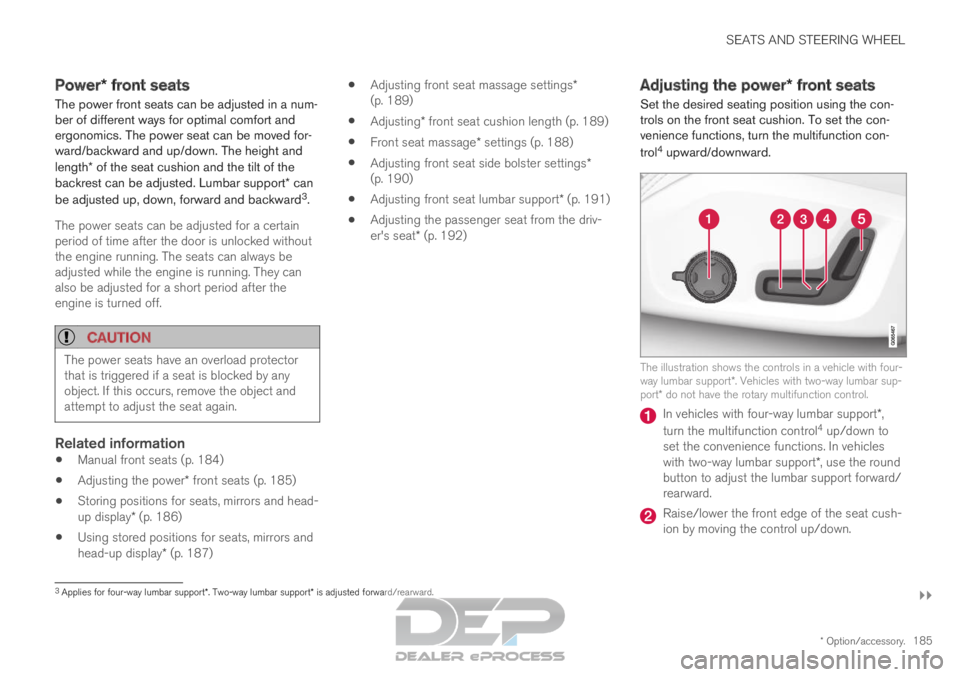
upward/downward. The illustration shows the controls in a vehicle with four-
way lumbar support*. Vehicles with two-way lumbar sup-
port* do not have the rotary multifunction control. In vehicles with four-way lumbar support*,
turn the multifunction control 4
up/down to
set the convenience functions. In vehicles
with two-way lumbar support*, use the round
button to adjust the lumbar support forward/
rearward. Raise/lower the front edge of the seat cush-
ion by moving the control up/down.
3
Applies for four-way lumbar support*. Two-way lumbar support* is adjusted forward/rearward.
Page 191 of 697
SEATS AND STEERING WHEEL
}}
* Option/accessory. 189
Adjusting front seat massage
settings*
The settings for the multifunctional seats can be
adjusted using either the mutifunction control on
the seat or the center display. The adjustment
settings are shown in the center display.
Adjusting front seat massage settingsThe front seat backrests have a massage func-
tion. Air-filled cushions provide the massaging
action and a number of settings are available.
The massage function can only be activated
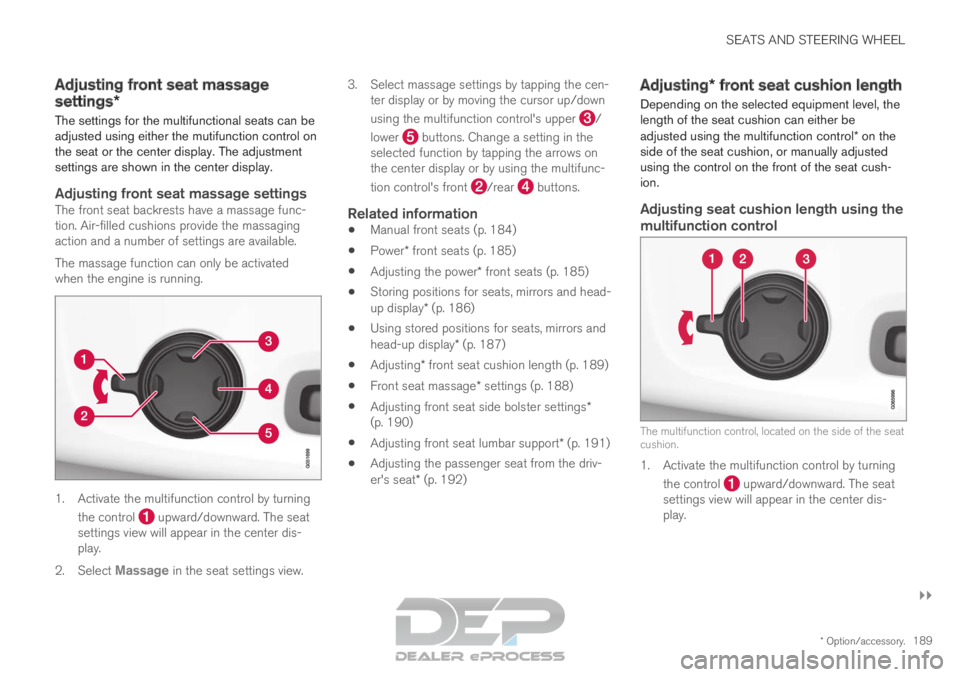
when the engine is running. 1. Activate the multifunction control by turning
the control upward/downward. The seat
settings view will appear in the center dis-
play.
2. Select Massage in the seat settings view. 3.
Select massage settings by tapping the cen-
ter display or by moving the cursor up/down
using the multifunction control's upper /
lower buttons. Change a setting in the
selected function by tapping the arrows on
the center display or by using the multifunc-
tion control's front /rear buttons.
Related information
Manual front seats (p. 184)
Power* front seats (p. 185)
Adjusting the power* front seats (p. 185)
Storing positions for seats, mirrors and head-
up display* (p. 186)
Using stored positions for seats, mirrors and
head-up display* (p. 187)
Adjusting* front seat cushion length (p. 189)
Front seat massage* settings (p. 188)
Adjusting front seat side bolster settings*
(p. 190)
Adjusting front seat lumbar support* (p. 191)
Adjusting the passenger seat from the driv-
er's seat* (p. 192) Adjusting* front seat cushion length
Depending on the selected equipment level, the
length of the seat cushion can either be
adjusted using the multifunction control* on the
side of the seat cushion, or manually adjusted
using the control on the front of the seat cush-
ion.
Adjusting seat cushion length using the
multifunction control The multifunction control, located on the side of the seat
cushion.
1. Activate the multifunction control by turning
the control upward/downward. The seat
settings view will appear in the center dis-
play.
Page 195 of 697
SEATS AND STEERING WHEEL
}}
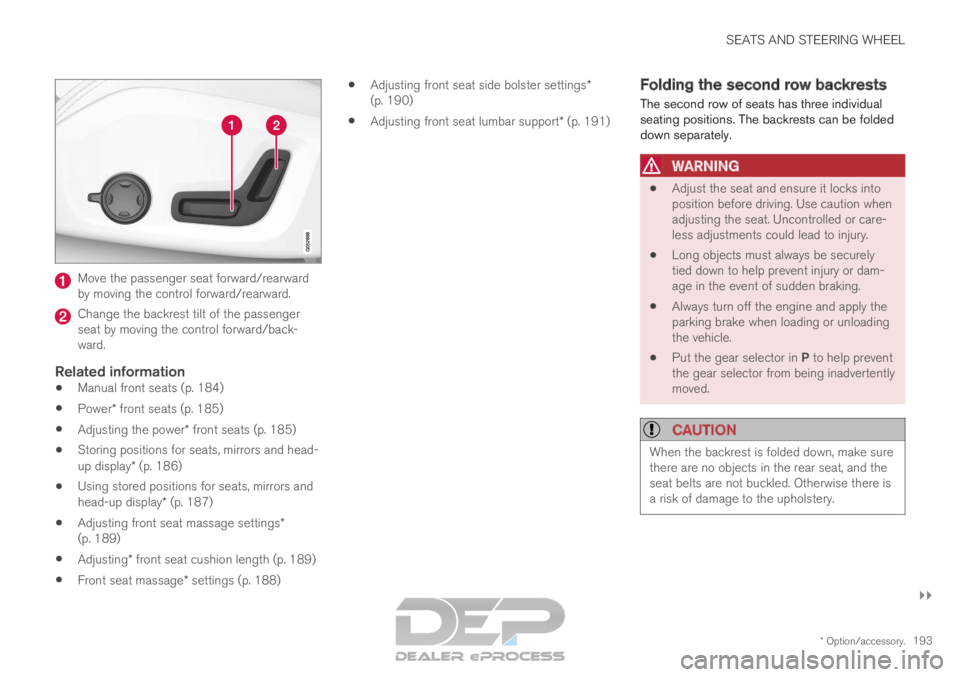
* Option/accessory. 193Move the passenger seat forward/rearward
by moving the control forward/rearward.
Change the backrest tilt of the passenger
seat by moving the control forward/back-
ward.
Related information
Manual front seats (p. 184)
Power* front seats (p. 185)
Adjusting the power* front seats (p. 185)
Storing positions for seats, mirrors and head-
up display* (p. 186)
Using stored positions for seats, mirrors and
head-up display* (p. 187)
Adjusting front seat massage settings*
(p. 189)
Adjusting* front seat cushion length (p. 189)
Front seat massage* settings (p. 188)
Adjusting front seat side bolster settings*
(p. 190)
Adjusting front seat lumbar support* (p. 191) Folding the second row backrests
The second row of seats has three individual
seating positions. The backrests can be folded
down separately.
WARNING
Adjust the seat and ensure it locks into
position before driving. Use caution when
adjusting the seat. Uncontrolled or care-
less adjustments could lead to injury.
Long objects must always be securely
tied down to help prevent injury or dam-
age in the event of sudden braking.
Always turn off the engine and apply the
parking brake when loading or unloading
the vehicle.
Put the gear selector in P to help prevent
the gear selector from being inadvertently
moved.
CAUTION When the backrest is folded down, make sure
there are no objects in the rear seat, and the
seat belts are not buckled. Otherwise there is
a risk of damage to the upholstery.
Page 199 of 697
SEATS AND STEERING WHEEL
}}
* Option/accessory. 197
Moving the second row seats
forward/rearward*
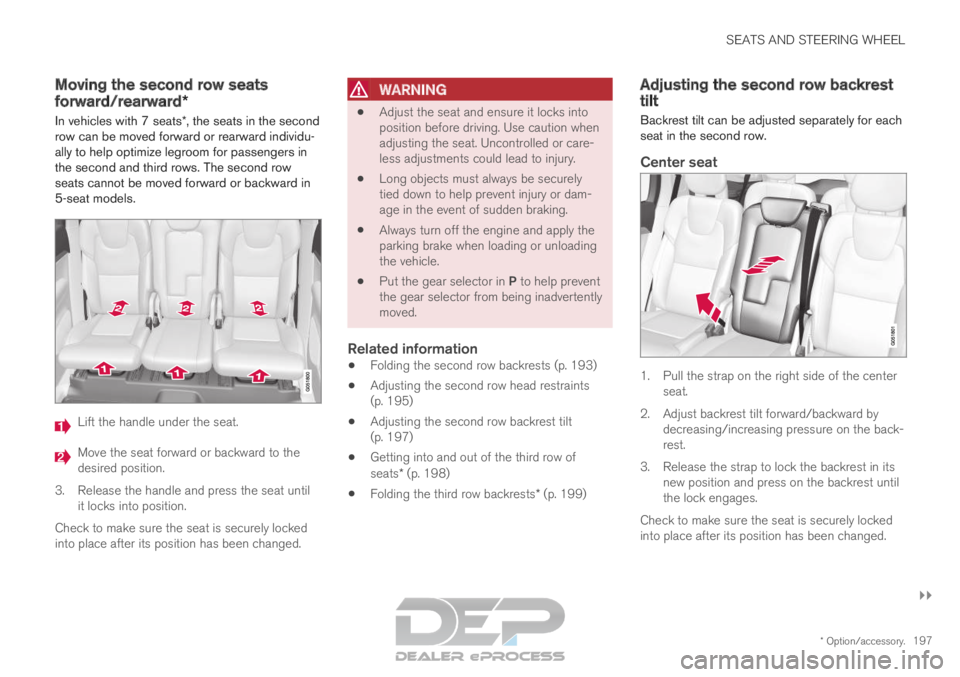
In vehicles with 7 seats*, the seats in the second
row can be moved forward or rearward individu-
ally to help optimize legroom for passengers in
the second and third rows. The second row
seats cannot be moved forward or backward in
5-seat models. Lift the handle under the seat.
Move the seat forward or backward to the
desired position.
3.
Release the handle and press the seat until
it locks into position.
Check to make sure the seat is securely locked
into place after its position has been changed.
WARNING
Adjust the seat and ensure it locks into
position before driving. Use caution when
adjusting the seat. Uncontrolled or care-
less adjustments could lead to injury.
Long objects must always be securely
tied down to help prevent injury or dam-
age in the event of sudden braking.
Always turn off the engine and apply the
parking brake when loading or unloading
the vehicle.
Put the gear selector in P to help prevent
the gear selector from being inadvertently
moved.
Related information
Folding the second row backrests (p. 193)
Adjusting the second row head restraints
(p. 195)
Adjusting the second row backrest tilt
(p. 197)
Getting into and out of the third row of
seats* (p. 198)
Folding the third row backrests* (p. 199) Adjusting the second row backrest
tilt
Backrest tilt can be adjusted separately for each
seat in the second row.
Center seat 1. Pull the strap on the right side of the center
seat.
2.
Adjust backrest tilt forward/backward by
decreasing/increasing pressure on the back-
rest.
3. Release the strap to lock the backrest in its new position and press on the backrest until
the lock engages.
Check to make sure the seat is securely locked
into place after its position has been changed.
Page 200 of 697

||SEATS AND STEERING WHEEL
* Option/accessory.
198
Outboard seats 1. Pull the handle on the side of the seat
upward.
2.
Adjust backrest tilt forward/backward by
decreasing/increasing pressure on the back-
rest.
3. Release the handle to lock the backrest in its new position and press on the backrest until
the lock engages.
Check to make sure the seat is securely locked
into place after its position has been changed.
WARNING
Adjust the seat and ensure it locks into
position before driving. Use caution when
adjusting the seat. Uncontrolled or care-
less adjustments could lead to injury.
Long objects must always be securely
tied down to help prevent injury or dam-
age in the event of sudden braking.
Always turn off the engine and apply the
parking brake when loading or unloading
the vehicle.
Put the gear selector in P to help prevent
the gear selector from being inadvertently
moved.
Related information
Folding the second row backrests (p. 193)
Adjusting the second row head restraints
(p. 195)
Moving the second row seats forward/rear-
ward* (p. 197)
Getting into and out of the third row of
seats* (p. 198)
Folding the third row backrests* (p. 199) Getting into and out of the third row
of seats*
The second row of seats can be adjusted for
easier access to the third row of seats*. To fold down the backrest:
1.
Pull the handle on the upper side of the right
or left outboard second row seat upward/
forward.
2. Fold the backrest down and move the entire seat forward.
To return the seat to the upright position:
– Push the seat rearward to its end position.
The backrest should then easily return to the
correct position.
Page 220 of 697
CLIMATE CONTROL
* Option/accessory.
218 Activating and deactivating the
heated front seat*
The seats can be heated for added comfort for
the driver and passengers in cold weather.
Seat heating can be set to automatically activate
when the engine is started. When set to automat-
ically activate, heating will be turned on at low
ambient temperatures.
1. Tap Settings in the Top view in the center
display.
2. Tap Climate.
3. Select Auto Driver Seat Heating Level
and Auto Passenger Seat Heating Level to activate/deactivate automatic start of
heated driver's and passenger seat.
4. Select Low, Medium or High to select level
after the function has been activated.
Related information
Climate system controls (p. 215)
Activating and deactivating power front
seats* (p. 217) Activating and deactivating the
heated rear seats*
The seats can be heated for added comfort for
the driver and passengers in cold weather.
Activating and deactivating the heated
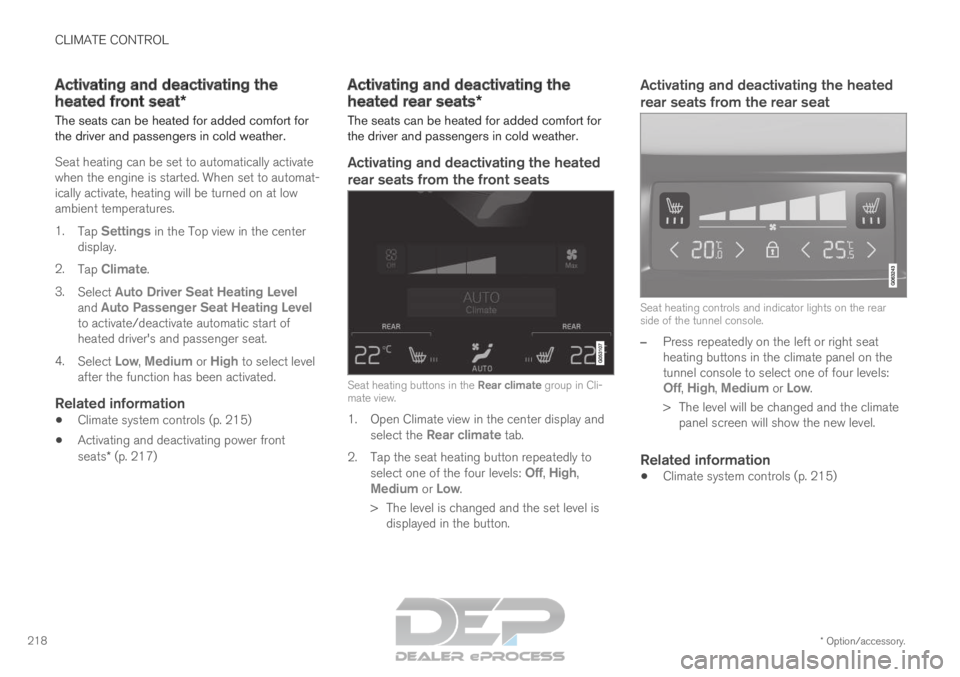
rear seats from the front seats Seat heating buttons in the Rear climate group in Cli-
mate view.
1. Open Climate view in the center display and select the Rear climate tab.
2.
Tap the seat heating button repeatedly to
select one of the four levels: Off, High,
Medium or Low.
>
The level is changed and the set level is
displayed in the button.
Activating and deactivating the heated
rear seats from the rear seat Seat heating controls and indicator lights on the rear
side of the tunnel console.
–
Press repeatedly on the left or right seat
heating buttons in the climate panel on the
tunnel console to select one of four levels:
Off,
High, Medium or Low.
>
The level will be changed and the climate
panel screen will show the new level.
Related information
Climate system controls (p. 215)
Page 221 of 697

CLIMATE CONTROL
}}
* Option/accessory. 219
Activating and deactivating front
seat ventilation*
The seats can be ventilated to provide increased
comfort in warm weather.
The ventilation system consists of fans in the
seats and backrest that draw air through the seat
upholstery. The cooler the passenger compart-
ment is, the greater the cooling effect of the ven-
tilation. The system can be activated when the
engine is running.
Steering wheel and seat buttons in the climate row.
1. Tap the left- or right-side steering wheel and
seat button in the center display's climate
bar to open the controls for steering wheel
and seat heating.
If the vehicle is not equipped with heated
seats or heated steering wheel, the button
for seat ventilation is directly accessible in
the climate bar.
2.
Tap the seat ventilation button repeatedly to
select one of the four levels: Off, High,
Medium or Low.
>
The level is changed and the set level is
displayed in the button.
Related information
Climate system controls (p. 215) Activating and deactivating the
heated steering wheel*
The steering wheel can be heated for added
comfort in cold weather. Steering wheel and seat buttons in the climate row.
1. Tap the driver's side steering wheel and seat
button in the climate bar in the center display
to open the controls for steering wheel and
seat heating.
If the vehicle is not equipped with heated or
ventilated seats, the button for steering
wheel heating is directly accessible in the cli-
mate bar.
2.
Tap the steering wheel heating button
repeatedly to select one of the four levels:
Off,
High, Medium or Low.
>
The level is changed and the set level is
displayed in the button.
Page 222 of 697

||CLIMATE CONTROL
* Option/accessory.
220
Related information
Climate system controls (p. 215)
Activating and deactivating automatic steer-
ing wheel heating* (p. 220) Activating and deactivating
automatic steering wheel heating*
The steering wheel can be heated for added
comfort in cold weather.
Steering wheel heating can be set to automati-
cally activate when the engine is started. When
set to automatically activate, heating will be
turned on at low ambient temperatures.
1. Tap Settings in the Top view in the center
display.
2. Tap Climate.
3. Select Auto Steering Wheel Heating
Level to activate/deactivate automatic start
of heated steering wheel.
4. Select Low, Medium or High to select level
after the function has been activated.
Related information
Activating and deactivating the heated steer-
ing wheel* (p. 219) Activating auto climate control
If auto climate control is activated, several cli-
mate system functions are controlled automati-
cally. Auto climate button in Climate view.
1. Open Climate view in the center display.
Page 226 of 697

||CLIMATE CONTROL
* Option/accessory.
224
Activating and deactivating windshield
heating from the center display Windshield heating button in Climate view.
1. Open Climate view in the center display.
2.
Tap Electric.
>
Windshield heating is activated/deacti-
vated and the button lights up/goes out.
NOTE Triangular areas at the far sides of the wind-
shield are not heated and will take slightly
longer to defrost/de-ice.
NOTE
The heated windshield may affect the per-
formance of transponders and other commu-
nication equipment.
Related information
Climate system controls (p. 215)
Activating and deactivating automatic wind-
shield heating* (p. 224) Activating and deactivating
automatic windshield heating*
Windshield heating is used to quickly remove
condensation and ice from the windshield.
Windshield heating can be set to automatically
activate when the engine is started. With auto-
matic start activated, heating will be activated
when there is a risk of ice or condensation on the
windows or mirrors. Heating is automatically
switched off when the window or door mirror is
sufficiently warm and the condensation or ice is
gone.
1. Tap Settings in the Top view in the center
display.
2. Tap Climate.
3. Select Auto Front Defroster to activate/
deactivate automatic windshield heating.
Related information
Activating and deactivating the heated wind-
shield* (p. 223)