engine VOLVO XC90 TWIN ENGINE 2019 Workshop Manual
[x] Cancel search | Manufacturer: VOLVO, Model Year: 2019, Model line: XC90 TWIN ENGINE, Model: VOLVO XC90 TWIN ENGINE 2019Pages: 697, PDF Size: 10.33 MB
Page 281 of 697
DRIVER SUPPORT
}}
* Option/accessory. 279
Changing the level of steering wheel
resistance*
To change the level of steering wheel resistance,
see the description of the INDIVIDUAL option
under "Available drive modes" in the "Drive
modes" section.
On models not equipped with drive mode con-
trols and the INDIVIDUAL option, steering wheel
resistance can instead be set in the center dis-
play's Top view under:
Settings My Car Drive Modes
Steering Force
Steering wheel resistance settings cannot be
accessed when turning at speeds above
10 km/h (6 mph).
Related information
Drive modes (p. 454)
Pilot Assist (p. 316)
Lane Keeping Aid (p. 372)
Steering assistance at risk of collision
(p. 380)
Park Assist Pilot* (p. 406) Stability system Roll Stability
Control
The Roll Stability Control (RSC 1
) system helps
minimize the risk of a rollover in the event of e.g.
a sudden evasive maneuver or if the vehicle
begins to skid.
The RSC system monitors the lateral angle at
which the vehicle is leaning and registers any
changes. Using this information, the system cal-
culates the likelihood of a rollover. If there is an
imminent risk of a rollover, Electronic Stability
Control is activated, engine torque is reduced and
brakes are applied to one or more of the wheels
until the vehicle has regained stability.
WARNING The vehicle
Page 282 of 697
||DRIVER SUPPORT
* Option/accessory.
280
WARNING
The Electronic Stability Control system
ESC is supplementary driver support
intended to facilitate driving and make it
safer – it cannot handle all situations in
all traffic, weather and road conditions.
ESC is not a substitute for the driver's
attention and judgment. The driver is
always responsible for ensuring the vehi-
cle is driven in a safe manner, at the
appropriate speed, with an appropriate
distance to other vehicles, and in accord-
ance with current traffic rules and regula-
tions.
Stability control 3This function helps control the driving and brak-
ing force of each individual wheel in an attempt
to stabilize the vehicle.
Spin control and active yaw controlThis function is active at low speeds and brakes
the wheels that are spinning to transfer additional
power from wheels that are not spinning.
This function also helps prevent the wheels from
spinning while the vehicle is accelerating.
Engine drag control
Engine drag control (EDC
4
) helps prevent inad-
vertent wheel lock, e.g. after downshifting or
using engine braking when driving at low speeds
on a slippery surface.
Inadvertent wheel lock while driving could impair
the driver's ability to steer the vehicle.
Trailer Stability Assist* 5
Trailer Stability Assist (TSA
6
) is designed to help
stabilize a vehicle that is towing a trailer if the
vehicle and trailer have begun to sway. For more
information, see "Trailer Stability Assist".
NOTE The TSA function is deactivated if
ESC Sport
Mode is activated.
Related information
Electronic Stability Control Sport mode
(p. 281)
Activating/deactivating Sport mode in Elec-
tronic Stability Control (p. 281)
Electronic Stability Control Sport mode limi-
tations (p. 281)
Electronic Stability Control symbols and mes-
sages (p. 282)
Trailer Stability Assist* (p. 485)
3
Also called traction control.4 Engine Drag Control5Trailer Stability Assist is included if the vehicle is equipped with a V\
olvo original towbar.6 Trailer Stability Assist
Page 283 of 697
DRIVER SUPPORT
281
Electronic Stability Control Sport
mode
The ESC 7
system is always activated and can-
not be switched off. However, the driver can
select ESC Sport Mode, which offers more
active driving characteristics.
With the ESC Sport Mode sub-function
selected, intervention from ESC is reduced and
more lateral movement is permitted, giving the
driver more control of the vehicle than usual.
When ESC Sport Mode is selected, ESC may
seem to be disabled even though the function
continues to assist the driver.
NOTE When the ESC Sport Mode function is
selected, the trailer stabilizer (TSA 8
) is
switched off. ESC Sport Mode also helps provide maximum
traction if the vehicle gets stuck or is driving on a
loose surface such as deep snow or loose sand.
Related information
Electronic Stability Control (p. 279) Activating/deactivating Sport mode
in Electronic Stability Control
The ESC
9
system is always activated and can-
not be switched off. However, the driver can
select Sport mode, which offers more active
driving characteristics.
Sport mode can be activated/
deactivated in the center dis-
play's Function view. –
Tap the
ESC Sport Mode button in Func-
tion view.
>
Sport mode is activated when the indica-
tor light is green, and deactivated when
the indicator light is gray.
When ESC Sport Mode is activated,
this symbol will illuminate with a steady
glow in the instrument panel. It will
remain on until the driver deactivates
the function or until the engine is turned off. The
ESC system will return to normal mode the next
time the engine is started.
Related information
Electronic Stability Control (p. 279) Electronic Stability Control Sport
mode limitations
There are certain limitations associated with the
ESC 10
system's subfunction ESC Sport Mode
being activated.
The
ESC Sport Mode function cannot be
selected when any of the following functions are
activated:
Speed limiter
Cruise control
Adaptive Cruise Control
Pilot Assist.
Related information
Electronic Stability Control (p. 279) 7
Electronic Stability Control
8 Trailer Stability Assist
9 Electronic Stability Control
10 Electronic Stability Control
Page 284 of 697
DRIVER SUPPORT
282Electronic Stability Control symbols
and messages
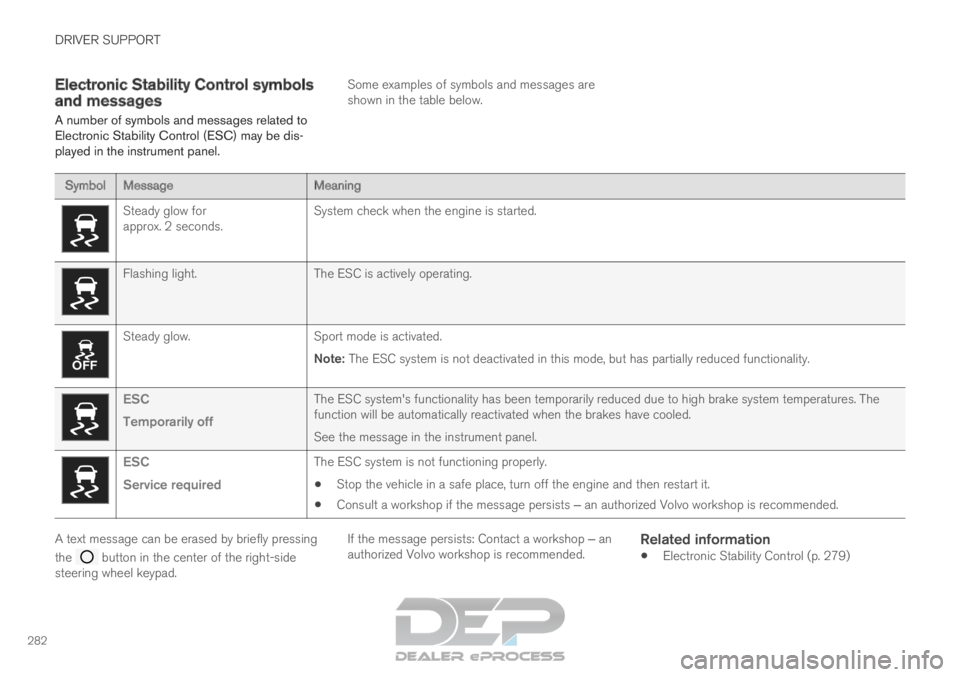
A number of symbols and messages related to
Electronic Stability Control (ESC) may be dis-
played in the instrument panel. Some examples of symbols and messages are
shown in the table below.Symbol
Message MeaningSteady glow for
approx. 2 seconds.
System check when the engine is started.Flashing light.
The ESC is actively operating.Steady glow.
Sport mode is activated.
Note: The ESC system is not deactivated in this mode, but has partially reduc\
ed functionality. ESC
Temporarily off
The ESC system's functionality has been temporarily reduced due to hi\
gh brake system temperatures. The
function will be automatically reactivated when the brakes have cooled.
See the message in the instrument panel.ESC
Service required
The ESC system is not functioning properly.
Stop the vehicle in a safe place, turn off the engine and then restart i\
t.
Consult a workshop if the message persists ‒ an authorized Volvo workshop is recommended. A text message can be erased by briefly pressing
the
button in the center of the right-side
steering wheel keypad. If the message persists: Contact a workshop ‒ an
authorized Volvo workshop is recommended.
Related information
Electronic Stability Control (p. 279)
Page 286 of 697
DRIVER SUPPORT
284Activating and starting Speed
Limiter
The Speed Limiter (SL 13
) function must be
selected and activated in order to regulate
speed.
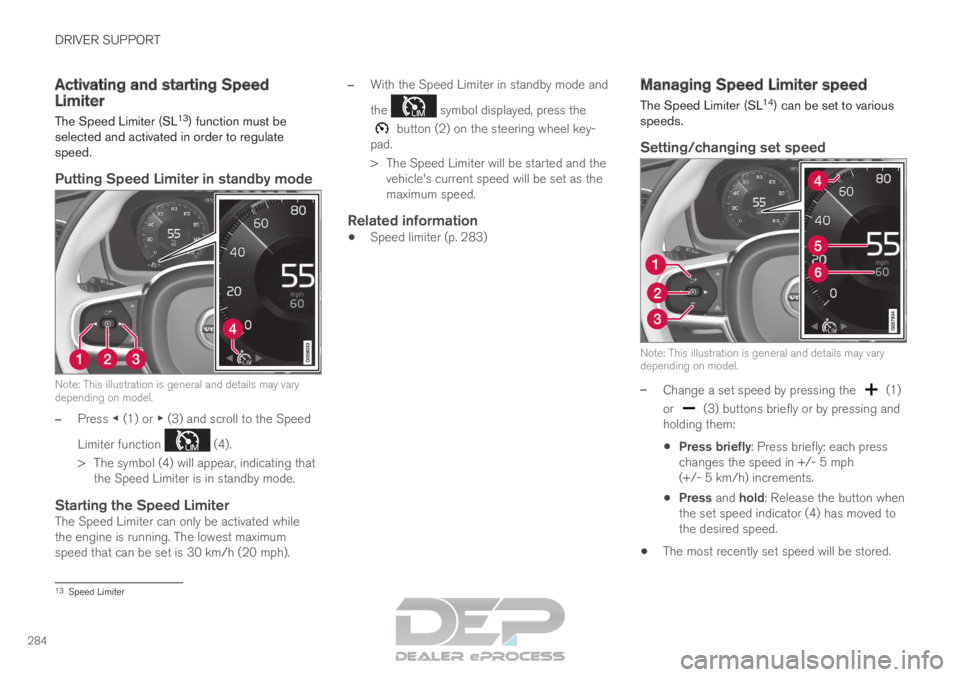
Putting Speed Limiter in standby mode Note: This illustration is general and details may vary
depending on model.
–
Press ◀ (1) or ▶ (3) and scroll to the Speed
Limiter function (4).
>
The symbol (4) will appear, indicating that
the Speed Limiter is in standby mode.
Starting the Speed LimiterThe Speed Limiter can only be activated while
the engine is running. The lowest maximum
speed that can be set is 30 km/h (20 mph). –
With the Speed Limiter in standby mode and
the symbol displayed, press the
button (2) on the steering wheel key-
pad.
>
The Speed Limiter will be started and the
vehicle's current speed will be set as the
maximum speed.
Related information
Speed limiter (p. 283) Managing Speed Limiter speed
The Speed Limiter (SL
14
) can be set to various
speeds.
Setting/changing set speed Note: This illustration is general and details may vary
depending on model.
–
Change a set speed by pressing the (1)
or (3) buttons briefly or by pressing and
holding them:
Press briefly: Press briefly: each press
changes the speed in +/- 5 mph
(+/- 5 km/h) increments.
Press and hold: Release the button when
the set speed indicator (4) has moved to
the desired speed.
The most recently set speed will be stored. 13
Speed Limiter
Page 287 of 697
DRIVER SUPPORT
285
Related information
Speed limiter (p. 283) Deactivating and putting Speed
Limiter in standby mode
The Speed Limiter (SL 15
) can be temporarily
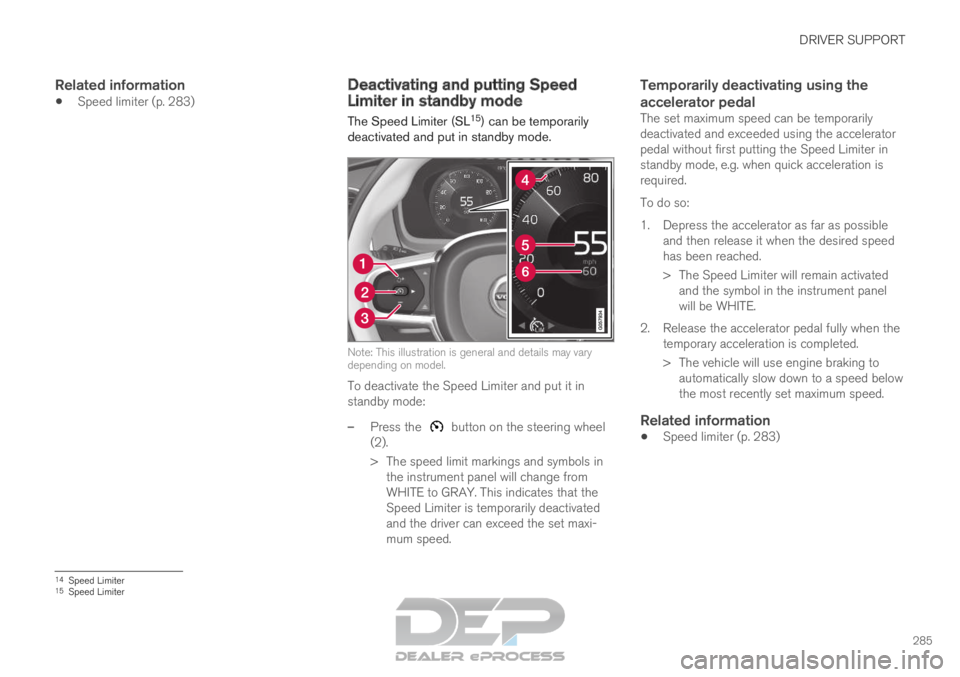
deactivated and put in standby mode. Note: This illustration is general and details may vary
depending on model.
To deactivate the Speed Limiter and put it in
standby mode:
–
Press the button on the steering wheel
(2).
>
The speed limit markings and symbols in
the instrument panel will change from
WHITE to GRAY. This indicates that the
Speed Limiter is temporarily deactivated
and the driver can exceed the set maxi-
mum speed.
Temporarily deactivating using the
accelerator pedal
The set maximum speed can be temporarily
deactivated and exceeded using the accelerator
pedal without first putting the Speed Limiter in
standby mode, e.g. when quick acceleration is
required.
To do so:
1. Depress the accelerator as far as possible and then release it when the desired speed
has been reached.
> The Speed Limiter will remain activatedand the symbol in the instrument panel
will be WHITE.
2. Release the accelerator pedal fully when the temporary acceleration is completed.
> The vehicle will use engine braking toautomatically slow down to a speed below
the most recently set maximum speed.
Related information
Speed limiter (p. 283) 14
Speed Limiter
15 Speed Limiter
Page 296 of 697
||DRIVER SUPPORT
294
For vehicles with both CC and ACC
–
Change a set speed by pressing the (1)
or (3) buttons briefly or by pressing and
holding them:
Press briefly: Press briefly: each press
changes the speed in +/- 5 mph
(+/- 5 km/h) increments.
Press and hold: release the button when
the set speed indicator (4) has moved to
the desired speed.
The most recently set speed will be stored.
If speed is increased by depressing the accelera-
tor pedal while pressing the (1) button on
the steering wheel, the vehicle's speed when the
button is pressed will be stored as the set speed.
Temporarily increasing speed using the accelera-
tor pedal, e.g. when passing another vehicle, will
not affect the setting. The vehicle will return to
the set speed when the accelerator pedal is
released.
Using engine braking instead of
applying the brakes
Cruise Control regulates speed by lightly applying
the brakes. On downgrades, it can sometimes be
desirable to roll a bit faster and let speed be
reduced instead by engine braking alone. The
driver can temporarily disengage the Cruise Con-
trol braking function. To disengage CC:
– Press the accelerator pedal about halfway
down and then release it.
>
Cruise Control will automatically disen-
gage the automatic brake function and
speed will only be reduced using the
engine braking function.
How drive mode affects cruise controlThe way the cruise control maintains the vehicle's
speed can vary depending on the selected drive
mode 26
.
Cruise Control Eco Cruise with ECO drive
mode
In the ECO drive mode, cruise control's accelera-
tion and deceleration will be smoother than in
other drive modes to help provide optimal fuel
efficiency and reduced environmental impact.
Because of this, the vehicle's actual speed may
be slightly above or below the set speed.
Cruise Control Dynamic Cruise
With the Dynamic drive mode, cruise control's
acceleration and deceleration will be faster and
more immediate than in other drive modes.
Related information
Cruise control (p. 291)
Drive modes (p. 454) Deactivating and putting Cruise
Control in standby mode
Cruise Control (CC 27
) can be temporarily put
into standby mode and then reactivated.
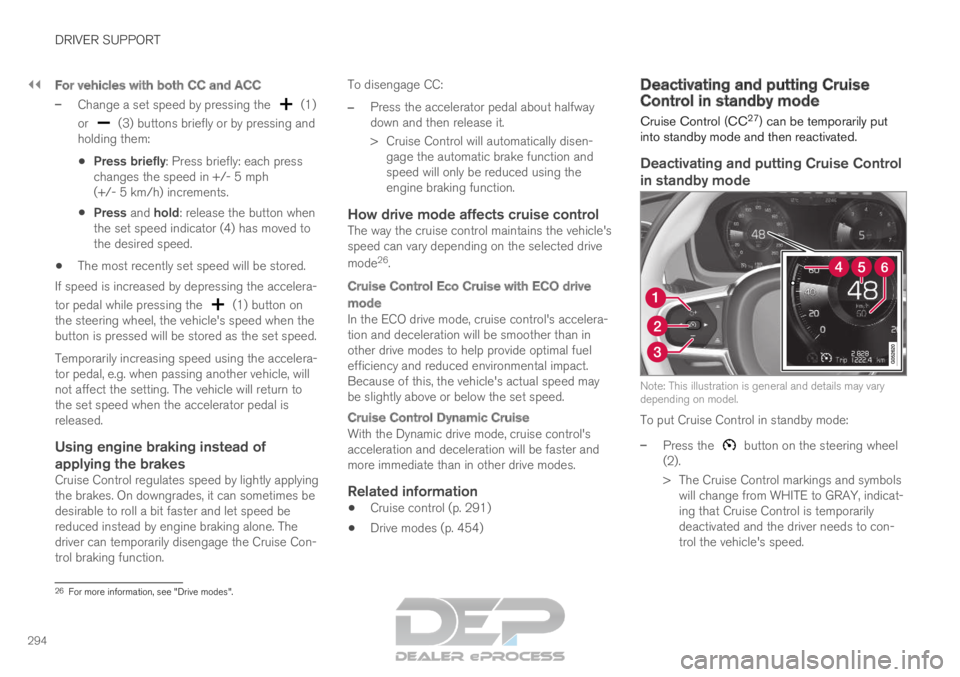
Deactivating and putting Cruise Control
in standby mode Note: This illustration is general and details may vary
depending on model.
To put Cruise Control in standby mode:
–
Press the button on the steering wheel
(2).
>
The Cruise Control markings and symbols
will change from WHITE to GRAY, indicat-
ing that Cruise Control is temporarily
deactivated and the driver needs to con-
trol the vehicle's speed. 26
For more information, see "Drive modes".
Page 297 of 697

DRIVER SUPPORT
295
Standby mode due to action by the driver
Cruise Control will be temporarily deactivated and
put in standby mode if: the brakes are applied
the gear selector is moved to N
the vehicle is driven faster than the set
speed for more than 1 minute
The driver must then control the vehicle's speed.
Temporarily increasing speed using the accelera-
tor pedal, e.g. when passing another vehicle, will
not affect the setting. The vehicle will return to
the set speed when the accelerator pedal is
released.
Automatic standby mode
Cruise Control will be temporarily deactivated and
put in standby mode if:
the wheels lose traction
the engine speed (rpm) is too low/high
the temperature in the brake system
becomes too high
the vehicle's speed goes below 30 km/h
(20 mph).
The driver must then control the vehicle's speed.
Related information
Cruise control (p. 291) Reactivating Cruise Control from
standby mode
Cruise Control (CC 28
) can be temporarily put
into standby mode and then reactivated.
Reactivating Cruise Control from
standby mode Note: This illustration is general and details may vary
depending on model.
To start Cruise Control from standby mode:
–
Press the button on the steering wheel
(1).
>
The Cruise Control marking in the instru-
ment panel will change from GRAY to
WHITE and the vehicle will then return to
the most recently set speed. or
To start Cruise Control from standby mode:
– Press the button on the steering wheel
(2).
>
The Cruise Control markings and symbols
in the instrument panel will change from
GRAY to WHITE and the vehicle's current
speed will be set.
WARNING A noticeable increase in speed may follow
when the speed is resumed with the
steering wheel button.
Related information
Cruise control (p. 291) 27
Cruise Control
28 Cruise Control
Page 300 of 697

||DRIVER SUPPORT
* Option/accessory.
298
NOTE Visual warnings on the windshield may be dif-
ficult to notice in cases of strong sunlight,
reflections, extreme light contrasts, or if the
driver is wearing sunglasses or is not looking
straight ahead.
Related information
Distance Alert* (p. 296)
Head-up display* (p. 142) Activating/deactivating Distance
Alert
35
Distance Alert can be turned off.
On/OffPress the Distance Alert but-
ton in the center display's
Function view.
GREEN button indicator light - Distance Alert
is on.
GRAY button indicator light - Distance Alert
is off.
Distance Alert is automatically activated each
time the engine is started.
Related information
Distance Alert* (p. 296) Setting a time interval for Distance
Alert
36
The Distance Alert function can be set to differ-
ent time intervals.
Different time intervals to the
vehicle ahead can be selected
and are shown in the instru-
ment panel as 1–5 horizontal
bars. The more bars, the longer
the time interval. One bar rep-
resents an interval of
approx. 1 second to the vehicle ahead. 5 bars
represents approx. 3 seconds. The same symbol appears when the Adaptive
Cruise Control function is activated.
35
The Distance Alert function is only available in vehicles that can displ\
ay information on the windshield with a head-up display.
36 The Distance Alert function is only available in vehicles that can displ\
ay information on the windshield with a head-up display.
Page 306 of 697

DRIVER SUPPORT
* Option/accessory.
304 Head-up display for Adaptive Cruise
Control with collision warning
In vehicles equipped with a head-up display*, a
flashing warning symbol will be displayed on the
windshield. Collision warning symbol on the windshield
41
.
NOTE Visual warnings on the windshield may be dif-
ficult to notice in cases of strong sunlight,
reflections, extreme light contrasts, or if the
driver is wearing sunglasses or is not looking
straight ahead.
Related information
Adaptive Cruise Control* (p. 300)
Head-up display* (p. 142) Activating and starting Adaptive
Cruise Control
Adaptive Cruise Control (ACC
42
) must first be
activated and then started before it can regulate
speed and distance.
Putting Adaptive Cruise Control in
standby mode Note: This illustration is general and details may vary
depending on model.
Adaptive Cruise Control is in standby mode each
time the engine is started. To put ACC in standby
mode from active mode:
–
Press ◀ (2) or ▶ (3) on the steering wheel
keypad and scroll to the (4) function.
>
The symbol will appear and Adaptive
Cruise Control will go into standby mode.
Starting/activating Adaptive Cruise
Control
To start ACC:
The driver's seat belt must be buckled and
the driver's door must be closed.
There must be a vehicle ahead (target vehi-
cle) within a reasonable distance or your
vehicle's current speed must be at least
15 km/h (9 mph). Note: This illustration is general and details may vary
depending on model.
–
With the (4) function displayed, press
(1) on the steering wheel keypad.
>
Adaptive Cruise Control will start and the
current speed will be stored, which will be
shown by numbers in the center of the
speedometer. 41
Note: This illustration is general and details may vary depending on mod\
el.