engine VOLVO XC90 TWIN ENGINE 2019 Service Manual
[x] Cancel search | Manufacturer: VOLVO, Model Year: 2019, Model line: XC90 TWIN ENGINE, Model: VOLVO XC90 TWIN ENGINE 2019Pages: 697, PDF Size: 10.33 MB
Page 227 of 697

CLIMATE CONTROL
225
Activating and deactivating the
heated rear window and door
mirrors
The heated rear window and door mirrors are
used to quickly remove condensation and ice
from the glass.
Activating and deactivating the heated
rear window and door mirrors from the
center console
A button in the center console offers quick
access to the heated rear window and door mir-
rors functions.
Button in center console.
–
Tap the button.
>
Heated windows and door mirrors are
activated and the button lights up/goes
out.
Activating and deactivating the heated
rear window and door mirrors from the
center display Rear window/door mirror heating button in Climate view.
1. Open Climate view in the center display.
2.
Tap Rear.
>
Heated windows and door mirrors are
activated and the button lights up/goes
out.
Related information
Climate system controls (p. 215)
Automatically activating and deactivating the
heated rear window and door mirrors
(p. 225) Automatically activating and
deactivating the heated rear window
and door mirrors
The heated rear window and door mirrors are
used to quickly remove condensation and ice
from the glass.
It is possible to select whether rear window and
door mirror heating should be automatically acti-
vated or deactivated when the engine is started.
With automatic start activated, heating will be
activated when there is a risk of ice or condensa-
tion on the windows or mirrors. Heating is auto-
matically switched off when the window or door
mirror is sufficiently warm and the condensation
or ice is gone.
1. Tap Settings in the Top view in the center
display.
2. Tap Climate.
3. Select Auto Rear Defroster to activate/
deactivate automatic rear window and door
heating.Related information
Activating and deactivating the heated rear
window and door mirrors (p. 225)
Page 235 of 697
CLIMATE CONTROL
}}
* Option/accessory. 233
Starting and stopping
preconditioning
Preconditioning heats or cools the passenger
compartment before driving. Preconditioning
can be started in the center display or from a
cellular phone.
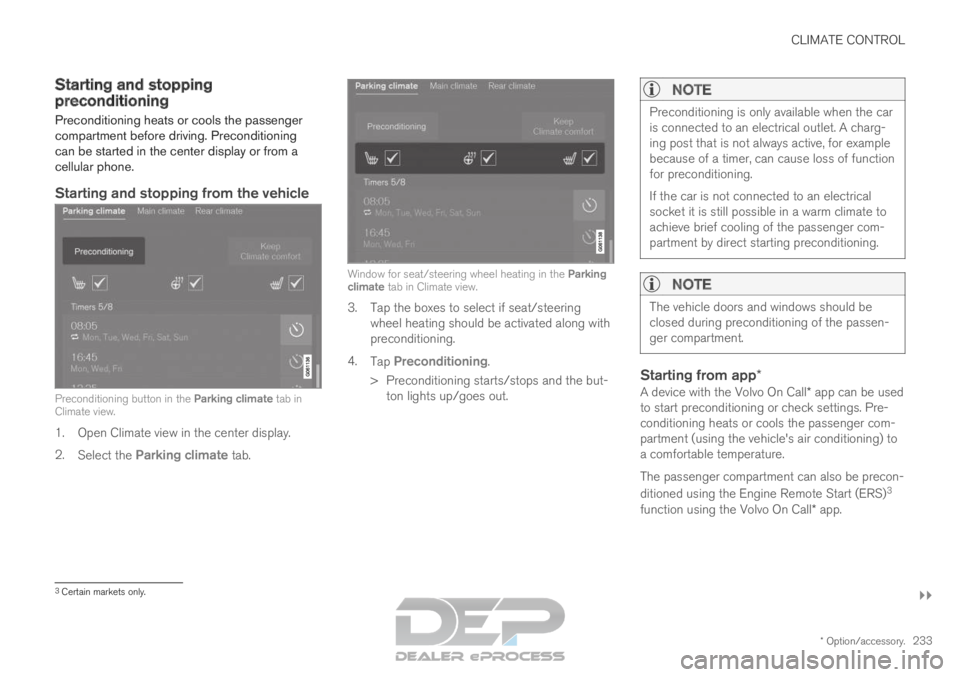
Starting and stopping from the vehicle Preconditioning button in the Parking climate tab in
Climate view.
1. Open Climate view in the center display.
2. Select the Parking climate tab. Window for seat/steering wheel heating in the Parking
climate tab in Climate view.
3. Tap the boxes to select if seat/steering
wheel heating should be activated along with
preconditioning.
4. Tap Preconditioning.
>
Preconditioning starts/stops and the but-
ton lights up/goes out.
NOTE Preconditioning is only available when the car
is connected to an electrical outlet. A charg-
ing post that is not always active, for example
because of a timer, can cause loss of function
for preconditioning.
If the car is not connected to an electrical
socket it is still possible in a warm climate to
achieve brief cooling of the passenger com-
partment by direct starting preconditioning.
NOTE
The vehicle doors and windows should be
closed during preconditioning of the passen-
ger compartment.
Starting from app*
A device with the Volvo On Call* app can be used
to start preconditioning or check settings. Pre-
conditioning heats or cools the passenger com-
partment (using the vehicle's air conditioning) to
a comfortable temperature.
The passenger compartment can also be precon-
ditioned using the Engine Remote Start (ERS) 3
function using the Volvo On Call* app. 3
Certain markets only.
Page 239 of 697
CLIMATE CONTROL
237
Climate comfort retaining function
The climate in the passenger compartment can
be maintained when the vehicle is parked, e.g. if
the engine is turned off but the driver or passen-
gers remain in the vehicle.
This function can only be direct-started.
The function utilizes several of the vehicle's sys-
tems: Residual heat from the engine is used to
help heat the passenger compartment to a
comfortable temperature.
In warm weather, the ventilation system cools
the passenger compartment by blowing air in
from outside.
NOTE Climate comfort maintenance will be deacti-
vated if the vehicle is locked from the outside
in order to avoid using residual engine heat
unnecessarily. This function is intended to be
used to maintain climate comfort when the
driver or a passenger remains in the vehicle
after the engine is turned off.
Related information
Parking climate (p. 231)
Starting and switching off the climate retain-
ing function when parking (p. 237) Starting and switching off the
climate retaining function when
parking
The climate retaining function maintains the cli-
mate settings in the vehicle after the engine has
been switched off. The function can be activated
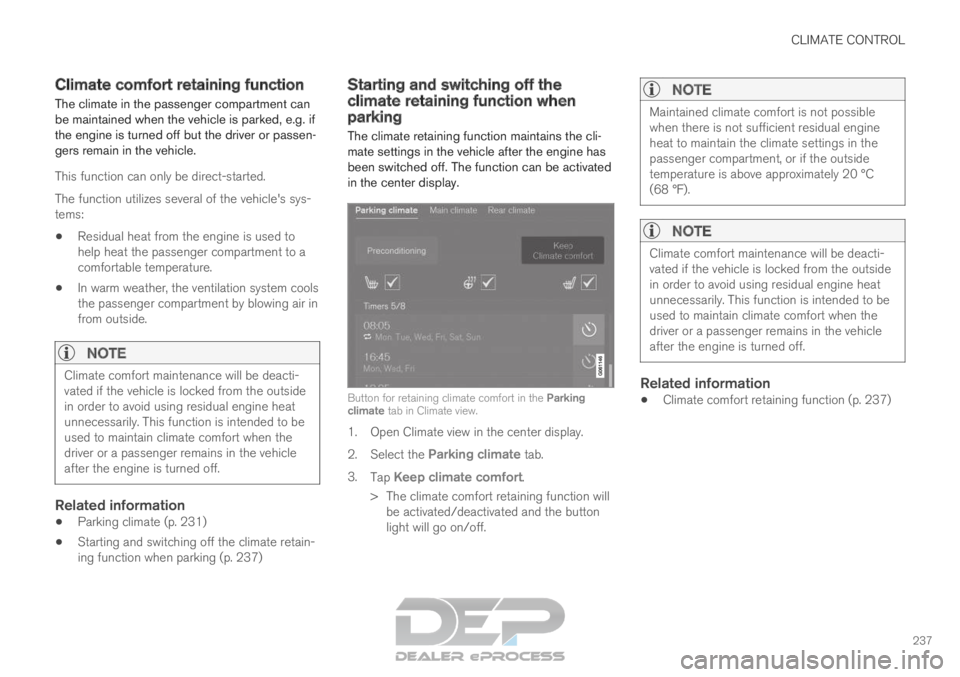
in the center display. Button for retaining climate comfort in the Parking
climate tab in Climate view.
1. Open Climate view in the center display.
2.
Select the Parking climate tab.
3. Tap Keep climate comfort.
>
The climate comfort retaining function will
be activated/deactivated and the button
light will go on/off.
NOTE Maintained climate comfort is not possible
when there is not sufficient residual engine
heat to maintain the climate settings in the
passenger compartment, or if the outside
temperature is above approximately 20 °C
(68 °F).
NOTE
Climate comfort maintenance will be deacti-
vated if the vehicle is locked from the outside
in order to avoid using residual engine heat
unnecessarily. This function is intended to be
used to maintain climate comfort when the
driver or a passenger remains in the vehicle
after the engine is turned off.
Related information
Climate comfort retaining function (p. 237)
Page 241 of 697
CLIMATE CONTROL
239
Heater
The heater helps the engine and passenger
compartment reach the correct temperature
before and while driving.
The heater has two sub-functions: Parking heater - heats the passenger com-
partment as needed when the parking cli-
mate's preconditioning is activated.
Auxiliary heater - heats the passenger com-
partment and engine while driving.
The heater is a high-voltage coolant heater and is
mounted in the front right-side wheel housing.
Battery and chargingThe heater is powered by the vehicle's hybrid bat-
tery. If the charge level in the hybrid battery is too
low, the heater will switch off automatically and a
message will be displayed in the instrument
panel.
NOTE Make sure that the battery has sufficient
charge if the heater must be used.
Related information
Climate (p. 204) Parking heater
The parking heater heats the passenger com-
partment as needed before driving if precondi-
tioning is activated.
The parking heater is one of two sub-functions of
the vehicle's heater. The heater is mounted in the
front right-side wheel housing.
The parking heater starts automatically if the
parking climate's preconditioning is activated and
the passenger compartment needs to be heated.
It switches off automatically when a set timer
time or the heater's maximum run time expires, or
if the car is restarted.
The heater's maximum running time is 40
minutes. Additional heater
The auxiliary heater helps heat the passenger
compartment and engine while driving.
The auxiliary heater is one of two sub-functions
of the vehicle's heater. The heater is mounted in
the front right-side wheel housing.
The auxiliary heater is started and controlled
automatically when extra heat is required while
the vehicle is being driven.
It switches off automatically when the ignition is
switched off.
Page 242 of 697
CLIMATE CONTROL
240Activating and deactivating the
auxiliary heater
The auxiliary heater helps heat the passenger
compartment and engine while driving.
It is possible to set whether automatic start for
the auxiliary heater should be activated or deacti-
vated.
1.
Tap Settings in the Top view in the center
display.
2. Tap Climate.
3. Select Additional Heater to activate/deac-
tivate automatic start for the auxiliary heater.
NOTE If automatic start of the auxiliary heater is
deactivated, this may impair comfort in the
passenger compartment since the climate
system then does not have a heat source dur-
ing electrical operation.
Page 245 of 697
KEY, LOCKS AND ALARM
}}
* Option/accessory. 243
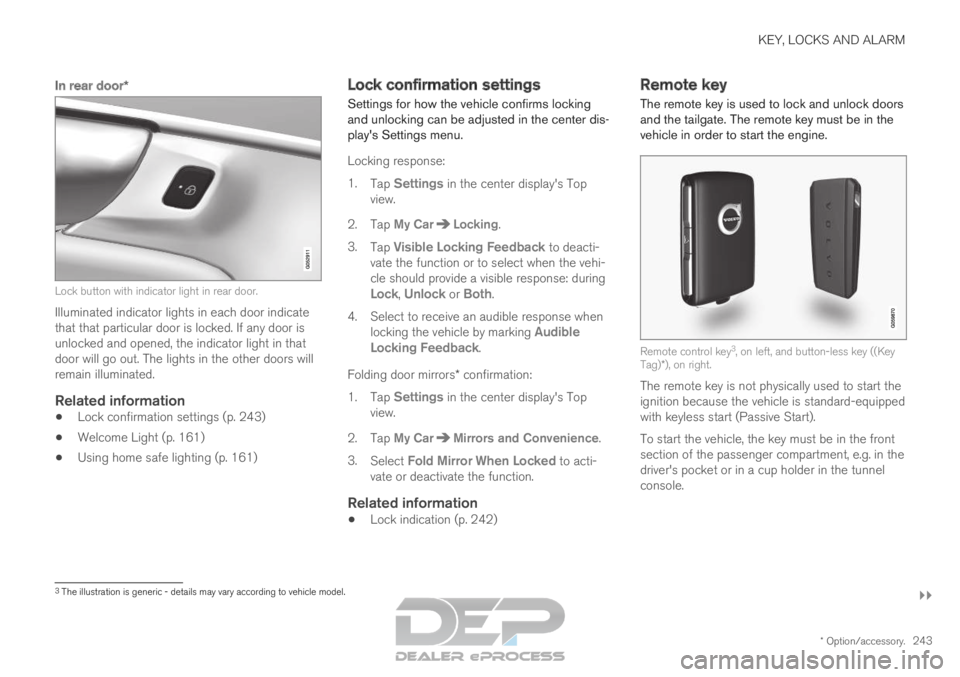
In rear door*Lock button with indicator light in rear door.
Illuminated indicator lights in each door indicate
that that particular door is locked. If any door is
unlocked and opened, the indicator light in that
door will go out. The lights in the other doors will
remain illuminated.
Related information
Lock confirmation settings (p. 243)
Welcome Light (p. 161)
Using home safe lighting (p. 161) Lock confirmation settings
Settings for how the vehicle confirms locking
and unlocking can be adjusted in the center dis-
play's Settings menu.
Locking response:
1.
Tap Settings in the center display's Top
view.
2.
Tap My Car Locking
.
3. Tap Visible Locking Feedback to deacti-
vate the function or to select when the vehi-
cle should provide a visible response: during
Lock, Unlock or Both.
4.
Select to receive an audible response when
locking the vehicle by marking Audible
Locking Feedback.
Folding door mirrors* confirmation:
1. Tap Settings in the center display's Top
view.
2.
Tap My Car Mirrors and Convenience
.
3. Select Fold Mirror When Locked to acti-
vate or deactivate the function.
Related information
Lock indication (p. 242) Remote key
The remote key is used to lock and unlock doors
and the tailgate. The remote key must be in the
vehicle in order to start the engine. Remote control key
3
, on left, and button-less key ((Key
Tag)*), on right.
The remote key is not physically used to start the
ignition because the vehicle is standard-equipped
with keyless start (Passive Start).
To start the vehicle, the key must be in the front
section of the passenger compartment, e.g. in the
driver's pocket or in a cup holder in the tunnel
console. 3
The illustration is generic - details may vary according to vehicle mode\
l.
Page 246 of 697
||KEY, LOCKS AND ALARM
* Option/accessory.
244 The keyless system for locking/unlocking the
doors and tailgate (Passive Entry*) is available as
an option. This system has a range in a semicircle
with a radius of approximately 1.5 meter (5 feet)
out from the driver's door and approx. 1 meter
(3 feet) out from the tailgate.
With keyless start in combination with keyless
locking and unlocking, the remote key can be
located anywhere in the passenger compartment
or cargo compartment in order to start the
engine.
Each remote key supplied with the vehicle can be
linked to a driver profile with unique settings for
the vehicle. When a key with a specific profile is
used, the vehicle settings are adjusted according
to that profile.
Buttonless key, Key TagFor vehicles equipped with keyless locking and
unlocking*, a smaller, lighter and button-less key
(Key Tag 4
) is also provided. It works the same
way as the regular remote key as regard keyless
start and keyless locking and unlocking. The key
is waterproof up to a depth of approx. 10 meters
(30 feet) for up to 60 minutes. It does not have a
detachable key blade and its battery cannot be
replaced.
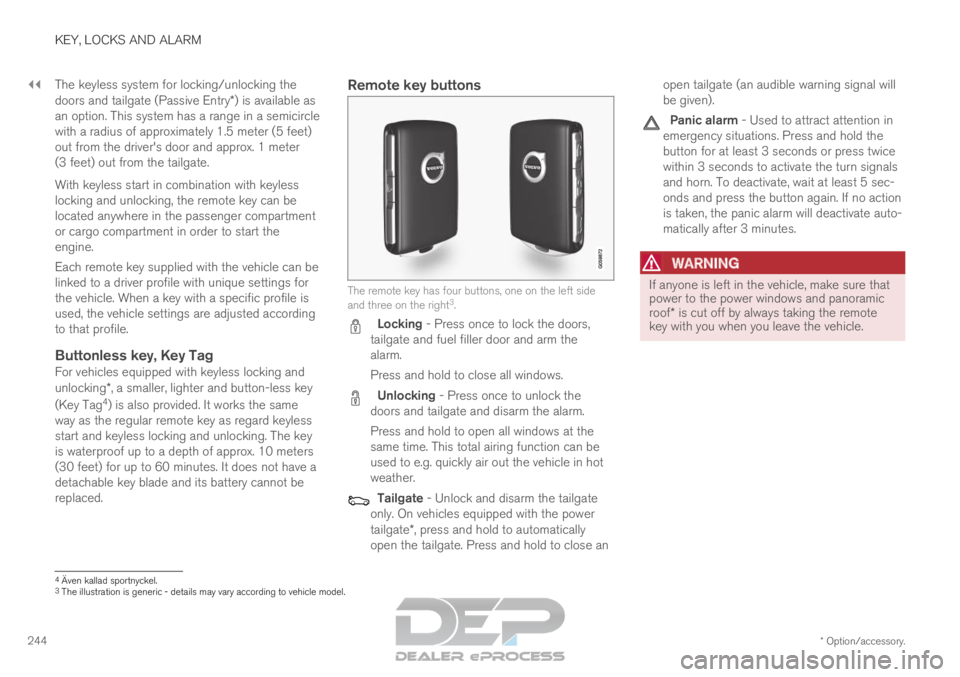
Remote key buttons The remote key has four buttons, one on the left side
and three on the right
3
. Locking - Press once to lock the doors,
tailgate and fuel filler door and arm the
alarm.
Press and hold to close all windows. Unlocking - Press once to unlock the
doors and tailgate and disarm the alarm.
Press and hold to open all windows at the
same time. This total airing function can be
used to e.g. quickly air out the vehicle in hot
weather. Tailgate - Unlock and disarm the tailgate
only. On vehicles equipped with the power
tailgate*, press and hold to automatically
open the tailgate. Press and hold to close an open tailgate (an audible warning signal will
be given). Panic alarm - Used to attract attention in
emergency situations. Press and hold the
button for at least 3 seconds or press twice
within 3 seconds to activate the turn signals
and horn. To deactivate, wait at least 5 sec-
onds and press the button again. If no action
is taken, the panic alarm will deactivate auto-
matically after 3 minutes.
WARNING If anyone is left in the vehicle, make sure that
power to the power windows and panoramic
roof* is cut off by always taking the remote
key with you when you leave the vehicle. 4
Även kallad sportnyckel.
3 The illustration is generic - details may vary according to vehicle mode\
l.
Page 247 of 697
KEY, LOCKS AND ALARM
* Option/accessory.245
NOTEBe aware of the risk of locking the remote
key in the vehicle.
If the remote key or Key Tag is left in the
vehicle, it will be deactivated when the
vehicle is locked and the alarm set using
another valid key. The deactivated key will
be reactivated when the vehicle is
unlocked.
If the remote key or Red Key is left in the
vehicle, it will be deactivated even if the
vehicle is locked using Volvo On Call, and
will be reactivated when the vehicle is
unlocked using Volvo On Call or by
pressing the unlock button on the key.
InterferenceElectromagnetic fields or obstructing objects may
interfere with the remote key's functions for key-
less start and keyless locking and unlocking*.
NOTE Avoid storing the remote control key near
metal objects or electronic devices, e.g. cell
phones, tablets, laptops or chargers – pref-
erably no closer than 10-15 cm (4-6 in.).
If you experience interference, use the remote
key's detachable blade to unlock the vehicle and place the remote key in the backup key reader in
the tunnel console cup holder to disarm the
alarm.
NOTE When the remote control key is placed in the
cup holder, make sure that no other vehicle
keys, metal objects or electronic devices (e.g.
cell phones, tablets, laptops or chargers) are
found in the cup holder. Multiple vehicle keys
close to each other in the cup holder can dis-
rupt their functionality.
WARNING
California Proposition 65
Operating, servicing and maintaining a pas-
senger vehicle can expose you to chemicals
including engine exhaust, carbon monoxide,
phthalates, and lead, which are known to the
State of California to cause cancer and birth
defects or other reproductive harm. To mini-
mize exposure, avoid breathing exhaust, do
not idle the engine except as necessary, serv-
ice your vehicle in a well ventilated area and
wear gloves or wash your hands frequently
when servicing your vehicle. For more infor-
mation go to www.P65Warnings.ca.gov/
passenger-vehicle.
Related information
Locking and unlocking using the remote key
(p. 246)
Remote key range (p. 248)
Replacing the remote key's battery (p. 249)
Detachable key blade (p. 254)
Electronic immobilizer (p. 257)
Linking a remote key to a driver profile
(p. 138)
Page 250 of 697
||KEY, LOCKS AND ALARM
* Option/accessory.
248 1.
Press the button on the remote key.
>
The lock and alarm indicator on the dash-
board will go out to indicate that the vehi-
cle is no longer fully armed.
The tailgate will be unlocked but remain
closed. However, the side doors will
remain locked and armed.
Press lightly on the rubberized pressure
plate under the tailgate handle to open
the tailgate.
If the tailgate is not opened within
2 minutes, it will be relocked and the
alarm armed.
2. With the optional power tailgate* -
Hold and press (about 1.5 seconds) the button on the remote key
>
The tailgate will unlock and open. How-
ever, the side doors will remain locked and
armed.
Related information
Locking and unlocking using the remote key
(p. 246)
Opening and closing the power tailgate*
(p. 266) Remote key range
In order to function correctly, the remote key
must be within a certain distance from the vehi-
cle.
Manual useThe remote key's functions for e.g. locking and
unlocking, which are activated by pressing or
, have a range of approx. 20 meters (65 feet)
from the vehicle.
If the vehicle's locks do not react, move closer
and try again.
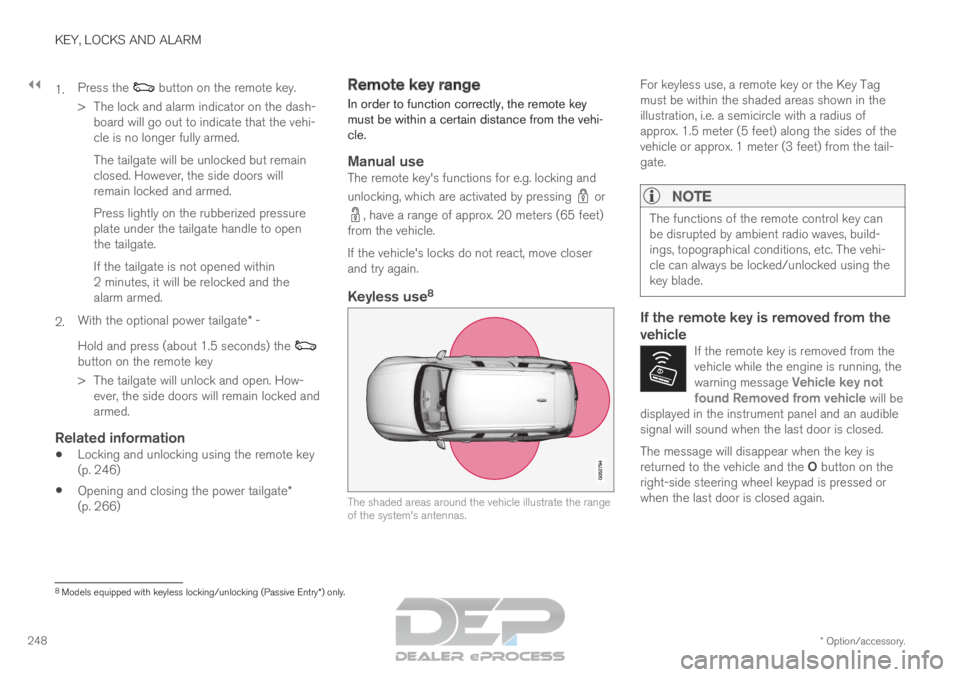
Keyless use 8 The shaded areas around the vehicle illustrate the range
of the system's antennas.For keyless use, a remote key or the Key Tag
must be within the shaded areas shown in the
illustration, i.e. a semicircle with a radius of
approx. 1.5 meter (5 feet) along the sides of the
vehicle or approx. 1 meter (3 feet) from the tail-
gate.
NOTE The functions of the remote control key can
be disrupted by ambient radio waves, build-
ings, topographical conditions, etc. The vehi-
cle can always be locked/unlocked using the
key blade.
If the remote key is removed from the
vehicle
If the remote key is removed from the
vehicle while the engine is running, the
warning message
Vehicle key not
found Removed from vehicle will be
displayed in the instrument panel and an audible
signal will sound when the last door is closed. The message will disappear when the key is
returned to the vehicle and the O button on the
right-side steering wheel keypad is pressed or
when the last door is closed again.
8 Models equipped with keyless locking/unlocking (Passive Entry*) only.
Page 254 of 697

||KEY, LOCKS AND ALARM
* Option/accessory.
252
CAUTION Be sure to dispose of end-of-life batteries in
a way that protects the environment.
WARNING
California Proposition 65
Operating, servicing and maintaining a pas-
senger vehicle can expose you to chemicals
including engine exhaust, carbon monoxide,
phthalates, and lead, which are known to the
State of California to cause cancer and birth
defects or other reproductive harm. To mini-
mize exposure, avoid breathing exhaust, do
not idle the engine except as necessary, serv-
ice your vehicle in a well ventilated area and
wear gloves or wash your hands frequently
when servicing your vehicle. For more infor-
mation go to www.P65Warnings.ca.gov/
passenger-vehicle.
Related information
Remote key (p. 243) Ordering additional remote keys
Two remote keys are provided with the vehicle.
One Key Tag is also included if the vehicle is
equipped with keyless locking/unlocking*. Addi-
tional keys can be ordered.
A total of 12 keys can be programmed and used
for the same vehicle. An additional driver profile
will be added for each new remote key. This also
applies to the key tag.
Loss of a remote keyIf you lose your remote key, you can order a
replacement from a workshop - an authorized
Volvo workshop is recommended. Bring the other
remaining remote keys to the workshop. As an
anti-theft measure, the code of the lost remote
key must be erased from the system.
The current number of keys registered for the
vehicle can be checked via driver profiles in the
center display's Top view. Select Settings System Driver Profiles
.
NOTE Volvo recommends that you order a new or
duplicate remote control key from an author-
ized Volvo workshop.
You can also obtain additional or duplicate
remote control keys from certain independent
repair facilities and locksmiths that are quali-
fied to make remote control keys. Each key
must be programmed to work with your vehi-
cle.
A list of independent repair facilities and/or
locksmiths known to Volvo that can cut and
code replacement keys can be found:
on Volvo's website www.volvocars.com/us
by calling Volvo Customer Care
1-800-458-1552.
Related information
Remote key (p. 243)