engine VOLVO XC90 TWIN ENGINE 2019 Repair Manual
[x] Cancel search | Manufacturer: VOLVO, Model Year: 2019, Model line: XC90 TWIN ENGINE, Model: VOLVO XC90 TWIN ENGINE 2019Pages: 697, PDF Size: 10.33 MB
Page 310 of 697

||DRIVER SUPPORT
308
To temporarily deactivate Adaptive Cruise Control
and put it in standby mode:
– Press the button on the steering wheel
(2).
> The symbol in the instrument panel
changes color from WHITE to GRAY and
the set speed in the center of the speed-
ometer will change from BEIGE to GRAY.
WARNING
If Adaptive Cruise Control is in standby
mode, the driver must intervene and regu-
late both speed and distance to the vehicle
ahead.
If the vehicle comes too close to a vehicle
ahead when Adaptive Cruise Control is in
standby mode, the driver is instead warned
of the short distance by the Distance Alert
function.
Standby mode due to action by the driver
Adaptive Cruise Control will be temporarily deac-
tivated and put in standby mode if:
the brakes are applied
the gear selector is moved to N
the vehicle is driven faster than the set
speed for more than 1 minute Temporarily increasing speed using the accelera-
tor pedal, e.g. when passing another vehicle, will
not affect the setting. The vehicle will return to
the set speed when the accelerator pedal is
released.
Automatic standby mode
Adaptive Cruise Control is dependent on other
systems, such as Electronic Stability Control
(ESC
47
). If any of these other systems stops
working, Adaptive Cruise Control will automati-
cally switch off.
WARNING With automatic standby mode, the driver is
warned by an acoustic signal and a message
on the instrument panel.
The driver must then regulate vehicle
speed, apply the brakes if necessary, and
maintain a safe distance to other vehicles.
Adaptive Cruise Control may go into standby
mode if: your vehicle's speed goes below 5 km/h
(3 mph) and ACC cannot determine if the
vehicle ahead is stationary or if it is another
object, e.g. a speed bump.
your vehicle's speed goes under 5 km/h
(3 mph) and the vehicle ahead turns so that
ACC no longer has a vehicle to follow.
the driver opens the door.
the driver unbuckles the seat belt.
the engine speed (rpm) is too low/high.
one or more of the wheels lose traction.
the brake temperature is high.
the parking brake is applied.
the camera/radar sensor is covered by snow
or heavy rain (the camera lens/radar waves
are blocked)
Reactivating Adaptive Cruise Control
from standby mode Note: This illustration is general and details may vary
depending on model.
47
Electronic Stability Control
Page 314 of 697
||DRIVER SUPPORT
* Option/accessory.
312 This occurs if Adaptive Cruise Control is keeping
the vehicle stationary using the brakes and:
the driver opens the door or unbuckles
his/her seat belt
ACC has kept the vehicle at a standstill for
more than approx. 5 minutes
the brakes overheat
the driver switches off the engine manually.
Related information
Adaptive Cruise Control* (p. 300) Adaptive Cruise Control limitations
Adaptive Cruise Control (ACC 53
) may have lim-
ited functionality in certain situations.
Steep roads and/or heavy loadsAdaptive Cruise Control is primarily intended to
be driven on flat roads. The function may not be
able to maintain the correct time interval to the
vehicle ahead when driving down steep hills. The
driver should be extra attentive and prepared to
apply the brakes.
Do not use Adaptive Cruise Control if the
vehicle is carrying a heavy load or towing a
trailer.
Other limitations
The
Off Road drive mode cannot be
selected if Adaptive Cruise Control is acti-
vated.
NOTE The function uses the vehicle's combined
camera and radar unit, which has certain gen-
eral limitations; see sections "Camera limita-
tions" and "Radar sensor limitations".
Related information
Adaptive Cruise Control* (p. 300)
Camera limitations (p. 338)
Radar sensor limitations (p. 333) 53
Adaptive Cruise Control
Page 315 of 697
DRIVER SUPPORT
* Option/accessory.313
Switching between Cruise Control
and Adaptive Cruise Control
In vehicles equipped with Adaptive Cruise Con-
trol (ACC), the driver can switch between Cruise
Control (CC) and ACC.
A symbol in the instrument panel indicates which
cruise control system is active CC
ACCA A
Cruise control
Adaptive Cruise Control A
WHITE symbol: The function is active. GRAY symbol: Standby
mode
Switching from ACC to CCTo do so:
1. Press the button on the steering wheel
keypad to put Adaptive Cruise Control in
standby mode.
2. Tap the Cruise Control button in the center
display's Function view. The button's indica-
tor will change from GRAY to GREEN.
>
The symbol in the instrument panel will
change from ACC to
CC, indicating that Adaptive Cruise Con-
trol is off and Cruise Control is in standby
mode. 3.
Pressing the button on the steering
wheel keypad.
>
Cruise Control will start and the vehicle's
current speed will be set.
WARNING Switching from ACC to CC means that the
vehicle:
will no longer maintain a preset time
interval to the vehicle ahead.
will only follow the stored speed and the
driver must therefore apply the brakes
when necessary.
If CC is active when the engine is turned off, ACC
will be automatically activated the next time the
engine is started.
Switching from CC to ACCTo do so:
1. Press the button on the steering wheel
keypad to put Cruise Control in standby
mode. 2.
Tap the Cruise Control button in Function
view. The button's indicator will change from
GREEN to GRAY.
>
The symbols in the instrument panel will
switch from CC to ACC
to indicate that Adaptive Cruise Control is
in standby mode.
3. Pressing the button on the steering
wheel keypad.
>
Adaptive Cruise Control will go into active
mode and set the vehicle's current speed
and the selected time interval to the vehi-
cle ahead.
Related information
Adaptive Cruise Control* (p. 300)
Cruise control (p. 291)
Page 327 of 697
DRIVER SUPPORT
}}
325
Standby mode due to action by the driver
Pilot Assist will be temporarily deactivated and
put in standby mode if: the brakes are applied.
the gear selector is moved to N
a turn signal is used for more than 1 minute.
the vehicle is driven faster than the set
speed for more than 1 minute
Temporarily increasing speed using the accelera-
tor pedal, e.g. when passing another vehicle, will
not affect the setting. The vehicle will return to
the set speed when the accelerator pedal is
released.
When the turn signals are used, Pilot Assist's
steering assistance will be temporarily deacti-
vated. When the turn signal is switched off, steer-
ing assistance will be automatically reactivated if
the traffic lane's side markings can still be
detected.
Automatic standby mode
Pilot Assist is dependent on other systems, such
as Electronic Stability Control (ESC 61
). If any of
these other systems stops working, Pilot Assist
will automatically switch off.
WARNING With automatic standby mode, the driver is
warned by an acoustic signal and a message
on the instrument panel.
The driver must then regulate vehicle
speed, apply the brakes if necessary, and
maintain a safe distance to other vehicles.
Adaptive Cruise Control may go into standby
mode if, e.g.:
the driver opens the door.
the brake temperature is high.
the driver's hands are not on the steering
wheel.
the parking brake is applied.
the engine speed (rpm) is too low/high.
the driver unbuckles the seat belt.
one or more of the wheels lose traction.
the camera/radar sensor is covered by snow
or heavy rain (the camera lens/radar waves
are blocked)
your vehicle's speed goes below 5 km/h
(3 mph) and Pilot Assist cannot determine if
the vehicle ahead is stationary or if it is
another object, e.g. a speed bump.
your vehicle's speed goes under 5 km/h
(3 mph) and the vehicle ahead turns so that
Pilot Assist no longer has a vehicle to follow.
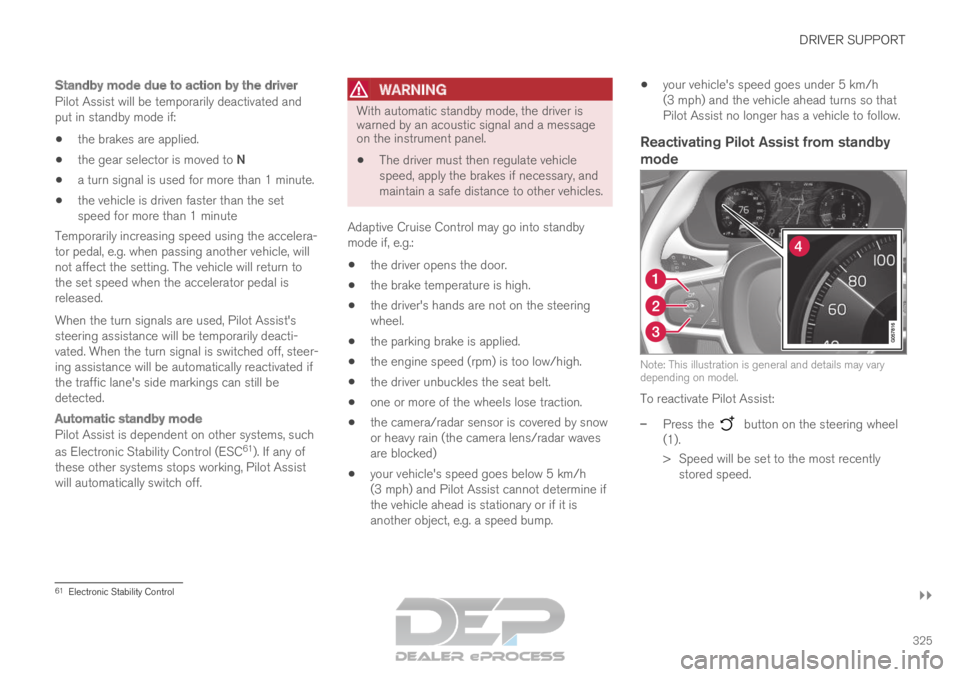
Reactivating Pilot Assist from standby
mode Note: This illustration is general and details may vary
depending on model.
To reactivate Pilot Assist:
–
Press the button on the steering wheel
(1).
>
Speed will be set to the most recently
stored speed. 61
Electronic Stability Control
Page 330 of 697
||DRIVER SUPPORT
328
WARNING
When Pilot Assist follows another vehicle at
speeds over approx. 30 km/h (20 mph) and
changes target vehicle – from a moving vehi-
cle to a stationary one – Pilot Assist will
ignore the stationary vehicle and instead
accelerate to the stored speed.
The driver must then intervene and apply
the brakes.
Automatic standby mode when switching
targets
Pilot Assist disengages and goes into standby
mode if:
your vehicle's speed goes below 5 km/h
(3 mph) and Pilot Assist cannot determine if
the target object is a stationary vehicle or
another object, e.g. a speed bump.
your vehicle's speed goes under 5 km/h
(3 mph) and the vehicle ahead turns so that
Pilot Assist no longer has a vehicle to follow.
Related information
Pilot Assist (p. 316) Auto-hold braking with Pilot Assist
Pilot Assist has a special braking function in
slow traffic and at a standstill.
Braking function in slow traffic and at a
standstill
In slow-moving, stop-and-go traffic or when stop-
ped at a traffic light, driving will resume automati-
cally if the vehicle is stopped for less than
approx. 3 seconds. If it takes more than 3 sec-
onds for the vehicle ahead to begin moving again,
Pilot Assist will go into standby mode and the
Auto-hold brake function will activate.
– Pilot Assist can be reactivated by:
Pressing the button on the steering
wheel keypad.
Pressing the accelerator pedal.
>
Pilot Assist will resume following the vehi-
cle ahead if it begins to move within
approx. 6 seconds.
NOTE Pilot Assist can keep the vehicle stationary
for no more than 5 minutes – after that time
the parking brake is applied and the function
is deactivated.
The parking brake must be released before
Pilot Assist can be reactivated.
Deactivation of the Auto-hold brake function
In certain situations, Auto-hold will be deactivated
when the vehicle is at a standstill and Pilot Assist
will go into standby mode. This means that the
brakes will be released and the vehicle could
begin to roll. The driver must actively apply the
brakes to keep the vehicle stationary.
This can occur if:
the driver depresses the brake pedal
the parking brake is applied
the gear selector is moved to the P, N or R
positions
the driver puts Pilot Assist in standby mode.
Auto Activate Parking BrakeIn certain situations, the parking brake will be
applied to keep the vehicle at a standstill.
This occurs if Pilot Assist is keeping the vehicle
stationary using the brakes and:
the driver opens the door or unbuckles
his/her seat belt
Pilot Assist has kept the vehicle at a stand-
still for more than approx. 5 minutes
the brakes overheat
the driver switches off the engine manually.
Related information
Pilot Assist (p. 316)
Page 337 of 697
DRIVER SUPPORT
335
High temperaturesIf the temperature in the passenger compartment
is very high, the camera/radar sensor will switch
off temporarily for approx. 15 minutes after the
engine is started to protect its electronic compo-
nents. When the temperature has cooled suffi-
ciently, the camera/radar sensor will automati-
cally restart.Damaged windshield
CAUTIONIf there are cracks, scratches or stone chips
on the windshield in front of any of the cam-
era and radar unit "windows" and this covers
an area of about 0.5 × 3.0 mm
(0.02 × 0.12 in.) or more, contact a workshop
to have the windshield replaced – an author-
ized Volvo workshop is recommended.
Failure to take action could result in reduced
performance for the driver support systems
that use the camera and radar unit.
It could cause functions to be reduced, deac-
tivated completely or produce an incorrect
function response.
To avoid the risk of loss of function, malfunc-
tion or reduced function of the driver support
systems that use the radar unit, the following
also apply:
Volvo advises against repairing cracks,
scratches or stone chips in the area in
front of the camera and radar unit – the
entire windshield should instead be
replaced.
Before replacing the windshield, contact
an authorized Volvo workshop to verify
that the right windshield has been
ordered and installed.
The same type of windshield wipers or
wipers approved by Volvo should be used
for replacement.
CAUTION If the windshield is replaced, the camera and
radar unit must be recalibrated by a workshop
to help ensure proper functioning of all of the
vehicle's camera and radar-based systems –
an authorized Volvo workshop is recom-
mended.
Related information
Radar sensor (p. 332)
Page 341 of 697

DRIVER SUPPORT
}}}}
339 Cause
Action
The area of the windshield in front of the camera/radar sensor is
dirty or covered by ice or snow. Clean the windshield in front of the camera/radar sensor and remove dirt\
, ice and
snow.
Thick fog, heavy rain or snow is blocking the radar signals or the
camera's range of visibility. No action. Heavy precipitation may sometimes prevent the camera/radar se\
nsor from
functioning.
Water or snow is spraying/swirling up and blocking the radar signals
or the camera's range of visibility. No action. Very wet or snow-covered roads may sometimes prevent the came\
ra/
radar sensor from functioning.
There is dirt between the inside of the windshield and the camera/
radar sensor. Consult a workshop to have the area of the windshield on the inside of t\
he camera's
casing cleaned. An authorized Volvo workshop is recommended.
Bright sunlight. No action. The camera/radar sensor will reset automatically when lightin\
g conditions
improve.
NOTEKeep the windshield in front of the camera
and radar unit clean.
High temperaturesIf the temperature in the passenger compartment
is very high, the camera/radar sensor will switch
off temporarily for approx. 15 minutes after the
engine is started to protect its electronic compo-
nents. When the temperature has cooled suffi-
ciently, the camera/radar sensor will automati-
cally restart.
Damaged windshield
CAUTION
If there are cracks, scratches or stone chips
on the windshield in front of any of the cam-
era and radar unit "windows" and this covers
an area of about 0.5 × 3.0 mm
(0.02 × 0.12 in.) or more, contact a workshop
to have the windshield replaced – an author-
ized Volvo workshop is recommended.
Failure to take action could result in reduced
performance for the driver support systems
that use the camera and radar unit. It could cause functions to be reduced, deac-
tivated completely or produce an incorrect
function response.
To avoid the risk of loss of function, malfunc-
tion or reduced function of the driver support
systems that use the radar unit, the following
also apply:
Volvo advises against repairing cracks,
scratches or stone chips in the area in
front of the camera and radar unit – the
entire windshield should instead be
replaced.
Before replacing the windshield, contact
an authorized Volvo workshop to verify
Page 346 of 697
||DRIVER SUPPORT
344
2 - Brake assistance
If the risk of a collision increases after the colli-
sion warning, brake support will be activated.
If the system determines that the pressure the
driver is exerting on the brake pedal is insufficient
to prevent the collision, brake support will
increase pressure.
3 - Auto-brake
The automatic braking function is activated at the
last moment.
If the driver has not taken evasive action by this
stage and a collision is imminent, the automatic
braking function will be triggered. This occurs
whether or not the driver is pressing the brake
pedal. Full braking force will be applied to reduce
the speed at impact or reduced braking effect will
be applied if this is sufficient to avoid the colli-
sion.
The seat belt tensioners may be activated along
with the automatic braking function. See "Seat
belt tensioners" for more information.
In certain situations, auto-braking may begin with
a limited braking force before applying full brak-
ing force.
If City Safety has prevented a collision, the vehi-
cle will be kept at a standstill until the driver
takes action. If the vehicle has slowed to avoid
colliding with a slower-moving vehicle ahead, your
speed will be reduced to that vehicle's speed.
Auto-braking can always be cancelled if the
driver presses hard on the accelerator pedal.
NOTE When City Safety activates the brakes, the
brake lights come on.
When City Safety applies the brakes, a text mes-
sage will appear in the instrument panel to notify
the driver that the function is/was activated.
WARNING
City Safety may not be used to change how
the driver operates the vehicle. The driver
must not only rely on City Safety to brake the
vehicle.
Related information
City Safety™ (p. 341) Setting a warning distance for City
Safety
City Safety is always active, but the function's
warning distance can be adjusted.
NOTE The City Safety function cannot be deacti-
vated. It is activated automatically each time
the engine/electric motor is started.
The alert distance determines the sensitivity of
the system and regulates the distance at which
the light, sound and brake pulsations will be acti-
vated.
To select warning distance:
1.
Select Settings My Car IntelliSafe
in
the center display's Top view.
2. Under City Safety Warning, tap Late,
Normal or Early to set the desired warning distance.
If the driver feels that the Early setting is giving
too many warnings or finds them irritating, the
Normal or Late warning distance settings can
be selected instead.
If the driver feels that the warnings are too fre-
quent and distracting, the warning distance can
be reduced. This will reduce the total number of
warnings, but it will also result in City Safety pro-
viding warnings at a later stage.
Page 356 of 697
DRIVER SUPPORT
354Rear Collision Warning
The Rear Collision Warning (
RCW) function can
help the driver avoid rear-end collisions from
vehicles approaching from behind.
RCW is automatically activated each time the
engine is started.
RCW can warn the driver of a potential collision
with vehicles approaching from behind by rapidly
flashing the turn signals.
If, at a speed below 30 km/h (20 mph), the RCW
function detects that the car is in danger of being
hit from behind, the seatbelt tensioners may ten-
sion the front seatbelts and activate the Whiplash
Protection System safety system.
Immediately before a collision from behind, RCW
may also activate the foot brake in order to
reduce the forward acceleration of the car during
the collision. However, the brakes will only be
applied if your vehicle is stationary. The brakes
will be immediately released if the accelerator
pedal is depressed.
Related information
Rear Collision Warning limitations (p. 354)
Whiplash Protection System (p. 46) Rear Collision Warning limitations
In some situations, it may be difficult for RCW to
warn the driver of a collision risk.
This may be the case if: the vehicle approaching from the rear is
detected at a late stage
the vehicle approaching from the rear
changes lanes at a late stage
the vehicle approaching from the rear is mov-
ing at a speed above 80 km/h (50 mph)
a trailer, bicycle holder or similar is con-
nected to the vehicle's electrical system - the
RCW function will then be automatically
deactivated.
NOTE In certain markets RCW does not warn with
the direction indicators due to local traffic
regulations – in such cases, that part of the
function is deactivated.
NOTE The warning with direction indicators for Rear
Collision Warning is deactivated if the colli-
sion warning distance in the City Safety func-
tion is set to the lowest level "
Late".
The seat belt tensioning and braking func-
tions remain active.
Related information
Rear Collision Warning (p. 354)
Page 358 of 697
||DRIVER SUPPORT
356
given, the indicator light will become brighter and
begin flashing.
NOTE
The light illuminates on the side of the vehicle
where the system has detected the vehicle. If
the vehicle is passed on both sides simulta-
neously, both lights come on.
WARNING
The BLIS function is supplementary driver
support intended to facilitate driving and
help make it safer – it cannot handle all
situations in all traffic, weather and road
conditions.
The responsibility for changing lanes
safely and using good judgment always
rests with the driver.
BLIS is not a substitute for the driver's
attention and judgment. The driver is
always responsible for ensuring the vehi-
cle is driven in a safe manner, at the
appropriate speed, with an appropriate
distance to other vehicles, and in accord-
ance with current traffic rules and regula-
tions.
Related information
Activating/deactivating BLIS (p. 356)
BLIS limitations (p. 357)
Recommended maintenance for BLIS
(p. 358)
BLIS messages (p. 359) Activating/deactivating BLIS
The BLIS
76
function can be activated/deacti-
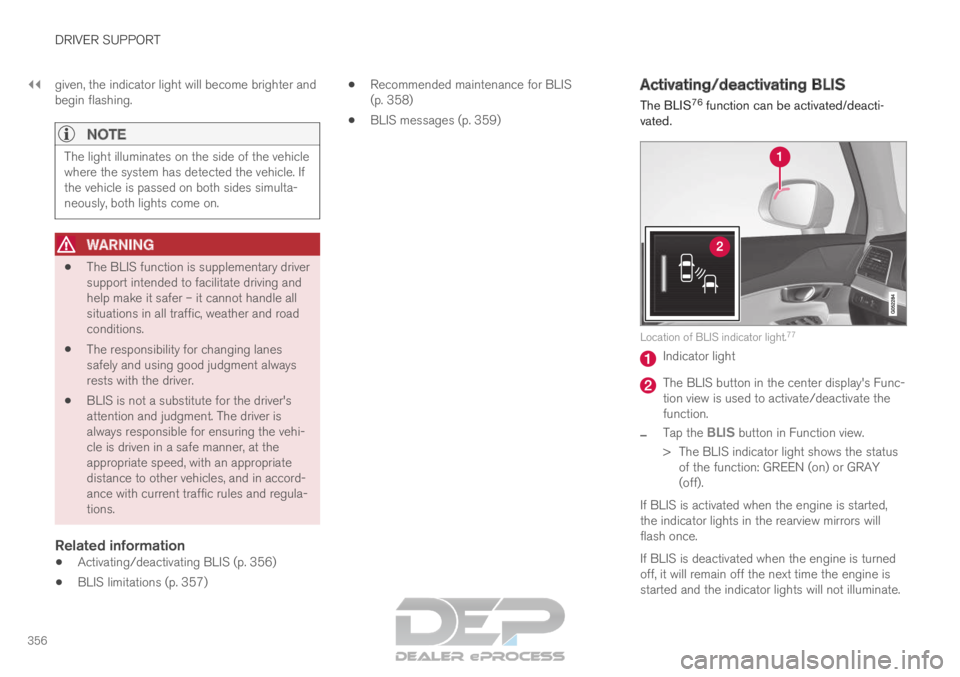
vated. Location of BLIS indicator light.
77 Indicator light
The BLIS button in the center display's Func-
tion view is used to activate/deactivate the
function.
– Tap the
BLIS button in Function view.
>
The BLIS indicator light shows the status
of the function: GREEN (on) or GRAY
(off).
If BLIS is activated when the engine is started,
the indicator lights in the rearview mirrors will
flash once.
If BLIS is deactivated when the engine is turned
off, it will remain off the next time the engine is
started and the indicator lights will not illuminate.