key YAMAHA TMAX 2017 User Guide
[x] Cancel search | Manufacturer: YAMAHA, Model Year: 2017, Model line: TMAX, Model: YAMAHA TMAX 2017Pages: 124, PDF Size: 14.56 MB
Page 24 of 124
Smart key system
3-8
1
2
3
4
5
6
7
8
9
10
11
12
13
14 the “ON/ ” switch one more time.
If the centerstand continues to be
locked and will not release, the
smart key system indicator light
will flash 16 times and the center-
stand lock release operation will
stop midway. Rock the vehicle for-
ward and backward to help release
the centerstand lock and then
press the “ON/ ” switch again.
NOTICE
ECA15826
If the steering lock or centerstand
lock will not release and the smart
key system indicator light is flash-
ing, have a Yamaha dealer check the
smart key system.
3. The power of the vehicle is turned on when all locks have been re-
leased. The multi-function display
will come on.
4. The engine can now be started. (See page 7-2.)
TIP
See page 8-37 for information about
emergency mode and how to turn the
vehicle power on without the smart key.
EAU78031
Powering off the vehicle
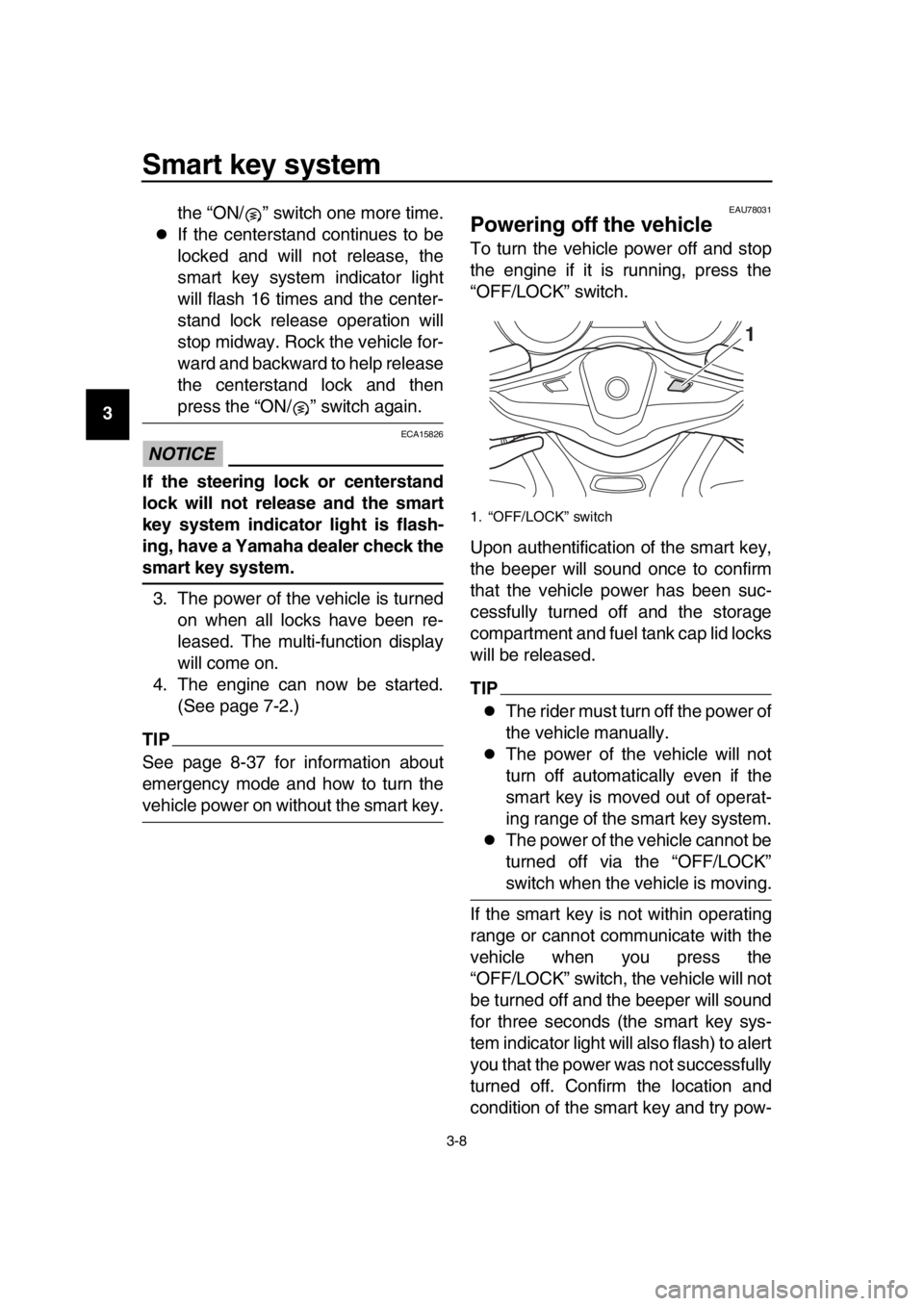
To turn the vehicle power off and stop
the engine if it is running, press the
“OFF/LOCK” switch.
Upon authentification of the smart key,
the beeper will sound once to confirm
that the vehicle power has been suc-
cessfully turned off and the storage
compartment and fuel tank cap lid locks
will be released.
TIP
The rider must turn off the power of
the vehicle manually.
The power of the vehicle will not
turn off automatically even if the
smart key is moved out of operat-
ing range of the smart key system.
The power of the vehicle cannot be
turned off via the “OFF/LOCK”
switch when the vehicle is moving.
If the smart key is not within operating
range or cannot communicate with the
vehicle when you press the
“OFF/LOCK” switch, the vehicle will not
be turned off and the beeper will sound
for three seconds (the smart key sys-
tem indicator light will also flash) to alert
you that the power was not successfully
turned off. Confirm the location and
condition of the smart key and try pow-
1. “OFF/LOCK” switch
1
BV1-28199-E0.book 8 ページ 2016年12月19日 月曜日 午前11時25分
Page 25 of 124
Smart key system
3-9
1
2
3
4
5
6
7
8
9
10
11
12
13
14
ering off the vehicle again.
TIP
Without the smart key, the vehicle pow-
er can be turned off by pressing the
“OFF/LOCK” switch again while the
smart key system indicator light is
flashing.
Auto lock function
After the engine is stopped via the
“OFF/LOCK” switch, (or whenever the
vehicle power is turned from on to off),
all storage compartment locks (if
equipped) and the fuel tank cap lid lock
are released and these compartments
can be accessed temporarily. When 60
seconds have passed, all compart-
ments will automatically lock.
When the compartment locks are re-
leased via the “ / ” switch, the com-
partments will automatically lock after
10 seconds have passed.
EAU80000
How to lock the steering
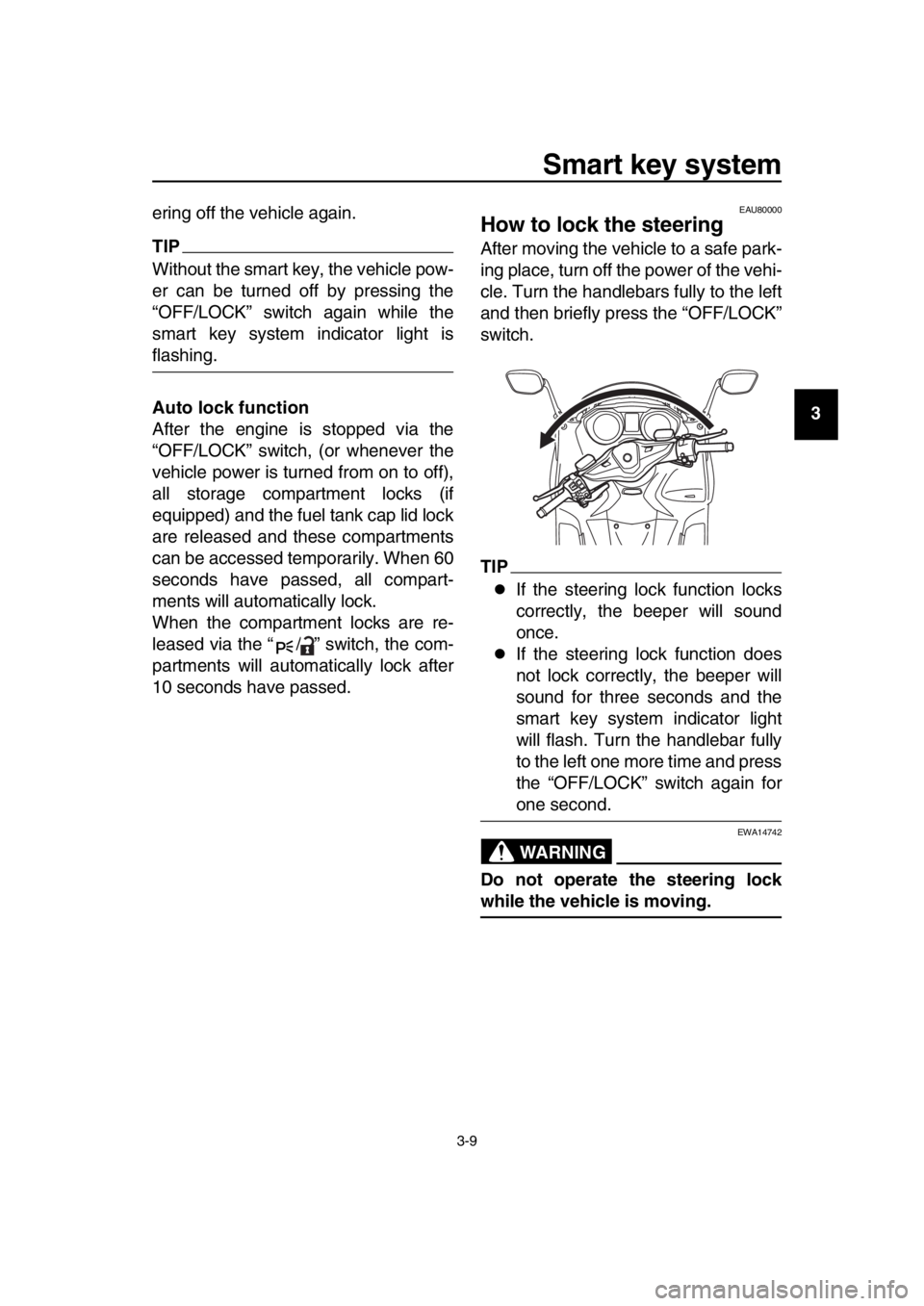
After moving the vehicle to a safe park-
ing place, turn off the power of the vehi-
cle. Turn the handlebars fully to the left
and then briefly press the “OFF/LOCK”
switch.
TIP
If the steering lock function locks
correctly, the beeper will sound
once.
If the steering lock function does
not lock correctly, the beeper will
sound for three seconds and the
smart key system indicator light
will flash. Turn the handlebar fully
to the left one more time and press
the “OFF/LOCK” switch again for
one second.
WARNING
EWA14742
Do not operate the steering lock
while the vehicle is moving.
BV1-28199-E0.book 9 ページ 2016年12月19日 月曜日 午前11時25分
Page 26 of 124
Smart key system
3-10
1
2
3
4
5
6
7
8
9
10
11
12
13
14
EAU78052
How to lock the centerstand
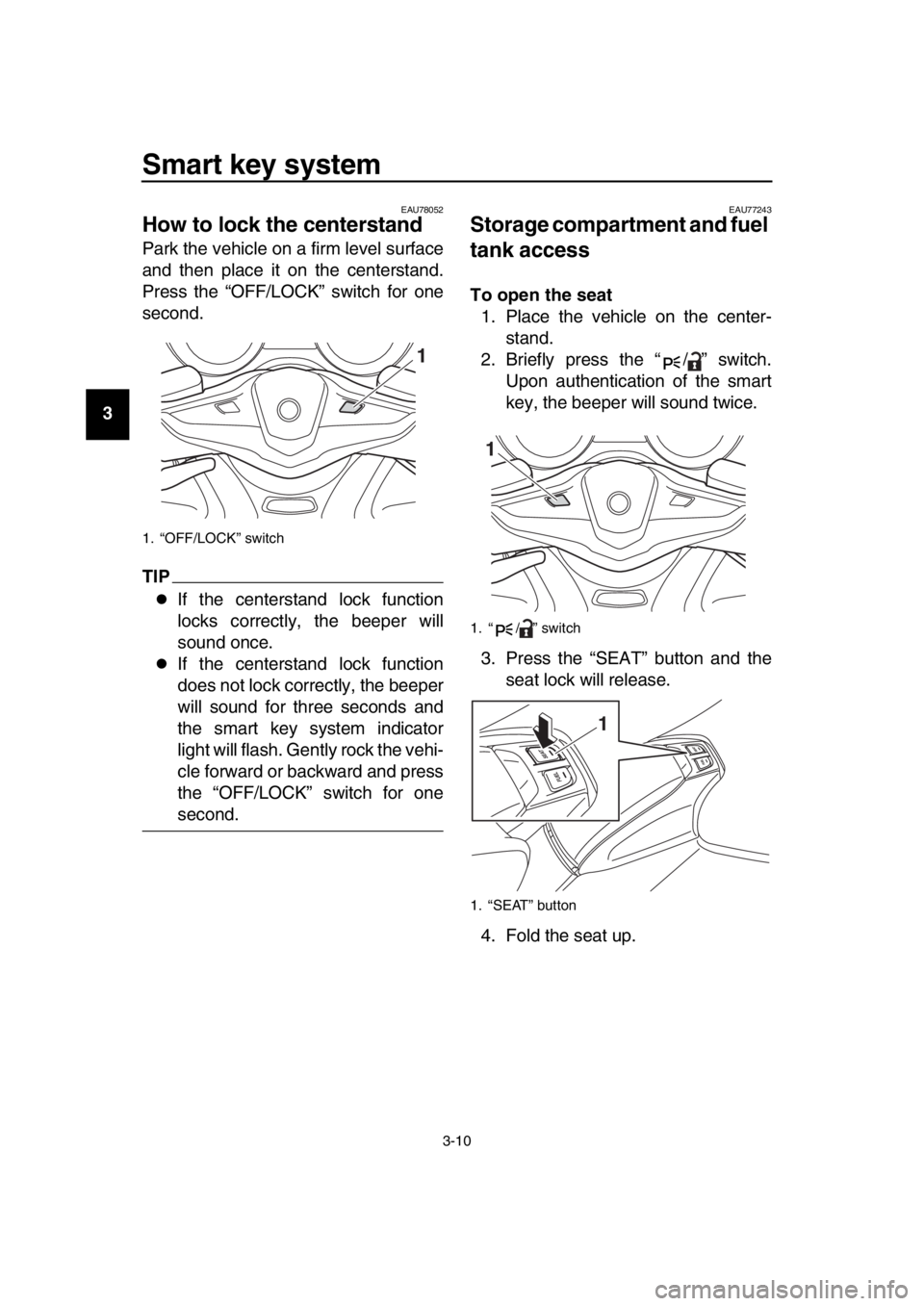
Park the vehicle on a firm level surface
and then place it on the centerstand.
Press the “OFF/LOCK” switch for one
second.
TIP
If the centerstand lock function
locks correctly, the beeper will
sound once.
If the centerstand lock function
does not lock correctly, the beeper
will sound for three seconds and
the smart key system indicator
light will flash. Gently rock the vehi-
cle forward or backward and press
the “OFF/LOCK” switch for one
second.
EAU77243
Storage compartment and fuel
tank access
To open the seat 1. Place the vehicle on the center- stand.
2. Briefly press the “ / ” switch. Upon authentication of the smart
key, the beeper will sound twice.
3. Press the “SEAT” button and the seat lock will release.
4. Fold the seat up.
1. “OFF/LOCK” switch
1
1. “ / ” switch
1. “SEAT” button
1
1
BV1-28199-E0.book 10 ページ 2016年12月19日 月曜日 午前11時25分
Page 27 of 124
Smart key system
3-11
1
2
3
4
5
6
7
8
9
10
11
12
13
14
To close the seat
Fold the seat down, and then push it to
lock it in place.
TIP
Make sure the seat is properly
closed before starting off.
In case of an emergency, the seat
can be opened with a mechanical
key. (See page 8-37.)
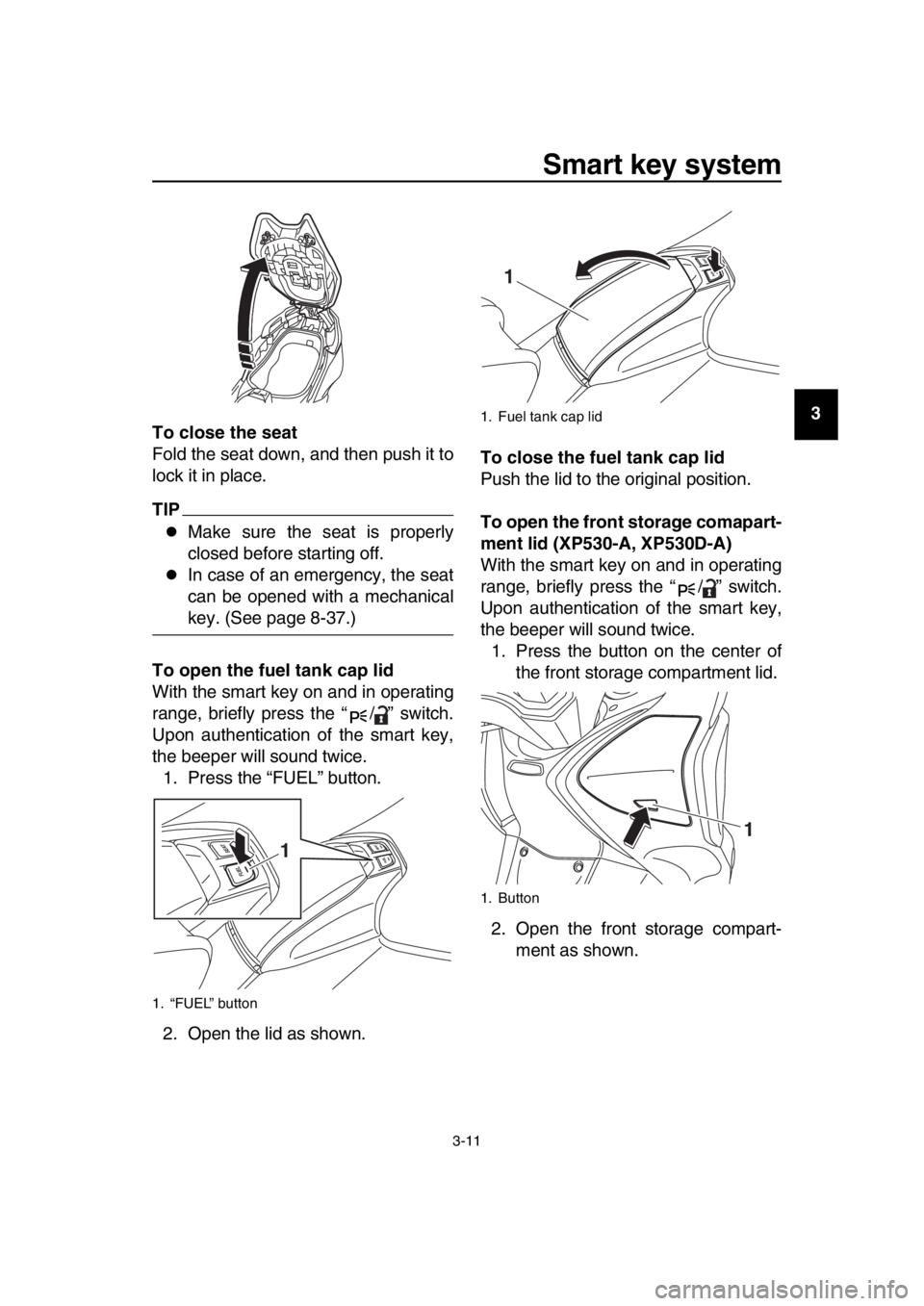
To open the fuel tank cap lid
With the smart key on and in operating
range, briefly press the “ / ” switch.
Upon authentication of the smart key,
the beeper will sound twice. 1. Press the “FUEL” button.
2. Open the lid as shown. To close the fuel tank cap lid
Push the lid to the original position.
To open the front storage comapart-
ment lid (XP530-A, XP530D-A)
With the smart key on and in operating
range, briefly press the “ / ” switch.
Upon authentication of the smart key,
the beeper will sound twice.
1. Press the button on the center of the front storage compartment lid.
2. Open the front storage compart- ment as shown.
1. “FUEL” button
1
1. Fuel tank cap lid
1. Button
1
1
BV1-28199-E0.book 11 ページ 2016年12月19日 月曜日 午前11時25分
Page 28 of 124
Smart key system
3-12
1
2
3
4
5
6
7
8
9
10
11
12
13
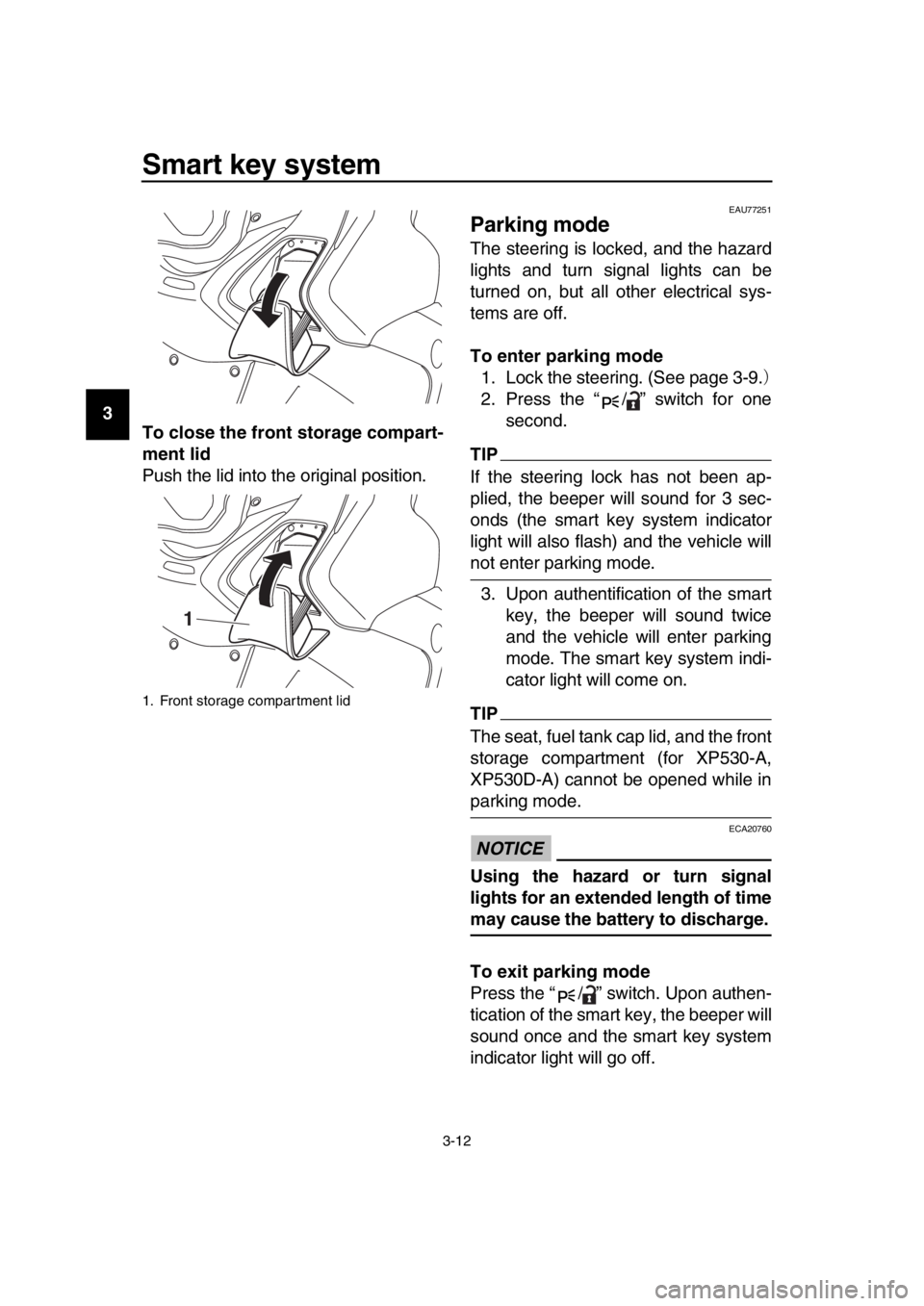
14 To close the front storage compart-
ment lid
Push the lid into the original position.
EAU77251
Parking mode
The steering is locked, and the hazard
lights and turn signal lights can be
turned on, but all other electrical sys-
tems are off.
To enter parking mode
1. Lock the steering. (See page 3-9.)
2. Press the “ / ” switch for one second.
TIP
If the steering lock has not been ap-
plied, the beeper will sound for 3 sec-
onds (the smart key system indicator
light will also flash) and the vehicle will
not enter parking mode.
3. Upon authentification of the smart key, the beeper will sound twice
and the vehicle will enter parking
mode. The smart key system indi-
cator light will come on.
TIP
The seat, fuel tank cap lid, and the front
storage compartment (for XP530-A,
XP530D-A) cannot be opened while in
parking mode.
NOTICE
ECA20760
Using the hazard or turn signal
lights for an extended length of time
may cause the battery to discharge.
To exit parking mode
Press the “ / ” switch. Upon authen-
tication of the smart key, the beeper will
sound once and the smart key system
indicator light will go off.
1. Front storage compartment lid
1
BV1-28199-E0.book 12 ページ 2016年12月19日 月曜日 午前11時25分
Page 34 of 124
5-1
1
2
3
4
5
6
7
8
9
10
11
12
13
14
Instrument and control functions
EAU77490
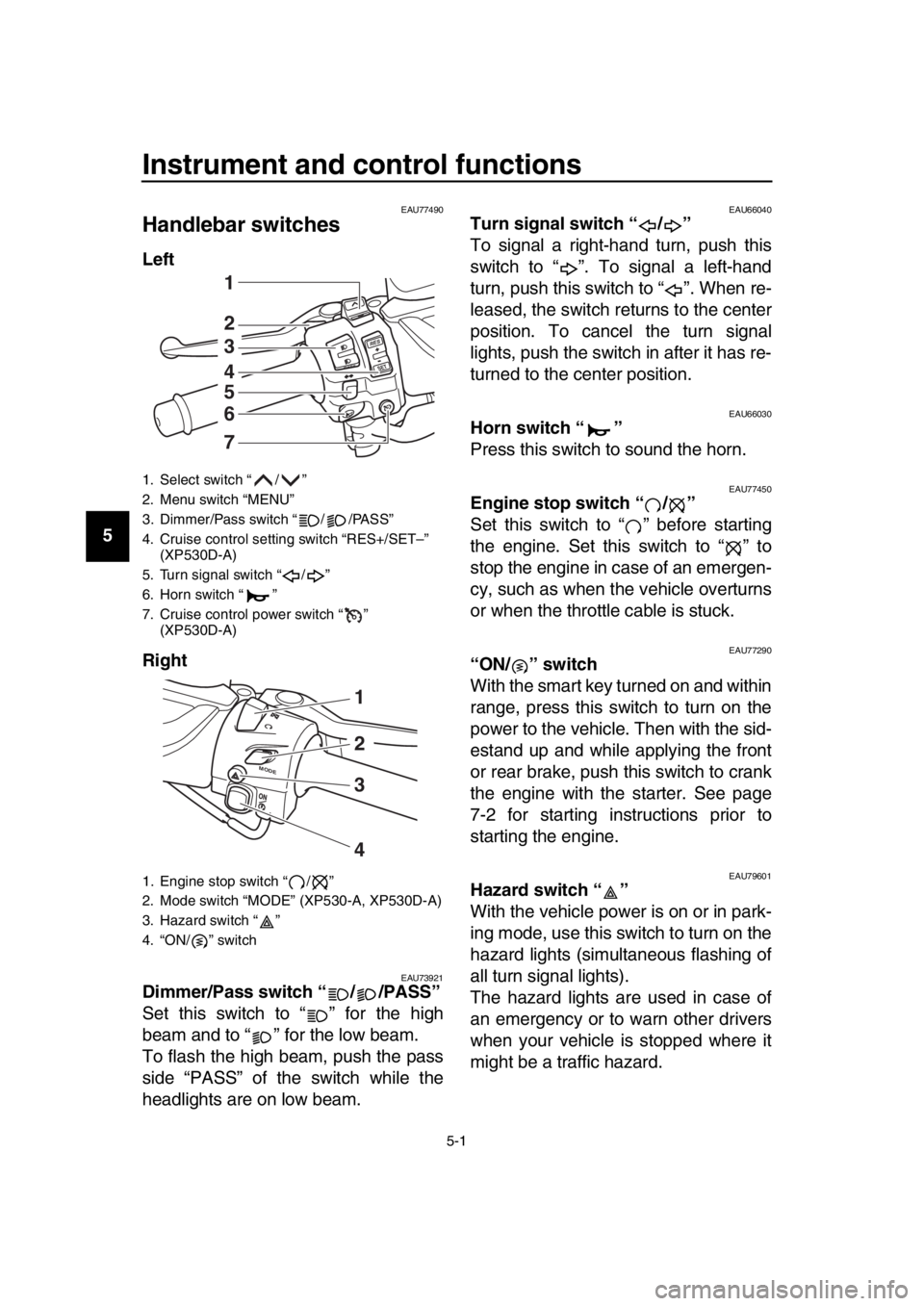
Handlebar switches
Left
Right
EAU73921Dimmer/Pass switch “ / /PASS”
Set this switch to “ ” for the high
beam and to “ ” for the low beam.
To flash the high beam, push the pass
side “PASS” of the switch while the
headlights are on low beam.
EAU66040Turn signal switch “ / ”
To signal a right-hand turn, push this
switch to “ ”. To signal a left-hand
turn, push this switch to “ ”. When re-
leased, the switch returns to the center
position. To cancel the turn signal
lights, push the switch in after it has re-
turned to the center position.
EAU66030Horn switch “ ”
Press this switch to sound the horn.
EAU77450Engine stop switch “ / ”
Set this switch to “ ” before starting
the engine. Set this switch to “ ” to
stop the engine in case of an emergen-
cy, such as when the vehicle overturns
or when the throttle cable is stuck.
EAU77290“ON/ ” switch
With the smart key turned on and within
range, press this switch to turn on the
power to the vehicle. Then with the sid-
estand up and while applying the front
or rear brake, push this switch to crank
the engine with the starter. See page
7-2 for starting instructions prior to
starting the engine.
EAU79601Hazard switch “ ”
With the vehicle power is on or in park-
ing mode, use this switch to turn on the
hazard lights (simultaneous flashing of
all turn signal lights).
The hazard lights are used in case of
an emergency or to warn other drivers
when your vehicle is stopped where it
might be a traffic hazard.
1. Select switch “ / ”
2. Menu switch “MENU”
3. Dimmer/Pass switch “ / /PASS”
4. Cruise control setting switch “RES+/SET–” (XP530D-A)
5. Turn signal switch “ / ”
6. Horn switch “ ”
7. Cruise control power switch “ ” (XP530D-A)
1. Engine stop switch “ / ”
2. Mode switch “MODE” (XP530-A, XP530D-A)
3. Hazard switch “ ”
4. “ON/ ” switch
RE S
SETPA SS
1
2
3
4
5
6
7
M ODE
1
3
4
2
BV1-28199-E0.book 1 ページ 2016年12月19日 月曜日 午前11時25分
Page 35 of 124
Instrument and control functions
5-2
1
2
3
4
5
6
7
8
9
10
11
12
13
14
NOTICE
ECA10062
Do not use the hazard lights for an
extended length of time with the en-
gine not running, otherwise the bat-
tery may discharge.
EAU73951Cruise control switches
See page 4-1 for an explanation of the
cruise control system.
EAU77300Menu switch “MENU”
This switch is used to perform selec-
tions in the function display and setting
mode display of the multi-function dis-
play.
See “Multi-function display” on page
5-5 for detailed information.
EAU77310Select switch “ / ”
This switch is used to perform selec-
tions in the function display and setting
mode display of the multi-function dis-
play.
See “Multi-function display” on page
5-5 for detailed information.
EAU73931Drive mode switch “MODE”
See page 4-3 for an explanation of the
drive mode.
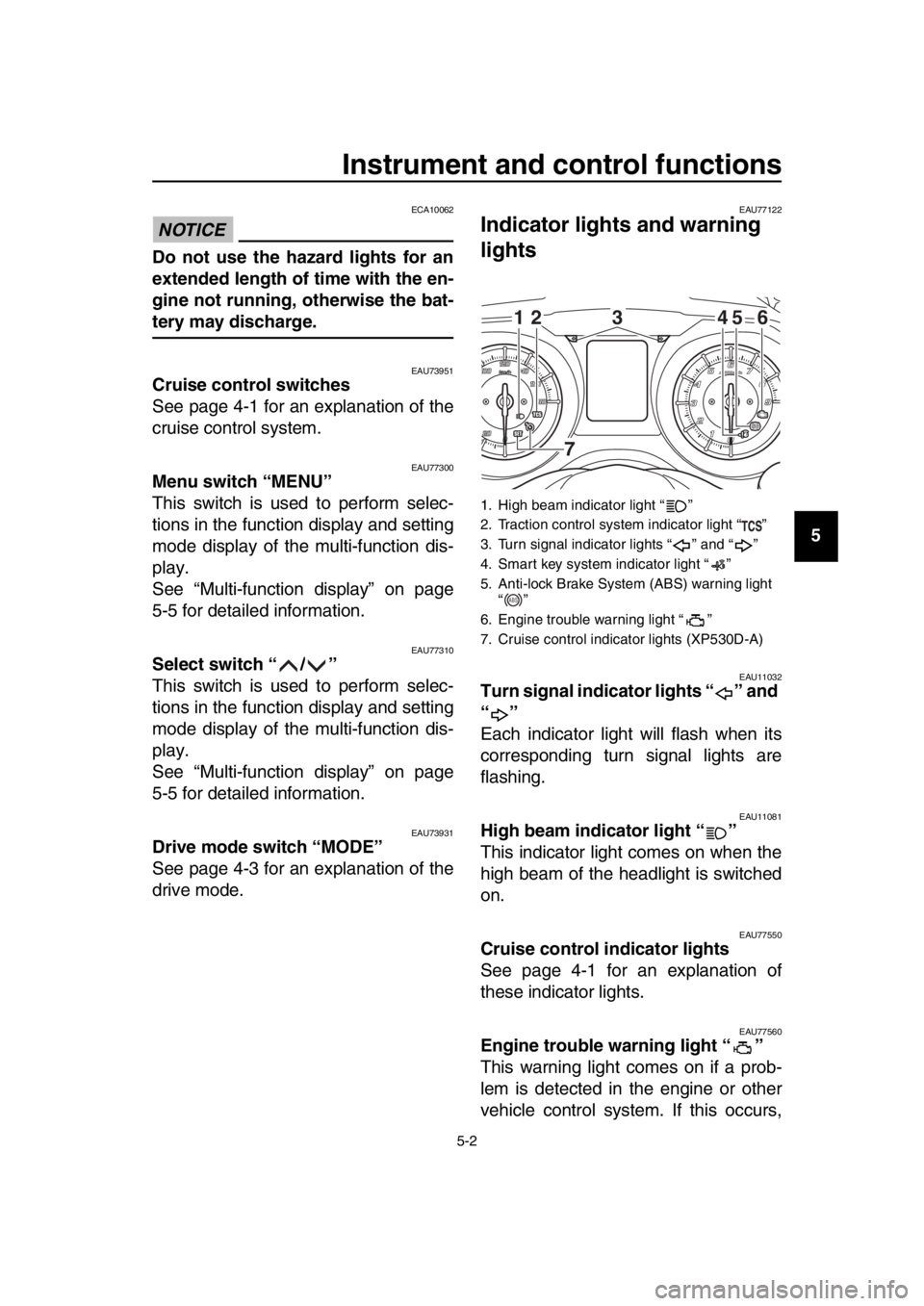
EAU77122
Indicator ligh ts and warning
lights
EAU11032Turn signal indicator lights “ ” and
“”
Each indicator light will flash when its
corresponding turn signal lights are
flashing.
EAU11081High beam indicator light “ ”
This indicator light comes on when the
high beam of the headlight is switched
on.
EAU77550Cruise control indicator lights
See page 4-1 for an explanation of
these indicator lights.
EAU77560Engine trouble warning light “ ”
This warning light comes on if a prob-
lem is detected in the engine or other
vehicle control system. If this occurs,
1. High beam indicator light “ ”
2. Traction control system indicator light “ ”
3. Turn signal indicator lights “ ” and “ ”
4. Smart key system indicator light “ ”
5. Anti-lock Brake System (ABS) warning light “”
6. Engine trouble warning light “ ”
7. Cruise control indicator lights (XP530D-A)
12 45 6
3
7
ABS
BV1-28199-E0.book 2 ページ 2016年12月19日 月曜日 午前11時25分
Page 36 of 124

Instrument and control functions
5-3
1
2
3
4
5
6
7
8
9
10
11
12
13
14 have a Yamaha dealer check the on-
board diagnostic system.
The electrical circuit of the warning light
can be checked by turning the vehicle
power on. The warning light should
come on for a few seconds, and then
go off.
If the warning light does not come on at
all, or if the warning light remains on,
have a Yamaha dealer check the vehi-
cle.
EAU77071ABS warning light “ ”
In normal operation, the ABS warning
light comes on when the vehicle power
is turned on and goes off after traveling
at a speed of 10 km/h (6 mi/h) or higher.
If the ABS warning light:
does not come on when the vehi-
cle power is turned on
comes on or flashes while riding
does not go off after traveling at a
speed of 10 km/h (6 mi/h) or higher
The ABS may not work correctly. If any
of the above occurs, have a Yamaha
dealer check the system as soon as
possible. (See page 5-19 for an expla-
nation of the ABS.)
WARNING
EWA16041
If the ABS warning light does not go
off after traveling at a speed of 10
km/h (6 mi/h) or higher, or if the
warning light comes on or flashes
while riding, the brake system re-
verts to conventional braking. If ei-
ther of the above occurs, or if the
warning light does not come on at
all, use extra caution to avoid possi-
ble wheel lock during emergency
braking. Have a Yamaha dealer
check the brake system and electri-
cal circuits as soon as possible.
TIP
The ABS warning light may come on
when revving the engine with the scoot-
er on its centerstand, but this does not
indicate a malfunction.
EAU74081Traction control system indicator
light “ ”
This indicator light will flash when trac-
tion control has engaged.
If the traction control system is turned
off, this indicator light will come on.
TIP
When the vehicle is turned on, the light
should come on for a few seconds and
then go off. If the light does not come
on, or if the light remains on, have a
Yamaha dealer check vehicle.
EAU78080Smart key system indicator light
“”
This indicator light will flash when com-
munication between the vehicle and
smart key takes place and when certain
smart key system operations are car-
ried out.
The indicator light may also flash when
there is an error in the smart key sys-
tem.
TIP
When the start switch is pushed, the in-
dicator light will come on for about one
second and then go off. If the indicator
light does not come on or go off as nor-
mal, have a Yamaha dealer check the
vehicle.
ABS
BV1-28199-E0.book 3 ページ 2016年12月19日 月曜日 午前11時25分
Page 53 of 124
Instrument and control functions
5-20
1
2
3
4
5
6
7
8
9
10
11
12
13
14
EAU77322
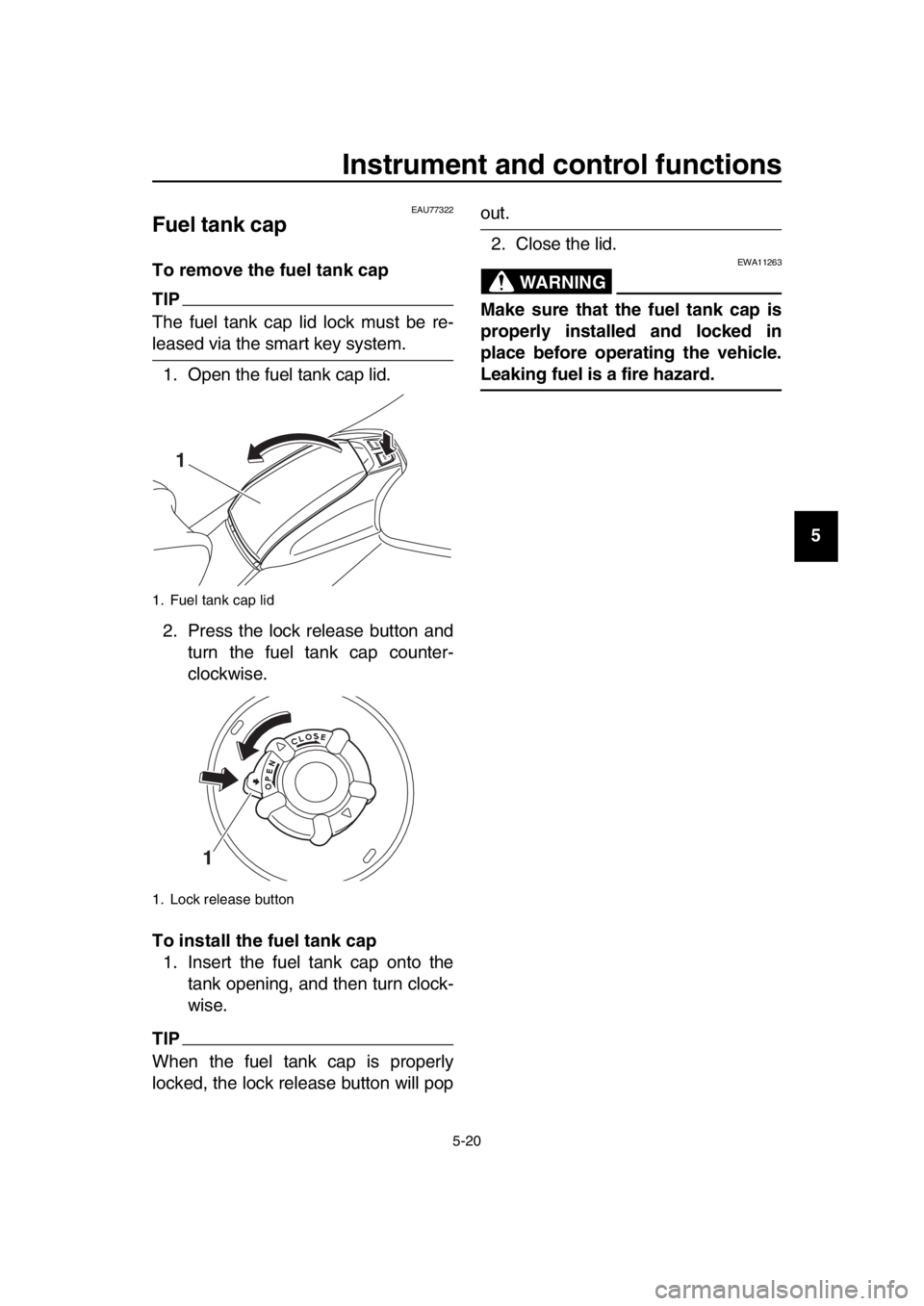
Fuel tank cap
To remove the fuel tank cap
TIP
The fuel tank cap lid lock must be re-
leased via the smart key system. 1. Open the fuel tank cap lid.
2. Press the lock release button and turn the fuel tank cap counter-
clockwise.
To install the fuel tank cap 1. Insert the fuel tank cap onto the tank opening, and then turn clock-
wise.
TIP
When the fuel tank cap is properly
locked, the lock release button will pop
out.
2. Close the lid.
WARNING
EWA11263
Make sure that the fuel tank cap is
properly installed and locked in
place before operating the vehicle.
Leaking fuel is a fire hazard.
1. Fuel tank cap lid
1. Lock release button
1
1
BV1-28199-E0.book 20 ページ 2016年12月19日 月曜日 午前11時25分
Page 57 of 124
![YAMAHA TMAX 2017 User Guide Instrument and control functions
5-24
1
2
3
4
5
6
7
8
9
10
11
12
13
14
partment. To prevent damaging the
seat hinges, do not place any items
in this area.
[ECA16092]
TIP
Some helmets cannot be stor](/img/51/51470/w960_51470-56.png "YAMAHA TMAX 2017 User Guide Instrument and control functions
5-24
1
2
3
4
5
6
7
8
9
10
11
12
13
14
partment. To prevent damaging the
seat hinges, do not place any items
in this area.
[ECA16092]
TIP
Some helmets cannot be stor")
Instrument and control functions
5-24
1
2
3
4
5
6
7
8
9
10
11
12
13
14
partment. To prevent damaging the
seat hinges, do not place any items
in this area.
[ECA16092]
TIP
Some helmets cannot be stored in
the rear storage compartment be-
cause of their size or shape.
Do not leave your scooter unat-
tended with the seat open.
Do not place the smart key inside
the rear storage compartment. It
may get locked inside and the
smart key system not operate nor-
mally.
NOTICE
ECA15963
Do not leave the seat open for
an extended period of time, oth-
erwise the light may cause the
battery to discharge.
Since the storage compartment
may get wet while the scooter is
being washed, wrap any articles
stored in the compartment in a
plastic bag.
To avoid humidity from spread-
ing through the storage com-
partment and to discourage
possible mold growth, wrap wet articles in a plastic bag before
storing them in the compart-
ment.
Do not keep anything valuable
or breakable in the storage com-
partment.
Since the storage compartment
accumulates heat from the en-
gine and from direct sunlight,
do not store anything suscepti-
ble to heat, such as food or
flammable items, inside the
compartment.
WARNING
EWA15401
Do not exceed the maximum load of
199 kg (439 lb) (XP530D-A)
202 kg (445 lb) (XP530-A, XP530E-A)
for the vehicle.
1. Rear storage compartment
2. Shaded area
2
1
BV1-28199-E0.book 24 ページ 2016年12月19日 月曜日 午前11時25分