brake YAMAHA TMAX 2017 Owners Manual
[x] Cancel search | Manufacturer: YAMAHA, Model Year: 2017, Model line: TMAX, Model: YAMAHA TMAX 2017Pages: 124, PDF Size: 14.56 MB
Page 7 of 124

Table of contents
Safety information............................ 1-1
Further safe-riding points ................ 1-5
Description ........................................ 2-1
Left view .......................................... 2-1
Right view ........................................ 2-2
Controls and instruments ................ 2-3
Smart key system ............................ 3-1
Smart key system ............................ 3-1
Operating range of the smart key system............. ....................... ...... 3-2
Handling of the smart key and
mechanical key ............................ 3-3
Smart key ........................................ 3-5
Replacing the smart key battery ...... 3-6
Powering on the vehicle .................. 3-7
Powering off the vehicle .................. 3-8
How to lock the steering .................. 3-9
How to lock the centerstand .......... 3-10
Storage compartment and fuel
tank access ................................ 3-10
Parking mode ................................ 3-12
Special features ................................ 4-1
Cruise control system (XP530D-A).................................. 4-1
D-mode (drive mode) (XP530-A, XP530D-A) ................. 4-3
Traction control system ................... 4-4
Instrument and control functions ... 5-1
Handlebar switches ......................... 5-1
Indicator lights and warning lights ... 5-2
Speedometer .............. ..................... 5-4
Tachometer ..................................... 5-4
Multi-function display ....................... 5-5
Front brake lever ........................... 5-17
Rear brake lever ............................ 5-18
Rear brake lock lever .................... 5-18
ABS ............................................... 5-19
Fuel tank cap ................................. 5-20
Fuel ............................................... 5-21
Fuel tank overflow hose ................ 5-22
Catalytic converter......................... 5-23
Storage compartments .................. 5-23 Windshield
(XP530E-A, XP530-A) ............... 5-25
Rear view mirrors .......................... 5-26
Shock absorber assembly............. 5-27
Auxiliary DC jack ........................... 5-28
Sidestand ...................................... 5-29
Ignition circuit cut- off system......... 5-30
For your safety – pre-operation
checks ............................................... 6-1
Operation and important riding
points ................................................. 7-1
Starting the engine .......................... 7-2
Starting off....................................... 7-3
Acceleration and deceleration......... 7-3
Braking ............................................ 7-4
Tips for reducing fuel consumption ................................ 7-5
Engine break-in ............................... 7-5
Parking ............................................ 7-6
Periodic maintenance and
adjustment ........................................ 8-1
Owner’s tool kit ............................... 8-2
Periodic maintenance chart for the emission control system .............. 8-3
General maintenance and lubrication chart ........................... 8-4
Removing and installing panels ...... 8-7
Checking the spark plugs................ 8-9
Canister......................................... 8-10
Engine oil and oil filter cartridge .... 8-10
Coolant.......................................... 8-14
Replacing the air filter element ..... 8-15
Checking the engine idling
speed ......................................... 8-16
Checking the throttle grip free play ............................................ 8-17
Valve clearance ............................ 8-17
Tires .............................................. 8-18
Cast wheels .................................. 8-20
Checking the front and rear brake lever free play .................. 8-20
Adjusting the rear brake lock
cable .......................................... 8-21
BV1-28199-E0.book 1 ページ 2016年12月19日 月曜日 午前11時25分
Page 8 of 124

Table of contents
Checking the rear brake lock .........8-22
Checking the front and rear brake pads ...........................................8-22
Checking the brake fluid level........8-23
Changing the brake fluid................8-24
Drive belt slack ..............................8-24
Checking and lubricating the
cables .........................................8-25
Checking and lubricating the throttle grip and cable.................8-25
Lubricating the front and rear brake levers................................8-26
Checking and lubricating the
centerstand and sidestand .........8-26
Checking the front fork ..................8-27
Checking the steering ....................8-27
Checking the wheel bearings ........8-28
Battery ...........................................8-28
Replacing the fuses .......................8-30
Vehicle lights .................................8-32
Replacing a front turn signal light
bulb ............................................8-33
Replacing the license plate light bulb ............................................8-33
Troubleshooting .......... ...................8-34
Troubleshooting charts ..................8-35
Emergency mode ..........................8-37
Scooter care and storage .................9-1
Matte color caution ..........................9-1
Care .................................................9-1
Storage ............................................9-4
Specifications ..................................10-1
Consumer information ...................11-1
Identification numbers ...................11-1
Diagnostic connector . ....................11-2
Vehicle data recording ...................11-2
Index .................................................12-1
BV1-28199-E0.book 2 ページ 2016年12月19日 月曜日 午前11時25分
Page 13 of 124

Safety information
1-5
1
2
3
4
5
6
7
8
9
10
11
12
13
14
Transporting the Scooter
Be sure to observe following instruc-
tions before transporting the scooter in
another vehicle.Remove all loose items from the
scooter.
Point the front wheel straight
ahead on the trailer or in the truck
bed, and choke it in a rail to pre-
vent movement.
Secure the scooter with tie-downs
or suitable straps that are attached
to solid parts of the scooter, such
as the frame or upper front fork tri-
ple clamp (and not, for example, to
rubber-mounted handlebars or
turn signals, or parts that could
break). Choose the location for the
straps carefully so the straps will
not rub against painted surfaces
during transport.
The suspension should be com-
pressed somewhat by the tie-
downs, if possible, so that the
scooter will not bounce excessive-
ly during transport.
EAU57600
Further safe-riding points
Be sure to signal clearly when
making turns.
Braking can be extremely difficult
on a wet road. Avoid hard braking,
because the scooter could slide.
Apply the brakes slowly when
stopping on a wet surface.
Slow down as you approach a cor-
ner or turn. Once you have com-
pleted a turn, accelerate slowly.
Be careful when passing parked
cars. A driver might not see you
and open a door in your path.
Railroad crossings, streetcar rails,
iron plates on road construction
sites, and manhole covers be-
come extremely slippery when
wet. Slow down and cross them
with caution. Keep the scooter up-
right, otherwise it could slide out
from under you.
The brake pads or linings could get
wet when you wash the scooter.
After washing the scooter, check
the brakes before riding.
Always wear a helmet, gloves,
trousers (tapered around the cuff
and ankle so they do not flap), and
a brightly colored jacket.
Do not carry too much luggage on
the scooter. An overloaded scoot-
er is unstable. Use a strong cord to
secure any luggage to the carrier
(if equipped). A loose load will af-
fect the stability of the scooter and
could divert your attention from the
road. (See page 1-3.)
BV1-28199-E0.book 5 ページ 2016年12月19日 月曜日 午前11時25分
Page 16 of 124
Description
2-3
1
2
3
4
5
6
7
8
9
10
11
12
13
14
EAU63401
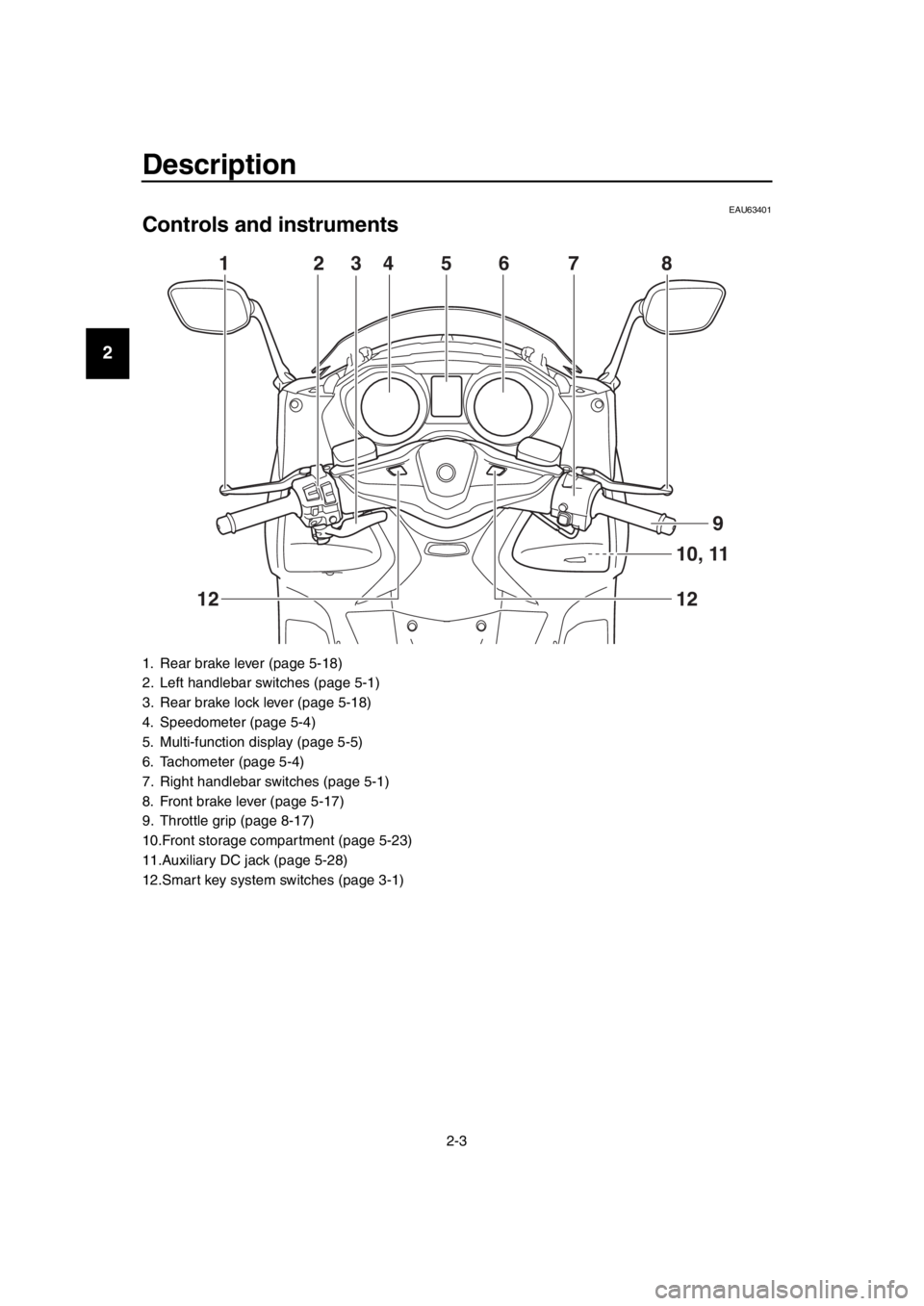
Controls and instruments
1. Rear brake lever (page 5-18)
2. Left handlebar switches (page 5-1)
3. Rear brake lock lever (page 5-18)
4. Speedometer (page 5-4)
5. Multi-function display (page 5-5)
6. Tachometer (page 5-4)
7. Right handlebar switches (page 5-1)
8. Front brake lever (page 5-17)
9. Throttle grip (page 8-17)
10.Front storage compartment (page 5-23)
11.Auxiliary DC jack (page 5-28)
12.Smart key system switches (page 3-1)
1 23456 7 8
10, 11
12
12
9
BV1-28199-E0.book 3 ページ 2016年12月19日 月曜日 午前11時25分
Page 30 of 124
Special features
4-2
1
2
3
4
5
6
7
8
9
10
11
12
13
14 traveling speed using the throttle. After
you have accelerated, you can set a
new cruising speed by pushing the
“SET–” side of the setting switch. If you
do not set a new cruising speed, when
you return the throttle grip, the vehicle
will decelerate to the previously set
cruising speed.
Deactivating the cruise control sys-
tem
Perform one of the following operations
to cancel the set cruising speed. The
“SET” indicator light will turn off.
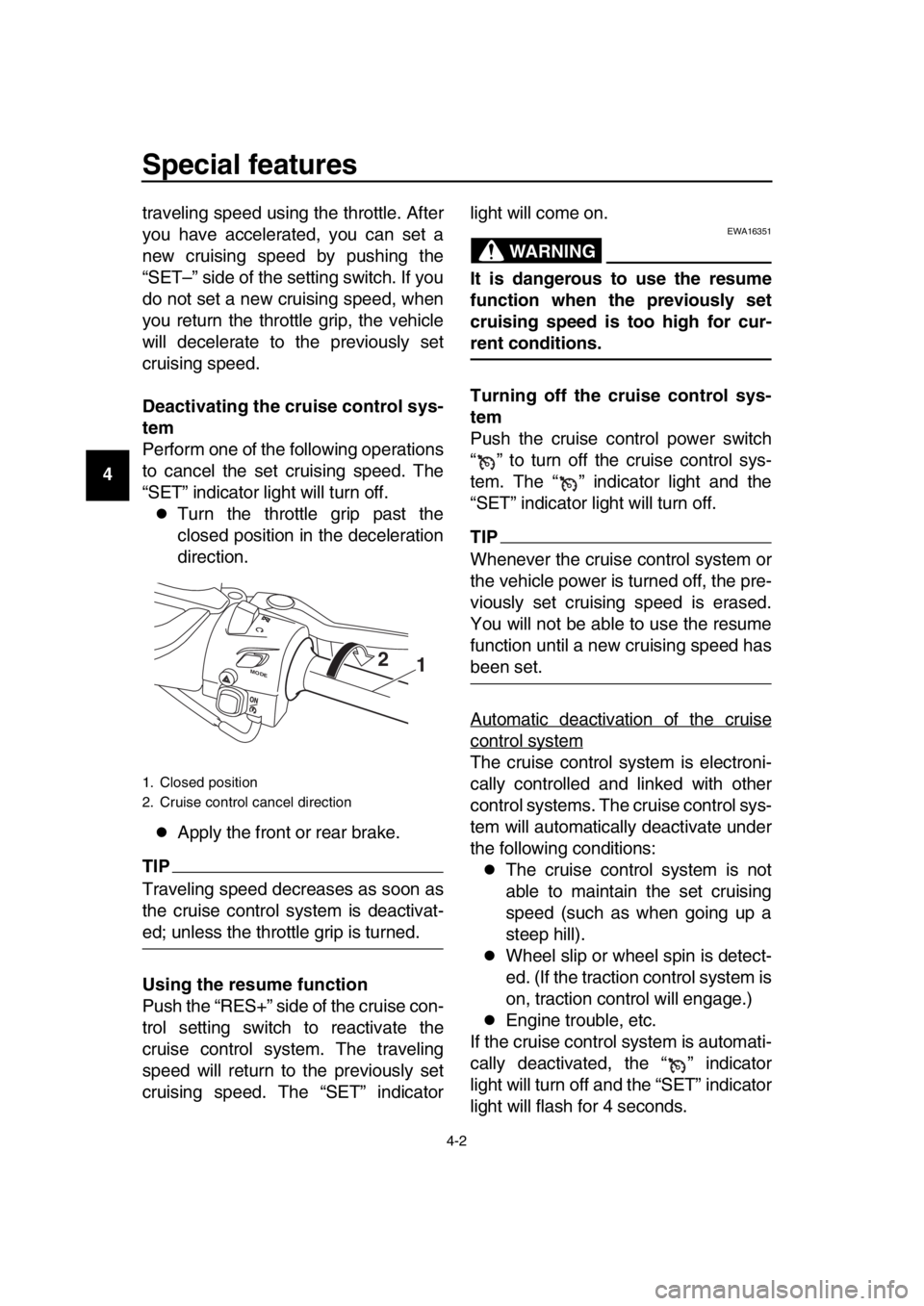
Turn the throttle grip past the
closed position in the deceleration
direction.
Apply the front or rear brake.
TIP
Traveling speed decreases as soon as
the cruise control system is deactivat-
ed; unless the throttle grip is turned.
Using the resume function
Push the “RES+” side of the cruise con-
trol setting switch to reactivate the
cruise control system. The traveling
speed will return to the previously set
cruising speed. The “SET” indicator light will come on.
WARNING
EWA16351
It is dangerous to use the resume
function when the previously set
cruising speed is too high for cur-
rent conditions.
Turning off the cruise control sys-
tem
Push the cruise control power switch
“ ” to turn off the cruise control sys-
tem. The “ ” indicator light and the
“SET” indicator light will turn off.
TIP
Whenever the cruise control system or
the vehicle power is turned off, the pre-
viously set cruisi
ng speed is erased.
You will not be able to use the resume
function until a new cruising speed has
been set.
Automatic deactivation of the cruise
control system
The cruise control system is electroni-
cally controlled and linked with other
control systems. The cruise control sys-
tem will automatically deactivate under
the following conditions:
The cruise control system is not
able to maintain the set cruising
speed (such as when going up a
steep hill).
Wheel slip or wheel spin is detect-
ed. (If the traction control system is
on, traction control will engage.)
Engine trouble, etc.
If the cruise control system is automati-
cally deactivated, the “ ” indicator
light will turn off and the “SET” indicator
light will flash for 4 seconds.
1. Closed position
2. Cruise control cancel direction
M ODE1
2
BV1-28199-E0.book 2 ページ 2016年12月19日 月曜日 午前11時25分
Page 31 of 124
Special features
4-3
1
2
3
4
5
6
7
8
9
10
11
12
13
14
If the cruise control system was auto-
matically deactivated, please stop and
confirm that your vehicle is in good op-
erating condition before continuing on.
When traveling on roads with steep
grades, the cruise control system may
not be able to maintain the set cruising
speed.
When going uphill, the actual trav-
eling speed may become lower
than the set cruising speed. If this
occurs, accelerate to the desired
traveling speed using the throttle.
When going downhill, the actual
traveling speed may become high-
er than the set cruising speed. If
this occurs, the setting switch can-
not be used to adjust the set cruis-
ing speed. To reduce the traveling
speed, apply the brakes. When the
brakes are applied, the cruise con-
trol system will deactivate.
EAU77272
D-mode (drive mode)
(XP530-A, XP530D-A)
D-mode is an electronically controlled
engine performance system with two
mode selections (touring mode “T” and
sports mode “S”).
WARNING
EWA18440
Do not change the drive mode while
the vehicle is moving.
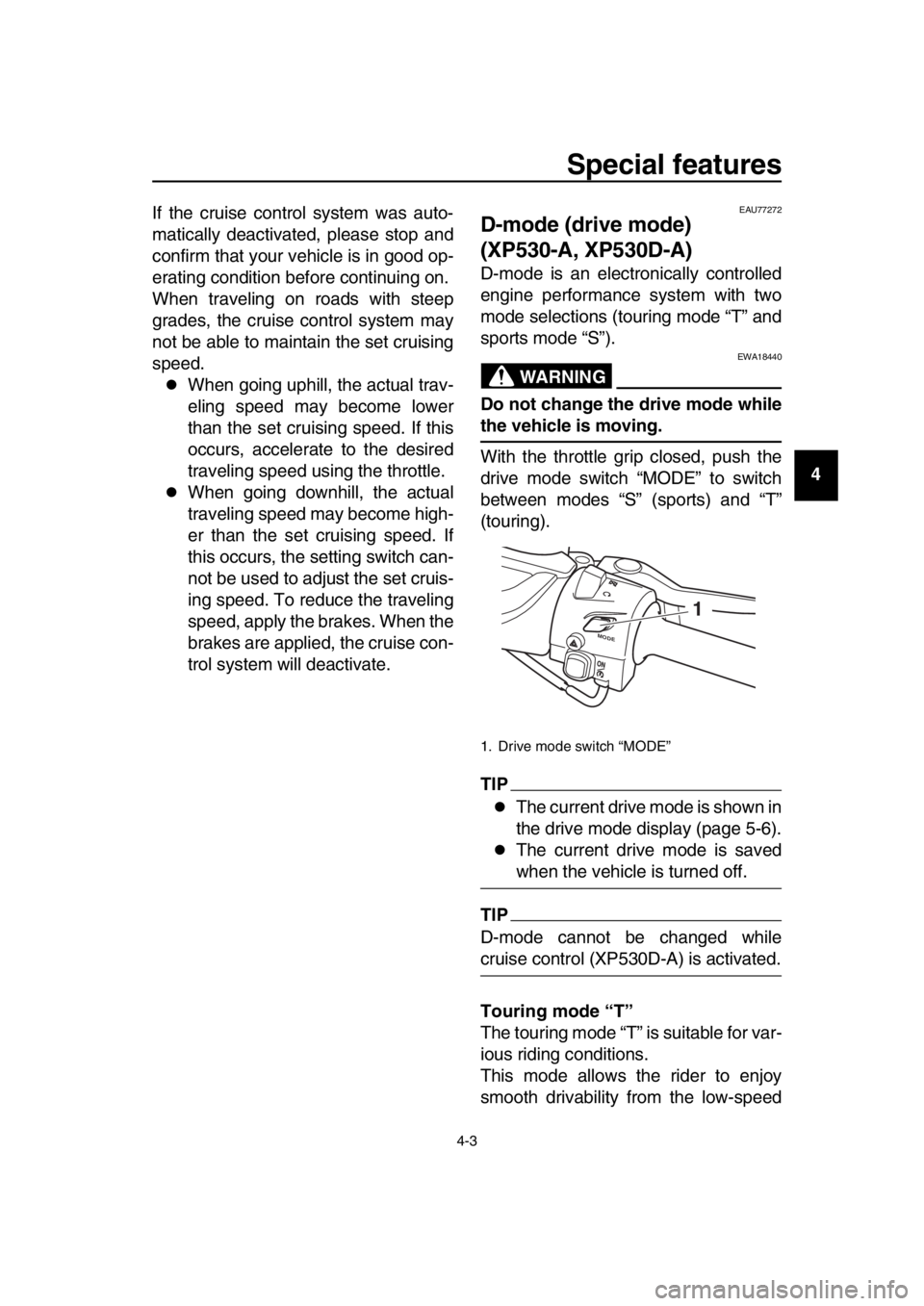
With the throttle grip closed, push the
drive mode switch “MODE” to switch
between modes “S” (sports) and “T”
(touring).
TIP
The current drive mode is shown in
the drive mode display (page 5-6).
The current drive mode is saved
when the vehicle is turned off.
TIP
D-mode cannot be changed while
cruise control (XP530D-A) is activated.
Touring mode “T”
The touring mode “T” is suitable for var-
ious riding conditions.
This mode allows the rider to enjoy
smooth drivability from the low-speed
1. Drive mode switch “MODE”
M
ODE
1
BV1-28199-E0.book 3 ページ 2016年12月19日 月曜日 午前11時25分
Page 34 of 124
5-1
1
2
3
4
5
6
7
8
9
10
11
12
13
14
Instrument and control functions
EAU77490
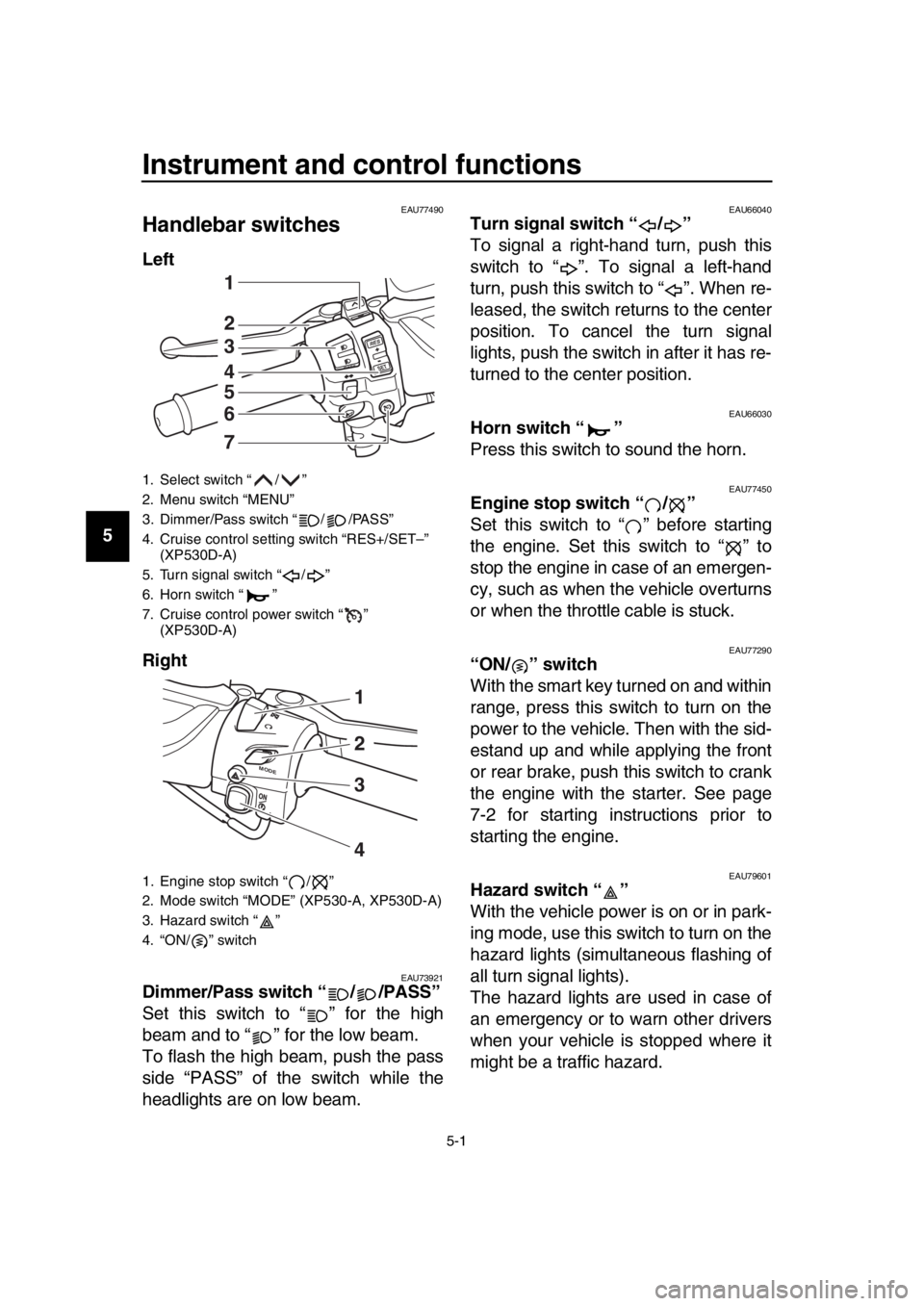
Handlebar switches
Left
Right
EAU73921Dimmer/Pass switch “ / /PASS”
Set this switch to “ ” for the high
beam and to “ ” for the low beam.
To flash the high beam, push the pass
side “PASS” of the switch while the
headlights are on low beam.
EAU66040Turn signal switch “ / ”
To signal a right-hand turn, push this
switch to “ ”. To signal a left-hand
turn, push this switch to “ ”. When re-
leased, the switch returns to the center
position. To cancel the turn signal
lights, push the switch in after it has re-
turned to the center position.
EAU66030Horn switch “ ”
Press this switch to sound the horn.
EAU77450Engine stop switch “ / ”
Set this switch to “ ” before starting
the engine. Set this switch to “ ” to
stop the engine in case of an emergen-
cy, such as when the vehicle overturns
or when the throttle cable is stuck.
EAU77290“ON/ ” switch
With the smart key turned on and within
range, press this switch to turn on the
power to the vehicle. Then with the sid-
estand up and while applying the front
or rear brake, push this switch to crank
the engine with the starter. See page
7-2 for starting instructions prior to
starting the engine.
EAU79601Hazard switch “ ”
With the vehicle power is on or in park-
ing mode, use this switch to turn on the
hazard lights (simultaneous flashing of
all turn signal lights).
The hazard lights are used in case of
an emergency or to warn other drivers
when your vehicle is stopped where it
might be a traffic hazard.
1. Select switch “ / ”
2. Menu switch “MENU”
3. Dimmer/Pass switch “ / /PASS”
4. Cruise control setting switch “RES+/SET–” (XP530D-A)
5. Turn signal switch “ / ”
6. Horn switch “ ”
7. Cruise control power switch “ ” (XP530D-A)
1. Engine stop switch “ / ”
2. Mode switch “MODE” (XP530-A, XP530D-A)
3. Hazard switch “ ”
4. “ON/ ” switch
RE S
SETPA SS
1
2
3
4
5
6
7
M ODE
1
3
4
2
BV1-28199-E0.book 1 ページ 2016年12月19日 月曜日 午前11時25分
Page 35 of 124
Instrument and control functions
5-2
1
2
3
4
5
6
7
8
9
10
11
12
13
14
NOTICE
ECA10062
Do not use the hazard lights for an
extended length of time with the en-
gine not running, otherwise the bat-
tery may discharge.
EAU73951Cruise control switches
See page 4-1 for an explanation of the
cruise control system.
EAU77300Menu switch “MENU”
This switch is used to perform selec-
tions in the function display and setting
mode display of the multi-function dis-
play.
See “Multi-function display” on page
5-5 for detailed information.
EAU77310Select switch “ / ”
This switch is used to perform selec-
tions in the function display and setting
mode display of the multi-function dis-
play.
See “Multi-function display” on page
5-5 for detailed information.
EAU73931Drive mode switch “MODE”
See page 4-3 for an explanation of the
drive mode.
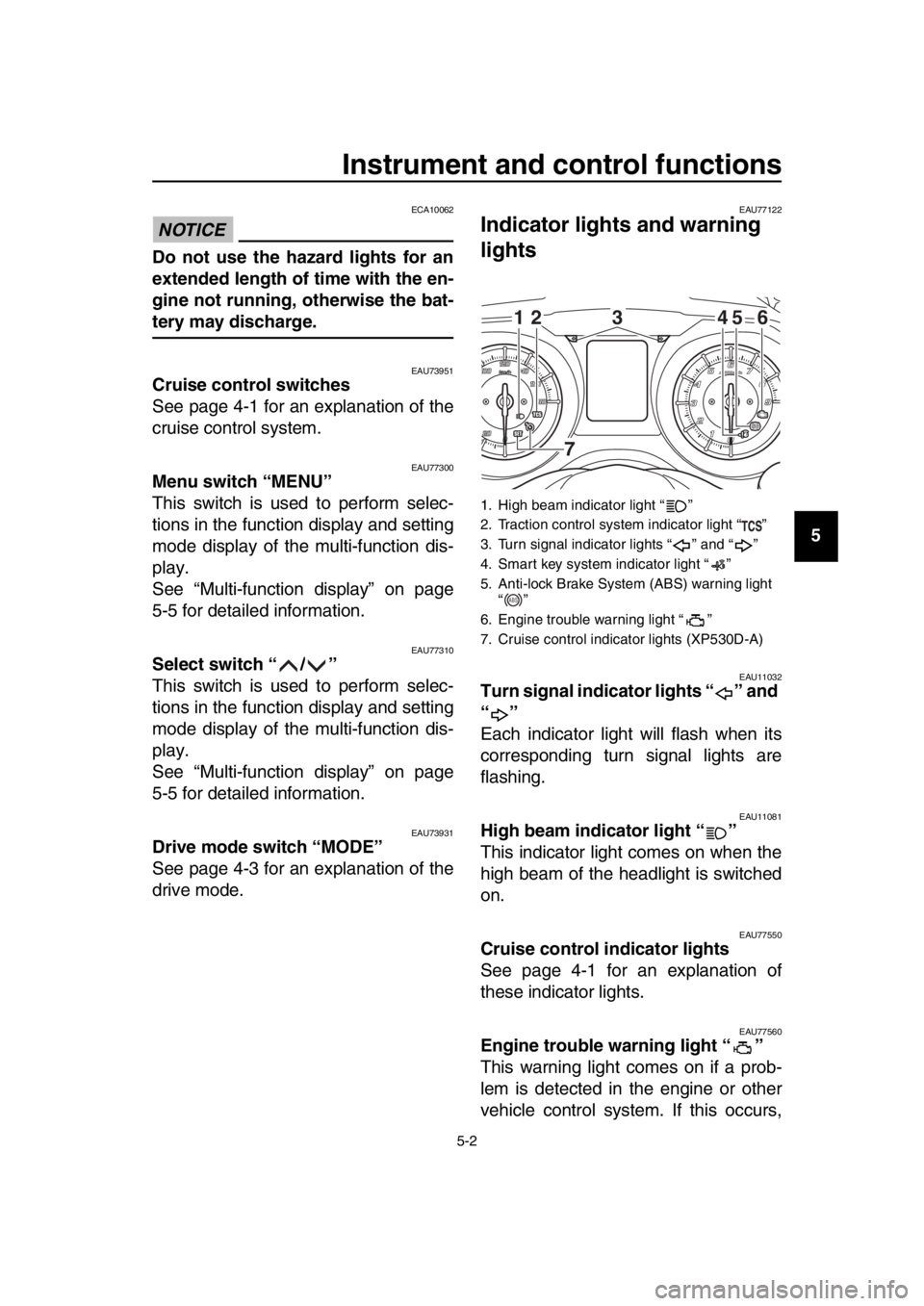
EAU77122
Indicator ligh ts and warning
lights
EAU11032Turn signal indicator lights “ ” and
“”
Each indicator light will flash when its
corresponding turn signal lights are
flashing.
EAU11081High beam indicator light “ ”
This indicator light comes on when the
high beam of the headlight is switched
on.
EAU77550Cruise control indicator lights
See page 4-1 for an explanation of
these indicator lights.
EAU77560Engine trouble warning light “ ”
This warning light comes on if a prob-
lem is detected in the engine or other
vehicle control system. If this occurs,
1. High beam indicator light “ ”
2. Traction control system indicator light “ ”
3. Turn signal indicator lights “ ” and “ ”
4. Smart key system indicator light “ ”
5. Anti-lock Brake System (ABS) warning light “”
6. Engine trouble warning light “ ”
7. Cruise control indicator lights (XP530D-A)
12 45 6
3
7
ABS
BV1-28199-E0.book 2 ページ 2016年12月19日 月曜日 午前11時25分
Page 36 of 124

Instrument and control functions
5-3
1
2
3
4
5
6
7
8
9
10
11
12
13
14 have a Yamaha dealer check the on-
board diagnostic system.
The electrical circuit of the warning light
can be checked by turning the vehicle
power on. The warning light should
come on for a few seconds, and then
go off.
If the warning light does not come on at
all, or if the warning light remains on,
have a Yamaha dealer check the vehi-
cle.
EAU77071ABS warning light “ ”
In normal operation, the ABS warning
light comes on when the vehicle power
is turned on and goes off after traveling
at a speed of 10 km/h (6 mi/h) or higher.
If the ABS warning light:
does not come on when the vehi-
cle power is turned on
comes on or flashes while riding
does not go off after traveling at a
speed of 10 km/h (6 mi/h) or higher
The ABS may not work correctly. If any
of the above occurs, have a Yamaha
dealer check the system as soon as
possible. (See page 5-19 for an expla-
nation of the ABS.)
WARNING
EWA16041
If the ABS warning light does not go
off after traveling at a speed of 10
km/h (6 mi/h) or higher, or if the
warning light comes on or flashes
while riding, the brake system re-
verts to conventional braking. If ei-
ther of the above occurs, or if the
warning light does not come on at
all, use extra caution to avoid possi-
ble wheel lock during emergency
braking. Have a Yamaha dealer
check the brake system and electri-
cal circuits as soon as possible.
TIP
The ABS warning light may come on
when revving the engine with the scoot-
er on its centerstand, but this does not
indicate a malfunction.
EAU74081Traction control system indicator
light “ ”
This indicator light will flash when trac-
tion control has engaged.
If the traction control system is turned
off, this indicator light will come on.
TIP
When the vehicle is turned on, the light
should come on for a few seconds and
then go off. If the light does not come
on, or if the light remains on, have a
Yamaha dealer check vehicle.
EAU78080Smart key system indicator light
“”
This indicator light will flash when com-
munication between the vehicle and
smart key takes place and when certain
smart key system operations are car-
ried out.
The indicator light may also flash when
there is an error in the smart key sys-
tem.
TIP
When the start switch is pushed, the in-
dicator light will come on for about one
second and then go off. If the indicator
light does not come on or go off as nor-
mal, have a Yamaha dealer check the
vehicle.
ABS
BV1-28199-E0.book 3 ページ 2016年12月19日 月曜日 午前11時25分
Page 50 of 124
Instrument and control functions
5-17
1
2
3
4
5
6
7
8
9
10
11
12
13
14 “YES”, and then push the “MENU”
switch. All items are reset to facto-
ry preset or default settings.
TIP
The odometer, clock, maintenance
counter item “Oil” and mainenance
counter item “V-Belt” will not be reset.
To exit the setting mode
1. Use the select switch to highlight
“Return”.
2. Push the “MENU” switch to exit the setting mode and return to the
standard display mode.
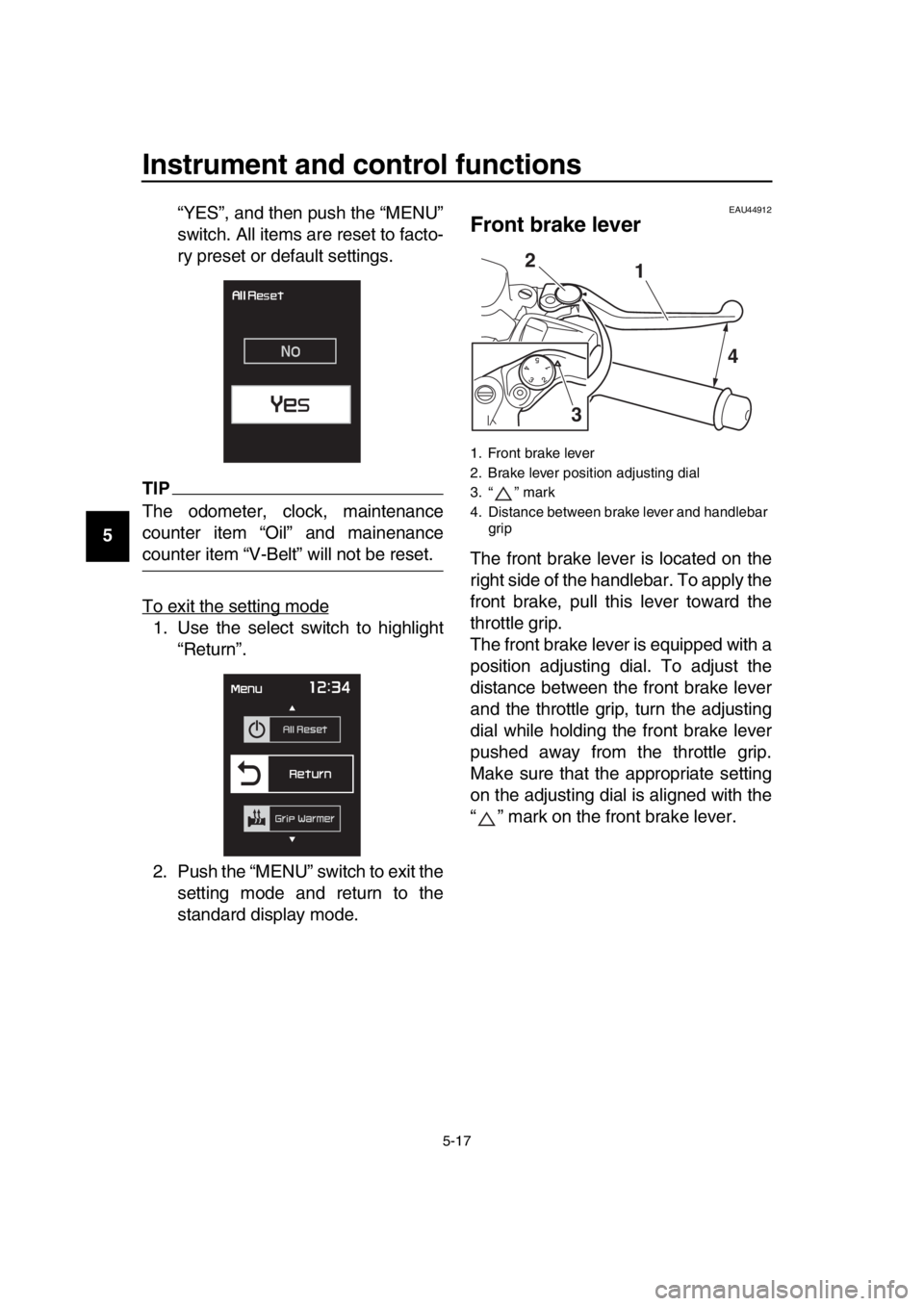
EAU44912
Front brake lever
The front brake lever is located on the
right side of the handlebar. To apply the
front brake, pull this lever toward the
throttle grip.
The front brake lever is equipped with a
position adjusting dial. To adjust the
distance between the front brake lever
and the throttle grip, turn the adjusting
dial while holding the front brake lever
pushed away from the throttle grip.
Make sure that the appropriate setting
on the adjusting dial is aligned with the
“ ” mark on the front brake lever.
1. Front brake lever
2. Brake lever position adjusting dial
3. “ ” mark
4. Distance between brake lever and handlebar grip
1
2
3 4
BV1-28199-E0.book 17 ページ 2016年12月19日 月曜日 午前11時25分