display YAMAHA TMAX 2019 User Guide
[x] Cancel search | Manufacturer: YAMAHA, Model Year: 2019, Model line: TMAX, Model: YAMAHA TMAX 2019Pages: 122, PDF Size: 14.98 MB
Page 44 of 122
Instrument and control functions
5-11
1
2
3
4
5
6
7
8
9
10
11
12
13
14
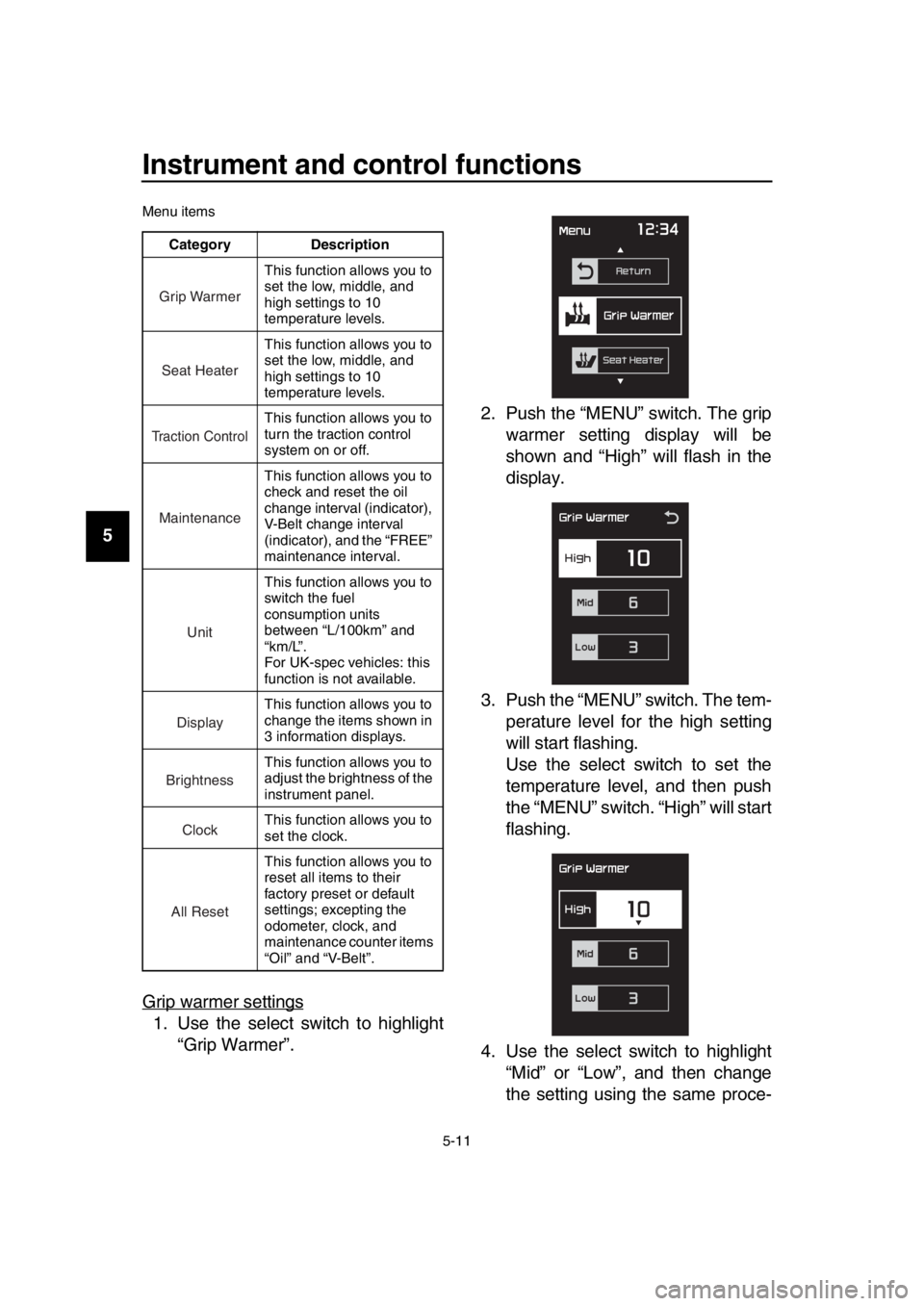
Menu items
Grip warmer settings
1. Use the select switch to highlight “Grip Warmer”. 2. Push the “MENU” switch. The grip
warmer setting display will be
shown and “High” will flash in the
display.
3. Push the “MENU” switch. The tem- perature level for the high setting
will start flashing.
Use the select switch to set the
temperature level, and then push
the “MENU” switch. “High” will start
flashing.
4. Use the select switch to highlight “Mid” or “Low”, and then change
the setting using the same proce-
Category Description
This function allows you to
set the low, middle, and
high settings to 10
temperature levels.
This function allows you to
set the low, middle, and
high settings to 10
temperature levels.
This function allows you to
turn the traction control
system on or off.
This function allows you to
check and reset the oil
change interval (indicator),
V-Belt change interval
(indicator), and the “FREE”
maintenance interval.
This function allows you to
switch the fuel
consumption units
between “L/100km” and
“km/L”.
For UK-spec vehicles: this
function is not available.
This function allows you to
change the items shown in
3 information displays.
This function allows you to
adjust the brightness of the
instrument panel.
This function allows you to
set the clock.
This function allows you to
reset all items to their
factory preset or default
settings; excepting the
odometer, clock, and
maintenance counter items
“Oil” and “V-Belt”.
Grip Warmer
Seat Heater
Tr action Control
Maintenance
Unit
Display
Brightness
Clock
All Reset
BV1-9-E2.book 11 ページ 2018年8月28日 火曜日 午後5時28分
Page 45 of 122
Instrument and control functions
5-12
1
2
3
4
5
6
7
8
9
10
11
12
13
14
dure that was used for the high set-
ting.
5. When you finished changing the settings, use the select switch to
highlight “ ”, and then push the
“MENU” switch to return to the
menu screen.
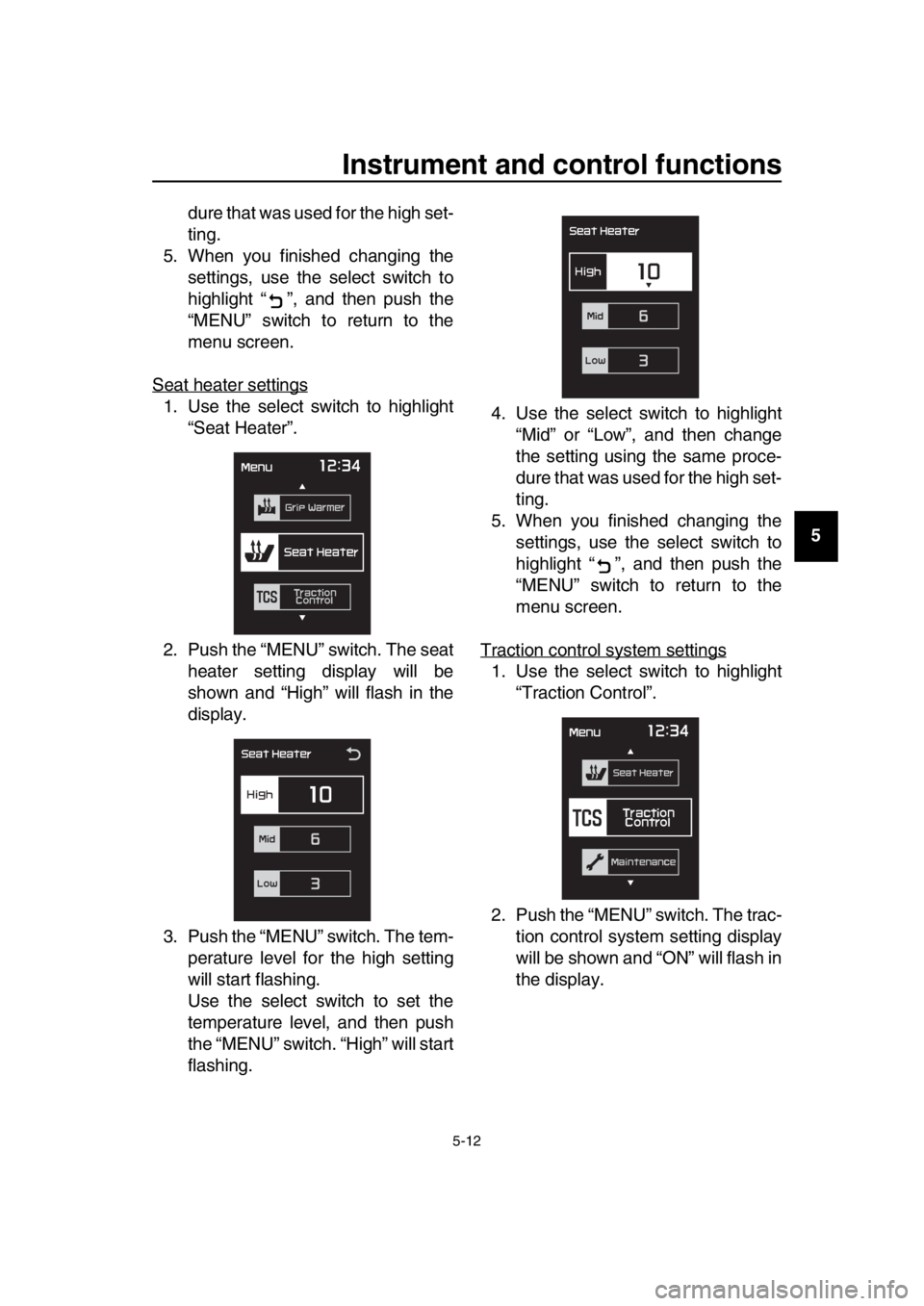
Seat heater settings
1. Use the select switch to highlight “Seat Heater”.
2. Push the “MENU” switch. The seat heater setting display will be
shown and “High” will flash in the
display.
3. Push the “MENU” switch. The tem- perature level for the high setting
will start flashing.
Use the select switch to set the
temperature level, and then push
the “MENU” switch. “High” will start
flashing. 4. Use the select switch to highlight
“Mid” or “Low”, and then change
the setting using the same proce-
dure that was used for the high set-
ting.
5. When you finished changing the settings, use the select switch to
highlight “ ”, and then push the
“MENU” switch to return to the
menu screen.
Traction control system settings
1. Use the select switch to highlight “Traction Control”.
2. Push the “MENU” switch. The trac- tion control system setting display
will be shown and “ON” will flash in
the display.
BV1-9-E2.book 12 ページ 2018年8月28日 火曜日 午後5時28分
Page 47 of 122
Instrument and control functions
5-14
1
2
3
4
5
6
7
8
9
10
11
12
13
14
function does not indicate on setting
mode display and cannot be selected.
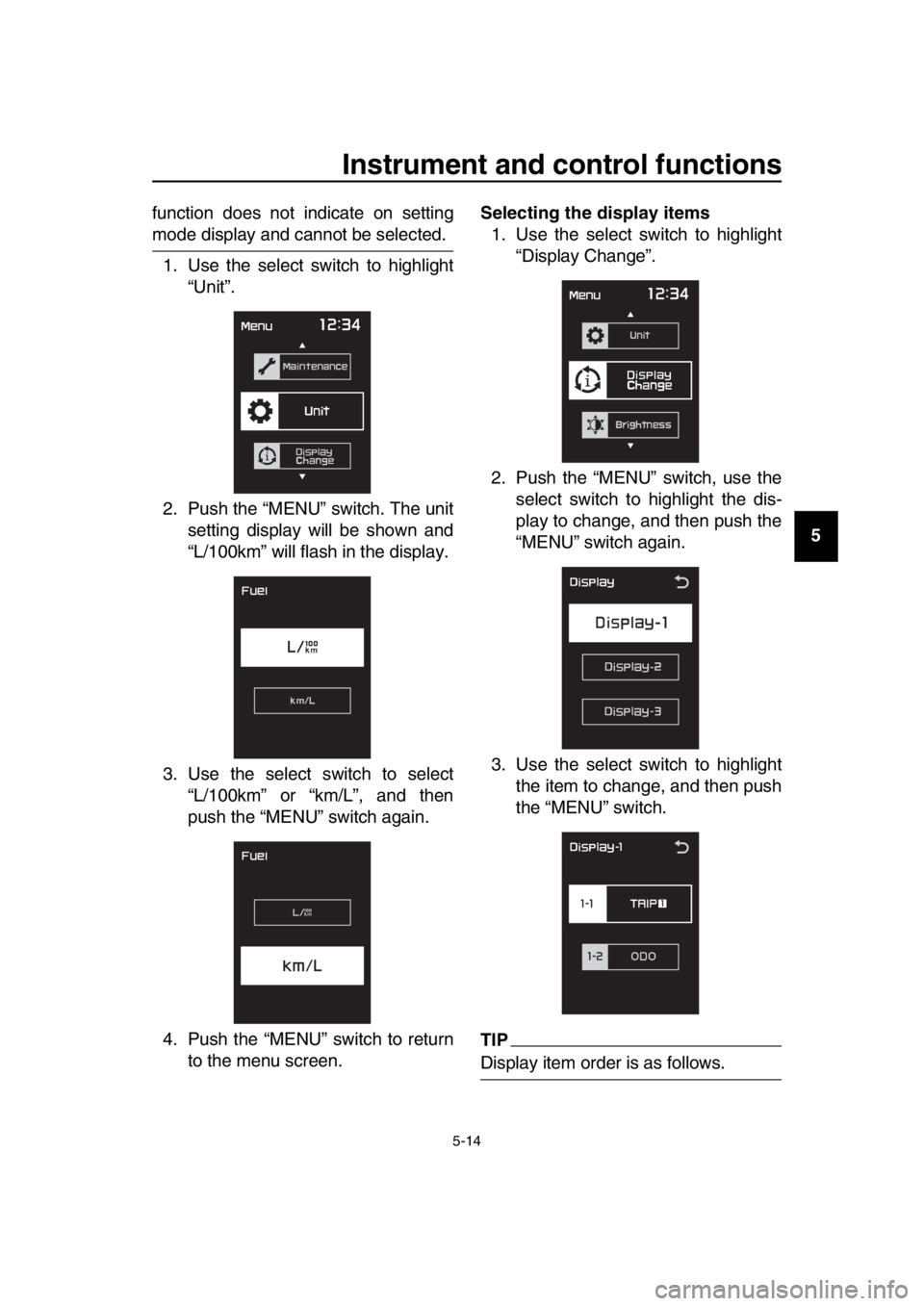
1. Use the select switch to highlight “Unit”.
2. Push the “MENU” switch. The unit setting display will be shown and
“L/100km” will flash in the display.
3. Use the select switch to select “L/100km” or “km/L”, and then
push the “MENU” switch again.
4. Push the “MENU” switch to return to the menu screen. Selecting the display items
1. Use the select switch to highlight “Display Change”.
2. Push the “MENU” switch, use the select switch to highlight the dis-
play to change, and then push the
“MENU” switch again.
3. Use the select switch to highlight the item to change, and then push
the “MENU” switch.
TIP
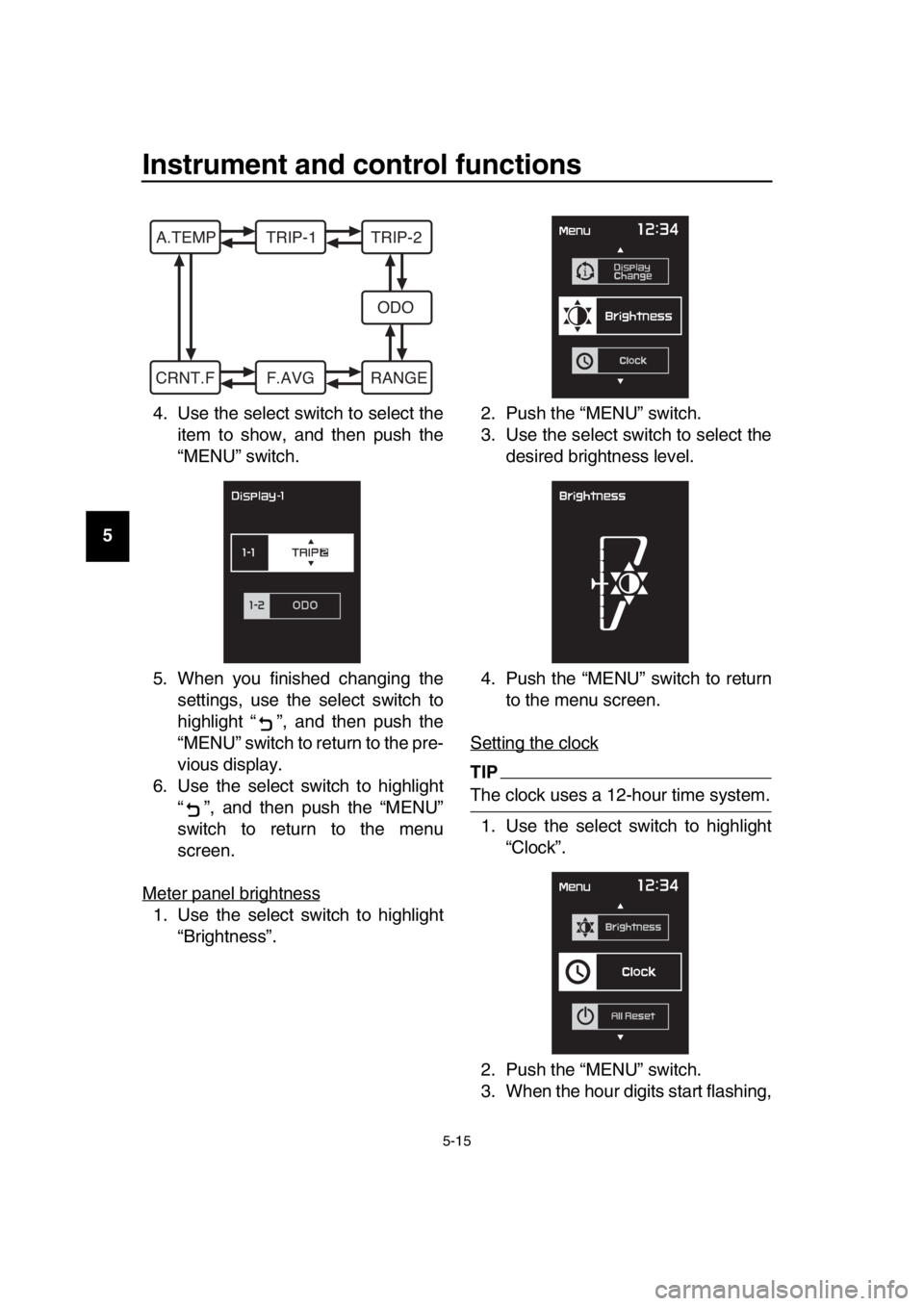
Display item order is as follows.
BV1-9-E2.book 14 ページ 2018年8月28日 火曜日 午後5時28分
Page 48 of 122
Instrument and control functions
5-15
1
2
3
4
5
6
7
8
9
10
11
12
13
14 4. Use the select switch to select the
item to show, and then push the
“MENU” switch.
5. When you finished changing the settings, use the select switch to
highlight “ ”, and then push the
“MENU” switch to return to the pre-
vious display.
6. Use the select switch to highlight “ ”, and then push the “MENU”
switch to return to the menu
screen.
Meter panel brightness
1. Use the select switch to highlight “Brightness”. 2. Push the “MENU” switch.
3. Use the select switch to select the
desired brightness level.
4. Push the “MENU” switch to return to the menu screen.
Setting the clock
TIP
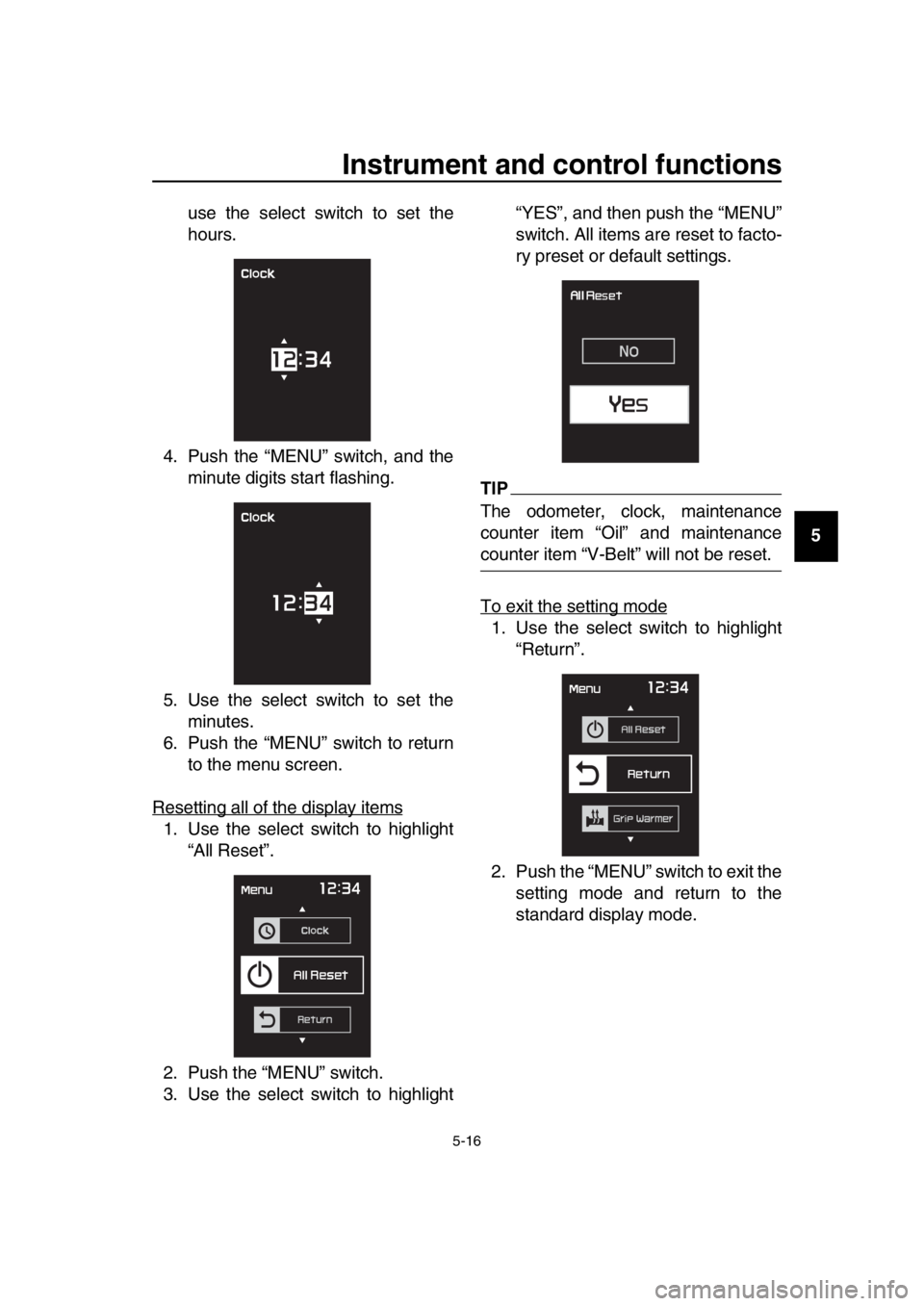
The clock uses a 12-hour time system. 1. Use the select switch to highlight “Clock”.
2. Push the “MENU” switch.
3. When the hour digits start flashing,
A.TEMP TRIP-1 TRIP-2 ODO
CRNT.F F.AVG RANGE
BV1-9-E2.book 15 ページ 2018年8月28日 火曜日 午後5時28分
Page 49 of 122
Instrument and control functions
5-16
1
2
3
4
5
6
7
8
9
10
11
12
13
14
use the select switch to set the
hours.
4. Push the “MENU” switch, and the minute digits start flashing.
5. Use the select switch to set the minutes.
6. Push the “MENU” switch to return to the menu screen.
Resetting all of the display items
1. Use the select switch to highlight “All Reset”.
2. Push the “MENU” switch.
3. Use the select switch to highlight “YES”, and then push the “MENU”
switch. All items are reset to facto-
ry preset or default settings.
TIP
The odometer, clock, maintenance
counter item “Oil” and maintenance
counter item “V-Belt” will not be reset.
To exit the setting mode
1. Use the select switch to highlight
“Return”.
2. Push the “MENU” switch to exit the setting mode and return to the
standard display mode.
BV1-9-E2.book 16 ページ 2018年8月28日 火曜日 午後5時28分
Page 119 of 122

12-1
1
2
3
4
5
6
7
8
9
10
11
12
13
14
Index
A
ABS warning light ....................................5-3
Acceleration and deceleration .................7-3
Air filter element, engine........................8-15
Anti-lock brake system (ABS)................5-18
Auxiliary DC jack ...................................5-28
B
Battery ...................................................8-28
Brake fluid, changing .............................8-23
Brake fluid level, checking .....................8-22
Brake lever, front ...................................5-17
Brake lever, rear ....................................5-17
Brake levers, lubricating ........................8-25
Braking ....................................................7-4
C
Cables, checking and lubricating...........8-24
Canister .................................................8-10
Care.........................................................9-1
Catalytic converter.................................5-22
Centerstand and sidestand, checking and lubricating.....................................8-26
Coolant ..................................................8-13
Cruise control indicator lights ..................5-2
Cruise control switches ...........................5-2
Cruise control system (XP530D-A) .........4-1
D
Data recording, vehicle..........................11-2
Diagnostic connector .............................11-2
Dimmer/Pass switch ................................5-1
D-mode (drive mode) ..............................4-3
Drive belt slack ......................................8-24
Drive mode switch ...................................5-2
E
Emergency mode ..................................8-37
Engine break-in .......................................7-5
Engine idling speed, checking ...............8-16
Engine oil and oil filter cartridge ............8-10
Engine serial number ............................11-1
Engine stop switch ..................................5-1
Engine trouble warning light ....................5-2
F
Front and rear brake lever free play,
checking ..............................................8-20
Front and rear brake pads, checking.....8-22
Front fork, checking ...............................8-26
Fuel .......................................................5-20
Fuel consumption, tips for reducing ........7-5
Fuel tank cap .........................................5-19
Fuel tank overflow hose ........................5-22
Fuses, replacing ....................................8-29
H
Handlebar switches................................. 5-1
Hazard switch ......................................... 5-1
High beam indicator light ........................ 5-2
Horn switch ............................................. 5-1
How to lock the centerstand.................. 3-10
How to lock the steering........................ 3-10
I
Identification numbers ........................... 11-1
Ignition circuit cut-off system................. 5-29
Indicator lights and warning lights ........... 5-2
K
Key, handling of smart and mechanical key ........................................................ 3-3
L
License plate light bulb, replacing ......... 8-32
M
Maintenance and lubrication, periodic .... 8-4
Maintenance, emission control system ... 8-3
Matte color, caution................................. 9-1
Menu switch ............................................ 5-2
Model label............................................ 11-1
Multi-function display .............................. 5-5
O
Operating range of the smart key system .................................................. 3-2
P
Panels, removing and installing .............. 8-7
Parking .................................................... 7-6
Parking mode ........................................ 3-13
Part locations .......................................... 2-1
Powering off the vehicle .......................... 3-9
Powering on the vehicle .......................... 3-8
Power on/Starter switch .......................... 5-1
R
Rear brake lock cable, adjusting ........... 8-21
Rear brake lock, checking..................... 8-21
Rear brake lock lever ............................ 5-18
Rear view mirrors .................................. 5-26
S
Safe-riding points .................................... 1-5
Safety information ................................... 1-1
Select switch ........................................... 5-2
Shock absorber assembly..................... 5-26
Sidestand .............................................. 5-29
Smart key ................................................ 3-5
Smart key battery, replacing ................... 3-6
Smart key system ................................... 3-1
Smart key system indicator light ............. 5-3
Smart key system, troubleshooting ....... 8-33
BV1-9-E2.book 1 ページ 2018年8月28日 火曜日 午後5時28分