Indicator YAMAHA TRICITY 300 2020 User Guide
[x] Cancel search | Manufacturer: YAMAHA, Model Year: 2020, Model line: TRICITY 300, Model: YAMAHA TRICITY 300 2020Pages: 114, PDF Size: 11.27 MB
Page 34 of 114
Instrument and control functions
5-3
5
TIPWhen the vehicle is turned on, the light
should come on for a few seconds and
then go off. If the light does not come
on, or if the light remains on, have a
Yamaha dealer check the vehicle.
EAU86811
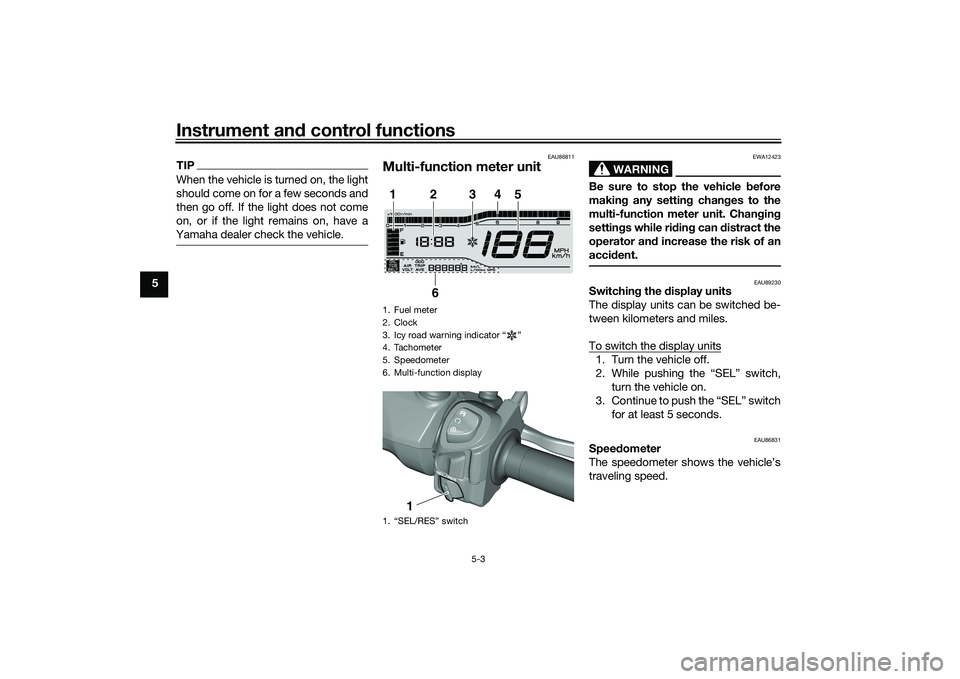
Multi-function meter unit
WARNING
EWA12423
Be sure to stop the vehicle before
makin g any settin g chan ges to the
multi-function meter unit. Chan gin g
settin gs while ri din g can distract the
operator an d increase the risk of an
acci dent.
EAU89230
Switchin g the d isplay units
The display units can be switched be-
tween kilometers and miles.
To switch the display units1. Turn the vehicle off.
2. While pushing the “SEL” switch, turn the vehicle on.
3. Continue to push the “SEL” switch for at least 5 seconds.
EAU86831
Speed ometer
The speedometer shows the vehicle’s
traveling speed.
1. Fuel meter
2. Clock
3. Icy road warning indicator “ ”
4. Tachometer
5. Speedometer
6. Multi-function display
1. “SEL/RES” switch1
2
3
4
5
6
1
UBX9E0E0.book Page 3 Monday, January 20, 2020 10:54 AM
Page 36 of 114
Instrument and control functions
5-5
5
EAU89130
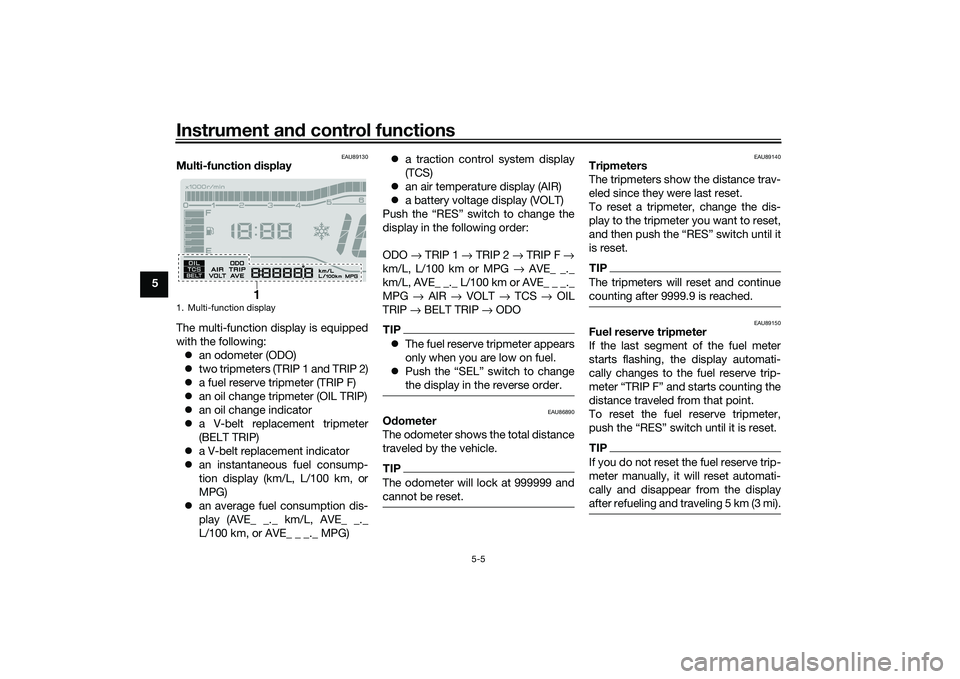
Multi-function display
The multi-function display is equipped
with the following: an odometer (ODO)
two tripmeters (TRIP 1 and TRIP 2)
a fuel reserve tripmeter (TRIP F)
an oil change tripmeter (OIL TRIP)
an oil change indicator
a V-belt replacement tripmeter
(BELT TRIP)
a V-belt replacement indicator
an instantaneous fuel consump-
tion display (km/L, L/100 km, or
MPG)
an average fuel consumption dis-
play (AVE_ _._ km/L, AVE_ _._
L/100 km, or AVE_ _ _._ MPG)
a traction control system display
(TCS)
an air temperature display (AIR)
a battery voltage display (VOLT)
Push the “RES” switch to change the
display in the following order:
ODO → TRIP 1 → TRIP 2 → TRIP F →
km/L, L/100 km or MPG → AVE_ _._
km/L, AVE_ _._ L/100 km or AVE_ _ _._
MPG → AIR → VOLT → TCS → OIL
TRIP → BELT TRIP → ODO
TIP The fuel reserve tripmeter appears
only when you are low on fuel.
Push the “SEL” switch to change
the display in the reverse order.
EAU86890
Odometer
The odometer shows the total distance
traveled by the vehicle.TIPThe odometer will lock at 999999 and
cannot be reset.
EAU89140
Tripmeters
The tripmeters show the distance trav-
eled since they were last reset.
To reset a tripmeter, change the dis-
play to the tripmeter you want to reset,
and then push the “RES” switch until it
is reset.TIPThe tripmeters will reset and continue
counting after 9999.9 is reached.
EAU89150
Fuel reserve tripmeter
If the last segment of the fuel meter
starts flashing, the display automati-
cally changes to the fuel reserve trip-
meter “TRIP F” and starts counting the
distance traveled from that point.
To reset the fuel reserve tripmeter,
push the “RES” switch until it is reset.TIPIf you do not reset the fuel reserve trip-
meter manually, it will reset automati-
cally and disappear from the display
after refueling and traveling 5 km (3 mi).
1. Multi-function display
1
UBX9E0E0.book Page 5 Monday, January 20, 2020 10:54 AM
Page 37 of 114
Instrument and control functions
5-6
5
EAU89161
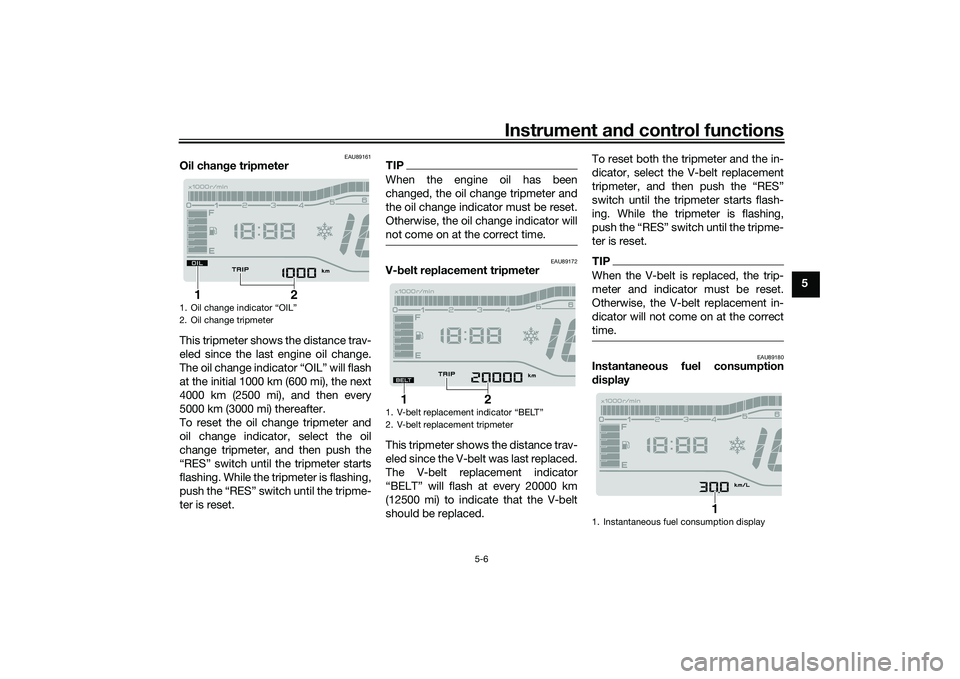
Oil chan ge tripmeter
This tripmeter shows the distance trav-
eled since the last engine oil change.
The oil change indicator “OIL” will flash
at the initial 1000 km (600 mi), the next
4000 km (2500 mi), and then every
5000 km (3000 mi) thereafter.
To reset the oil change tripmeter and
oil change indicator, select the oil
change tripmeter, and then push the
“RES” switch until the tripmeter starts
flashing. While the tripmeter is flashing,
push the “RES” switch until the tripme-
ter is reset.
TIPWhen the engine oil has been
changed, the oil change tripmeter and
the oil change indicator must be reset.
Otherwise, the oil change indicator will
not come on at the correct time.
EAU89172
V- belt replacement tripmeter
This tripmeter shows the distance trav-
eled since the V-belt was last replaced.
The V-belt replacement indicator
“BELT” will flash at every 20000 km
(12500 mi) to indicate that the V-belt
should be replaced. To reset both the tripmeter and the in-
dicator, select the V-belt replacement
tripmeter, and then push the “RES”
switch until the tripmeter starts flash-
ing. While the tripmeter is flashing,
push the “RES” switch until the tripme-
ter is reset.
TIPWhen the V-belt is replaced, the trip-
meter and indicator must be reset.
Otherwise, the V-belt replacement in-
dicator will not come on at the correct
time.
EAU89180
Instantaneous fuel consumption
d
isplay
1. Oil change indicator “OIL”
2. Oil change tripmeter
2
1
1. V-belt replacement indicator “BELT”
2. V-belt replacement tripmeter
2
1
1. Instantaneous fuel consumption display
1
UBX9E0E0.book Page 6 Monday, January 20, 2020 10:54 AM
Page 39 of 114
Instrument and control functions
5-8
5
TIPIf only “TCS” is displayed, there is a
communication error within the vehi-
cle. Have a Yamaha dealer check the
vehicle as soon as possible.
EAU89210
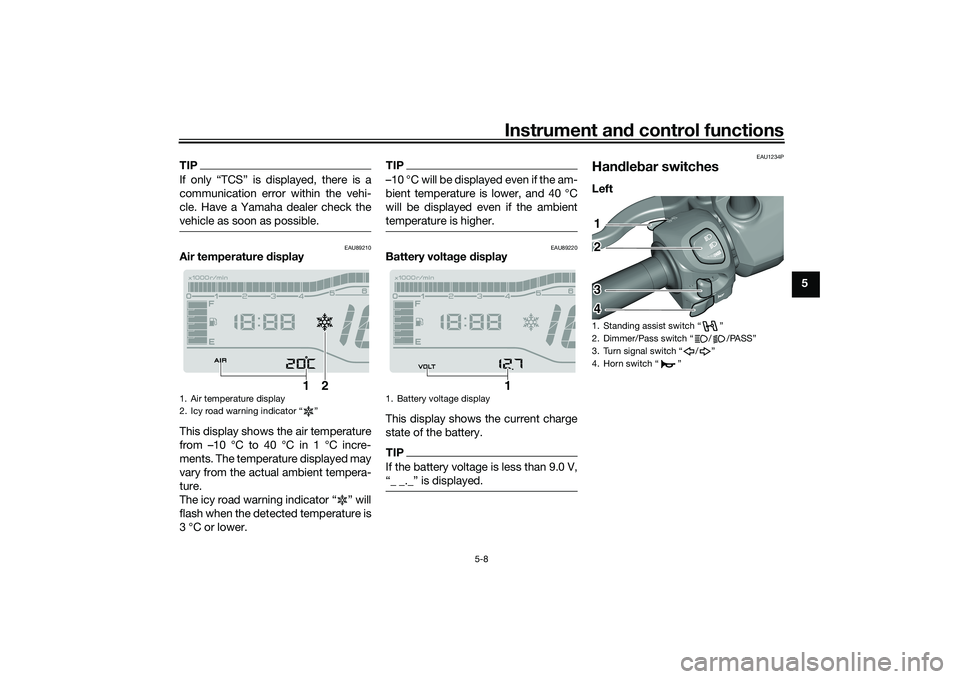
Air temperature display
This display shows the air temperature
from –10 °C to 40 °C in 1 °C incre-
ments. The temperature displayed may
vary from the actual ambient tempera-
ture.
The icy road warning indicator “ ” will
flash when the detected temperature is
3 °C or lower.
TIP–10 °C will be displayed even if the am-
bient temperature is lower, and 40 °C
will be displayed even if the ambient
temperature is higher.
EAU89220
Battery volta ge display
This display shows the current charge
state of the battery.TIPIf the battery voltage is less than 9.0 V,
“_ _._” is displayed.
EAU1234P
Han dle bar switchesLeft
1. Air temperature display
2. Icy road warning indicator “ ”
1
2
1. Battery voltage display
1
1. Standing assist switch “ ”
2. Dimmer/Pass switch “ / /PASS”
3. Turn signal switch “ / ”
4. Horn switch “ ”12
3
4
UBX9E0E0.book Page 8 Monday, January 20, 2020 10:54 AM
Page 40 of 114
Instrument and control functions
5-9
5 Ri
ght
EAU89310
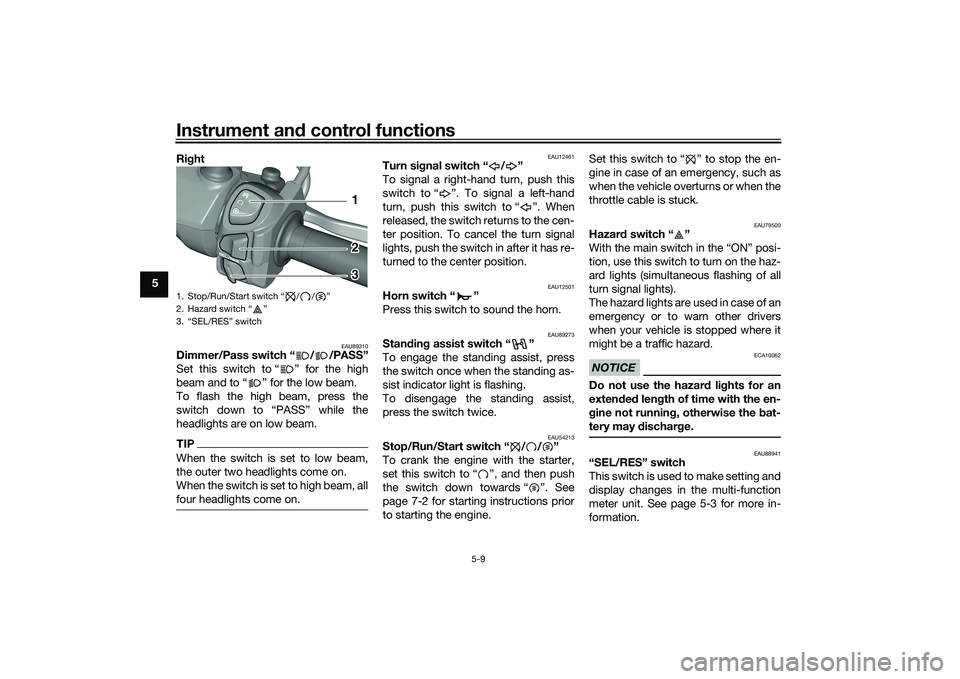
Dimmer/Pass switch “ / /PASS”
Set this switch to “ ” for the high
beam and to “ ” for the low beam.
To flash the high beam, press the
switch down to “PASS” while the
headlights are on low beam.TIPWhen the switch is set to low beam,
the outer two headlights come on.
When the switch is set to high beam, all
four headlights come on.
EAU12461
Turn si gnal switch “ / ”
To signal a right-hand turn, push this
switch to “ ”. To signal a left-hand
turn, push this switch to “ ”. When
released, the switch returns to the cen-
ter position. To cancel the turn signal
lights, push the switch in after it has re-
turned to the center position.
EAU12501
Horn switch “ ”
Press this switch to sound the horn.
EAU89273
Stan din g assist switch “ ”
To engage the standing assist, press
the switch once when the standing as-
sist indicator light is flashing.
To disengage the standing assist,
press the switch twice.
EAU54213
Stop/Run/Start switch “ / / ”
To crank the engine with the starter,
set this switch to “ ”, and then push
the switch down towards “ ”. See
page 7-2 for starting instructions prior
to starting the engine. Set this switch to “ ” to stop the en-
gine in case of an emergency, such as
when the vehicle overturns or when the
throttle cable is stuck.
EAU79500
Hazar
d switch “ ”
With the main switch in the “ON” posi-
tion, use this switch to turn on the haz-
ard lights (simultaneous flashing of all
turn signal lights).
The hazard lights are used in case of an
emergency or to warn other drivers
when your vehicle is stopped where it
might be a traffic hazard.NOTICE
ECA10062
Do not use the hazard lights for an
exten ded len gth of time with the en-
g ine not runnin g, otherwise the bat-
tery may dischar ge.
EAU88941
“SEL/RES” switch
This switch is used to make setting and
display changes in the multi-function
meter unit. See page 5-3 for more in-
formation.
1. Stop/Run/Start switch “ / / ”
2. Hazard switch “ ”
3. “SEL/RES” switch
12
3
UBX9E0E0.book Page 9 Monday, January 20, 2020 10:54 AM
Page 44 of 114
Instrument and control functions
5-13
5
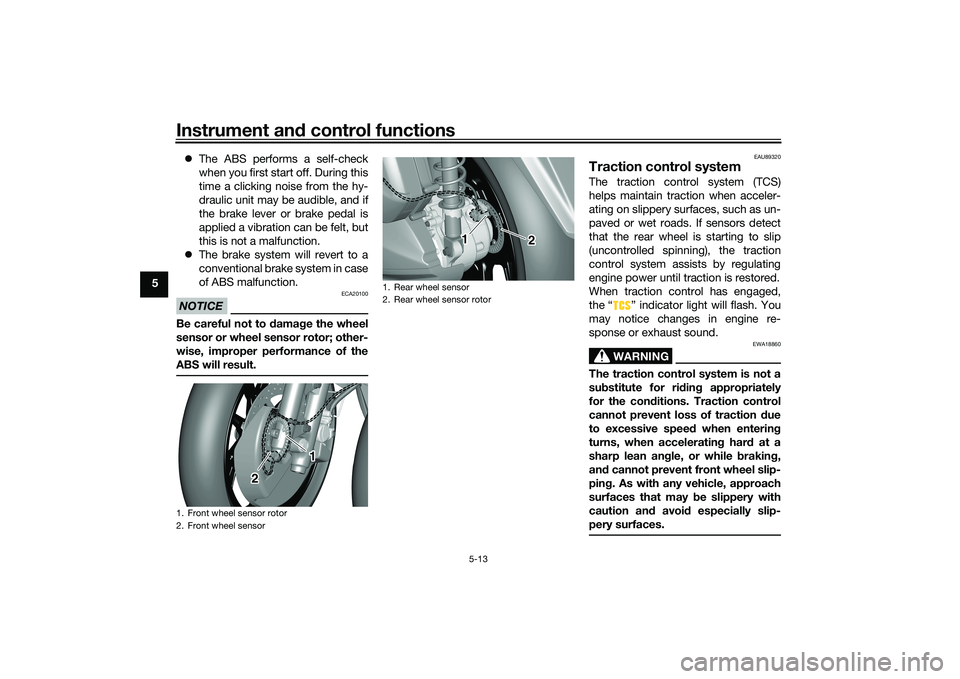
The ABS performs a self-check
when you first start off. During this
time a clicking noise from the hy-
draulic unit may be audible, and if
the brake lever or brake pedal is
applied a vibration can be felt, but
this is not a malfunction.
The brake system will revert to a
conventional brake system in case
of ABS malfunction.
NOTICE
ECA20100
Be careful not to damag e the wheel
sensor or wheel sensor rotor; other-
wise, improper performance of the
ABS will result.
EAU89320
Traction control systemThe traction control system (TCS)
helps maintain traction when acceler-
ating on slippery surfaces, such as un-
paved or wet roads. If sensors detect
that the rear wheel is starting to slip
(uncontrolled spinning), the traction
control system assists by regulating
engine power until traction is restored.
When traction control has engaged,
the “ ” indicator light will flash. You
may notice changes in engine re-
sponse or exhaust sound.
WARNING
EWA18860
The traction control system is not a
su bstitute for rid ing appropriately
for the con ditions. Traction control
cannot prevent loss of traction due
to excessive speed when entering
turns, when acceleratin g har d at a
sharp lean an gle, or while brakin g,
an d cannot prevent front wheel slip-
pin g. As with any vehicle, approach
surfaces that may be slippery with
caution an d avoi d especially slip-
pery surfaces.
1. Front wheel sensor rotor
2. Front wheel sensor
1
2
1. Rear wheel sensor
2. Rear wheel sensor rotor
1 2
2 2
UBX9E0E0.book Page 13 Monday, January 20, 2020 10:54 AM
Page 45 of 114
Instrument and control functions
5-14
5
Settin
g the traction control system
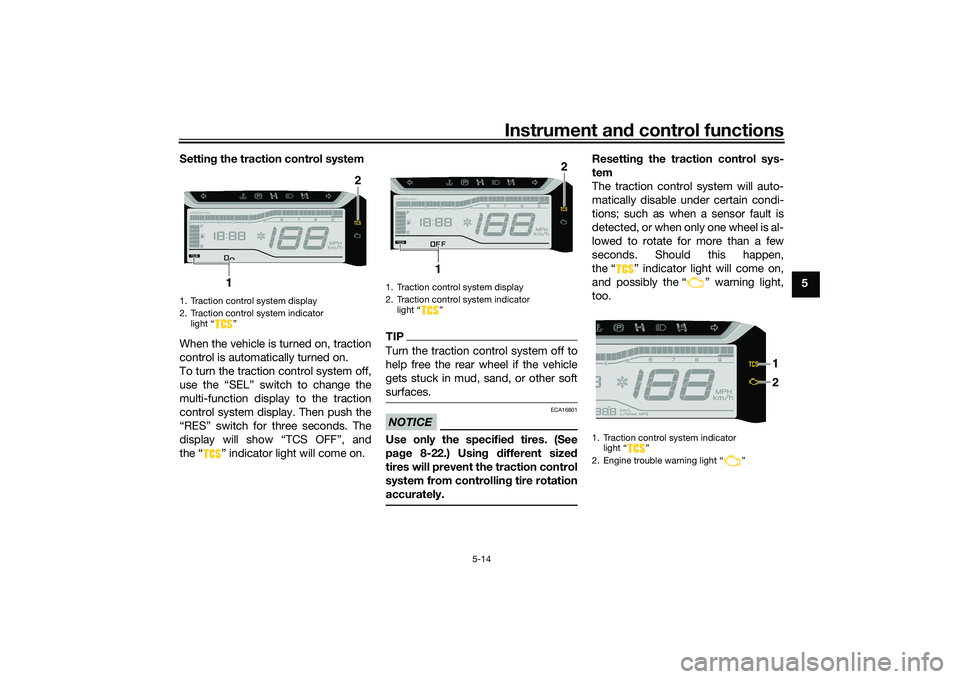
When the vehicle is turned on, traction
control is automatically turned on.
To turn the traction control system off,
use the “SEL” switch to change the
multi-function display to the traction
control system display. Then push the
“RES” switch for three seconds. The
display will show “TCS OFF”, and
the “ ” indicator light will come on.
TIPTurn the traction control system off to
help free the rear wheel if the vehicle
gets stuck in mud, sand, or other soft
surfaces.NOTICE
ECA16801
Use only the specifie d tires. (See
pa ge 8-22.) Usin g different sized
tires will prevent the traction control
system from controllin g tire rotation
accurately.
Resettin g the traction control sys-
tem
The traction control system will auto-
matically disable under certain condi-
tions; such as when a sensor fault is
detected, or when only one wheel is al-
lowed to rotate for more than a few
seconds. Should this happen,
the “ ” indicator light will come on,
and possibly the “ ” warning light,
too.
1. Traction control system display
2. Traction control system indicator light “ ”
2
1
1. Traction control system display
2. Traction control system indicator light “ ”
2
1
1. Traction control system indicator light “ ”
2. Engine trouble warning light “ ”
2 1
UBX9E0E0.book Page 14 Monday, January 20, 2020 10:54 AM
Page 46 of 114
Instrument and control functions
5-15
5
TIPWhen the vehicle is on the centerstand,
do not rev the engine for an extended
period of time. Otherwise, the traction
control system will automatically dis-
able and need to be reset.If the traction control system automat-
ically disables, try resetting it as fol-
lows.
1. Stop the vehicle and turn it off completely.
2. Wait a few seconds and then turn the vehicle power on.
3. The “ ” indicator light should turn off and the system be en-
abled.TIPIf the “ ” indicator light remains on
after resetting, the vehicle may still be
ridden; however, have a Yamaha deal-
er check the vehicle as soon as possi-
ble.4. Have a Yamaha dealer check thevehicle and turn off the “ ”
warning light.
EAU89040
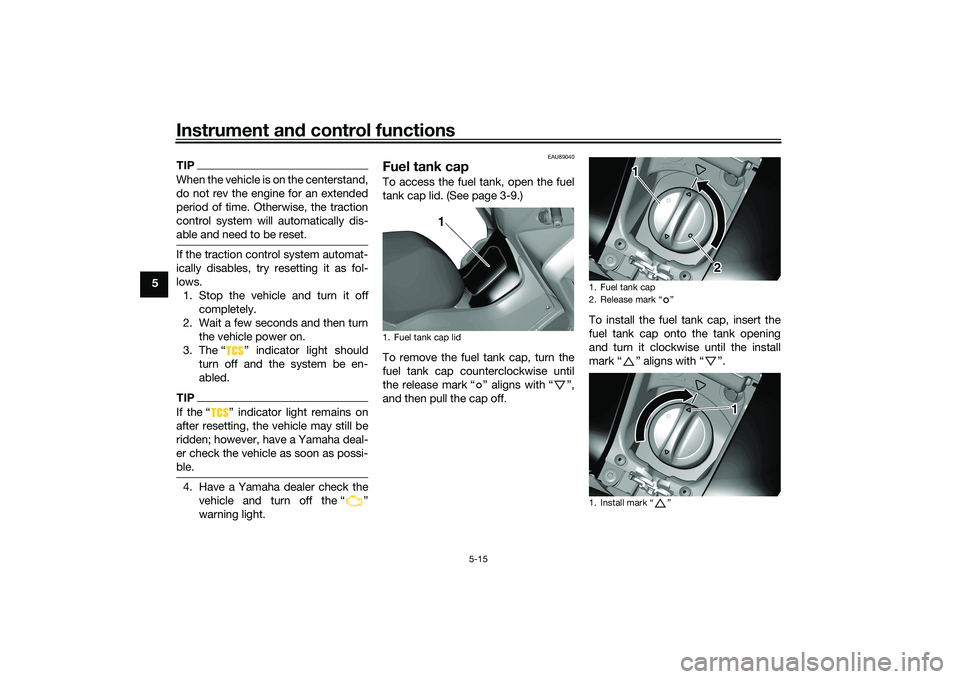
Fuel tank capTo access the fuel tank, open the fuel
tank cap lid. (See page 3-9.)
To remove the fuel tank cap, turn the
fuel tank cap counterclockwise until
the release mark “ ” aligns with “ ”,
and then pull the cap off. To install the fuel tank cap, insert the
fuel tank cap onto the tank opening
and turn it clockwise until the install
mark“” aligns with“”.1. Fuel tank cap lid
1
1. Fuel tank cap
2. Release mark “ ”
1. Install mark “ ”
1
2
1
UBX9E0E0.book Page 15 Monday, January 20, 2020 10:54 AM
Page 51 of 114
Instrument and control functions
5-20
5
EAU14895
A djustin g the shock a bsor ber
assem blies
WARNING
EWA10211
Always a djust both shock a bsor ber
assem blies equally, otherwise poor
han dlin g an d loss of sta bility may re-
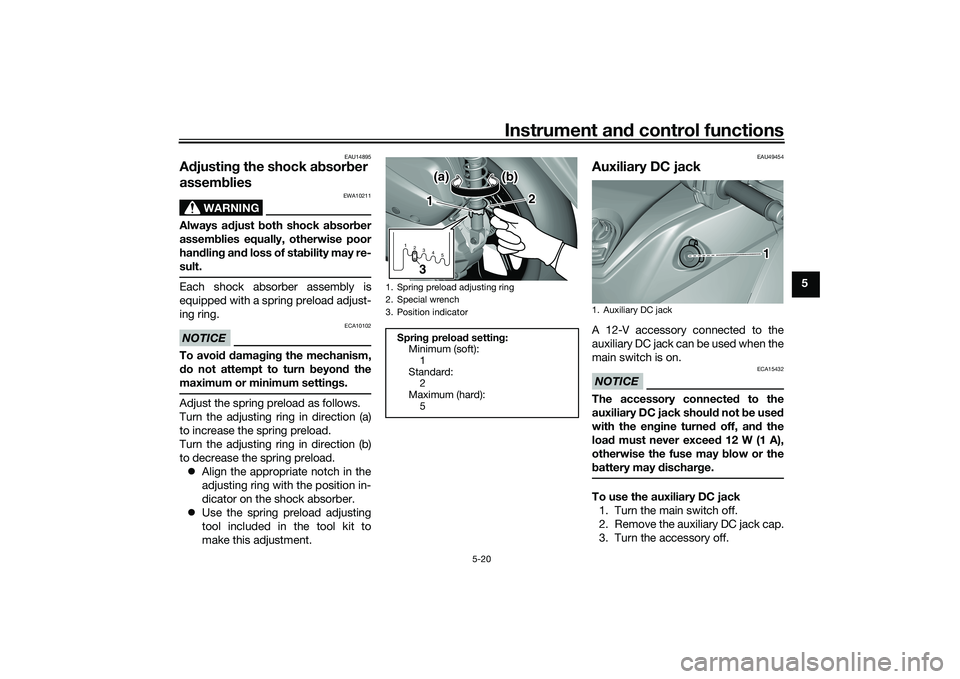
sult.Each shock absorber assembly is
equipped with a spring preload adjust-
ing ring.NOTICE
ECA10102
To avoi d d amag ing the mechanism,
d o not attempt to turn b eyond the
maximum or minimum settin gs.Adjust the spring preload as follows.
Turn the adjusting ring in direction (a)
to increase the spring preload.
Turn the adjusting ring in direction (b)
to decrease the spring preload.
Align the appropriate notch in the
adjusting ring with the position in-
dicator on the shock absorber.
Use the spring preload adjusting
tool included in the tool kit to
make this adjustment.
EAU49454
Auxiliary DC jackA 12-V accessory connected to the
auxiliary DC jack can be used when the
main switch is on.NOTICE
ECA15432
The accessory connecte d to the
auxiliary DC jack shoul d not b e used
with the en gine turne d off, an d the
loa d must never excee d 12 W (1 A),
otherwise the fuse may blow or the
b attery may dischar ge.To use the auxiliary DC jack
1. Turn the main switch off.
2. Remove the auxiliary DC jack cap.
3. Turn the accessory off.
1. Spring preload adjusting ring
2. Special wrench
3. Position indicator
Sprin g preloa d settin g:
Minimum (soft):
1
Standard: 2
Maximum (hard): 51 2345
1
2
3(a)
(a) (b) (b)
(a) (b)
1. Auxiliary DC jack
1
UBX9E0E0.book Page 20 Monday, January 20, 2020 10:54 AM
Page 58 of 114
Operation and important rid ing points
7-2
7
EAU86720
Startin g the eng ineThe ignition circuit cut-off system will
enable starting when the sidestand is
be up.
To start the engine1. Turn the main switch on and set
the engine stop switch to the run
position.
2. Confirm the indicator and warning light(s) come on for a few sec-
onds, and the go off. (See page
5-1.)TIPDo not start the engine if the en-
gine trouble warning light remains
on.
The ABS warning light should
come on and stay on until the ve-
hicle reaches a speed of 10 km/h
(6 mi/h).NOTICE
ECA24110
If a warnin g or in dicator li ght does
not work as d escribed a bove, have a
Yamaha dealer check the vehicle.3. Close the throttle completely. 4. While applying the front or rear
brake, push the start switch.
5. Release the start switch when the engine starts, or after 5 seconds.
Wait 10 seconds before pressing
the switch again to allow battery
voltage to restore.
NOTICE
ECA11043
For maximum en gine life, never ac-
celerate har d when the en gine is
col d!
EAU78221
TIPThis model is equipped with a lean an-
gle sensor to stop the engine in case of
a turnover. In this case, the engine
trouble warning light will come on but
this is not a malfunction. Before re-
starting the engine, turn the main
switch off and then back on to reset the
engine trouble warning light. Failing to
do so will prevent the engine from
starting even though the engine will
crank when pushing the start switch.
UBX9E0E0.book Page 2 Monday, January 20, 2020 10:54 AM