brake YAMAHA TRICITY 300 2020 Owners Manual
[x] Cancel search | Manufacturer: YAMAHA, Model Year: 2020, Model line: TRICITY 300, Model: YAMAHA TRICITY 300 2020Pages: 114, PDF Size: 11.27 MB
Page 8 of 114
Table of contentsSafety information ............................ 1-1
Further safe-riding points ............... 1-5
Description ....................................... 2-1
Left view ......................................... 2-1
Right view ....................................... 2-2
Controls and instruments ............... 2-3
Smart key system ........................... 3-1
Smart key system ........................... 3-1
Operating range of the smart key system......................................... 3-2
Handling of the smart key and mechanical keys ......................... 3-3
Smart key ....................................... 3-4
Replacing the smart key battery..... 3-6
Main switch .................................... 3-7
Stan din g assist ................................. 4-1
Standing assist ............................... 4-1
Instrument an d control functions ... 5-1
Indicator lights and warning
lights............................................ 5-1
Multi-function meter unit ................ 5-3
Handlebar switches ........................ 5-8
Front brake lever .......................... 5-10
Brake pedal .................................. 5-10
Rear brake lever ........................... 5-11
Parking brake lever ....................... 5-12
ABS .............................................. 5-12 Traction control system ................ 5-13
Fuel tank cap ................................ 5-15
Fuel ............................................... 5-16
Fuel tank overflow hose ................ 5-18
Catalytic converter ........................ 5-18
Storage compartment ................... 5-18
Adjusting the shock absorber
assemblies ................................. 5-20
Auxiliary DC jack ........................... 5-20
Sidestand ...................................... 5-21
Ignition circuit cut-off system ....... 5-22
For your safety – pre-operation
checks ............................................... 6-1
Operation an d important ri din g
points ................................................. 7-1
Engine break-in ............................... 7-1
Starting the engine .......................... 7-2
Starting off ...................................... 7-3
Acceleration and deceleration ........ 7-3
Braking ............................................ 7-3
Tips for reducing fuel consumption ................................ 7-4
Parking ............................................ 7-4
Perio dic maintenance an d
a d justment ........................................ 8-1
Tool kit ............................................ 8-2
Periodic maintenance charts .......... 8-3 Periodic maintenance chart for the
emission control system ............. 8-3
General maintenance and lubrication chart .......................... 8-4
Removing and installing the
panel............................................ 8-9
Checking the spark plug............... 8-10
Canister ........................................ 8-11
Engine oil and oil filter element..... 8-12
Why Yamalube.............................. 8-14
Final transmission oil .................... 8-14
Coolant ......................................... 8-15
Air filter and V-belt case air filter elements .................................... 8-17
Checking the throttle grip free play ............................................ 8-21
Valve clearance............................. 8-21
Tires .............................................. 8-22
Cast wheels .................................. 8-23
Checking the front brake lever
free play..................................... 8-24
Checking the rear brake lever free play..................................... 8-24
Checking the parking brake ......... 8-25
Checking the front and rear brake pads ................................ 8-25
Checking the brake fluid level ...... 8-26
Changing the brake fluid .............. 8-27
Checking the V-belt ...................... 8-27
Checking and lubricating the cables ........................................ 8-28UBX9E0E0.book Page 1 Monday, January 20, 2020 10:54 AM
Page 9 of 114
Table of contents
Checking and lubricating the
throttle grip and cable ................8-28
Lubricating the front and rear brake levers................................8-28
Checking and lubricating the
brake pedal ................................8-29
Checking and lubricating the centerstand and sidestand ........8-29
Checking the front fork..................8-30
Checking the steering ...................8-31
Lubricating the steering bearings .....................................8-31
Checking the wheel bearings ........8-31
Battery ...........................................8-32
Replacing the fuses .......................8-33
Vehicle lights .................................8-35
Replacing a turn signal light bulb ............................................8-35
Replacing the license plate light bulb ............................................8-36
Troubleshooting ............................8-36
Troubleshooting chart ...................8-38
Emergency mode .........................8-40
Vehicle care an d stora ge .................9-1
Matte color caution .........................9-1
Care .................................................9-1
Storage ............................................9-3 Specifications
................................. 10-1
Consumer information ................... 11-1
Identification numbers .................. 11-1
Diagnostic connector.................... 11-2
Vehicle data recording .................. 11-2
In dex ................................................ 12-1
UBX9E0E0.book Page 2 Monday, January 20, 2020 10:54 AM
Page 14 of 114
Safety information
1-5
1appropriate. Refer to page 8-22 for tire
specifications and more information on
replacing your tires.
Transportin
g the Vehicle
Be sure to observe the following in-
structions before transporting the vehi-
cle in another vehicle. Remove all loose items from the
vehicle.
Point the front wheels straight
ahead on the trailer or in the truck
bed, and choke it in a rail to pre-
vent movement.
Secure the vehicle with tie-downs
or suitable straps that are at-
tached to solid parts of the vehi-
cle, such as the frame or upper
front fork triple clamp (and not, for
example, to rubber-mounted han-
dlebars or turn signals, or parts
that could break). Choose the lo-
cation for the straps carefully so
the straps will not rub against
painted surfaces during transport.
The suspension should be com-
pressed somewhat by the tie-
downs, if possible, so that the ve-
hicle will not bounce excessively
during transport.
EAU60590
Further safe-ri din g points Be sure to signal clearly when
making turns.
Braking can be extremely difficult
on a wet road. Avoid hard braking,
because the vehicle could slide.
Apply the brakes slowly when
stopping on a wet surface.
Slow down as you approach a
corner or turn. Once you have
completed a turn, accelerate
slowly.
Be careful when passing parked
cars. A driver might not see you
and open a door in your path.
Railroad crossings, streetcar rails,
iron plates on road construction
sites, and manhole covers be-
come extremely slippery when
wet. Slow down and cross them
with caution. Keep the vehicle up-
right, otherwise it could slide out
from under you.
The brake pads or linings could
get wet when you wash the vehi-
cle. After washing the vehicle,
check the brakes before riding.
UBX9E0E0.book Page 5 Monday, January 20, 2020 10:54 AM
Page 16 of 114

Description
2-1
2
EAU10411
Left view
1,2
3
5
4
6
7
8
9
12
13
11
10
1. Battery (page 8-32)
2. Fuses (page 8-33)
3. Parking brake lever (page 5-12)
4. Grab bar (page 7-3)
5. Air filter element (page 8-17)
6. Spring preload adjusting ring (page 5-20)
7. Final transmission oil filler cap (page 8-14)
8. Final transmission oil drain bolt (page 8-14)9. V-belt case air filter element (page 8-17)
10.Engine oil drain bolt (page 8-12)
11.Engine oil filter element (page 8-12)
12.Sidestand (page 5-21)
13.Coolant reservoir (page 8-15)UBX9E0E0.book Page 1 Monday, January 20, 2020 10:54 AM
Page 17 of 114
Description
2-2
2
EAU10421
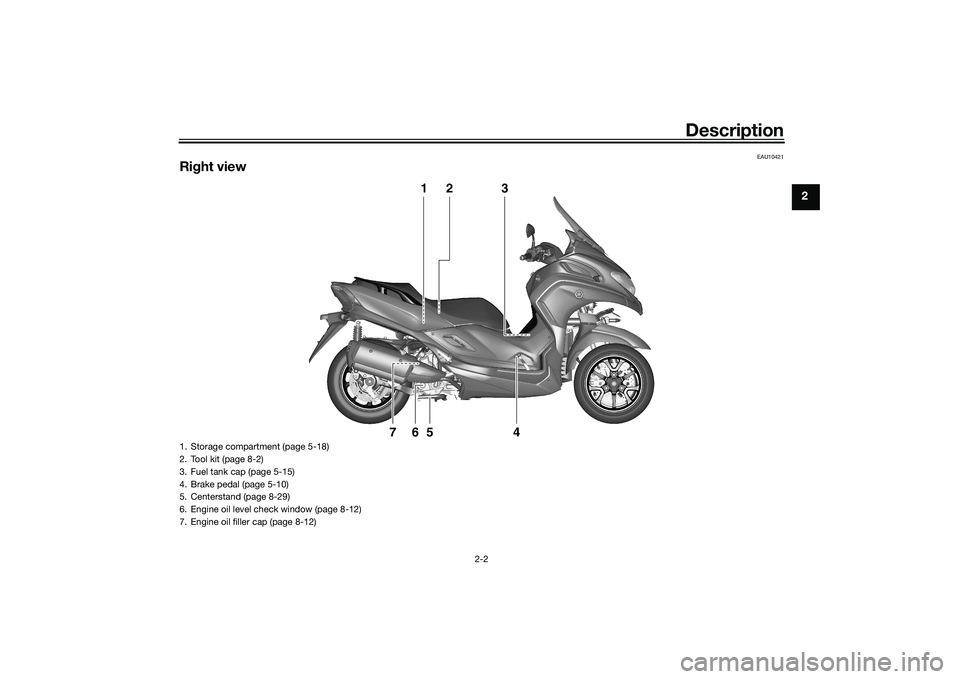
Right view
1
2
3
4
5
6
7
1. Storage compartment (page 5-18)
2. Tool kit (page 8-2)
3. Fuel tank cap (page 5-15)
4. Brake pedal (page 5-10)
5. Centerstand (page 8-29)
6. Engine oil level check window (page 8-12)
7. Engine oil filler cap (page 8-12)
UBX9E0E0.book Page 2 Monday, January 20, 2020 10:54 AM
Page 18 of 114
Description
2-3
2
EAU10431
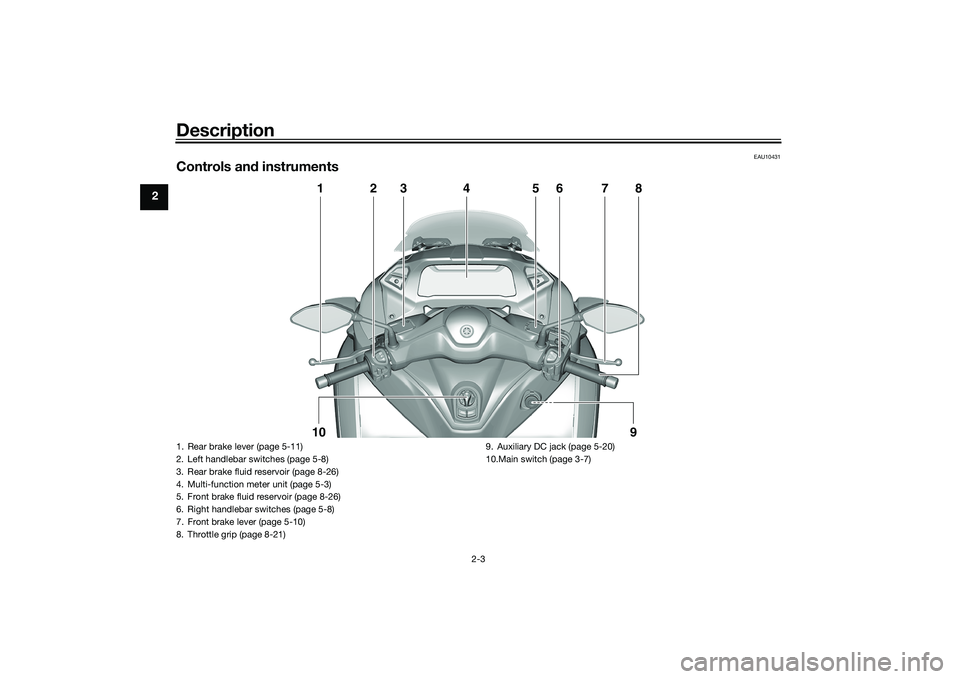
Controls and instruments
1
2
3
4
5
6
7
8
10
9
1. Rear brake lever (page 5-11)
2. Left handlebar switches (page 5-8)
3. Rear brake fluid reservoir (page 8-26)
4. Multi-function meter unit (page 5-3)
5. Front brake fluid reservoir (page 8-26)
6. Right handlebar switches (page 5-8)
7. Front brake lever (page 5-10)
8. Throttle grip (page 8-21) 9. Auxiliary DC jack (page 5-20)
10.Main switch (page 3-7)UBX9E0E0.book Page 3 Monday, January 20, 2020 10:54 AM
Page 30 of 114
Standin g assist
4-1
4
EAU89244
Stan din g assistThe standing assist helps the rider to
keep the vehicle upright when
stopped, or when parking. When you
press the standing assist switch, the
assist will be engaged to help you to
keep the vehicle at its current tilt angle.
WARNING
EWA20982
When you push the vehicle, b e
sure to turn the vehicle power
off. Otherwise uninten ded d is-
en gag in g of the stan din g assist
coul d result.
Always disen gag e the stan din g
assist un der the followin g situa-
tions. Otherwise uninten ded
loss of balance coul d result an d
lea d to vehicle overturn.
When pass the roa ds with o b-
stacles (e. g. roa d humps,
si dewalk)
When the vehicle is on un- pave d or rou gh groun d.
When the vehicle is on a slope.
Gettin g on an d off
When getting on the vehicle, make
sure the vehicle power is off, and apply
the front or rear brake.
When getting off the vehicle, apply the
parking brake and turn the vehicle
power off.
WARNING
EWA20992
When the vehicle is stoppe d with the
stan din g assist en gag ed , never step
on one si de of footrests, nor load the
lu gga ge unevenly on the vehicle. Otherwise uninten
ded loss of b alan-
ce may result, which coul d lea d to
vehicle overturn.
Stan din g assist operation
WARNING
EWA21002
The stan din g assist can b e operated
even the vehicle is leanin g. There-
fore, keep the followin g in min d:
Never en gag e the stan din g as-
sist while movin g. Otherwise
the vehicle will be hel d at an un-
inten ded leanin g an gle, which
may result in loss of control.
Be sure to disen gag e the stan d-
in g assist b efore startin g off.
Otherwise the stan din g assist
will uninten ded ly disen gag e,
an d may cause loss of b alance.Engaging the standing assist1. Stop the vehicle and close the
throttle completely. The standing
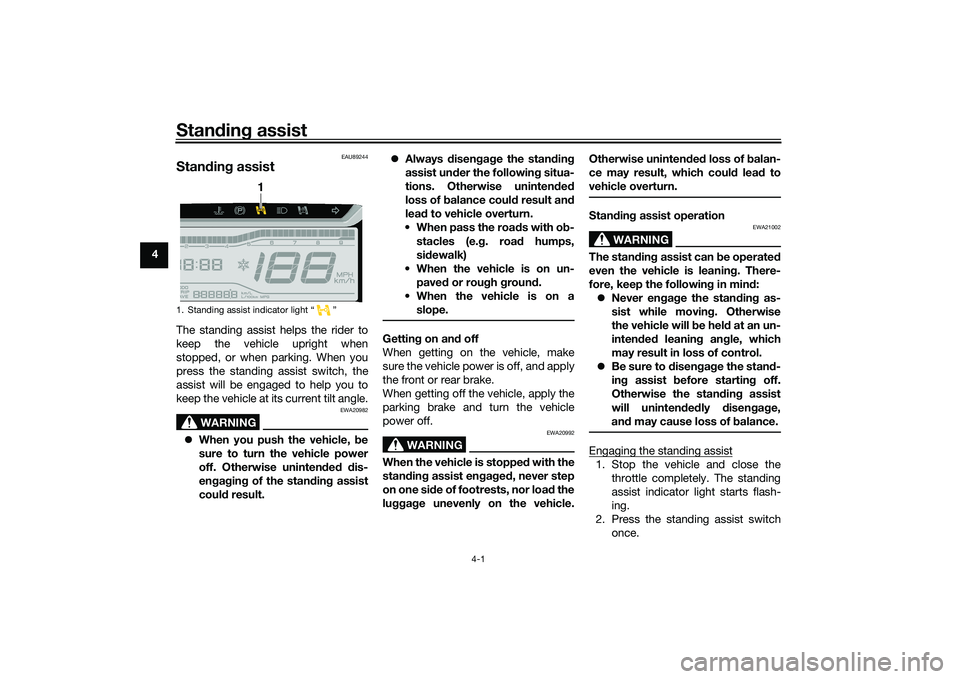
assist indicator light starts flash-
ing.
2. Press the standing assist switch once.
1. Standing assist indicator light “ ”
1
UBX9E0E0.book Page 1 Monday, January 20, 2020 10:54 AM
Page 32 of 114
Instrument and control functions
5-1
5
EAU4939M
In dicator li ghts an d warnin g
li g hts
EAU88900
Turn si gnal in dicator li ghts “ ”
an d“”
Each indicator light will flash when its
corresponding turn signal lights are
flashing.
EAU88910
Hi gh beam in dicator li ght “ ”
This indicator light comes on when the
high beam of the headlight is switched
on.
EAU89121
Parkin g b rake in dicator li ght “ ”
This indicator light comes on when the
parking brake is applied.
EAU88880
Coolant temperature warnin g
li g ht “ ”
This warning light comes on when the
engine is overheating. If this occurs,
stop the engine immediately and allow
the engine to cool. (See page 8-39.)
For vehicles with a radiator fan, the ra-
diator fan(s) automatically switch on or
off according to the coolant tempera-
ture.
TIPWhen the vehicle is turned on, the light
will come on for a few seconds, and
then go off. If the light does not come
on, or if the light remains on, have a
Yamaha dealer check the vehicle.NOTICE
ECA10022
Do not continue to operate the en-
g ine if it is overheatin g.
EAU88920
En gine trou ble warnin g lig ht “ ”
This warning light comes on if a prob-
lem is detected in the engine or other
vehicle control system. If this occurs,
have a Yamaha dealer check the on-
board diagnostic system.TIPWhen the vehicle is turned on, this light
should come on for a few seconds and
then go off. Otherwise, have a Yamaha
dealer check vehicle.
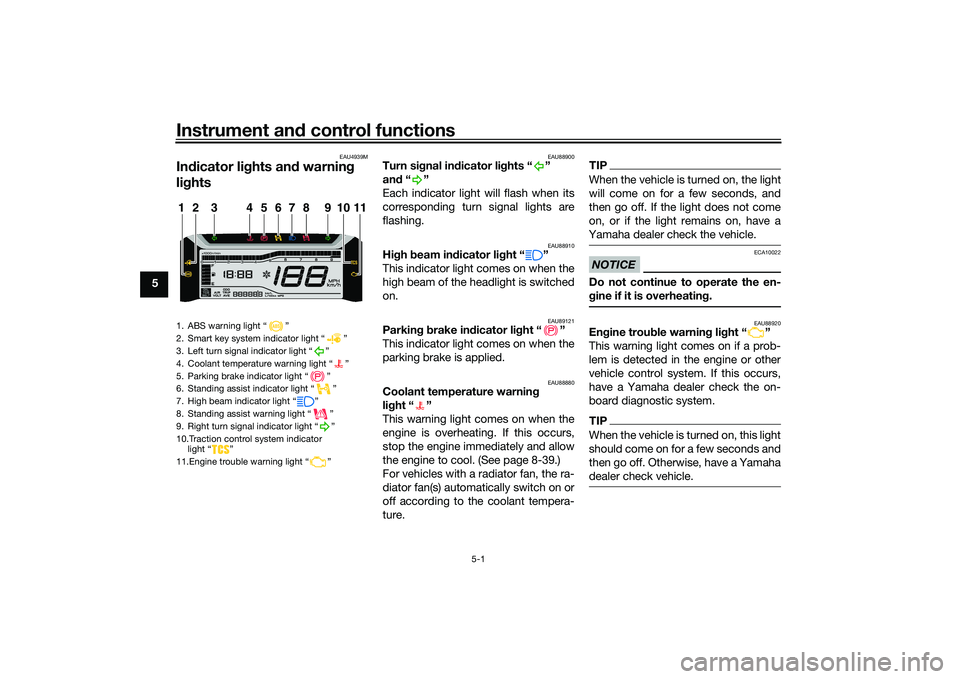
1. ABS warning light “ ”
2. Smart key system indicator light “ ”
3. Left turn signal indicator light “ ”
4. Coolant temperature warning light “ ”
5. Parking brake indicator light “ ”
6. Standing assist indicator light “ ”
7. High beam indicator light “ ”
8. Standing assist warning light “ ”
9. Right turn signal indicator light “ ”
10.Traction control system indicator light “ ”
11.Engine trouble warning light “ ”1
11
2
3
4
5
6
7
8
9
10
UBX9E0E0.book Page 1 Monday, January 20, 2020 10:54 AM
Page 33 of 114
Instrument and control functions
5-2
5
EAU88890
ABS warnin g lig ht “ ”
This warning light comes on when the
vehicle is first turned on, and goes off
after starting riding. If the warning light
comes on while riding, the anti-lock
brake system may not work correctly.
WARNING
EWA16043
If the ABS warnin g li ght does not
turn off after reachin g 10 km/h (6
mi/h), or if the warnin g lig ht comes
on while ri din g:
Use extra caution to avoi d pos-
si ble wheel lock durin g emer-
g ency brakin g.
Have a Yamaha dealer check
the vehicle as soon as possi ble.TIPThe ABS warning light may come on
while revving the engine with the vehi-
cle on its centerstand, but this does
not indicate a malfunction.
EAU88930
Traction control system in dicator
lig ht “ ”
This indicator light will flash when trac-
tion control has engaged. If the traction control system is turned
off, this indicator light will come on.
(See page 5-13.)
TIPWhen the vehicle is turned on, the light
should come on for a few seconds and
then go off. If the light does not come
on, or if the light remains on, have a
Yamaha dealer check vehicle.
EAU89252
Stan
din g assist in dicator li ght “ ”
This indicator light flashes when the
standing assist can be used.
The indicator light comes on when the
standing assist is engaged.TIPWhen the vehicle is turned on, the light
will come on for a few seconds, and
then go off. If the light does not come
on, have a Yamaha dealer check the
vehicle.
EAU89262
Stan din g assist warnin g li ght “ ”
This warning light comes on if a prob-
lem is detected in the standing assist.
If this occurs, have a Yamaha dealer
check the system.TIP Depending on the problem, the
engine speed may be limited and
the vehicle cannot be driven nor-
mally.
When the vehicle is turned on, the
light will come on for a few sec-
onds, and then go off. If the light
does not come on, or if the light
remains on, have a Yamaha dealer
check the vehicle.
EAU78083
Smart key system in dicator
li g ht “ ”
This indicator light will flash when com-
munication between the vehicle and
smart key takes place and when cer-
tain smart key system operations are
carried out.
The indicator light may also flash when
there is an error in the smart key sys-
tem.
UBX9E0E0.book Page 2 Monday, January 20, 2020 10:54 AM
Page 41 of 114
Instrument and control functions
5-10
5
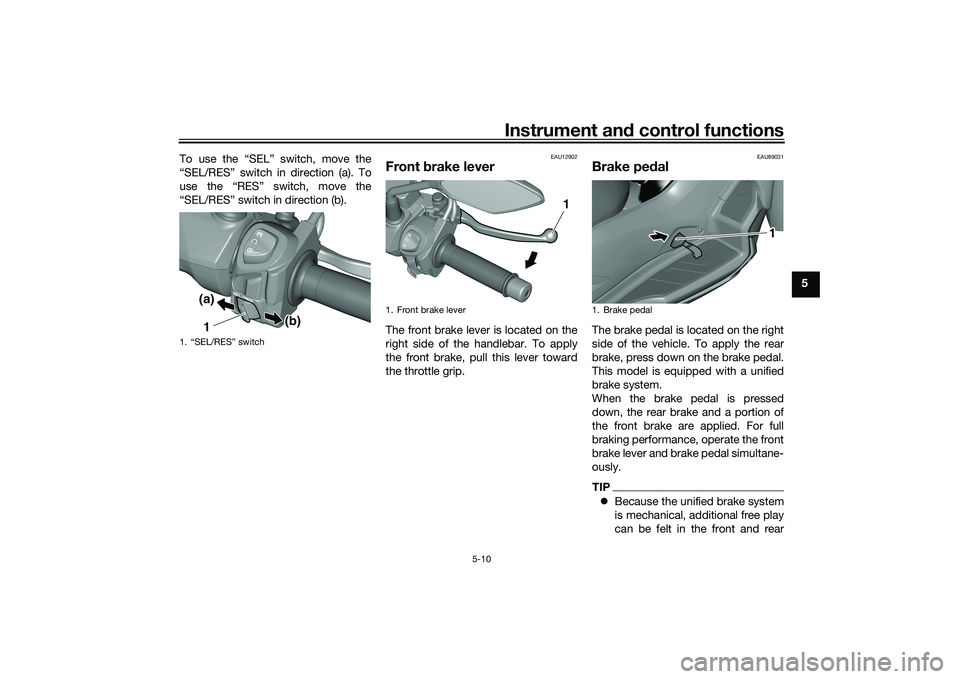
To use the “SEL” switch, move the
“SEL/RES” switch in direction (a). To
use the “RES” switch, move the
“SEL/RES” switch in direction (b).
EAU12902
Front
brake leverThe front brake lever is located on the
right side of the handlebar. To apply
the front brake, pull this lever toward
the throttle grip.
EAU89031
Brake pe dalThe brake pedal is located on the right
side of the vehicle. To apply the rear
brake, press down on the brake pedal.
This model is equipped with a unified
brake system.
When the brake pedal is pressed
down, the rear brake and a portion of
the front brake are applied. For full
braking performance, operate the front
brake lever and brake pedal simultane-
ously.TIP Because the unified brake system
is mechanical, additional free play
can be felt in the front and rear
1. “SEL/RES” switch
1(a)
(b)
1. Front brake lever
1
1. Brake pedal
1
UBX9E0E0.book Page 10 Monday, January 20, 2020 10:54 AM