engine YAMAHA TRICITY 300 2021 User Guide
[x] Cancel search | Manufacturer: YAMAHA, Model Year: 2021, Model line: TRICITY 300, Model: YAMAHA TRICITY 300 2021Pages: 112, PDF Size: 15.18 MB
Page 32 of 112
Instrument and control functions
5-3
5 The indicator light comes on when the
standing assist is engaged.
TIPWhen the vehicle is turned on, the light
will come on for a few seconds, and
then go off. If the light does not come
on, have a Yamaha dealer check the
vehicle.
EAU89262
Stan
din g assist warnin g lig ht “ ”
This warning light comes on if a prob-
lem is detected in the standing assist.
If this occurs, have a Yamaha dealer
check the system.TIP Depending on the problem, the
engine speed may be limited and
the vehicle cannot be driven nor-
mally.
When the vehicle is turned on, the
light will come on for a few sec-
onds, and then go off. If the light
does not come on, or if the light
remains on, have a Yamaha dealer
check the vehicle.
EAU78083
Smart key system in dicator
li g ht “ ”
This indicator light will flash when com-
munication between the vehicle and
smart key takes place and when cer-
tain smart key system operations are
carried out.
The indicator light may also flash when
there is an error in the smart key sys-
tem.TIPWhen the vehicle is turned on, the light
should come on for a few seconds and
then go off. If the light does not come
on, or if the light remains on, have a
Yamaha dealer check the vehicle.
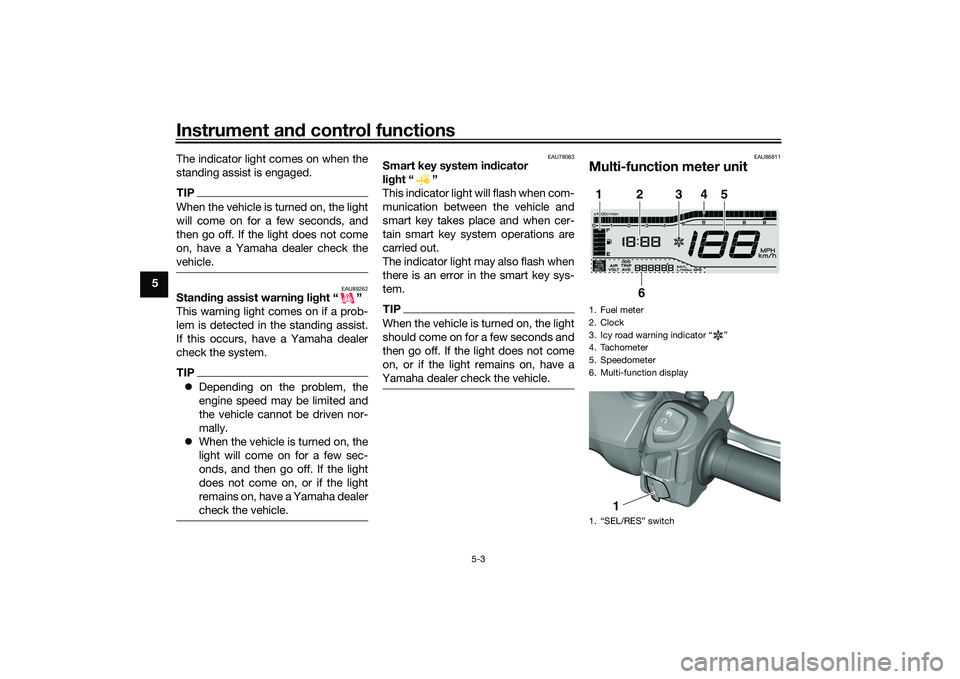
EAU86811
Multi-function meter unit1. Fuel meter
2. Clock
3. Icy road warning indicator “ ”
4. Tachometer
5. Speedometer
6. Multi-function display
1. “SEL/RES” switch1
2
3
4
5
6
1
UBEDE0E0.book Page 3 Thursday, October 1, 2020 1:04 PM
Page 33 of 112
Instrument and control functions
5-4
5
WARNING
EWA12423
Be sure to stop the vehicle before
makin g any settin g chan ges to the
multi-function meter unit. Chang ing
settin gs while ri din g can distract the
operator an d increase the risk of an
acci dent.
EAU89230
Switchin g the display units
The display units can be switched be-
tween kilometers and miles.
To switch the display units1. Turn the vehicle off.
2. While pushing the “SEL” switch, turn the vehicle on.
3. Continue to push the “SEL” switch for at least 5 seconds.
EAU86831
Spee dometer
The speedometer shows the vehicle’s
traveling speed.
EAU87180
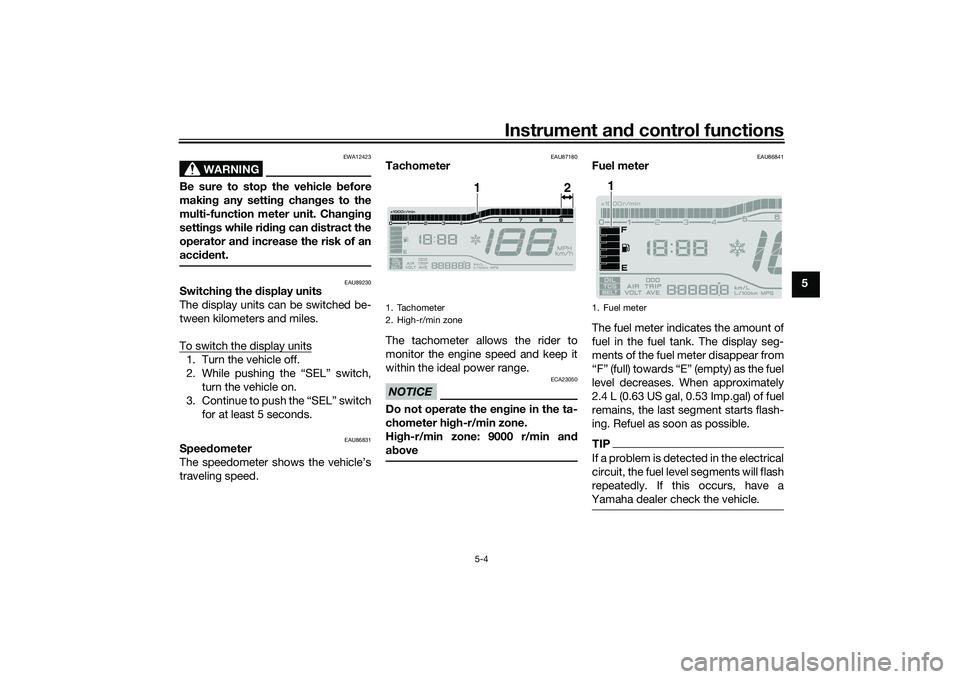
Tachometer
The tachometer allows the rider to
monitor the engine speed and keep it
within the ideal power range.NOTICE
ECA23050
Do not operate the en gine in the ta-
chometer hi gh-r/min zone.
Hi gh-r/min zone: 9000 r/min an d
a b ove
EAU86841
Fuel meter
The fuel meter indicates the amount of
fuel in the fuel tank. The display seg-
ments of the fuel meter disappear from
“F” (full) towards “E” (empty) as the fuel
level decreases. When approximately
2.4 L (0.63 US gal, 0.53 Imp.gal) of fuel
remains, the last segment starts flash-
ing. Refuel as soon as possible.TIPIf a problem is detected in the electrical
circuit, the fuel level segments will flash
repeatedly. If this occurs, have a
Yamaha dealer check the vehicle.
1. Tachometer
2. High-r/min zone
1
2
1. Fuel meter
1
UBEDE0E0.book Page 4 Thursday, October 1, 2020 1:04 PM
Page 35 of 112
Instrument and control functions
5-6
5
EAU89140
Tripmeters
The tripmeters show the distance trav-
eled since they were last reset.
To reset a tripmeter, change the dis-
play to the tripmeter you want to reset,
and then push the “RES” switch until it
is reset.TIPThe tripmeters will reset and continue
counting after 9999.9 is reached.
EAU89150
Fuel reserve tripmeter
If the last segment of the fuel meter
starts flashing, the display automati-
cally changes to the fuel reserve trip-
meter “TRIP F” and starts counting the
distance traveled from that point.
To reset the fuel reserve tripmeter,
push the “RES” switch until it is reset.TIPIf you do not reset the fuel reserve trip-
meter manually, it will reset automati-
cally and disappear from the display
after refueling and traveling 5 km (3 mi).
EAU89161
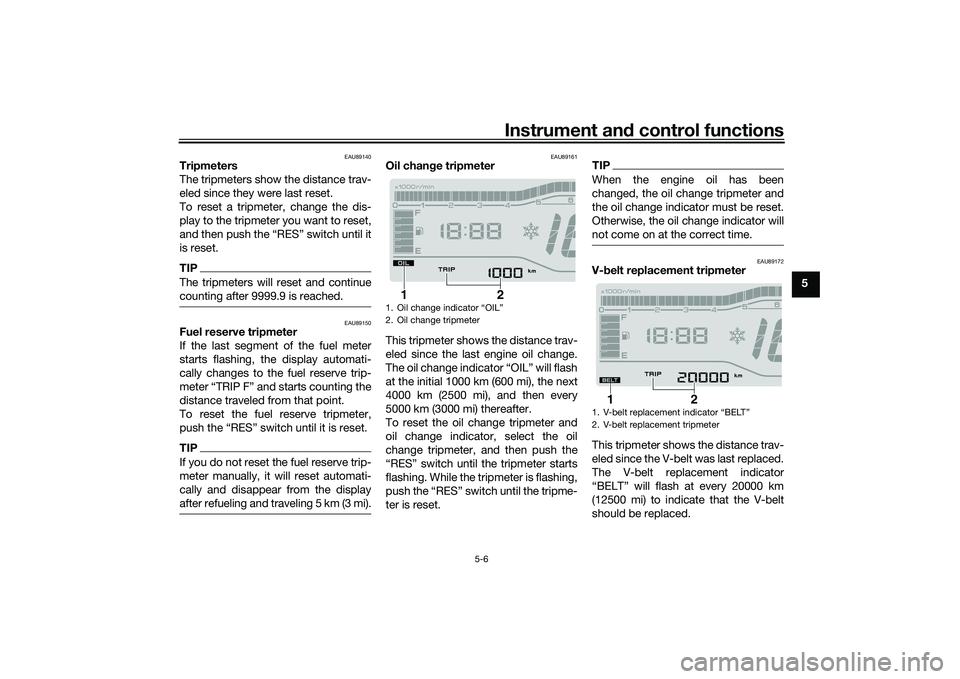
Oil chan ge tripmeter
This tripmeter shows the distance trav-
eled since the last engine oil change.
The oil change indicator “OIL” will flash
at the initial 1000 km (600 mi), the next
4000 km (2500 mi), and then every
5000 km (3000 mi) thereafter.
To reset the oil change tripmeter and
oil change indicator, select the oil
change tripmeter, and then push the
“RES” switch until the tripmeter starts
flashing. While the tripmeter is flashing,
push the “RES” switch until the tripme-
ter is reset.
TIPWhen the engine oil has been
changed, the oil change tripmeter and
the oil change indicator must be reset.
Otherwise, the oil change indicator will
not come on at the correct time.
EAU89172
V- belt replacement tripmeter
This tripmeter shows the distance trav-
eled since the V-belt was last replaced.
The V-belt replacement indicator
“BELT” will flash at every 20000 km
(12500 mi) to indicate that the V-belt
should be replaced.
1. Oil change indicator “OIL”
2. Oil change tripmeter
2
1
1.
2. V-belt replacement tripmeter
2
1
UBEDE0E0.book Page 6 Thursday, October 1, 2020 1:04 PM
Page 39 of 112
Instrument and control functions
5-10
5
To disengage the standing assist,
press the switch twice.
EAU54213
Stop/Run/Start switch “ / / ”
To crank the engine with the starter,
set this switch to “ ”, and then push
the switch down towards “ ”. See
page 7-2 for starting instructions prior
to starting the engine.
Set this switch to “ ” to stop the en-
gine in case of an emergency, such as
when the vehicle overturns or when the
throttle cable is stuck.
EAU79500
Hazar
d switch “ ”
With the main switch in the “ON” posi-
tion, use this switch to turn on the haz-
ard lights (simultaneous flashing of all
turn signal lights).
The hazard lights are used in case of an
emergency or to warn other drivers
when your vehicle is stopped where it
might be a traffic hazard.
NOTICE
ECA10062
Do not use the hazar d lig hts for an
exten ded len gth of time with the en-
g ine not runnin g, otherwise the bat-
tery may d ischarge.
EAU88941
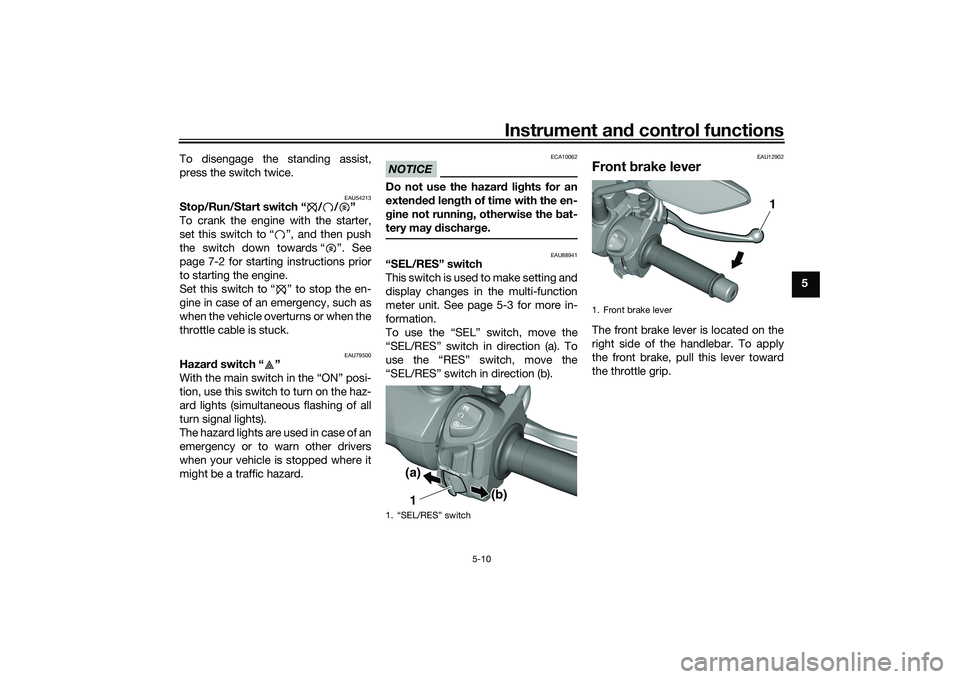
“SEL/RES” switch
T h i s s w i t c h i s u s e d t o m a k e s e t t i n g a n d
display changes in the multi-function
meter unit. See page 5-3 for more in-
formation.
To use the “SEL” switch, move the
“SEL/RES” switch in direction (a). To
use the “RES” switch, move the
“SEL/RES” switch in direction (b).
EAU12902
Front brake leverThe front brake lever is located on the
right side of the handlebar. To apply
the front brake, pull this lever toward
the throttle grip.
1. “SEL/RES” switch
1(a)
(b)
1. Front brake lever
1
UBEDE0E0.book Page 10 Thursday, October 1, 2020 1:04 PM
Page 43 of 112
Instrument and control functions
5-14
5
EAU91740
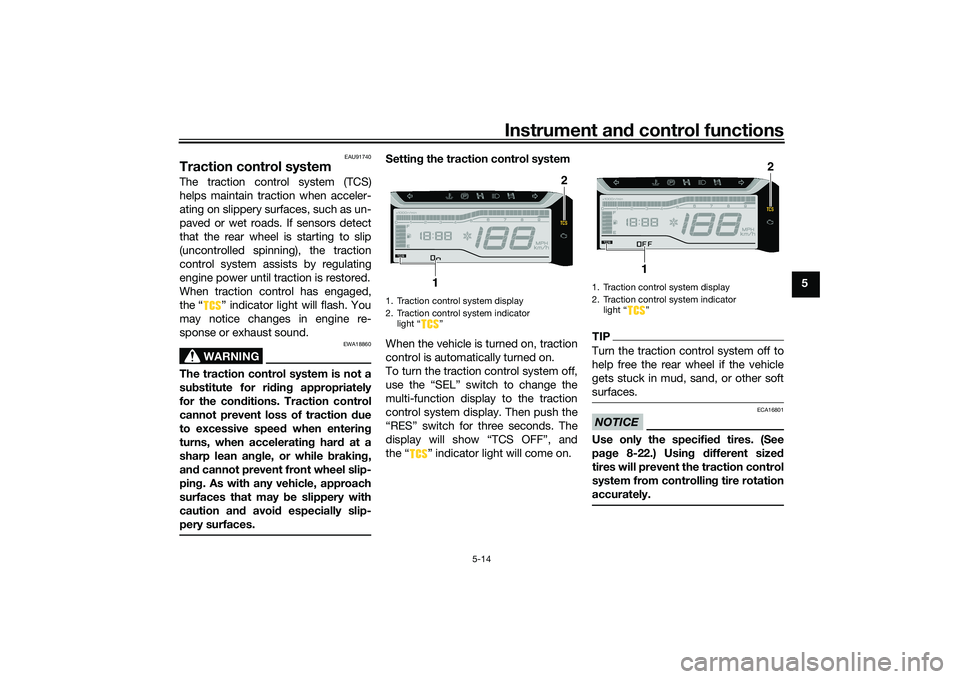
Traction control systemThe traction control system (TCS)
helps maintain traction when acceler-
ating on slippery surfaces, such as un-
paved or wet roads. If sensors detect
that the rear wheel is starting to slip
(uncontrolled spinning), the traction
control system assists by regulating
engine power until traction is restored.
When traction control has engaged,
the “ ” indicator light will flash. You
may notice changes in engine re-
sponse or exhaust sound.
WARNING
EWA18860
The traction control system is not a
su bstitute for ri din g appropriately
for the con ditions. Traction control
cannot prevent loss of traction d ue
to excessive spee d when enterin g
turns, when acceleratin g har d at a
sharp lean an gle, or while b raking,
an d cannot prevent front wheel slip-
pin g. As with any vehicle, approach
surfaces that may be slippery with
caution an d avoi d especially slip-
pery surfaces.
Settin g the traction control system
When the vehicle is turned on, traction
control is automatically turned on.
To turn the traction control system off,
use the “SEL” switch to change the
multi-function display to the traction
control system display. Then push the
“RES” switch for three seconds. The
display will show “TCS OFF”, and
the “ ” indicator light will come on.
TIPTurn the traction control system off to
help free the rear wheel if the vehicle
gets stuck in mud, sand, or other soft
surfaces.NOTICE
ECA16801
Use only the specifie d tires. (See
pa ge 8-22.) Usin g different size d
tires will prevent the traction control
system from controllin g tire rotation
accurately.
1. Traction control system display
2. Traction control system indicator light “ ”
2
1
1. Traction control system display
2. Traction control system indicator light Ž
2
1
UBEDE0E0.book Page 14 Thursday, October 1, 2020 1:04 PM
Page 44 of 112
Instrument and control functions
5-15
5 Resetting
the traction control sys-
tem
The traction control system will auto-
matically disable under certain condi-
tions; such as when a sensor fault is
detected, or when only one wheel is al-
lowed to rotate for more than a few
seconds. Should this happen,
the “ ” indicator light will come on.
TIPWhen the vehicle is on the centerstand,
do not rev the engine for an extended
period of time. Otherwise, the traction
control system will automatically dis-
able and need to be reset.If the traction control system automat-
ically disables, reset it by riding under
normal conditions.TIPIf the Ž indicator light remains on
after resetting, the vehicle may still be
ridden; however, have a Yamaha deal-
er check the vehicle as soon as possi-
ble.
EAU89040
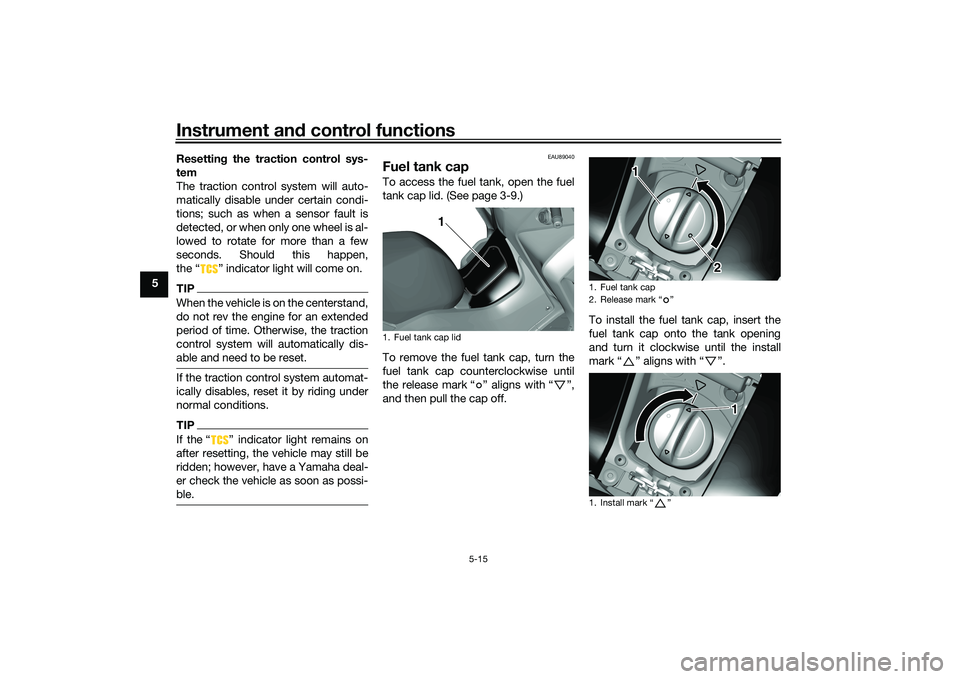
Fuel tank capTo access the fuel tank, open the fuel
tank cap lid. (See page 3-9.)
To remove the fuel tank cap, turn the
fuel tank cap counterclockwise until
the release mark “ ” aligns with “ ”,
and then pull the cap off. To install the fuel tank cap, insert the
fuel tank cap onto the tank opening
and turn it clockwise until the install
mark“” aligns with“”.1. Fuel tank cap lid
1
1. Fuel tank cap
2. Release mark Ž
1. Install mark Ž
1
2
1
UBEDE0E0.book Page 15 Thursday, October 1, 2020 1:04 PM
Page 45 of 112
Instrument and control functions
5-16
5
WARNING
EWA11092
Make sure that the fuel tank cap is
properly closed after filling fuel.
Leakin g fuel is a fire hazar d.
EAU13213
FuelMake sure there is sufficient gasoline in
the tank.
WARNING
EWA10882
Gasoline an d gasoline vapors are
extremely flammab le. To avoid fires
an d explosions an d to re duce the
risk of injury when refueling , follow
these instructions.1. Before refueling, turn off the en- gine and be sure that no one is sit-
ting on the vehicle. Never refuel
while smoking, or while in the vi-
cinity of sparks, open flames, or
other sources of ignition such as
the pilot lights of water heaters
and clothes dryers.
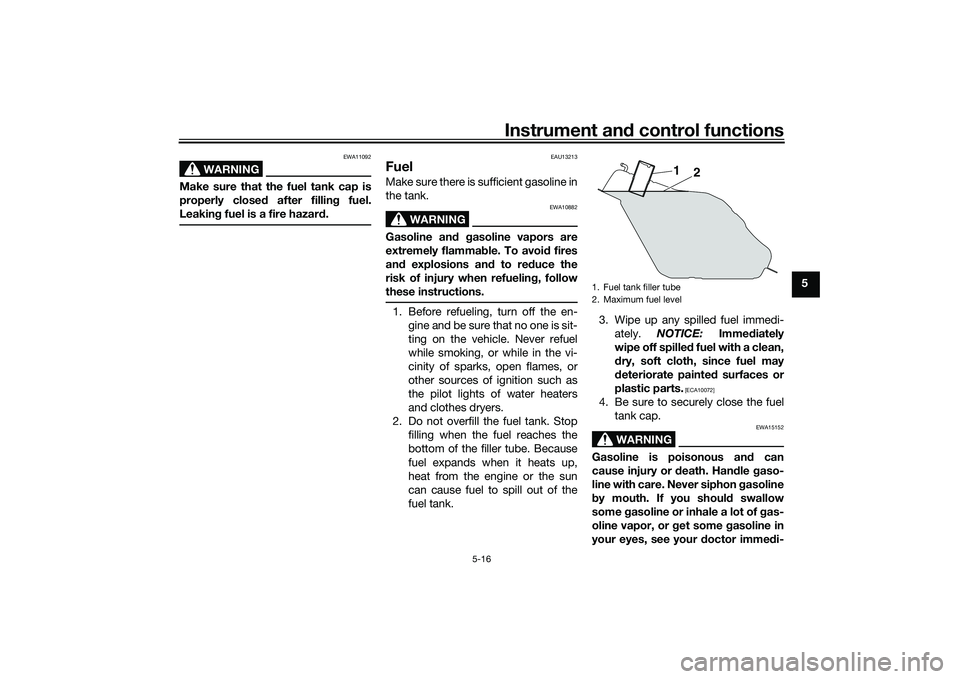
2. Do not overfill the fuel tank. Stop filling when the fuel reaches the
bottom of the filler tube. Because
fuel expands when it heats up,
heat from the engine or the sun
can cause fuel to spill out of the
fuel tank. 3. Wipe up any spilled fuel immedi-
ately. NOTICE: Immediately
wipe off spille d fuel with a clean,
d ry, soft cloth, since fuel may
d eteriorate painte d surfaces or
plastic parts.
[ECA10072]
4. Be sure to securely close the fuel tank cap.
WARNING
EWA15152
Gasoline is poisonous an d can
cause injury or death. Han dle gaso-
line with care. Never siphon gasoline
b y mouth. If you shoul d swallow
some gasoline or inhale a lot of g as-
oline vapor, or get some gasoline in
your eyes, see your doctor imme di-1. Fuel tank filler tube
2. Maximum fuel level
1
2
UBEDE0E0.book Page 16 Thursday, October 1, 2020 1:04 PM
Page 46 of 112
Instrument and control functions
5-17
5 ately. If
gasoline spills on your skin,
wash with soap an d water. If gaso-
line spills on your clothin g, chan ge
your clothes.
EAU76861
NOTICE
ECA11401
Use only unlea ded g asoline. The use
of lead ed g asoline will cause severe
d amag e to internal en gine parts,
such as the valves an d piston rin gs,
as well as to the exhaust system.
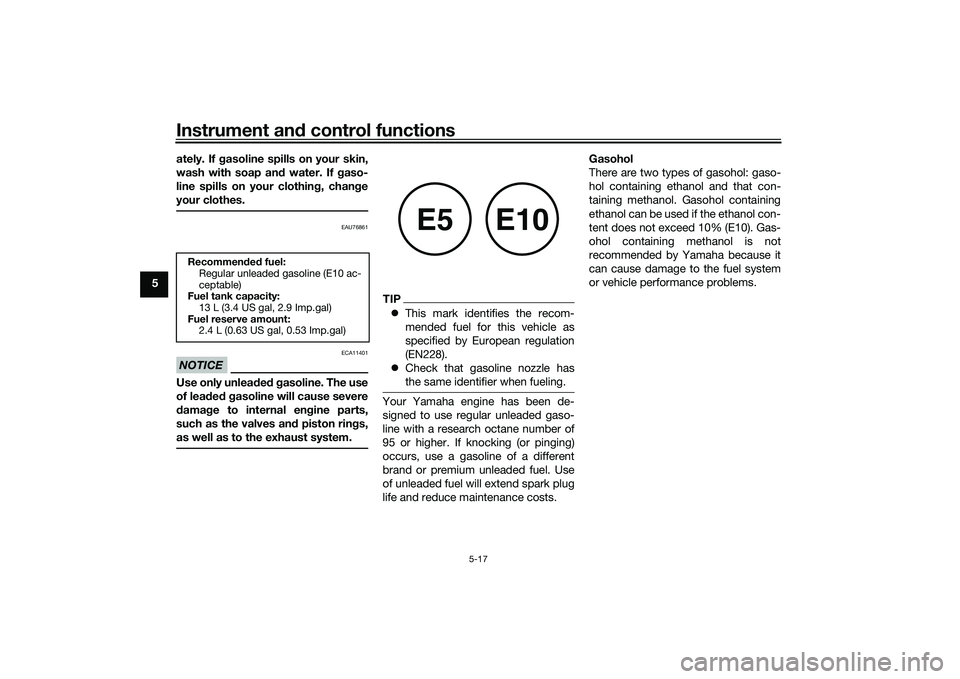
TIP This mark identifies the recom-
mended fuel for this vehicle as
specified by European regulation
(EN228).
Check that gasoline nozzle has
the same identifier when fueling.Your Yamaha engine has been de-
signed to use regular unleaded gaso-
line with a research octane number of
95 or higher. If knocking (or pinging)
occurs, use a gasoline of a different
brand or premium unleaded fuel. Use
of unleaded fuel will extend spark plug
life and reduce maintenance costs. Gasohol
There are two types of gasohol: gaso-
hol containing ethanol and that con-
taining methanol. Gasohol containing
ethanol can be used if the ethanol con-
tent does not exceed 10% (E10). Gas-
ohol containing methanol is not
recommended by Yamaha because it
can cause damage to the fuel system
or vehicle performance problems.
Recommen
ded fuel:
Regular unleaded gasoline (E10 ac-
ceptable)
Fuel tank capacity:
13 L (3.4 US gal, 2.9 Imp.gal)
Fuel reserve amount: 2.4 L (0.63 US gal, 0.53 Imp.gal)
E5
E10
UBEDE0E0.book Page 17 Thursday, October 1, 2020 1:04 PM
Page 50 of 112
Instrument and control functions
5-21
5 4. Insert the accessory plug into the
auxiliary DC jack.
5. Turn the main switch on, and start the engine. (See page 7-2.)
6. Turn the accessory on.
WARNING
EWA14361
To prevent electrical shock or short-
circuiting , make sure that the cap is
installe d when the auxiliary DC jack
is not bein g use d.
EAU15306
Si destan dThe sidestand is located on the left
side of the frame. Raise the sidestand
or lower it with your foot while holding
the vehicle upright.TIPThe built-in sidestand switch is part of
the ignition circuit cut-off system,
which cuts the ignition in certain situa-
tions. (See the following section for an
explanation of the ignition circuit cut-
off system.)
WARNING
EWA10242
The vehicle must not be ri dden with
the si destan d d own, or if the si de-
stan d cannot b e properly moved up
(or does not stay up), otherwise the
si destan d coul d contact the groun d
an d d istract the operator, resultin g
in a possi ble loss of control.
Yamaha’s ig nition circuit cut-off
system has been desi gne d to assist
the operator in fulfillin g the respon-
si bility of raisin g the si destan d b e-
fore startin g off. Therefore, check this system reg
ularly and have a
Yamaha dealer repair it if it does not
function properly.
UBEDE0E0.book Page 21 Thursday, October 1, 2020 1:04 PM
Page 51 of 112
Instrument and control functions
5-22
5
EAU45055
Ig nition circuit cut-off systemThis system prevents engine starts un-
less the sidestand is up. Also, it will
stop the running engine should the
sidestand be lowered.
Periodically check the system via the
following procedure.TIP This check is most reliable if per-
formed with a warmed-up engine.
See pages 3-7 and 5-9 for switch
operation information.
UBEDE0E0.book Page 22 Thursday, October 1, 2020 1:04 PM