key YAMAHA XMAX 300 2017 User Guide
[x] Cancel search | Manufacturer: YAMAHA, Model Year: 2017, Model line: XMAX 300, Model: YAMAHA XMAX 300 2017Pages: 116, PDF Size: 4.1 MB
Page 22 of 116

Smart key system
3-8
3
EAU76892
Main switch
The main switch is used to turn the ve-
hicle power on and off, lock and unlock
the steering, and open the seat, fuel
tank cap lid and storage compartment
A. After pushing the main switch knob
and confirmation with the smart key
has taken place, the main switch can
be turned while the smart key system
indicator light is on (approximately 4
seconds).
WARNING
EWA18720
Never turn the main switch to
“OFF”, “ ”, or “OPEN” while the ve-
hicle is moving. Otherwise the elec- trical systems will
be switched off,
which may result in loss of control or
an acci dent.
TIP
Do not push the main switch knob re-
peatedly or turn the main switch back
and forth beyond normal use. Other-
wise, to protect the main switch from
damage, the smart key system will
temporarily disable and the smart key
system indicator light will flash. If this
occurs, wait until the indicator light
stops flashing before operating the
main switch again.
The main switch positions are de-
scribed below.
EAU76500ON (on)
All electrical circuits are supplied with
the power, and the engine can be start-
ed.
To turn the vehicle power on
1. Turn the smart key on and bring it
within operating range.
1. Main switch
2. Main switch knob
1. Smart key system indicator light “ ”
2
1
1
1. Push.
2. Turn.
1 2
UB74E0E0.book Page 8 Tuesday, May 2, 2017 1:04 PM
Page 23 of 116

Smart key system
3-9
3
2. Push the main switch knob and
the smart key indicator light will
come on for approximately 4 sec-
onds.
3. While the smart key system indi- cator light is on, turn the main
switch to “ON”. All of the turn sig-
nal lights flash twice and the vehi-
cle power turns on.TIP
zIf the vehicle battery voltage is
low, the turn signal lights will not
flash.
z See “Emergency mode” on page
7-38 for information on turning the
vehicle power on without the
smart key.
EAU76510OFF (off)
All electrical systems are off.
To turn the vehicle power off
1. With the smart key turned on and
within operating range, turn the
main switch to “OFF”.
2. The turn signal lights flash once and the vehicle power turns off.
TIP
When the main switch is turned to
“OFF” but the smart key cannot be
confirmed (the smart key is either out-
side operation range or has been
turned off), the beeper will sound for 3
seconds and the smart key system in-
dicator light will flash for 30 seconds.z During this 30 seconds, the main
switch can be freely operated.
z After 30 seconds, the vehicle
power will turn off automatically.
z To turn the vehicle power off im-
mediately, push the main switch
knob four times within 2 seconds.
EAU79040OPEN (open)
The seat and storage compartment A
can be opened.
To open the seat, push the “SEAT”
button, and then lift the rear of the seat.
1. Turn.
1
1. Push.
2. Turn.
1
2
UB74E0E0.book Page 9 Tuesday, May 2, 2017 1:04 PM
Page 24 of 116

Smart key system
3-10
3To open storage compartment A, push
the “LID” button.
TIP
Make sure that the seat and storage
compartment are securely closed be-
fore starting off.
Open position remin der
To prevent you from accidentally leav-
ing the vehicle unlocked by walking
away with the main switch still in the
“OPEN” position, the smart key system
beeper will sound under the following
conditions. z When the main switch has been in
the open position for 3 minutes
z If the smart key is turned off while
the main switch is in the open po-
sition
z If you walk out of range of the
smart key system with the main
switch in the open position
If the beeper sounds after 3 minutes,
turn the main switch to “OFF” or “ ”.
If the beeper sounds because the
smart key was turned off or moved out
of range, turn the smart key on and
walk back into range.
TIP
z The beeper will turn off after 1 mi-
nute.
1. “SEAT” button
1. Storage compartment A
1
1
1. “LID” button
1
UB74E0E0.book Page 10 Tuesday, May 2, 2017 1:04 PM
Page 25 of 116

Smart key system
3-11
3
z
The seat can also be opened with
the mechanical key. (See page
4-20.)
EAU76521“ ” (lock)
The steering is locked and all electrical
systems are off.
To lock the steering
1. Turn the handlebar all the way to
the left.
2. With the smart key turned on and within operating range, push the
main switch knob.
3. While the smart key system indi- cator light is on, push and turn the
main switch to “ ”.
TIP
If the steering will not lock, try turning
the handlebar back to the right slightly.
To unlock the steering
1. With the smart key turned on andwithin operating range, push the
main switch knob.
2. While the smart key system indi- cator light is on, push and turn the
main switch to the desired posi-
tion.
EAU76903 (parkin g)
The hazard lights and turn signal lights
can be turned on, but all other electri-
cal systems are off.
To use the “ ” position
1. With the main switch in the “ ” position and the smart key turned
on and within operating range,
push the main switch knob.
2. While the smart key system indi- cator is light on, turn the main
switch to “ ”.
To exit the “ ” position
Simply turn the main switch to “ ”.
1. Push.
2. Push and turn.
1 2
1. Push.
2. Push and turn.
12
UB74E0E0.book Page 11 Tuesday, May 2, 2017 1:04 PM
Page 26 of 116

Smart key system
3-12
3
NOTICE
ECA20760
Using the hazar d or turn si gnal lig hts
for an exten ded len gth of time may
cause the battery to dischar ge.
EAU79000“ ” (fuel tank cap li d)
To open the fuel tank cap lid
1. With the smart key turned on and within operating range, push the
main switch knob.
2. While the smart key system indi- cator light is on, turn the main
switch to “ ”.
To close the fuel tank cap lid
Push the fuel tank cap lid down until it
is closed.
TIP
Make sure that fuel tank cap lid is se-
curely closed before starting off.
1. Push.
2. Turn.
12
UB74E0E0.book Page 12 Tuesday, May 2, 2017 1:04 PM
Page 27 of 116

Instrument and control functions
4-1
4
EAU4939C
In dicator li ghts an d warnin g
li g hts
EAU11032Turn si gnal in dicator li ghts “ ”
an d“”
Each indicator light will flash when its
corresponding turn signal lights are
flashing.
EAU11081Hi gh beam in dicator li ght “ ”
This indicator light comes on when the
high beam of the headlight is switched
on.
EAU78180En gine trou ble warnin g lig ht “ ”
This warning light comes on if a prob-
lem is detected in the engine or other
vehicle control system. If this occurs,
have a Yamaha dealer check the on-
board diagnostic system. The electrical circuit of the warning
light can be checked by turning the
main switch to “ON”. The warning light
should come on for a few seconds, and
then go off.
If the warning light does not come on
initially when the main switch is turned
to “ON”, or if the warning light remains
on, have a Yamaha dealer check the
vehicle.
EAU78171ABS warnin
g lig ht “ ”
In normal operation, the ABS warning
light comes on when the main switch is
turned to “ON”, and goes off after trav-
eling at a speed of 10 km/h (6 mi/h) or
higher.
If the ABS warning light: z does not come on when the main
switch is turned to “ON”
z comes on or flashes while riding
z does not go off after traveling at a
speed of 10 km/h (6 mi/h) or high-
er
The ABS may not work correctly. If any
of the above occurs, have a Yamaha
dealer check the system as soon as
possible. (See page 4-14 for an expla-
nation of the ABS.)
WARNING
EWA16041
If the ABS warnin g li ght does not go
off after travelin g at a speed of 10
km/h (6 mi/h) or hi gher, or if the
warnin g lig ht comes on or flashes
while ri din g, the b rake system re-
verts to conventional brakin g. If ei-
ther of the a bove occurs, or if the
warnin g lig ht does not come on at
all, use extra caution to avoi d possi-
b le wheel lock durin g emer gency
1. Left turn signal indicator light “ ”
2. Right turn signal indicator light “ ”
3. High beam indicator light “ ”
4. Anti-lock Brake System (ABS) warning
light “ ”
5. Engine trouble warning light “ ”
6. Traction control system indicator light “ ”
7. Smart key system indicator light “ ”
12
36745
ABS
ABS
UB74E0E0.book Page 1 Tuesday, May 2, 2017 1:04 PM
Page 28 of 116

Instrument and control functions
4-2
4 b
rakin g. Have a Yamaha dealer
check the brake system an d electri-
cal circuits as soon as possi ble.
TIP
The ABS warning light may come on
while accelerating the engine with the
vehicle on its centerstand, but this
does not indicate a malfunction.
If this happens, turn the main switch off
and then back on again to reset the in-
dicator light.
EAU78591Traction control system in dicator
li g ht “TCS”
This indicator light will flash when trac-
tion control has engaged.
If the traction control system is turned
off, this indicator light will come on.
(See page 4-15.)
TIP
When the vehicle is turned on, the light
should come on for a few seconds and
then go off. If the light does not come
on, or if the light remains on, have a
Yamaha dealer check vehicle.
EAU78600Smart key system in dicator
li g ht “ ”
This indicator light communicates the
status of the smart key system. When
the smart key system is operating nor-
mally, this indicator light will be off. If
there is an error in the smart key sys-
tem, the indicator light will flash. The
indicator light will also flash when com-
munication between the vehicle and
smart key takes place and when cer-
tain smart key system operations are
carried out.
EAU63542
Spee dometer
The speedometer shows the vehicle's
traveling speed.
When the vehicle power is turned on,
the speedometer needle will sweep
once across the speed range and then
return to zero in order to test the elec-
trical circuit.
1. Speedometer
1
UB74E0E0.book Page 2 Tuesday, May 2, 2017 1:04 PM
Page 46 of 116
Instrument and control functions
4-20
4
EAU13447
Catalytic converters
This vehicle is equipped with catalytic
converters in the exhaust system.
WARNING
EWA10863
The exhaust system is hot after op-
eration. To prevent a fire hazar d or
b urns:
z Do not park the vehicle near
possi ble fire hazard s such as
g rass or other materials that
easily burn.
z Park the vehicle in a place
where pe destrians or chil dren
are not likely to touch the hot
exhaust system.
z Make sure that the exhaust sys-
tem has coole d down before
d oin g any maintenance work.
z Do not allow the en gine to id le
more than a few minutes. Lon g
i d lin g can cause a b uild-up of
heat.
NOTICE
ECA10702
Use only unlea ded g asoline. The use
of lead ed g asoline will cause unre-
pairab le dama ge to the catalytic
converter.
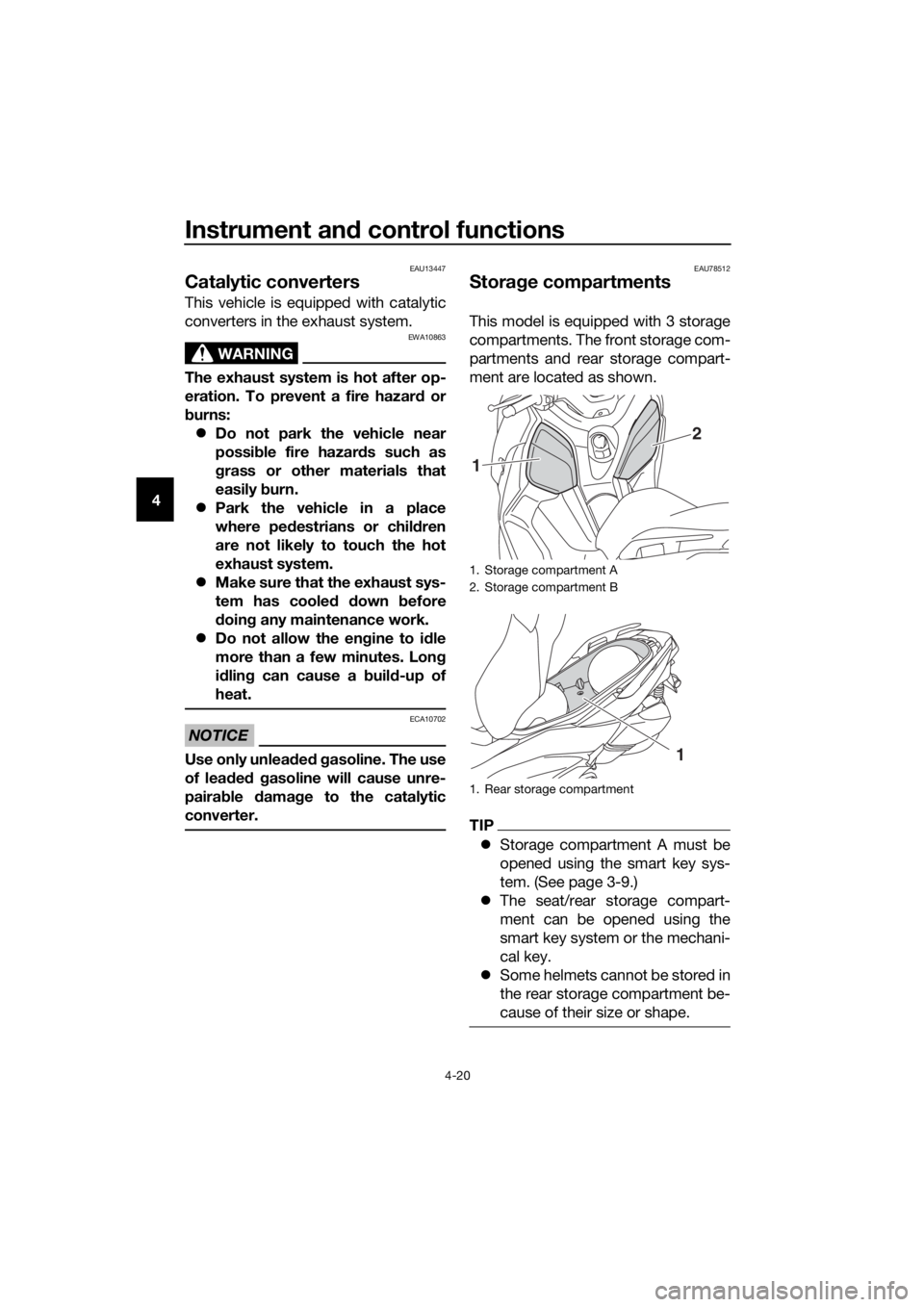
EAU78512
Stora ge compartments
This model is equipped with 3 storage
compartments. The front storage com-
partments and rear storage compart-
ment are located as shown.
TIP
z Storage compartment A must be
opened using the smart key sys-
tem. (See page 3-9.)
z The seat/rear storage compart-
ment can be opened using the
smart key system or the mechani-
cal key.
z Some helmets cannot be stored in
the rear storage compartment be-
cause of their size or shape.
1. Storage compartment A
2. Storage compartment B
1. Rear storage compartment
2
1
1
UB74E0E0.book Page 20 Tuesday, May 2, 2017 1:04 PM
Page 47 of 116

Instrument and control functions
4-21
4
Stora
ge compartment A
To open storage compartment A, turn
the main switch to “OPEN” and then
push the “LID” button.
To close storage compartment A, push
the storage compartment lid until it is
closed.
Stora ge compartment B
To open storage compartment B, push
the storage compartment lid inward to
unlock it, and then pull to open.
To close storage compartment B, push
the storage compartment lid into the
original position.
Seat/rear stora ge compartment
To open the seat/rear storage com-
partment via the main switch
Turn the main switch to “OPEN”, and
then push the “SEAT” button.
To open the seat/rear storage com-
partment with the mechanical key
1. Open the keyhole cover. 2. Insert the mechanical key into the
seat lock, and then turn it clock-
wise.
TIP
Be sure to close the seat and all stor-
age compartments before starting off.
NOTICE
ECA24020
Make sure that the keyhole cover is
installe d when the mechanical key is
not bein g use d.
NOTICE
ECA21150
Keep the followin g points in min d
when usin g the stora ge compart-
ment.
1. Lid
2. Storage compartment
1 2
1. Keyhole cover
1. Seat lock
2. Unlock.
1
1
2
UB74E0E0.book Page 21 Tuesday, May 2, 2017 1:04 PM
Page 59 of 116

Operation and important ri din g points
6-2
6
EAU78231
Startin g the eng ine
NOTICE
ECA10251
See pag e 6-5 for en gine break-in in-
structions prior to operatin g the ve-
hicle for the first time.
In order for the ignition circuit cut-off
system to enable starting, the side-
stand must be up. (See page 4-27.) 1. Turn the main switch on and make sure that the stop/run/start switch
is set to “ ”.
The following warning lights and
indicator lights should come on for
a few seconds, then go off.z Engine trouble warning light
z Traction control system indi-
cator light
z Smart key system indicator
light
TIP
The ABS warning light should come on
and stay on until the vehicle reaches a
traveling speed of 10 km/h (6 mi/h) or
higher.
NOTICE
ECA22510
If a warnin g or in dicator li ght does
not work as d escribed a bove, see
pa ge 4-1 for the correspon din g
warnin g an d in dicator li ght circuit
check.
2. Close the throttle.
3. While applying the front or rear brake, push the “ ” side of the
stop/run/start switch. Release it
when the engine starts.
TIP
If the engine does not start, release the
start switch after 5 seconds. Before
pressing the start switch again, wait 10
seconds to allow battery voltage to re-
store.
NOTICE
ECA11043
For maximum en gine life, never ac-
celerate har d when the en gine is
col d!
UB74E0E0.book Page 2 Tuesday, May 2, 2017 1:04 PM