light YAMAHA XMAX 300 2017 Owner's Guide
[x] Cancel search | Manufacturer: YAMAHA, Model Year: 2017, Model line: XMAX 300, Model: YAMAHA XMAX 300 2017Pages: 116, PDF Size: 4.1 MB
Page 101 of 116
Periodic maintenance an d a djustment
7-38
7
EAU76561
Emer gency mo de
When the smart key is lost or dam-
aged, or its battery has discharged, the
vehicle can still be turned on and the
engine started. You will need the smart
key system identification number.
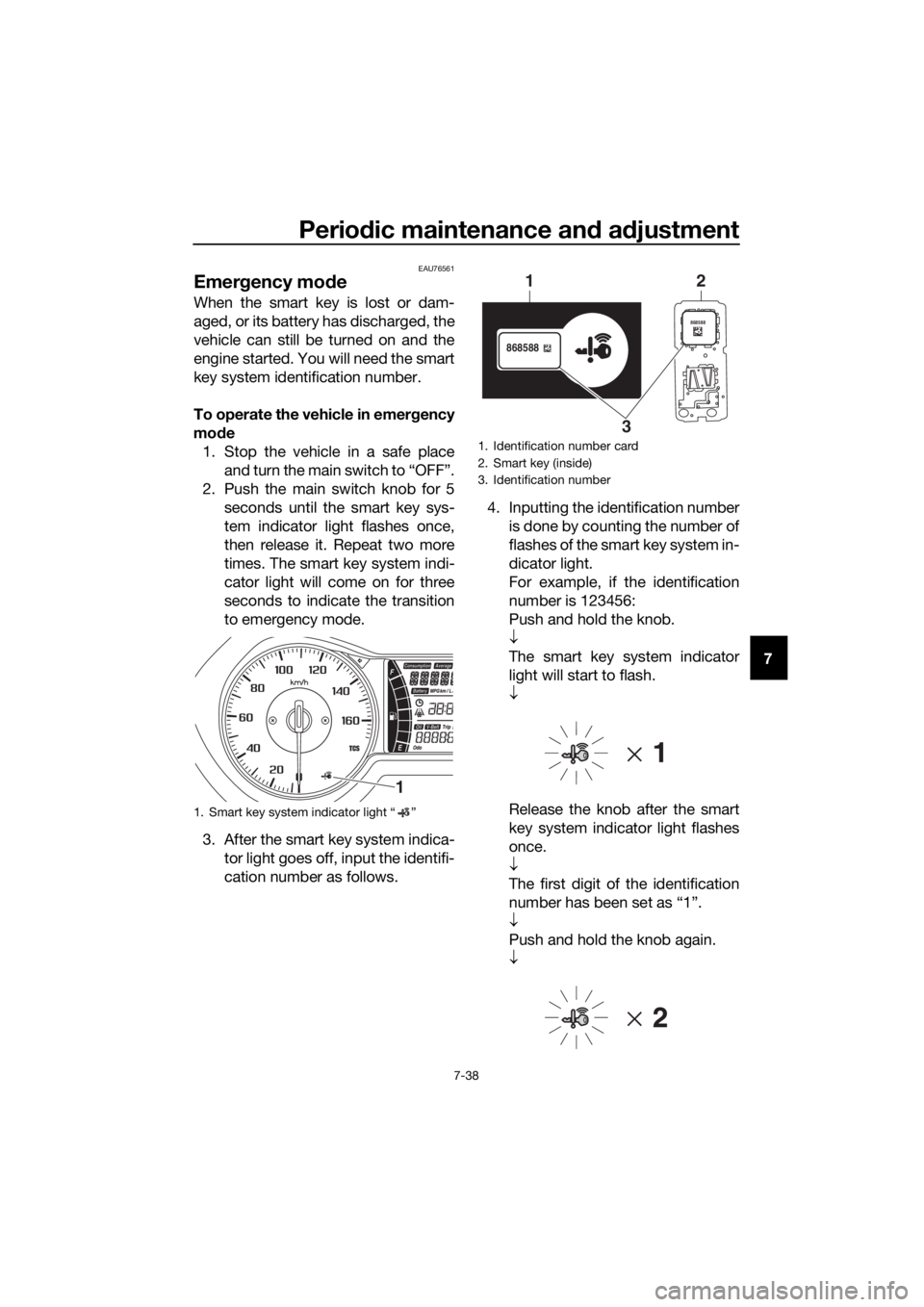
To operate the vehicle in emer gency
mo de
1. Stop the vehicle in a safe place and turn the main switch to “OFF”.
2. Push the main switch knob for 5 seconds until the smart key sys-
tem indicator light flashes once,
then release it. Repeat two more
times. The smart key system indi-
cator light will come on for three
seconds to indicate the transition
to emergency mode.
3. After the smart key system indica- tor light goes off, input the identifi-
cation number as follows. 4. Inputting the identification number
is done by counting the number of
flashes of the smart key system in-
dicator light.
For example, if the identification
number is 123456:
Push and hold the knob.
↓
The smart key system indicator
light will start to flash.
↓
Release the knob after the smart
key system indicator light flashes
once.
↓
The first digit of the identification
number has been set as “1”.
↓
Push and hold the knob again.
↓
1. Smart key system indicator light “ ”
1
1. Identification number card
2. Smart key (inside)
3. Identification number
868588
868588
1
3 2
UB74E0E0.book Page 38 Tuesday, May 2, 2017 1:04 PM
Page 102 of 116

Periodic maintenance an d a djustment
7-39
7 Release the knob after the smart
key system indicator light flashes
twice.
↓
The second digit has been set as
“2”.
↓
Repeat the above procedure until
all digits of the identification num-
ber have been set. The smart key
system indicator light will flash for
10 seconds if the correct identifi-
cation number was entered.
TIP
When one of the following situations
applies, emergency mode will be ter-
minated and the smart key system in-
dicator light will flash quickly for 3
seconds. In this case, start over again
from step 2.
z When there are no knob opera-
tions for 10 seconds during the
identification number input pro-
cess.
z When the smart key system indi-
cator light is allowed to flash nine
or more times.
z The identification number is not
entered correctly.
5. While the smart key system indi-
cator light is on, push the knob
once more to complete emergen-
cy mode access. The smart key
indicator light will go off and then
come back on for approximately 4
seconds.
6. While the smart key system indi- cator light is on, turn the main
switch to “ON”. The vehicle can
now be operated normally.
UB74E0E0.book Page 39 Tuesday, May 2, 2017 1:04 PM
Page 104 of 116

Scooter care and stora ge
8-2
8 structe
d. Also, thorou ghly rinse
the area off with water, imme di-
ately dry it, an d then apply a cor-
rosion protection spray.
z Improper cleanin g can d amage
plastic parts (such as cowlin gs,
panels, win dshield s, head light
lenses, meter lenses, etc.) an d
the mufflers. Use only a soft,
clean cloth or spon ge with wa-
ter to clean plastic. However, if
the plastic parts cannot be thor-
ou ghly cleaned with water, di-
lute d mil d d eter gent with water
may be used . Be sure to rinse
off any d etergent resi due usin g
plenty of water, as it is harmful
to plastic parts.
z Do not use any harsh chemical
prod ucts on plastic parts. Be
sure to avoi d using cloths or
spon ges which have been in
contact with stron g or a brasive
cleanin g prod ucts, solvent or
thinner, fuel (g asoline), rust re-
movers or inhi bito
rs, brake flui d,
antifreeze or electrolyte.
z Do not use hi gh-pressure wash-
ers or steam-jet cleaners since
they cause water seepa ge an d
d eterioration in the followin g ar-
eas: seals (of wheel an d swin g-
arm bearin gs, fork an d b rakes),
electric components (couplers,
connectors, instruments,
switches an d lig hts), breather
hoses an d vents.
z For scooters equippe d with a
win dshield : Do not use stron g
cleaners or har d spon ges as
they will cause dullin g or
scratchin g. Some cleanin gcompoun
ds for plastic may
leave scratches on the win d-
shield . Test the pro duct on a
small hi dden part of the win d-
shield to make sure that it d oes
not leave any marks. If the win d-
shield is scratche d, use a quality
plastic polishin g compoun d af-
te r
washin g.
After normal use
Remove dirt with warm water, a mild
detergent, and a soft, clean sponge,
and then rinse thoroughly with clean
water. Use a toothbrush or bottlebrush
for hard-to-reach areas. Stubborn dirt
and insects will come off more easily if
the area is covered with a wet cloth for
a few minutes before cleaning.
After riding in the rain, near the sea, or
on salt-sprayed roads
Since sea salt or salt sprayed on roads
during winter are extremely corrosive
in combination with water, carry out
the following steps after each ride in
the rain, near the sea, or on salt-
sprayed roads.
TIP
Salt sprayed on roads in the winter
may remain well into spring.
1. Clean the scooter with cold water
and a mild detergent after the en-
gine has cooled down. NOTICE:
Do not use warm water since it
increases the corrosive action
of the salt.
[ECA10792]
2. Apply a corrosion protection spray on all metal, including chrome-
and nickel-plated, surfaces to pre-
vent corrosion.
UB74E0E0.book Page 2 Tuesday, May 2, 2017 1:04 PM
Page 105 of 116
Scooter care and stora ge
8-3
8
Cleaning the windshield
Avoid using any alkaline or strong acid
cleaner, gasoline, brake fluid, or any
other solvent. Clean the windshield
with a cloth or sponge dampened with
a neutral detergent, and after cleaning,
thoroughly wash it off with water. For
additional cleaning, use Yamaha Wind-
shield Cleaner or other quality cleaner.
Some cleaning compounds for plastics
may leave scratches on surfaces of the
windshield. Before using them, make a
test by polishing an area which does
not affect your visibility.
After cleaning
1. Dry the scooter with a chamois or an absorbing cloth.
2. Use a chrome polish to shine chrome, aluminum and stainless-
steel parts, including the exhaust
system. (Even the thermally in-
duced discoloring of stainless-
steel exhaust systems can be re-
moved through polishing.)
3. To prevent corrosion, it is recom- mended to apply a corrosion pro-
tection spray on all metal,
including chrome- and nickel-plat-
ed, surfaces.
4. Use spray oil as a universal clean- er to remove any remaining dirt.
5. Touch up minor paint damage caused by stones, etc.
6. Wax all painted surfaces.
7. Let the scooter dry completely be- fore storing or covering it.
WARNING
EWA10943
Contaminants on the brakes or tires
can cause loss of control. z
Make sure that there is no oil or
wax on the brakes or tires. If
necessary, clean the brake
d iscs an d b rake linin gs with a
re gular brake disc cleaner or
acetone, an d wash the tires with
warm water an d a mil d d eter-
g ent.
z Before operatin g the scooter
test its brakin g performance
an d cornerin g b ehavior.
NOTICE
ECAU0022
z Apply spray oil an d wax spar-
in gly an d make sure to wipe off
any excess.
z Never apply oil or wax to any
rubber parts, plastic parts or
hea dlig ht, tailli ght an d meter
lenses, but treat them with a
suita ble care pro duct.
z Avoi d using abrasive polishin g
compoun ds as they will wear
away the paint.
TIP
z Consult a Yamaha dealer for ad-
vice on what products to use.
z Washing, rainy weather or humid
climates can cause the headlight
lens to fog. Turning the headlight
on for a short period of time will
help remove the moisture from the
lens.
UB74E0E0.book Page 3 Tuesday, May 2, 2017 1:04 PM
Page 109 of 116

Specifications
9-2
9
Trail:95 mm (3.7 in)
Front tire:
Type:
Tubeless
Size: 120/70-15 M/C 56P
Manufacturer/model: DUNLOP/SCOOTSMART
Rear tire:
Type:Tubeless
Size: 140/70-14 M/C 62P
Manufacturer/model: DUNLOP/SCOOTSMART
Loa din g:
Maximum load:
161 kg (355 lb)
(Total weight of rider, passenger, cargo
and accessories)
Tire air pressure (measure d on col d
tires):
1 person:
Front: 200 kPa (2.00 kgf/cm², 29 psi)
Rear: 225 kPa (2.25 kgf/cm², 33 psi)
2 persons:
Front: 200 kPa (2.00 kgf/cm², 29 psi)
Rear:
225 kPa (2.25 kgf/cm², 33 psi)
Front wheel:
Wheel type:Cast wheel
Rim size:
J15M/C x MT3.5
Rear wheel:
Wheel type:Cast wheel
Rim size:
J14M/C x MT4.0
Front brake:
Type:
Hydraulic single disc brake
Specified brake fluid:
DOT 4
Rear brake:
Type:
Hydraulic single disc brake
Specified brake fluid:
DOT 4
Front suspension:
Type:Telescopic fork
Spring:
Coil spring
Shock absorber: Hydraulic damper
Wheel travel: 110 mm (4.3 in)
Rear suspension:
Type:
Unit swing
Spring: Coil spring
Shock absorber: Hydraulic damper
Wheel travel:
79 mm (3.1 in)
Electrical system:
System voltage:12 V
Ignition system:
TCI
Charging system: AC magneto
Battery:
Model:
GTZ8V
Voltage, capacity: 12 V, 7.0 Ah (10 HR)
Bul b watta ge:
Headlight:
LED
Brake/tail light: LED
Front turn signal light: 10.0 W
Rear turn signal light:
10.0 W
Auxiliary light: LED
License plate light: 5.0 W
Meter lighting:
LED
UB74E0E0.book Page 2 Tuesday, May 2, 2017 1:04 PM
Page 110 of 116

Specifications
9-3
9
High beam indicator light:LED
Turn signal indicator light: LED
Engine trouble warning light:
LED
ABS warning light: LED
Smart key system indicator light: LED
Traction control system indicator/warning
light: LED
Fuse(s):
Main fuse:
20.0 A
Main fuse 2: 7.5 A
Terminal fuse 1: 2.0 A
Signaling system fuse:
10.0 A
Signaling system fuse 2: 7.5 A
Radiator fan motor fuse: 7.5 A
Turn signal light and hazard fuse:
7.5 A
ABS control unit fuse: 7.5 A
ABS motor fuse: 30.0 A
ABS solenoid fuse:
15.0 A
Answer back fuse: 2.0 A
Backup fuse: 7.5 A
UB74E0E0.book Page 3 Tuesday, May 2, 2017 1:04 PM
Page 113 of 116

11-1
11
Index
A
ABS ...................................................... 4-14
ABS warning light ................................... 4-1
Acceleration and deceleration................ 6-3
Air filter and V-belt case air filter
elements ............................................ 7-14
Auxiliary DC jack .................................. 4-29
Auxiliary lights ...................................... 7-32
B
Battery .................................................. 7-29
Brake fluid, changing ........................... 7-24
Brake fluid level, checking ................... 7-23
Brake lever, front .................................. 4-13
Brake lever, rear ................................... 4-14
Brake levers, lubricating ....................... 7-26
Brake/tail light ...................................... 7-33
Braking ................................................... 6-4
C
Cables, checking and lubricating ......... 7-25
Canister .................................................. 7-9
Care ........................................................ 8-1
Catalytic converters ............................. 4-20
Centerstand and sidestand, checking and lubricating ................................... 7-27
Coolant ................................................. 7-13
D
Data recording, vehicle ........................ 10-2
Diagnostic connector ........................... 10-2
Dimmer/Pass switch ............................ 4-12
E
Emergency mode ................................. 7-38
Engine break-in ...................................... 6-5
Engine oil and oil filter element .............. 7-9
Engine serial number............................ 10-1
Engine trouble warning light................... 4-1
F
Final transmission oil ............................ 7-12
Front and rear brake lever free play, checking............................................. 7-22
Front and rear brake pads, checking ... 7-23
Front fork, checking ............................. 7-27
Front turn signal light ........................... 7-33
Fuel....................................................... 4-18
Fuel consumption, tips for reducing ...... 6-4
Fuel tank cap........................................ 4-17
Fuel tank overflow hose ....................... 4-19
Fuses, replacing ................................... 7-30
H
Handlebar position, adjusting .............. 4-25
Handlebar switches.............................. 4-12 Hazard switch ....................................... 4-12
Headlights ............................................. 7-32
High beam indicator light........................ 4-1
Horn switch........................................... 4-12
I
Identification numbers .......................... 10-1
Ignition circuit cut-off system ............... 4-27
Indicator lights and warning lights .......... 4-1
K
Key, handling of smart and mechanical
keys ...................................................... 3-3
L
License plate light bulb, replacing ........ 7-34
M
Main switch............................................. 3-8
Maintenance and lubrication, periodic ... 7-4
Maintenance, emission control system .................................................. 7-3
Matte color, caution ................................ 8-1
Model label ........................................... 10-1
Multi-function display ............................. 4-3
O
Operating range of the smart key system .................................................. 3-2
P
Panel, removing and installing ................ 7-7
Parking .................................................... 6-5
Part locations .......................................... 2-1
S
Safe-riding points ................................... 1-5
Safety information................................... 1-1
Shock absorber assemblies, adjusting ............................................. 4-25
Sidestand .............................................. 4-26
Smart key ................................................ 3-5
Smart key battery, replacing................... 3-6
Smart key system ................................... 3-1
Smart key system indicator light ............ 4-2
Smart key system, troubleshooting ...... 7-35
Spark plug, checking .............................. 7-8
Specifications ......................................... 9-1
Speedometer .......................................... 4-2
Starting off .............................................. 6-3
Starting the engine.................................. 6-2
Steering, checking ................................ 7-28
Stop/Run/Start switch .......................... 4-12
Storage ................................................... 8-4
Storage compartments ......................... 4-20
T
Tachometer............................................. 4-3
UB74E0E0.book Page 1 Tuesday, May 2, 2017 1:04 PM
Page 114 of 116

Index
11-2
11
Throttle grip and cable, checking and
lubricating ........................................... 7-26
Throttle grip free play, checking ........... 7-18
Tires ...................................................... 7-19
Tool kit .................................................... 7-2
Traction control system ........................ 4-15
Traction control system indicator light ... 4-2
TRIP/INFO switch ................................. 4-12
Troubleshooting .................................... 7-35
Troubleshooting charts ......................... 7-36
Turn signal indicator lights ...................... 4-1
Turn signal switch ................................. 4-12
V
Valve clearance..................................... 7-19
V-belt, checking .................................... 7-25
Vehicle identification number ............... 10-1
W
Wheel bearings, checking..................... 7-28
Wheels .................................................. 7-21
Windshield ............................................ 4-22
UB74E0E0.book Page 2 Tuesday, May 2, 2017 1:04 PM