page 61 Acura RDX 2012 Owner's Manual
[x] Cancel search | Manufacturer: ACURA, Model Year: 2012, Model line: RDX, Model: Acura RDX 2012Pages: 518, PDF Size: 26.43 MB
Page 353 of 518

When you make an appointment
through My Acura's online Schedule
Service Appointment, you can be
reminded in advance about that
appointment through AcuraLink.
If you need to reschedule or cancel
the appointment, see page 342.Turning the Automated Appointment
preference off will disable
appointment notifications in the
vehicle based on appointments
created or changed at My Acura's
online scheduling website.
Appointments can still be created,
rescheduled, and canceled from the
vehicle; however, the appointment
information stored in the vehicle will
not be updated. Any changes to
those appointments should be made
from the My Acura website.
As required by the FCC:
This device complies with Part 15 of theFCC rules. Operation is subject to the
following two conditions: (1) This devicemay not cause harmful interference, and(2) this device must accept any
interference received, includinginterference that may cause undesiredoperation.
Changes or modifications not expresslyapproved by the party responsible for
compliance could void the user'sauthority to operate the equipment.
This device complies with IndustryCanada Standard RSS-210.
Operation is subject to the following twoconditions: (1) this device may not causeinterference, and (2) this device must
accept any interference that may causeundesired operation of the device.
AcuraLink
®(U.S. models only)
347
Features
11/06/16 17:42:51 12 ACURA RDX MMC North America Owner's M 50 31STK650 enu
Page 361 of 518

5. Screw the fuel fill cap back on untilit clicks at least once. If you do not
properly tighten the cap, you will
see a ‘‘TIGHTEN FUEL CAP ’’
message on the multi-information
display (see right column on this
page), and the malfunction
indicator lamp may also come on
(see page 466).
6. Push the fuel fill door closed until it latches. Tighten Fuel Cap Message
If your fuel fill cap is loose or
missing, a
‘‘TIGHTEN FUEL CAP ’’
message appears on the multi-
information display after you start the
engine. Turn the engine off, and confirm the
fuel fill cap is installed. If it is, loosen
it, then retighten it until it clicks at
least once. When you can restart the
engine, the message appears again.
The message goes off after several
days of normal driving once you
tighten or replace the fuel fill cap. To
scroll to another message, press the
INFO (
/
) button.
If the system still detects a leak in
your vehicle's evaporative emissions
system, the malfunction indicator
lamp (MIL) comes on. If the fuel fill
cap was not already tightened, turn
the engine off, and check or
retighten the fuel fill cap until it
clicks at least once. The MIL should
go off after several days of normal
driving once the cap is tightened or
replaced. If the MIL does not go off,
have your vehicle inspected by a
dealer. For more information, see
page 466.
Service Station Procedures
355
Before Driving
11/06/16 17:42:51 12 ACURA RDX MMC North America Owner's M 50 31STK650 enu
Page 363 of 518
To close the hood, lift it up slightly to
remove the support rod from the
hole. Put the support rod back into
its holding clip. Lower the hood to
about a foot (30 cm) above the
fender, then let it drop. Make sure it
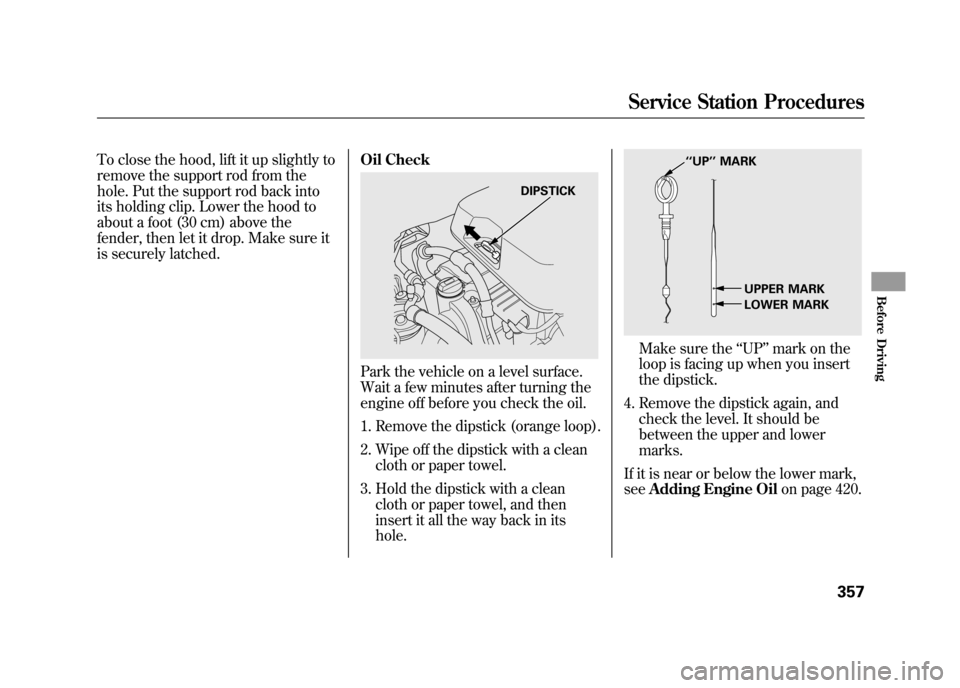
is securely latched.Oil Check
Park the vehicle on a level surface.
Wait a few minutes after turning the
engine off before you check the oil.
1. Remove the dipstick (orange loop).
2. Wipe off the dipstick with a clean
cloth or paper towel.
3. Hold the dipstick with a clean cloth or paper towel, and then
insert it all the way back in its
hole.
Make sure the ‘‘UP ’’mark on the
loop is facing up when you insert
the dipstick.
4. Remove the dipstick again, and check the level. It should be
between the upper and lower
marks.
If it is near or below the lower mark,
see Adding Engine Oil on page 420.
DIPSTICK
‘‘UP’’ MARK
UPPER MARK
LOWER MARK
Service Station Procedures
357
Before Driving
11/06/16 17:42:51 12 ACURA RDX MMC North America Owner's M 50 31STK650 enu
Page 364 of 518

Engine Coolant CheckLook at the coolant level in the
radiator reserve tank. Make sure it is
between the MAX and MIN lines. If
it is below the MIN line, seeAdding
Engine Coolant on page 424 for
information on adding the proper
coolant. Refer to
Owner's Maintenance
Checks on page 417 for information
about checking other items on your
vehicle. Actual Mileage and EPA Fuel
Economy Estimates Comparison.
Fuel economy is not a fixed number.
It varies based on driving conditions,
driving habits and vehicle condition.
Therefore, it is not possible for one
set of estimates to predict fuel
economy precisely for all drivers in
all environments.
The EPA fuel economy estimates
shown in the example to the right are
a useful tool for comparison when
buying a vehicle. EPA estimates
include:
City MPG
-Represents urban
driving in a vehicle in light traffic. A
range of miles per gallon achieved is
also provided.
Highway MPG -Represents a
mixture of rural and interstate
driving, in a warmed-up vehicle,
typical of longer trips in free-flowing
traffic. A range of miles per gallon
achieved is also provided.
RESERVE TANK
MAX MIN
Service Station Procedures, Fuel Economy35811/06/16 17:42:51 12 ACURA RDX MMC North America Owner's M 50 31STK650 enu
Page 366 of 518

Improving Fuel EconomyVehicle MaintenanceA properly maintained vehicle
maximizes fuel economy. Poor
maintenance can significantly reduce
fuel economy. Always maintain your
vehicle according to the maintenance
messages displayed on the
information display (seeOwner's
Maintenance Checks on page 417).
For example:●Use the required engine oil (see
page 420).●Maintain proper tire inflation -
An underinflated tire increases
‘‘ rolling resistance, ’’which reduces
fuel economy.●Avoid carrying excess weight in
your vehicle -It puts a heavier
load on the engine, increasing fuel
consumption.
●Keep your vehicle clean -In
particular, a build-up of snow or
mud on your vehicle's underside
adds weight and rolling resistance.
Frequent cleaning helps your fuel
economy.
Drive Efficiently●Drive moderately -Rapid
acceleration, abrupt cornering, and
hard braking increase fuel
consumption.●Observe the speed limit -
Aerodynamic drag has a big effect
on fuel economy at speeds above
45 mph (75 km/h). Reduce your
speed and you reduce the drag.
Trailers, car top carriers, roof
racks and bike racks are also big
contributors to increased drag.
Fuel Economy36011/06/16 17:42:51 12 ACURA RDX MMC North America Owner's M 50 31STK650 enu
Page 369 of 518

Improper accessories or
modifications can affect your
vehicle's handling, stability, and
performance, and cause a
crash in which you can be hurt
or killed.
Follow all instructions in this
owner's manual regarding
accessories and modifications.
When properly installed, cellular
phones, alarms, two-way radios, and
low-powered audio systems should
not interfere with your vehicle's
computer controlled systems, such
as your airbags, anti-lock brakes, and
tire pressure monitoring system. Before installing any accessory:
●Make sure the accessory does not
obscure any lights, or interfere
with proper vehicle operation or
performance.●Be sure electronic accessories do
not overload electrical circuits (see
page 469) or interfere with proper
operation of your vehicle.●Before installing any electronic
accessory, have the installer
contact your dealer for assistance.
If possible, have your dealer
inspect the final installation.●Do not install accessories on the
side pillars or across the rear
windows. Accessories installed in
these areas may interfere with
proper operation of the side
curtain airbags.Modifying Your Vehicle
Removing parts from your vehicle, or
replacing components with non-
Acura components could seriously
affect your vehicle's handling,
stability, and reliability.
Here are some examples:
●Lowering the vehicle with a non-
Acura suspension kit that
significantly reduces ground
clearance can allow the
undercarriage to hit speed bumps
or other raised objects, which
could cause the airbags to deploy.●Raising your vehicle with a non-
Acura suspension kit can affect the
handling, stability, and reliability.
CONTINUED
Accessories and Modifications
363
Before Driving
11/06/16 17:42:51 12 ACURA RDX MMC North America Owner's M 50 31STK650 enu
Page 371 of 518
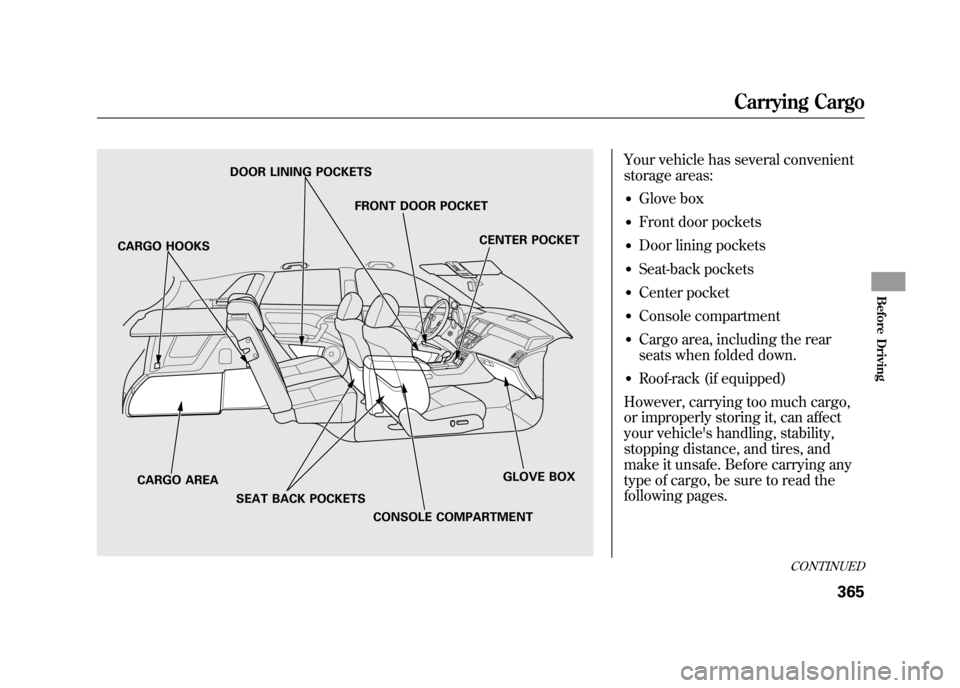
Your vehicle has several convenient
storage areas:●Glove box●Front door pockets●Door lining pockets●Seat-back pockets●Center pocket●Console compartment●Cargo area, including the rear
seats when folded down.●Roof-rack (if equipped)
However, carrying too much cargo,
or improperly storing it, can affect
your vehicle's handling, stability,
stopping distance, and tires, and
make it unsafe. Before carrying any
type of cargo, be sure to read the
following pages.
DOOR LINING POCKETS
FRONT DOOR POCKET CENTER POCKET
GLOVE BOX
CONSOLE COMPARTMENT
CARGO AREA
SEAT BACK POCKETS
CARGO HOOKS
CONTINUED
Carrying Cargo
365
Before Driving
11/06/16 17:42:51 12 ACURA RDX MMC North America Owner's M 50 31STK650 enu
Page 375 of 518
●If you carry large items that
prevent you from closing the
tailgate, exhaust gas can enter the
passenger area. To avoid the
possibility ofcarbon monoxide
poisoning, follow the instructions
on page 57.●●If you carry any items on a roof
rack, be sure the total weight of
the rack and the items does not
exceed 110 lbs (50 kg). Cargo Hooks/Hanger Bars
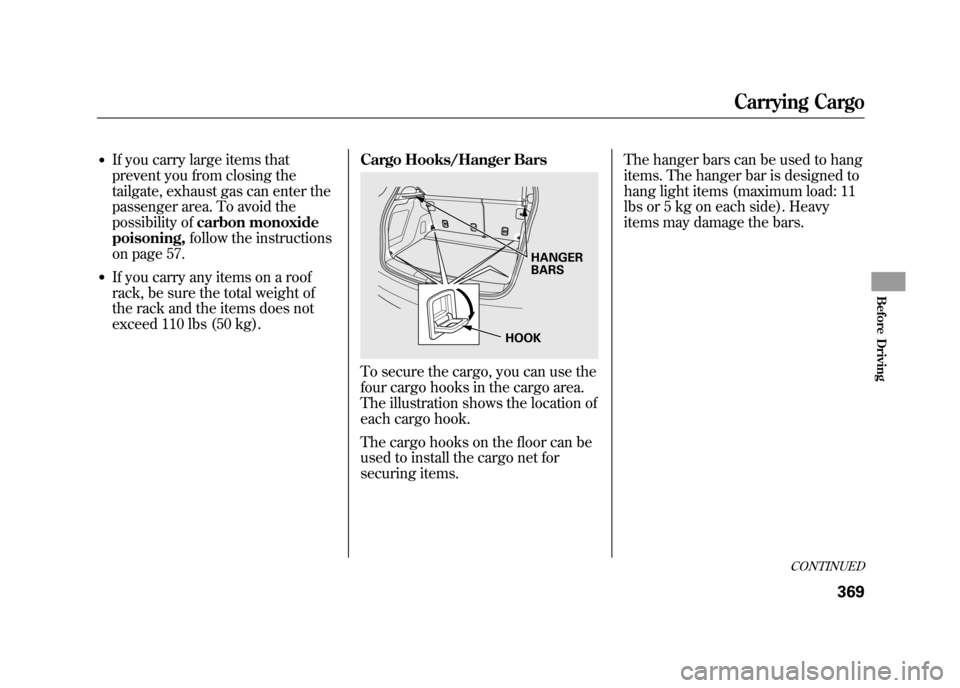
To secure the cargo, you can use the
four cargo hooks in the cargo area.
The illustration shows the location of
each cargo hook.
The cargo hooks on the floor can be
used to install the cargo net for
securing items. The hanger bars can be used to hang
items. The hanger bar is designed to
hang light items (maximum load: 11
lbs or 5 kg on each side). Heavy
items may damage the bars.
HANGER
BARS
HOOK
CONTINUED
Carrying Cargo
369
Before Driving
11/06/16 17:42:51 12 ACURA RDX MMC North America Owner's M 50 31STK650 enu
Page 378 of 518

Your vehicle has higher ground
clearance that allows you to travel
over bumps, obstacles, and rough
terrain. It also provides good
visibility so you can anticipate
problems earlier.
Because your vehicle rides higher off
the ground, it has a high center of
gravity that can cause it to roll over if
you make abrupt turns. Utility
vehicles have a significantly higher
roll over rate than other types of
vehicles.To prevent rollovers or loss of
control:
●Take corners at slower speeds
than you would with a passenger
vehicle.●Avoid sharp turns and abrupt
maneuvers whenever possible.●Do not modify your vehicle in any
way that would raise the center of
gravity.●Do not carry heavy cargo on the
roof.Your vehicle is equipped with a super
handling-all wheel drive (SH-AWD)
system. When the system senses a
loss of one or more wheel traction, it
automatically transfers some power
to the other wheels. This gives you
better traction and mobility.
You still need to exercise the same
care when accelerating, steering, and
braking that you would in a two-
wheel drive vehicle.
See page 405 for off-highway driving
guidelines.
Driving Guidelines37211/06/16 17:42:51 12 ACURA RDX MMC North America Owner's M 50 31STK650 enu
Page 379 of 518

You should do these checks and
adjustments before you drive your
vehicle:1. Make sure all windows, mirrors, and outside lights are clean and
unobstructed. Remove frost, snow,
or ice.
2. Check that the hood is fully closed.
3. Visually check the tires. If a tire looks low, use a gauge to check its
pressure.
4. Check that any items you may be carrying are stored properly or
fastened down securely. 5. Check the seat adjustment (see
page 134).
6. Check the adjustment of the inside and outside mirrors (see page
146).
7. Check the steering wheel adjustment (see page 122).
8. Make sure the doors and the tailgate are securely closed and
locked.
9. Fasten your seat belt. Check that your passengers have fastened
their seat belts (see page 15). 10. When you start the engine, check
the gauges and indicators in the
instrument panel, and the
messages on the multi-information
display (see pages 63, 73 and 74).
Preparing to Drive
373
Driving
11/06/16 17:42:51 12 ACURA RDX MMC North America Owner's M 50 31STK650 enu