map Acura RDX 2016 Navigation Manual
[x] Cancel search | Manufacturer: ACURA, Model Year: 2016, Model line: RDX, Model: Acura RDX 2016Pages: 363, PDF Size: 17.77 MB
Page 169 of 363
168
Navigation
Changing Your Destination
There are several methods you can use to change the route destination.
Find Nearest Place
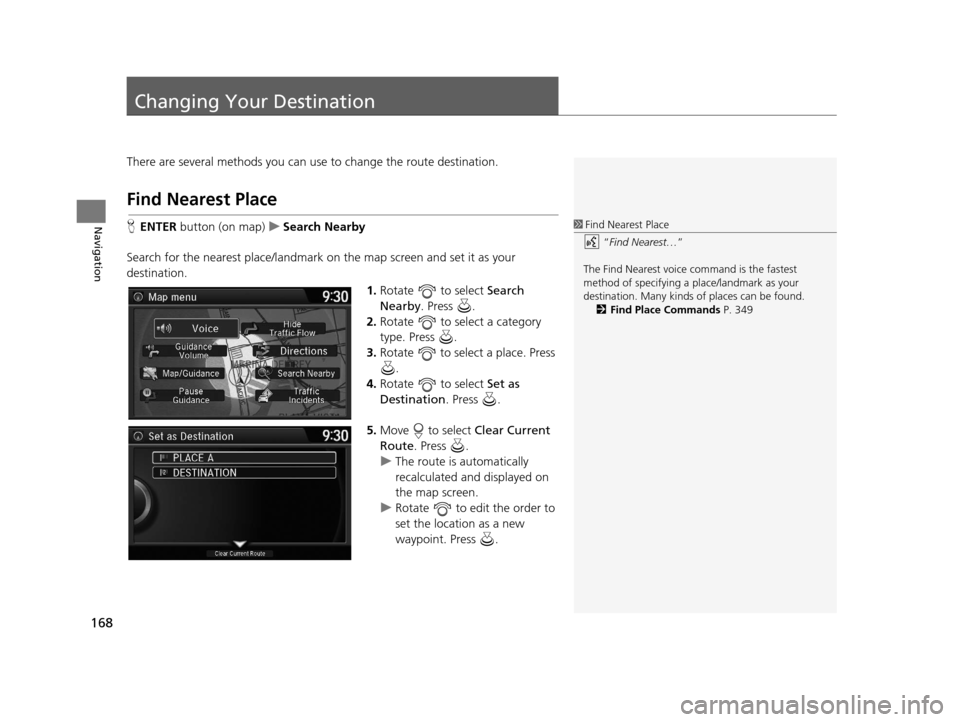
HENTER button (on map) uSearch Nearby
Search for the nearest place/landmark on the map screen and set it as your
destination. 1.Rotate to select Search
Nearby . Press .
2. Rotate to select a category
type. Press .
3. Rotate to select a place. Press
.
4. Rotate to select Set as
Destination . Press .
5. Move to select Clear Current
Route . Press .
u The route is automatically
recalculated and displayed on
the map screen.
u Rotate to edit the order to
set the location as a new
waypoint. Press .1Find Nearest Place
“Find Nearest… ”
The Find Nearest voice command is the fastest
method of specifying a pl ace/landmark as your
destination. Many kinds of places can be found.
2 Find Place Commands P. 349
16 ACURA RDX NAVI-31TX48300.book 168 ページ 2015年3月6日 金曜日 午後1時26分
Page 170 of 363
169
uuChanging Your Destination uSelecting a Destination on the Map
Navigation
Selecting a Destination on the Map
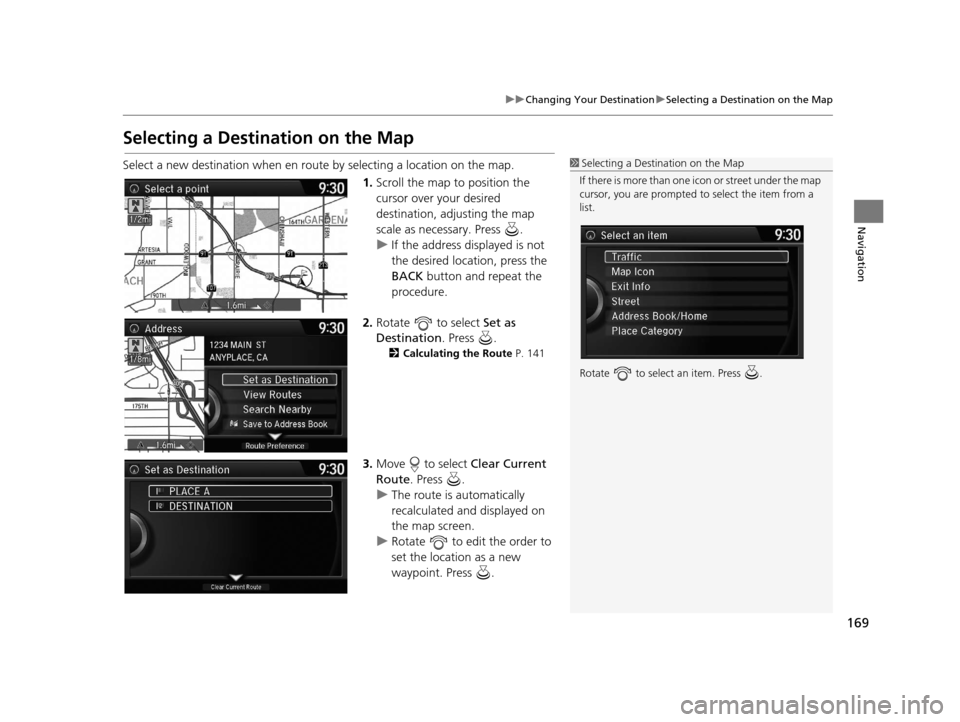
Select a new destination when en route by selecting a location on the map.
1.Scroll the map to position the
cursor over your desired
destination, adjusting the map
scale as necessary. Press .
u If the address displayed is not
the desired location, press the
BACK button and repeat the
procedure.
2. Rotate to select Set as
Destination . Press .
2Calculating the Route P. 141
3.Move to select Clear Current
Route . Press .
u The route is automatically
recalculated and displayed on
the map screen.
u Rotate to edit the order to
set the location as a new
waypoint. Press .
1Selecting a Destination on the Map
If there is more than one icon or street under the map
cursor, you are prompted to select the item from a
list.
Rotate to select an item. Press .
16 ACURA RDX NAVI-31TX48300.book 169 ページ 2015年3月6日 金曜日 午後1時26分
Page 171 of 363
170
uuChanging Your Destination uEntering a New Destination
Navigation
Entering a New Destination
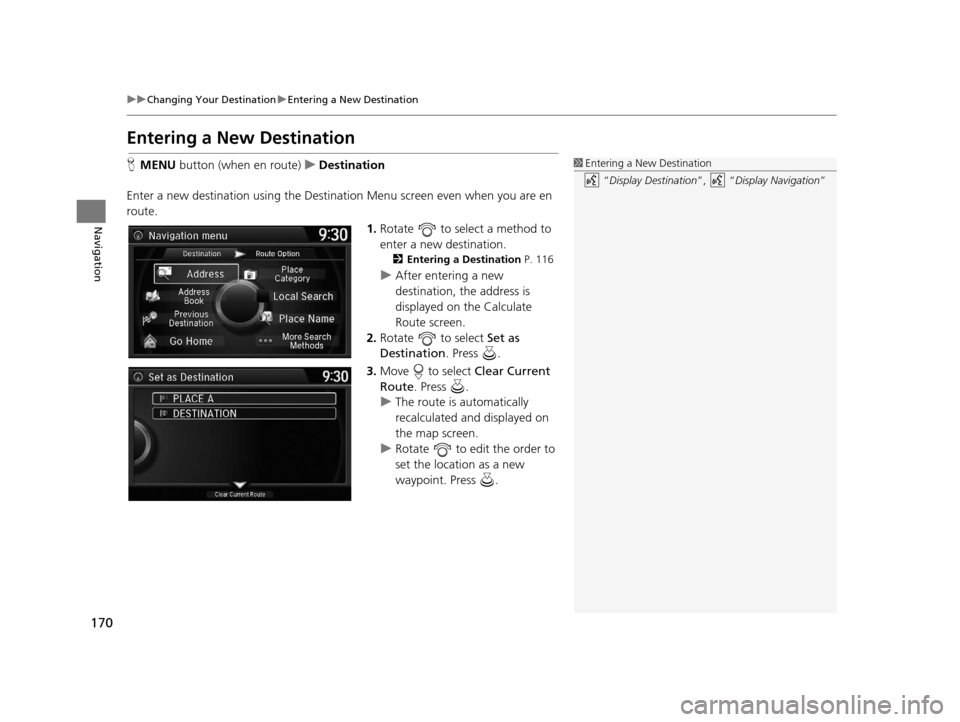
H MENU button (when en route) uDestination
Enter a new destination using the Destinat ion Menu screen even when you are en
route.
1.Rotate to select a method to
enter a new destination.
2 Entering a Destination P. 116
uAfter entering a new
destination, the address is
displayed on the Calculate
Route screen.
2. Rotate to select Set as
Destination . Press .
3. Move to select Clear Current
Route . Press .
u The route is automatically
recalculated and displayed on
the map screen.
u Rotate to edit the order to
set the location as a new
waypoint. Press .
1Entering a New Destination
“Display Destination ”, “Display Navigation ”
16 ACURA RDX NAVI-31TX48300.book 170 ページ 2015年3月6日 金曜日 午後1時26分
Page 172 of 363
171
Navigation
Resuming Your Trip
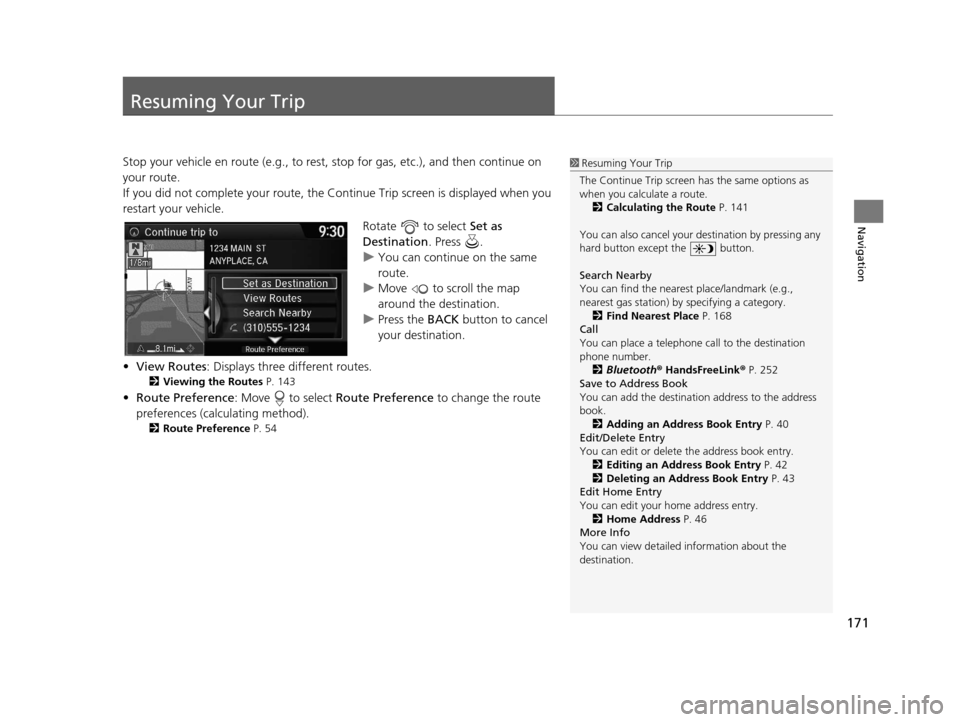
Stop your vehicle en route (e.g., to rest, stop for gas, etc.), and then continue on
your route.
If you did not complete your route, the Continue Trip screen is displayed when you
restart your vehicle.
Rotate to select Set as
Destination . Press .
u You can continue on the same
route.
u Move to scroll the map
around the destination.
u Press the BACK button to cancel
your destination.
• View Routes : Displays three different routes.
2Viewing the Routes P. 143
•Route Preference : Move to select Route Preference to change the route
preferences (calculating method).
2 Route Preference P. 54
1Resuming Your Trip
The Continue Trip screen has the same options as
when you calculate a route. 2 Calculating the Route P. 141
You can also cancel your de stination by pressing any
hard button except the button.
Search Nearby
You can find the nearest place/landmark (e.g.,
nearest gas station) by specifying a category.
2 Find Nearest Place P. 168
Call
You can place a telephone call to the destination
phone number.
2 Bluetooth® HandsFreeLink ® P. 252
Save to Address Book
You can add the destinati on address to the address
book. 2 Adding an Address Book Entry P. 40
Edit/Delete Entry
You can edit or delete the address book entry.
2 Editing an Address Book Entry P. 42
2 Deleting an Address Book Entry P. 43
Edit Home Entry
You can edit your home address entry.
2 Home Address P. 46
More Info
You can view detailed information about the
destination.
16 ACURA RDX NAVI-31TX48300.book 171 ページ 2015年3月6日 金曜日 午後1時26分
Page 312 of 363
311
Other Features
This section describes the useful functions incorporated into the navigation system.
Trip Computer....................................... 312
Calendar ................................................ 313
Information Functions .......................... 314
System Device Information ................... 314
Map Data Update ................................ 314
Info Screen Preference ......................... 315
Multi-View Rear Camera ...................... 316
16 ACURA RDX NAVI-31TX48300.book 311 ページ 2015年3月6日 金曜日 午後1時26分
Page 315 of 363
314
Other Features
Information Functions
System Device Information
HSETTINGS buttonuNavi Settings uMap uSystem Device Information
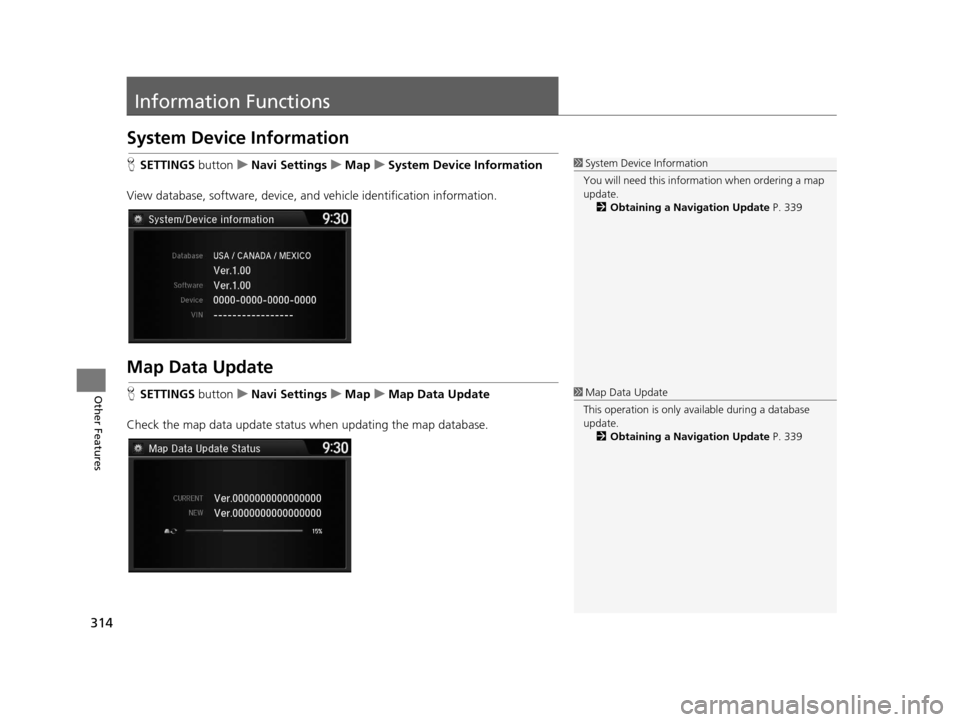
View database, software, device, a nd vehicle identification information.
Map Data Update
HSETTINGS buttonuNavi Settings uMap uMap Data Update
Check the map data update status when updating the map database.
1 System Device Information
You will need this informat ion when ordering a map
update.
2 Obtaining a Navigation Update P. 339
1Map Data Update
This operation is only avai lable during a database
update.
2 Obtaining a Navigation Update P. 339
16 ACURA RDX NAVI-31TX48300.book 314 ページ 2015年3月6日 金曜日 午後1時26分
Page 318 of 363
317
Troubleshooting
Troubleshooting....................................318
Map, Voice, Entering Destinations .........318
Traffic ...................................................320
Guidance, Routing ................................321
Update, Coverage, Map Errors ..............323
Display, Accessories ..............................323
Multi-View Rear Camera .......................323
Miscellaneous Questions .......................324
Error Messages ......................................325
Navigation System ................................325
CD Player ..............................................326
Hard Disc Drive (HDD) Audio .................327
iPod/USB Flash Drive .............................328
Pandora ®..............................................329 AhaTM Radio ......................................... 332
16 ACURA RDX NAVI-31TX48300.book 317 ページ 2015年3月6日 金曜日 午後1時26分
Page 319 of 363

318
Troubleshooting
Troubleshooting
Map, Voice, Entering Destinations
ProblemSolution
The Startup Confirmation screen is displayed
every time I start the car.This is normal. The Startup Confirmation screen reminds you and your guest
drivers to always operate the navigation system in a safe manner. The Startup
Confirmation screen goes off after a certain period of time and the top screen of
the last mode is displayed.
The navigation system reboots by itself
(returns to the opening screen).A reboot can be caused by extreme temperatures and does not necessarily
indicate a problem. If this happens frequently, please see a dealer.
How do I specify a de stination when an
entered city or street could not be found?●Try entering the street first. Some cities are lumped in with a major metro area.
In rural “unverified” areas or new subdivisions, streets may be missing or only
partially numbered.
●Try selecting the destination directly from the map.
2 Map Input P. 138
Why do some letters become grayed out
when I enter an address?As you enter each letter in an address or a place/landmark, the navigation system
looks in the database to see what letters are possible and grays out letters that do
not apply.
How do I delete Personal Addresses,
Previous Destinations, or the Home Address?1. Press the SETTINGS button. Select Navi Settings > Personal Info to display
the types of information.
2. Select the type of address to delete.
3. Select Delete.
I cannot hear the navigation system voice.1.Press the SETTINGS button. Select System Settings and check that Guidance
Volume is not set to 0.
2. Select Voice Reco and set Voice Prompt to On.
Why is Call grayed out on the Calculate
Route screen?Your phone is not paired to Bluetooth® HandsFreeLink ® or, if paired, your phone
is in use.
2 Bluetooth® HandsFreeLink ® P. 252
16 ACURA RDX NAVI-31TX48300.book 318 ページ 2015年3月6日 金曜日 午後1時26分
Page 320 of 363

319
uuTroubleshooting uMap, Voice, Entering Destinations
Troubleshooting
The voice control system is having difficulty
recognizing my voice commands.●Check that the vents are not blowing air onto the microphone on the ceiling,
the vehicle is as quiet as possible, a nd you are using the correct command when
speaking.
2 Voice Recognition P. 23●Say “Voice Help” on any screen to see a li st of the applicable voice
commands.
I cannot give voice commands.Make sure you selected OK at the Startup Confirmation screen.
2Start-up P. 20
I cannot select an option using the Interface
Dial.To reduce potential driver distraction, ce rtain onscreen functions and features are
limited or inoperable while the vehicle is moving. Use voice commands or pull over
to proceed.
The navigation system pronunciation of
street names in the guidance command or
destination address sounds strange.The basic guidance phrases use a studio-recorded voice, but street names are
pronounced using a machine-generated voice. Consequently, the name may be
mispronounced or sound strange at times.
The screen is bright when I drive at night.1.Check that the nighttime dashboard bri ghtness control is not set to maximum.
2. Press the SETTINGS button. Select Navi Settings > Map > Color (Night) .
2Color P. 73
The screen is dark when I drive during the
day.Press the SETTINGS button. Select Navi Settings > Map > Color (Day) .
2Color P. 73
How do I change or remove my PIN?1.Press the SETTINGS button. Select Navi Settings > Personal Info > PIN
Number > Address Book PIN or Go Home PIN .
2. Enter your existing PIN. You then have the choice to change or remove the PIN.
2 PIN Numbers P. 47
I have forgotten my PIN. How do I reset the
PIN for Home or the PIN for personal
addresses?A dealer must reset the PIN for you.
ProblemSolution
16 ACURA RDX NAVI-31TX48300.book 319 ページ 2015年3月6日 金曜日 午後1時26分
Page 321 of 363

320
uuTroubleshooting uTraffic
Troubleshooting
Traffic
ProblemSolution
AcuraLink Real-Time TrafficTM information could not
be received or is not displayed properly.●Check that the traffic status indicato r is available on the map screen.
2AcuraLink Real-Time TrafficTM P. 14●Check that the traffic icons are turned on.
2Showing Icons on Map P. 71●Check the AcuraLink® subscription status.
2AcuraLink® P. 300●There may be a temporary technical prob lem in your metropolitan area. Call
Acura Client Relations to see if there is an outage.
2 Acura Client Relations Contact Information P. 338●If the situation persists, see your Acura dealer for assistance.●AcuraLink® is not available in Alaska, Ha waii, Puerto Rico, and Mexico.
The navigation system sometimes provides a detour
route when I am driving a route on the freeway/
highway.If Traffic Rerouting is set to On, the navigation system provides a detour route
to your destination only if it can find a si gnificantly faster route than the original
one.
2 Traffic Rerouting P. 58
The navigation system routes me to an exit and an
alternate freeway/highway with unknown flow
speeds or surface streets.The navigation system predicts which r oute should be faster based on freeway/
highway congestion along your route. Us e your own experience to determine
whether the alternate route would be faster.
How can I ignore the detour route and return to the
original route?Press the SETTINGS button. Select Navi Settings > Routing , and set Traffic
Rerouting to Off .
2Traffic Rerouting P. 58
16 ACURA RDX NAVI-31TX48300.book 320 ページ 2015年3月6日 金曜日 午後1時26分