Voice Acura TL 2009 Navigation Manua
[x] Cancel search | Manufacturer: ACURA, Model Year: 2009, Model line: TL, Model: Acura TL 2009Pages: 172, PDF Size: 16.82 MB
Page 102 of 172

System Setup
102 Navigation System
Routing & Guidance
From the SET UP screen (Other), say
or select Routing & Guidance and
the following screen appears:
Rerouting
If Rerouting is set to AUTOMATIC
and you deviate from the route, you will
see “Recalculating...” at the top of the
screen for several seconds as the system
calculates a new route. This is followed
by new routing instructions.
If Rerouting is set to MANUAL , you
will hear a tone when the “Off route”
message is displayed. Say “Recalculation”
or select Recalculation on the screen
to make the system recalculate your
new route.
NOTE:
• It is strongly recommended that you leave the system set to the factory
default (Automatic) .
• If you live in an area with poor mapping, you may wish to set
Rerouting to MANUAL to avoid
constant recalculation. However,
you will have to manually select
Recalculation on the screen to
have the system plot a new route.
Units (mile or km)
Allows you to select the units for the
entire system ( mile or km ).
Voice Recognition Feedback
Allows you to turn voice control system
prompts ON or OFF . When OFF , you
will not hear the voice control system
confi rmations or prompts.
Verbal Reminders
If the parking brake has not been
disengaged, or if either the driver or a
passenger forgets to buckle his/her seat
belt, an audio voice warning is given.
This function can be toggled between
ON and OFF at this time.
2009 TL
Page 103 of 172

System Setup
Navigation System103
Unverifi ed Area Routing
Allows you to receive turn-by-turn map and voice guidance in unverifi ed areas when en route to a destination (see Map
Overview on page 6 ). The chart below illustrates the routing differences with this setting ON or OFF .
Unverifi ed Area Routing: OFF (factory default) Unverifi ed Area Routing: ON
Decision:
Why choose
ON or OFF? The driver wishes to navigate manually by using the
navigation map and choosing the streets that lead to the
destination. The driver understands that unverifi
ed roads
may not be accurate, and can contain errors in location,
naming, and address range. The driver chooses to let the navigation system suggest
possible routing. The driver understands that in some cases
guidance may not be appropriate. Unverifi
ed roads may not
be accurate, and can contain errors in location, naming, and
address range.
What you will
see... A blue dotted vector line is displayed on the map that
continually points to your destination. The driver should
stop and then use the map to select streets that lead to the
destination. A blue-pink dashed route line highlights suggested
unverifi
ed streets on the map while traveling to your
destination. This is in sharp contrast to the normal blue
route line displayed in verifi ed areas.
Cautionary
messages There are cautionary pop-up screens and voice
announcements, before and during the route. These serve as
reminders that you should obey all traffi
c restrictions. There are cautionary pop-up screens and voice
announcements, before and during the route. These serve as
reminders that you should exercise additional caution, and
obey all traffi
c restrictions.
Guidance
(map /voice) There is no turn-by-turn map or voice guidance.
Voice guidance commands end with the words “if possible.”
This is to remind the driver to verify all traffi c restrictions
before making a maneuver.
Directions list A direction list is typically not available. However,
depending on your route, directions are provided to help you
reach the fi
rst available verifi ed road. A direction list is provided showing street names and turn
symbols in pink.
2009 TL
Page 105 of 172

System Setup
Navigation System105
With Unveri ed Area Routing
OFF , before you enter an unverifi ed
street, a caution box appears on the
screen and a voice message is given.
This lets you know that you are about
to enter an unverifi ed area and that you
will be following a dotted “vector line”
that points to your destination.
With Unveri ed Area Routing ON ,
a caution box appears on the screen and
is read by the voice. In this case, you
will be presented with a dashed blue/
pink line instead of the regular blue
route line. This is your signal to pay
attention to posted traffi c restrictions.
You cannot assume that all guidance is
appropriate.
In both cases, when you actually enter
the unverifi ed street, a short caution
will remind you. You will see and hear
this short caution message whenever
you enter unverifi ed areas.
If you regularly enter and leave
unverifi ed roads for short amounts
of time, there may be cases where no
guidance is provided. Unveri
ed Area Routing “OFF” Unveri ed Area Routing “ON”
2009 TL
Page 106 of 172

System Setup
106 Navigation System
With Unveri ed Area Routing
OFF , you are presented with a blue
“vector line” that always points to the
destination. You must manually choose
streets from the map that will lead
to your destination. No guidance is
provided, and there are no directions to
the destination.
With Unveri ed Area Routing ON ,
a blue/pink route line is shown for
unverifi ed segments. Voice guidance
commands in unverifi ed areas always
end with “if possible.” This is your
signal that you should use additional
caution, and obey all traffi c restrictions.
The maneuver window “arrow” shows
any portions of unverifi ed turns in blue/
pink dashes.
These guidance maneuvers are only
a suggestion. You should always
confi rm that the maneuver is possible.
A directions list is also provided that
shows any unverifi ed roads in a blue
color, with pink arrows pointing to the
next maneuver. Unveri
ed Area Routing “OFF”
NOTE:
For the pop-up menu displayed when
pushing in on the Interface Dial from
the map screen, Voic e is grayed out.
With Unverifi ed Area Routing OFF, no
Direction List is provided.
If you select Directions in the
Guidance Menu on the Map Menu
screen, you will receive guidance by
Directions while you are driving. Unveri
ed Area Routing “ON”
2009 TL
Page 109 of 172
System Setup
Navigation System109
Edit Waypoint Search Area
When driving en route to your
destination, you can select a temporary
destination waypoint (marked with a
small fl ag on the map) along your route
for gas, a restaurant, or other POI.
When you resume your trip from the
waypoint, the system continues the trip
to your original destination. To use this
feature, see Waypoint on page 75 .
This SET UP item allows you to select
the distance from your highlighted
route line (on either side of your
route), that the system will search for a
waypoint.
From the Routing & Guidance screen,
select Edit Waypoint Search Area ,
and then choose the desired search
distance for either “On Freeways” or
“On Surface Street.”
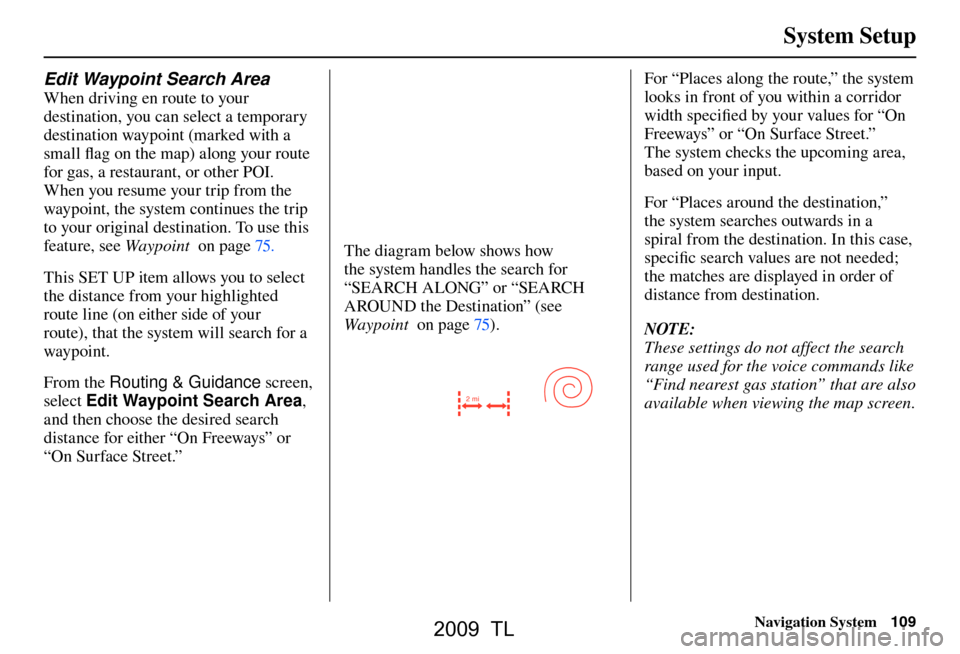
The diagram below shows how
the system handles the search for
“SEARCH ALONG” or “SEARCH
AROUND the Destination” (see
Waypoint on page 75 ).
2 mi
For “Places along the route,” the system
looks in front of you within a corridor
width specifi ed by your values for “On
Freeways” or “On Surface Street.”
The system checks the upcoming area,
based on your input.
For “Places around the destination,”
the system searches outwards in a
spiral from the destination. In this case,
specifi c search values are not needed;
the matches are displayed in order of
distance from destination.
NOTE:
These settings do not affect the search
range used for the voice commands like
“Find nearest gas station” that are also
available when viewing the map screen.
2009 TL
Page 110 of 172
System Setup
110 Navigation System
Guidance Mode
Allows you to select the guidance
display mode: Single Screen or Split
Screen .
To get to Guidance Mode from the
SET UP screen, select the “Other”
tab, Routing & Guidance , and
Guidance Mode .
The factory default is Single Screen .
NOTE:
The Guidance Mode on the Map
Menu screen can also be selected.
See Showing Icons on the Map on page
68 .
Street Name Guidance
Allows voice guidance to include the
street names during maneuvers (for
example, “Turn right on Main Street”).
You can choose to turn this feature ON
or OFF .
To access the guidance mode from the
SET UP screen, select the “Other” tab,
Routing & Guidance , and Street
Name Guidance .
This feature is set to OFF as a factory
default.
NOTE:
If the system language selection is not
English, Street Name Guidance will
be grayed out, making its selection
impossible.
Tr a f fi c Rerouting
This feature considers traffi c
information when carrying out
automatic rerouting. Select either ON
or OFF for this function. Please see
Traffi c Rerouting on page 73 .
To access the guidance mode from the
SET UP screen, select the “Other” tab,
Routing & Guidance , and Tr a f c
Rerouting .
See Traffi c & Weather Status on page
121 re garding verifying reception
status.
This is set to OFF as factory default.
NOTE:
Automatic traffi c rerouting may give
inappropriate guidance in metro areas
with limited or incomplete traffi c fl ow
data.
2009 TL
Page 117 of 172
System Setup
Navigation System117
Language
Selects the language to be used on each
screen that the system displays. From
the SET UP screen (Other), say or
select Language and the following
screen will be displayed.
You can choose from three languages:
English , French, or Spanish .
NOTE:
• If you select one language, and then select a different language
immediately after, there are cases
where the conversion will not be
successful. In this case, conversion
of all the voice data has not been
completed (the system will display a
message). • Voice confi rmation of cities and
streets only occurs when English has
been selected.
• When French or Spanish is selected, messages will continue to be
displayed in English.
Wallpapers Setting
From the SET UP screen (Other), say
or select Wallpapers Setting and the
following screen will be displayed.
With the factory default, two images
are provided for the HDD.
2009 TL
Page 119 of 172
System Setup
Navigation System119
Delete Pictures on HDD
If you say or select Delete pictures
on HDD , a list of the images on the
HDD will appear.
To delete the image, use the Interface
Dial to select it, and the image will
display. Select OK if you want to
continue to delete the image, and the
list of images will be displayed, with
your selected image highlighted. Move
the Interface Dial down to select OK
to delete. A confi rmation message will
appear.
NOTE:
If there are no images on the HDD,
“No Entries Exist” will appear. Images that have not yet completed
uploading from a USB thumb drive
cannot be deleted.
Reset Factory Default
Settings
The
Set up settings and rear camera
brightness value settings can be
returned to the factory default settings.
If you say or select Reset Factory
Default from the SET UP screen
( Other ), the following screen will
display.
If you select Ye s, the following Set up
settings return to the factory default
settings. If you select No , these settings
will remain as they are currently set.
• Brightness, Contrast, Black Level,
Volume, Interface Dial Feedback,
Brightness (Rear Camera)
• Basic Settings: Units, Voice
Recognition Feedback, Verbal
Reminder
2009 TL
Page 120 of 172
System Setup
120 Navigation System
• Routing & Guidance: Rerouting,
Unver ifi ed Area Rerouting, Traffi c
Rerouting, Edit Waypoint Search
Area, Guidance Mode, Street Name
Guidance
• Clock Adjustment: Auto Daylight,
Auto Time Zone, Time
• Ve h i c l e : O f f- r o a d Tr a c k i n g
• Color: Map Color, Menu Color
NOTE:
Messages are not deleted.
AcuraLink /Messages settings do not
return to the factory default settings.Clear Personal Data
Any uploaded data, calendar entries,
address books, stored destinations, or
other settings can be cleared or returned
to factory defaults. If you say or select
Clear Personal Data from the SET
UP screen ( Other), the Select items
to clear screen will display.
Rotate the Interface Dial knob and
select the data to be deleted.
If a PIN number is set, the screen
for entering the PIN code will be
displayed. A pop-up screen verifying
whether deletion is to be continued or
not will be displayed, and then another
deletion veri fi cation message will
appear. Select Ye s to commence the
deletion; select No to suspend it .NOTE:
• When the
Address Book is deleted,
all contents (except the Categories)
will be deleted.
• When Cellular Phone Information is deleted, Voice Tag information will
also be deleted.
• If you select Music on HDD ,
the system will automatically be
restarted after deletion.
2009 TL
Page 122 of 172
System Setup
122 Navigation System
Rearview Camera
Your vehicle is equipped with a
rearview camera as shown in the
illustration.
Whenever you shift to R (Reverse) with
the power mode in the ON mode, the
rear view is shown on the navigation
screen. Parking guidelines appear in the
rear view. For the best image, always
keep the rearview camera lens clean,
and be sure it is not covered.
Since the rearview camera display area
is limited, you should always back up
slowly and carefully, and look behind
you for obstacles.
Rearview Camera Brightness
Adjustment
When in reverse, the navigation “hard”
buttons are locked out, except the
rotating portion of the Interface Dial
knob . Rotate the Interface Dial
knob clockwise to make the camera
image brighter, and counterclockwise to
darken the image.
This brightness adjustment is
independent of the screen brightness
adjustment in SET UP.
NOTE:
• The camera brightness cannot be adjusted by voice control.
• Slight delays can occur when switching to the camera image, or
switching back to the map/menu
screen. This is normal.
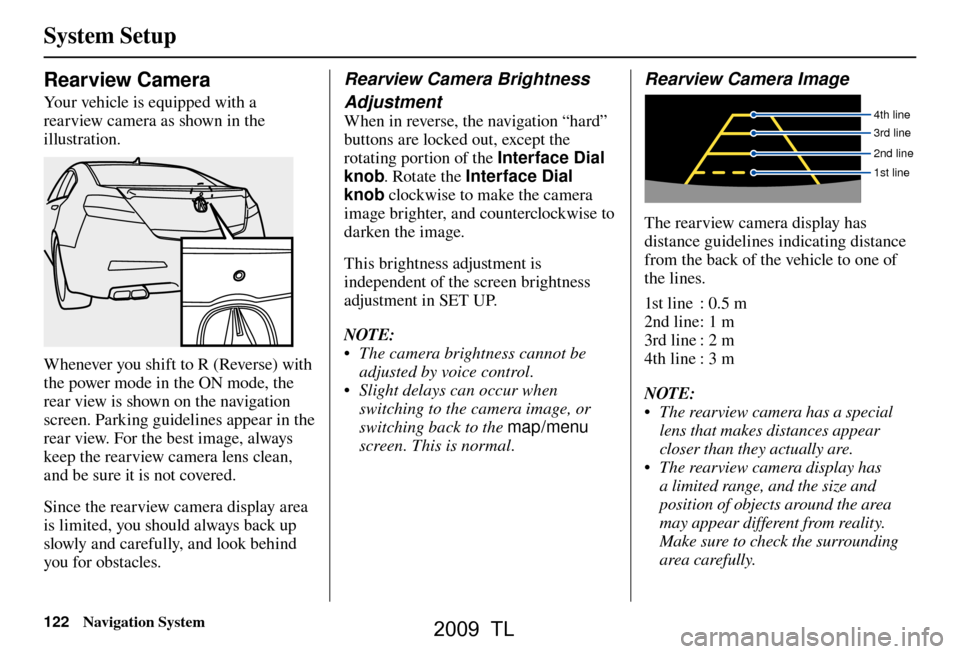
Rearview Camera Image
4th line
3rd line
2nd line
1st line
The rearview camera display has
distance guidelines indicating distance
from the back of the vehicle to one of
the lines.
1st line : 0.5 m
2nd line : 1 m
3rd line : 2 m
4th line : 3 m
NOTE:
• The rearview camera has a special lens that makes distances appear
closer than they actually are.
• The rearview camera display has a limited range, and the size and
position of objects around the area
may appear different from reality.
Make sure to check the surrounding
area carefully.
2009 TL