key Alfa Romeo MiTo 2014 User Guide
[x] Cancel search | Manufacturer: ALFA ROMEO, Model Year: 2014, Model line: MiTo, Model: Alfa Romeo MiTo 2014Pages: 280, PDF Size: 8.79 MB
Page 24 of 280
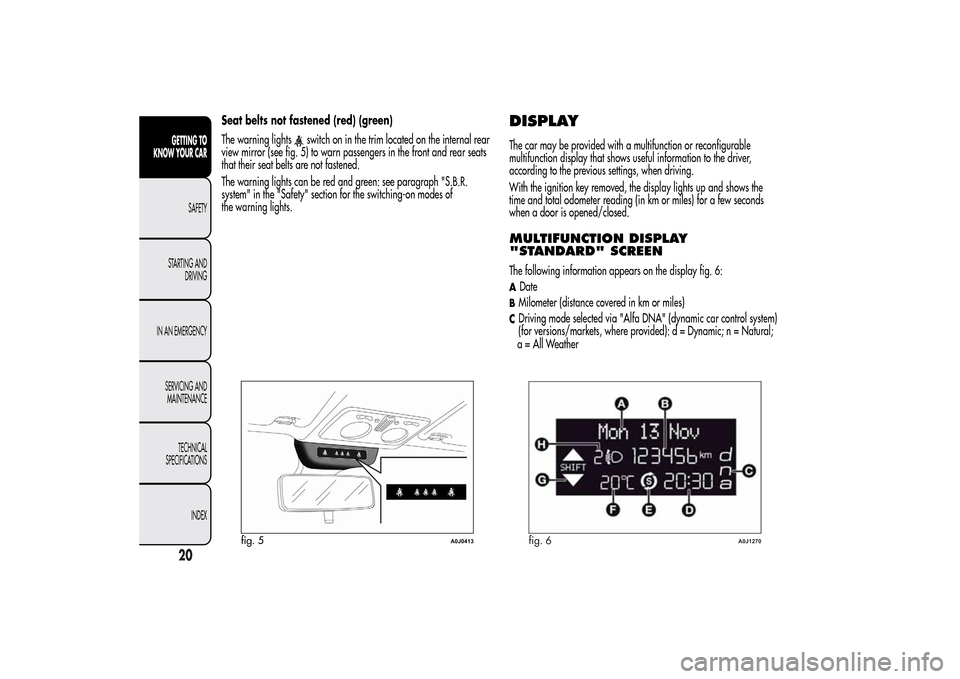
Seat belts not fastened (red) (green)
The warning lights
switch on in the trim located on the internal rear
view mirror (see fig. 5) to warn passengers in the front and rear seats
that their seat belts are not fastened.
The warning lights can be red and green: see paragraph "S.B.R.
system" in the "Safety" section for the switching-on modes of
the warning lights.
DISPLAYThe car may be provided with a multifunction or reconfigurable
multifunction display that shows useful information to the driver,
according to the previous settings, when driving.
With the ignition key removed, the display lights up and shows the
time and total odometer reading (in km or miles) for a few seconds
when a door is opened/closed.MULTIFUNCTION DISPLAY
"STANDARD" SCREENThe following information appears on the display fig. 6:ADateBMilometer (distance covered in km or miles)CDriving mode selected via "Alfa DNA" (dynamic car control system)
(for versions/markets, where provided): d = Dynamic; n = Natural;
fig. 5
A0J0413
fig. 6
A0J1270
20GETTING TO
KNOW YOUR CAR
SAFETY
STARTING AND
DRIVING
IN AN EMERGENCY
SERVICING AND
MAINTENANCE
TECHNICAL
SPECIFICATIONS
INDEX
a = All Weather
Page 25 of 280
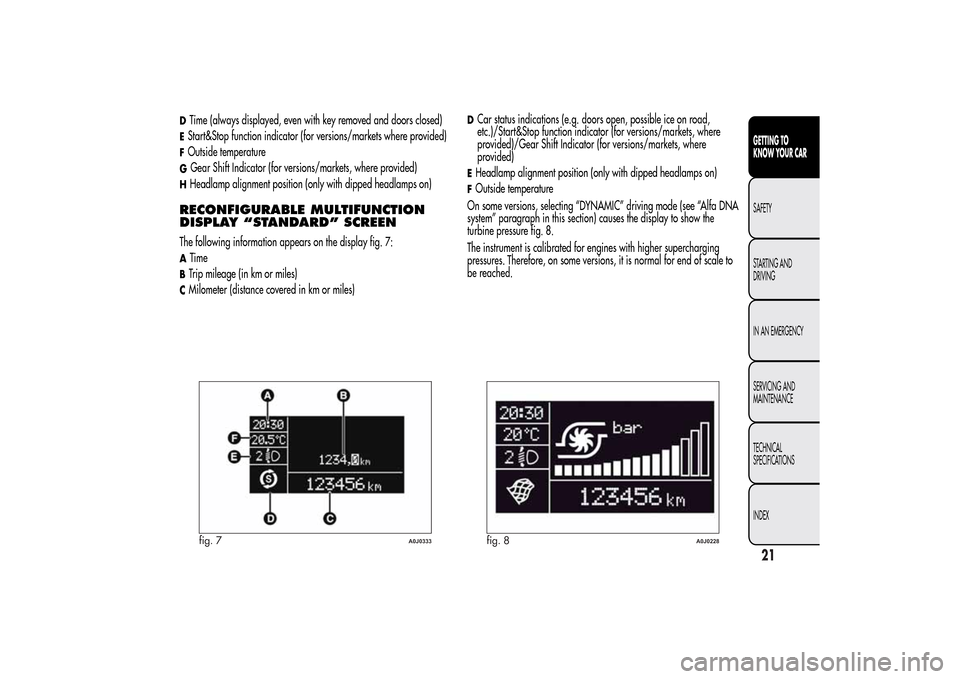
DTime (always displayed, even with key removed and doors closed)EStart&Stop function indicator (for versions/markets where provided)FOutside temperatureGGear Shift Indicator (for versions/markets, where provided)HHeadlamp alignment position (only with dipped headlamps on)RECONFIGURABLE MULTIFUNCTION
DISPLAY “STANDARD” SCREENThe following information appears on the display fig. 7:ATimeBTrip mileage (in km or miles)CMilometer (distance covered in km or miles)
DCar status indications (e.g. doors open, possible ice on road,
etc.)/Start&Stop function indicator (for versions/markets, where
provided)/Gear Shift Indicator (for versions/markets, where
provided)EHeadlamp alignment position (only with dipped headlamps on)FOutside temperature
On some versions, selecting “DYNAMIC” driving mode (see “Alfa DNA
system” paragraph in this section) causes the display to show the
turbine pressure fig. 8.
The instrument is calibrated for engines with higher supercharging
pressures. Therefore, on some versions, it is normal for end of scale to
be reached.
fig. 7
A0J0333
fig. 8
A0J0228
21GETTING TO
KNOW YOUR CARSAFETY
STARTING AND
DRIVING
IN AN EMERGENCY
SERVICING AND
MAINTENANCE
TECHNICAL
SPECIFICATIONS
INDEX
Page 26 of 280
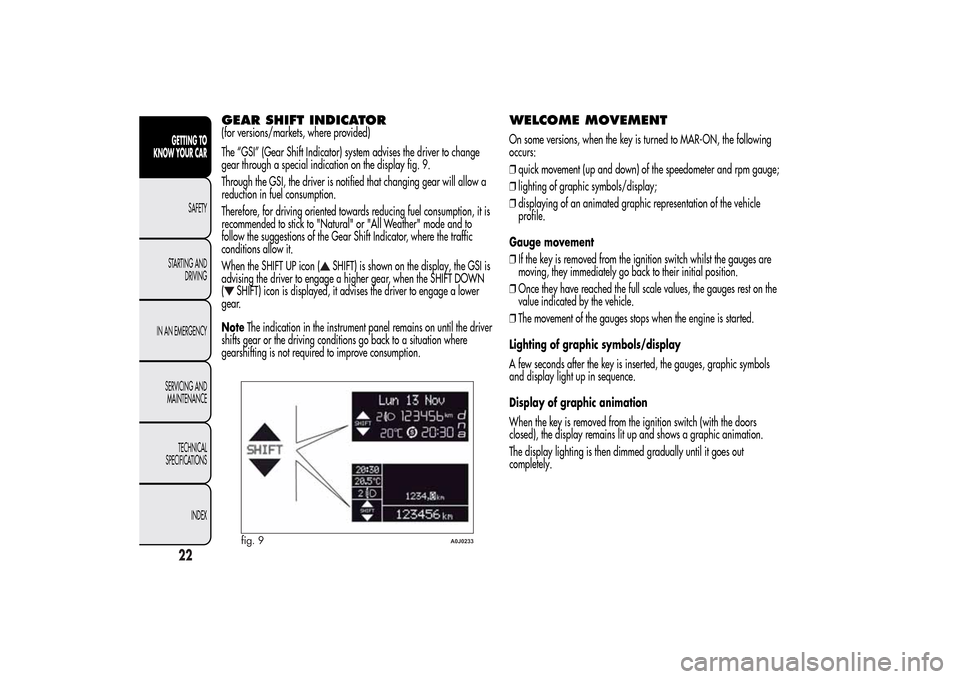
GEAR SHIFT INDICATOR(for versions/markets, where provided)
The “GSI” (Gear Shift Indicator) system advises the driver to change
gear through a special indication on the display fig. 9.
Through the GSI, the driver is notified that changing gear will allow a
reduction in fuel consumption.
Therefore, for driving oriented towards reducing fuel consumption, it is
recommended to stick to "Natural" or "All Weather" mode and to
follow the suggestions of the Gear Shift Indicator, where the traffic
conditions allow it.
When the SHIFT UP icon (
SHIFT) is shown on the display, the GSI is
advising the driver to engage a higher gear, when the SHIFT DOWN
(
SHIFT) icon is displayed, it advises the driver to engage a lower
gear.
NoteThe indication in the instrument panel remains on until the driver
shifts gear or the driving conditions go back to a situation where
gearshifting is not required to improve consumption.
WELCOME MOVEMENTOn some versions, when the key is turned to MAR-ON, the following
occurs:
❒quick movement (up and down) of the speedometer and rpm gauge;
❒lighting of graphic symbols/display;
❒displaying of an animated graphic representation of the vehicle
profile.
Gauge movement
❒If the key is removed from the ignition switch whilst the gauges are
moving, they immediately go back to their initial position.
❒Once they have reached the full scale values, the gauges rest on the
value indicated by the vehicle.
❒The movement of the gauges stops when the engine is started.
Lighting of graphic symbols/display
A few seconds after the key is inserted, the gauges, graphic symbols
and display light up in sequence.
Display of graphic animation
When the key is removed from the ignition switch (with the doors
closed), the display remains lit up and shows a graphic animation.
The display lighting is then dimmed gradually until it goes out
completely.
fig. 9
A0J0233
22GETTING TO
KNOW YOUR CAR
SAFETY
STARTING AND
DRIVING
IN AN EMERGENCY
SERVICING AND
MAINTENANCE
TECHNICAL
SPECIFICATIONS
INDEX
Page 31 of 280
❒press the SET/
button again briefly to display the "date" and
"engine info" options;
❒press "+" or "−" to select the desired view on the main screen of the
display;
❒briefly press the SET/
button to go back to the menu screen or
hold the button down to go back to the standard screen without
saving.
When the key is turned to MAR-ON and the initial check stage is over,
the display will show the information selected via the "First page"
menu function.
See radio
(audio information display)This function is used to display radio information.
❒Radio: selected radio station frequency or RDS message, automatic
tuning activation or AutoSTore;
❒CD audio/CD MP3: track number.
To show the radio information on the display ("On") or clear it ("Off"),
proceed as follows:
❒briefly press the SET/
button, the display will show "On" or
"Off" flashing depending on the previous setting;
❒press the "+" or "−" button to select;
❒briefly press the SET/button to go back to the menu screen or
hold the button down to go back to the standard screen without
saving.
Autoclose (Automatic door lock
operation with car running)When activated (On), this function locks the doors automatically when
the vehicle speed exceeds 20 km/h.
Proceed as follows to activate or deactivate this function:
❒press the SET/
button briefly to display a submenu;
❒press the SET/button briefly to make the display flash "On" or
"Off" according to what was previously set;
❒press the "+" or "−" button to select;
❒press the SET/button briefly to return to the submenu screen or
hold the button down to return to the main menu screen without
saving;
❒hold the SET/button down again to return to the standard
screen or to the main menu according to where you are in the menu.
Unit of measurement (Setting the
unit of measurement)With this function it is possible to set the measurement units through
three sub-menus: “Distance”, “Consumption” and “Temperature”.
To set the desired measurement unit, proceed as follows:
❒briefly press the SET/
button to display the three sub-menus;
❒press the "+" or "−" button to move between the three submenus;
❒once the submenu to be modified has been selected, briefly press the
SET/
button;
❒when the “Distance” submenu is entered: briefly pressing SET/
displays "km" or "mi" depending on the previous setting;
27GETTING TO
KNOW YOUR CARSAFETY
STARTING AND
DRIVING
IN AN EMERGENCY
SERVICING AND
MAINTENANCE
TECHNICAL
SPECIFICATIONS
INDEX
Page 33 of 280
❒press the "+" or "−" button to adjust the volume; an acoustic signal
equal to the volume level being selected is emitted during this
adjustment;
❒briefly press the SET/
button to go back to the previous screen
or hold the button down to go back to the standard screen without
saving.
On versions with reconfigurable multifunction display, the volume level
is represented by bars.
Belt reminder
(Reactivation of SBR buzzer)(for versions/markets, where provided)
This function will only be displayed after the SBR system has been
deactivated by Alfa Romeo Authorised Services (see "SBR system" in
the "Safety" chapter).
To reactivate this function, proceed as follows:
❒briefly press the SET/
button, the display shows "OFF"
flashing. Press the "+" or "−" button and "On" will be displayed;
❒briefly press the SET/button to go back to the previous screen
or hold the button down to go back to the standard screen without
saving.
Service (Scheduled servicing)With this function it is possible to view information on servicing
deadlines depending on kilometres travelled or daily intervals.
With the Service function it is also possible to view the interval (in
kilometres or miles) before the next engine oil change is due.
To consult this information, proceed as follows:
❒briefly press the SET/
button: the display shows when servicing
is due in km or mi according to the previous setting (see paragraph
"Units of measurement");
❒briefly press the SET/button to go back to the menu screen or
hold the button down to go back to the standard screen.
IMPORTANT According to the “Scheduled Servicing Plan”, the car must
be serviced every 30,000 km (petrol versions) or 35,000 km (diesel
versions). This message is displayed automatically when the key is
turned to MAR-ON, starting at 2,000 km (or equivalent value in miles)
from when the next service is due and reappearing every 200 km (or
equivalent value in miles). Below 200 km servicing indications are
more frequent. The display will be in km or mi depending on the
measurement unit settings. When the next scheduled service is
approaching and the key is turned to MAR-ON, the word Service will
appear on the display, followed by the number of kilometres or miles
left. Contact Alfa Romeo Authorized Services where the "Scheduled
Servicing Plan" operations will be performed and the message will be
reset.
29GETTING TO
KNOW YOUR CARSAFETY
STARTING AND
DRIVING
IN AN EMERGENCY
SERVICING AND
MAINTENANCE
TECHNICAL
SPECIFICATIONS
INDEX
Page 35 of 280
Menu exitThis is the last function that closes the cycle of settings listed in the
menu screen.
Pressing the SET/
button briefly will return the display to the
standard screen without saving.
Press the − button to return to the first menu option.
TRIP COMPUTERGENERAL INFORMATIONThe Trip computer is used to display information on car operation
when the key is turned to MAR.
This function allows you to define two separate trips called “Trip A”
and “Trip B” for monitoring the car's "complete journey" in a
reciprocally independent manner.
Both functions are resettable (reset - start of a new journey).
“Trip A” is used to display the figures relating to:
❒Range
❒Distance travelled
❒Average fuel consumption
❒Instant fuel consumption
❒Average speed
❒Trip time (driving time).
“Trip B” may be used to display the figures relating to:
❒Distance travelled B
❒Average consumption B
❒Average speed B
❒Trip time B (driving time).
The “Trip B” function may be disabled (see “Activating Trip B”).
“Range” and “Instant consumption" parameters cannot be reset.
31GETTING TO
KNOW YOUR CARSAFETY
STARTING AND
DRIVING
IN AN EMERGENCY
SERVICING AND
MAINTENANCE
TECHNICAL
SPECIFICATIONS
INDEX
Page 37 of 280
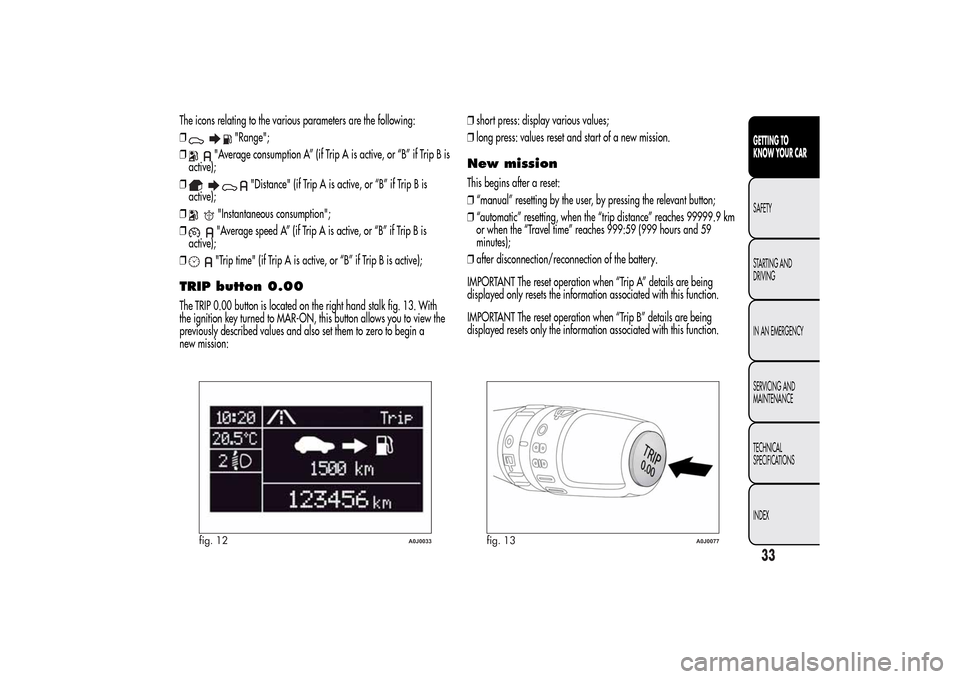
The icons relating to the various parameters are the following:
❒
"Range";
❒
"Average consumption A” (if Trip A is active, or “B” if Trip B is
active);
❒
"Distance" (if Trip A is active, or “B” if Trip B is
active);
❒
"Instantaneous consumption";
❒"Average speed A” (if Trip A is active, or “B” if Trip B is
active);
❒"Trip time" (if Trip A is active, or “B” if Trip B is active);
TRIP button 0.00The TRIP 0.00 button is located on the right hand stalk fig. 13. With
the ignition key turned to MAR-ON, this button allows you to view the
previously described values and also set them to zero to begin a
new mission:❒short press: display various values;
❒long press: values reset and start of a new mission.
New missionThis begins after a reset:
❒“manual” resetting by the user, by pressing the relevant button;
❒“automatic” resetting, when the “trip distance” reaches 99999.9 km
or when the “Travel time” reaches 999:59 (999 hours and 59
minutes);
❒after disconnection/reconnection of the battery.
IMPORTANT The reset operation when “Trip A” details are being
displayed only resets the information associated with this function.
IMPORTANT The reset operation when “Trip B” details are being
displayed resets only the information associated with this function.
fig. 12
A0J0033
fig. 13
A0J0077
33GETTING TO
KNOW YOUR CARSAFETY
STARTING AND
DRIVING
IN AN EMERGENCY
SERVICING AND
MAINTENANCE
TECHNICAL
SPECIFICATIONS
INDEX
Page 38 of 280
Start of journey procedureWith the ignition key at MAR-ON, reset by pressing the TRIP 0.00
button and holding it down for more than 2 seconds.Trip ExitYou can automatically exit the Trip function once all the values have
been displayed or by holding the SET/
button down for more than
1 second.
SYMBOLSSome car components have coloured labels whose symbols indicate
precautions to be observed when using this component. Under the
bonnet there is also a label that summarises all the symbols.
34GETTING TO
KNOW YOUR CAR
SAFETY
STARTING AND
DRIVING
IN AN EMERGENCY
SERVICING AND
MAINTENANCE
TECHNICAL
SPECIFICATIONS
INDEX
Page 39 of 280
ALFA ROMEO CODE SYSTEMTo further protect your car from theft, it has been fitted with an engine
immobilising system. It is automatically activated when the ignition
key is removed.
Each key contains an electronic device which modulates the signal
emitted during ignition by an antenna built into the ignition device. The
modulated signal, which changes each time the engine is started, is
the “password”, by means of which the control unit recognises the key
and enables to start the engine.OPERATIONEach time the car is started by turning the ignition key to MAR, the
Alfa Romeo CODE system control unit sends an acknowledgement
code to the engine management control unit to deactivate the inhibitor.
The code is sent only if the Alfa Romeo CODE system control unit has
recognised the code transmitted from the key.
Each time the ignition key is turned to STOP, the Alfa Romeo CODE
system deactivates the functions of the engine management control
unit. If, during starting, the code is not correctly recognised, the
warning light switches on in the instrument panel.
In this case, turn the key to STOP and then to MAR; if it is still locked,
try again with the other keys that come with the vehicle. If you are
still unable to start the engine contact Alfa Romeo Authorized Services.Activation of warning light while driving
❒If the
warning light switches on, this means that the system is
running a self-diagnosis (for example due to a voltage drop).
❒If thewarning light remains on, contact Alfa Romeo Authorized
Services.The electronic components inside the key may be damaged
if the key is subjected to strong shocks.
35GETTING TO
KNOW YOUR CARSAFETY
STARTING AND
DRIVING
IN AN EMERGENCY
SERVICING AND
MAINTENANCE
TECHNICAL
SPECIFICATIONS
INDEX
Page 40 of 280
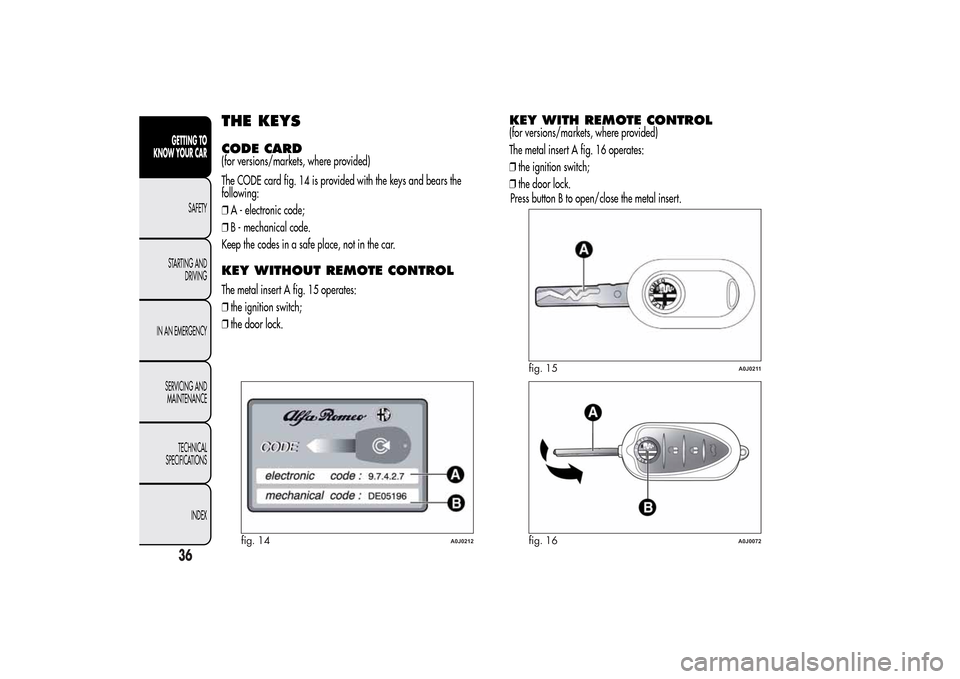
THE KEYSCODE CARD(for versions/markets, where provided)
The CODE card fig. 14 is provided with the keys and bears the
following:
❒A - electronic code;
❒B - mechanical code.
Keep the codes in a safe place, not in the car.KEY WITHOUT REMOTE CONTROLThe metal insert A fig. 15 operates:
❒the ignition switch;
❒the door lock.
KEY WITH REMOTE CONTROL(for versions/markets, where provided)
The metal insert A fig. 16 operates:
❒the ignition switch;
❒the door lock.
fig. 14
A0J0212
fig. 15
A0J0211
fig. 16
A0J0072
36GETTING TO
KNOW YOUR CAR
SAFETY
STARTING AND
DRIVING
IN AN EMERGENCY
SERVICING AND
MAINTENANCE
TECHNICAL
SPECIFICATIONS
INDEX
Press button B to open/close the metal insert.