ECU AUDI A3 CABRIOLET 2016 User Guide
[x] Cancel search | Manufacturer: AUDI, Model Year: 2016, Model line: A3 CABRIOLET, Model: AUDI A3 CABRIOLET 2016Pages: 272, PDF Size: 67.88 MB
Page 59 of 272
Sea ts and stor age
wh ile driving. These objects could prevent
you from braking or accelerat ing during
sudden brak.ing maneuvers.
- Always keep the g love compartment closed
wh ile driving to reduce the risk of injury dur
ing a collision or heavy braking.
- Read and following the WARNINGS in
¢ page 163, Important safety instructions
on the side airbag system.
Luggage compartment
Loading luggage compartment
Luggage items must be stowed securely.
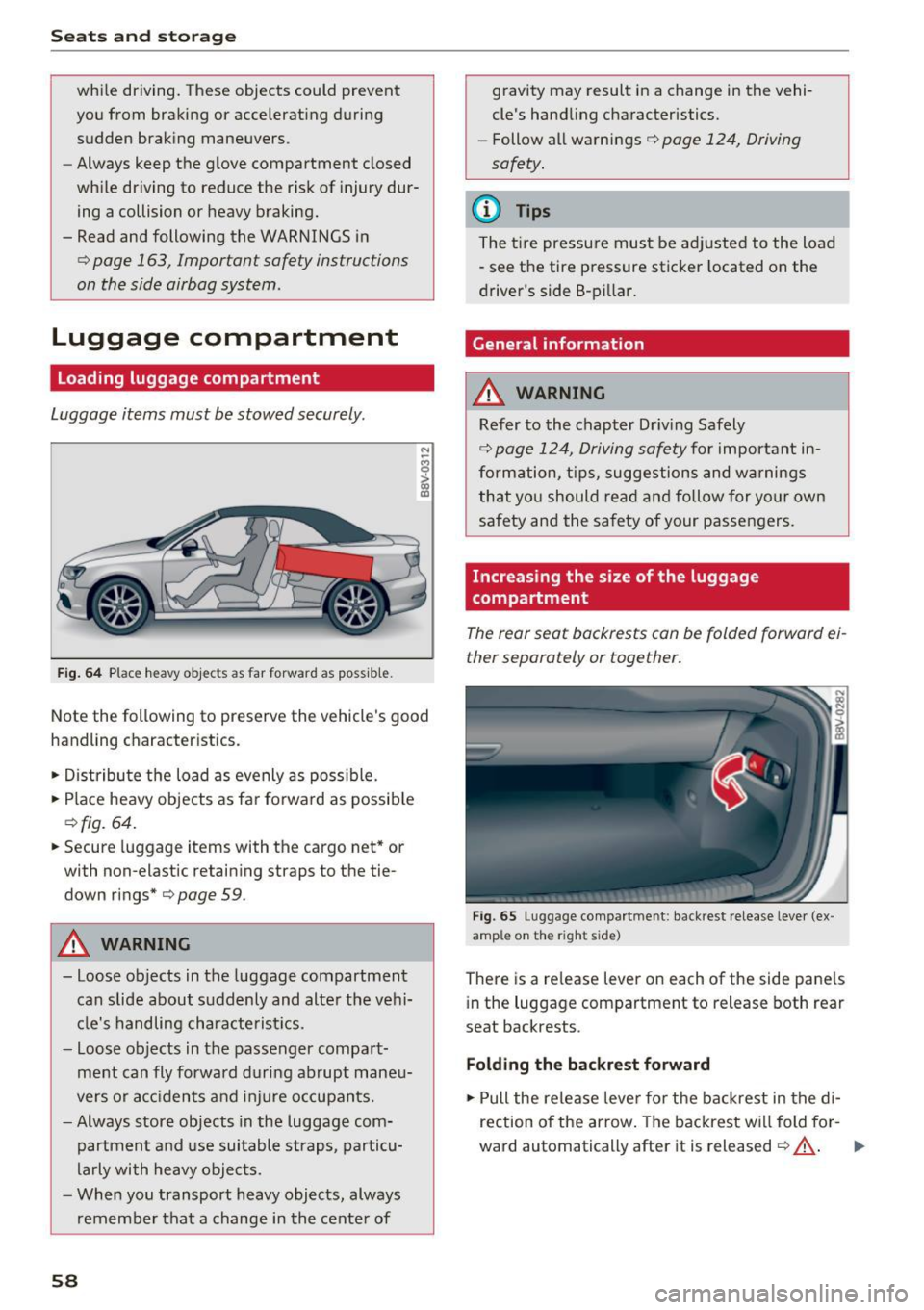
Fig. 64 Place heavy objec ts as far forward as possible.
Note the following to preserve the vehicle's good
handling characteristics.
• Distribute the load as evenly as possible.
• Place heavy objects as fa r forward as possib le
¢ fig. 64.
• Secure luggage items with the cargo net* or
with non-elastic retain ing straps to the tie
down rings*
¢page 59.
_&. WARNING
-loose objects in the luggage compartment
can slide about suddenly and alte r the vehi
cl e's handling chara cte rist ics.
- loose objects in t he passenger compa rt
ment can fly forward during abrupt mane u
vers or a cc idents and injure occupants.
- Always store objects in the luggage com
partment and use sui table st raps, par ticu
larly with heavy objects.
- When you transport heavy objects, always
remembe r that a change in the cente r of
58
gravity may result in a change in the vehi
cle's hand ling cha racteristics.
- Follow a ll wa rnings¢
page 124, Driving
safety.
(D Tips
The t ire pressu re must be ad justed to the load
"see the tire pressure sticker located on the
driver 's side 8-p illar.
General information
_&. WARNING
Refer to the chapter Dr iv ing Safely
¢
page 124, Driving safety fo r important in
formation, t ips, suggestions and warnings
that you should read and follow for yo ur own
safety and the sa fety of your passe ngers.
Increasing the size of the luggage
compartment
The rear seat backrests can be folded forward ei
ther separately or together.
Fig. 65 Luggage compartment: backrest release lever (ex
amp le on the right s ide)
There is a re lease lever on each of the side pane ls
i n the luggage compartment to release both rear
seat backrests .
Folding the backrest forward
• Pull the release leve r for the backrest in the d i
rection of the arrow . The backrest wi ll fold fo r-
ward automatically after it is released ¢
_&. .,.
Page 60 of 272
<( co ..... N
" N ..... 0 r--. > 00
Folding th e ba ckr est back into the upright
po sition
• Fold th e backrest down un til i t latches securely
Q .&. -
A WARNING
-
-When releasing the rear seat backrest,
make sure there are no people or animals
within its range of motion . The backrest will
fold forwa rd automatically after it is re
leased .
- The backrest must be securely latched so
objects cannot slide forward out of the lug
gage compa rtment dur ing sudden bra king.
- Always make sure the back rest is la tched
completely by pulling forward on it.
- Make sure the safety be lt is not ca ught in
t he door h inges o r the seat fitt ings and
damaged.
- Torn or frayed safety belts can break , and
bel t anchors can break d uring a co llision .
C heck the safety bel ts regularly . Safe ty
bel ts wit h noti ce a ble damage to the web
bing, bindings, buckles or retractors mus t
be rep laced .
(D Note
-If yo u move the front seat ba ck when t he
rear se at backres t is folded forward, you
could damage the head restraints on the rear seat. If necessary, remove the rear seat
head restra int before moving the front seat
back
- Make su re the safety be lt is not pinched in
the backrest lock and damaged when the rear seat backrest if fo lded back. Other ob
j ects should be
removed from the rear
bench seat to p rotect the rear backrest from
damage .
Seats and storag e
Tie-downs
Applies to: vehicles w ith tie-dow ns
---~~~ --- --
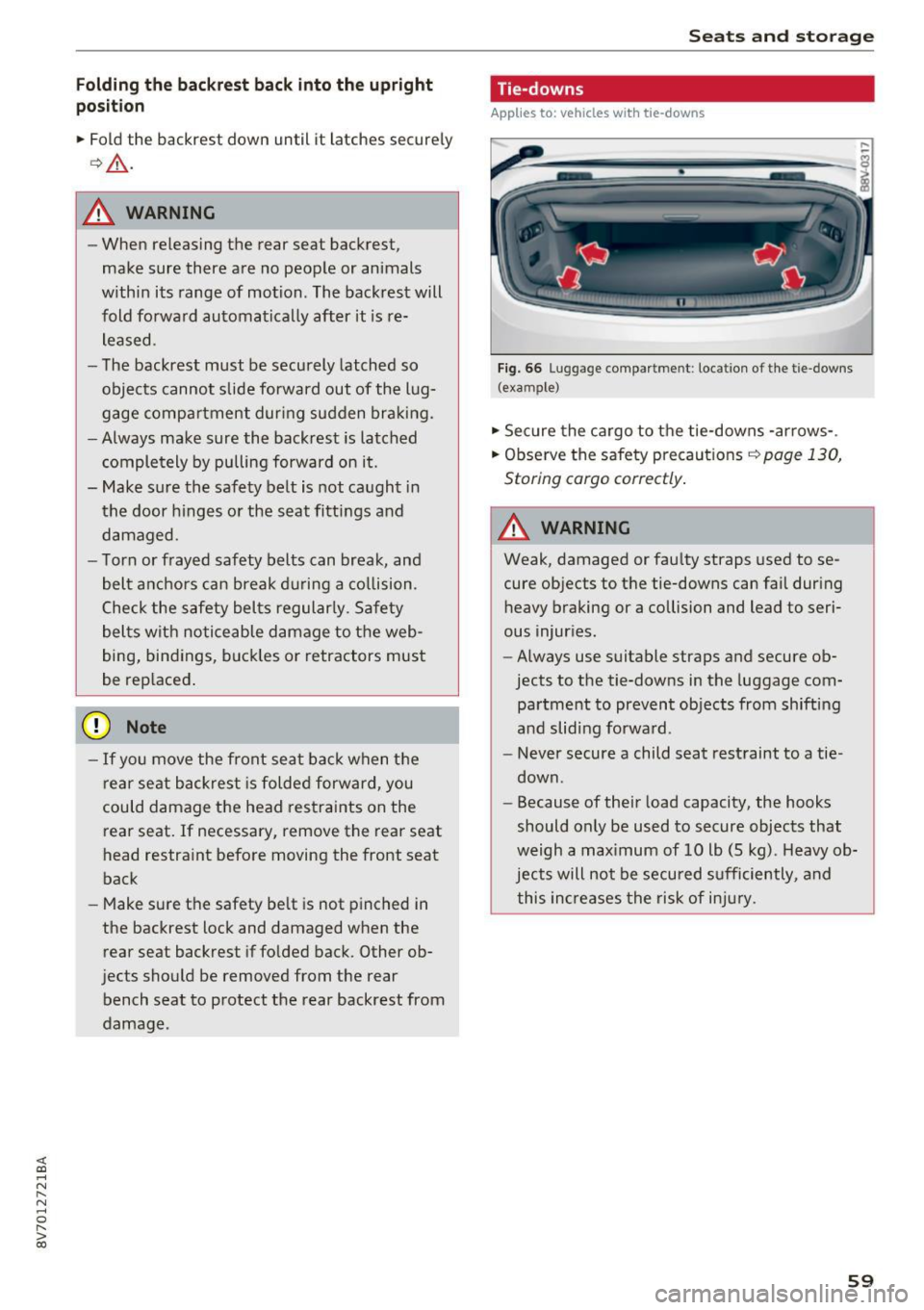
Fig. 66 Lug gag e compa rtm en t: loc ation of th e t ie -d owns
( exa mpl e)
• Sec ure the cargo to the tie-downs -arrows- .
• Observ e the safety precaut ions <=>
page 130,
Stor ing cargo correctly .
A WARNING ~ -
Weak, damaged or fau lty straps used to se
cure objects to t he tie-downs can fail dur ing
heavy braking or a collision and lead to seri
ous injur ies.
- Always use suitable straps and secure ob
jects to the tie-downs in the luggage com
pa rtme nt to prevent objects from shifting
a nd slid ing forwa rd .
- Never secure a child seat restraint to a tie
down .
- Because of the ir load capacity, the hooks
should only be used to secure objects that
weigh a max imum of 10 lb (5 kg) . Heavy ob
jects will not be secu red s ufficiently , and
this in creases the risk of in jury.
59
Page 61 of 272
Sea ts and stor age
Cargo net/cargo bag
Applies to: vehicles with luggage compartment cargo net/bag
The cargo net prevents light objects from sliding,
and it can also be used as a cargo bag* .
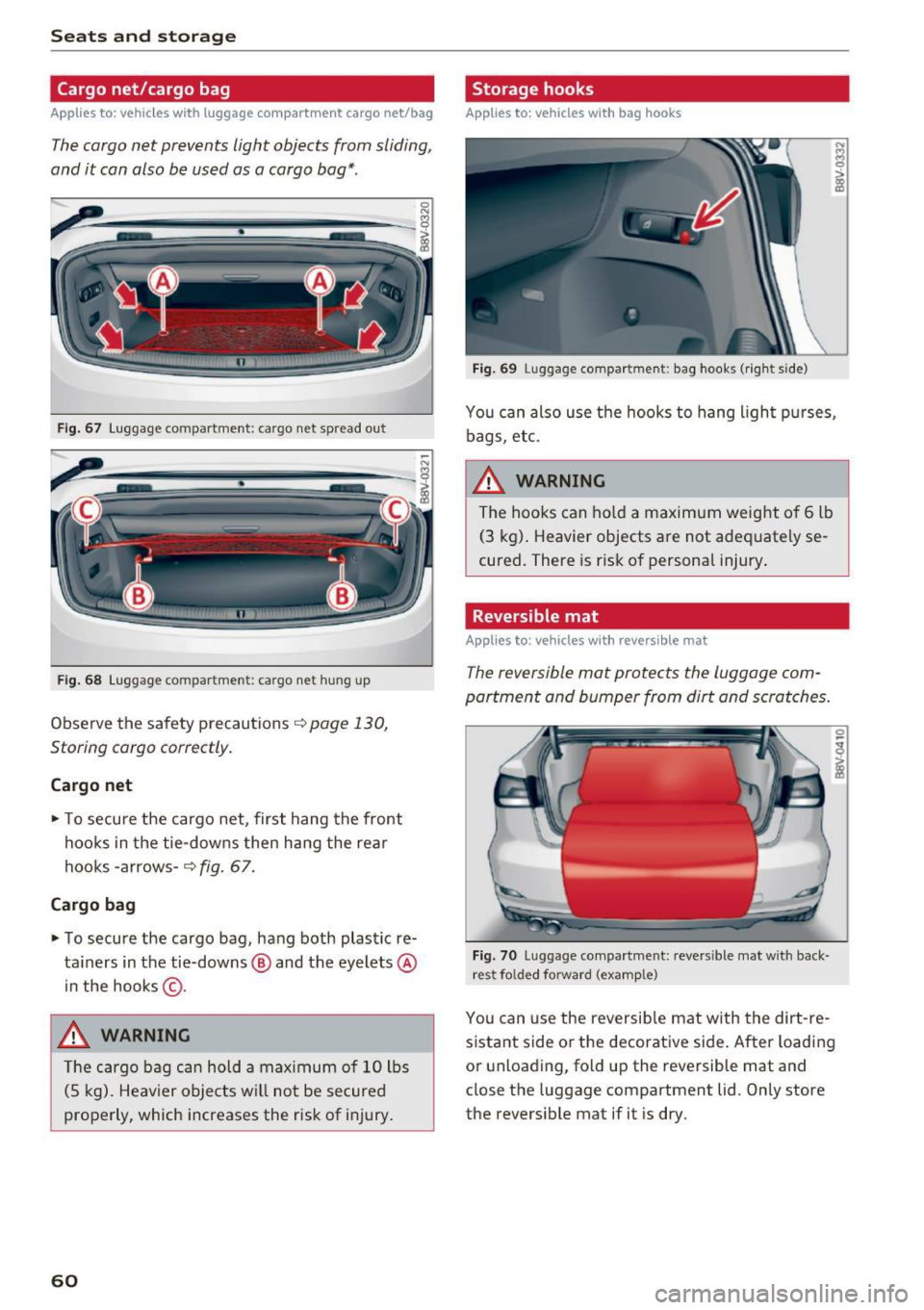
Fig. 67 Luggage compartment: cargo net spread out
Fig . 68 Luggage compartment: cargo net hung up
Observe the safety precautions c::> page 130,
Storing cargo correctly .
Cargo net
• To secure the cargo net, first hang the front
hoo ks in the tie-downs then hang the rea r
hooks -arrows -
c::> fig. 67.
Cargo bag
• To secure the cargo bag, hang both plastic re
ta iners in the tie-downs @ and the eyelets @
in the hooks @.
_8. WARNING
The cargo bag ca n hold a max imum o f 10 lbs
(5 kg). Heav ier objects wi ll not be secured
properly, which increases the risk of injury.
60
Storage hooks
Applies to: vehicles with bag hooks
Fi g. 69 Luggage compartment: bag hooks (rig ht s ide)
You can also use the hooks to hang light p urses,
bags, etc.
_8. WARNING
The hooks can ho ld a maximum weight o f 6 lb
(3 kg) . Heavier objects are not adequately se
cured. There is ris k of personal injury .
Reversible mat
Applies to: vehicles with reversible mat
The reversible mat protects the luggage com
partment and bumper from dirt and scratches.
Fig. 70 Luggage co mpa rtment: reversible mat with back
r est folde d forward (example)
You can use the reversib le mat w ith the dirt-re
s istant side or the decorative side . After loading
or unloading, fold up the reversible mat and
close the luggage compartment lid. Only store
the revers ible mat if it is dry.
Page 74 of 272
<( co ..... N
" N ..... 0
" > 00
Please select N or P
This message appears when starting or stopping
the eng ine if the selector lever is not in the Nor P
position . The eng ine will not sta rt/stop.
Shift to P , veh icle can roll away. D oors can onl y
b e loc ked in P
This message appears for safety reasons along
with a warning tone.
It appears if the selector
l ever for the automatic transmission is not in the
P posit ion when switching the ignition off with
the
! STAR T ENGINE ST OPI* button . S hi ft these
l ecto r lever to the P position. Otherwise, the veh i
cle could roll. You also cannot lock the vehicle us
ing the locking sensor on the door handle or us
ing the convenience key .
Electromechanical
parking brake
Operating
The electromechanical parking brake replaces
the hand brake .
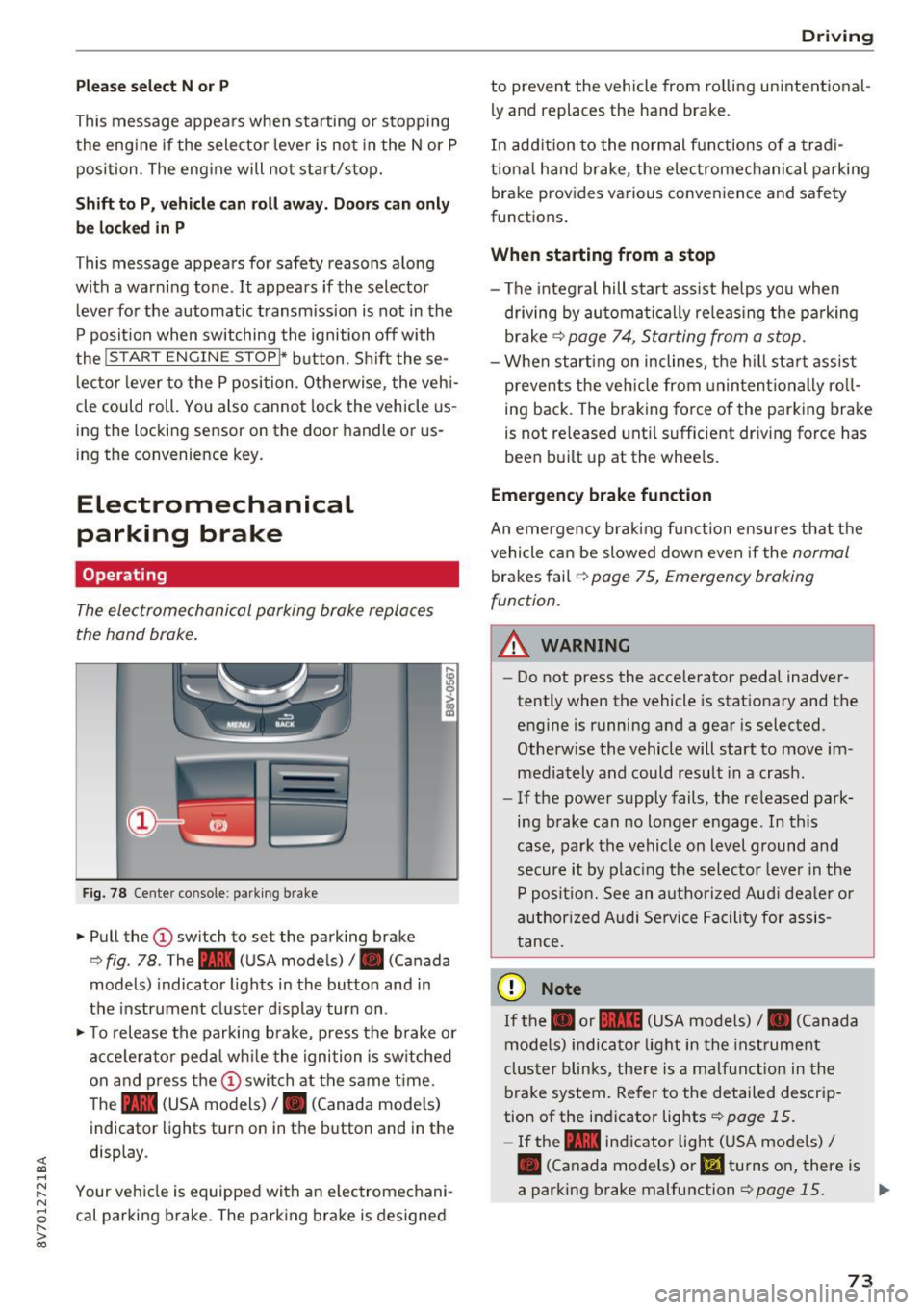
Fig. 78 Center console : p arking brake
.,. Pull the (I) sw itch to set the park ing brake
c> fig . 78 . The - (USA models)/ . (Canada
models) indicator lights in the button and in
the instrument cluster d isplay turn on .
.,. To release the parking brake , press the b rake o r
acce lera to r ped al wh ile the igni tion is sw itched
on and p ress the
(D swi tch at the same t ime.
The - (USA models) /. (Canada mode ls)
indicator lights turn on in the b utton and in the
display .
Your veh icle is equipped with an e lectromechani
cal parki ng b rake. The park ing brake is designed
D rivi ng
to prevent the vehicle from ro lling unintent ional
ly and replaces the hand brake.
In add ition to the normal f unctions of a trad i
t iona l hand b rake, the elec tromechanical parking
brake provides va rious convenience and safety
functions .
When starting from a stop
- The integral hill start assist he lps yo u when
driving by automa tically re leas ing the pa rking
brake
c> page 74 , Starting from a stop.
- When starting on inclines, the h ill sta rt assist
p revents the veh icle from un in tentionally ro ll
ing back . The braking force of the parking brake
is not re leased unt il sufficient dr iving force has
been b uilt up at the whee ls.
Emergency brake function
An emergency bra kin g f unction ensures that the
vehicle can be slowed down even if the
normal
brakes fail c> page 75, Emergency braking
function .
A WARNING
---=---Do not press the acce le rator pedal inadver
tently when the vehicle is stat ionary and the
engine is running a nd a gear is selected.
Othe rw ise the vehicle will start to move im
mediately and could result in a crash.
- If the power supply fails, the re leased park
ing b rake can no longer engage . In this
case, park the vehicle on level ground and
secure it by plac ing the selecto r leve r in t he
P positio n. See an a utho riz e d Aud i dea le r o r
author ized A udi Se rvice Facility for assis
tance.
(D Note
If the . or 111111 (USA mo dels) /. (Canada
models) indica to r lig ht in the inst rument
clus ter blinks, the re is a malf unc tion in the
brake system. Refer to the detailed descrip
tion of the indicator lights
i=>page 15.
-If the - indic a tor light (USA mode ls)/
• (Canada models) or
l!I turns o n, there is
a parking brake malfunction
c> page 15. ..,_
73
Page 83 of 272
Automatic transmissio n
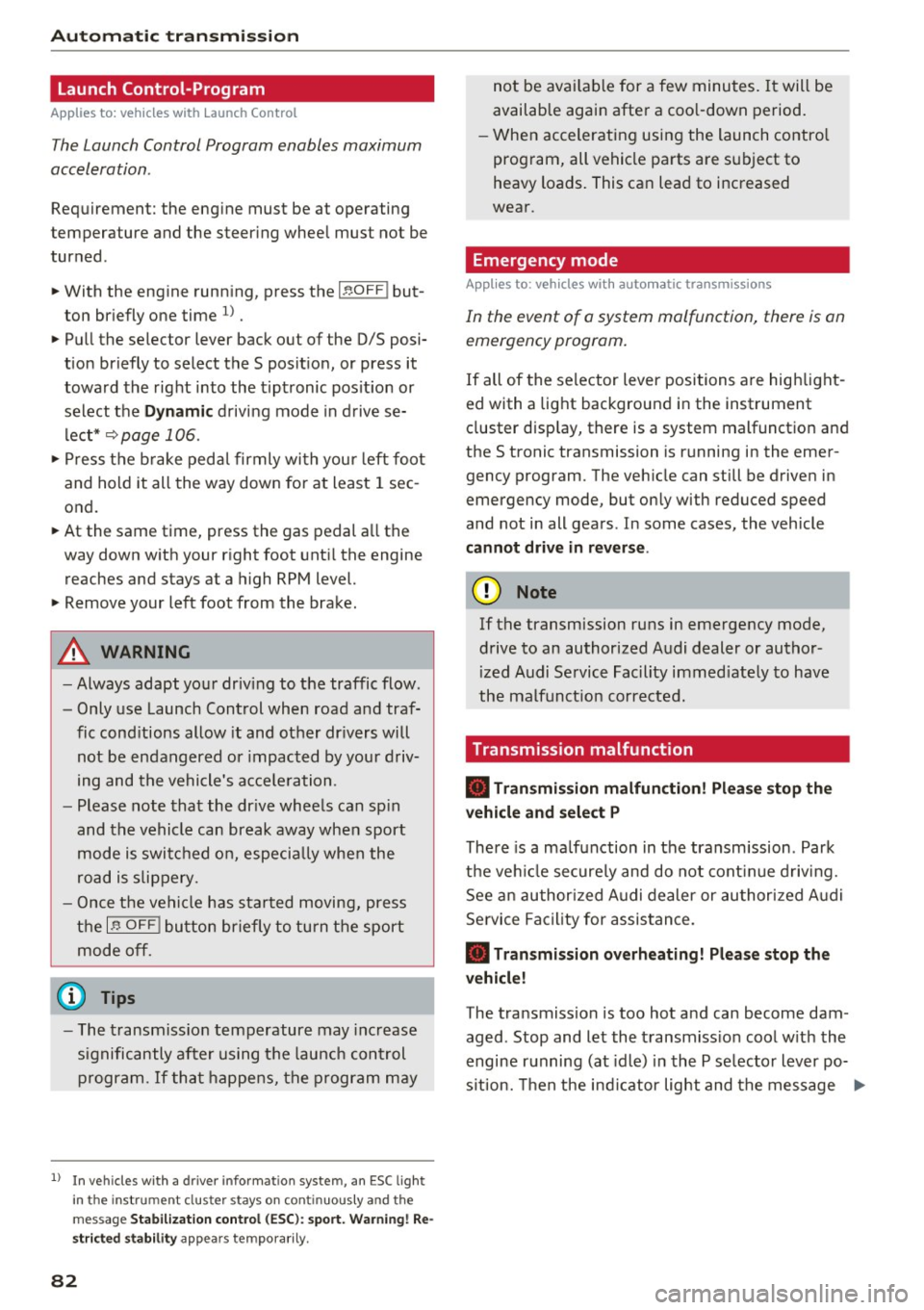
Launch Control-Program
Applies to: vehicles with Launch Control
The Launch Control Program enables maximum
acceleration .
Requirement: the engine must be at operating
temperature and the steer ing wheel must not be
turned .
.,. With the engine runn ing, press the
i ,; OFF ! but
ton br iefly one time
l) .
"' Pull the selector lever back out of the 0/5 posi
tion briefly to select the 5 posit ion, or press it
toward the rig ht into the tiptronic pos ition or
select the
Dynami c driving mode in d rive se
lect*
~ page 106.
"' Press the b rake pedal firmly with your left foot
and hold it all the way down for at least 1 sec
ond.
"' At the same time, press the gas pedal a ll the
way down w ith your right foot unti l the engine
reaches and stays at a high RPM level.
"' Remove your left foot from the brake.
_.&. WARNING
-Always adapt you r driv ing to the traffic flow .
- Only use Launch Control when road and traf-
fic cond itions allow it and other dr ivers will
not be endangered or impacted by your d riv
ing and the vehicle's a cce le ration.
- Please note that the dr ive wheels can sp in
and the vehicle can break away when sport
mode is switched on, especia lly when the
road is s lippery.
- Once the vehi cle has sta rted moving, press
the
l .!'3 OFF ! button briefly to tu rn the sport
mode off.
(D Tips
- The t ransmiss ion temperature may increase
significantly after using t he launch control
program.
If tha t happens, the p rogram may
l ) In vehicles with a driver info rma tion system, an ESC light
i n the in st rument cl uste r stays on cont inuous ly and t he
message Sta bilization co ntrol (ES C): sport . Warning! Re
st ricted stab il ity app ears temp orar ily .
82
not be avai lab le for a few minutes. It will be
available again after a coo l-down period.
- When accelerating using the launch contro l
program, all vehicle parts are s ubject to
heavy loads. This can lead to increased
wear .
Emergency mode
App lies to: vehicles with auto matic transmissions
In the event of a system malfunction, there is an
emergency program.
If all of the selector lever positions are hig hlight
ed with a light background in the instrument
cluster disp lay, there is a system malfunction and
the 5 tronic transmission is running in the emer
gency program. The veh icle can still be driven in
emergency mode, but only with reduced speed
and not in all gears . In some cases, the vehicle
cannot dri ve in rever se .
(D Note
If the transmission runs in emergency mode,
drive to an authorized A udi dealer or author
ized Audi Se rvice Facility immed iate ly to have
the malfunct ion corrected.
Transmission malfunction
• Tran smi ssion malfun ction ! Pl ea se stop the
vehicle and sele ct P
There is a ma lfunction in the transm ission . Park
the ve hicle secure ly and do not cont inue driving.
See an author ized Audi dealer or authorized A udi
Se rvice Facility for assistance.
• Tran smi ssion overheating! Pleas e stop the
v e hicle!
The transmission is too hot and can become dam
aged . Stop and let the transmiss ion cool w ith the
engine r unning (at idle) in the P se lector lever po
s it ion. Then the ind icator light and the message ..,.
Page 84 of 272
<( co ..... N
" N ..... 0 r--. > 00
turn off, drive to an authorized Audi dea ler or au
thorized Audi Service Facility immediate ly to have
the malfunction corrected.
If the indicator light
and the driver message do not turn off, do not
continue driving . See an authorized Audi dealer
or authorized Audi Service Facility for assistance .
ml Transmission malfunction: You can continue
driving
Drive to an authorized Audi dea ler o r authorized
Audi Service Facility immediately to have the
malfunction corrected.
ml Transmission malfunction: no reverse gear
(you can continue driving)
Drive to an authorized Aud i dea le r or authorized
Aud i Service Facility immediately to have the
malfunct ion corrected.
ml Transmission malfunction: You can continue
driving in D until engine off
Drive the vehicle away from moving traffic and
park. See an authorized Audi dealer or authorized
Audi Service Facility for assistance.
ml Transmission overheating! Please adapt
driving style
Continue driving moderately. When the indicator
light turns off, you can continue driving normal
ly .
ml Transmission : Press brake pedal and select
gear again.
If the transmission malfunctions because the
temperature is too high, a message appears
when the transmission is cooled.
Automatic transmission
Selector lever emergency release
A pp lies to : vehicles wi th automatic transmissions
If the vehicle's power supply fails, the selector
lever can be released in an emergency .
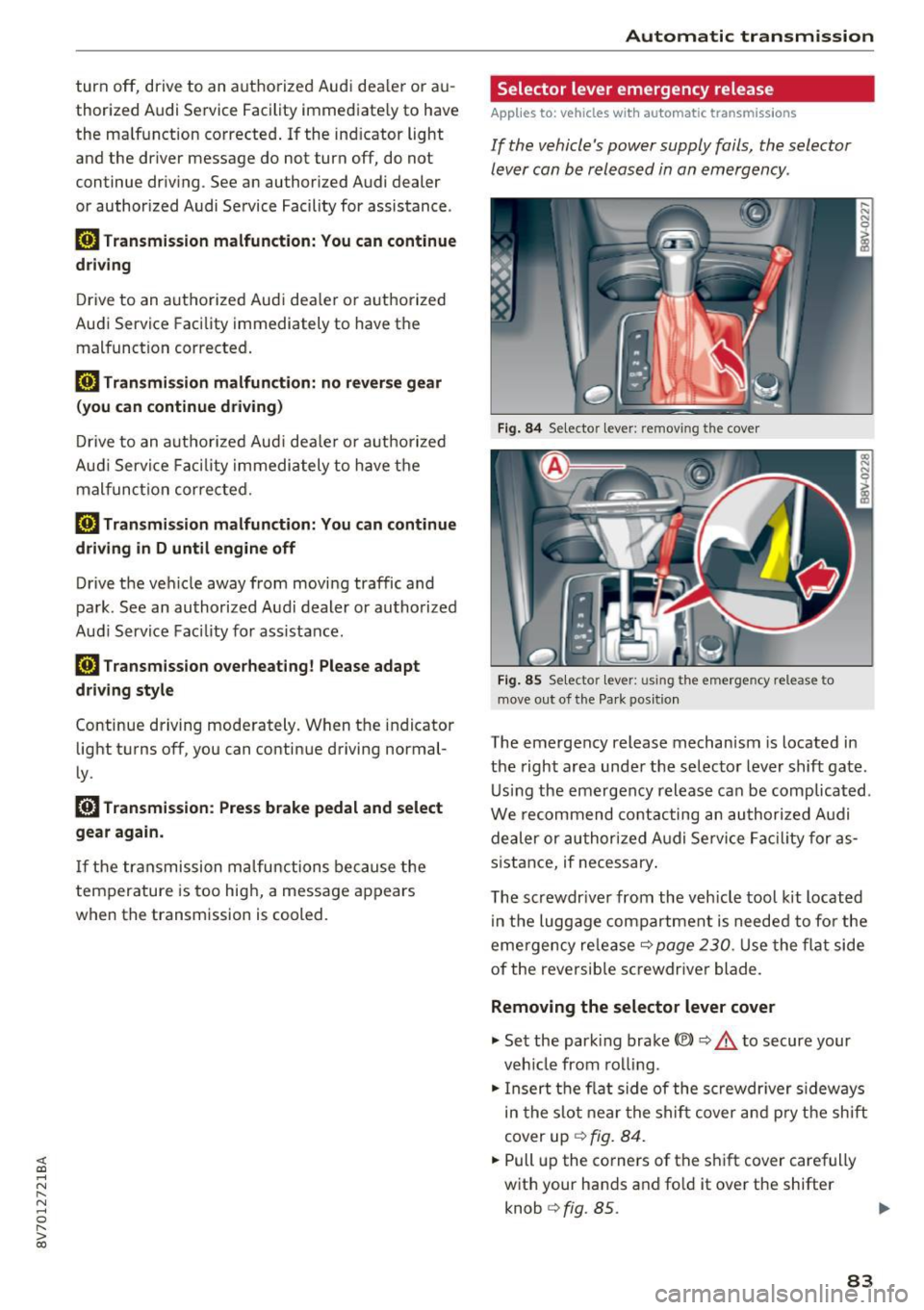
Fig. 84 Selector lever: removi ng the cover
Fig. 85 Se lecto r lever: using the emergency release to
move out of the Pa rk pos ition
The emergency release mechanism is located in
the right area under the selector lever shift gate .
Using the emergency release can be complicated .
We recommend contacting an authorized Aud i
dealer or authorized Audi Service Facility for as
sistance, if necessary .
The screwdr iver from the veh icle tool kit located
in the luggage compartment is needed to for the
eme rgency re lease
c:::> page 230. Use the flat side
of the reversible screwdriver blade.
Removing the selector lever cover
.,. Set the park ing brake<®> c:::> .&. to secure your
veh icle from rolling .
.,. Insert the flat side of the screwdriver sideways
in the slot near the shift cover and pry the shift
cover up
c:::> fig. 84 .
.,. Pull up the co rners of the shift cover carefully
with your hands and fold it over the shifter knob
c:::> fig. 85. ..,.
83
Page 85 of 272
Automatic transmission
Selector lever emergency release
.,. Press and hold the yellow release button with
the screwdriver ~
fig. 85 .
.,. Press the release button in the se lector lever @
and move the lever into the N position .
.,. Clip the shift cover back into the shift gate after
using the emergency release .
If the vehicle must be pushed or towed due to a
power failure (for example, the battery is dead),
the selector lever must first be moved to the N
position using the emergency release mecha
n ism.
A WARNING
Only move the selector lever out of the P posi
t ion when the parking brake is set.
If that
does not work, secure the vehicle with the
brake pedal. Otherwise, the vehicle could
start to move unintentionally when the selec
tor lever is moved out of the P position.
84
Page 86 of 272
<( co .... N ,.__
N .... 0 ,.__
> co
Trailer mode Driving with a trailer
General information
Your Audi was designed primarily for passenger
transportation .
If you plan to tow a trailer, please remember that
the additiona l load will affect durability, econo
my and performance.
T railer tow ing not only p laces more stress on the
vehicle, it a lso calls for more concentration from
the dr iver.
F or this reason, always follow the operating and
driving instructions provided and use common
sense.
Technical requirements
Trailer hitch Use a weight -carrying hitch conforming to the
gross tra iler weig ht. The h itch must be suitab le
for your vehicle and tra iler and must be mo unted
securely on the vehicle's chassis at a technically
sound
location . Use on ly a trailer hitch with a re
movable ba ll mou nt. Always che ck wit h the t rail
e r hitch manufac turer to make s ure that you are
usi ng the correct hitch .
Do not u se a bumper hitch .
The hitc h must be installed in such a way t hat it
does not interfere with the impact -absorbing
bumper system . No modifications should be
made to the vehicle exhaust and brake systems .
Fr om time to time, chec k that a ll hitc h mount ing
bo lts rema in securely faste ned.
When you are not towing a trailer,
remove the
tra iler hitch ba ll mount . This prevents the hitch
from ca using damage s hou ld your veh icle be
s truck from beh ind
~ ,&. .
Trailer brakes
If your trailer is equipped with a braking system,
check to be su re that it conforms to all regula
tions .
Trailer mode
The t rai ler hydra ulic brake sys tem must not be
directly connected to the vehicle's hydra ulic
bra ke system.
Safety chains
Always use safety ch ains be tween your ve hicle
and the trailer.
Trailer lights
T ra ile r ligh ts must meet all regulations . Be sure
to chec k w it h your Aud i dea le r fo r correct wir ing,
swi tches and relays .
Mirrors
If you are unab le to see the traffic behind you us
i ng the regular outside mir rors, then you
must in
sta ll extended mirro rs . It i s important that you
always have clear vision to t he rear.
,8. WARNING
Afte r remov ing the tra ile r hi tch , do no t st o re
i t in yo ur vehicle. In ca se of sudden brak ing,
the hitch could fly fo rward and injure you or
your passengers .
Operating instructions
Maximum trailer we ight
A tra iler for your vehicle is lim ited to a typical
class 1 or class 2 trailer.
Trailer load distribution B e sure the load in the tra ile r i s held se curely in
pla ce to p reve nt i t from shifting forward, bac k
ward or si deways.
Never allow a passenger to ride in a trailer~.&.
in Driving instructions on page 86.
Engine cooling system
Towing a tra iler makes the engine work harder. It
is important that the cooling system's perform
ance is up to the additional load . Make sure that
the coo ling syst em has enoug h flu id.
Tire pressure
When towing a trailer, inflate the tires of your
vehicle to the cold tire pressure listed under
"Full ..,.
85
Page 99 of 272
<( co .... N r--N .... 0 r--> co
-Please note that the sensor does not always
detect all objects . This increases the risk of
a collision.
- Pre sense front does not react to people or
animals or objects that are crossing the ve
hicle's path or are difficult to detect
¢ page 91 .
-Reflective objects such as guard rails or the
entrance to a tunnel, heavy rain and ice can
affect the function of the radar sensor and
the system's ability to detect a collision risk.
- Lack of attention can lead to collisions, oth
er accidents and serious injuries. pre sense
front is an assistance system and cannot
prevent a collision by itself. The driver must
always intervene . The driver is always re
sponsible for braking at the correct time.
- Always pay attention to traffic , even when
pre sense front is switched on. Always be
ready to intervene and take over complete
control of the vehicle whenever it is neces
sary. Always follow traffic laws regarding
maintaining a safe distance between your
vehicle and vehicles ahead.
- pre sense front works within certain limits
and cannot react to situations that are out
side of the system limits, such as when ap
proaching a stationary vehicle or a station
ary obstacle (the end of a traffic jam or ave
hicle that has broken down).
- Always keep in mind that the radar sensor
for pre sense front only works within de
fined detection zones , which means other
vehicles may not always be detected cor
rectly.
- The function and range of the radar sensor
can be impaired by rain, snow and heavy
mist. Vehicles ahead may not be detected
right away, or not detected at all.
(1) Note
The sensor can be displaced by impacts or
damage to the bumper, wheel housing and
underbody. Pre sense front can be impaired
by this. Have an authorized Audi dea ler or au
thorized Audi Service Facility check their func
tion .
Assist
{!) Tips
-You can cancel the braking with increasing
force that is initiated by the system by brak
ing yourself, by accelerating noticeably or
by swerving.
- For information on driver messages about
pre sense, refer to
¢ page 100.
- Keep in mind that pre sense front can brake
unexpectedly. Always secure any cargo or
objects that you are transporting to reduce
the risk of damage or injury.
- Certain pre sense front functions switch off
when ESC is switched off (sport mode) or
when driving in reverse.
- The pre sense front functions are not availa
ble if there is a malfunction in the adaptive
cruise control* system
Q page 96 or
Q page 100 .
-Keep in mind that pre sense front can brake
abruptly . Always secure cargo or objects
that you transport to reduce the risk of
damage or injury.
Settings in the Infotainment system
Appl ies to: vehicles with Audi pre sense front or Audi adaptive
cruise contro l
.,. In the MMI, select: the I MENU I button >Ca r>
Systems*
control button > Driver assistance >
Audi pre sense.
Switching the system on and off
Audi pre sense (Syste m): if the system is switch
ed off , it automatically switches on once the igni
tion is switched on again .
System -Switch Audi pre sense On-Off. With
th is, you can switch the prewarning and the brak
ing intervention from Audi pre sense on or off .
Early warning -The distance and approach warn
ings can be switched
On/Off .
(D Tips
-If you restrict or switch off the ESC, the pre
sense also switches itse lf off ¢
page 117 .
-Switch the pre sense off when you a re load
ing the vehicle onto a vehicle carrier, train,
ship or other type of transportation. This ..,.
99
Page 124 of 272
Driving sa fe ty
Driving safety
Basics
Safe driving habits
Please remember -safety first!
This chapter contains important information,
tips, instruct ions and warn ings that you need to
read and observe for your own safety, the safety
of your passengers and others. We have summar ized here what you need to know about safety
be lts, a irbags, child restra ints as well as child
safety. Your safety is for us
priority number 1 . Al
ways observe the i nfo rmation and wa rn ings in
this section - for your own safety as well as that
of your passengers.
The information i n this section applies to all
model versions of yo ur vehicle . Some of the fea
tures descr ibed in t his sections may be s tanda rd
equipment on some models, or may be optional
equipment on others . If you are not sure, ask
your authorized Audi dealer.
A WARNING
- Always make sure that you follow the in
structions and heed the WARNINGS in th is
Manual.
It is in your interest and in the in
te rest of your passengers.
- Always keep the comp lete Owner's Litera
ture in your A udi when you lend or se ll your
vehicle so that this important information
will always be available to the d river and
passenge rs.
- Always keep the Owner 's literature handy so
that you can find it easily i f you have ques
t ions.
- Always adjust your speed to the wea ther
t raff ic and conditions. Follow the speed lim
its.
- Always dr ive in such a way that you can s top
yo ur vehicle safely.
- Always adjust your speed to the genera l
flow of traffic. Follow the speed l imits.
124
· Safety equipment
The safety features are part of the occupant re
straint system and work together to help reduce the risk of injury in a wide variety of accident sit
uations.
You r safety and the safety of your passengers
should not be left to chance . Advances in tech
no logy have made a va riety of features available
to help red uce the risk of inj ury in an accident.
The following is a lis t of jus t a few of the safe ty
fea tures in yo ur Audi :
- sophisticated safety be lts fo r drive r and all pas-
senge r seat ing pos itions,
- safety belt pretensioners,
- safety bel t force lim ite rs fo r the front seats,
- front airbags,
- knee airbags for the front seats*
- side airbags in the front seats,
- special LATCH anchorages fo r child res trai nts,
- head rest raints fo r each seati ng position,
- adjustab le steering column.
- pre sense bas ic * (preventative passenger pro-
tect ion)
These ind iv idual safety features, can work to
gether as a system to he lp protect you and your
passengers i n a wide range of acc idents. These
fea tures cannot wo rk as a system if they are not
always correctly adjusted and cor rect ly used.
Safet y is e verybody's responsibility!
Important things to do before driving
Safety is everybody 's job! Vehicle and occupant
safety always depends on the informed and care
ful driver .
For your safety and the safety of your passen
gers,
be fo re dri ving always:
.. Make sure that a ll lights and signals a re operat
ing correctly.
.. Make sure that the tire pressure is correct.
.. Make sure that all windows are clean and afford
good vis ibility to the outs ide .
.. Secu re all luggage and other items carefully
,=;,page 58, ,=;,page 57 . .,.