infotainment AUDI A4 2018 Owners Manual
[x] Cancel search | Manufacturer: AUDI, Model Year: 2018, Model line: A4, Model: AUDI A4 2018Pages: 403, PDF Size: 66.81 MB
Page 4 of 403
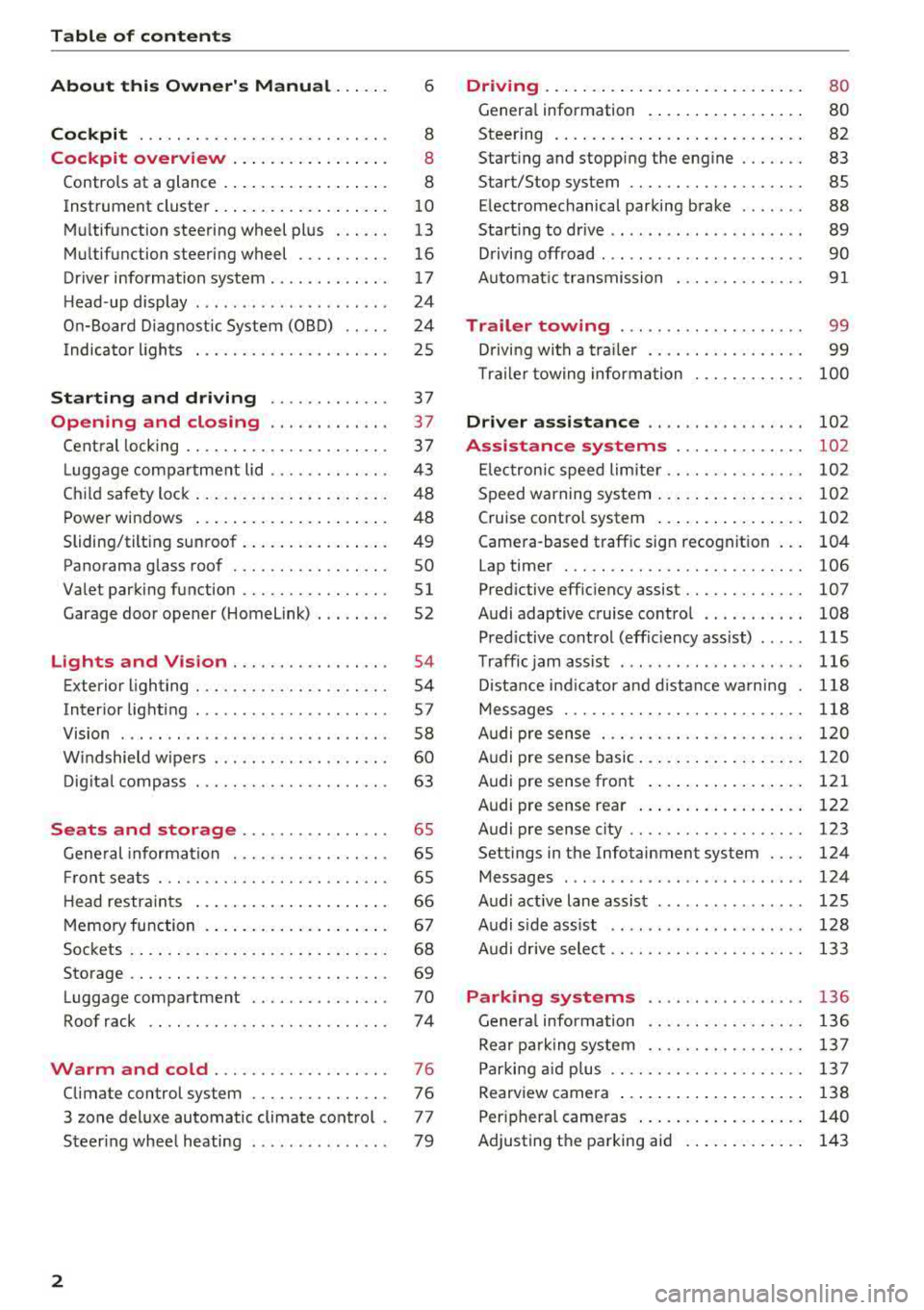
Table of contents
About this Owner's Manual . .. .. .
Cockpit ... .. ............... .... .. .
Cockpit overview ................ .
Controls at a glance ... .......... .. .. .
Instrument cluster .. .......... .. .. .. .
Multifunction steering wheel plus ... .. .
Multifunction steering wheel ......... .
Driver information system ...... .. .. .. .
H ead-up display .... .. .. ..... ... .. .. .
On-Board Diagnostic System (OBD) .. .. .
I ndicator lights .................... . 6
8
8
8
10
13
16
17
24
24
25
Starting and driving . . . . . . . . . . . . . 37
Opening and closing . . . . . . . . . . . . . 3 7
Central locking . . . . . . . . . . . . . . . . . . . . . . 3 7
L uggage compartment lid . . . . . . . . . . . . .
43
Child safety lock . . . . . . . . . . . . . . . . . . . . . 48
Power windows . . . . . . . . . . . . . . . . . . . . . 48
Sliding/tilting sunroof . . . . . . . . . . . . . . . . 49
Panorama glass roof . . . . . . . . . . . . . . . . . SO
Valet parking function . . . . . . . . . . . . . . . .
51
Garage door opener (Homelink) . . . . . . . . 52
L ights and Vision . . . . . . . . . . . . . . . . . 54
Exterior lighting . . . . . . . . . . . . . . . . . . . . . 54
Interior lighting . . . . . . . . . . . . . . . . . . . . . 57
V1s1on . . . . . . . . . . . . . . . . . . . . . . . . . . . . . 58
Windshield wipers . . . . . . . . . . . . . . . . . . .
60
Digital compass . . . . . . . . . . . . . . . . . . . . . 63
Seats and storage . . . . . . . . . . . . . . . . 65
General information . . . . . . . . . . . . . . . . . 65
Front seats . . . . . . . . . . . . . . . . . . . . . . . . . 65
H ead restraints . . . . . . . . . . . . . . . . . . . . . 66
Memory function . . . . . . . . . . . . . . . . . . . .
67
Sockets . . . . . . . . . . . . . . . . . . . . . . . . . . . . 68
Storage . . . . . . . . . . . . . . . . . . . . . . . . . . . . 69
Luggage compartment ........ .... .. .
Roof rack .. .. ... ............ .... .. .
Warm and cold ................ .. .
Climate control system .............. .
3 zone deluxe automatic climate control .
Steer ing wheel heating .. ........ .. .. .
2
70
74
76
76
77
79
Driving ... .. .. .. .. .. ... .......... . .
General information . ... ........... . .
Steering .......... .. .. . .......... . .
Start ing and stopping the eng ine ..... . .
Start/Stop system .. .. ............. . .
E le ctromechanical parking brake ...... .
Start ing to drive .. .. .. ........ ..... . .
D rivi ng offroad . .. ... ...... ....... .. .
Automatic transmission
Trailer towing ..... .............. .
Driving with a trailer .. ............. . .
8 0
80
82
83
85
88
89
90
91
99
99
T raile r towing information . . . . . . . . . . . . 100
Driver assistance . . . . . . . . . . . . . . . . . 102
Assistance systems . . . . . . . . . . . . . . 102
Electronic speed limiter. . . . . . . . . . . . . . . 102
Speed warning system . . . . . . . . . . . . . . . . 102
Cruise control system . . . . . . . . . . . . . . . . 102
Camera-based traffic sign recognition . . . 104
Lap timer . . . . . . . . . . . . . . . . . . . . . . . . . . 106
Pred ictive efficiency assist. . . . . . . . . . . . . 107
Audi adaptive cruise contro l . . . . . . . . . . . 108
Pred ictive control (eff ic ie ncy assist) . . . . . 115
Traffic jam assist . . . . . . . . . . . . . . . . . . . . 116
Distance indicat or and distance warnin g 118
Messages . . . . . . . . . . . . . . . . . . . . . . . . . . 118
Audi pre sense . . . . . . . . . . . . . . . . . . . . . . 120
Audi pre sense basic . . . . . . . . . . . . . . . . . . 120
Audi pre sense front . . . . . . . . . . . . . . . . . 121
Audi pre sense rea r . . . . . . . . . . . . . . . . . . 122
Audi pre sense city . . . . . . . . . . . . . . . . . . . 123
Settings in the Infotainment system . . . . 124
Messages . . . . . . . . . . . . . . . . . . . . . . . . . . 124
Audi active lane assist . . . . . . . . . . . . . . . . 125
Audi s ide assist . . . . . . . . . . . . . . . . . . . . . 128
Audi drive select . . . . . . . . . . . . . . . . . . . . . 133
Parking systems
General information .. ... .......... . .
Rear parking system .. .. ........... . .
Parking aid plus .. .. .. ............. . .
Rearview camera ... .. .. ........... . .
Periphera l cameras ... ... .......... . .
Adjusting th e parking aid . ........... .
136
136
137
137
138
140
143
Page 5 of 403
a co .... N ,....
N .... 0 0
3 co
Error messages . . . . . . . . . . . . . . . . . . . . . 144
Trai ler hitch . . . . . . . . . . . . . . . . . . . . . . . . 144
Intelligent Technology . . . . . . . . . . 146
Elect ronic stabilization control (ESC) . . . . 14 6
Brakes ... .. .. ... .. ..... ... .. .. .... . 14 9
Electromechanica l steer ing, Dynamic
steering . . . . . . . . . . . . . . . . . . . . . . . . . . . 150
All-wheel drive (quattro) . . . . . . . . . . . . . . 150
Energy ma nagement . . . . . . . . . . . . . . . . . 151
Not ice about data reco rded by the Event
D ata Reco rde r and vehicle control
mod ules . . . . . . . . . . . . . . . . . . . . . . . . . . . 153
Infotainment system . . . . . . . . . . . . 155
Multi Media Interface . . . . . . . . . . . . 155
Traffic safety information . . . . . . . . . . . . . 155
I n troduction . . . . . . . . . . . . . . . . . . . . . . . . 155
M MI On/Off knob with joystic k function . . 155
Infotainment system display . . . . . . . . . . 156
M MI operat ion . . . . . . . . . . . . . . . . . . . . . . 157
MMI touc h . . . . . . . . . . . . . . . . . . . . . . . . . 158
Contro l knob with joystick f unction . . . . . 160
Shortcut keys . . . . . . . . . . . . . . . . . . . . . . . 162
L etter/numbe r speller . . . . . . . . . . . . . . . . 162
Fr ee tex t sea rch . . . . . . . . . . . . . . . . . . . . . 164
M enus and Symbols . . . . . . . . . . . . . . . . . . 165
Voice recognition system . . . . . . . . 168
Operating . . . . . . . . . . . . . . . . . . . . . . . . . . 167
Command overview inform ation . . . . . . . . 168
Commands . . . . . . . . . . . . . . . . . . . . . . . . . 169
External vo ice operat ion 173
Telephone . . . . . . . . . . . . . . . . . . . . . . . . 175
I ntroduction . . . . . . . . . . . . . . . . . . . . . . . . 17 S
Setup . . . . . . . . . . . . . . . . . . . . . . . . . . . . . 175
Using the te lephone . . . . . . . . . . . . . . . . . 177
Favorites . . . . . . . . . . . . . . . . . . . . . . . . . . . 180
Messages . . . . . . . . . . . . . . . . . . . . . . . . . . 180
Listening to voicema il . . . . . . . . . . . . . . . . 183
D irectory . . . . . . . . . . . . . . . . . . . . . . . . . . . 183
Addit ional settings . . . . . . . . . . . . . . . . . . 185
Tr oubleshoo ting . . . . . . . . . . . . . . . . . . . . . 187
Audi connect (Infotainment) . . . . 188
I ntroduction . . . . . . . . . . . . . . . . . . . . . . . . 188
Setup . . . . . . . . . . . . . . . . . . . . . . . . . . . . . 188
Table of contents
Configuration thro ugh myAudi . . . . . . . . . 188
Opening A udi connect (Infotainment) . . . 189
A udi connect Infotainment services . . . . . 189
Wi-Fi hotspot . . . . . . . . . . . . . . . . . . . . . . . 194
Configuring the data connection........ 195
Audi connect (Infotainment) general
i nformation . . . . . . . . . . . . . . . . . . . . . . . . 195
T roub leshooting . . . . . . . . . . . . . . . . . . . . . 197
Audi connect vehicle control . . . . 198
I n trod uction . . . . . . . . . . . . . . . . . . . . . . . . 198
Setup . . . . . . . . . . . . . . . . . . . . . . . . . . . . . 198
Additional o ptions . . . . . . . . . . . . . . . . . . . 199
Remote locking and un lo cki ng . . . . . . . . . 199
Vehicle sta tus report . . . . . . . . . . . . . . . . . 199
Parking location . . . . . . . . . . . . . . . . . . . . . 199
Geofencing Alert . . . . . . . . . . . . . . . . . . . . 200
Speed Alert . . . . . . . . . . . . . . . . . . . . . . . . . 200
Valet Alert . . . . . . . . . . . . . . . . . . . . . . . . . 200
Stolen Vehicle Locator . . . . . . . . . . . . . . . . 200
Online Aud i serv ice reques t . . . . . . . . . . . . 200
Eme rgency call . . . . . . . . . . . . . . . . . . . 202
I n trod uction . . . . . . . . . . . . . . . . . . . . . . . . 202
E mergency call . . . . . . . . . . . . . . . . . . . . . . 202
Online roads ide ass ista nce . . . . . . . . . . . . 203
N avigation . . . . . . . . . . . . . . . . . . . . . . . . 204
Open ing navigation . . . . . . . . . . . . . . . . . . 204
E nte ring a des tina tion . . . . . . . . . . . . . . . . 205
Persona l rou te ass istance . . . . . . . . . . . . . 210
Alte rnative rou tes . . . . . . . . . . . . . . . . . . . 2 11
Additional settings . . . . . . . . . . . . . . . . . . 212
Map. ... .. .. .. .. .. .... . ..... ... .. .. 214
Online map d isp lay . . . . . . . . . . . . . . . . . . 216
Map update . . . . . . . . . . . . . . . . . . . . . . . . 217
Traffic information . . . . . . . . . . . . . . . . . . 219
T roubleshooting . . . . . . . . . . . . . . . . . . . . . 221
Radio ............................. 222
Open ing the radio . . . . . . . . . . . . . . . . . . . 222
Radio funct ions . . . . . . . . . . . . . . . . . . . . . 223
Radio menu . . . . . . . . . . . . . . . . . . . . . . . . 225
Presets . . . . . . . . . . . . . . . . . . . . . . . . . . . . 22 5
Addition al settings . . . . . . . . . . . . . . . . . . 22 5
T roub leshooting . . . . . . . . . . . . . . . . . . . . . 226
3
Page 11 of 403
a co .... N ,....
N .... 0 0
3 co
(!) side assist displays, warning abo ut
exiting the vehicle ..... ... .. .. .
@ Door handle
@ Cent ral locking switch ....... .. .
@ Memory buttons ........... .. .
® Vent
® Thumbwhee l for vent
(J) Lever for:
- T urn signals and h igh beams
- High beam assistant ........ .
- Active lane assist .. ..... ... . .
- Traffic jam assist ....... .. .. .
@ Mul tifunction steer ing wheel with:
- Horn
- Driver's airbag . ..... ... .. .. .
- Drive r information system con -
t rols .. .. ............. .. .. .
- Audio/v ideo, telephone, nav iga
t ion and voice recognition con-
trols . ... .... .. .... ... .. .. .
- ~ button/stee ring wheel heating
- Sh ift paddles .............. .
® Instrument cluster .... ... .. .. .
@
@
@
@
~
@
Reset trip odometer ........ .. .
W indshie ld washer system lever
Emergency flashers .... ... .. .. .
Knee a irbag ........ ..... ... . .
Adjustable steer ing column
Lever for:
- Cruise cont rol system ..... .. .
- Adaptive cruise cont rol .. ... . .
@ Instrument i llum ination ... .. .. .
@ Data link connector for On Board
Diagnostic System (OBD II) .. .. .
@ H ood release . ........... .. .. .
@ Button for switching the head-up
d isplay on/off, adjust ing the
height .. .. ............... .. .
@ Lig ht switch ............... .. .
@ Buttons for :
- All -weather lights
- Rear fog lights ........... .. .
@ Sw itch for luggage compartment
lid .. .. .. .. ............. .. .. .
128
41
67
55
55
125
116
275
13, 16
15, 16
15
94
10
12
60
56
287 82
10 2
108
58
24
324
24
54
54
54
43
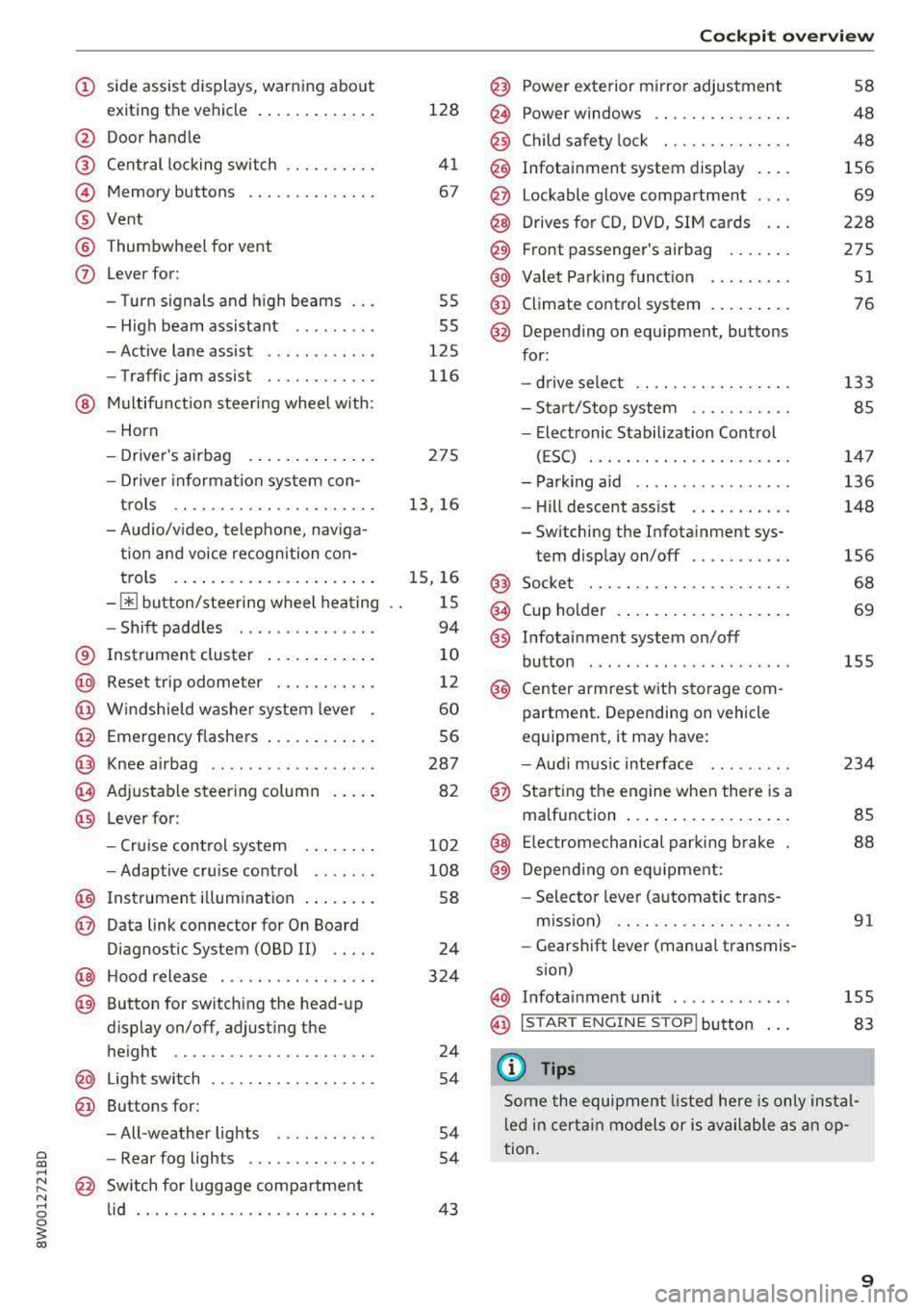
Coc kpit o ve rv iew
@ Power exterior m irror adjustment
@ Power windows .............. .
@ Child safety lock . ............ .
@ Infotainment system display . .. .
@ Lockable glove compartment . .. .
@) Drives for CD, DVD, SI M cards .. .
@ Front passenger's airbag ...... .
@ Valet Park ing funct ion ... .. ... .
@ Climate contro l system . ..... .. .
@ Depend ing on equ ipment, buttons
for:
- drive select .. .. ............ .
- Start/Stop system .......... .
- Elect ronic Stabilization Control
(ESC) . .... .. .............. .
- Park ing aid .. .. ............ .
- Hill descent ass ist .. . ..... .. .
- Switching the Infota inment sys-
tem disp lay on/off .......... .
@ Socke t ..... .. .............. .
@ Cup holder . .. ... .... . ..... .. .
@ Infotai nment system on/off
button ....... .. ............ .
@ Center armrest with sto rage com
partment . Depending on vehicle
equipment, it may have:
- Aud i m usic interface .. ..... . .
@ Sta rt ing t he engine when there is a
malfunction ... .. .... . ..... .. .
@ E lectromechanical parking brake
@) Depend ing o n eq uipment:
- Selector leve r (a utomatic trans -
m iss ion) .. .. .. ............ .
- Gearshift lever (manua l transmis-
sion)
58
48
48
156
69
228
275
51
76
133
85
14 7
136
148
156
68
69
155
234
85
88
91
@ In fotai nment unit . . . . . . . . . . . . . 155
@ I STAR T ENGINE ST OP I button 83
(D Tips
Some the equipment listed he re is only instal
l e d in certa in models or is available as an op
tion.
9
Page 13 of 403
a co .... N ,....
N .... 0 0
3 co
A WARNING
Do not assume the roads are free of ice based
on the outside temperature display . Be aware
that there may be ice on roads even when the outside temperature is around 41 °F (+5 °C)
and that ice can increase the risk of accidents.
@ Tips
- Depending on vehicle equipment, the in
strument illumination (needles and gauges) may turn on when the lights are off and the
ignition is switched on . The illumination for
the gauges reduces automatically and even
tually turns off as brightness outside in
creases. This function reminds the driver to
turn the low beams on at the appropriate
time .
- You can select the units used for tempera
ture, speed and other measurements in the
Infotainment system
c::> page 248.
- If your vehicle is stationary or if you are driv
ing at very low speeds, the temperature dis
played may be slightly higher than the ac
tual temperature outside due to the heat ra
diating from the engine .
- At temperatures below 41 °F ( +5 °C), a
snowflake symbol appears in front of the
temperature display
c::> A .
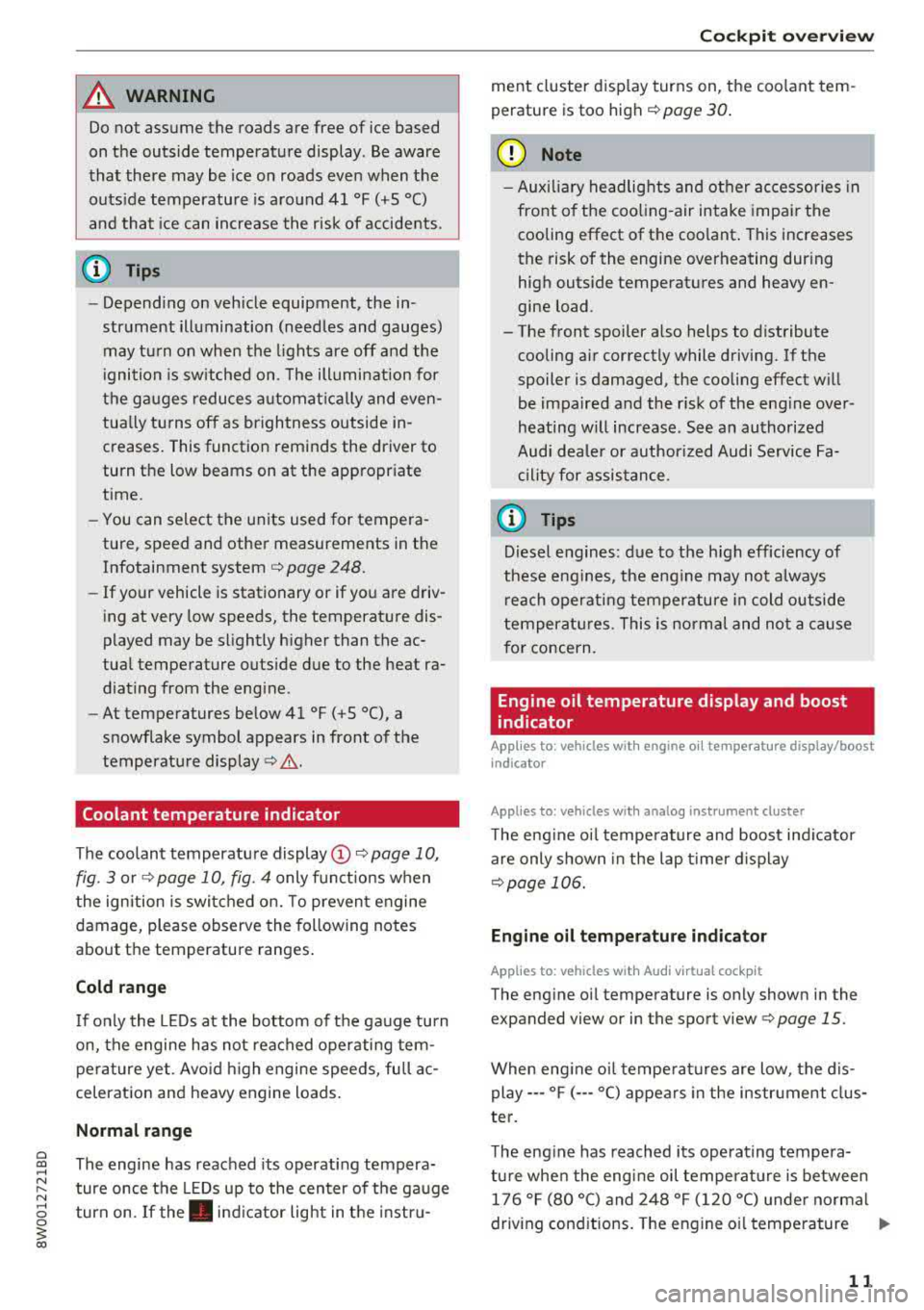
Coolant temperature indicator
The coolant temperature
display @c::> page 10,
fig. 3 or c::> page 10, fig. 4 only functions when
the ignition is switched on. To prevent engine
damage, please observe the following notes
about the temperature ranges.
Cold range
If only the LEDs at the bottom of the gauge turn
on, the engine has not reached operating tem
perature yet . Avoid high engine speeds, full ac
celeration and heavy engine loads.
Normal range
The engine has reached its operating tempera
ture once the LEDs up to the center of the gauge
turn on. If
the. indicator light in the instru-
Cockpit overview
ment cluster display turns on, the coolant tem
perature is too high
c::> page 30.
(D Note
- Auxiliary headlights and other accessories in
front of the cooling-air intake impair the
cooling effect of the coolant. This increases
the risk of the engine overheating during
high outside temperatures and heavy en
gine load.
- The front spoiler also helps to distribute cooling air correctly while driving. If the
spoiler is damaged, the cooling effect will
be impaired and the risk of the engine over
heating will increase . See an authorized
Audi dealer or authorized Audi Service Fa cility for assistance .
@ Tips
Diesel engines: due to the high efficiency of
these engines, the engine may not always reach operating temperature in cold outside
temperatures . This is normal and not a cause
for concern.
Engine oil temperature display and boost
indicator
App lies to : vehicles wi th engine o il temperatu re display/boost
indica tor
Appl ies to : vehicles wi th analog ins trumen t cl uster
The engine oil temperature and boost indicator
are only shown in the lap timer display
c::> page 106.
Engine oil temperature indicator
Applies to : vehicles wit h Audi v ir tu al coc kpit
The engine oil temperature is only shown in the
expanded view or in the sport view
c::> page 15.
When engine oil temperatures are low, the display--- °F
(---°C) appears in the instrument clus
ter.
The engine has reached its operating tempera
ture when the engine oil temperature is between 176 °F (80 °C) and 248 °F (120 °C) under normal
driving conditions. The engine oil temperature
.,,.
11
Page 18 of 403
Cockpit overview
-Increasing or decreasing the volume: tu rn the
r ig ht th umbwhee l up o r down.
-Muting or pausing : turn the right thumbw heel
down .
Or: press the rig ht t hu mbwhee l.
-Unmuting or resuming: tur n th e right t humb
whee l up.
Or : press t he rig ht t humbwheel.
© Button lt
-Selecting the previous/next track or station :
press th e l1<1
-Fast forwarding/rewinding audio files: press
and hold the
! 1
lo ca tion in the fi le i s r eache d.
® @button/ steering wheel heating* ~
-Steering wheel heating* : you can find addition
al i nfo rmation in
¢ pag e 79.
-Programmable steering wheel button -open
ing a function :
press the@butto n on the mul
tif unct ion s teer ing whee l.
-Programmable steering wheel button -re
questing a function :
press and hol d the@ but
ton .
-Programmable steering wheel button - chang
ing a function :
press and ho ld the @ button .
Se lect and confir m an entry .
Or
-Select in the Infotainment system: I M EN U I but
ton
> Vehicle > left contro l bu tton > Vehicle
settings > Steering wheel button assignment.
® button 1~·" 1
-Repeating the last navigation prompt : press
the
I Q•« I button when route guida nce is act ive .
-Changing the voice guidance volume : when
route guidance is active, tu rn t he right thumb
whee l upwar d or dow nward during a navigation
pro mpt.
16
Multifunction steering
wheel
Operating
Applies to: vehicles with multifunction steering wheel
With t he multif unct ion s teering wheel , you can
oper ate the driver info rm at ion system as well as
t he
MM I functions and y ou con al so a djus t the
volume.
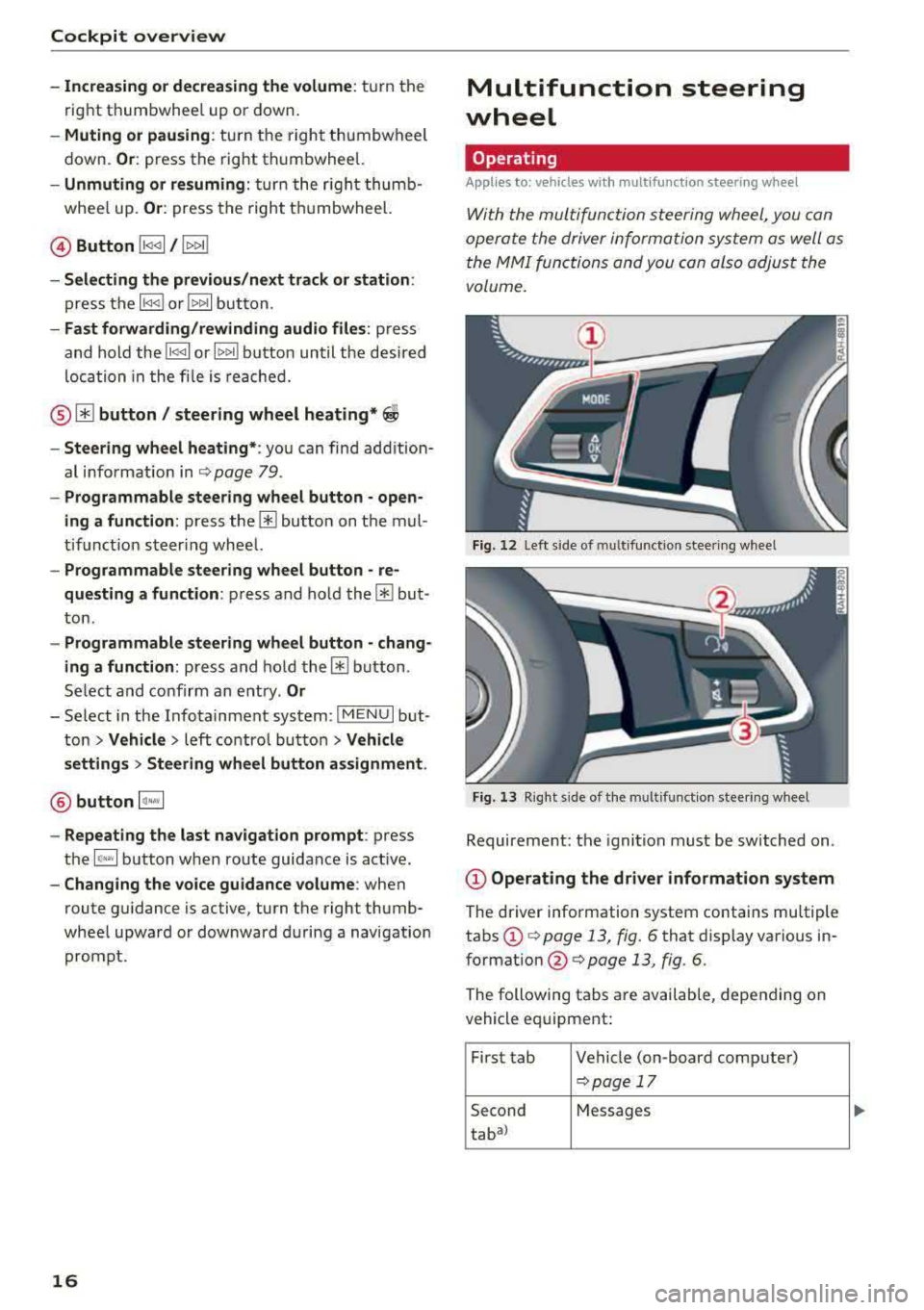
Fig. 12 L ef t side of multifunction s tee rin g w heel
Fig. 13 R ig ht side of the mul tifu ncti on s tee rin g w hee l
Requirement : the igni tion must b e switch ed on .
@Operating the driver information system
The driver information system contains mu ltiple
tabs
(D ¢ page 13, fig. 6 that d isp lay various in
formatio n @ ¢ page 13, fig. 6.
The following tabs a re available, depen ding on
vehicle eq uipme nt:
Fi rst tab Ve hicle (on -boar d co mp ute r)
~ pag e 17
Second Messages
tab al
Page 20 of 403
Cockpit over view
The short -term memory collects driving informa
tion from the time the ignition is switched on un
til it is switched off . If you cont inue driv ing with
in two hours after switching the ignition off, the
new values are included when calculat ing the cur
rent tr ip informat ion.
Unlike the short-term memory, the long-term
memory is not erased automat ically. You can se
lect the time period for evaluat ing trip informa
tion yourself .
Fuel con sumpti on
The current fue l consumption can be shown us
ing a bar graph
cc> fig. 14. The average cons ump
tion stored in the short-term memory is also dis
played. If the bars are green or the gray tone on
the bars changes (depending on the equipment),
your veh icle is sav ing fuel by the following func
tion:
- Recupe ration : electrical energy can be stored in
the ve hicle battery when the vehicle is coasting
o r driving downhi ll. The bar will move toward
0 /0.
(D Tips
The date, time of day and t ime and date for
mat can be set in the Infotainment system
cc>page248 .
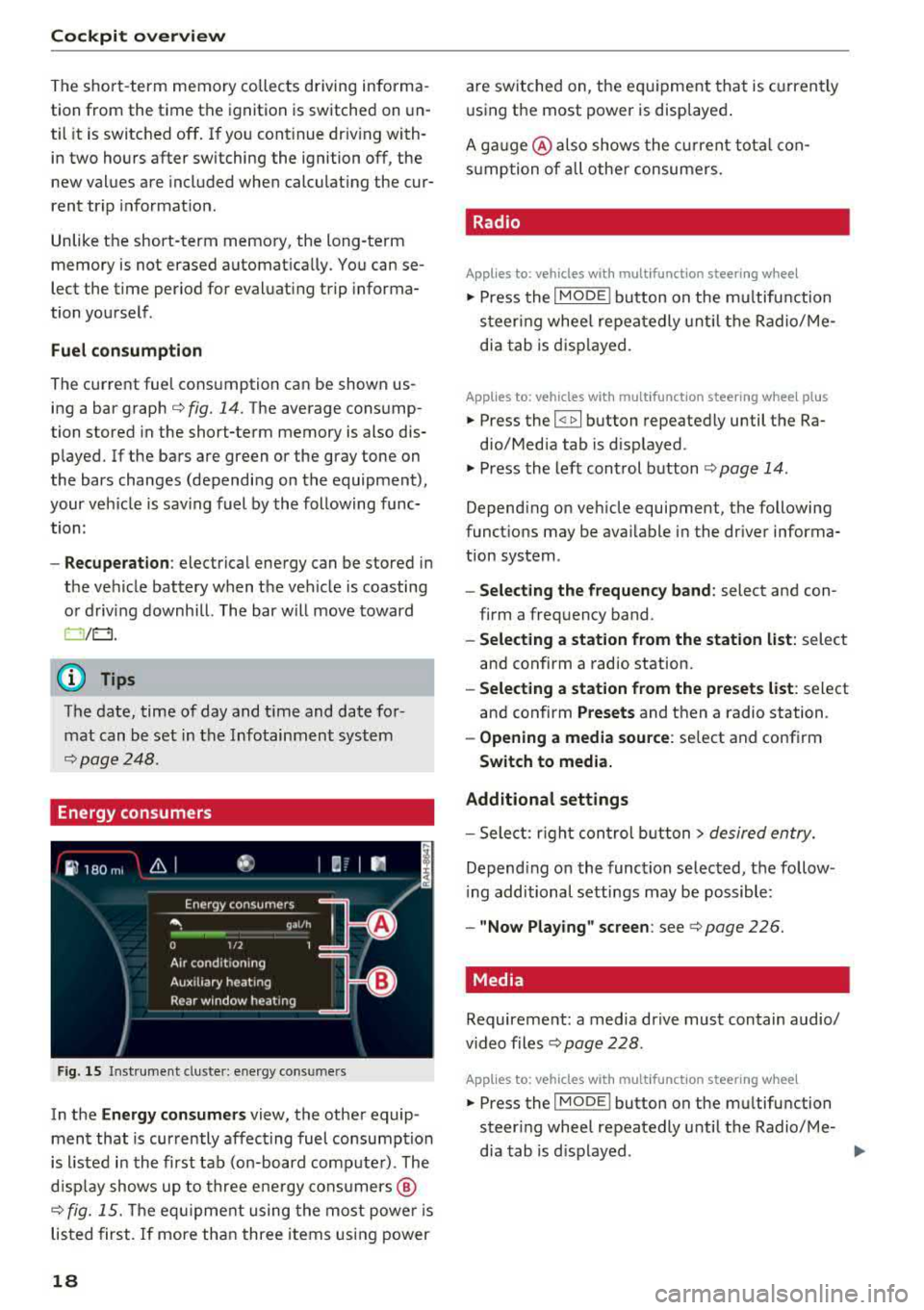
Energy consumers
Fig . 15 Inst rume nt cluste r: e nergy cons ume rs
In the En ergy con sumer s view, the othe r equip
ment that is currently affecting fuel consumption
is listed in the first tab (on-board comp ute r) . The
d isp lay shows up to three ene rgy consumers @
cc> fig. 15. The eq uipme nt using the most powe r is
listed first. If more than three items using power
18
are switched on, the eq uipment that is c urren tly
using the most power is disp layed .
A ga uge @ also shows the c urrent tota l con
s u mption of a ll othe r consumers .
. Radio
Applies to: vehicles with multifunction steering wheel
.,. Press the I MODE i button on the m ultif un ction
s teer ing whee l repeatedly u nti l the Radio/ Me
dia tab is d isp layed.
Applies to: vehicles with multifunction steering wheel plus
.,. Press the I <11>I button repeatedly until the Ra-
dio/Med ia tab is d isplayed.
.,. Press the left control b utton cc> page 14 .
Depending on veh icle equipment, the following
funct ions may be ava ilable i n the dr iver informa
tion system .
-Select ing the frequen cy band : select and con
firm a freq uency band .
-Selecting a station from the station list : select
and confirm a radio station.
- Select ing a station from the preset s list : select
and confirm
Presets and then a radio station .
-Opening a media sou rce: se lect and confirm
Swit ch to media.
Additional settings
- Sele ct: r ight cont rol b utton> desired entry.
Depend ing on the function se lected, the follow
i ng additional settings may be possible:
- "Now Playing" screen : see cc> page 226.
Media .
Requirement: a media drive must contain audio/
video files
cc> page 228 .
Applies to: vehicles with multifunction steering wheel
.,. Press the I MODE i button on the mu ltifunction
steer ing whee l repeatedly until the Radio/Me-
dia tab is d isplayed .
.,.
Page 26 of 403
Cockpit overv iew
Head-up display
Applies to: vehicles with head-up display
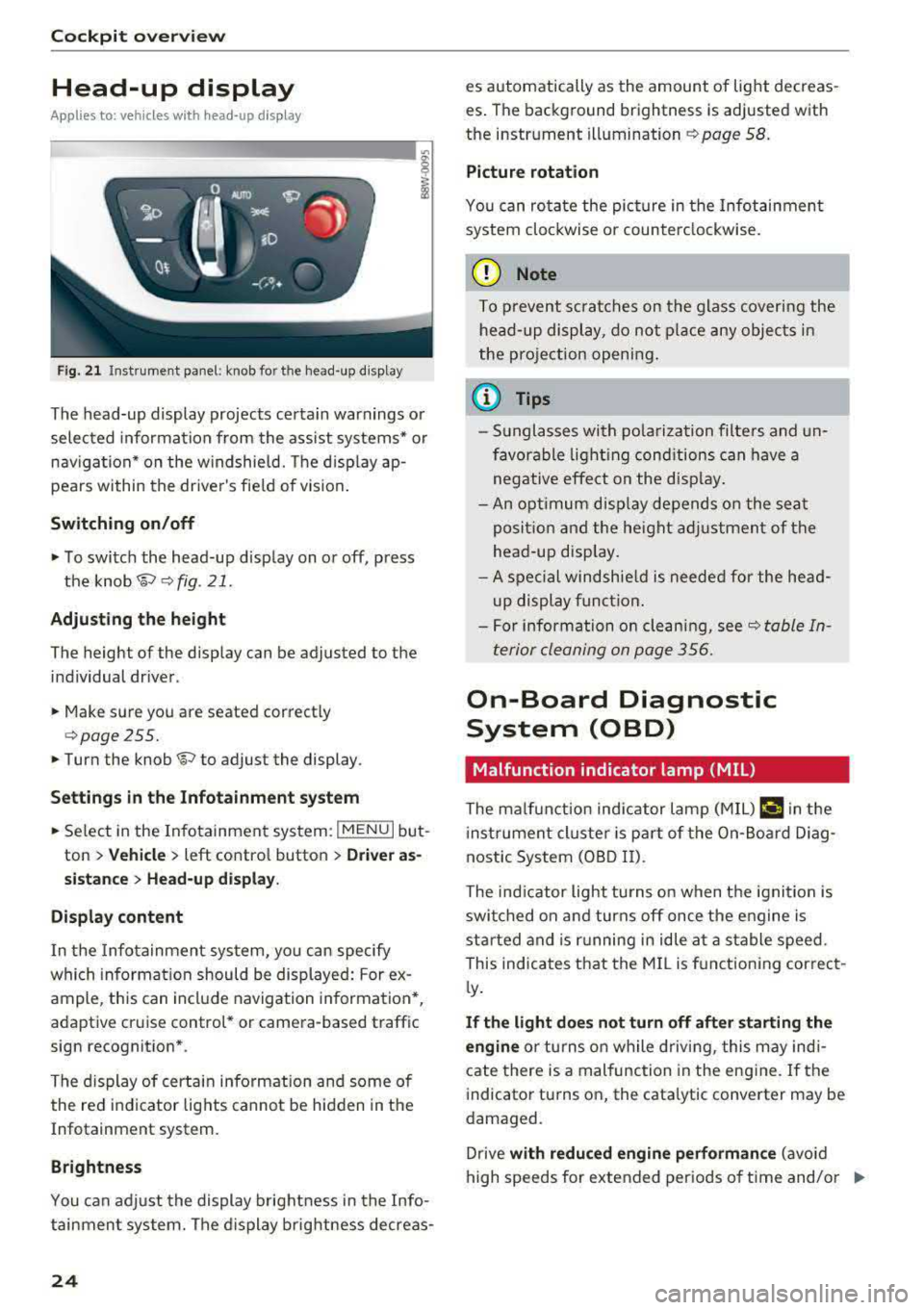
Fig. 21 Instrument panel: knob for the head-up display
The head-up display projects certa in warnings or
selected information from the ass ist systems* or
nav igation* on the w indshield. The d isplay ap
pears within the drive r's fie ld of vision .
Switching on /off
• To switch the head-up display on or off, press
the
knob~ ~ fig. 21.
Adjust ing th e height
The height of the display can be adjusted to the
individual driver.
• Make sure you are seated correctly
qpage255.
• Turn the knob~ to adjust the display .
Setting s in th e Infotainm ent sy ste m
• Se lect in the Infotainment system: I MENU I but
ton
> Vehi cle > left contro l button > Dri ver as
s ist ance
> H ea d-up di spl ay .
D is play content
In the Infotainment system, you can specify
which information should be displayed: For ex
ample, this can include navigation information*,
adaptive cruise control* or camera-based traffic
sign recognition *.
The display of certa in information and some of
the red indicator lights cannot be hidden in the
Infotainment system.
Brightness
You can adjust the display brightness in the Info
tainment system. The d isplay brightness decreas -
24
es automatically as the amount of light decreas
es . The background brightness is adjusted with
the instrument
illumination ~ page 58.
Picture rotation
You can rotate the picture in the Infotainment
system clockwise or counter clockwise.
(D Note
To p revent sc ratches on the glass covering the
head-up display, do no t place any objec ts in
the pro jection opening .
@ Tips
-Sunglasses with po larization filte rs and un
favorable light ing cond itions can have a
negative effect on the disp lay .
- An optimum disp lay depends on the seat
posit ion and the height ad justment of the
head -up disp lay.
- A spec ial windshie ld is needed for the head
up display funct ion .
- For information on clean ing,
see~ table In
terior cleaning on page 356.
On-Board Diagnostic
System (OBD)
Malfunction indicator lamp (MIL)
The ma lf u nction indicator lamp (MIL) ¢;# in the
i nstrumen t cluster is part of the On-Board Diag
nostic System (OBD II).
The indicator light turns on when the ignition is
switched on and turns off once the engine is
star ted and is r unning in idle at a stable speed.
This indicates that the MI L is fu nctioning correct
l y .
If th e light do es n ot turn off aft er start ing the
e ngin e
or turns on while driving, this may indi
cate there is a malfunction in the engine .
If the
i ndicator turns on, the cata lytic converter may be
damaged.
Drive
with reduc ed eng in e perf orman ce (avoid
high speeds for extended periods of time and/o r
IJJ,-
Page 39 of 403
a co .... N ,....
N .... 0 0
3 co
Opening and closing
Central locking
Description
You can lock and unlock the veh icle centrally . You
have the following options:
-Remote control key¢ page 40,
-Sensors in the door handles* ¢ page 40,
-Lock cylinder on the driver's door c::> page 42,
or
-Interior central locking switch c::> page 41.
Turn signals
The turn s ignals flash twice when you unlock the
veh icle and flash once when you lock the veh icle.
If they do not flash, then one of the doors, the
rear lid or the hood is not closed.
Automatic locking (Auto Lock)
The Auto Lock funct ion locks all doors and the
luggage compartment lid once the speed has
ex
ceeded approximately 9 mph (15 km/h).
The vehicle can be unlocked if the opening func
tion in the central locking system sw itch is used
or one of the door handles is pulled.
In the event of a crash with airbag deployment,
the doors will a lso automat ically unlock to allow
access to the vehicle.
Selective door unlocking
The doors and luggage compartment lid will lock
when they close . You can set in the Infotainment
system whether
only the driver's door or the en
tire vehicle should be unlocked when unlocking
c::> page 41.
Unintentionally locking yourself out
Only lock your vehicle when all of the doors and
the luggage compartment lid are closed and the remote control key is not in the vehicle . This
helps to prevent you from locking yourse lf out
accidentally .
The follow ing cond it ions prevent you from lock
ing your remote control key in the vehicle:
Opening and closing
-If the driver's door is open, the vehicle cannot
be locked by pressing the
fi'.) button on the re
mote contro l key or by touching the locking
sensor* on a door.
-If the most recently used convenience key* is
detected in the luggage compartment, the lug
gage compartment lid automatically unlocks
again after closing it.
-If the convenience key* that was last used is de
tected inside the vehicle, then the vehicle will
not be able to lock from the outside .
_& WARNING
---
-When you lock your vehicle from outs ide,
nobody- espec ially children
-should rema in
inside the vehicle. Remember, when you
loc k the vehicle from the outside the win
dows cannot be opened from the inside .
- When you leave the vehicle, always take the
ignit ion key with yo u. This will prevent pas
sengers (children, for examp le) from acci
dentally being locked in the vehicle should
they accidentally press the power locking
switch in the doors.
- Do not leave children inside the vehicle
un
supervised. In an emergency it would be im
possible to open the doors from the outside
without the key.
(D Tips
-Do not leave valuables unattended in the ve
hicle. A locked vehicle is not a safe!
-The LED in the driver's door rail blinks when
you lock the vehicle. If the LED lights up for
approximately 30 seconds after locking,
there is a malfunction in the central locking
system. Have the problem corrected by an
authorized Audi dealer or authorized Audi
Service Facility.
37
Page 40 of 403
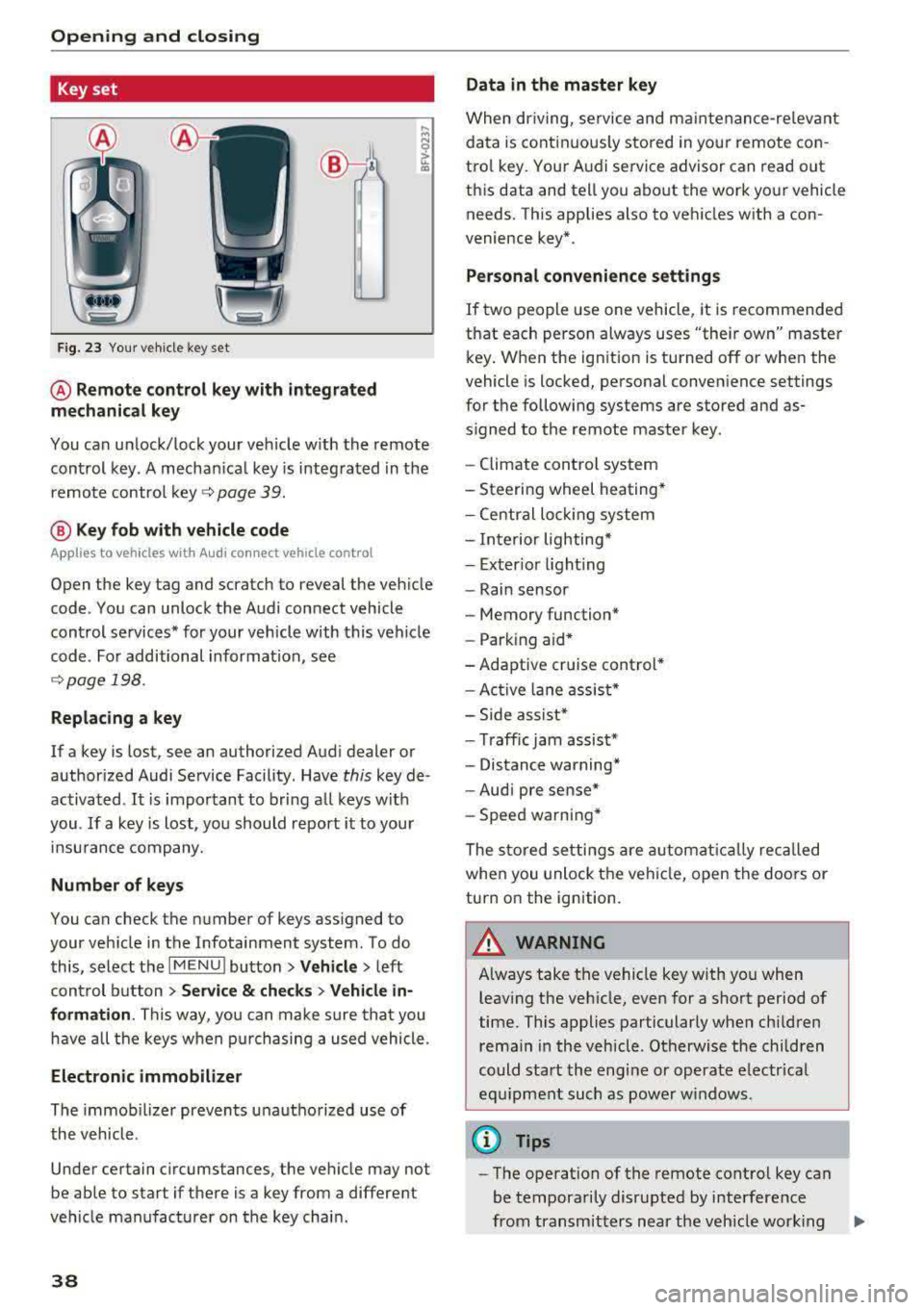
Opening and closing
Key set
Fig. 23 Your veh icle key set
@ Remote control key with integrated
mechanical key
You can unlock/lock your veh icle w ith the remote
control key . A mechan ical key is integrated in the
remote control
key ~ page 39.
@ Key fob with vehicle code
Appl ies to veh icles with A udi co nnect vehicle con trol
Open the key tag and scratch to reveal the veh icle
code . You can unlock the Audi connect vehicle
control se rvices* for your vehicle with this vehicle
code . For additional information, see
~ page 198 .
Replacing a key
If a key is lost, see an authorized Audi dealer or
authorized Audi Service Facility. Have
this key de
activated .
It is important to bring all keys with
you .
If a key is lost, you should report it to your
insu rance company.
Number of keys
You can check the number of keys assigned to
your vehicle in the Infotainment system . To do
this, select the
IM ENU I button > Vehicle > left
control button
> Service & checks> Vehicle in·
formation . This way, you can make sure that you
have all the keys when purchasing a used vehicle.
Electronic immobilizer
The immob ilizer prevents unauthorized use of
the vehicle .
Under certain circumstances, the vehicle may not
be able to start if there is a key from a different
veh icle manufacturer on the key chain.
38
Data in the master key
When dr iving, service and maintenance-re levant
data is continuously stored in your remote con
trol key. Your A udi service advisor can read out
this data and tell you about the work your vehicle needs . This applies also to vehicles with a con
venience key*.
Personal convenience settings
If two people use one vehicle, it is recommended
that each person always uses "their own" master
key . When the ign ition is turned off or when the
vehicle is locked, personal convenience settings
for the following systems are stored and as
s igned to the remote master key.
- Climate control system
-Steering wheel heating*
-Central lockin g system
-Interior lighting*
-Exter ior lighting
- Rain sensor
- Memory function*
- Park ing a id *
-Adaptive cr uise control *
-Active lane assist*
-Side assist*
-Traff ic jam assist*
- Distance warning*
-Audi pre sense*
- Speed warning *
The stored settings are automatically recalled
when you unlock the vehicle, open the doors or
turn on the ignition .
~ WARNING
Always take the vehicle key with you when
leaving the vehicle, even for a short period of
time. This applies particularly when children
rema in in the vehicle . Otherwise the children
could start the engine or operate electrical
equipment such as power windows .
(© Tips
-
-The operation of the remote control key can
be temporarily disrupted by interference
from transmitters near the veh icle work ing
1J11,
Page 42 of 403

Opening and clo sin g
@ Tips
The replacement battery must meet the same
specifications as the orig inal battery in the re
mote control key.
Unlocking/locking by remote control
I rn
F ig . 27 Re mote contro l key: bu tton programm ing
• To unlock the vehicle, press the 6:l button
¢ fig. 27.
• To lock the vehicle, press the {D button on ce.
• To unlock the luggage compartment lid, press
the
a button briefly .
• To open the luggage compartment lid, press
and hold the
a button for at least one second .
• To trigger the alarm, p ress t he red I PANIC I but
ton. The ve hicle horn and emergency flashers
turn on.
• To switch off the alarm, p ress the red I PANIC I
button again .
I f the ve hicle is unlocked and none of the doors,
the hood, or the luggage compartment lid are
opened within 45 seconds, the vehicle locks
again automatica lly. This feature prevents the ve
hicle from being accidentally left unlocked over a long per iod of time.
The settings in the Infotainment system deter mine if the entire vehicle or only the driver's door
is unlocked when unlocking the vehicle
¢page 41.
A WARNING
No one, especially chi ldren, should stay in the
vehicle when it is locked from the outside, be cause the w indows can no longer be opened
from the
inside¢ page 42. Locked doors
40
make it more difficult for emergency workers
to get into the veh icle, wh ich puts lives at
risk.
@ Tips
- Only use the remote control key when you
are within view of the vehicle.
- Applies to: vehicles with automatic trans
mission: the vehicle can only be locked
when the selector lever is in P.
- Do not use the remote control when you a re
inside the vehicle. Otherwise, you could un
intentionally lock the vehicle. If you then try
to open a door, the anti-theft alarm w ill
trigger. If this happens, press the unlock
button
6:l.
- Only use the pan ic function in an emergen
cy.
Unlocking/locking with the convenience
key
Applies to : vehicles with convenience key
The doors and luggage compartment lid can be
unlocked/locked without using the remote con
trol key.
F ig . 28 Door ha nd le: locki ng t he veh icle
Unlocking the v ehicl e
• Grip the door hand le . The door unlocks auto-
matically.
• Pull on the door handle to open the door.
Locking th e vehicle
• Applies to: veh icles with automatic transmis
sion : Se lect the P position, otherwise the vehi -
cle will not lock .
.,.